
Step 1 of 7
Keep Decoded JSON Unknown
Keep external JSON untrusted at the boundary and distinguish runtime validation from TypeScript-only assumptions.

Learning path · Level 8 · Tutorial 6
Build a typed API boundary that checks external JSON before returning application data and handles invalid input without bypassing the type checker.

 Keep Decoded JSON Unknown
Keep external JSON untrusted at the boundary and distinguish runtime validation from TypeScript-only assumptions. 3 min
Keep Decoded JSON Unknown
Keep external JSON untrusted at the boundary and distinguish runtime validation from TypeScript-only assumptions. 3 min
 Build a Trustworthy Product Predicate
Implement a Product type predicate that earns TypeScript narrowing through complete runtime checks. 5 min
Build a Trustworthy Product Predicate
Implement a Product type predicate that earns TypeScript narrowing through complete runtime checks. 5 min
 Parse the Whole Collection
Build an all-or-nothing parser that returns Product[] only after validating the collection root and every product entry. 4 min
Parse the Whole Collection
Build an all-or-nothing parser that returns Product[] only after validating the collection root and every product entry. 4 min
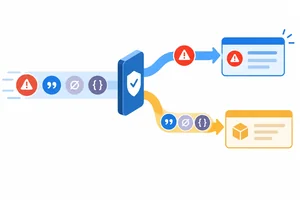 Handle Unknown Caught Errors
Safely narrow unknown caught values before reading an Error-specific message. 3 min
Handle Unknown Caught Errors
Safely narrow unknown caught values before reading an Error-specific message. 3 min
 Return a Validated Async Result
Connect response decoding and runtime validation to a typed asynchronous success-or-failure result. 5 min
Return a Validated Async Result
Connect response decoding and runtime validation to a typed asynchronous success-or-failure result. 5 min
 Verify the Boundary with Local JSON
Change local JSON fixtures and observe how the typed API boundary accepts valid data or returns failure without relying on unchecked assumptions. 5 min
Verify the Boundary with Local JSON
Change local JSON fixtures and observe how the typed API boundary accepts valid data or returns failure without relying on unchecked assumptions. 5 min
 Review and Apply the Boundary Checklist
Review the full typed API boundary, audit unchecked assumptions, and justify a runtime-validated success result. 2 min
Review and Apply the Boundary Checklist
Review the full typed API boundary, audit unchecked assumptions, and justify a runtime-validated success result. 2 min
Step 1 of 7
Keep external JSON untrusted at the boundary and distinguish runtime validation from TypeScript-only assumptions.
A response body can be valid JSON and still have the wrong application shape. It might be an array, a string, or an object with missing or incorrectly typed fields.
At the typed API boundary, keep decoded JSON as unknown. This states an important fact: the application has received a value, but has not yet established runtime evidence for its shape.
Unlike any, unknown blocks unchecked property access. Before application code can treat the value as product data, a later runtime validation step must inspect it.
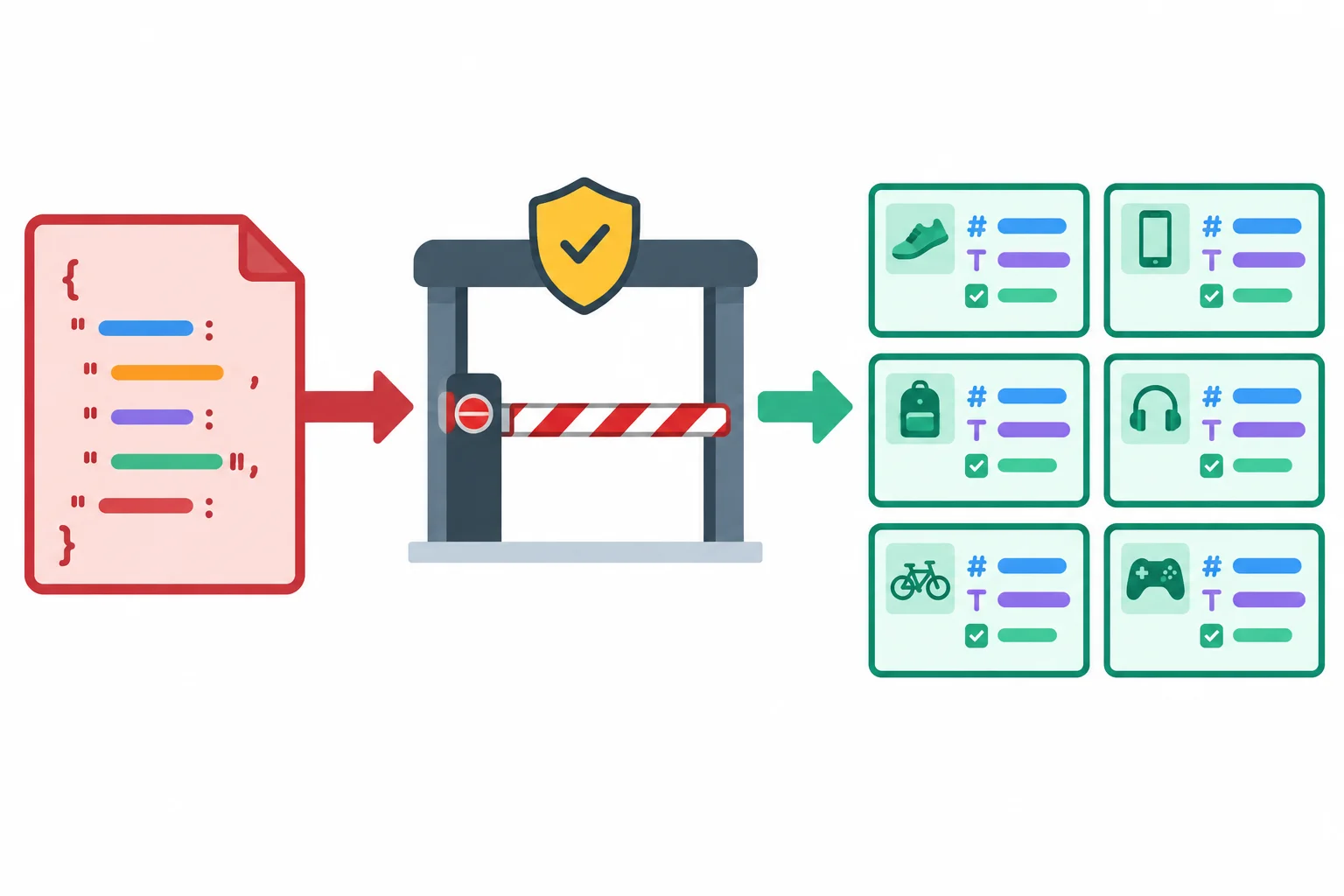
The boundary has three stages: decoded JSON, runtime validation, then typed application data.
Place the explicit annotation directly after decoding. It prevents a permissive library return type from spreading into the rest of the program.
src/product-api.ts
export type Product = {
  id: number;
  name: string;
  inStock: boolean;
};

export async function decodeProductPayload(
  response: Response,
): Promise<unknown> {
  const raw: unknown = await response.json();
  return raw;
}
These forms affect what the TypeScript checker permits. None examines a decoded response while the program runs. Runtime validation must provide that evidence later.
| Form | Effect on TypeScript | Runtime inspection |
|---|---|---|
| `const raw: unknown` | Requires evidence before use | No; intentionally preserves uncertainty |
| `value as Product` | Claims the value is Product | No |
| `Promise<Product>` | Describes a promised result | No |
| `value!` | Removes null or undefined from the checker view | No |
Complete the boundary annotation.
async function decode(response: Response): Promise<unknown> {
  const raw:  = await response.json();
  return raw;
}
A response could decode to { "id": "wrong" }. Which boundary choice both preserves uncertainty and correctly explains why assertions cannot make this payload valid?

Step 2 of 7
Implement a Product type predicate that earns TypeScript narrowing through complete runtime checks.
A predicate is the first runtime gate for one candidate value. Its job is to accept a value only when the value actually has every required part of the Product contract:
id: a numbername: a stringinStock: a booleanStart from unknown. Before reading fields, prove that the candidate is an object, is not null, and is not an array. Then check field presence and each field’s runtime type.
This is runtime validation: the JavaScript checks run against the actual decoded JSON value.
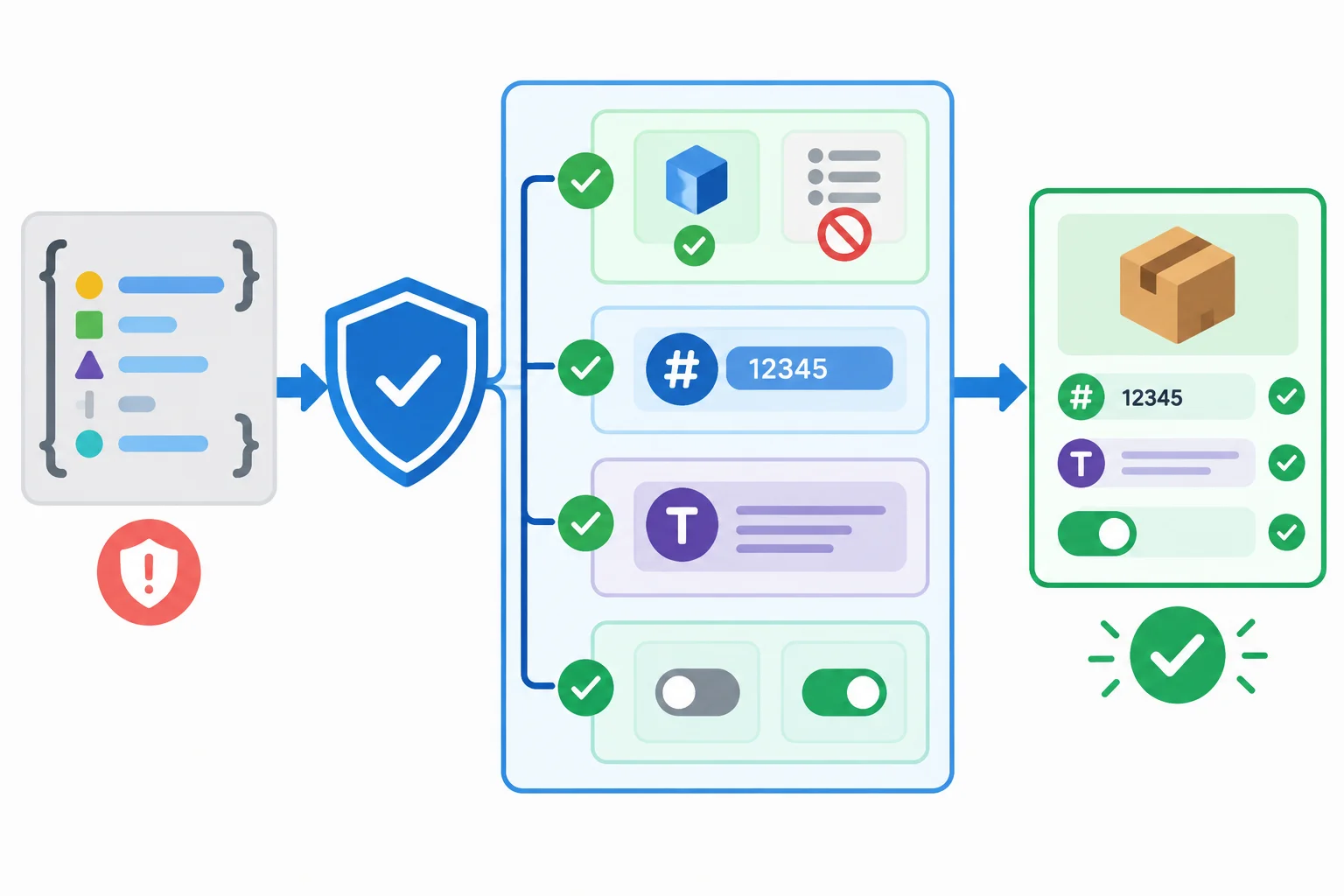
Every required field needs its own runtime check; an off boolean toggle represents the valid value false.
Tip
Do not use truthiness for required fields. A condition such as if (value.inStock) rejects false, even though false is a valid boolean for this contract. Likewise, 0 is a valid number and an empty string is still a string.
Check the declared type instead. Extra properties do not prevent a record from being a Product; this predicate validates the required contract rather than removing data.
Add the contract and predicate to src/product-api.ts. The return annotation value is Product is a user-defined type predicate. When this function returns true, TypeScript narrows the caller’s value to Product.
The object guard comes first because property inspection is only safe after unknown has been narrowed to a non-null, non-array object. Each "field" in value check establishes presence, and its following typeof check establishes the declared runtime type.
src/product-api.ts
export type Product = {
  id: number;
  name: string;
  inStock: boolean;
};

export function isProduct(value: unknown): value is Product {
  if (
    typeof value !== "object" ||
    value === null ||
    Array.isArray(value)
  ) {
    return false;
  }

  return (
    "id" in value &&
    typeof value.id === "number" &&
    "name" in value &&
    typeof value.name === "string" &&
    "inStock" in value &&
    typeof value.inStock === "boolean"
  );
}
Warning
The annotation value is Product does not make the implementation correct. TypeScript trusts the predicate’s declared result; it does not prove that you checked every field. A missing check can compile while letting invalid runtime data through.
A type assertion such as value as Product would only tell the checker to assume the contract. It would not inspect decoded JSON, so it cannot replace these checks.
Complete the structural guard and the runtime type checks for this Product predicate.
export function isProduct(value: unknown): value is Product {
  if (
    typeof value !==  ||
    value ===  ||
    (value)
  ) {
    return false;
  }

  return (
    "id" in value &&
    typeof value.id ===  &&
    "name" in value &&
    typeof value.name ===  &&
    "inStock" in value &&
    typeof value.inStock ===
  );
}Consider this predicate:
function isProduct(value: unknown): value is Product {
  if (
    typeof value !== "object" ||
    value === null ||
    Array.isArray(value)
  ) {
    return false;
  }

  return (
    "id" in value &&
    typeof value.id === "number" &&
    "name" in value &&
    typeof value.name === "string"
  );
}
True or false: This is a trustworthy isProduct predicate for the Product contract.

Step 3 of 7
Build an all-or-nothing parser that returns Product[] only after validating the collection root and every product entry.
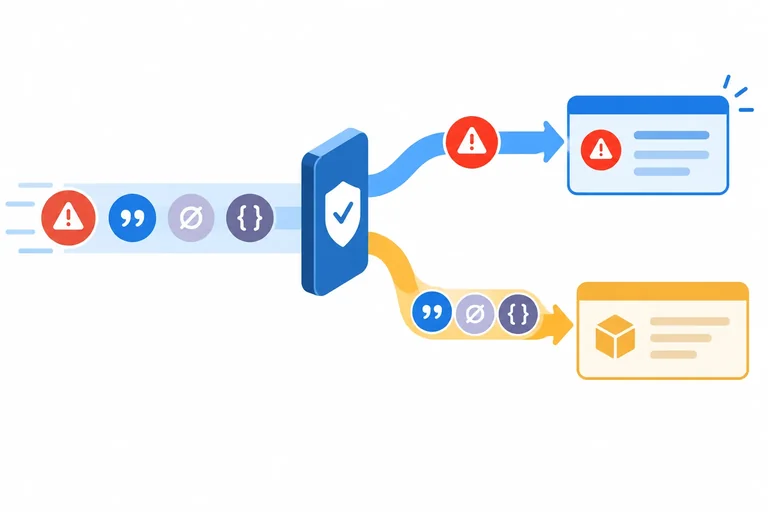
Decoded JSON may be an array, an object, a string, a number, or null. parseProducts is the next boundary: it accepts unknown and either returns a fully checked Product[] or throws new Error("Invalid product data.").
Decoding answers “is this valid JSON syntax?” Parsing answers “does this value have the application shape we require?” Those are different checks.
The parser is all-or-nothing. An empty array is valid. A collection with even one invalid entry is rejected rather than filtered. Extra properties are allowed: validation confirms the required Product fields; it does not sanitize records.
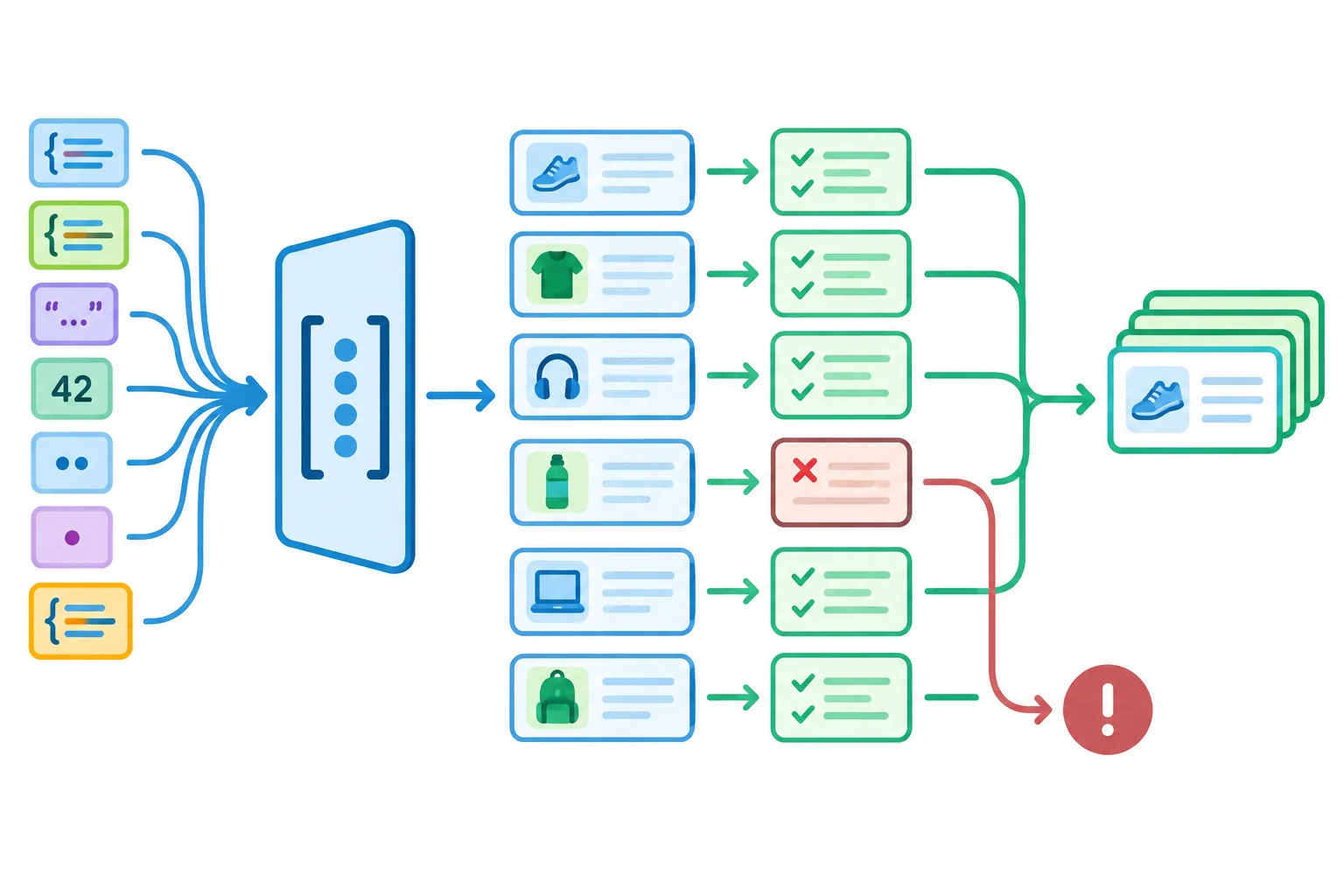
The root must be an array, and every entry must pass isProduct before the parser returns.
Tip
Do not silently keep only the valid entries. Filtering would make a damaged external payload look like a successful, incomplete result.
src/product-api.ts — complete file
export type Product = {
  id: number;
  name: string;
  inStock: boolean;
};

export function isProduct(value: unknown): value is Product {
  if (typeof value !== "object" || value === null || Array.isArray(value)) {
    return false;
  }

  return (
    "id" in value &&
    typeof value.id === "number" &&
    "name" in value &&
    typeof value.name === "string" &&
    "inStock" in value &&
    typeof value.inStock === "boolean"
  );
}

export function parseProducts(value: unknown): Product[] {
  if (!Array.isArray(value)) {
    throw new Error("Invalid product data.");
  }

  const entries: unknown[] = value;
  const products: Product[] = [];

  for (const entry of entries) {
    if (!isProduct(entry)) {
      throw new Error("Invalid product data.");
    }

    products.push(entry);
  }

  return products;
}
Tip
Array.isArray identifies the root, but its library typing can expose array elements too permissively. Assigning to unknown[] makes each entry earn its Product type through isProduct. After that predicate succeeds, products.push(entry) is safe.
Complete the parser safeguards without using a type assertion.
export function parseProducts(value: unknown): Product[] {
  if (!(value)) {
    throw new Error("Invalid product data.");
  }

  const entries:  = value;
  const products:  = [];

  for (const entry of entries) {
    if (!(entry)) {
      throw new Error("Invalid product data.");
    }

    products.push(entry);
  }

  return products;
}Without using a type assertion or non-null assertion, write a compact parseProducts implementation or outline. It must show the safe check order, use an unknown[] entries variable and a Product[] accumulator, and reject an invalid entry.
Then predict what happens for these two decoded values:
[][{"id":1,"name":"Notebook","inStock":false},{"id":2,"name":"Pen","inStock":"yes"}]Write at least 250 characters (0/250).
Step 4 of 7
Safely narrow unknown caught values before reading an Error-specific message.
A parser may throw an Error, but JavaScript allows any value to be thrown. A catch block can therefore receive a string, null, or an unrelated object—not only an Error.
Treat the caught value as unknown. Before reading error.message, obtain runtime evidence that the value is actually an Error. This keeps error handling from becoming a second unchecked boundary.
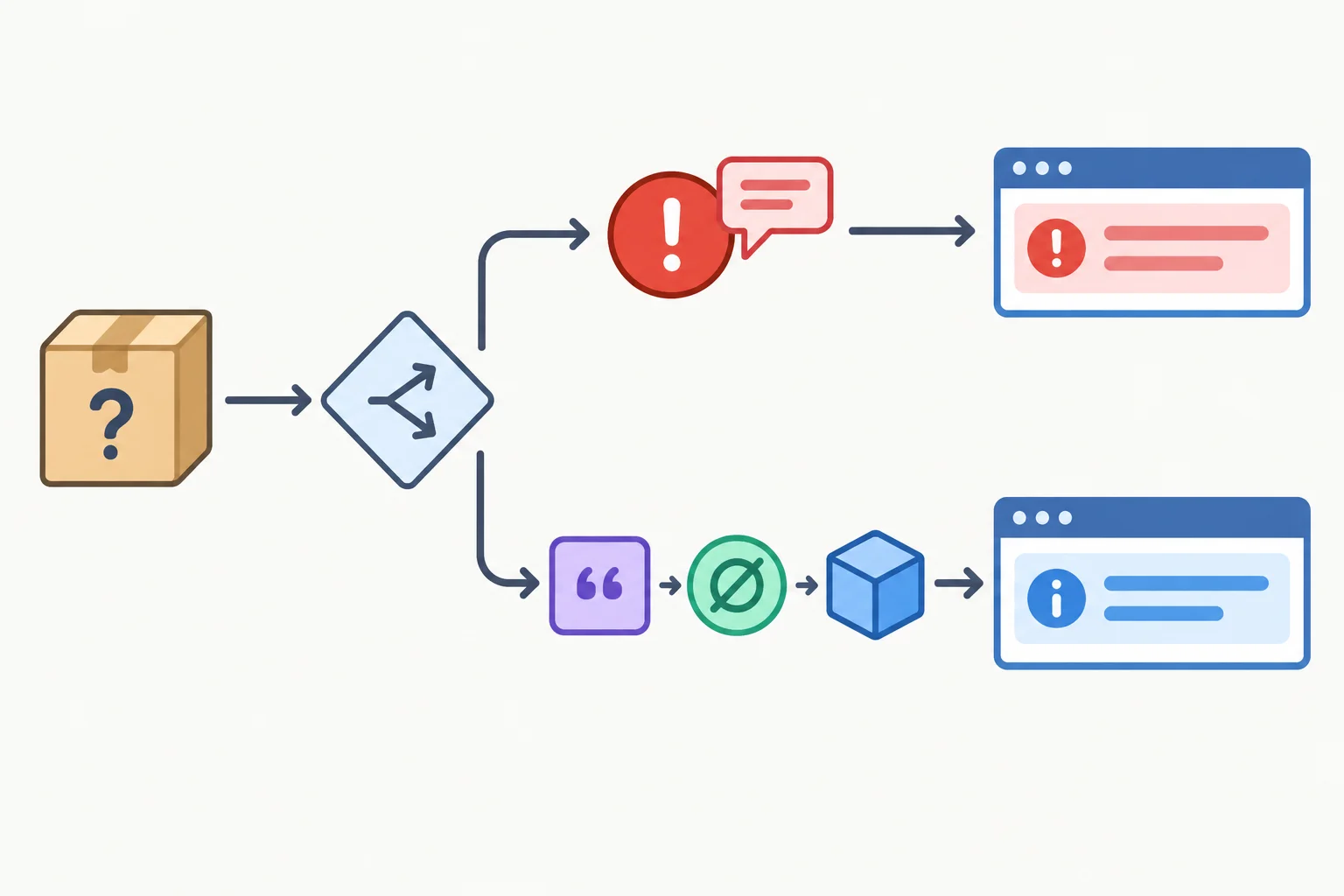
The runtime check decides whether it is safe to read an error-specific property.
Add this helper to src/product-api.ts. instanceof Error narrows error only inside the if block. Outside that block, the function returns the documented fallback for every non-Error thrown value.
src/product-api.ts — add this complete helper
export function getErrorMessage(error: unknown): string {
  if (error instanceof Error) {
    return error.message;
  }

  return "Unexpected failure.";
}The fallback is deliberate: it is not safe to assume that a thrown string, null, or { message: "..." } is an Error. Do not use a type assertion to skip this check; an assertion changes the checker’s assumption but does not inspect the runtime value.
| Thrown value | Runtime result | Returned string |
|---|---|---|
| new Error("Offline.") | Error instance | Offline. |
| "Offline." | Not an Error | Unexpected failure. |
| null | Not an Error | Unexpected failure. |
| { message: "Offline." } | Not an Error | Unexpected failure. |
Complete the condition so this helper can safely return a caught Error's message and otherwise return its fallback.
export function getErrorMessage(error: unknown): string {
  if (error  Error) {
    return error.message;
  }

  return "Unexpected failure.";
}Match each thrown value to the string returned by getErrorMessage.
Tap an item and then its matching pair.

Step 5 of 7
Connect response decoding and runtime validation to a typed asynchronous success-or-failure result.
A typed API boundary turns an uncertain asynchronous operation into one of two explicit outcomes:
Product[] only after runtime validation.loadProducts returns Promise<Result<Product[]>>. A resolved promise can therefore still represent failure; callers must inspect result.ok before reading variant-specific properties. HTTP status, JSON decoding, and application-shape validation are separate checks, but each can lead to the failure variant.
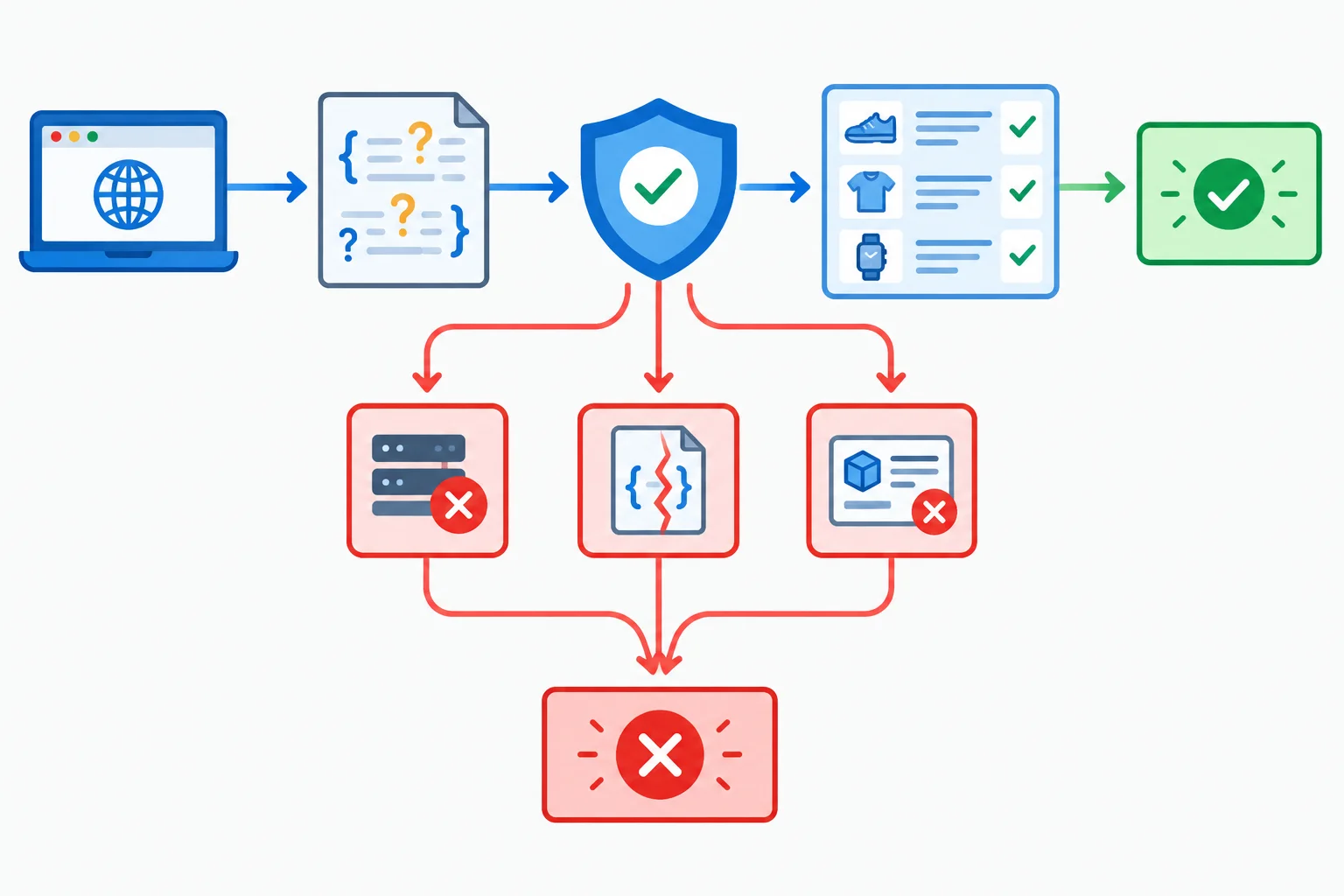
Only data that passes parseProducts can travel to the success outcome.
In src/product-api.ts, keep the Product, parseProducts, and getErrorMessage exports built in earlier steps. Add this result contract and asynchronous boundary below them. The raw value remains unknown after decoding; parseProducts is the runtime gate before success is constructed.
export type Result<T> =
  | { ok: true; data: T }
  | { ok: false; error: string };

export async function loadProducts(
  url: string,
): Promise<Result<Product[]>> {
  try {
    const response = await fetch(url);

    if (!response.ok) {
      return { ok: false, error: `HTTP ${response.status}` };
    }

    const raw: unknown = await response.json();
    const products = parseProducts(raw);

    return { ok: true, data: products };
  } catch (error: unknown) {
    return { ok: false, error: getErrorMessage(error) };
  }
}
Tip
fetch rejection, invalid JSON, and parseProducts throwing all reach catch. getErrorMessage safely converts the unknown caught value into a message. An unsuccessful HTTP response is returned earlier as a message such as HTTP 404, without attempting to decode its body.
A caller does not receive a bare Product[]; it receives a result union. Check its discriminant first. Inside each branch, TypeScript narrows to the matching variant, so the available property is safe to use.
import { loadProducts } from "./product-api.ts";

async function showProducts(): Promise<void> {
  const result = await loadProducts("/products.json");

  if (result.ok) {
    console.log("Success:", result.data);
    return;
  }

  console.error("Failure:", result.error);
}

void showProducts();Success: [{ id: 1, name: "Notebook", inStock: false }, { id: 2, name: "Pen", inStock: true }]With a valid local fixture, the browser console prints a Success label and the validated array. With a failed request, invalid JSON, or invalid product shape, it prints a Failure label and a message.
Complete the typed API boundary and its consumer. Preserve the rule that unchecked decoded JSON cannot be placed directly into the success result.
export async function loadProducts(
  url: string,
): Promise<Result<Product[]>> {
  try {
    const response = await fetch(url);

    if (!response.ok) {
      return { ok: false, error: `HTTP ${response.status}` };
    }

    const raw:  = await response.json();
    const products = ;

    return { ok: true, data: products };
  } catch (error: unknown) {
    return { ok: false, error:  };
  }
}

async function showProducts(): Promise<void> {
  const result = await loadProducts("/products.json");

  if () {
    console.log("Success:", );
    return;
  }

  console.error("Failure:", );
}
Step 6 of 7
Change local JSON fixtures and observe how the typed API boundary accepts valid data or returns failure without relying on unchecked assumptions.
Use your completed src/product-api.ts from the earlier steps. Create the local fixture below in public/products.json, then replace src/main.ts with the complete invocation shown here. The loader receives the fixture through "/products.json"; application code does not import the JSON as trusted data.
public/products.json — baseline fixture
[
  {
    "id": 1,
    "name": "Notebook",
    "inStock": false
  },
  {
    "id": 2,
    "name": "Pen",
    "inStock": true
  }
]
src/main.ts — complete file
import { loadProducts } from "./product-api.ts";

async function run(): Promise<void> {
  const result = await loadProducts("/products.json");

  if (result.ok) {
    console.log("success", result.data);
  } else {
    console.error("failure", result.error);
  }
}

void run();success [
{ id: 1, name: "Notebook", inStock: false },
{ id: 2, name: "Pen", inStock: true }
]Browser developer tools may format the array differently. What matters is the "success" label and both validated records, including inStock: false.
First run npm run typecheck. It checks your TypeScript source, but it does not inspect the JSON that the browser will later fetch from public/products.json.
Then run npm run dev, open the local site, and inspect the browser console. After every fixture edit, save the file and reload the browser. The console result is runtime evidence from the typed API boundary.
A successful type check can therefore coexist with either a runtime success or a runtime failure after you edit the fixture.
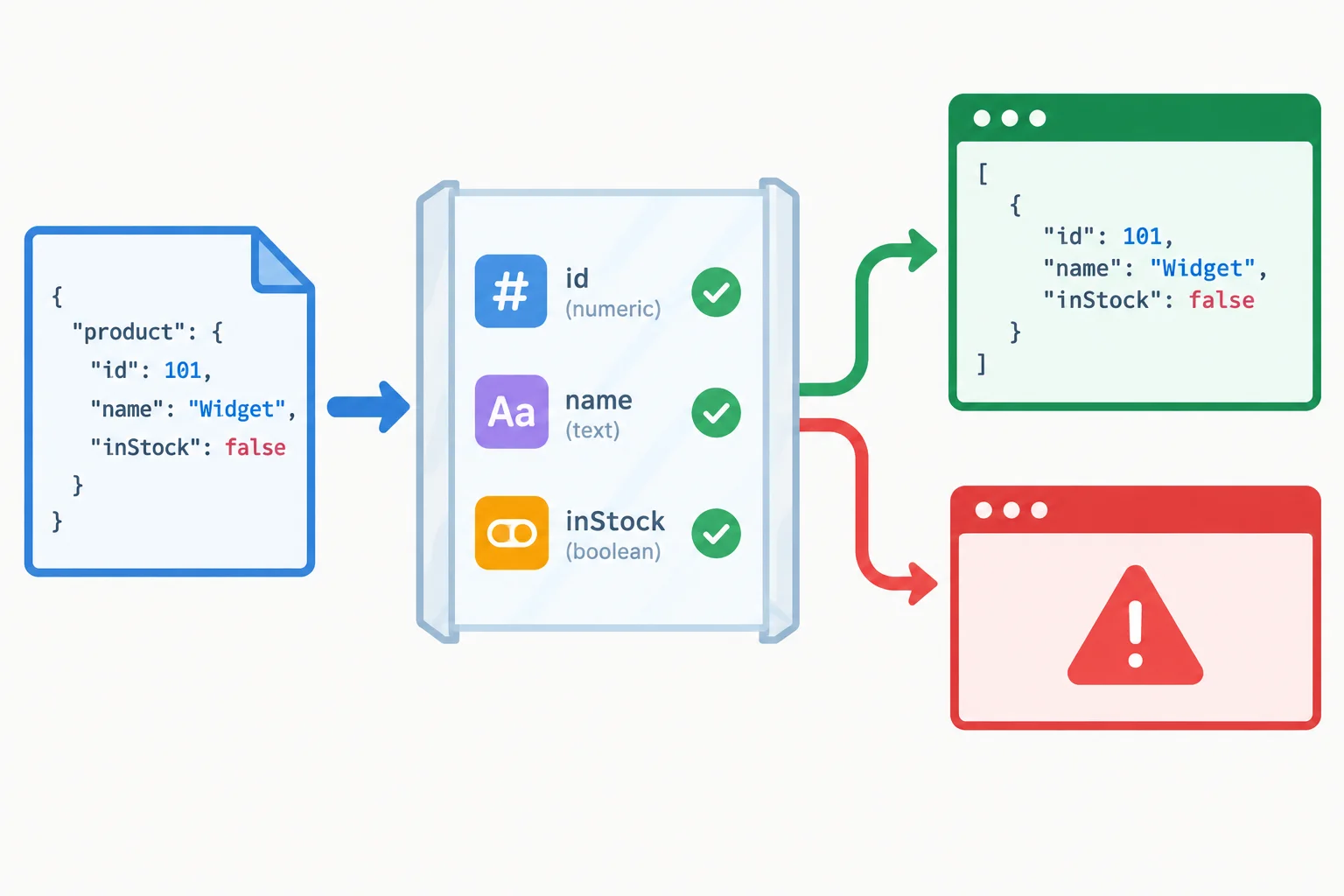
The TypeScript source stays the same while a changed JSON payload can produce success or failure at runtime.
Tip
Do not change Product, add an assertion, or weaken the predicate to make a failing fixture pass. Keep the typed API boundary unchanged; each fixture is evidence about whether its runtime shape actually satisfies the contract.
Replace the entire contents of public/products.json with one fixture at a time. Save and reload after each replacement. All rows except the last are syntactically valid JSON; their outcome depends on runtime validation of the application shape.
Use each complete value as the full contents of public/products.json.
| Case | Complete fixture contents | Expected console branch |
|---|---|---|
| Baseline with false | [{"id":1,"name":"Notebook","inStock":false},{"id":2,"name":"Pen","inStock":true}] | success |
| Missing field | [{"id":1,"name":"Notebook"}] | failure: Invalid product data. |
| Incorrect field type | [{"id":1,"name":"Notebook","inStock":"false"}] | failure: Invalid product data. |
| Mixed collection | [{"id":1,"name":"Notebook","inStock":false},{"id":2,"name":"Pen"}] | failure: Invalid product data. |
| Invalid root | {"id":1,"name":"Notebook","inStock":false} | failure: Invalid product data. |
| Empty collection | [] | success |
| Invalid JSON | [{"id":1,"name":"Notebook","inStock":false},] | failure with a JSON parsing message |
Run the baseline, empty collection, missing-field, incorrect-type, mixed-collection, invalid-root, and invalid-JSON cases. Run npm run typecheck without changing the TypeScript source, and inspect the console after each browser reload.
Write one concise report of what you observed. Include the console branch for every case and explain why the type-check result did not establish that the edited JSON had the Product collection shape.
Report the observed type-check result and console outcome for every fixture case. State what happened for the baseline containing false and for the empty collection. State what happened for the missing field, incorrect type, mixed collection, invalid root, and invalid JSON. Finish by explaining why unchanged TypeScript can type-check successfully while runtime validation rejects edited JSON.
Write at least 300 characters (0/300).

Step 7 of 7
Review the full typed API boundary, audit unchecked assumptions, and justify a runtime-validated success result.
A typed API boundary has one job: turn untrusted decoded JSON into either typed application data or an explicit failure.
A TypeScript annotation affects the checker, not the payload arriving at runtime. The reliable sequence is:
unknown.as Product[] and value! can silence a checker concern, but neither examines a JSON value. A successful npm run typecheck proves that your code follows declared types; it does not prove that a server or local JSON fixture sent those types.
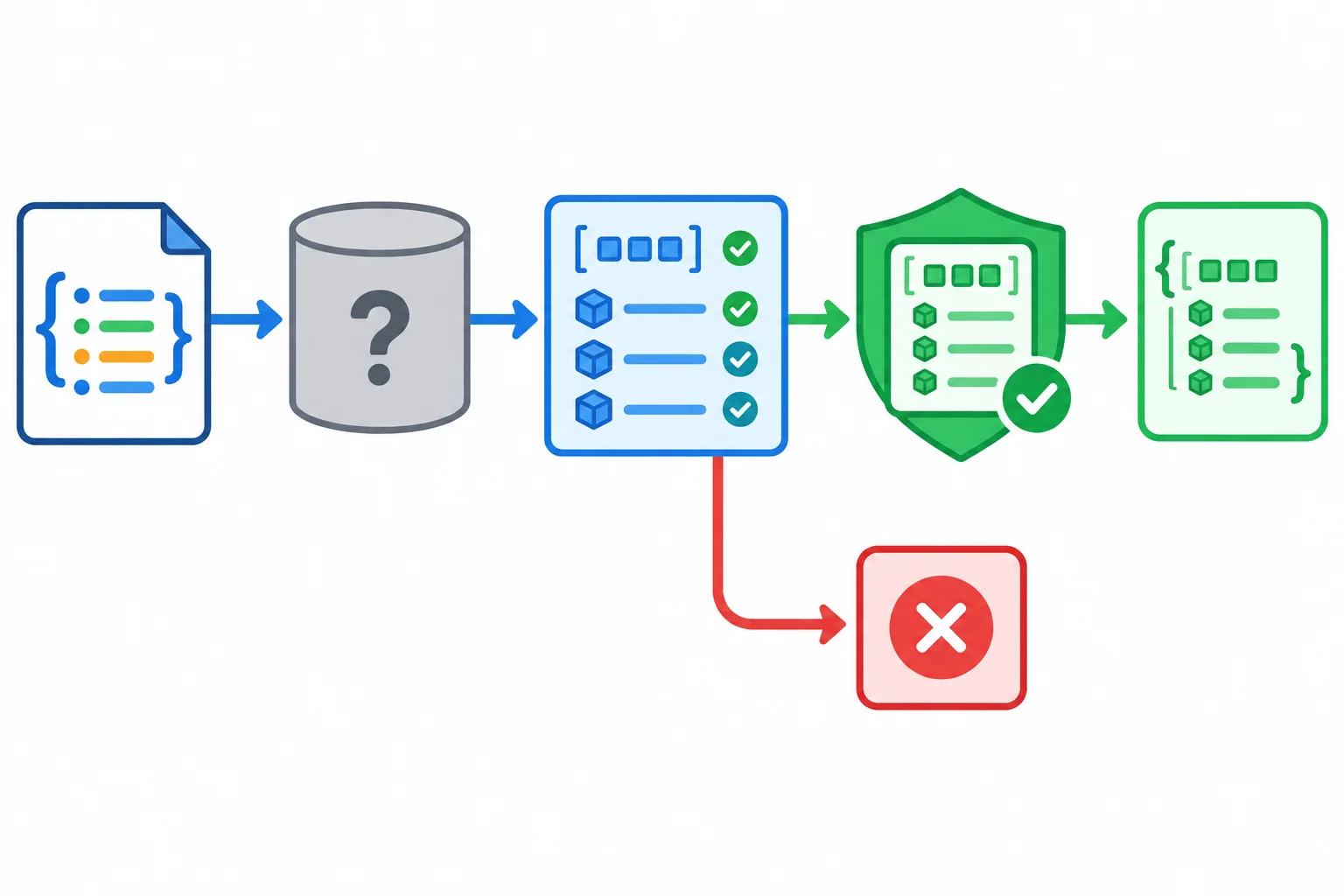
Only values that pass runtime validation may cross into typed application data.
This intentionally flawed excerpt may type-check, but it has no runtime basis for its success result.
export type Product = {
  id: number;
  name: string;
  inStock: boolean;
};

export type Result<T> =
  | { ok: true; data: T }
  | { ok: false; error: string };

export function isProduct(value: unknown): value is Product {
  return (
    typeof value === "object" &&
    value !== null &&
    "id" in value &&
    typeof value.id === "number"
  );
}

export async function loadProducts(url: string): Promise<Result<Product[]>> {
  try {
    const response = await fetch(url);
    const raw = await response.json();
    return { ok: true, data: raw as Product[] };
  } catch (error: any) {
    return { ok: false, error: error.message };
  }
}
Warning
This excerpt has several boundary leaks:
id; it has not established name or inStock.response.ok.error: any assumes a message property exists.A safe repair does not need a more persuasive assertion. It needs runtime evidence: an HTTP check, const raw: unknown = await response.json();, a parser that validates the root and every entry, and getErrorMessage(error) after catching error: unknown.
Summary
Complete the two boundary calls in this src/product-api.ts function.
export async function loadProducts(url: string): Promise<Result<Product[]>> {
  try {
    const response = await fetch(url);

    if (!response.ok) {
      throw new Error(`HTTP ${response.status}`);
    }

    const raw: unknown = await response.json();
    const products = (raw);

    return { ok: true, data: products };
  } catch (error: unknown) {
    return { ok: false, error: (error) };
  }
}Assume Product and a complete isProduct(value: unknown): value is Product already exist in src/product-api.ts. This assertion-based parser is the boundary to repair.
export function parseProducts(value: unknown): Product[] {
  return value as Product[];
}Rewrite parseProducts as a complete implementation without any, type assertions, or non-null assertions. It must reject a non-array root and any invalid entry with new Error("Invalid product data."); use an unknown[] entries variable and a Product[] accumulator.
Then predict what happens for this unseen decoded JSON value:
[{"id":3,"name":"Cable","inStock":"yes"}]State whether the parser returns or throws, and explain exactly where runtime evidence establishes the type of a successful returned collection.
Write at least 280 characters (0/280).
Congratulations! You completed: Validate Unknown Data at Typed API Boundaries
You completed this level!
Up next: React Components and State
 Build a Local React App with TypeScriptConfigure React in a local TypeScript and Vite project, render a semantic interface with JSX, and extend the existing checking workflow to cover TSX and official React Hooks rules.
Thousands of online courses in video, ebooks and audiobooks.
To test your knowledge during online courses
Generated directly from your cell phone's photo gallery and sent to your email

Download our app via QR Code or the links below:.



Carry knowledge in your pocket.
Download the Cursa app.
There are hundreds of free courses available, with a free certificate of completion that is saved in your mobile image gallery.
Download the app to access the Course Completion Certificate for Free.


+ 10 million
students

Free and Valid
Certificate

60 thousand free
exercises

4.8/5 rating in
app stores

Free courses in
video and ebooks