
Step 1 of 8
Recognize a Coordinated State Transition
Recognize when a feature needs centralized transition rules rather than independent local updates.

Learning path · Level 10 · Tutorial 5
Model related client-state changes with a typed reducer. Keep transitions predictable and application rules consistent when several user actions affect the same state.

 Recognize a Coordinated State Transition
Recognize when a feature needs centralized transition rules rather than independent local updates. 2 min
Recognize a Coordinated State Transition
Recognize when a feature needs centralized transition rules rather than independent local updates. 2 min
 Define the State Contract and Its Rules
Define the minimal Comparison Tray state contract, derive availability from it, and recognize snapshots that break its rules. 2 min
Define the State Contract and Its Rules
Define the minimal Comparison Tray state contract, derive availability from it, and recognize snapshots that break its rules. 2 min
 Describe Intentions with Typed Actions
Define a typed action vocabulary for Comparison Tray interactions and keep browser-event details outside the transition contract. 2 min
Describe Intentions with Typed Actions
Define a typed action vocabulary for Comparison Tray interactions and keep browser-event details outside the transition contract. 2 min
 Implement Rule-Preserving Transitions
Implement reducer branches that preserve Comparison Tray rules, including blocked actions and coordinated removal behavior. 4 min
Implement Rule-Preserving Transitions
Implement reducer branches that preserve Comparison Tray rules, including blocked actions and coordinated removal behavior. 4 min
 Keep Reducer Execution Pure
Keep Comparison Tray transitions repeatable by separating pure reducer calculations from external work. 2 min
Keep Reducer Execution Pure
Keep Comparison Tray transitions repeatable by separating pure reducer calculations from external work. 2 min
 Connect the Reducer to the Interface
Wire the Comparison Tray reducer into a local React interface, dispatch semantic actions from controls, and render the resulting local state. 3 min
Connect the Reducer to the Interface
Wire the Comparison Tray reducer into a local React interface, dispatch semantic actions from controls, and render the resulting local state. 3 min
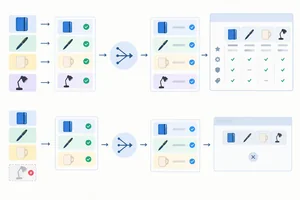 Trace an Action Sequence
Trace reducer actions as one connected state timeline, including guards and the transition that changes the visible comparison panel. 2 min
Trace an Action Sequence
Trace reducer actions as one connected state timeline, including guards and the transition that changes the visible comparison panel. 2 min
 Apply and Review the Complete Model
Apply the complete Comparison Tray model, verify a coordinated removal, and choose the right boundary for reducer state. 2 min
Apply and Review the Complete Model
Apply the complete Comparison Tray model, verify a coordinated removal, and choose the right boundary for reducer state. 2 min
Step 1 of 8
Recognize when a feature needs centralized transition rules rather than independent local updates.
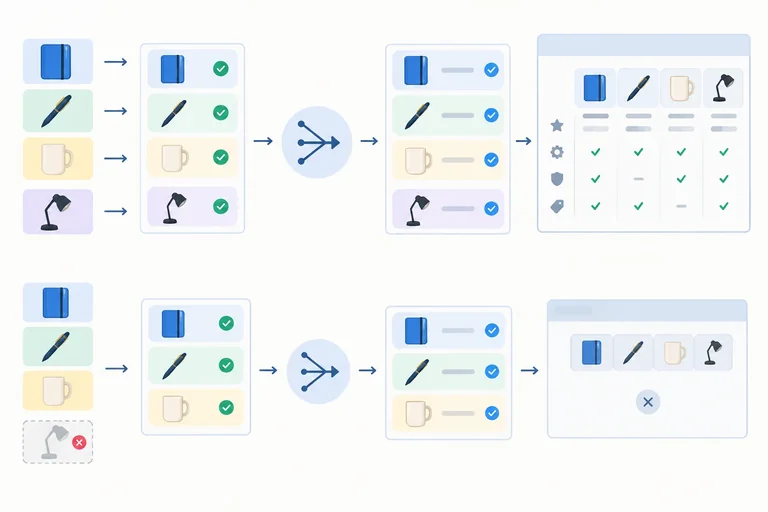
The Comparison Tray lets a user select local products—Notebook, Pen, Mug, and Lamp—then compare selected items, remove items, or clear the tray.
A reducer is a function that maps a current state and an action (a meaningful user intention) to a next state. It is useful when one user intention must consistently apply related rules across the feature.
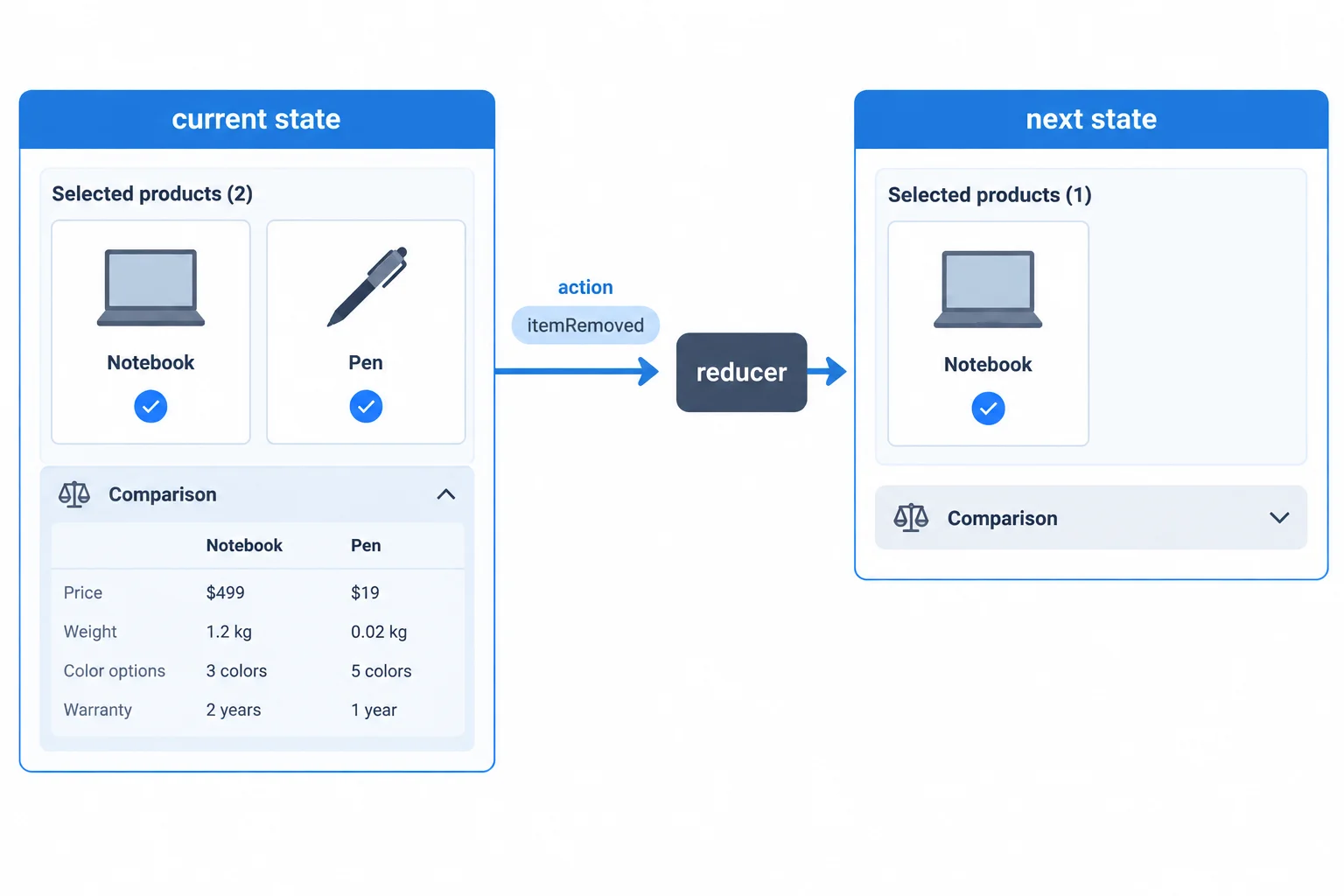
A reducer makes the whole state transition explicit: current state + action → next state.
Several state values alone do not require a reducer. A simple, independent value can remain easy to manage with local useState.
Choose a reducer when transitions are coordinated: one action can affect more than one part of the feature state, and the same rules must hold no matter where that action originates.
Compare the two interaction shapes.
| Interaction | What changes | Suitable approach |
|---|---|---|
| Show or hide one help hint | One independent boolean | Local useState is sufficient |
| Remove a tray selection | Selection changes; comparison may also need to close | Reducer centralizes the rule |
| Clear the tray | Selections and comparison visibility reset together | Reducer centralizes the rule |
Tip
A reducer changes how updates are expressed and where rules are applied. It does not automatically make the tray state global, and it does not inherently improve rendering performance. The Comparison Tray can still be owned by one component.
Which interaction is the stronger reason to use a reducer?

Step 2 of 8
Define the minimal Comparison Tray state contract, derive availability from it, and recognize snapshots that break its rules.
A state contract names the smallest data the Comparison Tray needs to remember. The tray remembers which product IDs are selected and whether the user explicitly opened comparison.
It does not store the selected count or a separate “can compare” flag. Calculate those values from selectedIds whenever the interface renders.
Two selected products make opening available, but they do not mean that comparison is already open. Opening is an explicit user choice, so isOpen must be stored.
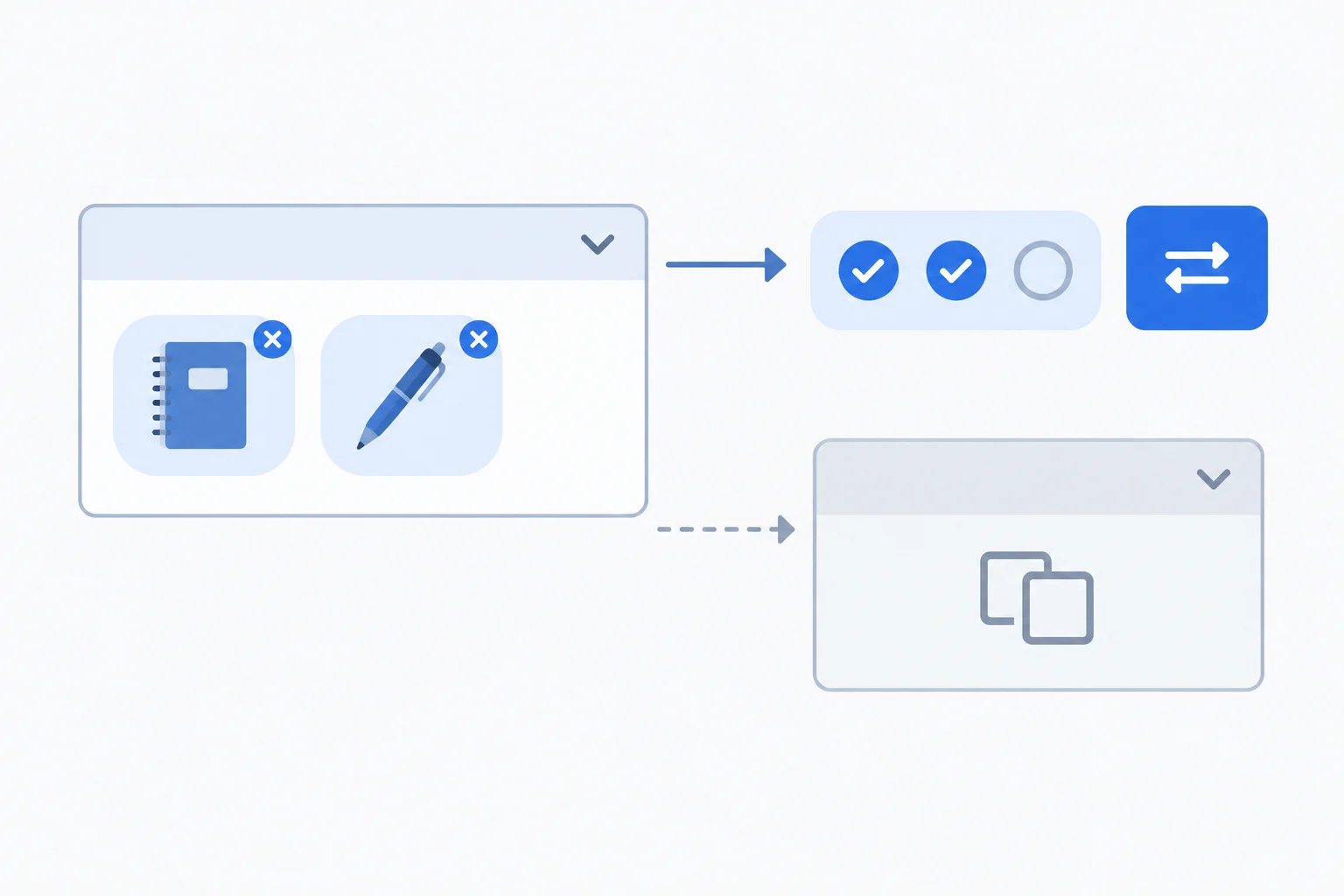
Selection count and opening permission are derived. Whether the panel is open is stored because it reflects a user choice.
Create src/features/comparison/comparisonReducer.ts. The fixed local catalog gives us a narrow ProductId union, so an unknown string cannot be selected by mistake.
ComparisonState has exactly two fields. initialState starts with no selections and a closed comparison. The capacity is a named rule rather than a repeated magic number.
src/features/comparison/comparisonReducer.ts
export type ProductId =
  | 'notebook'
  | 'pen'
  | 'mug'
  | 'lamp';

export type ComparisonState = {
  selectedIds: ProductId[];
  isOpen: boolean;
};

export const MAX_SELECTION = 3;

export const initialState: ComparisonState = {
  selectedIds: [],
  isOpen: false
};
Tip
Later, derive display values from the state:
selectedIds.length supplies text such as 2 of 3 selected.selectedIds.length >= 2 tells the interface whether opening is currently permitted.Neither value belongs in ComparisonState: each duplicates information already available from the selection.
Before implementing transitions, write the invariants: conditions that every valid snapshot must satisfy.
isOpen is true, at least two products are selected.The reverse of rule 3 is not required. A tray with two or three selections may still be closed, because permission to open is not the same as an open comparison.
Read each record as a possible tray snapshot. A snapshot is invalid when it breaks a rule, regardless of how it might have been produced.
| Snapshot | Valid? | Reason |
|---|---|---|
| { selectedIds: ['notebook', 'pen'], isOpen: false } | Yes | Two selections may remain closed |
| { selectedIds: ['notebook', 'notebook'], isOpen: false } | No | A selected ID is duplicated |
| { selectedIds: ['notebook', 'pen', 'mug', 'lamp'], isOpen: false } | No | Four selections exceed capacity |
| { selectedIds: ['mug'], isOpen: true } | No | An open comparison needs two selections |
Complete the missing parts of the Comparison Tray state contract.
export type ComparisonState = {
  selectedIds: ;
  isOpen: ;
};

export const MAX_SELECTION = ;

export const initialState: ComparisonState = {
  selectedIds: [],
  isOpen:
};Which snapshot satisfies every Comparison Tray invariant?

Step 3 of 8
Define a typed action vocabulary for Comparison Tray interactions and keep browser-event details outside the transition contract.
A reducer action names an application intention. It does not describe a low-level field assignment.
For the Comparison Tray, “open the comparison” is meaningful even if the rule for opening later involves more than one state field. Model that intention as comparisonOpened, not as an instruction such as “set isOpen to true.”
This gives every transition a vocabulary that matches what the user is trying to do: add an item, remove an item, open, close, or clear.
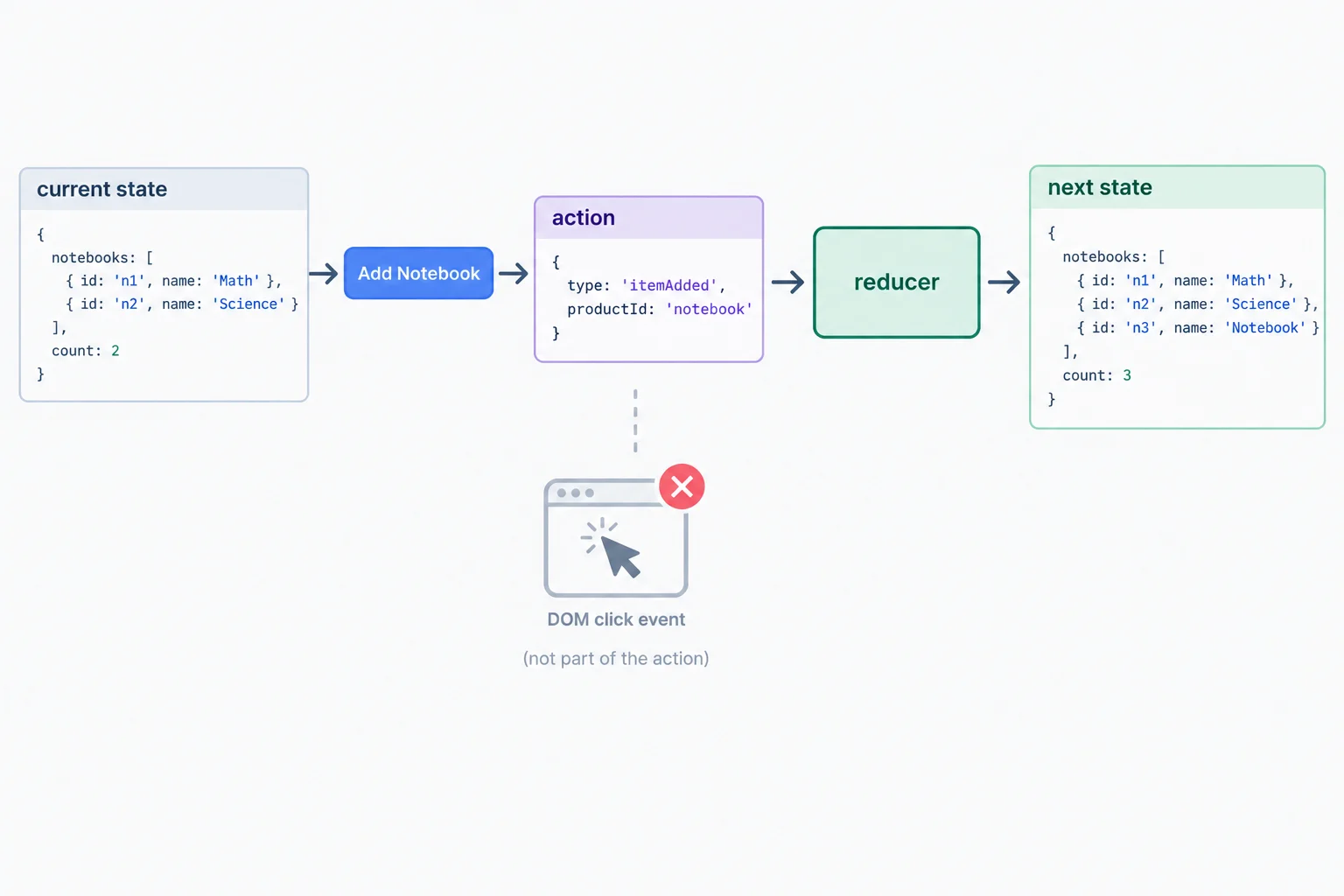
An action carries the application data needed for a transition, not the browser event that led to it.
In src/features/comparison/comparisonReducer.ts, define one union for every permitted Comparison Tray intention. ProductId is the catalog identifier type defined with the tray state contract.
export type ComparisonAction =
  | { type: 'itemAdded'; productId: ProductId }
  | { type: 'itemRemoved'; productId: ProductId }
  | { type: 'comparisonOpened' }
  | { type: 'comparisonClosed' }
| { type: 'selectionCleared' };Each union member has a literal type value. That shared field is the discriminant: TypeScript can use it to determine which fields belong to a particular action.
Only adding and removing identify a product. Opening, closing, and clearing already express complete intentions, so they carry no extra payload.
These are the action-object shapes produced for the tray's controls.
| User intention | Action object | Payload |
|---|---|---|
| Add Notebook | { type: 'itemAdded', productId: 'notebook' } | productId |
| Remove Notebook | { type: 'itemRemoved', productId: 'notebook' } | productId |
| Compare | { type: 'comparisonOpened' } | None |
| Close comparison | { type: 'comparisonClosed' } | None |
| Clear selection | { type: 'selectionCleared' } | None |
The discriminant prevents vague or malformed objects. Once an action is identified as itemAdded or itemRemoved, its productId is available as a ProductId. For an action identified as comparisonOpened, there is no product ID to read.
Likewise, an object such as { type: 'comparisonOpened', productId: 'notebook' } does not match this contract. Type checking catches that unnecessary payload when the object is written as an action.
Tip
A browser event belongs to the interface layer. The interface may read interaction details to determine a product ID, but the action contract receives only application data such as productId. Do not put an event object, a button element, or another DOM value into ComparisonAction.
Complete the discriminants for this action contract. Preserve the payload structure shown: do not add DOM events or extra payloads.
export type ComparisonAction =
  // A product becomes selected.
  | { type: ; productId: ProductId }
  // A selected product is removed.
  | { type: ; productId: ProductId }
  // The user requests the comparison view.
  | { type:  }
  // The user dismisses the comparison view.
  | { type:  }
  // The user resets the tray selection.
  | { type:  };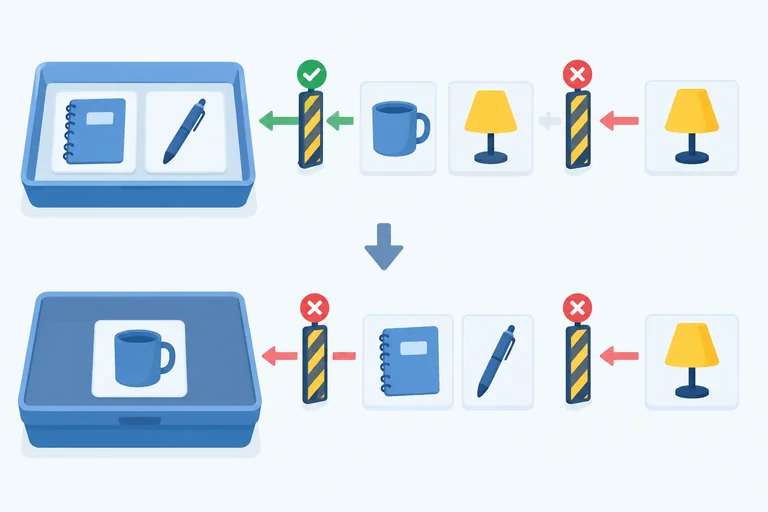
Step 4 of 8
Implement reducer branches that preserve Comparison Tray rules, including blocked actions and coordinated removal behavior.
comparisonReducer is the rule boundary for the Comparison Tray. It receives the current state and a semantic action, then returns the next state.
A branch returns a new state object only when the transition is allowed. For a blocked or irrelevant action, return the existing state. This keeps the rules true even if an action reaches the reducer without the expected interface control.
For this tray:
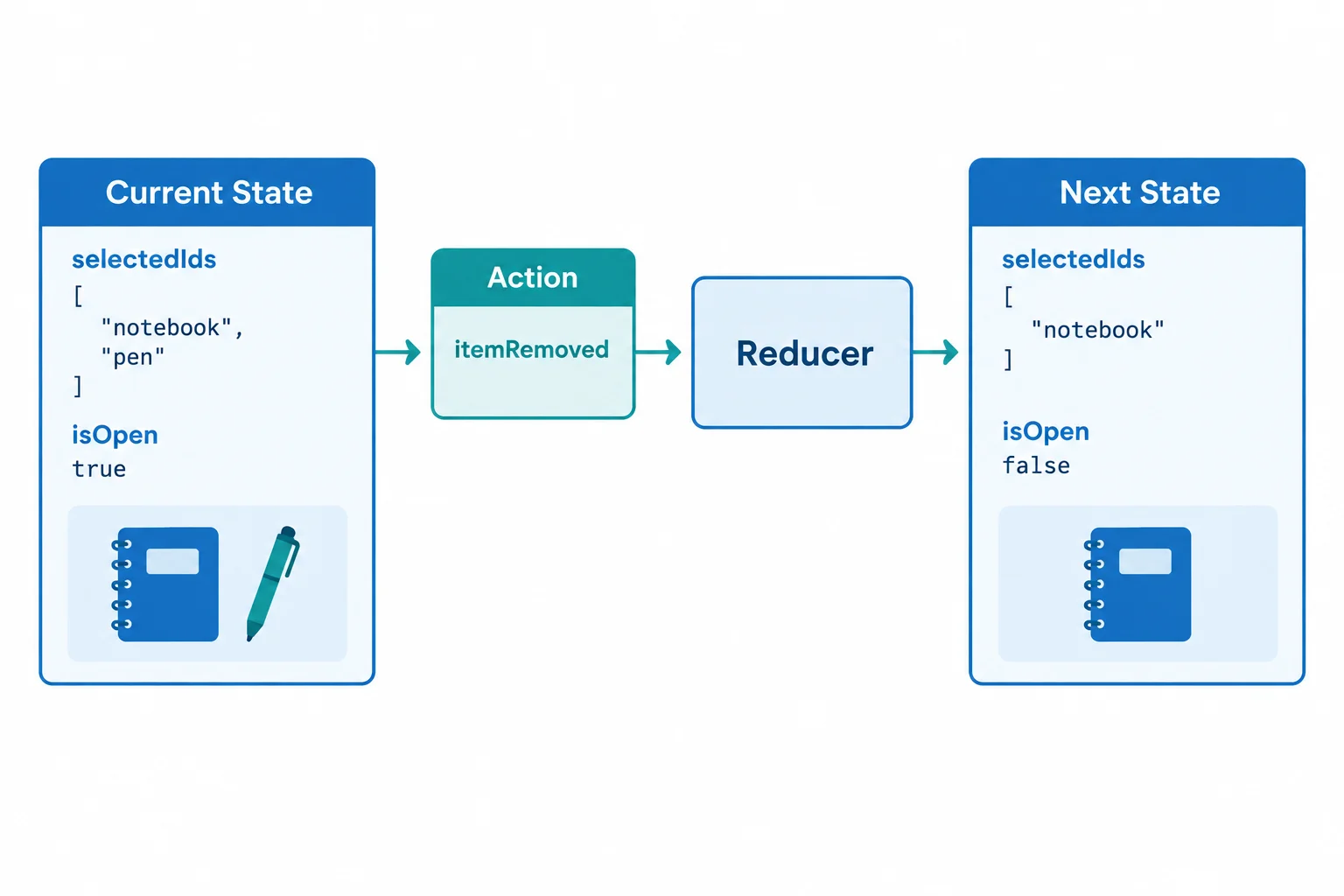
Removing a selected product can change both selectedIds and isOpen in one rule-preserving transition.
Place comparisonReducer below the state and action contracts in src/features/comparison/comparisonReducer.ts. The switch narrows action by its type.
The itemAdded branch rejects duplicate and full-tray requests. When it accepts an ID, array spread creates a new selection in insertion order. Object spread retains the current isOpen value, so adding an item does not silently open or close the comparison.
Addition branch inside comparisonReducer
case 'itemAdded':
  if (
    state.selectedIds.includes(action.productId) ||
    state.selectedIds.length === MAX_SELECTION
  ) {
    return state;
  }
  return {
    ...state,
    selectedIds: [...state.selectedIds, action.productId]
  };
Tip
Do not use push on state.selectedIds. Array spread creates a new array and leaves the input state unchanged. The guard also protects the invariant when an action is dispatched without a disabled button.
Removal needs a coordinated result. First ignore an ID that is not selected. For a real removal, create the filtered array, then use its length to decide whether an open comparison must close.
The other branches preserve unrelated fields. Opening requires at least two selections, closing preserves the selection, and clearing restores the known empty, closed starting state.
Continue the same switch (action.type) block.
case 'itemRemoved': {
  if (!state.selectedIds.includes(action.productId)) return state;
  const selectedIds = state.selectedIds.filter(
    (id) => id !== action.productId
  );
  return {
    selectedIds,
    isOpen: selectedIds.length >= 2 ? state.isOpen : false
  };
}

case 'comparisonOpened':
  if (state.selectedIds.length < 2 || state.isOpen) return state;
  return { ...state, isOpen: true };

case 'comparisonClosed':
  return state.isOpen ? { ...state, isOpen: false } : state;

case 'selectionCleared':
  return state.selectedIds.length === 0 && !state.isOpen
    ? state
: initialState;Examples of accepted and blocked transitions.
| Current state | Action | Next state |
|---|---|---|
| { selectedIds: ['notebook'], isOpen: false } | { type: 'comparisonOpened' } | { selectedIds: ['notebook'], isOpen: false } |
| { selectedIds: ['notebook', 'pen'], isOpen: false } | { type: 'comparisonOpened' } | { selectedIds: ['notebook', 'pen'], isOpen: true } |
| { selectedIds: ['notebook', 'pen'], isOpen: true } | { type: 'itemRemoved', productId: 'pen' } | { selectedIds: ['notebook'], isOpen: false } |
What does this action return when applied to the current state?
Current state: { selectedIds: ['notebook', 'pen', 'mug'], isOpen: false }
Action: { type: 'itemAdded', productId: 'lamp' }
Complete the capacity guard, the blocked-transition return, and the coordinated removal return.
case 'itemAdded':
  if (
    state.selectedIds.includes(action.productId) ||
    state.selectedIds.length ===
  ) {
    return ;
  }
  return {
    ...state,
    selectedIds: [...state.selectedIds, action.productId]
  };

case 'itemRemoved': {
  if (!state.selectedIds.includes(action.productId)) return state;
  const selectedIds = state.selectedIds.filter(
    (id) => id !== action.productId
  );
  return {
    selectedIds,
    isOpen: selectedIds.length < 2 ? false :
  };
}
Step 5 of 8
Keep Comparison Tray transitions repeatable by separating pure reducer calculations from external work.
A reducer is a calculation: it receives the current state and one semantic action, then returns the next state. For the same inputs, it should always produce the same result.
Keep it self-contained. Do not mutate state or action, write to browser storage, change the DOM, start a request, read the clock, or use random values. Those operations depend on or change something outside the reducer.
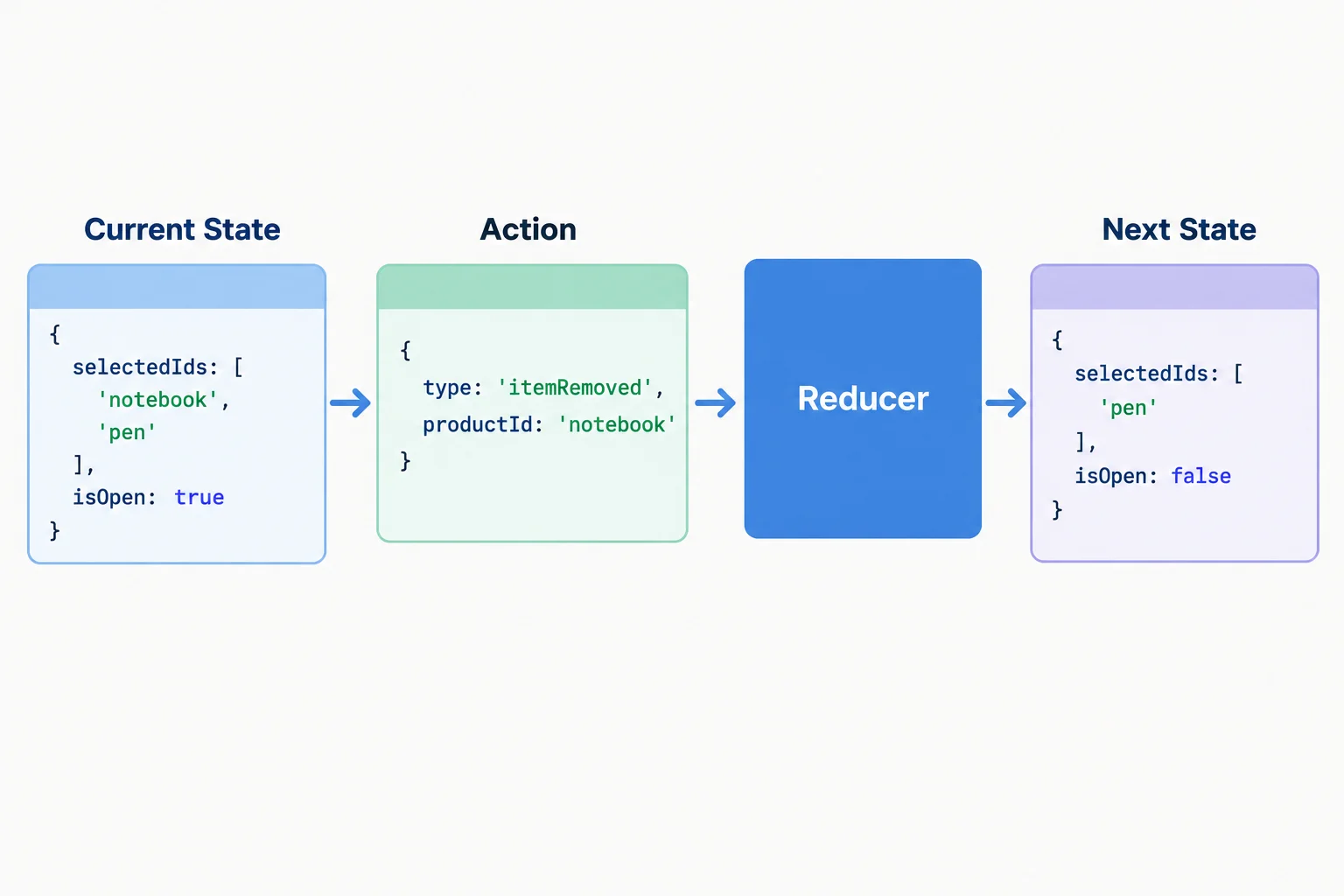
The reducer derives the next state from its two inputs; it does not perform browser or network work.
The following branch is deliberately incorrect. The storage write is an external effect, so it must not run while React is evaluating a state transition.
Deliberately incorrect reducer branch—do not copy this pattern.
case 'selectionCleared':
  localStorage.setItem('comparison-tray', 'cleared');
return initialState;Use the boundary that owns the work. The reducer remains the rule-enforcement boundary for state transitions.
| Work | Appropriate boundary | Reducer responsibility |
|---|---|---|
| Calculate a valid next tray state | Reducer | Return it synchronously |
| Start work from a user click | Event handler | Dispatch an action when appropriate |
| Synchronize with an external system | Existing Effect | Do not calculate the next tray state |
| Read time or generate a random value | Outside the reducer | Dispatch only ordinary needed data |
An event handler can own user-triggered external work. If that work is asynchronous, it may wait for completion and then dispatch an ordinary action with the relevant application data. The reducer itself still returns a ComparisonState immediately—not a promise.
Effects remain for synchronizing React with external systems. They are not a substitute for calculating the next Comparison Tray state.
A reducer branch computes and returns the state immediately.
case 'comparisonClosed':
  return {
    ...state,
    isOpen: false
  };
Warning
React development checks can evaluate a reducer more than once. Treat reducer execution as repeatable calculation, never as a once-only callback for a request, storage write, DOM change, timer, or analytics event.
A draft has placed all three operations inside comparisonReducer. Match each operation to the boundary where it belongs.
Tap an item and then its matching pair.

Step 6 of 8
Wire the Comparison Tray reducer into a local React interface, dispatch semantic actions from controls, and render the resulting local state.
ComparisonTray owns its local state. Inside the component, useReducer connects the existing comparisonReducer and initialState to two values:
state is the current tray snapshot used for rendering.dispatch sends a semantic action to the reducer.Importing a reducer module centralizes transition rules, but it does not create shared storage. Each mounted ComparisonTray has its own state.
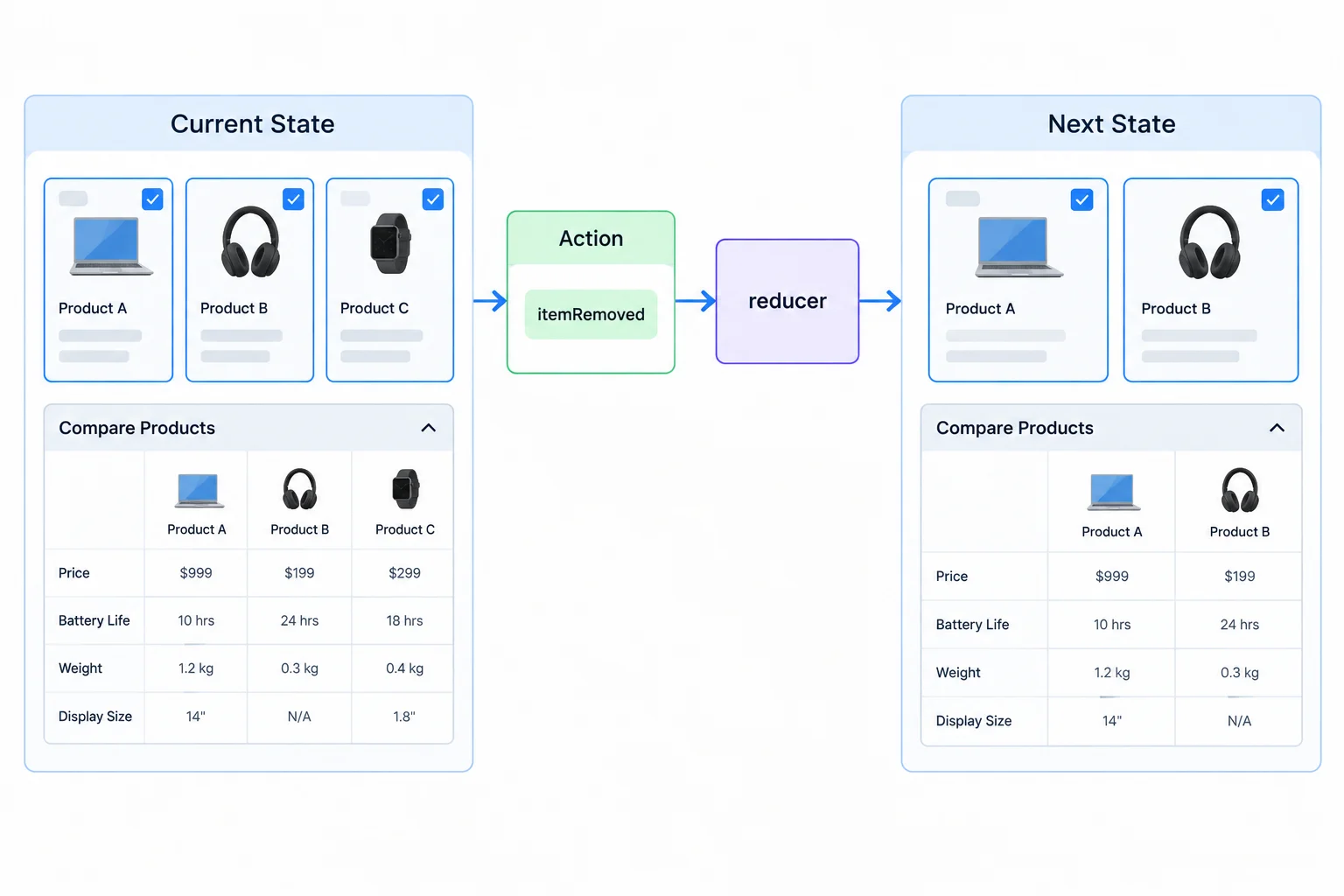
The interface renders the next state returned after each dispatched action.
Tip
Disabled buttons communicate what is currently unavailable, such as opening with fewer than two selections. They improve the interface, but they are not the rule boundary: the reducer must still reject an invalid action dispatched another way.
Create src/features/comparison/comparisonReducer.ts, or confirm that your existing file contains this complete reducer implementation. It remains independent of React; the component will import its named exports.
export type ProductId =
  | 'notebook'
  | 'pen'
  | 'mug'
  | 'lamp';

export type ComparisonState = {
  selectedIds: ProductId[];
  isOpen: boolean;
};

export const MAX_SELECTION = 3;

export const initialState: ComparisonState = {
  selectedIds: [],
  isOpen: false
};

export type ComparisonAction =
  | { type: 'itemAdded'; productId: ProductId }
  | { type: 'itemRemoved'; productId: ProductId }
  | { type: 'comparisonOpened' }
  | { type: 'comparisonClosed' }
  | { type: 'selectionCleared' };

export function comparisonReducer(
  state: ComparisonState,
  action: ComparisonAction
): ComparisonState {
  switch (action.type) {
    case 'itemAdded':
      if (
        state.selectedIds.includes(action.productId) ||
        state.selectedIds.length === MAX_SELECTION
      ) {
        return state;
      }
      return {
        ...state,
        selectedIds: [...state.selectedIds, action.productId]
      };

    case 'itemRemoved': {
      if (!state.selectedIds.includes(action.productId)) return state;
      const selectedIds = state.selectedIds.filter(
        (id) => id !== action.productId
      );
      return {
        selectedIds,
        isOpen: selectedIds.length >= 2 ? state.isOpen : false
      };
    }

    case 'comparisonOpened':
      if (state.selectedIds.length < 2 || state.isOpen) return state;
      return { ...state, isOpen: true };

    case 'comparisonClosed':
      return state.isOpen ? { ...state, isOpen: false } : state;

    case 'selectionCleared':
      return state.selectedIds.length === 0 && !state.isOpen
        ? state
        : initialState;
  }
}Create src/features/comparison/ComparisonTray.tsx. This component derives display values during rendering and dispatches only application data from its controls.
import { useReducer } from 'react';
import {
  comparisonReducer,
  initialState,
  MAX_SELECTION,
  type ProductId
} from './comparisonReducer';

const products: { id: ProductId; name: string }[] = [
  { id: 'notebook', name: 'Notebook' },
  { id: 'pen', name: 'Pen' },
  { id: 'mug', name: 'Mug' },
  { id: 'lamp', name: 'Lamp' }
];

export function ComparisonTray() {
  const [state, dispatch] = useReducer(comparisonReducer, initialState);
  const selectedNames = state.selectedIds.map(
    (id) => products.find((product) => product.id === id)?.name ?? id
  );
  const canAdd = state.selectedIds.length < MAX_SELECTION;
  const canOpen = state.selectedIds.length >= 2 && !state.isOpen;

  return (
    <section aria-labelledby="comparison-tray-heading">
      <h1 id="comparison-tray-heading">Comparison Tray</h1>
      <p>{state.selectedIds.length} of {MAX_SELECTION} selected</p>
      <p>Selected: {selectedNames.join(', ') || 'None'}</p>

      <h2>Products</h2>
      {products.map((product) => {
        const selected = state.selectedIds.includes(product.id);
        return (
          <div key={product.id}>
            <span>{product.name}</span>{' '}
            <button
              disabled={selected || !canAdd}
              onClick={() =>
                dispatch({ type: 'itemAdded', productId: product.id })
              }
            >
              Add {product.name}
            </button>{' '}
            <button
              disabled={!selected}
              onClick={() =>
                dispatch({ type: 'itemRemoved', productId: product.id })
              }
            >
              Remove {product.name}
            </button>
          </div>
        );
      })}

      <p>
        <button
          disabled={!canOpen}
          onClick={() => dispatch({ type: 'comparisonOpened' })}
        >
          Compare
        </button>{' '}
        <button
          disabled={!state.isOpen}
          onClick={() => dispatch({ type: 'comparisonClosed' })}
        >
          Close comparison
        </button>{' '}
        <button
          disabled={state.selectedIds.length === 0}
          onClick={() => dispatch({ type: 'selectionCleared' })}
        >
          Clear selection
        </button>
      </p>

      {state.isOpen && (
        <section aria-labelledby="comparison-heading">
          <h2 id="comparison-heading">Comparison</h2>
          <p>{selectedNames.join(' and ')}</p>
        </section>
      )}
    </section>
  );
}Replace the contents of src/App.tsx with this local mounting example. Run your existing Vite app after all three files are in place.
import { ComparisonTray } from './features/comparison/ComparisonTray';

export default function App() {
  return <ComparisonTray />;
}Initial render Comparison Tray 0 of 3 selected Selected: None No Comparison section is visible. After Add Notebook 1 of 3 selected Selected: Notebook No Comparison section is visible. After Add Pen, then Compare 2 of 3 selected Selected: Notebook, Pen Comparison Notebook and Pen After Remove Pen 1 of 3 selected Selected: Notebook The Comparison section is no longer visible. After Clear selection 0 of 3 selected Selected: None No Comparison section is visible.
Expected browser-visible result. Button availability also changes with the shown state; this is not console output.
Complete the Hook binding and the semantic dispatches. The handlers send action objects, not DOM events.
function Controls() {
  const [state, dispatch] = (comparisonReducer, initialState);

  return (
    <>
      <p>{state.selectedIds.length} of {MAX_SELECTION} selected</p>
      <button
        onClick={() =>
          dispatch({ type: , productId: 'notebook' })
        }
      >
        Add Notebook
      </button>
      <button onClick={() => dispatch({ type:  })}>
        Compare
      </button>
      <button
        onClick={() =>
          dispatch({ type: , productId: 'notebook' })
        }
      >
        Remove Notebook
      </button>
      <button onClick={() => dispatch({ type:  })}>
        Clear selection
      </button>
    </>
  );
}After completing the binding and running the local app, perform this sequence: add Notebook, add Pen, choose Compare, remove Pen, then clear the selection. Report the selected names and count after each meaningful change, when the inline Comparison section appears, why it disappears after removal, and what remains after clearing.
Write at least 160 characters (0/160).
Step 7 of 8
Trace reducer actions as one connected state timeline, including guards and the transition that changes the visible comparison panel.
A trace is a chain, not a set of independent reducer calls. Begin with initialState, pass it with the first action to comparisonReducer, and then pass that returned state into the next call.
A guarded action can return the exact current state. Record that unchanged snapshot and continue from it; do not restart from initialState. At every row, inspect both selectedIds and isOpen, then check the tray rules: IDs stay unique, no more than three are selected, and an open comparison has at least two selections.
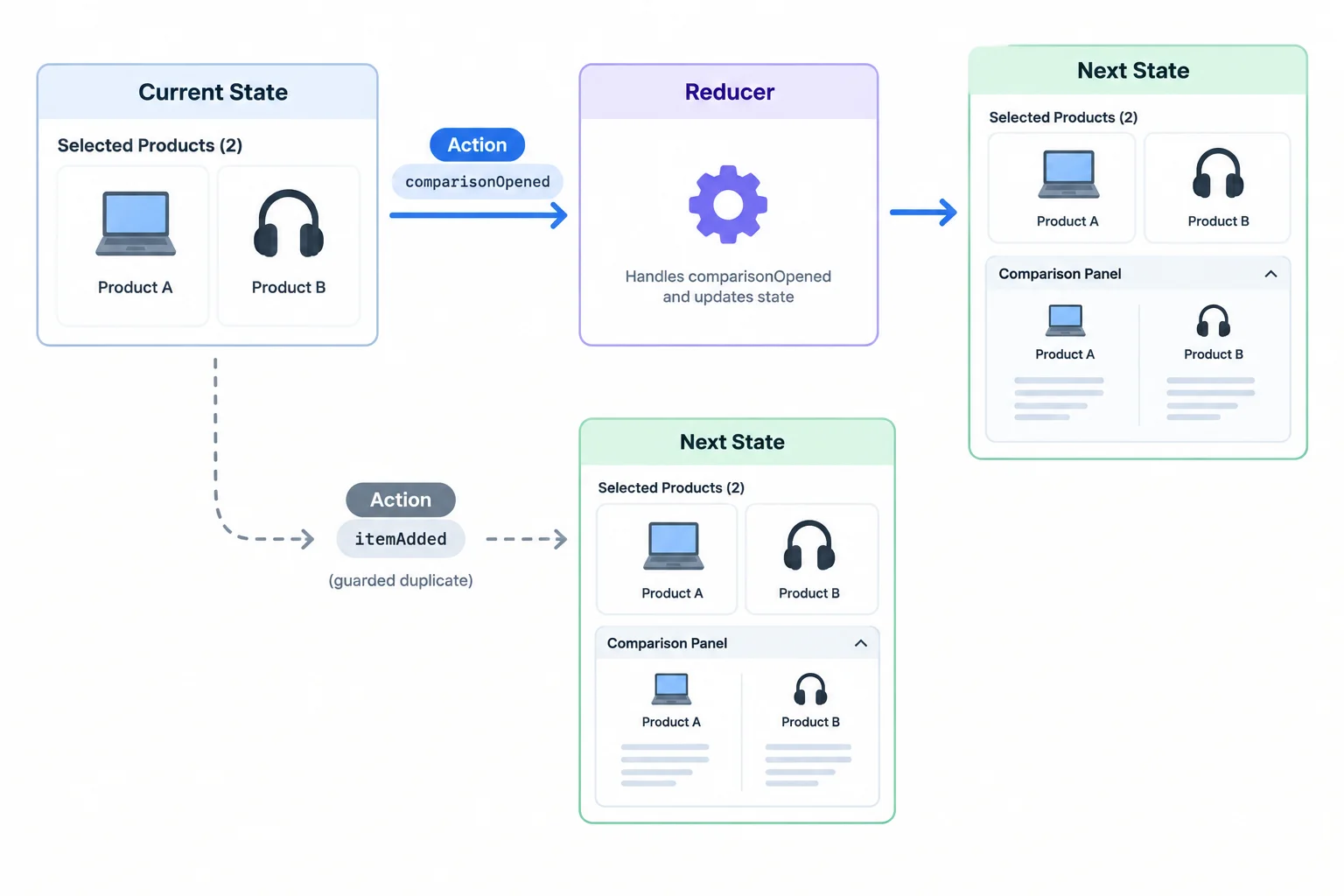
For every action, the next state becomes the current state for the following reducer call.
Tip
Treat an unchanged return as evidence that a guard worked. It is still a real point in the timeline and still determines what the next action receives.
Create src/features/comparison/traceComparison.ts with this temporary trace. Then, at the top of src/App.tsx, directly after the existing ComparisonTray import, add this side-effect import:
import './features/comparison/traceComparison';
Vite now evaluates the trace module when it loads App.tsx, so inspect the browser console while the app runs. These are ordinary typed calls, not a test framework. Remove the temporary side-effect import from src/App.tsx after checking the trace.
import {
  comparisonReducer,
  initialState,
  type ComparisonAction
} from './comparisonReducer';

export function runComparisonTrace(): void {
  let state = initialState;

  function trace(action: ComparisonAction): void {
    state = comparisonReducer(state, action);
    console.log(`${JSON.stringify(action)} -> ${JSON.stringify(state)}`);
  }

  trace({ type: 'comparisonOpened' });
  trace({ type: 'itemAdded', productId: 'notebook' });
  trace({ type: 'itemAdded', productId: 'notebook' });
  trace({ type: 'itemAdded', productId: 'pen' });
  trace({ type: 'comparisonOpened' });
  trace({ type: 'itemAdded', productId: 'mug' });
  trace({ type: 'itemAdded', productId: 'lamp' });
  trace({ type: 'itemRemoved', productId: 'lamp' });
  trace({ type: 'itemRemoved', productId: 'pen' });
  trace({ type: 'itemRemoved', productId: 'mug' });
}

runComparisonTrace();{"type":"comparisonOpened"} -> {"selectedIds":[],"isOpen":false}
{"type":"itemAdded","productId":"notebook"} -> {"selectedIds":["notebook"],"isOpen":false}
{"type":"itemAdded","productId":"notebook"} -> {"selectedIds":["notebook"],"isOpen":false}
{"type":"itemAdded","productId":"pen"} -> {"selectedIds":["notebook","pen"],"isOpen":false}
{"type":"comparisonOpened"} -> {"selectedIds":["notebook","pen"],"isOpen":true}
{"type":"itemAdded","productId":"mug"} -> {"selectedIds":["notebook","pen","mug"],"isOpen":true}
{"type":"itemAdded","productId":"lamp"} -> {"selectedIds":["notebook","pen","mug"],"isOpen":true}
{"type":"itemRemoved","productId":"lamp"} -> {"selectedIds":["notebook","pen","mug"],"isOpen":true}
{"type":"itemRemoved","productId":"pen"} -> {"selectedIds":["notebook","mug"],"isOpen":true}
{"type":"itemRemoved","productId":"mug"} -> {"selectedIds":["notebook"],"isOpen":false}The browser console shows one line for each action. Formatting may vary slightly by browser, but the state snapshots and action order should match.
Use the action list and console output together. The table makes the current-to-next relationship explicit, including actions that are blocked because they would break a rule.
| Current state | Action | Next state |
|---|---|---|
| { selectedIds: [], isOpen: false } | { type: 'comparisonOpened' } | { selectedIds: [], isOpen: false } |
| { selectedIds: [], isOpen: false } | { type: 'itemAdded', productId: 'notebook' } | { selectedIds: ['notebook'], isOpen: false } |
| { selectedIds: ['notebook'], isOpen: false } | { type: 'itemAdded', productId: 'notebook' } | { selectedIds: ['notebook'], isOpen: false } |
| { selectedIds: ['notebook'], isOpen: false } | { type: 'itemAdded', productId: 'pen' } | { selectedIds: ['notebook', 'pen'], isOpen: false } |
| { selectedIds: ['notebook', 'pen'], isOpen: false } | { type: 'comparisonOpened' } | { selectedIds: ['notebook', 'pen'], isOpen: true } |
| { selectedIds: ['notebook', 'pen'], isOpen: true } | { type: 'itemAdded', productId: 'mug' } | { selectedIds: ['notebook', 'pen', 'mug'], isOpen: true } |
| { selectedIds: ['notebook', 'pen', 'mug'], isOpen: true } | { type: 'itemAdded', productId: 'lamp' } | { selectedIds: ['notebook', 'pen', 'mug'], isOpen: true } |
| { selectedIds: ['notebook', 'pen', 'mug'], isOpen: true } | { type: 'itemRemoved', productId: 'lamp' } | { selectedIds: ['notebook', 'pen', 'mug'], isOpen: true } |
| { selectedIds: ['notebook', 'pen', 'mug'], isOpen: true } | { type: 'itemRemoved', productId: 'pen' } | { selectedIds: ['notebook', 'mug'], isOpen: true } |
| { selectedIds: ['notebook', 'mug'], isOpen: true } | { type: 'itemRemoved', productId: 'mug' } | { selectedIds: ['notebook'], isOpen: false } |
The interface reflects the same timeline. The count is derived from selectedIds, so two selected products render 2 of 3 selected. The inline Comparison section additionally requires isOpen.
After the successful open action, two selected products show the panel. A duplicate addition, an over-capacity addition, and removal of an absent product do not change what is visible. Removing pen leaves two selections, so the panel remains open. Removing mug next leaves only one selection, and that transition closes the panel.
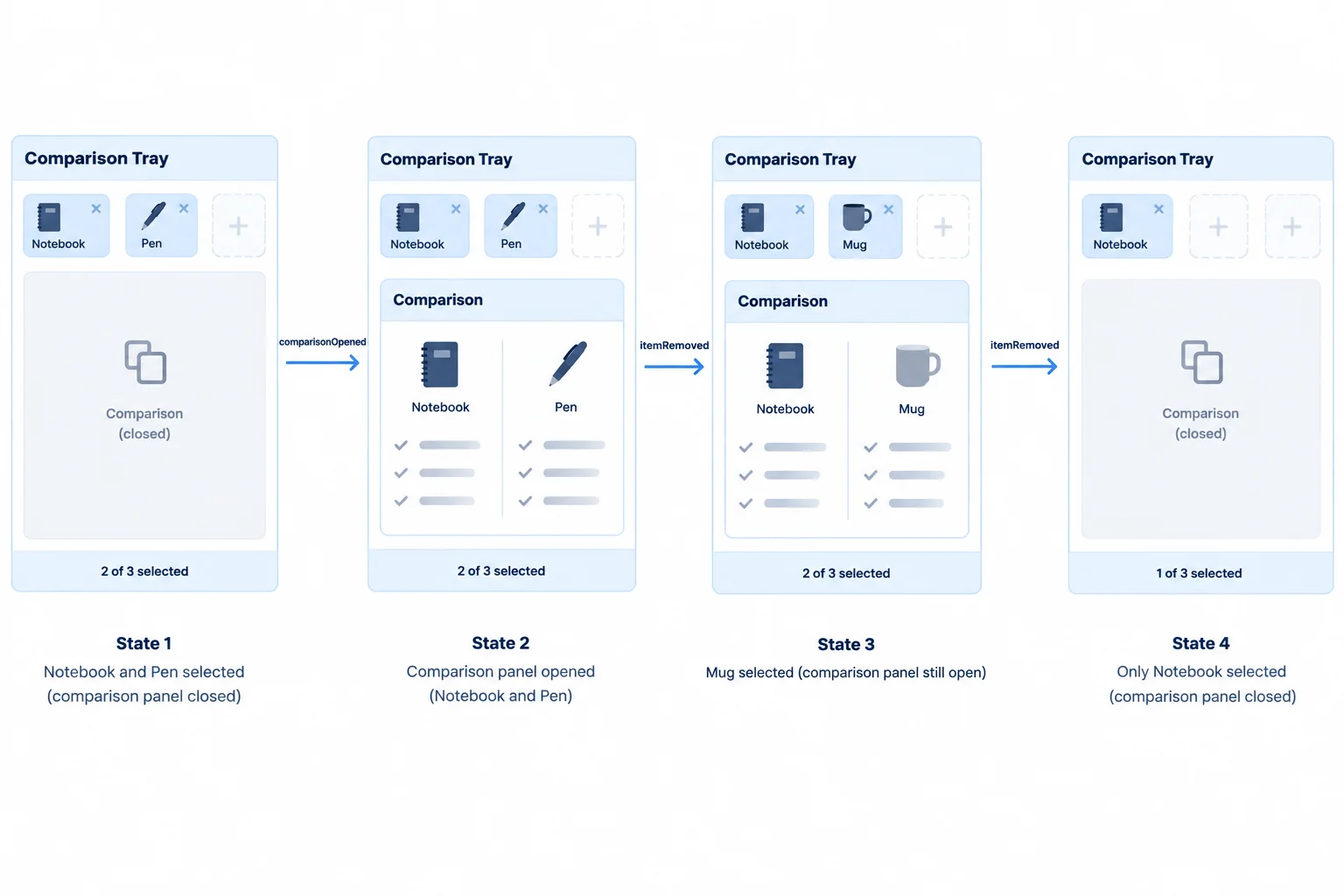
The panel is controlled by isOpen; the displayed count is derived from the selected IDs.
Starting from initialState, trace these actions in order:
{ type: 'itemAdded', productId: 'notebook' }{ type: 'itemAdded', productId: 'pen' }{ type: 'comparisonOpened' }{ type: 'itemAdded', productId: 'lamp' }{ type: 'itemAdded', productId: 'lamp' }{ type: 'itemRemoved', productId: 'pen' }{ type: 'itemRemoved', productId: 'lamp' }Write the state snapshot after each action. Name the guarded action and explain why it leaves the state unchanged. Then identify the exact transition that closes the open comparison and explain why.

Step 8 of 8
Apply the complete Comparison Tray model, verify a coordinated removal, and choose the right boundary for reducer state.
A complete Comparison Tray interaction can cross several state fields, but the interface still reads one current snapshot. The action contract describes intent, the reducer applies the rules, and the rendered controls provide feedback from the resulting state.
Review this sequence as one continuous trace: select products, explicitly open comparison, remove a product, then reset the tray. The visible panel must agree with isOpen, while the count is derived from selectedIds.
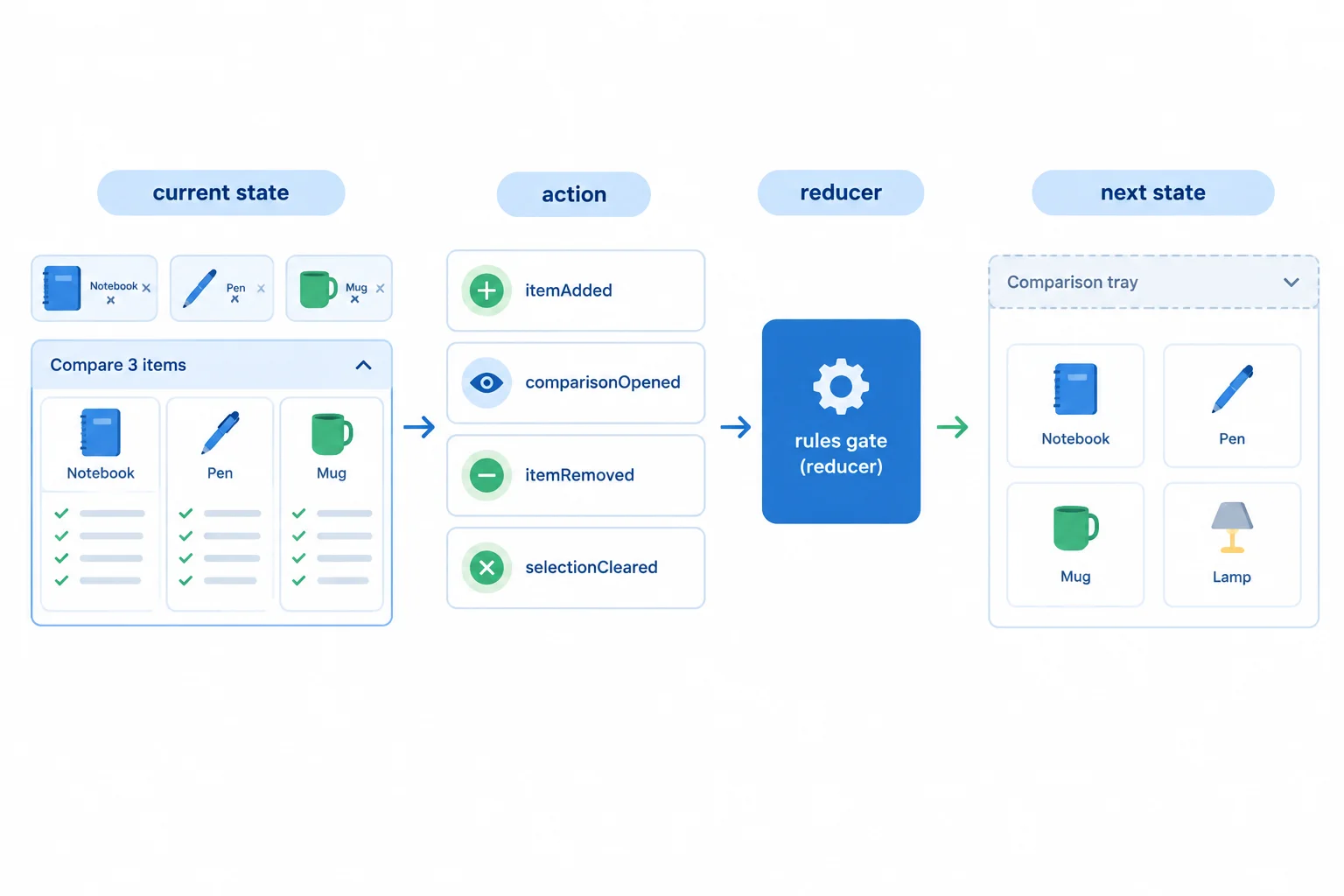
The interface reflects the next state produced by the reducer; it does not independently decide feature rules.
Each row uses the previous row’s next state as its current state.
| Current state | Action | Next state |
|---|---|---|
| { selectedIds: [], isOpen: false } | { type: 'itemAdded', productId: 'notebook' } | { selectedIds: ['notebook'], isOpen: false } |
| { selectedIds: ['notebook'], isOpen: false } | { type: 'itemAdded', productId: 'pen' } | { selectedIds: ['notebook', 'pen'], isOpen: false } |
| { selectedIds: ['notebook', 'pen'], isOpen: false } | { type: 'comparisonOpened' } | { selectedIds: ['notebook', 'pen'], isOpen: true } |
| { selectedIds: ['notebook', 'pen'], isOpen: true } | { type: 'itemRemoved', productId: 'notebook' } | { selectedIds: ['pen'], isOpen: false } |
| { selectedIds: ['pen'], isOpen: false } | { type: 'selectionCleared' } | { selectedIds: [], isOpen: false } |
Complete the removal branch so that a successful removal also preserves the open-comparison rule. This branch already handles an absent product by returning the existing state.
Fill the missing comparison operator.
case 'itemRemoved': {
  if (!state.selectedIds.includes(action.productId)) {
    return state;
  }

  const selectedIds = state.selectedIds.filter(
    (id) => id !== action.productId
  );

  return {
    selectedIds,
    isOpen: selectedIds.length  2 ? false : state.isOpen
  };
}Use this starting snapshot:
{ selectedIds: ['notebook', 'pen'], isOpen: true }
The reducer receives { type: 'itemRemoved', productId: 'pen' }.
In one response:
selectedIds.length [operator] 2 ? false : state.isOpen.Comparison section is rendered.useReducer, while an unrelated simple boolean such as isHelpVisible can remain in useState.Write at least 180 characters (0/180).
Summary
Congratulations! You completed: Model Client-State Transitions with Reducers
Thousands of online courses in video, ebooks and audiobooks.
To test your knowledge during online courses
Generated directly from your cell phone's photo gallery and sent to your email

Download our app via QR Code or the links below:.



Carry knowledge in your pocket.
Download the Cursa app.
There are hundreds of free courses available, with a free certificate of completion that is saved in your mobile image gallery.
Download the app to access the Course Completion Certificate for Free.


+ 10 million
students

Free and Valid
Certificate

60 thousand free
exercises

4.8/5 rating in
app stores

Free courses in
video and ebooks