Step 1 of 8
Separate Credential Format, Storage, and Transport
Separate what a credential is from where it is stored and how it travels with a request.

Learning path · Level 11 · Tutorial 5
Compare browser session designs by separating credential format, storage, and transport, and explain which protections depend on cookie attributes and server-enforced session behavior.

 Separate Credential Format, Storage, and Transport
Separate what a credential is from where it is stored and how it travels with a request. 2 min
Separate Credential Format, Storage, and Transport
Separate what a credential is from where it is stored and how it travels with a request. 2 min
 Trace Cookie and Bearer-Header Requests
Trace cookie-based and bearer-header authentication requests by identifying whether the browser or Page JavaScript attaches each credential. 3 min
Trace Cookie and Bearer-Header Requests
Trace cookie-based and bearer-header authentication requests by identifying whether the browser or Page JavaScript attaches each credential. 3 min
 Identify What Secure and HttpOnly Protect
Separate HTTPS cookie transport and blocked JavaScript cookie reads from the authenticated actions that injected page code can still perform. 3 min
Identify What Secure and HttpOnly Protect
Separate HTTPS cookie transport and blocked JavaScript cookie reads from the authenticated actions that injected page code can still perform. 3 min
 Compare Storage Against Application Requirements
Compare localStorage, sessionStorage, an in-memory credential, and an HttpOnly cookie against Atlas Workspace’s reload, transport, and XSS-exposure requirements. 4 min
Compare Storage Against Application Requirements
Compare localStorage, sessionStorage, an in-memory credential, and an HttpOnly cookie against Atlas Workspace’s reload, transport, and XSS-exposure requirements. 4 min
 Configure Browser-Managed Credentials in Fetch
Choose fetch credentials modes for browser-managed cookies and distinguish them from explicit bearer-header transport. 3 min
Configure Browser-Managed Credentials in Fetch
Choose fetch credentials modes for browser-managed cookies and distinguish them from explicit bearer-header transport. 3 min
 Check Credentialed Cross-Origin Response Access
Diagnose the distinct browser and server checks that determine whether Atlas Workspace can read a credentialed cross-origin API response. 3 min
Check Credentialed Cross-Origin Response Access
Diagnose the distinct browser and server checks that determine whether Atlas Workspace can read a credentialed cross-origin API response. 3 min
 Separate Local Sign-Out from Server Invalidation
Distinguish local cleanup, browser credential removal, and server-enforced invalidation during logout and expiration. 3 min
Separate Local Sign-Out from Server Invalidation
Distinguish local cleanup, browser credential removal, and server-enforced invalidation during logout and expiration. 3 min
 Recommend and Defend a Session Design
Synthesize a documented session design for Atlas Workspace and defend its browser and server boundaries. 3 min
Recommend and Defend a Session Design
Synthesize a documented session design for Atlas Workspace and defend its browser and server boundaries. 3 min
Step 1 of 8
Separate what a credential is from where it is stored and how it travels with a request.
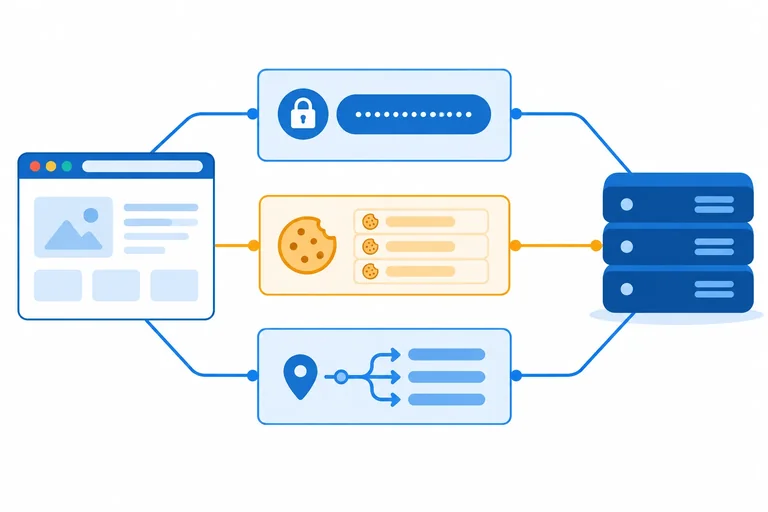
A credential is a value that connects a later request to an authenticated identity. Two common credential formats are an opaque session identifier, such as DEMO_SESSION_ID, and an access token, such as DEMO_ACCESS_TOKEN.
To describe a session design precisely, separate three independent dimensions:
Do not treat “cookies versus tokens” as a complete comparison. A cookie can carry either kind of credential.
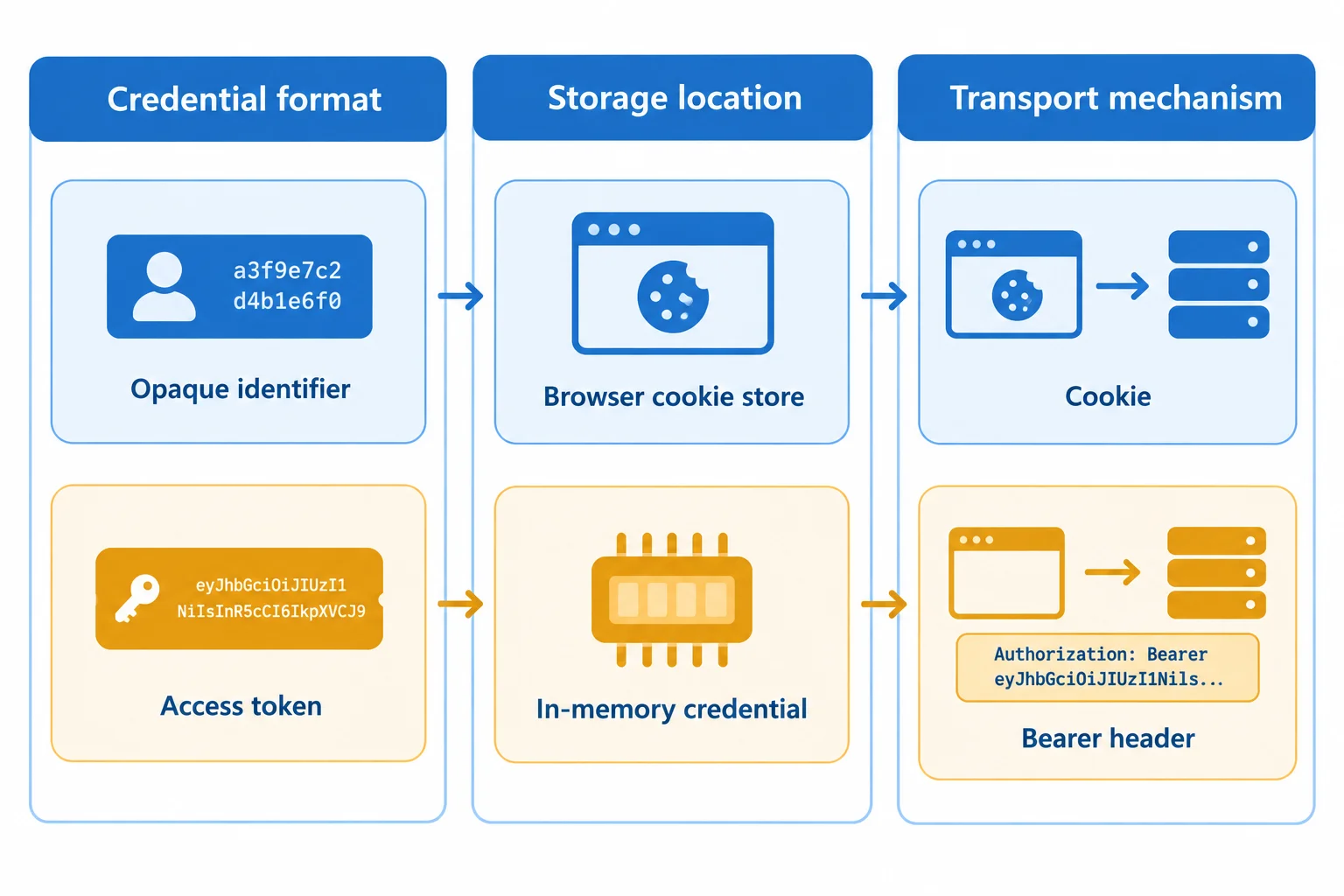
A session design is a combination of one choice from each column, not a single “cookie” or “token” choice.
Read each row across. The same credential format can be paired with different storage locations and transport mechanisms. Likewise, a cookie is not proof that the credential format is an opaque identifier.
| Credential format | Storage location | Transport mechanism |
|---|---|---|
| Opaque session identifier (`DEMO_SESSION_ID`) | Browser cookie store | Cookie |
| Access token (`DEMO_ACCESS_TOKEN`) | In-memory credential | Bearer header |
| Access token (`DEMO_ACCESS_TOKEN`) | Browser cookie store | Cookie |
Example
These two values can use the same cookie name while representing different credential formats:
atlas_session=DEMO_SESSION_ID — the value is an opaque identifier.
atlas_session=DEMO_ACCESS_TOKEN — the value is an access token.
The server defines what a credential means. “Access token” does not imply a particular internal structure, and this tutorial does not assume one.
Match each design statement to the dimension it describes.
Tap an item and then its matching pair.
Step 2 of 8
Trace cookie-based and bearer-header authentication requests by identifying whether the browser or Page JavaScript attaches each credential.
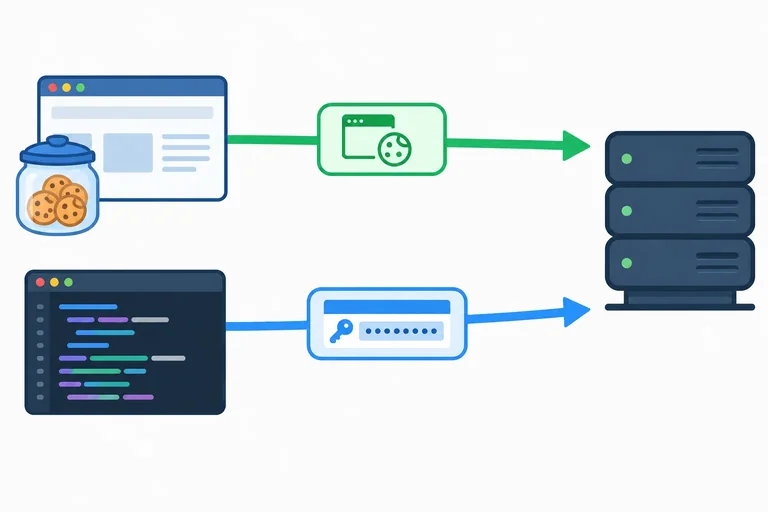
A credential can travel in two different ways even when it represents the same signed-in identity.
In the cookie path, the API server sends Set-Cookie; the browser accepts it into the Browser cookie store and later adds Cookie to an eligible request. In the bearer path, Page JavaScript has an accessToken value and explicitly builds an Authorization header.
The important question is: who attaches the later request header? The browser attaches Cookie; application code supplies Authorization.
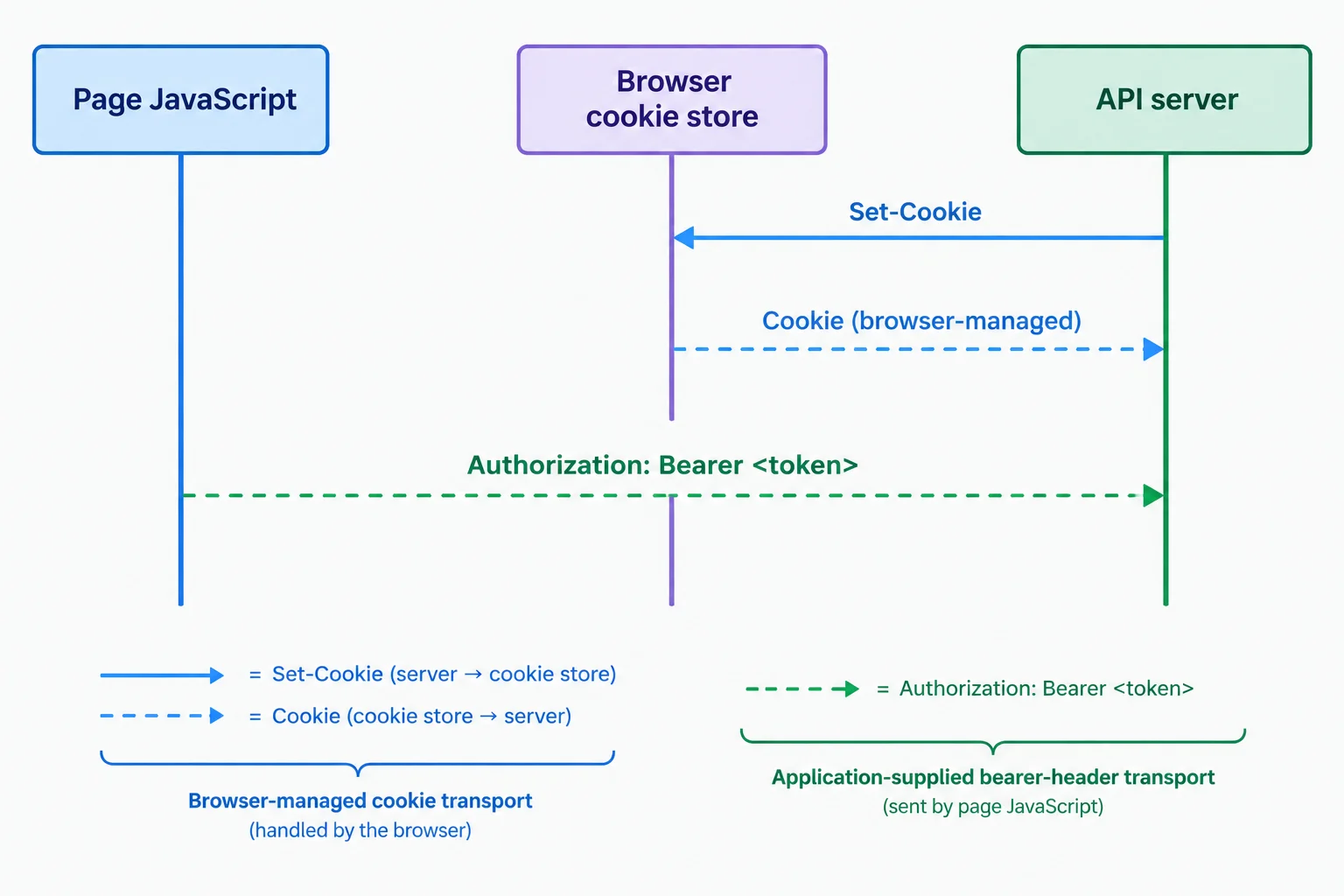
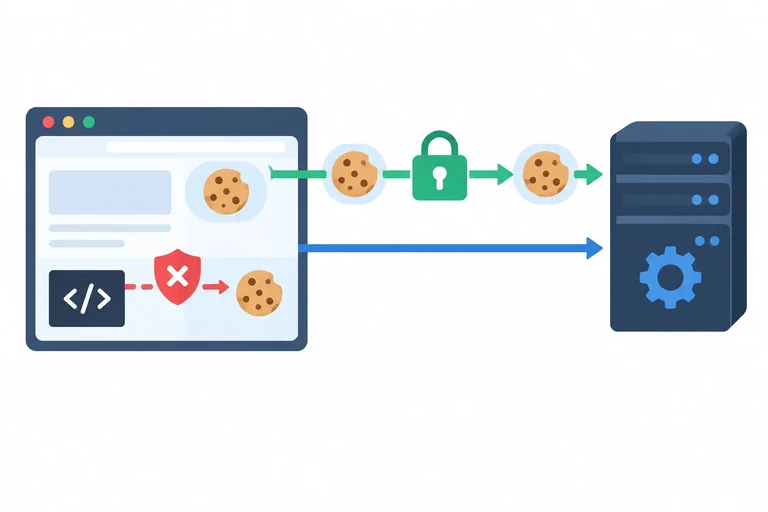
Browser-managed cookie arrows and application-supplied bearer-header arrows have different owners.
A cookie exchange has two separate moments: issuance and later transport. The Set-Cookie response header asks the browser to store a cookie. On a later eligible request, the browser network layer adds the Cookie request header.
Page JavaScript can start a fetch, but it does not directly supply the Cookie header as an application header. The browser controls that header.
Illustrative exchange: API issues a session credential, then the browser sends it later.
POST /api/session HTTP/1.1
Host: api.example.test

HTTP/1.1 200 OK
Set-Cookie: atlas_session=DEMO_SESSION_ID

GET /api/me HTTP/1.1
Host: api.example.test
Cookie: atlas_session=DEMO_SESSION_ID
Tip
Treat the Cookie line as browser-managed transport. It is not evidence that Page JavaScript read the credential or manually copied it into the request.
Bearer transport works differently. Before making the request, application code must have a credential value available as accessToken. It explicitly constructs the Authorization header.
Putting a value in localStorage or sessionStorage does not automatically add it to outgoing requests. Code must read a JavaScript-accessible value and supply the header. An in-memory credential also needs code to supply the header.
This fragment uses a dummy value so the application code can construct the request header.
const accessToken = 'DEMO_ACCESS_TOKEN';

const response = await fetch('/api/me', {
  headers: {
    Authorization: `Bearer ${accessToken}`
  }
});
Tip
This code does not demonstrate an authentication protocol. It only traces transport: Page JavaScript supplies Authorization, while the browser supplies a qualifying Cookie in the other design.
Put the cookie-based events in their required order.
Complete the application-supplied request header.
const accessToken = 'DEMO_ACCESS_TOKEN';

await fetch('/api/me', {
  headers: {
    : `Bearer ${accessToken}`
  }
});
Step 3 of 8
Separate HTTPS cookie transport and blocked JavaScript cookie reads from the authenticated actions that injected page code can still perform.
Secure and HttpOnly are separate cookie attributes with separate enforcement points.
Secure restricts transmission of the cookie to HTTPS in these HTTPS deployment examples.HttpOnly prevents Page JavaScript from reading the cookie through cookie APIs.Neither attribute decides whether JavaScript is executing in the page. If injected JavaScript runs, it can still attempt actions as that page.
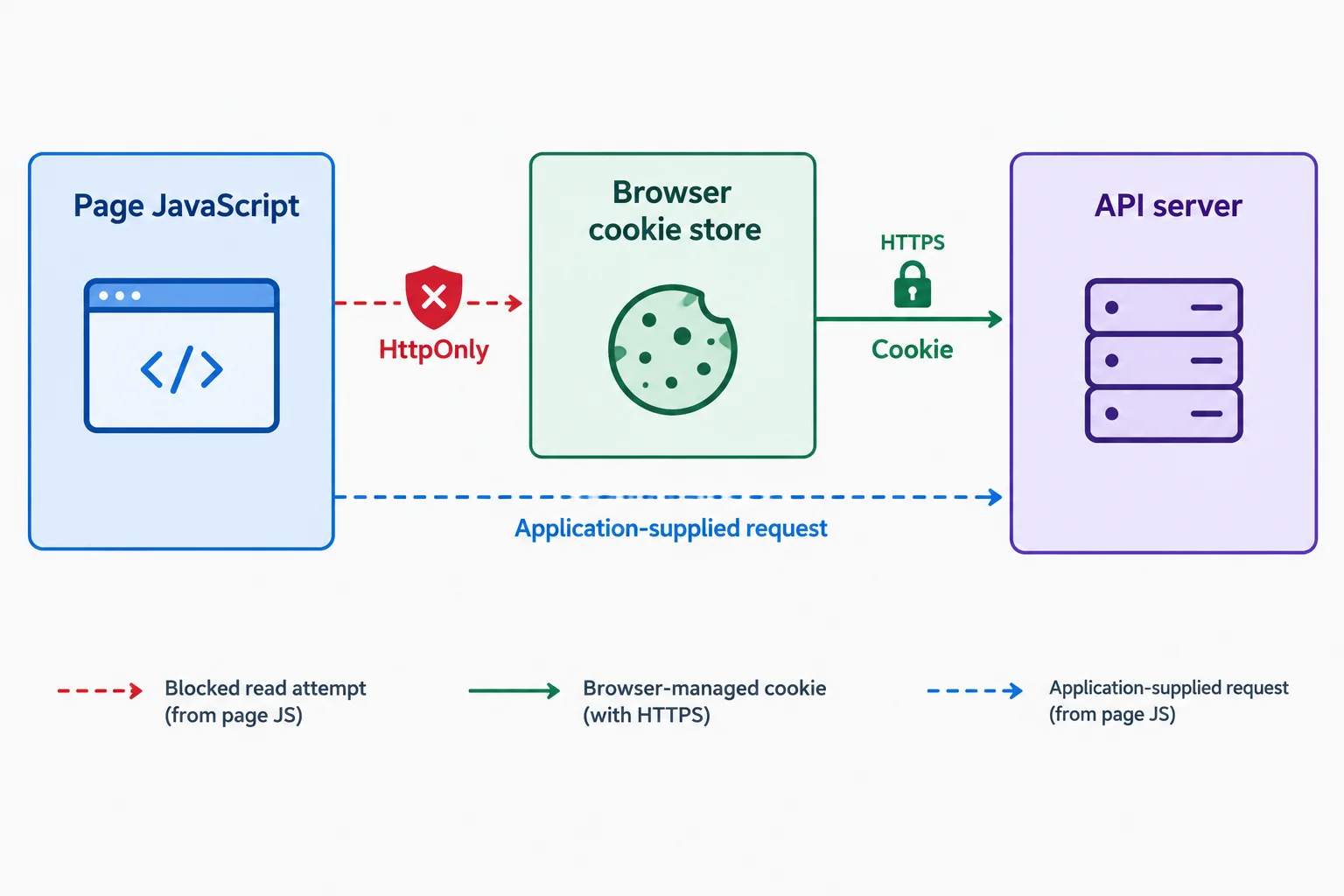
HttpOnly blocks a cookie-reading route. Secure constrains the browser-managed cookie route. Neither stops code already running in the page from making requests.
The browser enforces both attributes; React state does not. They reduce particular exposure paths, but they do not make a session immune to XSS.
| Attribute | Primary boundary | What it prevents | What it does not prevent |
|---|---|---|---|
| Secure | Browser cookie transport | Transmission of that cookie over non-HTTPS | Malicious JavaScript running in the page |
| HttpOnly | Page JavaScript cookie APIs | Direct reading of that cookie through cookie APIs | Authenticated requests made by injected JavaScript |
An HttpOnly cookie is created by the API server through Set-Cookie. A React variable cannot add an equivalent protection, and document.cookie cannot create an HttpOnly cookie.
The browser processes the response header, but Set-Cookie is not a fetch response header that Page JavaScript can read. The application may receive a normal response body while the browser separately stores the cookie.
Illustrative exchange: the API server issues an HttpOnly cookie after sign-in.
HTTP/1.1 200 OK
Content-Type: application/json
Set-Cookie: atlas_session=DEMO_SESSION_ID; Secure; HttpOnly

{"signedIn":true}Even though the cookie value is not readable through document.cookie or response.headers.get('Set-Cookie'), code executing in the affected page can request a protected same-origin resource. The browser can attach an eligible cookie; the code can then read data that the page is permitted to access.
const response = await fetch('/api/me', {
  credentials: 'same-origin'
});

const projectData = await response.json();
Warning
Treat Secure and HttpOnly as valuable, specific defenses—not as an XSS cure. Preventing injected code from running remains essential.
Atlas Workspace uses an atlas_session cookie with Secure and HttpOnly. Injected JavaScript is running at https://app.example.test. Which statement is accurate?

Step 4 of 8
Compare localStorage, sessionStorage, an in-memory credential, and an HttpOnly cookie against Atlas Workspace’s reload, transport, and XSS-exposure requirements.
A session design is clearer when you separate three choices:
sessionId or an accessToken.Storage does not determine format or transport. For example, an opaque sessionId can be stored in an HttpOnly cookie and sent by the browser, while an accessToken in localStorage must be read by Page JavaScript before application code supplies a bearer header.
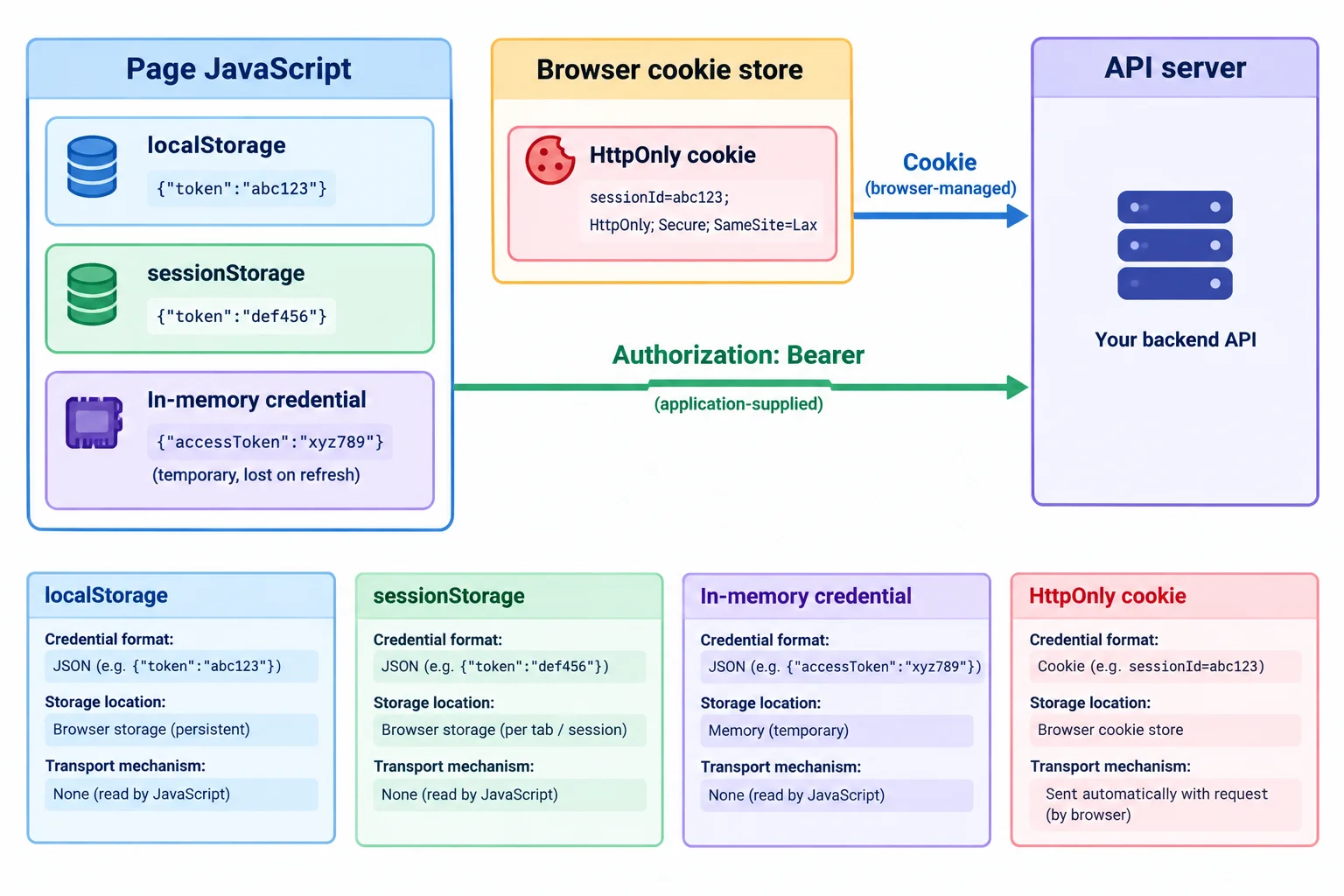
The arrows show transport mechanism; the places holding the credential show storage location.
Compare candidates against the requirements rather than treating “cookies versus tokens” as a complete architecture decision.
| Storage location | Script readable? | Browser retention | Reload continuity | Transport mechanism |
|---|---|---|---|---|
| localStorage | Yes | Usually persists until cleared or browser policy | Yes | App reads it and supplies a bearer header |
| sessionStorage | Yes | Current page session | Yes, while that page session remains | App reads it and supplies a bearer header |
| in-memory credential | Yes | Only while current page runs | Normally no | App supplies a bearer header |
| HttpOnly cookie | No, through cookie APIs | Session or persistent; depends on cookie lifetime attributes and browser behavior | Yes, if retained | Browser attaches Cookie when eligible |
localStorage and sessionStorage are Web Storage APIs, not server sessions. sessionStorage survives a reload during its page session, but it is normally removed when that page session ends.
An in-memory credential reduces how long a JavaScript-readable value remains stored, but a reload normally loses it. Restoring sign-in then needs an additional design decision.
An HttpOnly cookie is not automatically persistent. HttpOnly controls JavaScript cookie access; cookie lifetime attributes and browser behavior govern retention. In every row, the API separately decides whether it accepts the presented credential.
Example
Atlas Workspace displays private project data and must preserve sign-in across reloads. Its cooperating API team makes a browser-managed session design a defensible candidate: store an opaque sessionId in an HttpOnly cookie and let the browser use the Cookie transport mechanism for eligible requests.
This can provide reload continuity when the cookie’s lifetime is configured to retain it. It also keeps the credential from direct reads through JavaScript cookie APIs. It is a trade-off, not a universal winner: it depends on API support and cookie rules, and it does not decide the credential’s format by itself.
Tip
Persistent JavaScript-readable credentials in localStorage or sessionStorage create more opportunity for direct credential theft if malicious code runs in the page. An in-memory credential reduces persistence, but active injected JavaScript can still use values available to it.
HttpOnly reduces direct cookie theft through cookie APIs. It does not make Atlas Workspace immune to injected JavaScript: compromised Page JavaScript can still attempt authenticated actions as the current page and may access data returned to that page.
For Atlas Workspace, choose one storage candidate and write 3–5 sentences. State one benefit, one limitation, and the residual risk if active injected JavaScript runs in the page. Also explain why sessionStorage is not a server-session mechanism.
Write at least 220 characters (0/220).

Step 5 of 8
Choose fetch credentials modes for browser-managed cookies and distinguish them from explicit bearer-header transport.
fetch has a credentials mode for browser-managed credentials such as cookies. It is a transport setting—not a credential format or storage location.
By default, fetch uses credentials: 'same-origin'. That allows the browser to attach eligible cookies to a same-origin request. For a cross-origin request, use credentials: 'include' when the request is intended to permit eligible browser-managed cookies.
The mode also affects whether the browser respects a Set-Cookie response. It never reads an access token from JavaScript storage or creates an Authorization header for you.
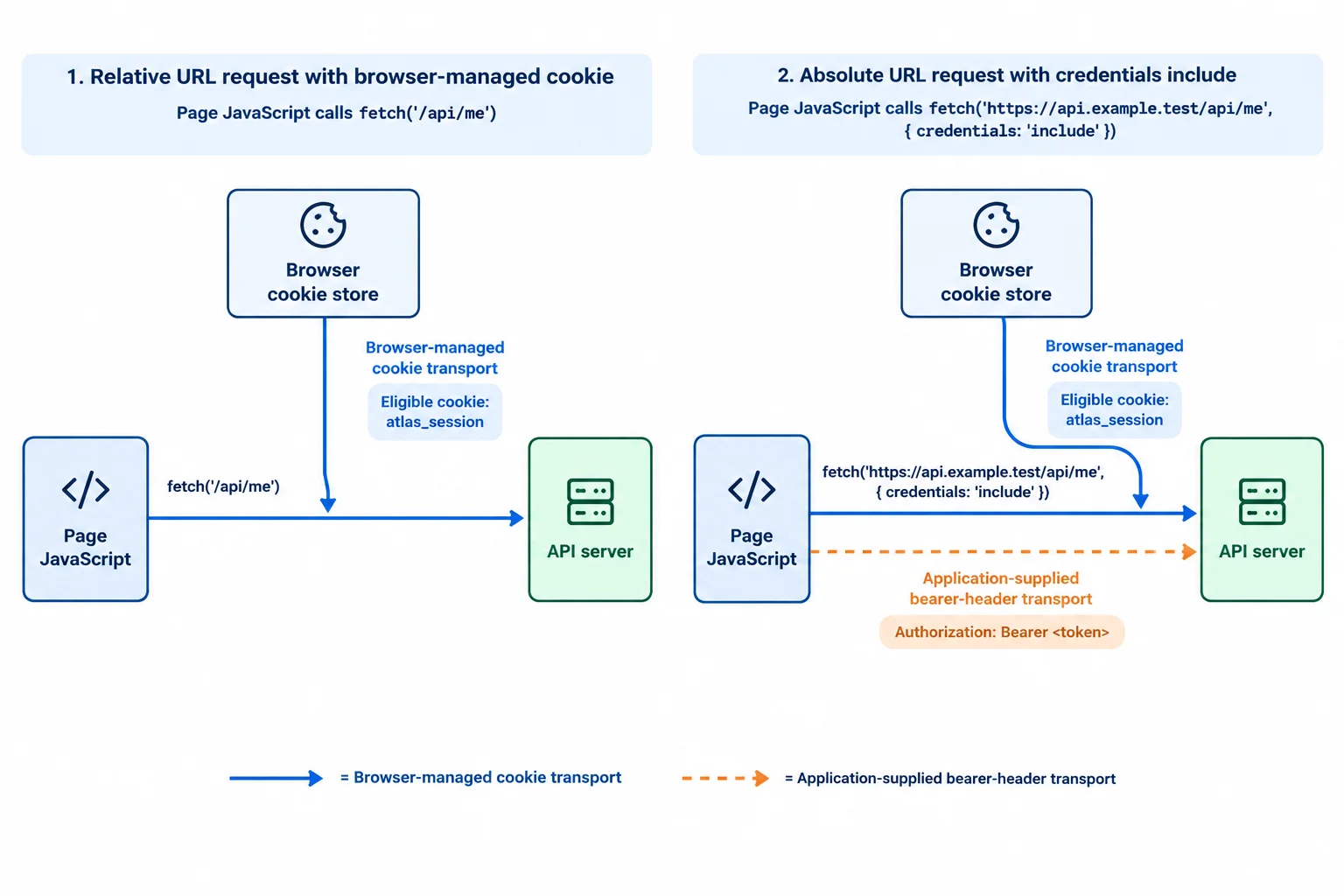
A credentials mode permits browser-managed cookie behavior; it does not turn application data into a bearer header.
Tip
credentials: 'include' is permission, not a guarantee. A cookie must exist and be eligible under the browser's cookie rules before it can be attached. Also, cookie attachment does not by itself prove that page JavaScript can read the response; cross-origin response access is a separate check covered next.
For a same-origin protected read, the default mode is already suitable for browser-managed cookies. Writing it explicitly can make the request policy easier to review.
Illustrative same-origin fetch from https://app.example.test.
const response = await fetch('/api/me', {
  credentials: 'same-origin'
});For the cross-origin API, select include when the design permits the browser to send eligible cookies. This still does not promise that a cookie exists, qualifies for the request, or that the response will be readable by page JavaScript.
Illustrative cross-origin fetch from https://app.example.test.
const response = await fetch('https://api.example.test/api/me', {
  credentials: 'include'
});The mode concerns browser-managed credentials and Set-Cookie handling. It is not a shortcut for supplying an access token.
| Mode | Cookie behavior | Set-Cookie handling |
|---|---|---|
| 'same-origin' | Permits eligible cookies only for same-origin requests | Respected for same-origin responses |
| 'include' | Permits eligible cookies for same- or cross-origin requests | May be respected when other browser rules allow it |
| 'omit' | Excludes browser-managed credentials | Set-Cookie is not respected |
A bearer header is application-supplied transport. Your code must already have an accessToken value and explicitly place it in Authorization.
credentials: 'omit' excludes browser-managed credentials such as cookies. It does not remove an Authorization header that the application explicitly supplies. Likewise, changing the mode does not retrieve a value from localStorage, sessionStorage, or an in-memory credential.
Illustrative exchange: the constructed request header is Authorization: Bearer DEMO_ACCESS_TOKEN.
const accessToken = 'DEMO_ACCESS_TOKEN';

const response = await fetch('https://api.example.test/api/me', {
  credentials: 'omit',
  headers: {
    Authorization: `Bearer ${accessToken}`
  }
});
Tip
Use omit when you intend to exclude browser-managed cookies. It is not a security cleanup operation for headers your code has already added.
Match each request goal to its fetch configuration and credential handling. Assume atlas_session exists and is eligible wherever a cookie is mentioned. Ignore cross-origin response-readability requirements for this activity.
Tap an item and then its matching pair.

Step 6 of 8
Diagnose the distinct browser and server checks that determine whether Atlas Workspace can read a credentialed cross-origin API response.
A cross-origin cookie request has two separate browser decisions. First, credentials: 'include' permits eligible browser-managed credentials to travel with the request. Second, the API response must explicitly grant https://app.example.test permission to read it.
For Atlas Workspace, a response to https://api.example.test/api/me is readable by page JavaScript only when it names the requesting origin and sends Access-Control-Allow-Credentials: true. Access-Control-Allow-Origin: * cannot grant readable response access when the request uses credentials: 'include'.
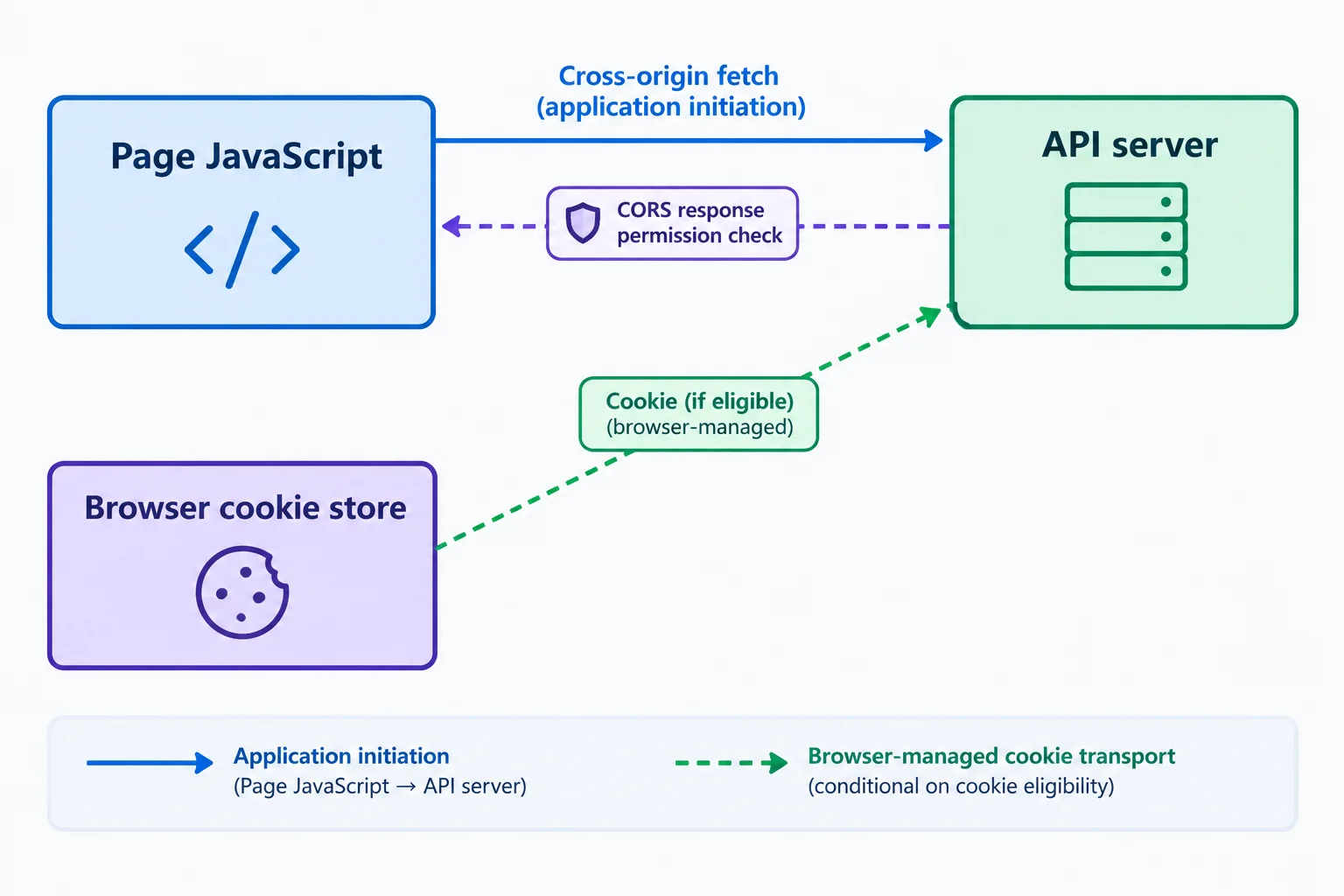
CORS controls whether the page can read a cross-origin response. Cookie eligibility separately controls whether the browser attaches a cookie.
Atlas Workspace explicitly permits browser-managed credentials for this cross-origin request.
const response = await fetch('https://api.example.test/api/me', {
  credentials: 'include'
});This is an illustrative exchange in which an eligible atlas_session cookie is attached and the response is readable by the page.
Illustrative exchange

GET /api/me HTTP/1.1
Host: api.example.test
Origin: https://app.example.test
Cookie: atlas_session=DEMO_SESSION_ID

HTTP/1.1 200 OK
Content-Type: application/json
Access-Control-Allow-Origin: https://app.example.test
Access-Control-Allow-Credentials: true

{ "projectCount": 4 }CORS permission is not cookie attachment. The response headers can allow page JavaScript to read a response, but they do not create a cookie or force an existing cookie to be eligible for the request. Conversely, an eligible cookie does not make a cross-origin response readable without the required CORS permission.
A bearer-header request uses a different transport mechanism: application code supplies Authorization. It can use credentials: 'omit'; that setting excludes browser-managed credentials but does not remove an Authorization header that the application explicitly supplies.
The bearer credential is available to application code, so the application constructs the header itself.
const accessToken = 'DEMO_ACCESS_TOKEN';

const response = await fetch('https://api.example.test/api/me', {
  headers: {
    Authorization: `Bearer ${accessToken}`
  },
  credentials: 'omit'
});
Authorization requires preflight permission. A browser may reuse a previously cached successful preflight, but the API must permit the header for the request to proceed under that permission.
Illustrative exchange

OPTIONS /api/me HTTP/1.1
Host: api.example.test
Origin: https://app.example.test
Access-Control-Request-Method: GET
Access-Control-Request-Headers: authorization

HTTP/1.1 204 No Content
Access-Control-Allow-Origin: https://app.example.test
Access-Control-Allow-Methods: GET
Access-Control-Allow-Headers: Authorization

GET /api/me HTTP/1.1
Host: api.example.test
Origin: https://app.example.test
Authorization: Bearer DEMO_ACCESS_TOKEN
Warning
A CORS error is not, by itself, proof that the protected request did not reach the API server. A denied preflight prevents the corresponding actual request. But if a request was sent and its response fails a CORS response check, the server may have processed it while page JavaScript is still unable to read the response.
Complete the two response-header values so page JavaScript at https://app.example.test can read this response to a cross-origin request using credentials: 'include'.
Illustrative exchange

HTTP/1.1 200 OK
Content-Type: application/json
Access-Control-Allow-Origin:
Access-Control-Allow-Credentials:

{ "projectCount": 4 }Match each Atlas Workspace case to its primary diagnosis.
Tap an item and then its matching pair.
Step 7 of 8
Distinguish local cleanup, browser credential removal, and server-enforced invalidation during logout and expiration.
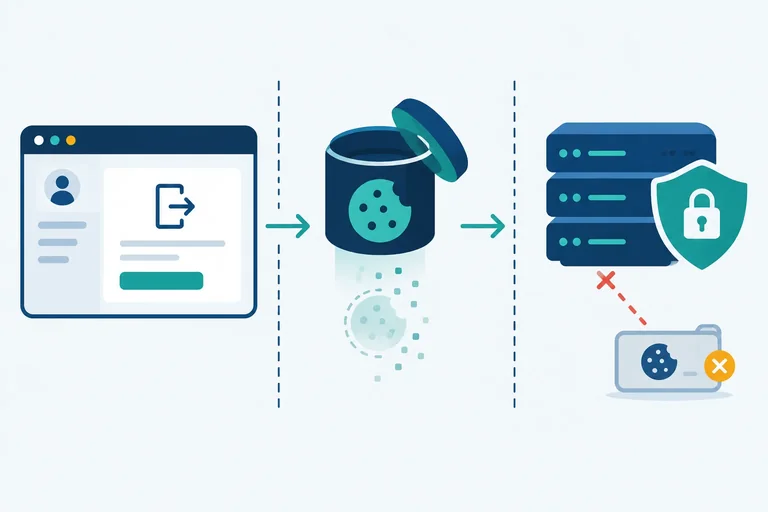
A logout flow has effects at different boundaries. Clearing React state, redirecting away from a private route, or clearing a JavaScript-held credential changes what the current page can do. That is local cleanup.
Local cleanup does not alter another copy of a credential and does not change the API server’s decision about whether that credential is valid. A client-side expiry timer is also interface behavior: it can sign this page out, but it is not the boundary that makes the API reject a request.
Browser credential removal changes browser retention. Server enforcement occurs when the API processes a protected request such as /api/me and rejects an expired or invalidated credential.
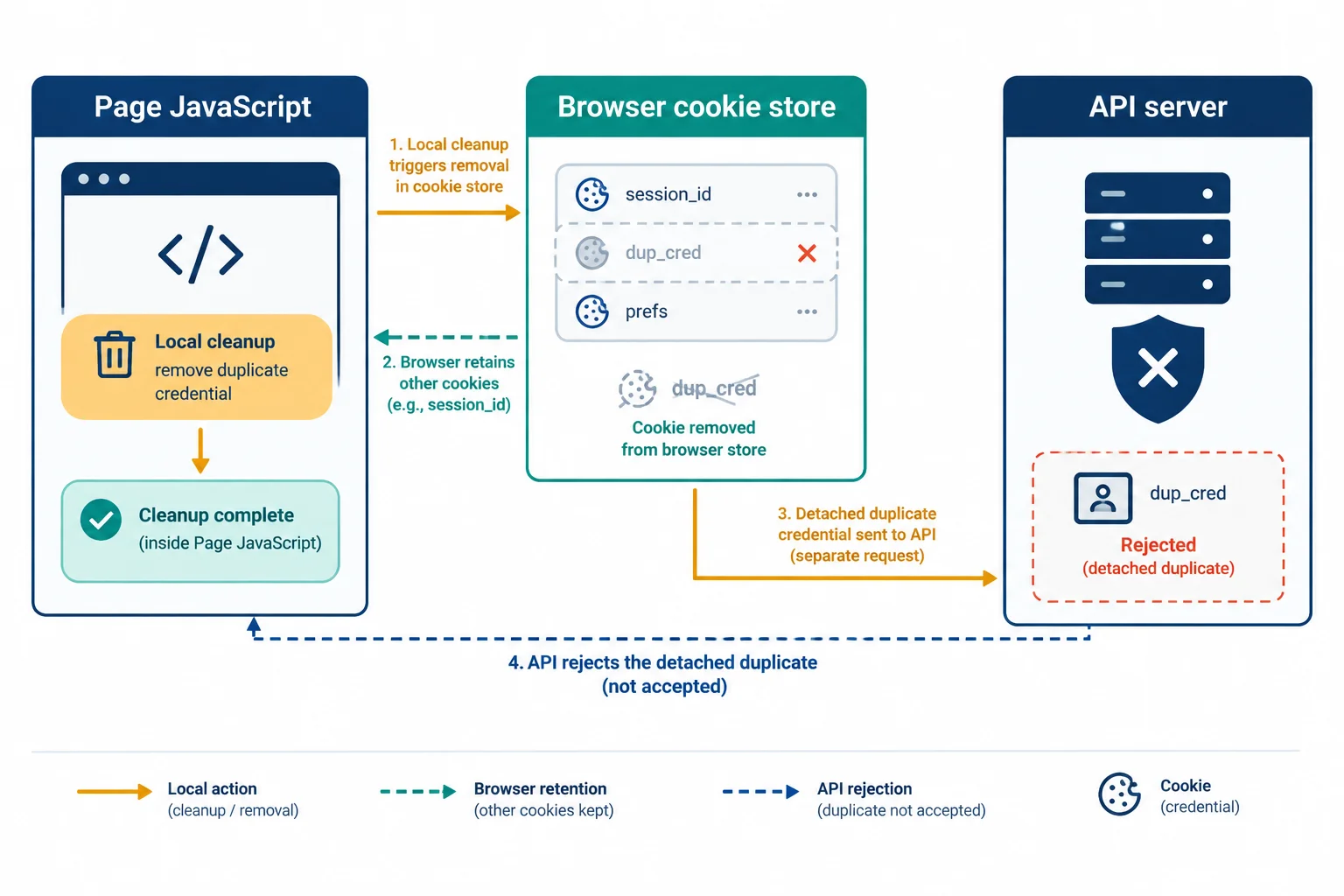
A page-state change, browser removal, and API acceptance are separate effects.
Page JavaScript cannot directly delete an HttpOnly cookie through cookie APIs. For application-directed logout, Atlas Workspace normally calls /api/logout; a successful API response can direct the browser to remove the cookie with an expiring Set-Cookie header.
The deletion must match the cookie identity and scope used when it was set, including its name and Path, plus Domain when applicable. An HttpOnly cookie can also disappear because its cookie lifetime expires, the browser evicts data, or the user clears site data. None of those browser events alone proves that the API has invalidated the credential.
Illustrative exchange: the API performs its defined invalidation behavior and directs the browser to remove the matching cookie.
Illustrative exchange

POST /api/logout HTTP/1.1
Host: api.example.test
Cookie: atlas_session=DEMO_SESSION_ID

HTTP/1.1 204 No Content
Set-Cookie: atlas_session=; Max-Age=0; Path=/; Secure; HttpOnly
Tip
Max-Age=0 directs the browser to remove its stored cookie. It does not, by itself, establish that the API will reject a copied DEMO_SESSION_ID.
Keep these controls distinct: cookie lifetime governs browser retention; server-enforced credential validity governs whether the API accepts a presented credential. A token design may continue accepting an issued credential until its expiry unless its API defines and successfully performs a revocation mechanism.
Each row describes the primary effect of one action by itself.
| Action | Primary result | Makes the API reject a credential by itself? |
|---|---|---|
| Set React user state to signed out | Local cleanup | No |
| Client expiry timer fires | Interface behavior | No |
| Matching Set-Cookie with Max-Age=0 | Browser credential removal | No |
| Cookie lifetime expires or site data is cleared | Browser credential removal | No |
| API rejects expired or invalidated credential on /api/me | Server enforcement | Yes |
Atlas Workspace clears its React state after sending /api/logout, but the request fails before the application receives a response. Which conclusion is justified?
Choose the justified conclusion.
Classify these Atlas Workspace actions as local cleanup, browser credential removal, or server enforcement: (1) setting the React user state to signed out, (2) processing a matching Set-Cookie response with Max-Age=0, and (3) rejecting an invalidated credential during /api/me.
Then explain why a copied credential may still work after only React state is cleared, and why a failed /api/logout request cannot confirm revocation.
Write at least 220 characters (0/220).

Step 8 of 8
Synthesize a documented session design for Atlas Workspace and defend its browser and server boundaries.
Atlas Workspace needs private project data, sign-in continuity after reload, a cooperating cross-origin API, and server-confirmed logout. A defensible baseline is an opaque session identifier as the credential format, kept in a retained HttpOnly cookie as the storage location, and sent through the browser-managed Cookie header as the transport mechanism.
This reduces direct credential copying by injected JavaScript compared with a JavaScript-readable persistent credential. It does not make XSS harmless: injected code can still act as the signed-in page, issue eligible requests, and read responses that the compromised page is allowed to read. The API server remains responsible for credential validity and authorization.
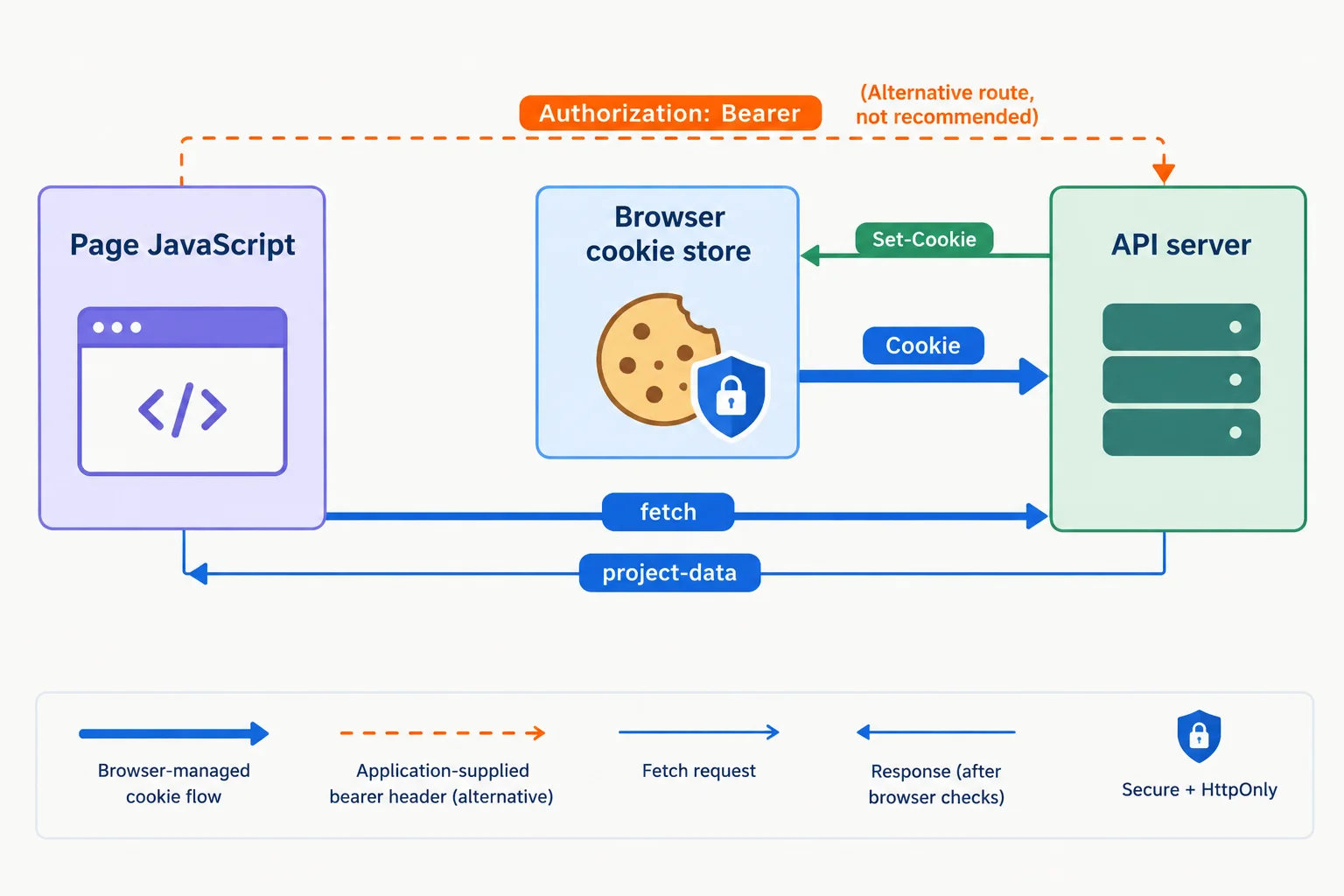
Browser-managed cookie transport differs from an application-supplied bearer header, even when both credentials represent an authenticated identity.
The comparison is not “cookies versus tokens.” It records the credential format, storage location, and transport mechanism, then adds the browser and server conditions that make the design work.
| Decision dimension | Recommended design | Alternative or required consequence |
|---|---|---|
| Credential format | Opaque session identifier | Access token is a credible alternative |
| Storage location | Retained HttpOnly cookie | localStorage is JavaScript-readable |
| Transport mechanism | Browser-managed Cookie | JavaScript must add Authorization for bearer transport |
| Cross-origin request | credentials: 'include' | Permits eligible browser-managed cookies; does not guarantee one is sent |
| Readable API response | Explicit origin and credential permission | Access-Control-Allow-Origin names app origin; Access-Control-Allow-Credentials is true |
| Cookie protections | Secure and HttpOnly | Secure restricts HTTPS transmission; HttpOnly blocks direct JavaScript cookie reads |
| Logout cleanup | Set-Cookie with Max-Age=0 | Matching cookie identity and scope remove the browser copy |
| Validity decision | API server expires or invalidates session | React state and cookie removal do not revoke a copied valid credential |
Example
Illustrative exchange
POST /api/session HTTP/1.1
Host: api.example.test
Origin: https://app.example.test
HTTP/1.1 200 OK
Set-Cookie: atlas_session=DEMO_SESSION_ID; Path=/; Secure; HttpOnly
GET /api/me HTTP/1.1
Host: api.example.test
Origin: https://app.example.test
Cookie: atlas_session=DEMO_SESSION_ID
HTTP/1.1 200 OK
Access-Control-Allow-Origin: https://app.example.test
Access-Control-Allow-Credentials: true
POST /api/logout HTTP/1.1
Host: api.example.test
Cookie: atlas_session=DEMO_SESSION_ID
HTTP/1.1 200 OK
Set-Cookie: atlas_session=; Path=/; Max-Age=0; Secure; HttpOnly
Tip
Cookie eligibility and CORS are separate browser decisions. credentials: 'include' allows eligible browser-managed credentials on the cross-origin call. The explicit CORS response headers allow Page JavaScript to read the response. Neither condition forces a cookie to exist, and neither substitutes for API-server validation.
Warning
Cookie-based authentication also needs separate request-forgery analysis. This tutorial has not covered those defenses; the next tutorial addresses them. Include that boundary in a design review rather than assuming that Secure, HttpOnly, CORS, or server-confirmed logout solves every request-forgery concern.
Write a concise session-design recommendation for Atlas Workspace. Include all of the following:
https://api.example.test/api/me request, including who attaches the credential;Secure and HttpOnly protections and one XSS limitation that remains;Use Atlas Workspace and the documented origins and endpoints in your recommendation.
Write at least 700 characters (0/700).
Summary
Congratulations! You completed: Compare Browser Session Storage and Transport
100 XP
Thousands of online courses in video, ebooks and audiobooks.
To test your knowledge during online courses
Generated directly from your cell phone's photo gallery and sent to your email

Download our app via QR Code or the links below:.



Carry knowledge in your pocket.
Download the Cursa app.
There are hundreds of free courses available, with a free certificate of completion that is saved in your mobile image gallery.
Download the app to access the Course Completion Certificate for Free.


+ 10 million
students

Free and Valid
Certificate

60 thousand free
exercises

4.8/5 rating in
app stores

Free courses in
video and ebooks