Step 1 of 8
A Different Download Origin Is Not Isolation
See why an included third-party script executes with page-level access even when it was downloaded from another origin.

Learning path · Level 11 · Tutorial 3
Evaluate the trust granted to third-party browser code and explain what dependency review and server-delivered script restrictions can—and cannot—protect.
 A Different Download Origin Is Not Isolation
See why an included third-party script executes with page-level access even when it was downloaded from another origin. 2 min
A Different Download Origin Is Not Isolation
See why an included third-party script executes with page-level access even when it was downloaded from another origin. 2 min
 Trace How Third-Party Code Reaches the Page
Trace direct packages, transitive dependencies, and remotely loaded scripts that execute on the Harbor Shop checkout page. 2 min
Trace How Third-Party Code Reaches the Page
Trace direct packages, transitive dependencies, and remotely loaded scripts that execute on the Harbor Shop checkout page. 2 min
 Review Need, Identity, Maintenance, and Advisories
Use necessity, provenance, maintenance evidence, and advisory details to make a proportionate dependency decision. 2 min
Review Need, Identity, Maintenance, and Advisories
Use necessity, provenance, maintenance evidence, and advisory details to make a proportionate dependency decision. 2 min
 Separate Reproducibility from Trust
Use lockfiles, integrity results, and advisory checks as focused evidence without treating any one of them as proof of trust. 2 min
Separate Reproducibility from Trust
Use lockfiles, integrity results, and advisory checks as focused evidence without treating any one of them as proof of trust. 2 min
 Read a Simple Script Policy
Read a simple source-based script policy for Harbor Shop and distinguish narrow source permissions from broad ones. 3 min
Read a Simple Script Policy
Read a simple source-based script policy for Harbor Shop and distinguish narrow source permissions from broad ones. 3 min
 Assign Controls to the Right Layer
Identify which layer can reduce included code, deliver a policy header, and enforce the delivered policy. 2 min
Assign Controls to the Right Layer
Identify which layer can reduce included code, deliver a policy header, and enforce the delivered policy. 2 min
 Recognize What the Policy Cannot Guarantee
A restrictive source-based policy is valuable defense in depth, but it cannot establish that permitted code is trustworthy or isolate it from the page. 2 min
Recognize What the Policy Cannot Guarantee
A restrictive source-based policy is valuable defense in depth, but it cannot establish that permitted code is trustworthy or isolate it from the page. 2 min
 Make a Third-Party Script Risk Decision
Integrate a fictional Harbor Shop case packet into an actionable, evidence-based third-party script risk recommendation. 2 min
Make a Third-Party Script Risk Decision
Integrate a fictional Harbor Shop case packet into an actionable, evidence-based third-party script risk recommendation. 2 min
Step 1 of 8
See why an included third-party script executes with page-level access even when it was downloaded from another origin.
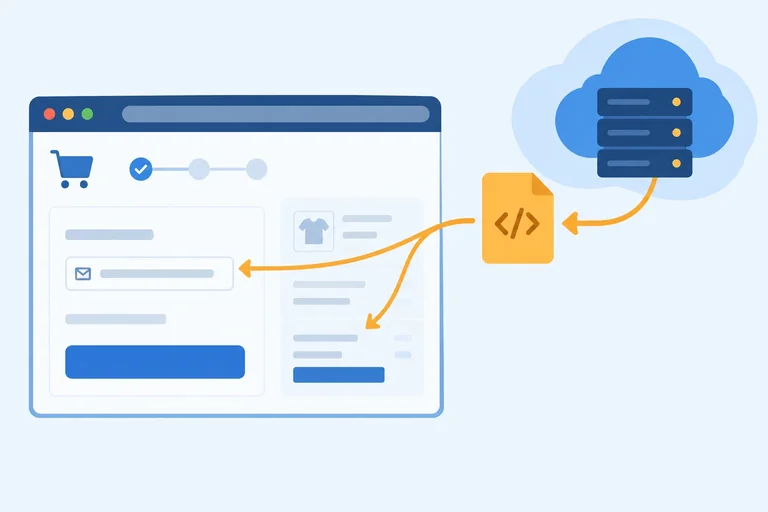
Harbor Shop's checkout page is at https://shop.example/checkout. It can include a third-party script whose download origin is https://cdn.widgets.example.
The different download origin describes where the browser fetched the file. It does not create a separate, isolated page for that file. When the browser executes an in-page script, it executes it in the including document's page origin and page context.
The checkout document includes a remotely downloaded script.
<form id="checkout-form">
  <label>
    Email
    <input id="email" name="email" type="email" value="alex@example.com" />
  </label>
</form>

<script src="https://cdn.widgets.example/metrics.js"></script>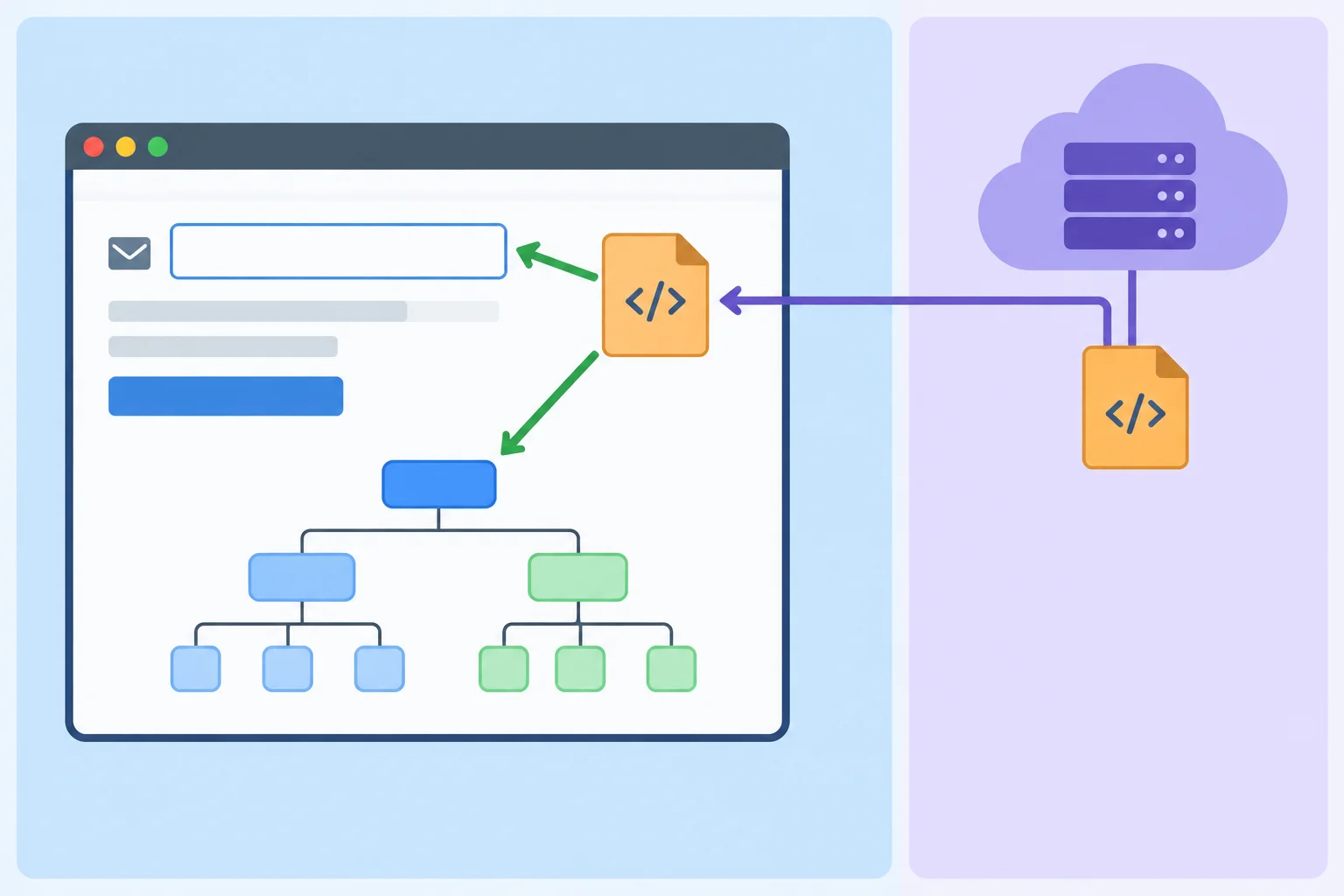
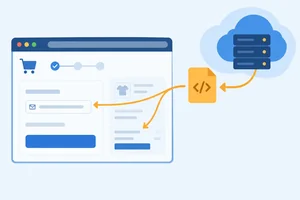
The download origin is separate, but the included script executes in the checkout page's context at the page origin.
After metrics.js is included and executed, its code can use normal page APIs. For example, it can read or change DOM elements, attach listeners that observe form interactions, and use JavaScript-accessible data available to code on that page.
That access is still subject to ordinary browser and page rules. It is not permission to access every system. But a different download origin alone does not prevent the script from interacting with Harbor Shop's checkout page.
Example
A script can use the same DOM APIs that Harbor Shop's own browser code uses:
const emailField = document.querySelector('#email');

emailField?.addEventListener('input', (event) => {
  console.log(event.currentTarget.value);
});
This example illustrates why including a third-party script is a trust decision: it can observe input handled in the page context.
Tip
CORS is not a sandbox for an included script. CORS governs particular cross-origin resource interactions; it does not give a script that has already executed in the page a restricted DOM view based on its download origin.
Using the trust-boundary diagram, which conclusion correctly evaluates the claim: “Because metrics.js comes from a different origin, it cannot read Harbor Shop's checkout email field”?
Step 2 of 8
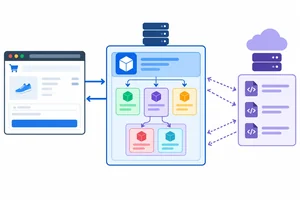
Trace direct packages, transitive dependencies, and remotely loaded scripts that execute on the Harbor Shop checkout page.
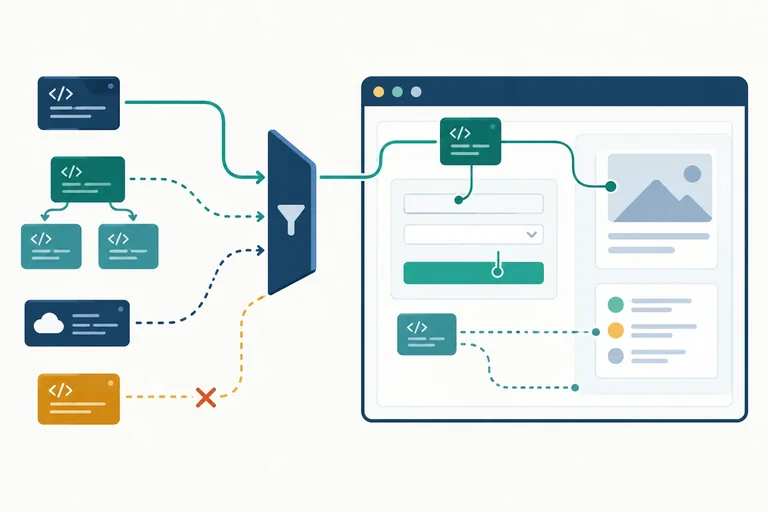
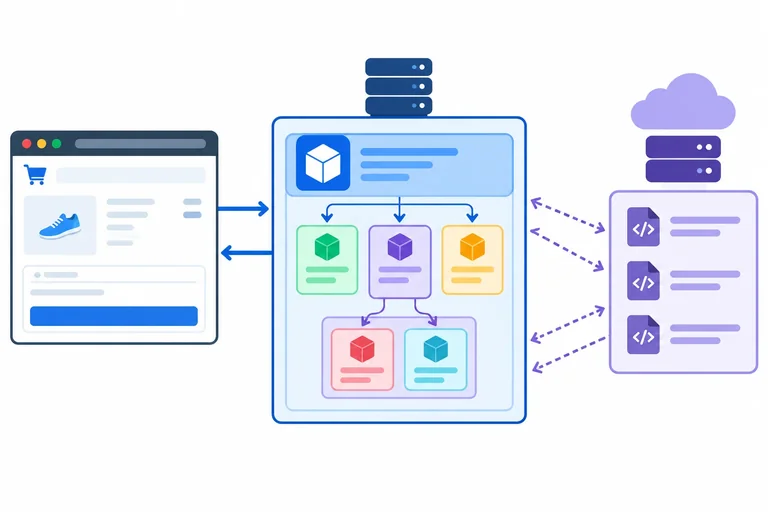
At Harbor Shop, the checkout page at https://shop.example/checkout can execute third-party code through more than one route.
<script src> URL while the page loads.These routes matter because a browser-runtime inventory tracks code that actually reaches the page—not merely code listed somewhere in the project.
The delivery paths differ, but all of this code can reach the checkout page's browser runtime.
Suppose Harbor Shop imports the fictional package @demo/review-widget version 2.4.0. That package depends on the fictional @demo/dom-utils version 1.3.0. The build places their browser-needed code in /assets/app.js.
The page can also load a separate third-party script directly:
<script src="https://cdn.widgets.example/metrics.js"></script>
/assets/app.js has the page origin because it is delivered from shop.example. That does not make all code inside it authored by Harbor Shop. Delivery location and authorship are different facts to record in an inventory.
For this checkout-page inventory, include code that can execute in the browser. A development-only tool that is installed locally but not shipped in the browser build is outside this particular inventory.
| Item | How it reaches the page | Inventory classification | Delivery location |
|---|---|---|---|
| @demo/review-widget 2.4.0 | Imported by application code | Direct package | Inside /assets/app.js |
| @demo/dom-utils 1.3.0 | Required by the review widget | Transitive dependency | Inside /assets/app.js |
| metrics.js | Script src URL in the document | Remote script | cdn.widgets.example |
| Development-only tool | Not shipped to browser | Not included | No browser delivery |
Match each Harbor Shop item to its browser-runtime classification or delivery description.
Tap an item and then its matching pair.

Step 3 of 8
Use necessity, provenance, maintenance evidence, and advisory details to make a proportionate dependency decision.
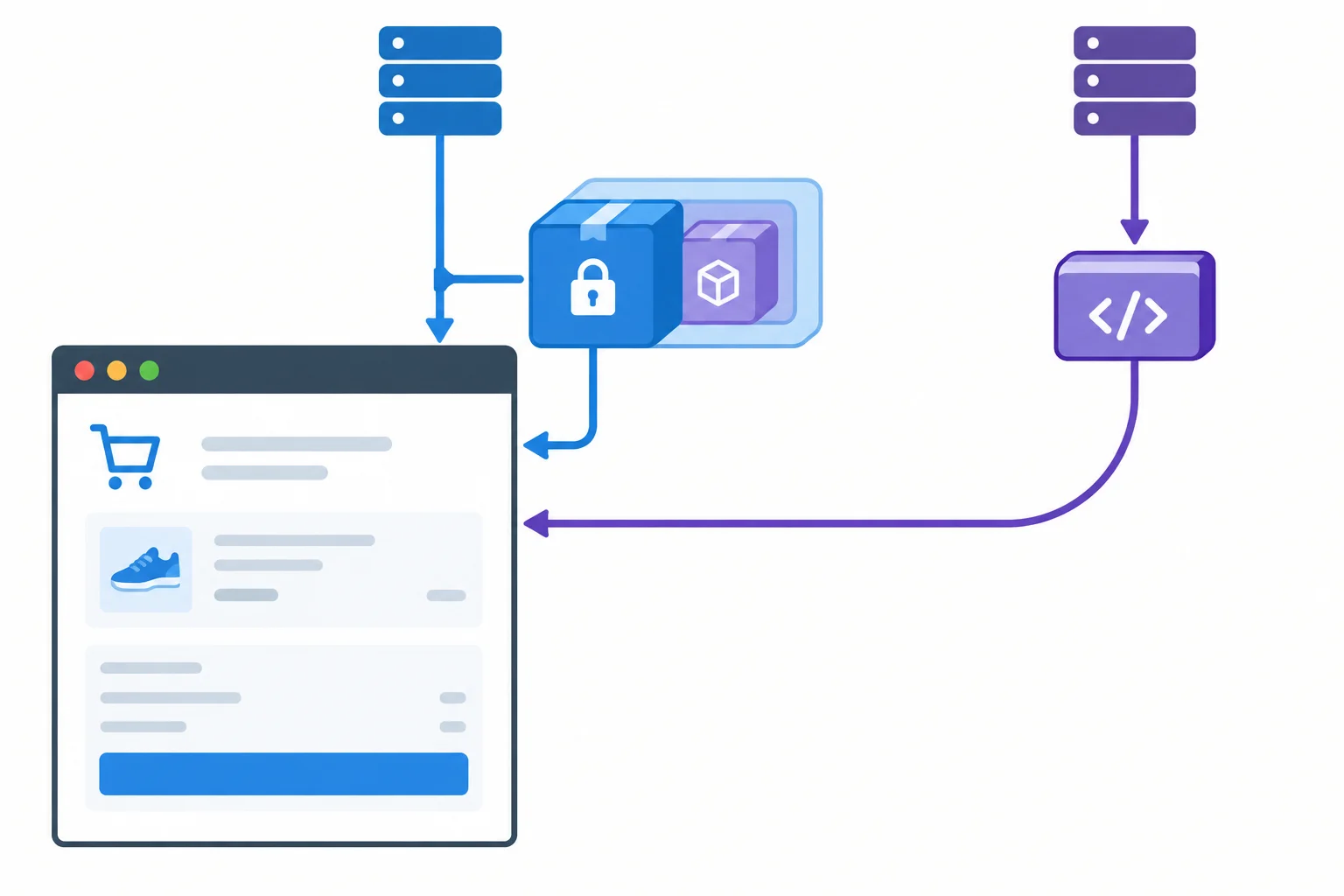
Begin with necessity, not reputation. Harbor Shop’s checkout page at https://shop.example/checkout is a high-value page: any browser-executed third-party script included there can interact with the page context.
Ask what the feature contributes on this specific page. If a review widget is not needed during checkout, remove it. If shoppers only need reassurance, a short, locally authored trust message or a link to reviews may meet the need without loading third-party browser code.
When code is justified, prefer the smallest feature and access footprint that meets the requirement. Fewer included scripts means fewer parties granted page-level access.
A feature loaded onto the checkout page receives access to the shared page context; decide whether that access is necessary before evaluating the package.
Tip
“Popular” does not answer “needed here.” First document the page-specific purpose, the data the feature can encounter, and a smaller alternative if one exists.
If the feature is necessary, confirm that the package or provider is the intended one. Compare the exact package identity, repository link, and ownership information with the project you meant to use. A similar-looking name is a reason to pause, not a minor spelling detail.
Then collect maintenance signals: clear ownership, documented releases, responsive issue handling, and a maintained repository can support confidence. They are evidence to weigh—not proof that a dependency is secure.
All entries below are fictional case evidence for Harbor Shop.
| Evidence area | Useful evidence | What it does not establish |
|---|---|---|
| Package identity | Exact name `@demo/review-widget`; repository linked from the intended project | That a similar name, such as `@demo/review-widgit`, is the same project |
| Ownership | Repository owner and publishing account match the intended provider | That every published release deserves trust |
| Maintenance | Recent issue responses, documented releases, and clear maintainers | That popularity, age, or frequent releases prove security |
| Feature scope | A checkout-specific reason for the widget | That optional code should receive checkout-page access |
Warning
Do not install or retain a dependency merely because its display name looks familiar. An ownership mismatch, unrelated repository, or suspiciously similar name warrants further investigation before the code reaches the browser.
An advisory matters when it applies to the version selected for your application, affects behavior that reaches the browser, and has a documented remedy. Read those details rather than reacting only to a package name or severity label.
Example
Fictional advisory evidence for Harbor Shop:
Selected browser dependency chain:@demo/review-widget version 2.4.0 → @demo/dom-utils version 1.3.0
The fictional advisory affects @demo/dom-utils version 1.3.0. It describes browser-relevant DOM handling that can create unexpected script-capable markup when the review widget processes untrusted review content. The issue has a documented fix in version 1.3.1.
Because the affected version is in the selected chain and its code reaches the checkout page, this is relevant evidence—not an abstract concern about an unrelated package.
Use the evidence to choose a next action. Removal is strongest when the feature is unnecessary. A provenance concern calls for investigation before trusting the dependency. A relevant advisory with a documented fix calls for a reviewed update path; if that path is not suitable, remove or replace the feature.
| Evidence finding | Justified next action |
|---|---|
| The checkout feature is unnecessary | Remove the feature and its browser code |
| Identity or ownership cannot be confirmed | Investigate provenance; use a verified alternative if needed |
| Selected browser dependency is affected and a fix exists | Review an update path that includes the documented fixed version |
| Only maintenance signals look reassuring | Continue the review; do not treat them as approval |
Match each fictional Harbor Shop evidence record to the most justified next action.
Tap an item and then its matching pair.

Step 4 of 8
Use lockfiles, integrity results, and advisory checks as focused evidence without treating any one of them as proof of trust.
A lockfile records the dependency versions and resolutions selected for a build. This includes transitive code: Harbor Shop may select @demo/review-widget version 2.4.0, which resolves to @demo/dom-utils version 1.3.0.
When teammates or automation use the same lockfile, they can select the same dependency tree more reliably. That is reproducibility: knowing which code was selected. It is not a judgment that the selected code deserves access to the checkout page.
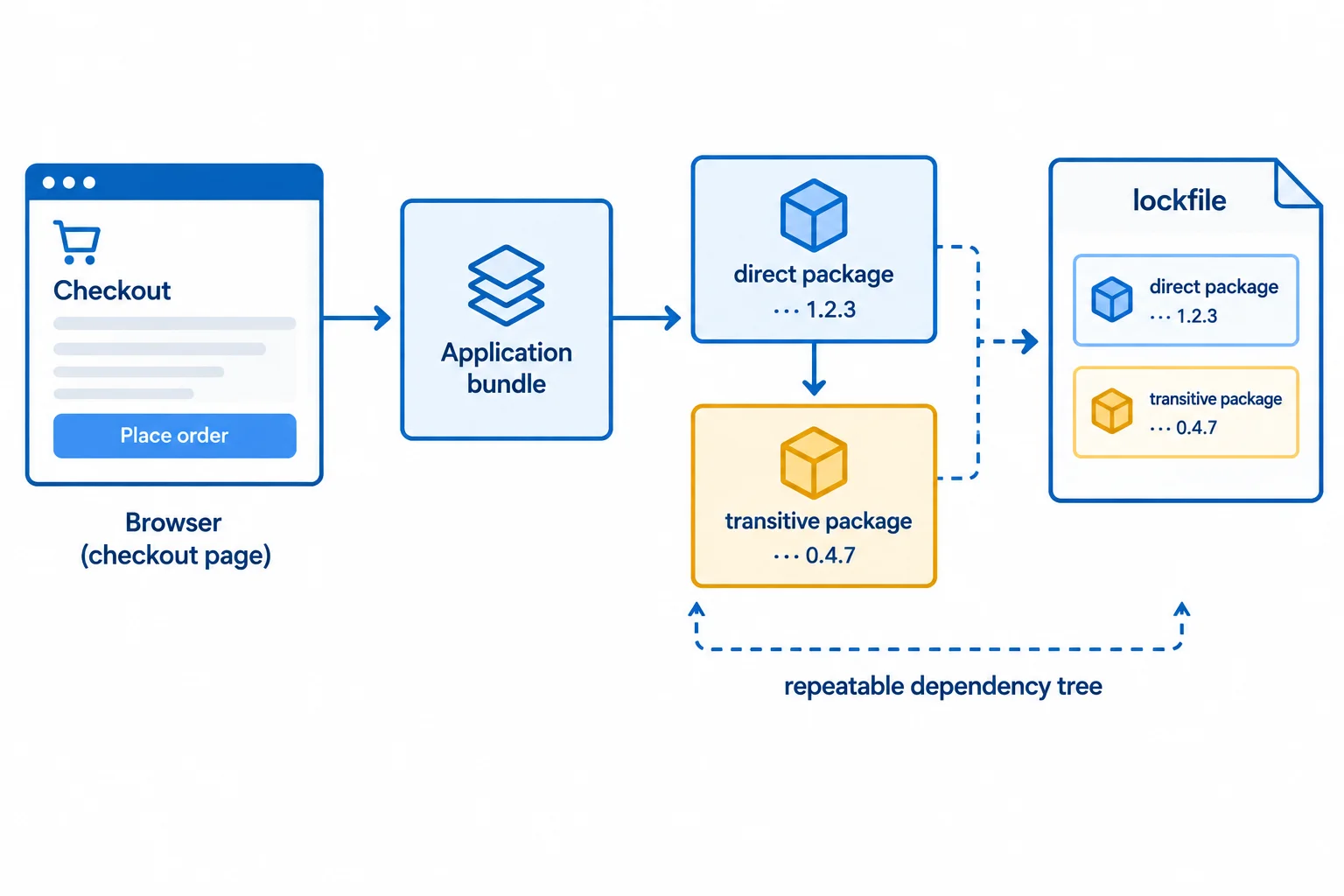
The lockfile can preserve the selected chain: @demo/review-widget 2.4.0 → @demo/dom-utils 1.3.0.
A lockfile can faithfully preserve a bad selection as well as a good one. In the fictional case evidence for this tutorial, @demo/dom-utils version 1.3.0 has a browser-relevant security issue, with a documented fix in 1.3.1. Pinning 1.3.0 makes that affected selection repeatable; it does not remove the concern.
Likewise, an integrity check can show that an obtained package matches the expected selected artifact. It cannot determine whether that artifact’s behavior is appropriate, necessary, or malicious.
Treat each result as a bounded piece of evidence, then combine it with the need, identity, maintenance, and advisory review already performed.
| Evidence | What it supports | What it does not establish |
|---|---|---|
| package-lock.json selects 1.3.0 | Repeatable dependency selection | That 1.3.0 is acceptable |
| Artifact matches expected integrity data | The selected artifact was obtained consistently | That its behavior is trustworthy |
| No applicable advisory reported | No matching issue was reported by that check | That no security concern exists |
True or false: If an advisory check reports no applicable issue for the selected dependency tree, the tree has been proven trustworthy.
Match each piece of evidence to the conclusion it supports.
Tap an item and then its matching pair.
Step 5 of 8
Read a simple source-based script policy for Harbor Shop and distinguish narrow source permissions from broad ones.
Content Security Policy (CSP) is enforced by the browser. A source-based policy is commonly delivered in an HTTP response header on the HTML document.
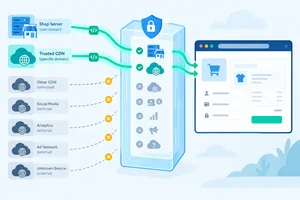
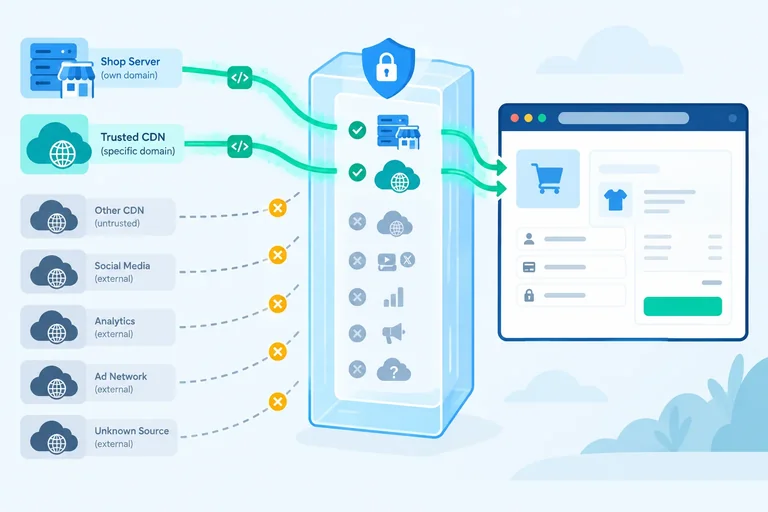
For Harbor Shop’s checkout page, script-src answers a narrow question: which script sources may execute? It evaluates a script’s source against the page origin and the policy—not who authored a package.
'self' means the document’s own origin. On https://shop.example/checkout, it can permit /assets/app.js because that URL is delivered from https://shop.example, even if the bundle contains code originally written by a third party.
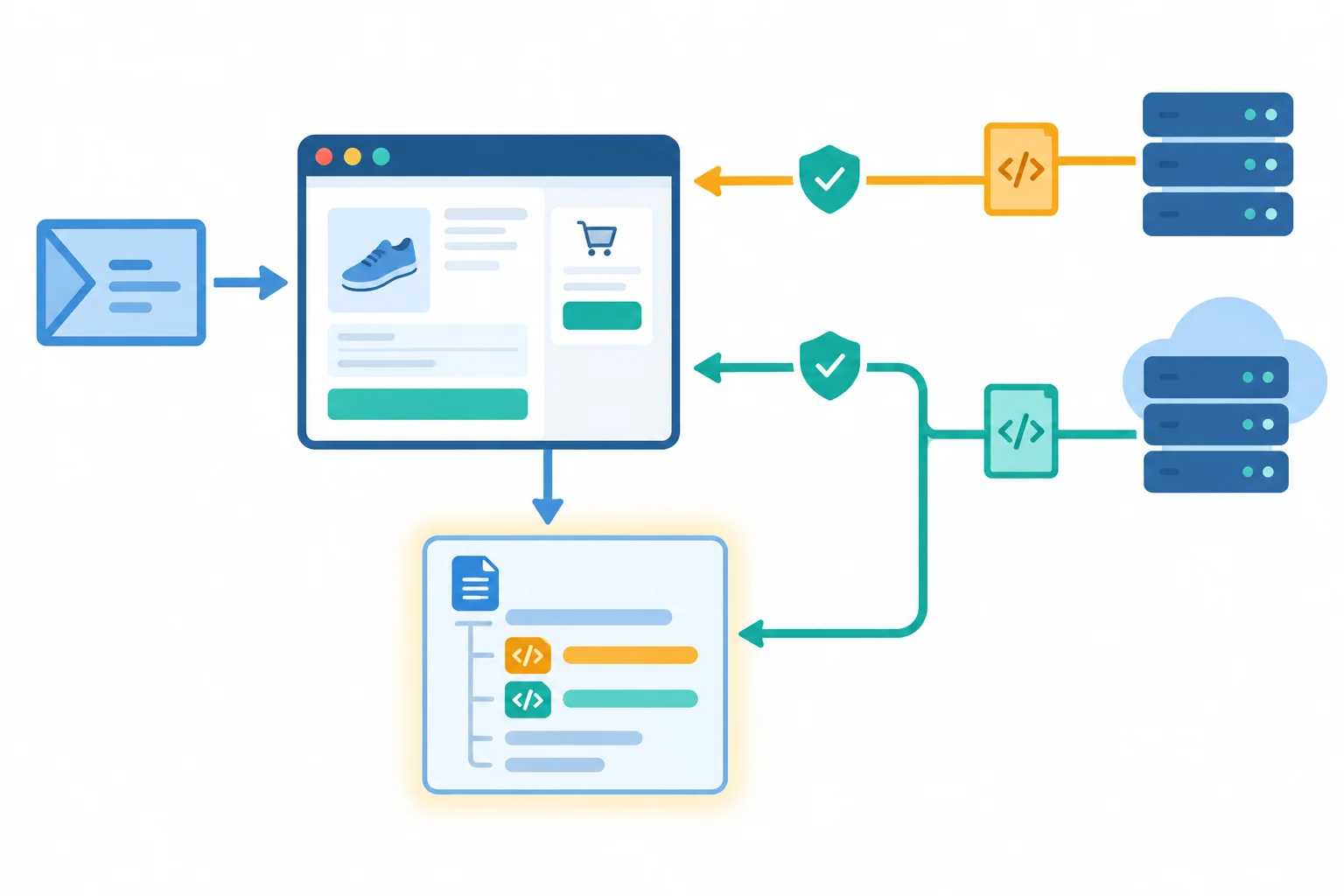
The browser checks each script source against the policy before execution. A permitted source is not a separate or less-privileged page environment.
Tip
Allowed is a policy decision only. It does not prove that a script is trustworthy, nor does it guarantee that the resource will load successfully.
Assume this single enforced source-based policy is sent with the HTML document. Script URLs have no redirects, and there are no additional script permissions.
Content-Security-Policy: script-src 'self' https://cdn.widgets.exampleRead the expressions literally:
'self' permits a script from the page origin: https://shop.example.https://cdn.widgets.example permits scripts from that listed HTTPS origin.<script> is blocked in this simplified example.The following decisions use the stated assumptions for this source-based policy.
| Script | Origin | Allowed by script-src? | Reason |
|---|---|---|---|
| `/assets/app.js` | https://shop.example | Allowed | Matches 'self' |
| `https://cdn.widgets.example/metrics.js` | https://cdn.widgets.example | Allowed | Listed HTTPS origin |
| `https://analytics.example/tag.js` | https://analytics.example | Blocked | External origin is unlisted |
| Inline `<script>...</script>` | No URL | Blocked | No inline permission is present |
A policy can become much broader than the intended source list:
https: permits scripts from many HTTPS origins, not just one reviewed provider.* admits a very broad set of sources.'unsafe-inline' permits inline script execution in these simplified examples.These expressions may be appropriate only when their wider permission is intentional and understood.
This narrower comparison permits scripts only from the page origin. It would block the remotely loaded metrics script because its origin is not listed.
Content-Security-Policy: script-src 'self'Warning
A restrictive source list reduces which script sources the browser permits. It does not turn permitted code into trustworthy code or decide whether a network request will succeed.
Complete the Harbor Shop review. Classify every script, then complete the header so it permits only the page origin and the stated CDN origin—without a broad permission.
# Classify under the completed source-based policy:
# /assets/app.js ->
# https://cdn.widgets.example/metrics.js ->
# https://other.example/tag.js ->
# inline <script>...</script> ->
Content-Security-Policy: script-src 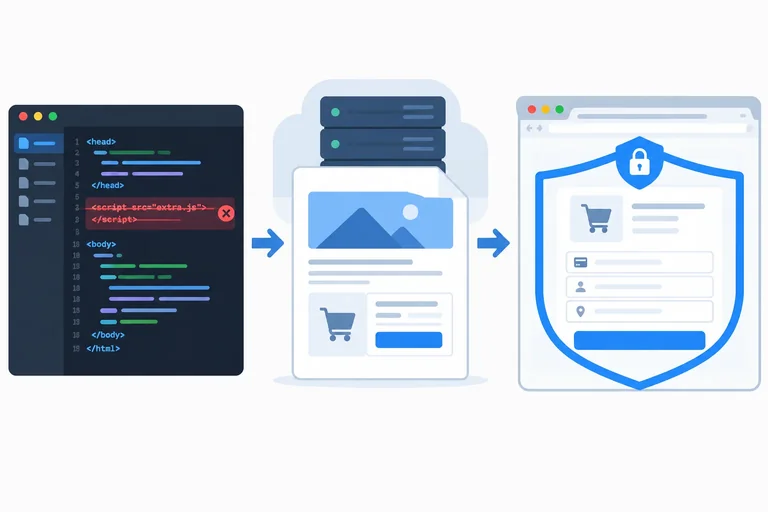
Step 6 of 8
Identify which layer can reduce included code, deliver a policy header, and enforce the delivered policy.
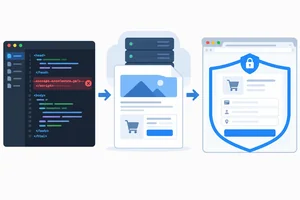
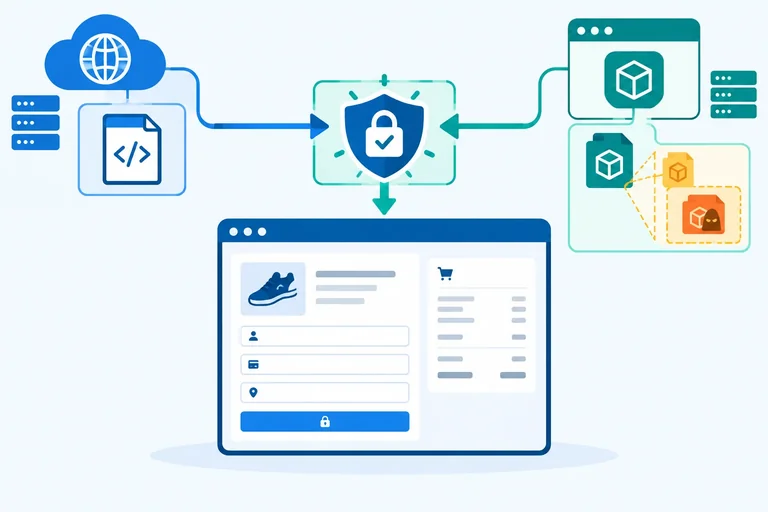
A restrictive script policy involves three layers:
<script> tag or import, reduce dependencies, review updates, and document the script origins a page genuinely needs.For Harbor Shop, deleting an unneeded third-party script from https://shop.example/checkout reduces what reaches the browser. That is valuable, but it does not itself deliver a Content-Security-Policy header.
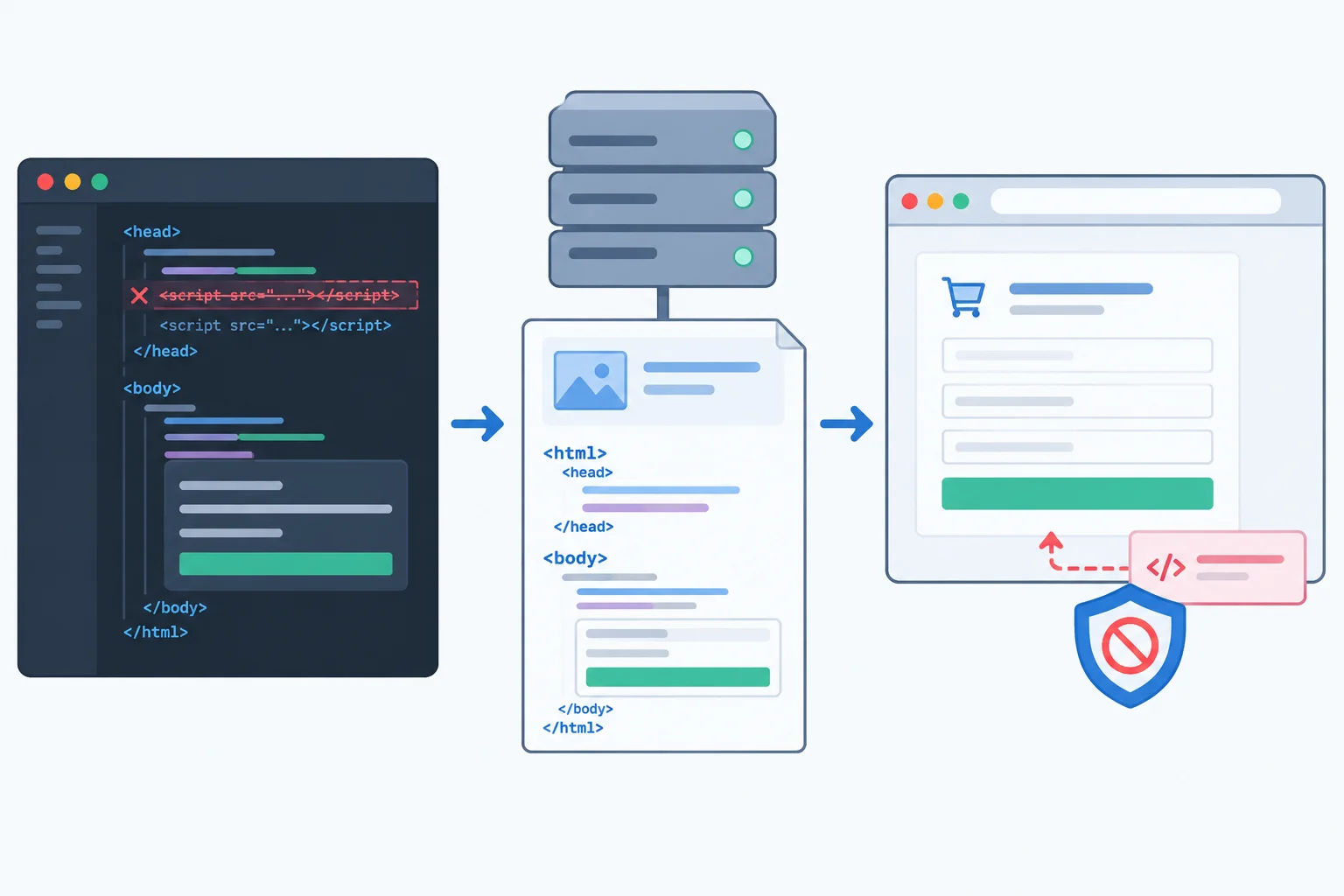
Front-end work changes what the page includes; the serving system delivers the document header; the browser applies that header.
Tip
The header is part of the response for the HTML document. Application JavaScript cannot retroactively add that response header or provide equivalent protection after an untrusted script has already executed.
Use these roles when reviewing a script restriction.
| Layer | What it can do | What it cannot establish alone |
|---|---|---|
| Front-end work | Remove imports and script tags; reduce dependencies | The document response header |
| Serving system | Deliver the HTML document and its CSP header | Whether an unnecessary package remains in application code |
| Browser | Enforce the received policy while processing the document | A policy that was never delivered |
A string that looks like a CSP header in application source code shows an intention, not evidence that a policy reached the browser. Likewise, JavaScript that runs after loading cannot go back in time and protect earlier document processing or code that already ran.
A supported HTML <meta> policy can be part of document markup, but it has limitations and is not the same as arbitrary late runtime injection. Do not treat adding a meta element with JavaScript as equivalent to a response-header policy. When Harbor Shop needs a response-header policy, the serving system must supply it.
This excerpt contains the evidence to inspect: the policy appears among the HTTP headers for the HTML document, before the document body.
HTTP/1.1 200 OK
Content-Type: text/html
Content-Security-Policy: script-src 'self' https://cdn.widgets.example

<!doctype html>
<html lang="en">
  <head><title>Harbor Shop checkout</title></head>
  <body>
    <script src="/assets/app.js"></script>
    <script src="https://cdn.widgets.example/metrics.js"></script>
  </body>
</html>
Warning
Check the actual response headers for the HTML document in a browser’s network inspection tools or in a supplied response excerpt. Do not infer effective delivery merely from a configuration string, a JavaScript variable, or a planned source-code change.
Harbor Shop is reviewing the checkout document. Read the two supplied document-response excerpts.
Response A
HTTP/1.1 200 OK
Content-Type: text/html
Content-Security-Policy: script-src 'self' https://cdn.widgets.example

<!doctype html>
<html><body>Checkout</body></html>
Response B
HTTP/1.1 200 OK
Content-Type: text/html

<!doctype html>
<html><body>
<script>
  const intendedPolicy = "Content-Security-Policy: script-src 'self' https://cdn.widgets.example";
</script>
</body></html>
In 3–5 sentences, identify which response shows that the intended enforced source-based policy is present and state why. Then assign these actions to the correct layer: removing an unnecessary dependency, delivering the policy header, and enforcing the received policy.
Write at least 120 characters (0/120).
Step 7 of 8
A restrictive source-based policy is valuable defense in depth, but it cannot establish that permitted code is trustworthy or isolate it from the page.
A restrictive source-based policy decides where a script may be loaded from. It does not inspect the script’s intent or make an allowed script less powerful inside the page.
At Harbor Shop, both of these can be permitted by a policy:
https://cdn.widgets.example/metrics.js, from an allowed download origin/assets/app.js, from the page originIf the provider serving metrics.js is compromised, its allowed script can still run on https://shop.example/checkout. Likewise, if /assets/app.js contains a malicious dependency, same-origin delivery does not remove that risk.
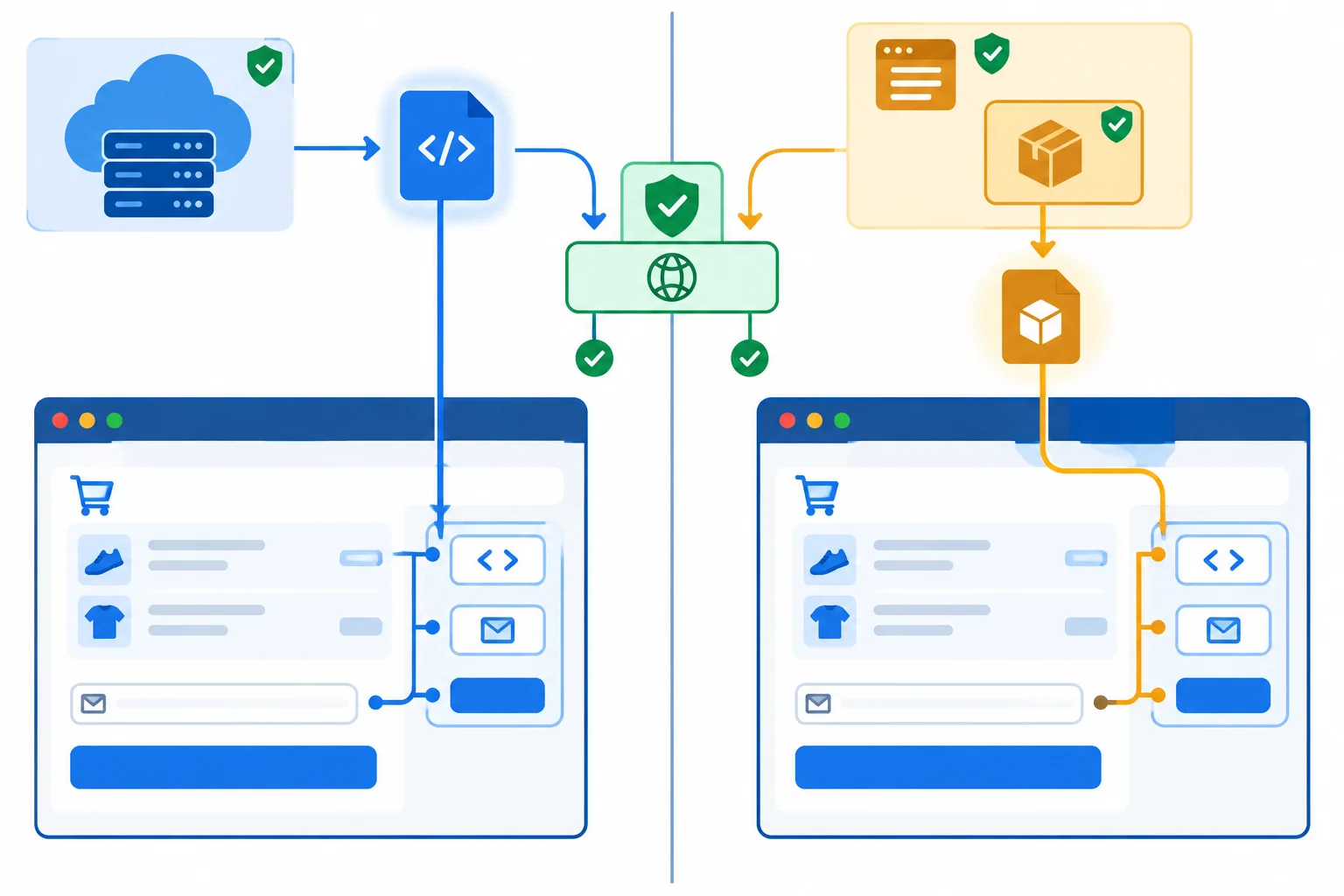
Source matching can allow a compromised provider script or a malicious dependency inside an allowed bundle.
Once code is allowed to execute in the page, a source-based CSP does not assign separate DOM permissions to it. The policy does not mean that a third-party script may only touch “its own” page elements.
It also does not replace the other safeguards Harbor Shop needs:
These controls address different risks; none is a substitute for the others.
Example
Policy:
Content-Security-Policy: script-src 'self' https://cdn.widgets.exampleThis header can allow /assets/app.js and https://cdn.widgets.example/metrics.js to load. It does not prove either file is trustworthy, inspect a dependency bundled into /assets/app.js, or isolate their access to the checkout page.
Also, script-src alone does not specify every network destination a running script may use or prevent every possible data leak. Treat it as defense in depth, not as a complete boundary around allowed code.
Which conclusion best describes a source-based policy that permits Harbor Shop’s same-origin bundle and the metrics provider?
Choose the most accurate statement.
Harbor Shop delivers this response header on its checkout document:
Content-Security-Policy: script-src 'self' https://cdn.widgets.exampleLater, https://cdn.widgets.example/metrics.js is compromised. Separately, reviewers discover that a malicious dependency was bundled inside /assets/app.js.
In 3–5 sentences, explain why the policy does not make either case harmless. Distinguish what the source restriction does from code review, data-access isolation, and server-enforced access control.
Write at least 180 characters (0/180).
Step 8 of 8
Integrate a fictional Harbor Shop case packet into an actionable, evidence-based third-party script risk recommendation.
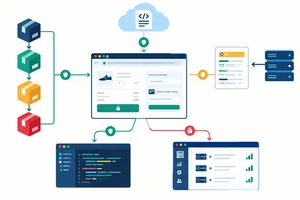
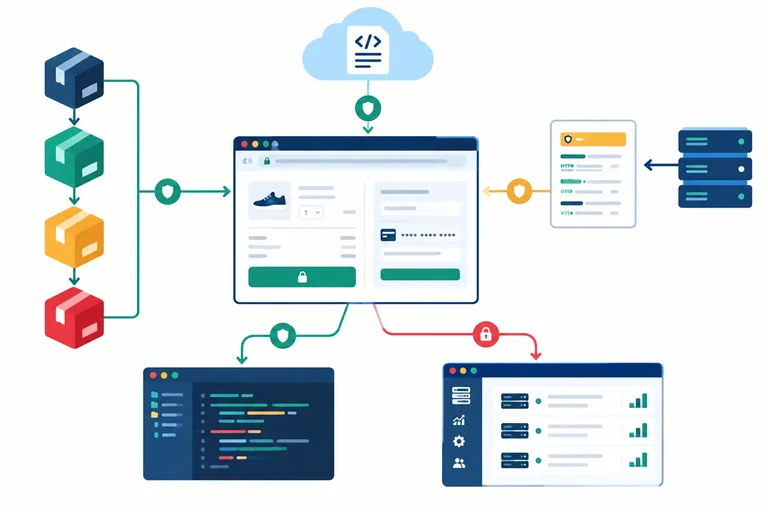
A final risk decision is a short argument, not a score from one tool. For the Harbor Shop checkout page, connect the evidence in this order:
Keep a policy result separate from a trust conclusion: Allowed means the browser permits a source under the header; it does not mean that code deserves trust.
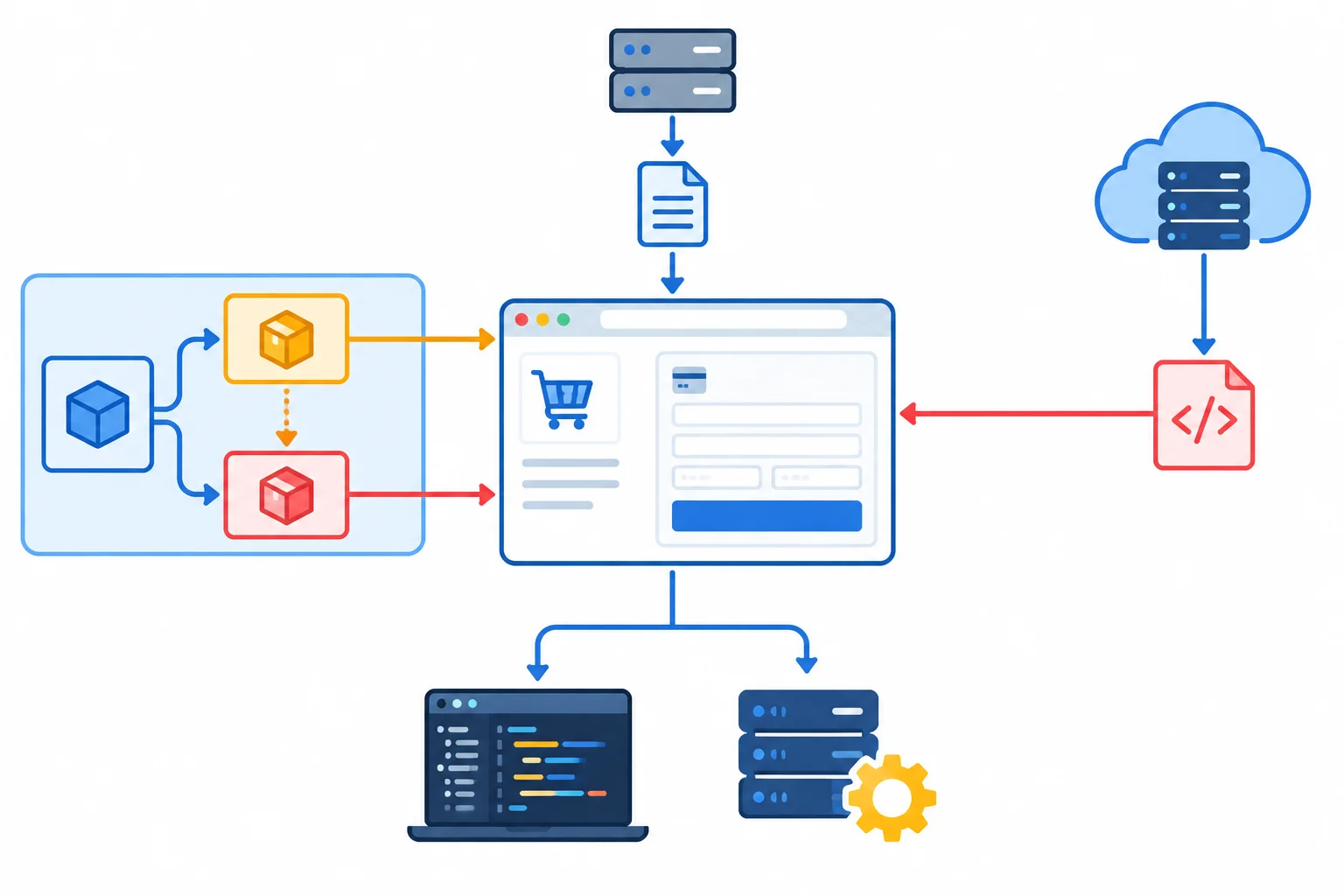
Trace every path that brings browser code to the page, then assign each decision to the layer that can actually make the change.
Use this fictional case packet. It describes the checkout document at https://shop.example/checkout; it is not a finding about real packages or services. The page origin is https://shop.example. The remote third-party script has the download origin https://cdn.widgets.example.
Current browser-executed code and review evidence
| Evidence area | Fictional case evidence | Decision relevance |
|---|---|---|
| Application bundle | `/assets/app.js` is required for the checkout interface and is delivered from the page origin. | It is same-origin delivery, not automatic proof that every bundled author is trusted. |
| Dependency chain | `@demo/review-widget` 2.4.0 → `@demo/dom-utils` 1.3.0 is bundled into `/assets/app.js`. | The chain is browser-executed even though its delivery location is same-origin. |
| Need on checkout | The review widget supports product-review display, but no review feature appears on checkout. | Its page-level access has no documented checkout need. |
| Identity and maintenance | The widget name and repository link match the intended fictional project, but a recent ownership transfer has no recorded Harbor Shop review. | Matching identity is useful evidence; the ownership gap needs investigation. |
| Lockfile and advisory | `package-lock.json` selects `@demo/dom-utils` 1.3.0. A fictional browser-relevant advisory affects 1.3.0; a documented fix exists in 1.3.1. | The selected version is reproducible, but the advisory requires removal or a compatible update decision. |
| Remote metrics | `https://cdn.widgets.example/metrics.js` supports checkout metrics. A business need is claimed, but provider approval and data-use review are not recorded. | Its source and purpose need investigation before continued trust. |
Current HTML document response header
Content-Security-Policy: script-src 'self' https://cdn.widgets.exampleTip
Assume this is one enforced policy on the HTML document, with ordinary script URLs, no redirects, and no additional directives, nonces, or hashes. Interpret only what this script-src source-based policy permits; do not treat it as a statement about code quality.
Write an 80–150 word recommendation for Harbor Shop’s checkout page. Ground every conclusion in the case packet.
Include all of the following:
End with one explicit remaining uncertainty.
Write at least 350 characters (0/350).
Summary
script-src result is an Allowed or Blocked decision, not a safety verdict.Congratulations! You completed: Evaluate the Risks of Third-Party Scripts
Thousands of online courses in video, ebooks and audiobooks.
To test your knowledge during online courses
Generated directly from your cell phone's photo gallery and sent to your email

Download our app via QR Code or the links below:.



Carry knowledge in your pocket.
Download the Cursa app.
There are hundreds of free courses available, with a free certificate of completion that is saved in your mobile image gallery.
Download the app to access the Course Completion Certificate for Free.


+ 10 million
students

Free and Valid
Certificate

60 thousand free
exercises

4.8/5 rating in
app stores

Free courses in
video and ebooks