
Step 1 of 7
Trace Untrusted Content to a Rendering Sink
Identify an untrusted source, trace it through a React component, and recognize an HTML-interpreting rendering sink.

Learning path · Level 11 · Tutorial 2
Trace external content into React rendering and choose safe handling for plain text, justified rich HTML, and link destinations without relying on TypeScript alone.

 Trace Untrusted Content to a Rendering Sink
Identify an untrusted source, trace it through a React component, and recognize an HTML-interpreting rendering sink. 3 min
Trace Untrusted Content to a Rendering Sink
Identify an untrusted source, trace it through a React component, and recognize an HTML-interpreting rendering sink. 3 min
 Keep Plain Text Out of HTML Sinks
Render text-only external article fields with ordinary React JSX instead of raw HTML interpretation. 3 min
Keep Plain Text Out of HTML Sinks
Render text-only external article fields with ordinary React JSX instead of raw HTML interpretation. 3 min
 Sanitize Only the Rich HTML You Need
Use DOMPurify with a restricted formatting policy for the article preview's one justified rich HTML region. 4 min
Sanitize Only the Rich HTML You Need
Use DOMPurify with a restricted formatting policy for the article preview's one justified rich HTML region. 4 min
 Preserve the Sanitization Boundary
Keep DOMPurify as the final processing boundary for the narrow rich-HTML path, and prevent later markup from bypassing it. 2 min
Preserve the Sanitization Boundary
Keep DOMPurify as the final processing boundary for the narrow rich-HTML path, and prevent later markup from bypassing it. 2 min
 Parse Links and Allow Explicit Protocols
Parse external link destinations, allow only this feature’s supported web protocols, and render noninteractive fallback text when the destination is rejected. 3 min
Parse Links and Allow Explicit Protocols
Parse external link destinations, allow only this feature’s supported web protocols, and render noninteractive fallback text when the destination is rejected. 3 min
 Restrict Origins When the Feature Requires It
Extend a parsed URL policy with an optional exact-origin requirement for navigation that must stay inside the application. 3 min
Restrict Origins When the Feature Requires It
Extend a parsed URL policy with an optional exact-origin requirement for navigation that must stay inside the application. 3 min
 Apply and Review the Rendering Boundaries
Assemble and inspect a local article preview that applies the correct protection to each external field. 6 min
Apply and Review the Rendering Boundaries
Assemble and inspect a local article preview that applies the correct protection to each external field. 6 min
Step 1 of 7
Identify an untrusted source, trace it through a React component, and recognize an HTML-interpreting rendering sink.
Cross-site scripting (XSS) becomes possible when attacker-controlled content is interpreted as executable code in your application's browser context.
Treat an API response as an untrusted source, even when the API belongs to your organization. A URL value supplied by external content is also an untrusted source. Ownership, a TypeScript annotation, or a successful string-shape check does not establish that a value is safe for every browser context.
To assess a rendering path, trace one value from its source, through props and local variables, to the browser operation that interprets it.

The key question is where an external value first receives HTML interpretation.
dangerouslySetInnerHTML is a rendering sink: it asks the browser to interpret a string as HTML. A prop and a local variable can make the path look ordinary, but they do not change the source of the value.
HTML interpretation can process more than visible elements. For example, an external element can contain an event attribute such as onerror, creating an executable path. You do not need to insert or trigger a script tag to recognize the risk.
A runtime check can establish that bodyHtml is a string, and ExternalArticle can describe its shape. Neither proves that its contents are safe for HTML interpretation or navigation.
Inspect this complete trace. It is deliberately unsafe and is shown only for analysis; do not use this rendering pattern.
// src/sampleArticle.ts
export type ExternalArticle = {
  title: string;
  summary: string;
  bodyHtml: string;
  url: string;
};

// This local fixture represents externally supplied API data.
export const sampleArticle: ExternalArticle = {
  title: "Field notes",
  summary: "Notes from a reader.",
  bodyHtml: "<p>Read the <strong>highlights</strong>.</p>",
  url: "https://resources.example/guide"
};

// src/ArticleCard.tsx
import type { ExternalArticle } from "./sampleArticle";

type ArticleCardProps = {
  article: ExternalArticle;
};

export const ArticleCard = ({ article }: ArticleCardProps) => {
  const htmlFromResponse = article.bodyHtml;

  return <section dangerouslySetInnerHTML={{ __html: htmlFromResponse }} />;
};

// src/App.tsx
import { ArticleCard } from "./ArticleCard";
import { sampleArticle } from "./sampleArticle";

const App = () => <ArticleCard article={sampleArticle} />;

export default App;Match each part of the preceding flow to its role.
Tap an item and then its matching pair.
Which assessment correctly labels the API-to-component flow and evaluates the string type claim?

Step 2 of 7
Render text-only external article fields with ordinary React JSX instead of raw HTML interpretation.
title and summary are plain text fields in this article preview. Even when external text contains characters that resemble markup, render it as an ordinary JSX expression.
React escapes string values placed in JSX. The browser displays the characters instead of interpreting them as HTML elements. This keeps a text-only requirement out of a raw HTML rendering sink.
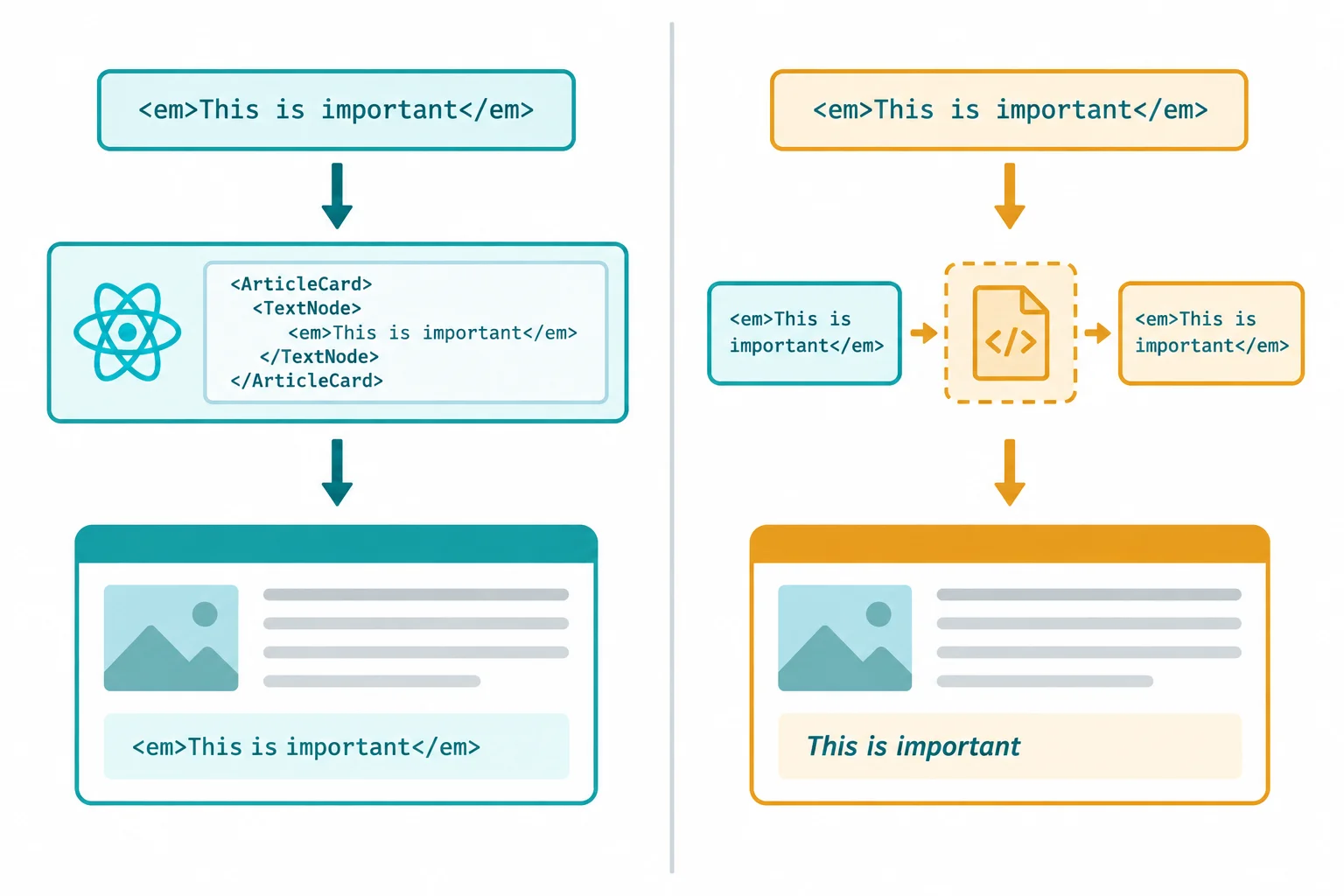
The same external string has different results depending on whether React treats it as plain text or HTML.
Replace raw HTML rendering for text-only fields with normal elements and JSX expressions. No sanitizer, manual escaping, or HTML interpretation is needed for this requirement.
Do not pre-escape a value before placing it in ordinary JSX. React already performs text escaping, and manual escaping can produce confusing double-escaped output. Output context still matters: plain text uses JSX; a justified rich HTML region and a link destination need separate handling decisions.
src/ArticleCard.tsx — replace the text-only rendering
import type { ExternalArticle } from "./sampleArticle";

type ArticleCardProps = {
  article: ExternalArticle;
};

export const ArticleCard = ({ article }: ArticleCardProps) => {
  return (
    <article>
      <h2>{article.title}</h2>
      <p>{article.summary}</p>
    </article>
  );
};
Tip
Use ordinary JSX only because these fields have a plain-text requirement. Do not send every string through an HTML path “just in case.” Keeping title and summary out of the HTML-interpreting sink is simpler and preserves React’s safe text-rendering default.
Complete the text-only ArticleCard rendering with the appropriate JSX expressions.
export const ArticleCard = ({ article }: ArticleCardProps) => {
  return (
    <article>
      <h2></h2>
      <p></p>
    </article>
  );
};A previous version used raw HTML rendering for both text-only fields:
<h2 dangerouslySetInnerHTML={{ __html: article.title }} />
<p dangerouslySetInnerHTML={{ __html: article.summary }} />
Write the two ordinary-JSX replacement lines. Then predict what the page shows when article.title contains <em>Field notes</em>: state whether an em formatting element is created.
Write at least 40 characters (0/40).

Step 3 of 7
Use DOMPurify with a restricted formatting policy for the article preview's one justified rich HTML region.
The article highlights region has a real formatting requirement: paragraphs, emphasis, and lists must remain visible. That makes it the one justified rich HTML region in this preview.
article.bodyHtml is still an untrusted source. Before it reaches the dedicated raw-HTML rendering sink, reduce it to exactly the formatting the feature needs. Title and summary do not have that requirement; they remain plain text in ordinary JSX.
A sanitizer is context-specific: it prepares this one rich HTML output boundary. It does not decide whether a link destination is acceptable.

Sanitize external bodyHtml only at the dedicated rich HTML boundary.
In your local React TypeScript project, install the maintained sanitizer package.
npm install dompurifyadded 2 packages, and audited 144 packages in 1s found 0 vulnerabilities
The package count, audit message, and timing vary by project. Confirm that the command completes successfully and records DOMPurify in your project dependencies.
Use a maintained sanitizer rather than a home-grown filter. Keep DOMPurify updated through your normal dependency maintenance process.
This highlights feature permits formatting only. The allowlist contains paragraph, emphasis, list, and line-break tags. It intentionally excludes links, images, and embedded content. ALLOWED_ATTR: [] is paired with ALLOW_ARIA_ATTR: false and ALLOW_DATA_ATTR: false so the feature's no-attribute policy also disables DOMPurify's default ARIA and data-* attribute families.
This configuration is a product rule for article highlights, not a general-purpose HTML policy.
| Content in external HTML | Policy result | Expected rendering |
|---|---|---|
| p and br elements | Allowed | Paragraph or line break remains |
| strong and em elements | Allowed | Emphasis remains |
| ul, ol, and li elements | Allowed | List structure remains |
| Event, style, ARIA, or data attributes | Excluded | Attribute is removed |
| a, img, or embedded elements | Excluded | Element is removed; safe nested text can remain as text |
Replace the contents of src/ArticleCard.tsx with this component. cleanHtml is created from external bodyHtml immediately before the only raw-HTML rendering boundary.
The component continues to render title and summary as plain text. The separate url field is not rendered here: navigation gets its own URL policy later.
src/ArticleCard.tsx — replace the file contents
import DOMPurify from "dompurify";
import type { ExternalArticle } from "./sampleArticle";

type ArticleCardProps = {
  article: ExternalArticle;
};

export const ArticleCard = ({ article }: ArticleCardProps) => {
  const cleanHtml = DOMPurify.sanitize(article.bodyHtml, {
    ALLOWED_TAGS: ["p", "strong", "em", "ul", "ol", "li", "br"],
    ALLOWED_ATTR: [],
    ALLOW_ARIA_ATTR: false,
    ALLOW_DATA_ATTR: false,
  });

  return (
    <article>
      <h2>{article.title}</h2>
      <p>{article.summary}</p>
      <section dangerouslySetInnerHTML={{ __html: cleanHtml }} />
    </article>
  );
};
Example
With the baseline fixture, <p>Read the <strong>highlights</strong>.</p>, the paragraph and bold word remain. If external markup includes an event attribute, that attribute is removed. If it uses an unsupported element, the element wrapper is removed; ordinary text inside such a wrapper can still be preserved as text.
That behavior is intentional: this feature preserves a small formatting vocabulary, not arbitrary HTML.
Complete the sanitizer-to-sink connection and the review outcomes for the restricted highlights policy.
const cleanHtml = DOMPurify.(article.bodyHtml, {
  ALLOWED_TAGS: ["p", "strong", "em", "ul", "ol", "li", "br"],
  ALLOWED_ATTR: [],
  ALLOW_ARIA_ATTR: false,
  ALLOW_DATA_ATTR: false,
});

const review = {
  strongFormatting: "",
  onclickAttribute: "",
  unsupportedAnchorElement: "",
  anchorText: "",
};

return <section ={{ __html: cleanHtml }} />;
Step 4 of 7
Keep DOMPurify as the final processing boundary for the narrow rich-HTML path, and prevent later markup from bypassing it.
A sanitization boundary is a timing rule as well as a tool choice. External bodyHtml remains an untrusted source until every operation that produces HTML is complete and DOMPurify processes that final value. Only then may the result cross into the dedicated rendering sink.
If untrusted markup is appended after sanitization, it bypasses the boundary. Keep this rich HTML path narrow: title and summary remain plain text in ordinary JSX; only the justified highlights region reaches the raw-HTML sink.
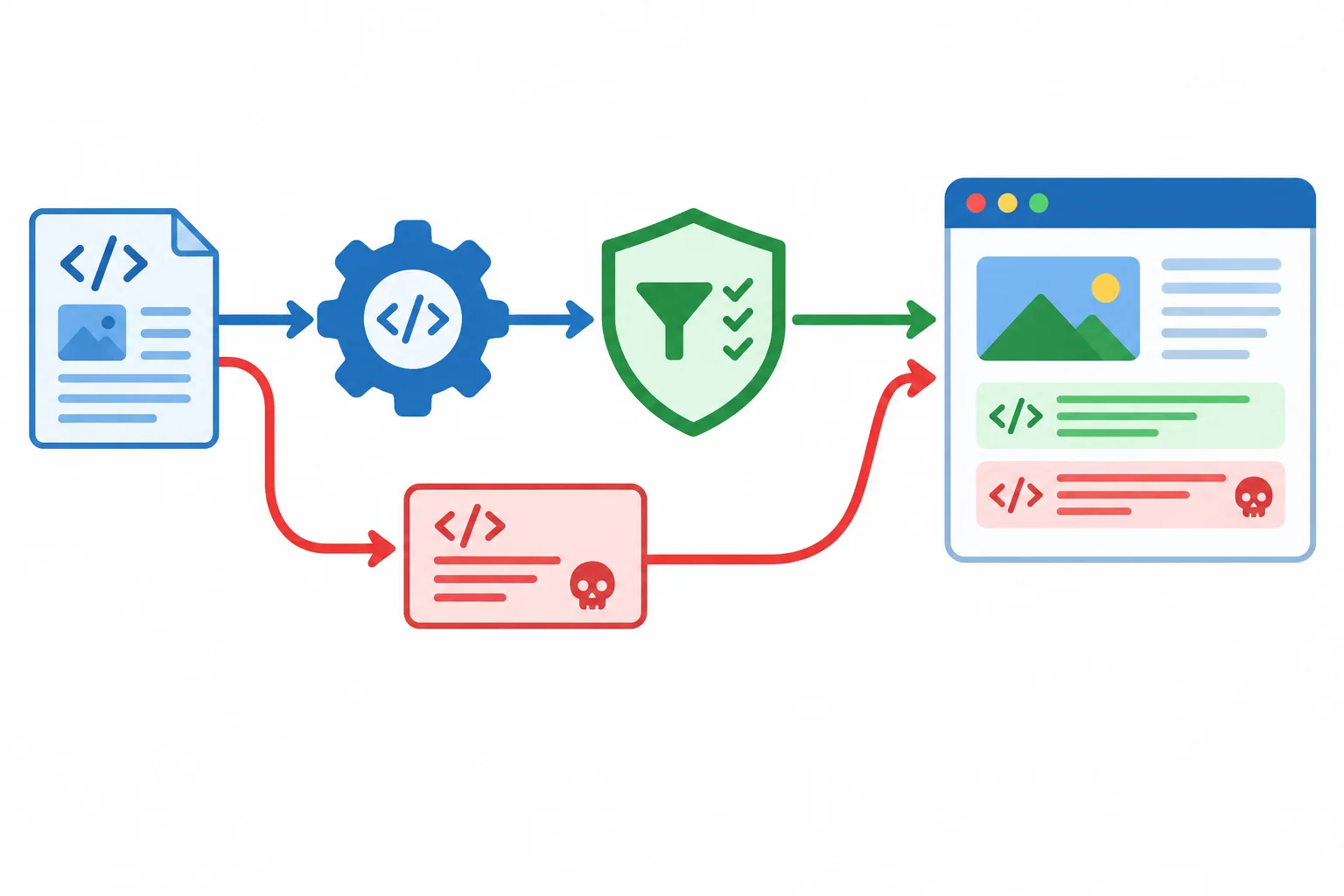
Complete every HTML-producing operation before sanitization; only the sanitized result reaches the raw-HTML rendering sink.
These mechanisms answer different questions. Choose the handling based on the output context, not because a value has a particular TypeScript type.
| Mechanism | Question answered | Result here |
|---|---|---|
| Data-shape validation | Are expected fields present? | Does not establish HTML safety |
| JSX escaping | Should this value be plain text? | Markup-like characters display literally |
| HTML sanitization | Which rich HTML structure may remain? | Restricted formatting reaches the sink |
ExternalArticle says that bodyHtml is a string. A runtime shape check can establish that the field exists and has that shape. Neither establishes that its contents are safe for HTML interpretation.
Escaping is the right behavior when content is plain text. It is not a replacement for sanitization when the product intentionally renders rich HTML. Under the highlights policy, unsupported element wrappers can be removed while their safe text content remains visible.
Warning
Do not write a regular expression or a home-grown “escape dangerous tags” function as a sanitizer. Arbitrary HTML is parsed structure, not a small string pattern. Use the maintained DOMPurify boundary and its explicit allowlist instead.
This pipeline looks close to correct, but its final concatenation reintroduces the original untrusted source after DOMPurify has finished. displayHtml is therefore not a sanitized value.
Inside ArticleCard — unsafe review example
const cleanHtml = DOMPurify.sanitize(article.bodyHtml, {
  ALLOWED_TAGS: ["p", "strong", "em", "ul", "ol", "li", "br"],
  ALLOWED_ATTR: [],
  ALLOW_ARIA_ATTR: false,
  ALLOW_DATA_ATTR: false,
});

const displayHtml = `${cleanHtml}${article.bodyHtml}`;

return <section dangerouslySetInnerHTML={{ __html: displayHtml }} />;If a final operation genuinely produces HTML for the highlights feature, perform it first. Then sanitize that final value, store the result as cleanHtml, and send only cleanHtml to the rendering sink. In ordinary layouts, prefer JSX rather than creating additional HTML strings.
Inside ArticleCard — rich HTML boundary
const finalHtml = `${article.bodyHtml}<br>`;
const cleanHtml = DOMPurify.sanitize(finalHtml, {
  ALLOWED_TAGS: ["p", "strong", "em", "ul", "ol", "li", "br"],
  ALLOWED_ATTR: [],
  ALLOW_ARIA_ATTR: false,
  ALLOW_DATA_ATTR: false,
});

return <section dangerouslySetInnerHTML={{ __html: cleanHtml }} />;
Tip
The fixed <br> demonstrates the ordering rule. Do not move title or summary into this pipeline: render those fields as plain text with JSX. A narrow rich-HTML path is easier to review and protect.
A review found that article.bodyHtml was concatenated after DOMPurify ran. Arrange the repair and review actions in the only safe sequence.

Step 5 of 7
Parse external link destinations, allow only this feature’s supported web protocols, and render noninteractive fallback text when the destination is rejected.
article.url is an untrusted source, even when it arrives in a value typed as string. React’s escaping of plain text does not establish a URL policy for an anchor’s href.
Treat navigation as its own rendering boundary: parse the candidate, decide whether the feature supports the parsed destination, then render a link only for an accepted result. A rejected value becomes noninteractive text.

The URL policy sits between the untrusted source and the navigation rendering sink.
Tip
Fail closed: do not approve a raw value with a prefix test such as rawUrl.startsWith("https"). Browser parsing can resolve different textual forms into different destinations. This helper returns null whenever the input cannot satisfy its policy.
Create src/safeUrl.ts. The helper rejects blank input and parsing failures, then checks the parsed protocol against this feature’s exact allowlist: http: and https:. It returns the parser’s url.href, never the unchecked input.
HTTP is included here to support local development. This is the example feature’s URL policy, not a universal recommendation.
src/safeUrl.ts — create or replace the helper
const allowedProtocols = ["http:", "https:"];

export const getSafeHref = (
  rawUrl: string,
  sameOriginOnly = false,
): string | null => {
  void sameOriginOnly;

  if (rawUrl.trim() === "") {
    return null;
  }

  try {
    const url = new URL(rawUrl, window.location.href);

    if (!allowedProtocols.includes(url.protocol)) {
      return null;
    }

    return url.href;
  } catch {
    return null;
  }
};src/ArticleCard.tsx — add the import, then add the local value before return and the conditional branch inside the existing <article>. Keep the previously established plain-text and rich-HTML rendering unchanged.
import { getSafeHref } from "./safeUrl";

// Inside ArticleCard, before return:
const href = getSafeHref(article.url);

// Inside the returned <article>:
{href ? (
  <a href={href}>Read more</a>
) : (
  <span>Link unavailable</span>
)}The URL constructor resolves relative and protocol-relative forms against window.location.href before the protocol check. These are inspection examples: do not browse to unsupported destinations.
Results under this step’s protocol-only URL policy.
| Input | Policy | Expected result |
|---|---|---|
| /articles/42 | Parsed protocol is http: or https: | Allowed |
| https://resources.example/guide | Parsed protocol is https: | Allowed |
| //outside.example/guide | Parsed protocol is http: or https: | Allowed |
| javascript:alert(1) | Unsupported protocol | Rejected |
| data:text/html,example | Unsupported protocol | Rejected |
| Blank input | No destination to parse | Rejected |
Complete the parser base, the two exact protocol checks, the accepted parsed return value, the null fallback, and the classification of the unsupported destination.
export const getSafeHref = (
  rawUrl: string,
  sameOriginOnly = false,
): string | null => {
  void sameOriginOnly;

  if (rawUrl.trim() === "") {
    return null;
  }

  try {
    const url = new URL(rawUrl, );

    if (url.protocol !== "" && url.protocol !== "") {
      return null;
    }

    return ;
  } catch {
    return null;
  }
};

const href = getSafeHref(article.url);

const destination = href ? (
  <a href={href}>Read more</a>
) : (
  <span></span>
);

const blockedHref = getSafeHref("javascript:alert(1)");
const blockedStatus = blockedHref ? "Allowed" : "";
Step 6 of 7
Extend a parsed URL policy with an optional exact-origin requirement for navigation that must stay inside the application.
A protocol check answers one question: “Is this a supported kind of web URL?” It does not answer: “Must this destination stay inside this application?”
A public Read more link can allow an external https: origin. An in-app destination feature can require a stricter URL policy: after parsing, its destination must have the current page’s exact origin.
Keep the protocol check for both policies. Enable the additional origin rule only for a feature that truly must remain in the current application.
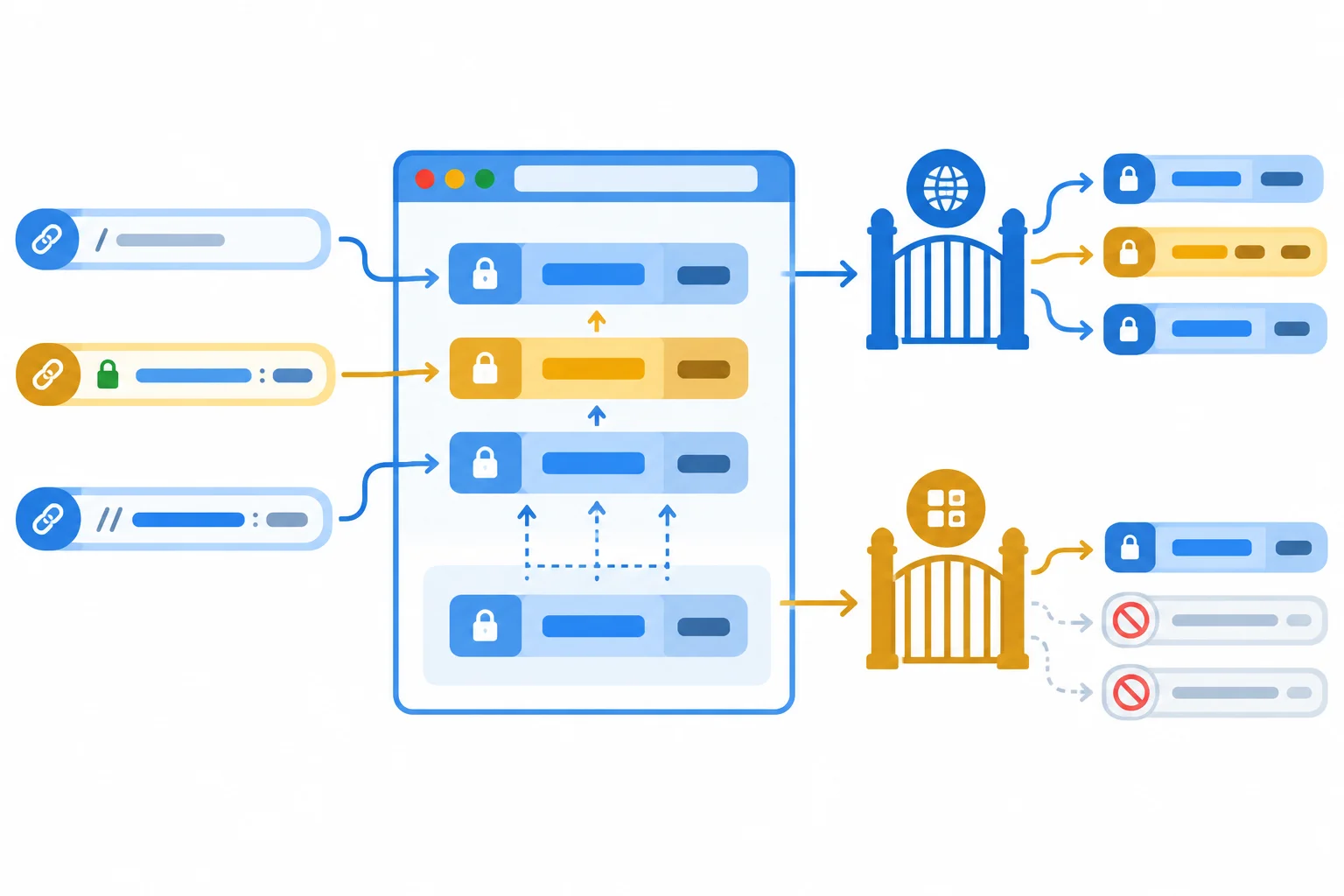
Compare parsed origins, not raw URL prefixes.
In src/safeUrl.ts, retain the existing blank-input, parsing, and protocol checks. Add an exact parsed-origin comparison only when sameOriginOnly is enabled.
Both url.origin and window.location.origin contain the scheme, host, and port. Comparing these parsed values avoids errors from raw-string prefixes or hostname substrings. A destination accepted by this URL policy is permitted for this feature; it is not proof that a remote website is trustworthy.
src/safeUrl.ts — replace the helper with this version
const allowedProtocols = ["http:", "https:"];

export const getSafeHref = (
  rawUrl: string,
  sameOriginOnly = false,
): string | null => {
  if (rawUrl.trim() === "") {
    return null;
  }

  try {
    const url = new URL(rawUrl, window.location.href);

    if (!allowedProtocols.includes(url.protocol)) {
      return null;
    }

    if (sameOriginOnly && url.origin !== window.location.origin) {
      return null;
    }

    return url.href;
  } catch {
    return null;
  }
};Assume the current page is https://app.example:5173/articles.
The URL constructor resolves relative and protocol-relative inputs before the URL policy evaluates them. Therefore, //outside.example/guide becomes an HTTPS destination under this current page, but its parsed origin is still external. These are inspection examples only; do not browse to them.
The public-resource policy calls getSafeHref(input). The in-app policy calls getSafeHref(input, true).
| Input | Policy | Expected result |
|---|---|---|
| /articles/42 | Public resource | Allowed |
| /articles/42 | In-app destination | Allowed |
| https://resources.example/guide | Public resource | Allowed |
| https://resources.example/guide | In-app destination | Rejected |
| //outside.example/guide | Public resource | Allowed |
| //outside.example/guide | In-app destination | Rejected |
Tip
Exact origin means that scheme, host, and port all match. A different port is a different origin even when the hostname looks the same. Do not replace the parsed comparison with startsWith, includes, or a hostname substring check.
Complete the optional exact-origin rejection condition. Then classify each destination as Allowed or Rejected in this order: public resource / in-app destination. Assume the current page is https://app.example:5173/articles.
// `url` has already been parsed and passed the protocol check.
if () {
  return null;
}

return url.href;

const classifications = [
  "/articles/42: ",
  "https://resources.example/guide: ",
  "//outside.example/guide: ",
];
// Each pair is: public resource / in-app destination.
Step 7 of 7
Assemble and inspect a local article preview that applies the correct protection to each external field.
Use your own local React + TypeScript project. If you completed the earlier steps, keep that project and replace the four files shown in this step. Otherwise, create a small Vite project with the optional setup below.
Every field in sampleArticle is an untrusted source, even though this local fixture is under your control. The same rendering boundaries apply when the values later arrive from an API.
Run these commands only if you need a fresh project. If you already have the project, run npm install dompurify from its root instead.
npm create vite@latest xss-preview -- --template react-ts
cd xss-preview
npm install
npm install dompurifyNeed to install the following packages: create-vite@latest Ok to proceed? (y) y Scaffolding project in ./xss-preview... Done. Now run: cd xss-preview npm install npm run dev added 180 packages, and audited 181 packages in 12s found 0 vulnerabilities added 2 packages, and audited 183 packages in 1s found 0 vulnerabilities
Package versions, package counts, audit messages, and elapsed times vary by npm version and project state.
Create or replace this file. It provides the external article fixture and its TypeScript shape.
export type ExternalArticle = {
  title: string;
  summary: string;
  bodyHtml: string;
  url: string;
};

export const sampleArticle: ExternalArticle = {
  title: "Field notes",
  summary: "Notes from a reader.",
  bodyHtml: "<p>Read the <strong>highlights</strong>.</p>",
  url: "https://resources.example/guide",
};Create or replace this helper. It parses a candidate before enforcing the protocol and optional exact-origin URL policy, then fails closed with null.
const allowedProtocols = ["http:", "https:"];

export const getSafeHref = (
  rawUrl: string,
  sameOriginOnly = false,
): string | null => {
  if (rawUrl.trim() === "") {
    return null;
  }

  try {
    const url = new URL(rawUrl, window.location.href);

    if (!allowedProtocols.includes(url.protocol)) {
      return null;
    }

    if (sameOriginOnly && url.origin !== window.location.origin) {
      return null;
    }

    return url.href;
  } catch {
    return null;
  }
};One component has three distinct output contexts. Render title and summary as plain text. Sanitize the justified highlights rich HTML immediately before its dedicated rendering sink. Pass the URL through the URL policy before creating a link.
The highlights policy allows only formatting tags and no attributes: it explicitly disables the default ARIA and data-* attribute families as well. Unsupported element wrappers can be removed while safe text content inside them can remain visible.
Create or replace the complete component. Links do not belong in the rich HTML region; the separate url field receives its own URL policy.
import DOMPurify from "dompurify";
import type { ExternalArticle } from "./sampleArticle";
import { getSafeHref } from "./safeUrl";

type ArticleCardProps = {
  article: ExternalArticle;
};

export const ArticleCard = ({ article }: ArticleCardProps) => {
  const cleanHtml = DOMPurify.sanitize(article.bodyHtml, {
    ALLOWED_TAGS: ["p", "strong", "em", "ul", "ol", "li", "br"],
    ALLOWED_ATTR: [],
    ALLOW_ARIA_ATTR: false,
    ALLOW_DATA_ATTR: false,
  });
  const href = getSafeHref(article.url);

  return (
    <article>
      <h2>{article.title}</h2>
      <p>{article.summary}</p>
      <section dangerouslySetInnerHTML={{ __html: cleanHtml }} />
      {href ? (
        <a href={href}>Read more</a>
      ) : (
        <span>Link unavailable</span>
      )}
    </article>
  );
};
Tip
ExternalArticle establishes a data shape: all four values are strings. It does not decide whether a value belongs in text display, HTML interpretation, or navigation. Make that decision at each rendering sink, based on the feature requirement.
Replace the default app component with this composition. The second line deliberately applies the stricter same-origin URL policy to the fixture’s external destination.
import { ArticleCard } from "./ArticleCard";
import { sampleArticle } from "./sampleArticle";
import { getSafeHref } from "./safeUrl";

const App = () => {
  const sameOriginHref = getSafeHref(sampleArticle.url, true);

  return (
    <main>
      <ArticleCard article={sampleArticle} />
      <p>
        Same-origin URL policy: {sameOriginHref ? "Allowed" : "Rejected"}
      </p>
    </main>
  );
};

export default App;Field notes Notes from a reader. Read the highlights. Read more Same-origin URL policy: Rejected
Browser styling and spacing depend on the existing Vite CSS, but the listed text, bold formatting, link, and rejected status are the initial visible results.
After saving all four files, start the local development server from the project root and open the Local address shown in your terminal.
npm run dev> xss-preview@0.0.0 dev > vite VITE v6.0.0 ready in 180 ms ➜ Local: http://localhost:5173/ ➜ Network: use --host to expose ➜ press h + enter to show help
The Vite version, startup time, and available port vary. If port 5173 is in use, Vite may select another local port.
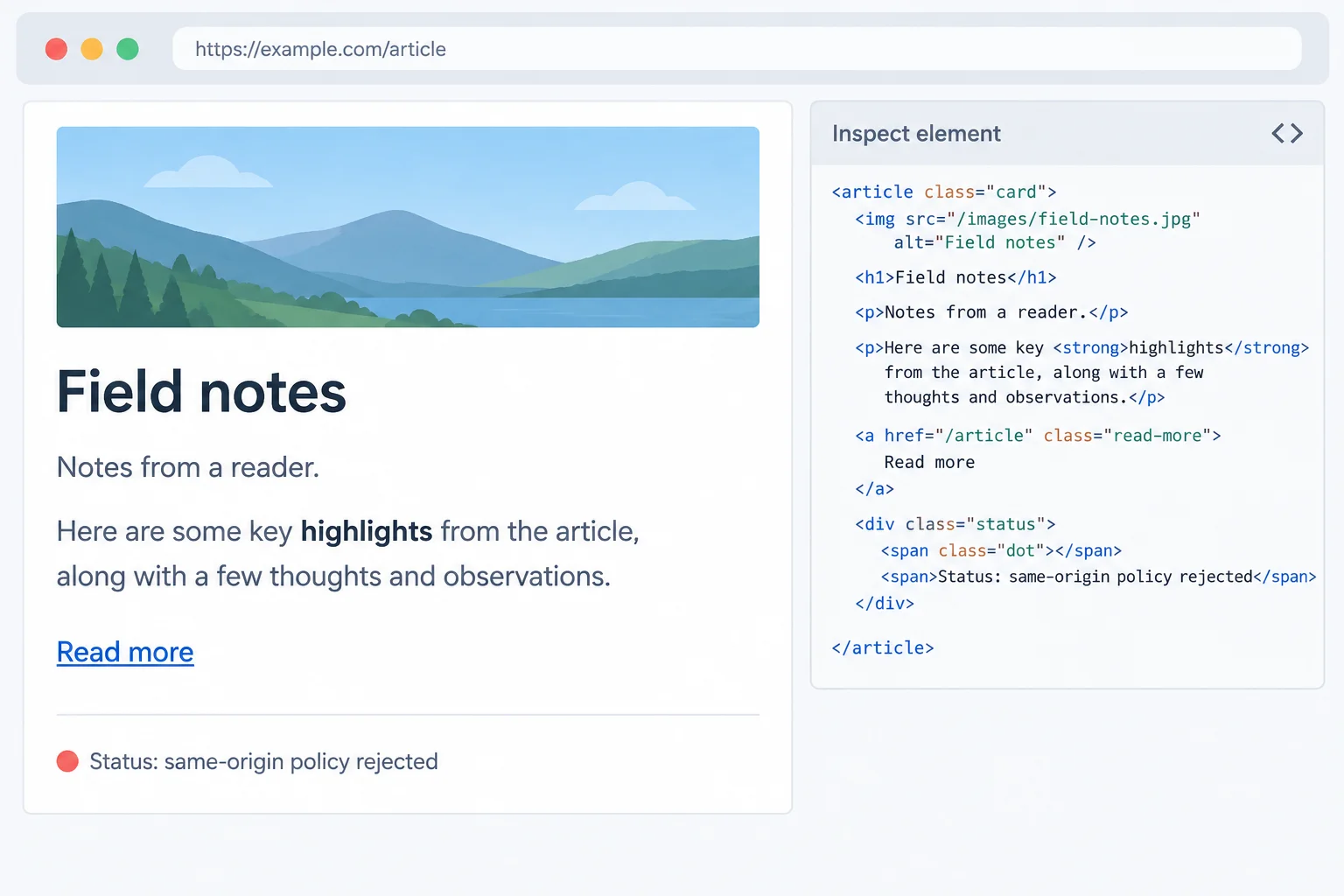
The baseline fixture renders the card. The inset illustrates the separate plain-text inspection check.
Use browser inspection rather than activating suspicious destinations. Change one fixture value at a time, refresh, observe the result, and then restore the baseline value.
summary to <em>Reader note</em>. The angle brackets remain visible; no em formatting element is created.bodyHtml to <p onmouseover="alert(1)">Read the <strong>highlights</strong>.</p>. Bold formatting remains. In the Elements panel, confirm that the event attribute is absent; do not hover to test it.url to javascript:alert(1). The card shows Link unavailable.These are inspection examples, not destinations to browse.
Evaluate each input only after parsing it. The public-resource policy calls getSafeHref(input); the in-app policy calls getSafeHref(input, true). Do not navigate to these illustrative destinations.
| Input | Policy | Expected result |
|---|---|---|
| /articles/42 | Same-origin only | Allowed |
| https://resources.example/guide | Web protocols | Allowed |
| https://resources.example/guide | Same-origin only | Rejected |
| //outside.example/guide | Same-origin only | Rejected |
| javascript:alert(1) | Web protocols | Rejected |
| data:text/html,example | Web protocols | Rejected |
| External field | Output context | Handling |
|---|---|---|
| title | Plain text | Ordinary JSX |
| summary | Plain text | Ordinary JSX |
| bodyHtml | Restricted rich HTML | Sanitize final HTML before sink |
| url | Navigation | Parse and enforce URL policy |
Complete the integrated rendering boundaries.
const cleanHtml = (article.bodyHtml, {
  ALLOWED_TAGS: ["p", "strong", "em", "ul", "ol", "li", "br"],
  ALLOWED_ATTR: [],
  ALLOW_ARIA_ATTR: false,
  ALLOW_DATA_ATTR: false,
});
const href = (article.url);

return (
  <article>
    <h2>{article.title}</h2>
    <p></p>
    <section dangerouslySetInnerHTML={{ __html: cleanHtml }} />
    {href ? <a href={href}>Read more</a> : <span>Link unavailable</span>}
  </article>
);In 2–5 sentences, report the results you observed for the markup-like summary, the inspected event attribute, the rejected destination, and the same-origin check. Then state the handling you completed for plain text, rich HTML, and the URL, and explain why declaring all four fields as string cannot replace those context-specific decisions.
Write at least 180 characters (0/180).
Congratulations! You completed: Prevent XSS When Rendering External Content
Thousands of online courses in video, ebooks and audiobooks.
To test your knowledge during online courses
Generated directly from your cell phone's photo gallery and sent to your email

Download our app via QR Code or the links below:.



Carry knowledge in your pocket.
Download the Cursa app.
There are hundreds of free courses available, with a free certificate of completion that is saved in your mobile image gallery.
Download the app to access the Course Completion Certificate for Free.


+ 10 million
students

Free and Valid
Certificate

60 thousand free
exercises

4.8/5 rating in
app stores

Free courses in
video and ebooks