Step 1 of 9
Convert Values Explicitly
Choose Number() or String() to create the value type a later decision needs while preserving the original input.

Learning path · Level 4 · Tutorial 2
Write predictable decisions by converting values deliberately, comparing them correctly, and selecting the appropriate conditional branch.

 Convert Values Explicitly
Choose Number() or String() to create the value type a later decision needs while preserving the original input. 2 min
Convert Values Explicitly
Choose Number() or String() to create the value type a later decision needs while preserving the original input. 2 min
 Recognize Failed Numeric Conversions
Detect failed numeric conversions with Number.isNaN() while keeping the original quiz input intact. 2 min
Recognize Failed Numeric Conversions
Detect failed numeric conversions with Number.isNaN() while keeping the original quiz input intact. 2 min
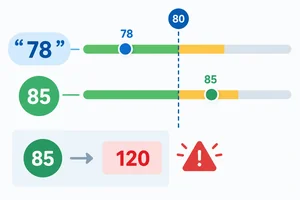 Compare Values Without Surprises
Compare JavaScript values predictably by checking types, converting score input deliberately, and selecting inclusive or exclusive operators. 2 min
Compare Values Without Surprises
Compare JavaScript values predictably by checking types, converting score input deliberately, and selecting inclusive or exclusive operators. 2 min
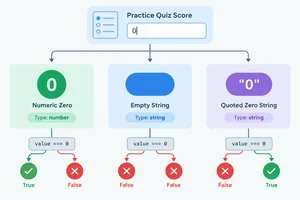 Understand Truthy and Falsy Values
Use Boolean conversion to classify relevant primitive values and recognize why truthiness cannot identify missing quiz scores by itself. 2 min
Understand Truthy and Falsy Values
Use Boolean conversion to classify relevant primitive values and recognize why truthiness cannot identify missing quiz scores by itself. 2 min
 Choose Between Two Branches
Write and trace an if/else decision that selects feedback from a score threshold. 2 min
Choose Between Two Branches
Write and trace an if/else decision that selects feedback from a score threshold. 2 min
 Combine and Negate Conditions
Combine logical conditions with parentheses, trace short-circuit evaluation, and distinguish selected operands from Boolean results. 2 min
Combine and Negate Conditions
Combine logical conditions with parentheses, trace short-circuit evaluation, and distinguish selected operands from Boolean results. 2 min
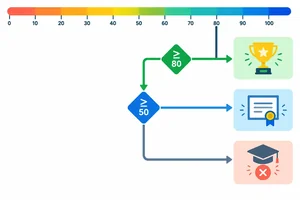 Choose the First Matching Branch
Order a mutually exclusive if/else if/else chain so each already-valid quiz score reaches one feedback branch. 2 min
Choose the First Matching Branch
Order a mutually exclusive if/else if/else chain so each already-valid quiz score reaches one feedback branch. 2 min
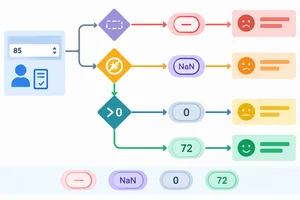 Validate Before Classifying
Protect score classification by checking missing original input and invalid converted values before score-band branches. 3 min
Validate Before Classifying
Protect score classification by checking missing original input and invalid converted values before score-band branches. 3 min
 Build and Check the Complete Decision
Build the complete Practice Quiz Feedback decision locally, then verify its branch order against normal, missing, invalid, boundary, and unsubmitted inputs. 3 min
Build and Check the Complete Decision
Build the complete Practice Quiz Feedback decision locally, then verify its branch order against normal, missing, invalid, boundary, and unsubmitted inputs. 3 min
Step 1 of 9
Choose Number() or String() to create the value type a later decision needs while preserving the original input.
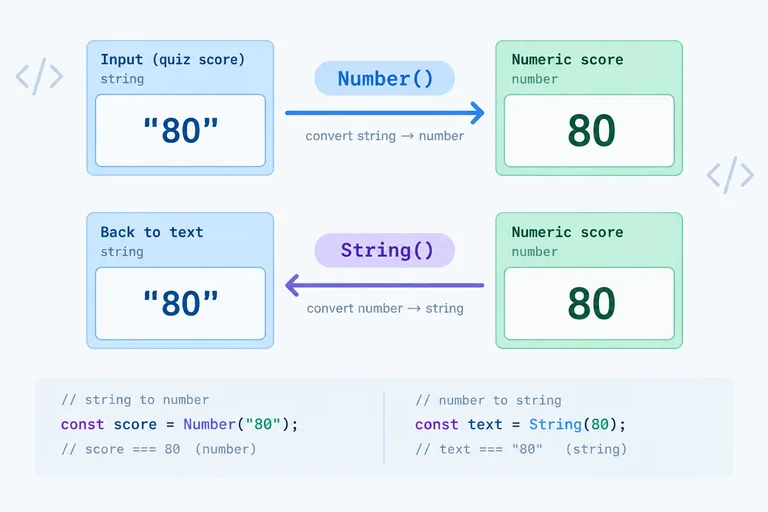
A conversion creates a new value in the type you request; it does not change the original value. For the quiz input, keep the original rawScore as the string "80", then create score as a number for later decision-making.
Use Number(...) when digits stored as text need to become a number. Use String(...) when a primitive value needs a text representation.
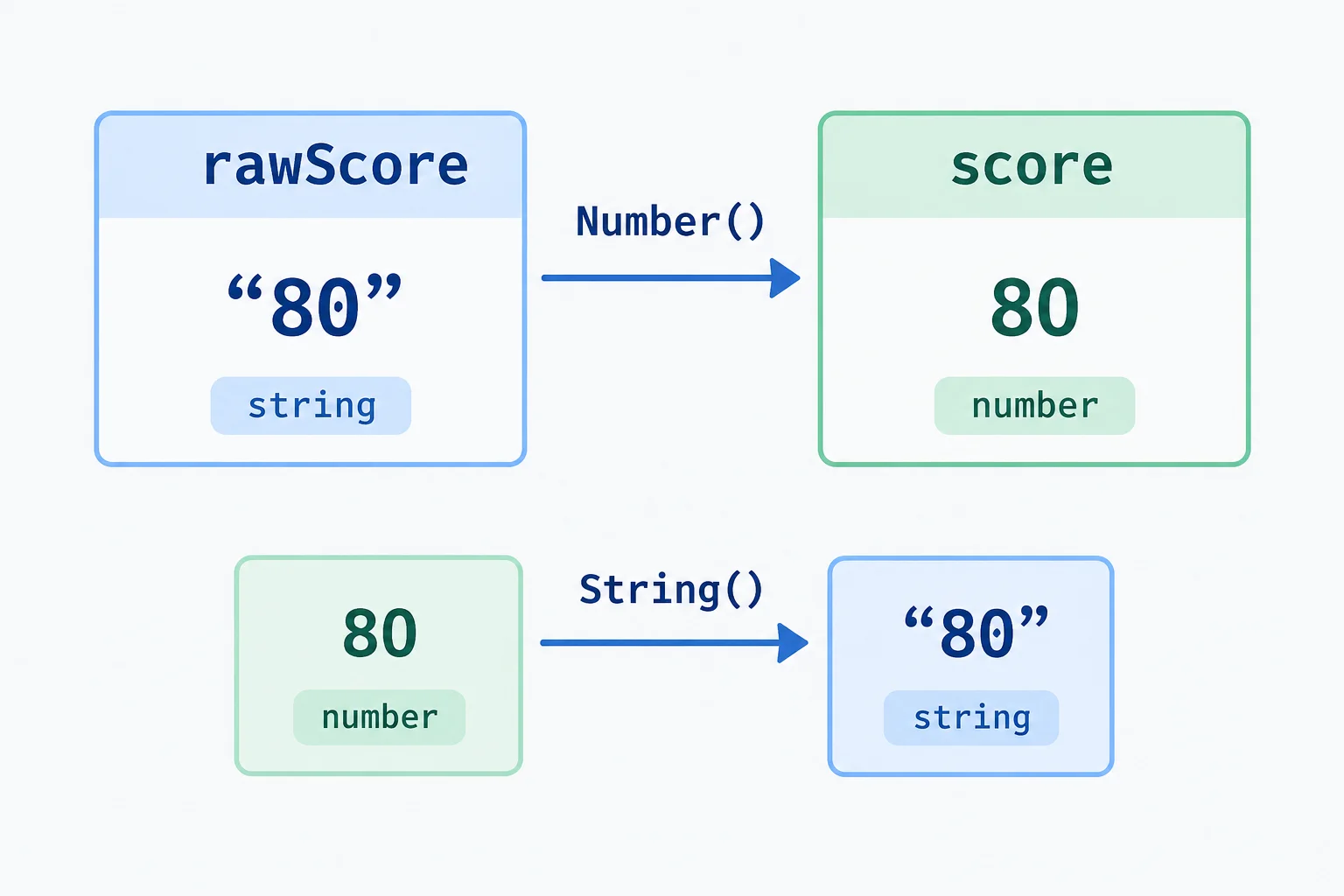
Quotes are part of the visual clue: "80" is a string, while 80 is a number.
Here is the running quiz example. rawScore remains available as its original input, while score and scoreText hold newly converted values. Paste this into your local script.js to inspect the types in the console.
const rawScore = "80";
const score = Number(rawScore);
const scoreText = String(score);

console.log(typeof rawScore, rawScore);
console.log(typeof score, score);
console.log(typeof scoreText, scoreText);string 80 number 80 string 80
Browsers commonly show the values without quotation marks in the console. The `typeof` result identifies whether each value is a string or number.
An empty string does not prove that a meaningful score was supplied. JavaScript converts both an empty string and a whitespace-only string to the number 0.
The Practice Quiz Feedback example accepts numeric strings without surrounding whitespace. The whitespace case below demonstrates JavaScript behavior, but normalizing whitespace is outside this example's input contract.
These results show why a conversion result alone cannot establish that a score was supplied.
| Expression | Resulting value | Resulting type |
|---|---|---|
| Number("") | 0 | number |
| Number(" ") | 0 | number |
| Number("80") | 80 | number |
| String(80) | "80" | string |
Complete the two conversion expressions.
const rawScore = "80";
const score = ;
const scoreText = ;

console.log(typeof rawScore, rawScore);
console.log(typeof score, score);
console.log(typeof scoreText, scoreText);Match each expression to the value and type it produces.
Tap an item and then its matching pair.
Step 2 of 9
Detect failed numeric conversions with Number.isNaN() while keeping the original quiz input intact.
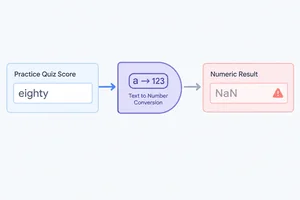
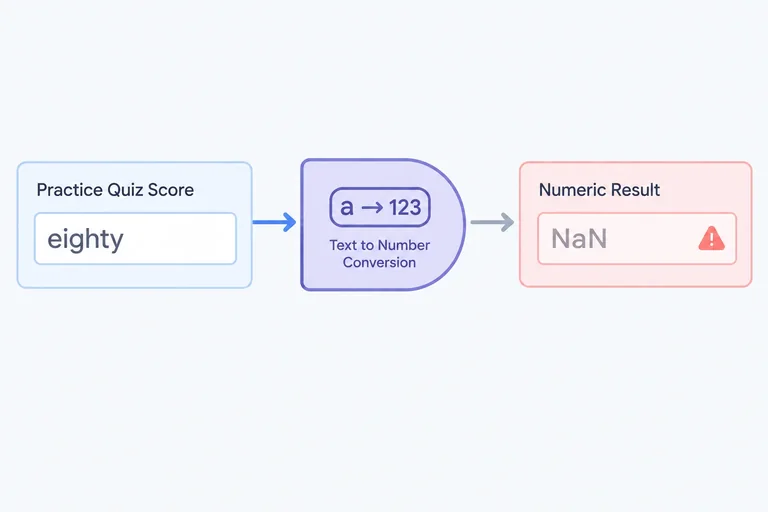
A numeric string that cannot be converted produces NaN (Not-a-Number), a special numeric value. The original input is still preserved: converting a value creates a new result; it does not change rawScore.
For quiz input, "eighty" is a string, while Number(rawScore) becomes NaN. Although typeof NaN is "number", NaN is not a usable quiz score. Therefore, typeof alone cannot tell you whether numeric conversion failed.
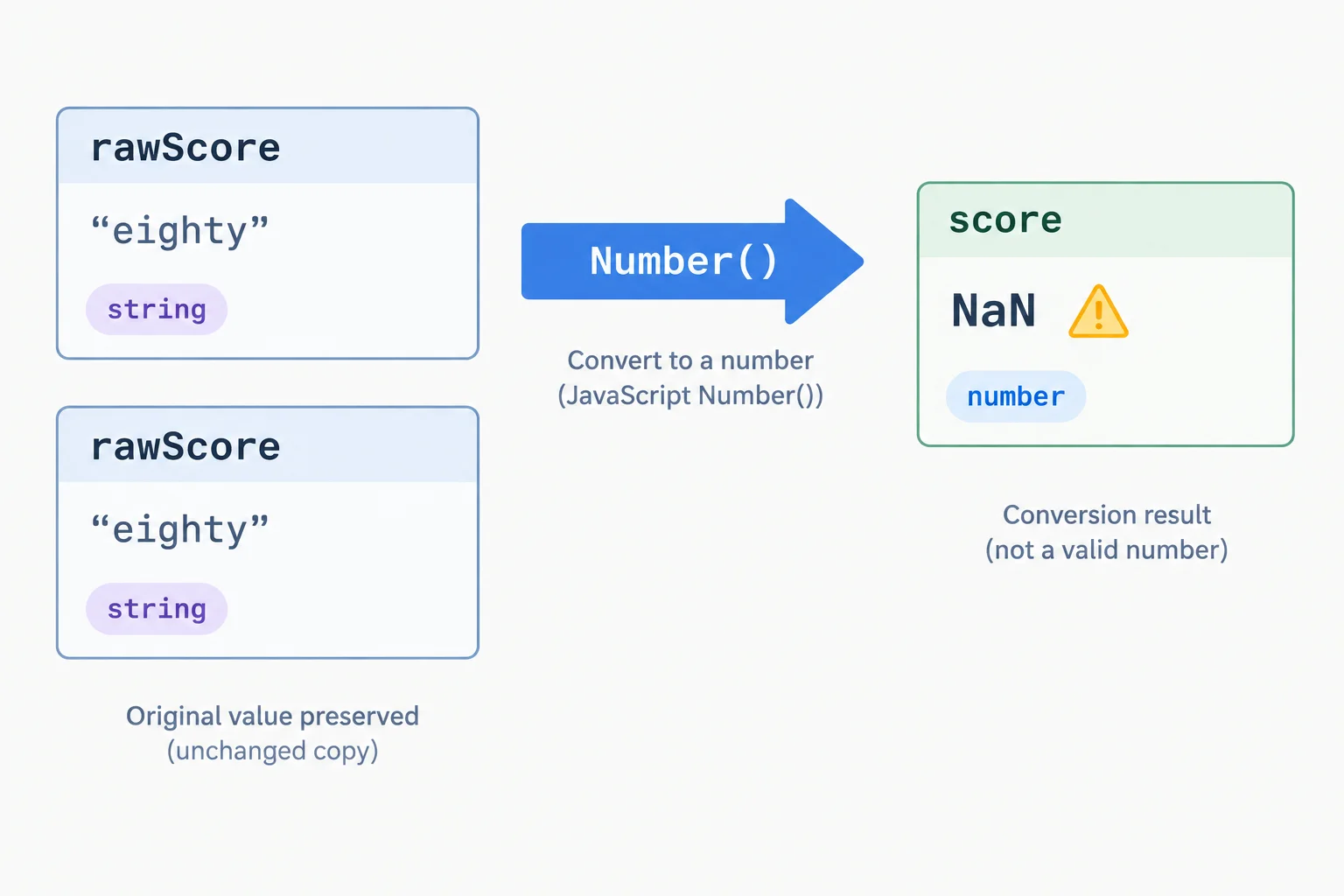
Keep the original input and the converted result as separate values.
Use Number.isNaN() on the converted result. It returns true only when its argument is actually NaN; it does not convert a string before checking it.
A missing value and a failed conversion are different concerns. For example, null converts to 0, while undefined converts to NaN. Later, the decision will check the original input to identify missing values rather than treating every conversion result the same way.
These results show why Number.isNaN(score) answers only one question: whether conversion produced NaN.
| rawScore | Number(rawScore) | Number.isNaN(score) | Meaning |
|---|---|---|---|
| "80" | 80 | false | Numeric conversion succeeded |
| "eighty" | NaN | true | Conversion failed |
| "" | 0 | false | Missing input, not a failed conversion |
| null | 0 | false | Missing input, not a failed conversion |
| undefined | NaN | true | Missing input that produces NaN |
Run this in script.js to see why the check must receive the converted value.
const rawScore = "eighty";
const score = Number(rawScore);

console.log(typeof score);
console.log(Number.isNaN(rawScore));
console.log(Number.isNaN(score));number false true
The first line is important: `typeof NaN` is "number", so type inspection does not identify this failed conversion.
Complete the conversion-and-check sequence. The Boolean must check the converted result, not the unconverted string.
const rawScore = "eighty";
const score = ;
const isInvalidScore = ;

console.log(isInvalidScore);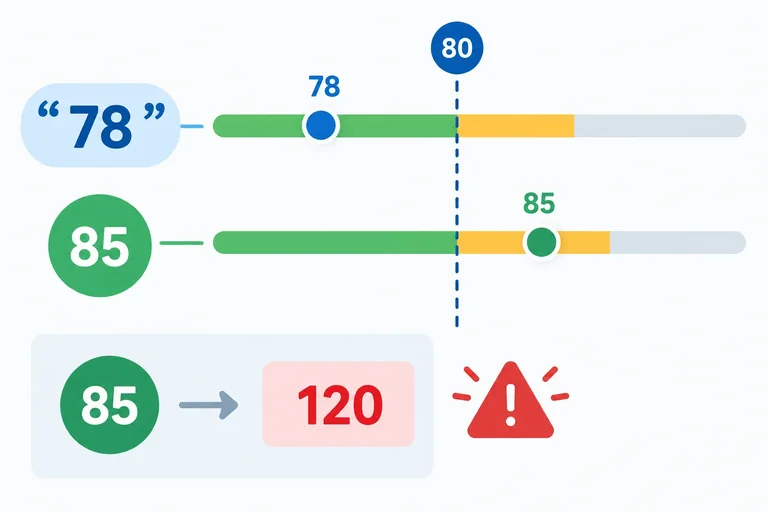
Step 3 of 9
Compare JavaScript values predictably by checking types, converting score input deliberately, and selecting inclusive or exclusive operators.
A comparison starts with the types of its operands. rawScore is the original string, while score is the deliberately converted number.
Strict equality (===) and strict inequality (!==) compare type and value without converting either side. Therefore, rawScore === 80 is false, but rawScore === "80" is true.
Coercive equality (==) and inequality (!=) may convert values first. They can produce a different result, so use them here only as a labeled contrast—not in decision code.
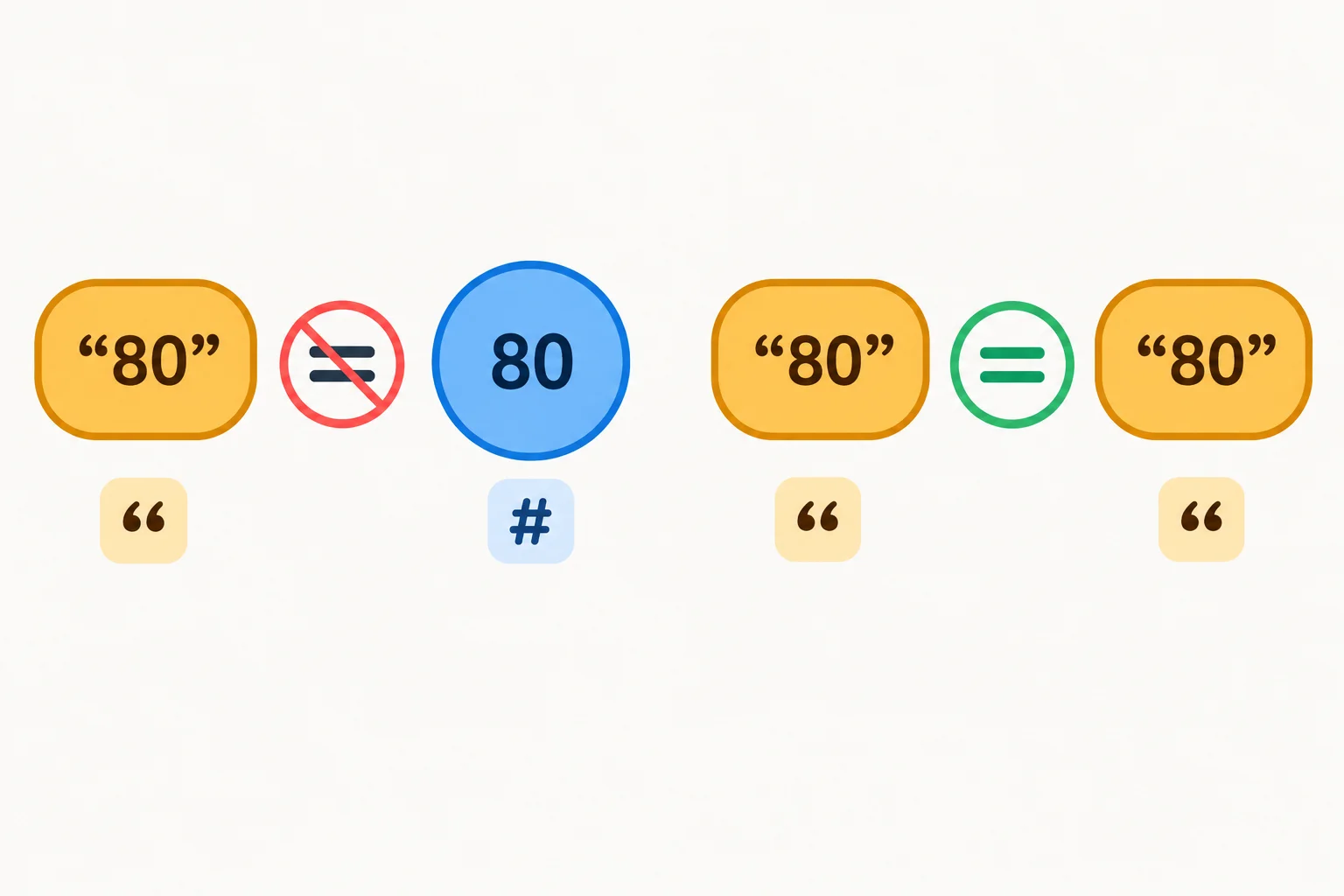
Strict comparison checks both the primitive type and the value.
Compare the same value with strict and coercive equality.
const rawScore = "80";
const score = Number(rawScore);

console.log(rawScore === 80);
console.log(rawScore !== 80);
console.log(rawScore === "80");
// Coercive comparison for contrast only:
console.log(rawScore == 80);false true true true
Relational operators describe boundaries: > and < exclude the boundary; >= and <= include it. For example, a score of 80 meets score >= 80 but not score > 80.
Do not compare score strings as though they were numbers. When both operands are strings, JavaScript compares them lexicographically (character by character). Convert score input deliberately before making a numeric boundary comparison.
A failed conversion is also not a valid score. NaN is not strictly equal to itself, and ordered comparisons involving it are false. Use Number.isNaN(score) to detect that result rather than relying on a comparison.
The right operator depends on whether the boundary itself belongs in the range.
| Operator | Boundary behavior | Result |
|---|---|---|
| > | Excludes 80 | false |
| >= | Includes 80 | true |
| < | Excludes 80 | false |
| <= | Includes 80 | true |
A string comparison can produce a surprising ordering. Numeric conversion gives the intended score comparison.
const score = 80;

console.log(score > 80);
console.log(score >= 80);
console.log("100" < "80");
console.log(Number("100") < Number("80"));false true true false
Ordered comparisons do not identify a failed conversion.
const score = Number("eighty");

console.log(score === score);
console.log(score >= 0);
console.log(Number.isNaN(score));false false true
const score = Number("eighty");
Which expression evaluates to true?
Complete the conversion and comparisons so every labeled result is accurate for the 80-point boundary.
const rawScore = "80";
const score = (rawScore);

console.log("strict same-type equality:", rawScore  "80");
console.log("coercive different-type equality:", rawScore  80);
console.log("at least 80:", score  80);
console.log("below 80:", score  80);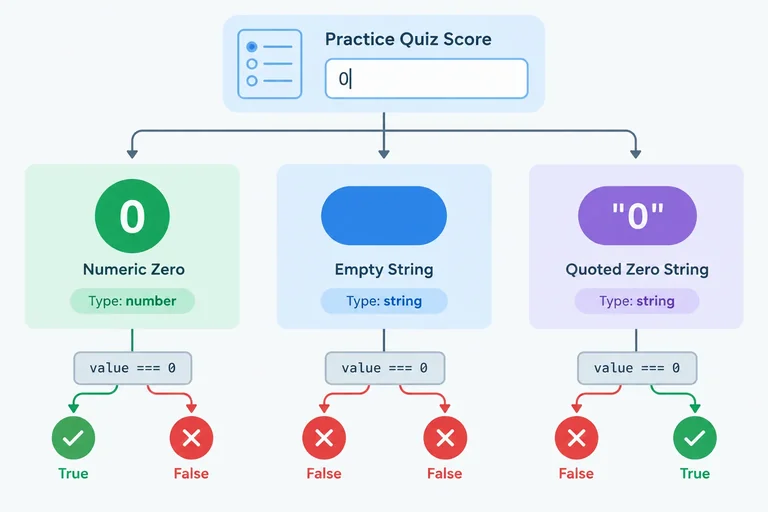
Step 4 of 9
Use Boolean conversion to classify relevant primitive values and recognize why truthiness cannot identify missing quiz scores by itself.
Boolean(value) explicitly converts a value to either true or false. It does not change the original value.
This matters for quiz input: the original rawScore can be a string, while score is its numeric conversion. Their truthiness can differ even when they represent the same characters.
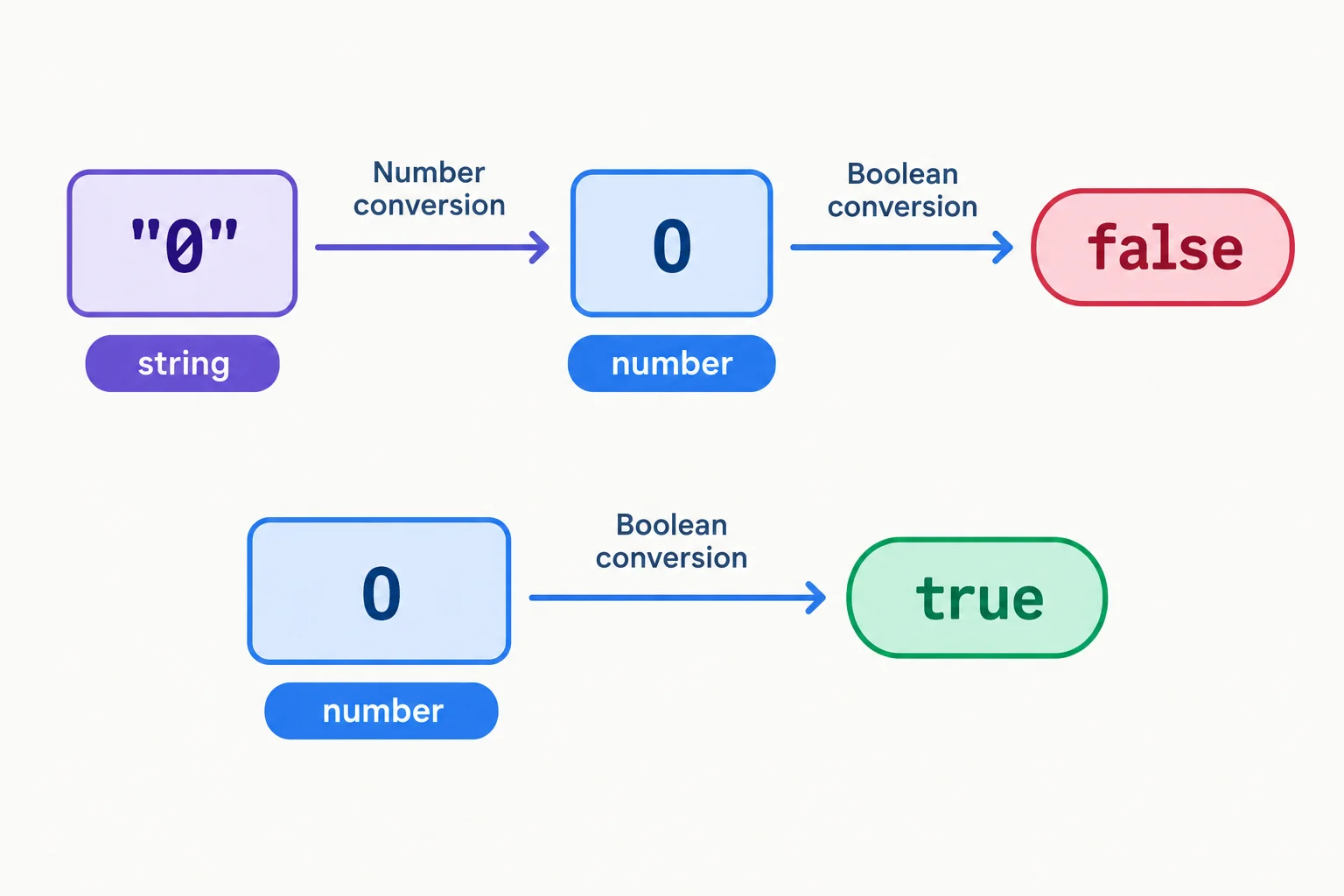
Truthiness depends on the value and its type, not just on visible characters.
The original input is the string "0"; the converted score is the number 0. Run this in script.js.
const rawScore = "0";
const score = Number(rawScore);

console.log(Boolean(rawScore));
console.log(Boolean(score));true false
A value is falsy when Boolean(value) produces false. Otherwise, it is truthy.
For this quiz example, truthiness is useful information, but it is not a general validity check. In particular, a score of zero is valid even though the number 0 is falsy.
These are the primitive values relevant to this tutorial.
| Value | Boolean result | Why |
|---|---|---|
| false | false | Boolean false |
| 0 | false | Numeric zero |
| "" | false | Empty string |
| null | false | No value |
| undefined | false | No assigned value |
| NaN | false | Failed numeric result |
| "0" | true | Nonempty string |
| "false" | true | Nonempty string |
| A string containing only spaces | true | Still nonempty |
| -1 or 80 | true | Nonzero number |
Truthiness is different from strict equality with true.
console.log(Boolean("80"));
console.log("80" === true);true false
Complete the conversion so wasProvided receives an explicit Boolean value.
const rawScore = "80";
const wasProvided = (rawScore);

console.log(wasProvided);Match each primitive value to its truthiness classification.
Tap an item and then its matching pair.

Step 5 of 9
Write and trace an if/else decision that selects feedback from a score threshold.
An if statement evaluates a condition. When that condition is truthy, JavaScript runs the code inside the if braces. When it is falsy, the optional else braces run instead.
Only one branch runs for one evaluation. After that branch finishes, JavaScript continues with the statement after the conditional.
For quiz feedback, use an explicit comparison such as score >= 80. Avoid if (score): both 49 and 80 are truthy, but they need different feedback.
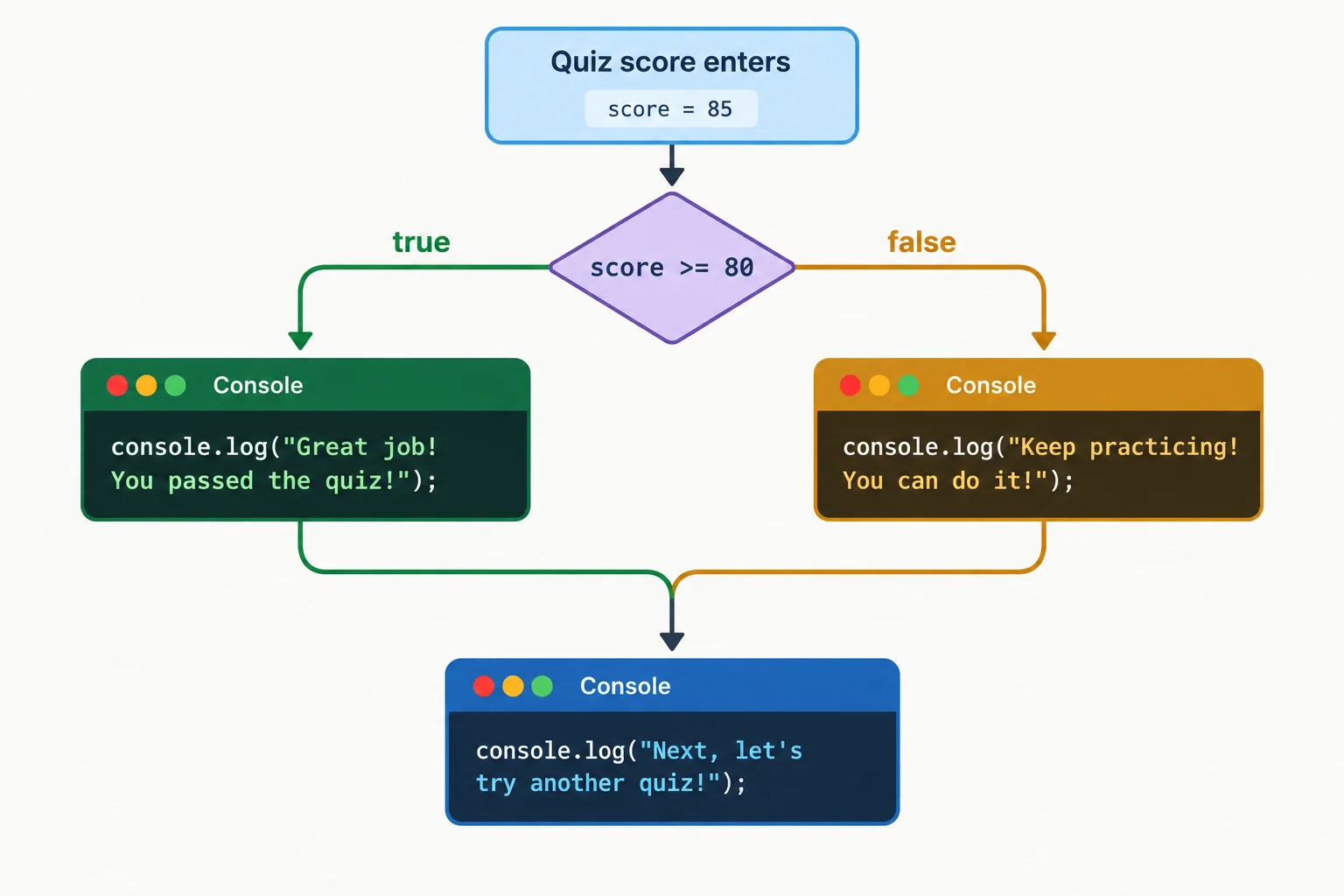
The condition has two exits: true and false. Exactly one branch executes, then both paths continue.
The original input remains a string, while score is the number used in the comparison. The >= operator includes the boundary: a score of 80 takes the first branch.
The last console.log(...) is outside both braced blocks. It runs after either branch, not just after the if branch.
Run this in your local script.js and inspect the browser console.
const rawScore = "80";
const score = Number(rawScore);

if (score >= 80) {
  console.log("Ready for the next challenge.");
} else {
  console.log("Keep practicing.");
}

console.log("Decision complete.");Ready for the next challenge. Decision complete.
The two lines show the feedback branch followed by the statement after the conditional.
Tip
The comparison answers a specific question: “Is the numeric score at least 80?” This makes the threshold visible and predictable.
Complete the two missing parts of this two-branch conditional. Run it locally when finished. For the next screen, change only rawScore to "80" and run it again.
const rawScore = "49";
const score = Number(rawScore);

if (score  80) {
  console.log("Ready for the next challenge.");
}  {
  console.log("Keep practicing.");
}

console.log("Decision complete.");Using the completed program from the previous screen, run it with rawScore = "49". Then change only rawScore to "80" and run it again.
Write the two console lines for each run, and label each input value.
Write at least 50 characters (0/50).

Step 6 of 9
Combine logical conditions with parentheses, trace short-circuit evaluation, and distinguish selected operands from Boolean results.
Logical operators combine conditions you already know from comparisons.
&& (AND) makes a combined condition truthy only when both conditions are truthy.|| (OR) makes a combined condition truthy when at least one condition is truthy.! (NOT) produces the Boolean opposite of a value’s truthiness.Use parentheses to make a compound condition easy to read. They show that the two range comparisons belong together.
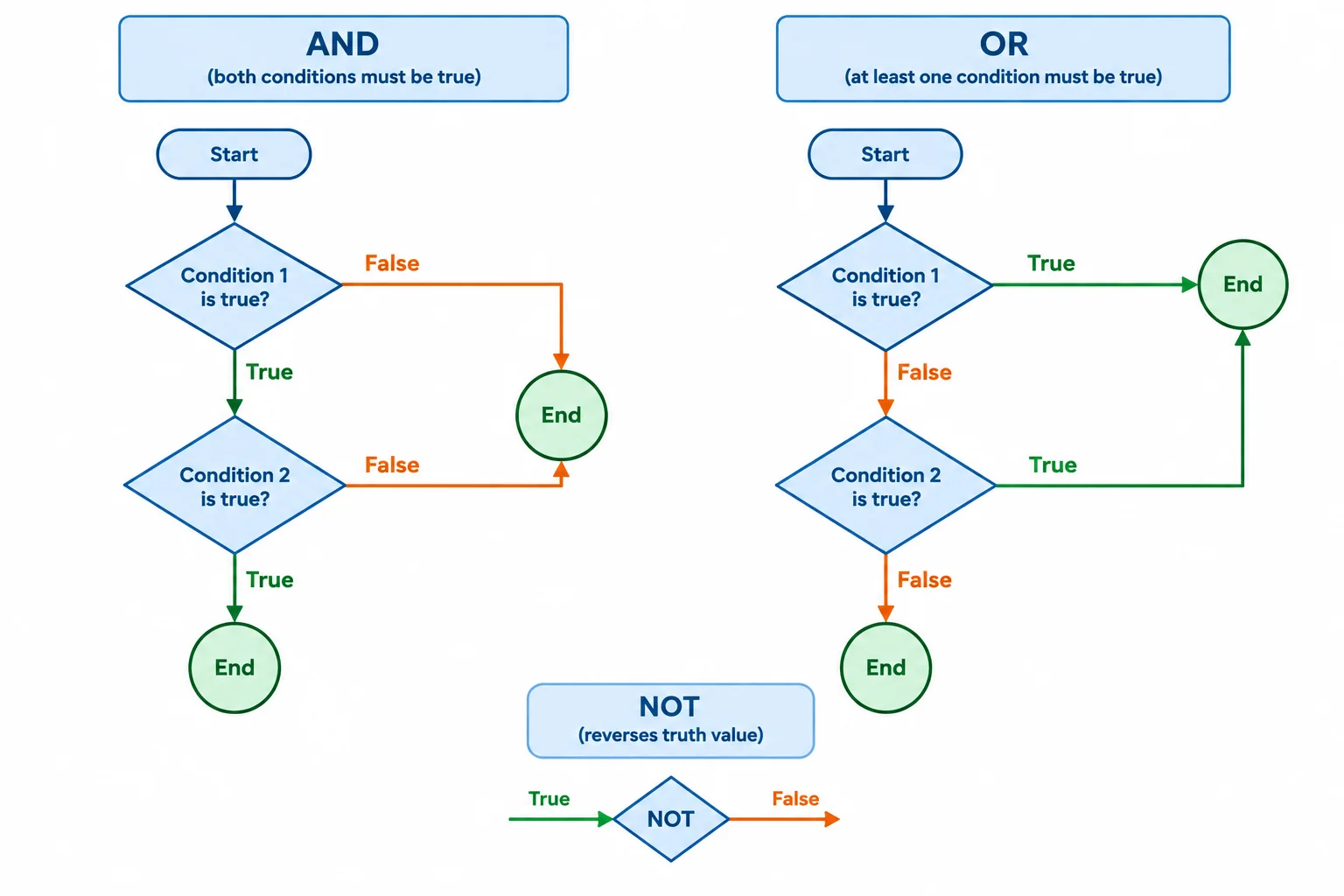
Read each compound condition from left to right. Parentheses make the intended grouping visible.
For a known numeric score, combine the submission state with an inclusive range check. This is grouping practice, not yet a complete missing-input or invalid-score check.
const rawScore = "80";
const score = Number(rawScore);
const hasSubmitted = true;

const isInRange = (score >= 0) && (score <= 100);
const canShowFeedback = hasSubmitted && isInRange;
const needsAttention = !hasSubmitted || !isInRange;

console.log(isInRange);
console.log(canShowFeedback);
console.log(needsAttention);true true false
JavaScript evaluates && and || from left to right. This is short-circuit evaluation.
For &&, a falsy left operand already prevents the whole condition from being truthy, so JavaScript skips the right operand. For ||, a truthy left operand already makes the expression truthy, so JavaScript skips the right operand.
When used with values rather than only Boolean conditions, && and || return a selected operand. They do not always return true or false. In contrast, ! always returns a Boolean.
The returned result can be an operand rather than a Boolean.
| Expression | Left truthiness | Right evaluated? | Result |
|---|---|---|---|
| false && "right" | falsy | No | false |
| true && "right" | truthy | Yes | "right" |
| "ready" || "fallback" | truthy | No | "ready" |
| "" || "fallback" | falsy | Yes | "fallback" |
With the default submission state, inspect an AND result, an OR fallback, and NOT.
const hasSubmitted = true;

const nextMessage = hasSubmitted && "Ready for the next challenge.";
const statusMessage = "" || "Enter a score.";

console.log(nextMessage);
console.log(statusMessage);
console.log(!hasSubmitted);Ready for the next challenge. Enter a score. false
The first two outputs are strings selected by AND and OR; the final output is a Boolean from NOT.
When the left operand of && is falsy, JavaScript reaches the right operand.
Complete the condition that allows feedback only for a submitted quiz with a score in the allowed inclusive range.
const canShowFeedback = && (score >= && score <= );Use the Practice Quiz bindings from the earlier screens. Assume hasSubmitted is set to false, score is set to 80, and rawScore is still a numeric string.
&& is not reached for these values.rawScore && 5.Write at least 120 characters (0/120).
Step 7 of 9
Order a mutually exclusive if/else if/else chain so each already-valid quiz score reaches one feedback branch.
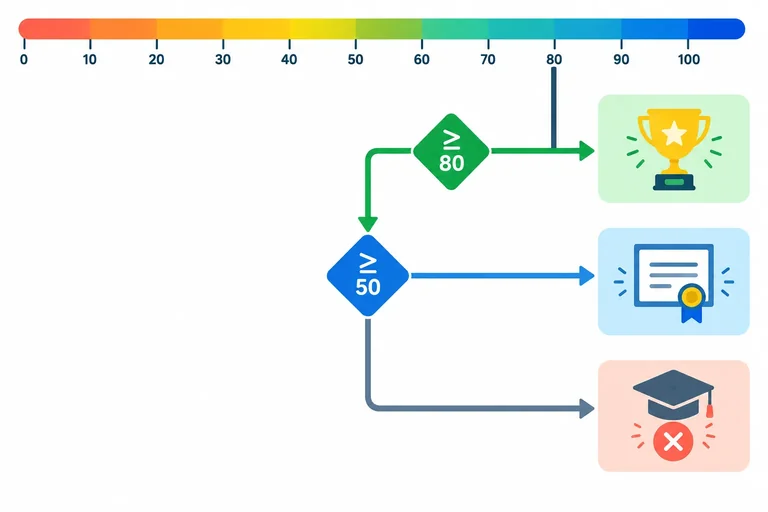
For an already-valid numeric score, an if / else if / else chain evaluates conditions from top to bottom. As soon as one condition is truthy, its branch runs and the rest of the chain is skipped.
Put the highest threshold first. A score of 80 meets both score >= 80 and score >= 50, so checking score >= 80 first gives it the more specific feedback.
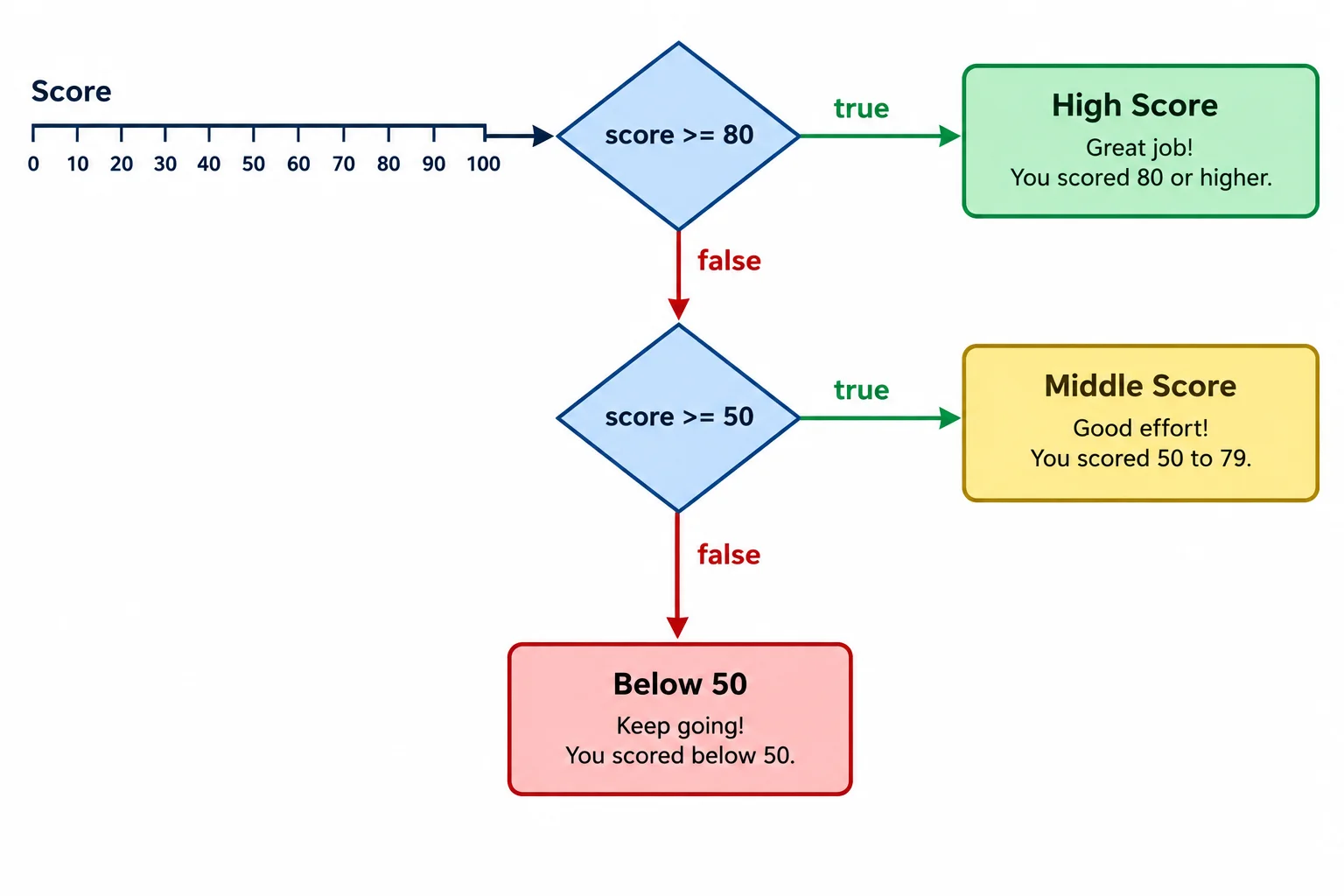
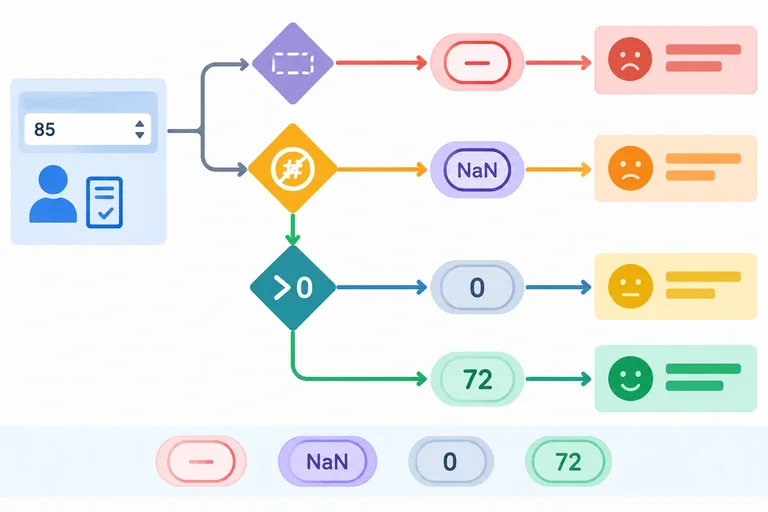
A true exit ends the chain. A false exit continues to the next alternative.
This chain classifies a score that has already been established as valid.
const rawScore = "80";
const score = Number(rawScore);

if (score >= 80) {
  console.log("Ready for the next challenge.");
} else if (score >= 50) {
  console.log("Keep practicing.");
} else {
  console.log("Review the basics.");
}Ready for the next challenge.
With `rawScore` set to `"80"`, only the first branch logs a message.
At each threshold, equality belongs to the higher band because the comparison uses >=. The final else handles every valid score that did not match either earlier condition.
| score | First matching condition | Executed branch |
|---|---|---|
| 49 | Neither comparison is true | Review the basics. |
| 50 | score >= 50 | Keep practicing. |
| 79 | score >= 50 | Keep practicing. |
| 80 | score >= 80 | Ready for the next challenge. |
Tip
With descending thresholds, the second condition does not need score < 80. Reaching it already means the first condition was false, so score is below 80.
With score set to 80, how many feedback messages does this code log?
if (score >= 80) {
  console.log("Ready for the next challenge.");
}

if (score >= 50) {
  console.log("Keep practicing.");
}

if (score < 50) {
  console.log("Review the basics.");
}Choose the syntactically valid repaired chain and its correct trace for these valid scores: 49, 50, 79, and 80.
Step 8 of 9
Protect score classification by checking missing original input and invalid converted values before score-band branches.
Convert the score, but keep the original input. A conversion result alone cannot tell you whether a score was supplied.
For this quiz contract, missing input means the original rawScore is exactly "", null, or undefined. This matters because Number("") and Number(null) both produce 0, while Number(undefined) produces NaN.
A numeric string such as "0" is not missing: it converts to the valid number 0. Check missingness against rawScore, not against the converted score.
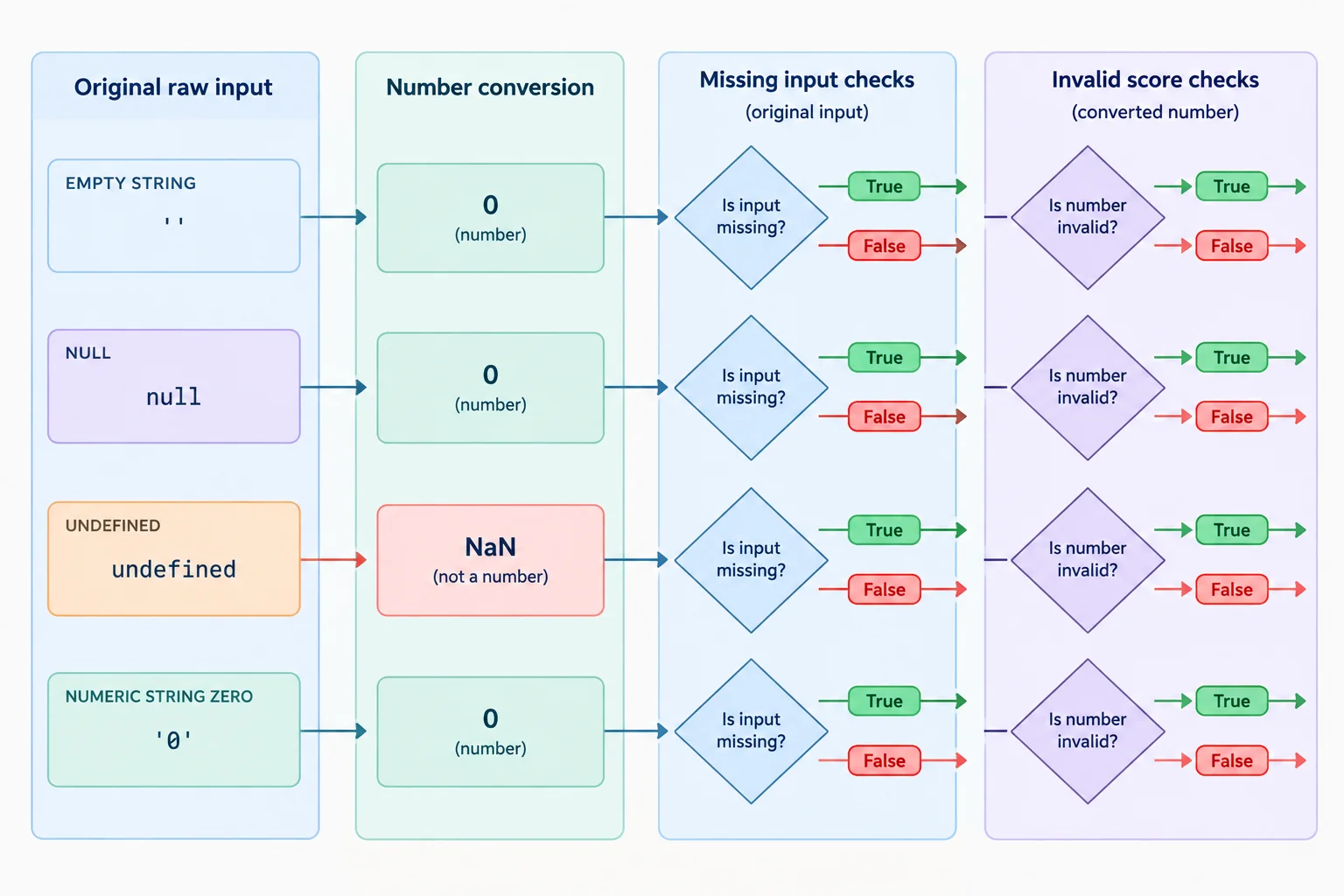
Retain rawScore so conversion does not hide a missing value.
Create derived Boolean conditions before the branch chain. The missing condition uses strict comparisons on rawScore. The invalid condition applies only to the converted score and covers failed conversion and values outside the inclusive range from 0 through 100.
Derived conditions for the Practice Quiz Feedback example
const rawScore = "80";
const score = Number(rawScore);

const isMissingScore =
  rawScore === "" ||
  rawScore === null ||
  rawScore === undefined;

const isInvalidScore =
  Number.isNaN(score) ||
  score < 0 ||
  score > 100;
Warning
Do not use !score as a missing-input check. The number 0 is falsy, but zero is a valid quiz score. A missing check and an invalid-score check answer different questions.
Put the guards before the score-band branches. An else if chain uses the first matching branch:
For rawScore = "0", neither guard matches, so zero continues to valid classification. For rawScore = "eighty", conversion produces NaN, so the invalid guard stops it from falling through to a normal band. undefined is both missing and converts to NaN, but the earlier missing branch wins.
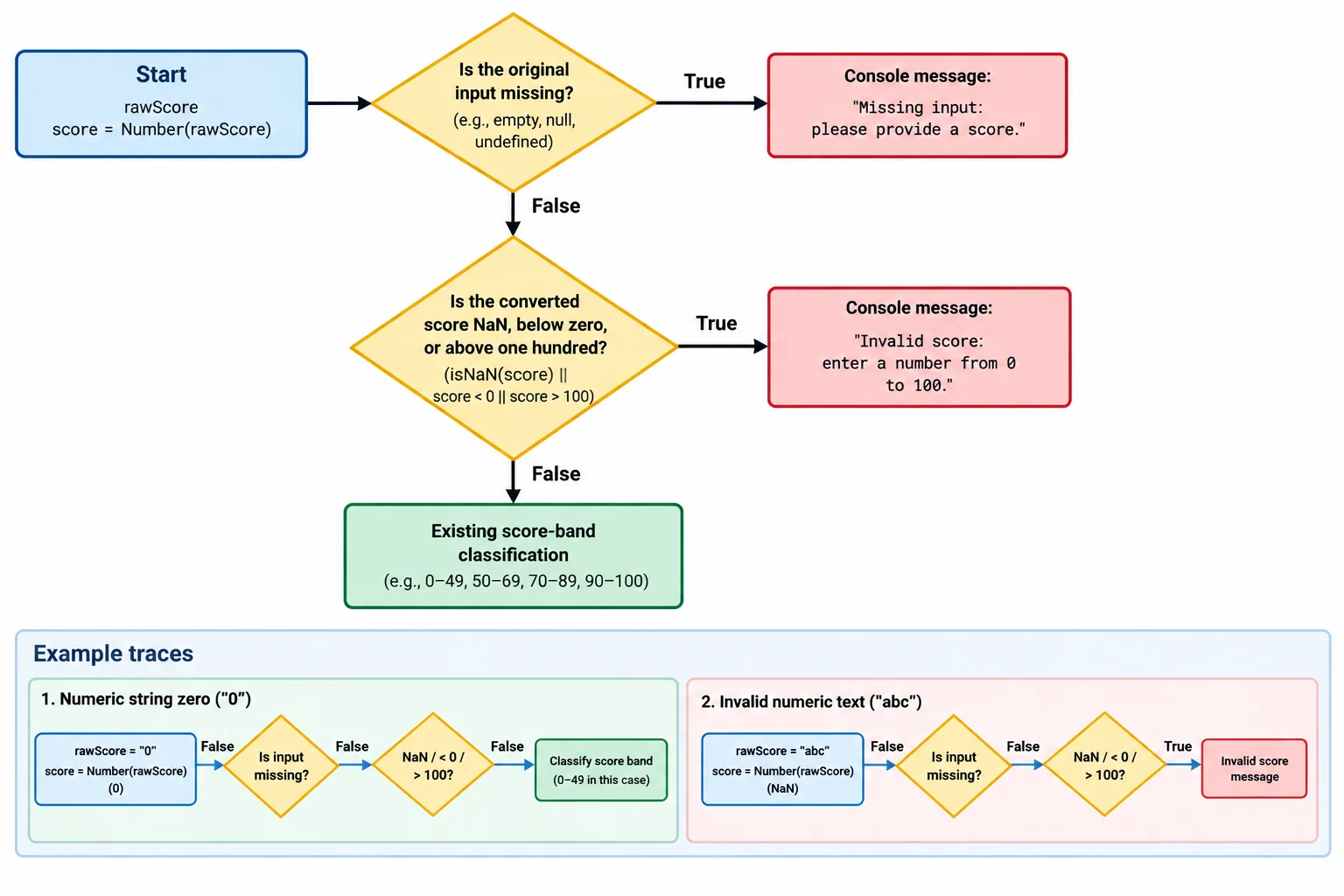
Early guards keep missing values and NaN out of ordinary score-band comparisons.
Warning
These guards are designed for this tutorial's stated input contract. They deliberately distinguish missing values, failed numeric conversion, and out-of-range scores; they are not a complete validator for every possible input format.
Complete the ordered guard chain. It must treat empty input, null, and undefined as missing; reject NaN and scores outside 0 through 100; and allow the numeric string "0" to reach valid classification.
const rawScore = "0";
const score = Number(rawScore);

if () {
  console.log("Enter a score.");
} else if () {
  console.log("Enter a score from 0 to 100.");
} else {
  console.log("Review the basics.");
}
Step 9 of 9
Build the complete Practice Quiz Feedback decision locally, then verify its branch order against normal, missing, invalid, boundary, and unsubmitted inputs.
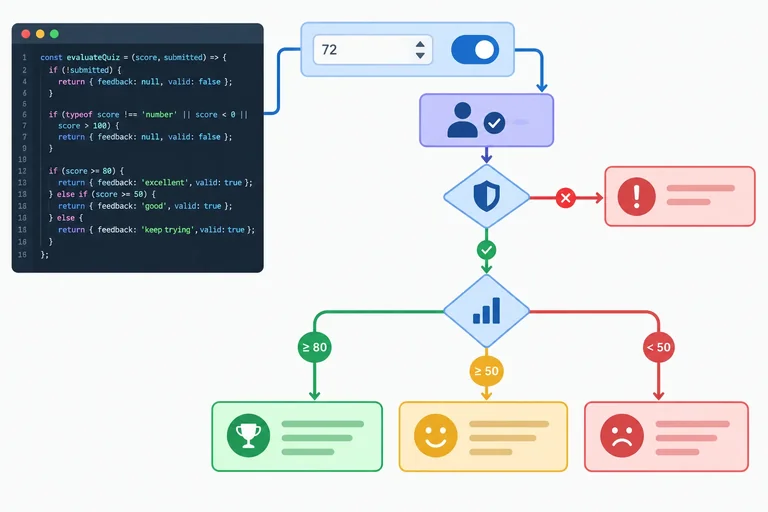
A complete decision has a priority order. First, stop when the quiz has not been submitted. Next, separate missing input from an invalid converted score. Only then classify a valid score into one feedback band.
Because an if / else if / else chain executes its first matching branch, a later score-band condition cannot override an earlier guard condition.
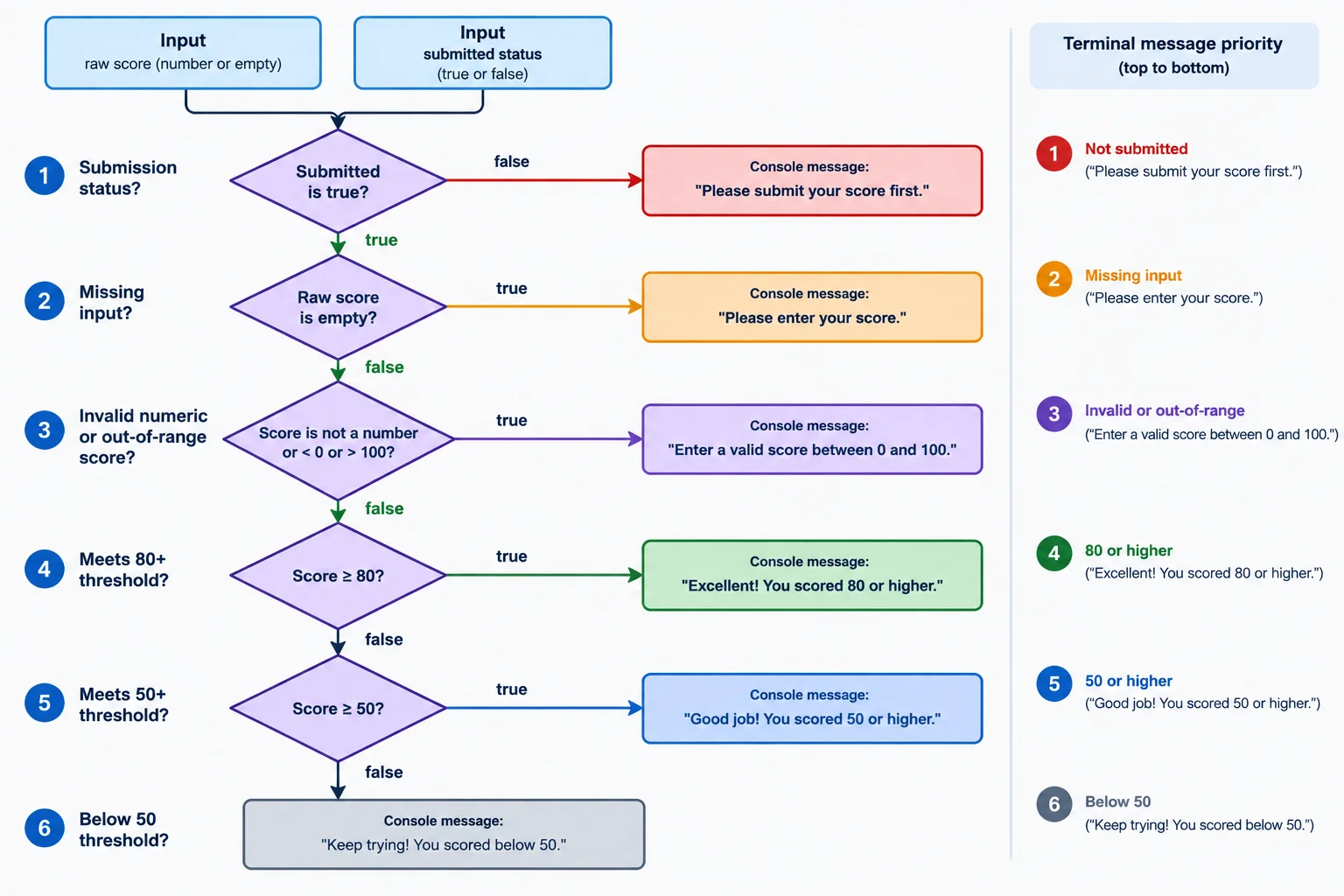
Read from top to bottom: the first true condition selects the only branch that runs.
Create these two files in the same local folder. The HTML file loads the script after the document is parsed.
<!doctype html>
<html lang="en">
<head>
  <meta charset="UTF-8">
  <meta name="viewport" content="width=device-width, initial-scale=1.0">
  <title>Practice Quiz Feedback</title>
  <script src="script.js" defer></script>
</head>
<body>
  <h1>Practice Quiz Feedback</h1>
</body>
</html>In script.js, retain rawScore, explicitly convert it to score, and derive the two Boolean conditions before the conditional. With the default inputs, save both files, refresh index.html, and inspect the browser console.
const rawScore = "80";
const hasSubmitted = true;
const score = Number(rawScore);

const isMissingScore =
  rawScore === "" ||
  rawScore === null ||
  rawScore === undefined;

const isInvalidScore =
  Number.isNaN(score) ||
  score < 0 ||
  score > 100;

if (!hasSubmitted) {
  console.log("Submit your quiz.");
} else if (isMissingScore) {
  console.log("Enter a score.");
} else if (isInvalidScore) {
  console.log("Enter a score from 0 to 100.");
} else if (score >= 80) {
  console.log("Ready for the next challenge.");
} else if (score >= 50) {
  console.log("Keep practicing.");
} else {
  console.log("Review the basics.");
}Ready for the next challenge.
This is the console output for the default inputs: `rawScore = "80"` and `hasSubmitted = true`. Change only one input case at a time when testing.
Use this matrix as a manual check. Replace the two input declarations at the top of script.js, save, refresh, and compare the console output with the expected message. Do not change multiple cases at once.
| rawScore | Expected console output |
|---|---|
| "0" | Review the basics. |
| "49" | Review the basics. |
| "50" | Keep practicing. |
| "79" | Keep practicing. |
| "80" | Ready for the next challenge. |
| "100" | Ready for the next challenge. |
These cases check the guards. Write null and undefined without quotation marks; they are values, not strings.
| rawScore | hasSubmitted | Expected console output |
|---|---|---|
| "-1" | true | Enter a score from 0 to 100. |
| "101" | true | Enter a score from 0 to 100. |
| "eighty" | true | Enter a score from 0 to 100. |
| "" | true | Enter a score. |
| null | true | Enter a score. |
| undefined | true | Enter a score. |
| "80" | false | Submit your quiz. |
Complete the branch conditions and boundaries for the integrated decision.
if () {
  console.log("Submit your quiz.");
} else if () {
  console.log("Enter a score.");
} else if () {
  console.log("Enter a score from 0 to 100.");
} else if (score >= ) {
  console.log("Ready for the next challenge.");
} else if (score >= ) {
  console.log("Keep practicing.");
} else {
  console.log("Review the basics.");
}After completing the script locally, run at least four cases: one missing case, one invalid case, one score-band boundary case, and one unsubmitted case. For each case, report the values you used, the expected console message, and the message you actually observed. State whether every expected and observed message matched.
Write at least 180 characters (0/180).
Summary
A predictable conditional starts with deliberately chosen values and ends at one traceable branch.
rawScore and convert it explicitly with Number(rawScore).Number.isNaN(score), and logical conditions for clear guards.if / else if / else chain runs only its first matching branch.Congratulations! You completed: Make Decisions with JavaScript Conditionals
Thousands of online courses in video, ebooks and audiobooks.
To test your knowledge during online courses
Generated directly from your cell phone's photo gallery and sent to your email

Download our app via QR Code or the links below:.



Carry knowledge in your pocket.
Download the Cursa app.
There are hundreds of free courses available, with a free certificate of completion that is saved in your mobile image gallery.
Download the app to access the Course Completion Certificate for Free.


+ 10 million
students

Free and Valid
Certificate

60 thousand free
exercises

4.8/5 rating in
app stores

Free courses in
video and ebooks