
Step 1 of 6
Find the Nearest Shared Owner
Identify the lowest component that can coordinate a search value across sibling components.

Learning path · Level 9 · Tutorial 6
Coordinate sibling components by assigning clear state ownership, passing typed callbacks, and deriving shared output without redundant state.

 Find the Nearest Shared Owner
Identify the lowest component that can coordinate a search value across sibling components. 2 min
Find the Nearest Shared Owner
Identify the lowest component that can coordinate a search value across sibling components. 2 min
 Lift the Value and Connect Typed Callbacks
Move the editable search value into ProductExplorer and connect child interactions through typed, value-based callbacks. 4 min
Lift the Value and Connect Typed Callbacks
Move the editable search value into ProductExplorer and connect child interactions through typed, value-based callbacks. 4 min
 Derive Results and Counts
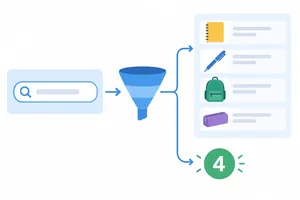
Calculate a filtered collection and its count from the parent-owned query, then give each child only the derived output it requires. 3 min
Derive Results and Counts
Calculate a filtered collection and its count from the parent-owned query, then give each child only the derived output it requires. 3 min
 Remove Mirrored Child State
Diagnose a stale child-state copy and restore one authoritative search value. 3 min
Remove Mirrored Child State
Diagnose a stale child-state copy and restore one authoritative search value. 3 min
 Keep Unrelated State Local
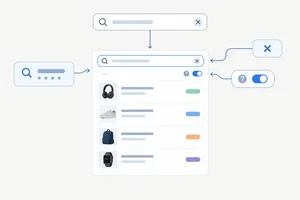
Keep the search query shared while preserving an independent help toggle inside the child that uses it. 2 min
Keep Unrelated State Local
Keep the search query shared while preserving an independent help toggle inside the child that uses it. 2 min
 Refactor and Verify the Shared Search
Complete and verify a local React refactor that coordinates sibling search components through one authoritative query while keeping independent help state local. 5 min
Refactor and Verify the Shared Search
Complete and verify a local React refactor that coordinates sibling search components through one authoritative query while keeping independent help state local. 5 min
Step 1 of 6
Identify the lowest component that can coordinate a search value across sibling components.
A value becomes shared state when more than one component must stay coordinated around it. In this interface, the editable search query begins in SearchControls, but the current search also affects what ProductList presents and what ResultSummary reports.
Siblings cannot directly own one another’s state. Instead, find the lowest component above every component that needs to coordinate around the value. That component is the state owner.
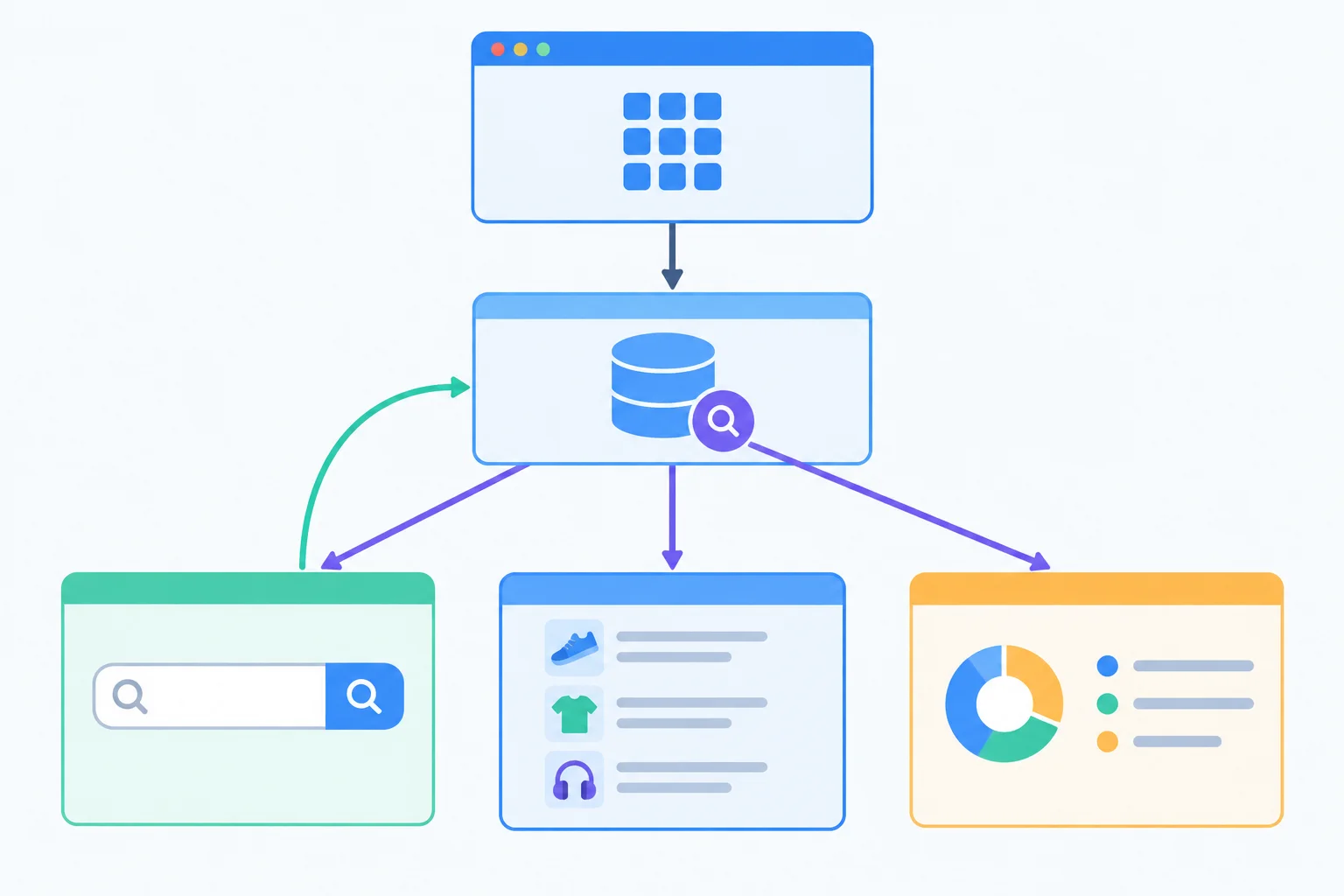
The shared query belongs where all three sibling responsibilities can be coordinated.
Use the nearest common ancestor rule:
For this tree, ProductExplorer is the nearest common ancestor of SearchControls, ProductList, and ResultSummary. It can hold the query, provide current information downward, and receive requests to change it from a child.
Example
SearchControls is too low: it is only one sibling, so it cannot coordinate its siblings from its own local state.
App is high enough, but it is farther away than necessary. Placing the query there would make App manage a feature that belongs entirely inside ProductExplorer.
Choose the smallest component boundary that contains every participant.
Consider this component tree:
App
└─ ProductExplorer
├─ SearchControls
├─ ProductList
└─ ResultSummary
Which component should own the search query?

Step 2 of 6
Move the editable search value into ProductExplorer and connect child interactions through typed, value-based callbacks.
query is shared state: SearchControls requests a new search string, while ResultSummary can request that the search be cleared. Their nearest shared state owner is ProductExplorer.
Move the authoritative query value out of SearchControls and into ProductExplorer. A child never changes a prop directly. It calls a callback supplied by the state owner; the owner updates state, and the next render sends the current value down through props.
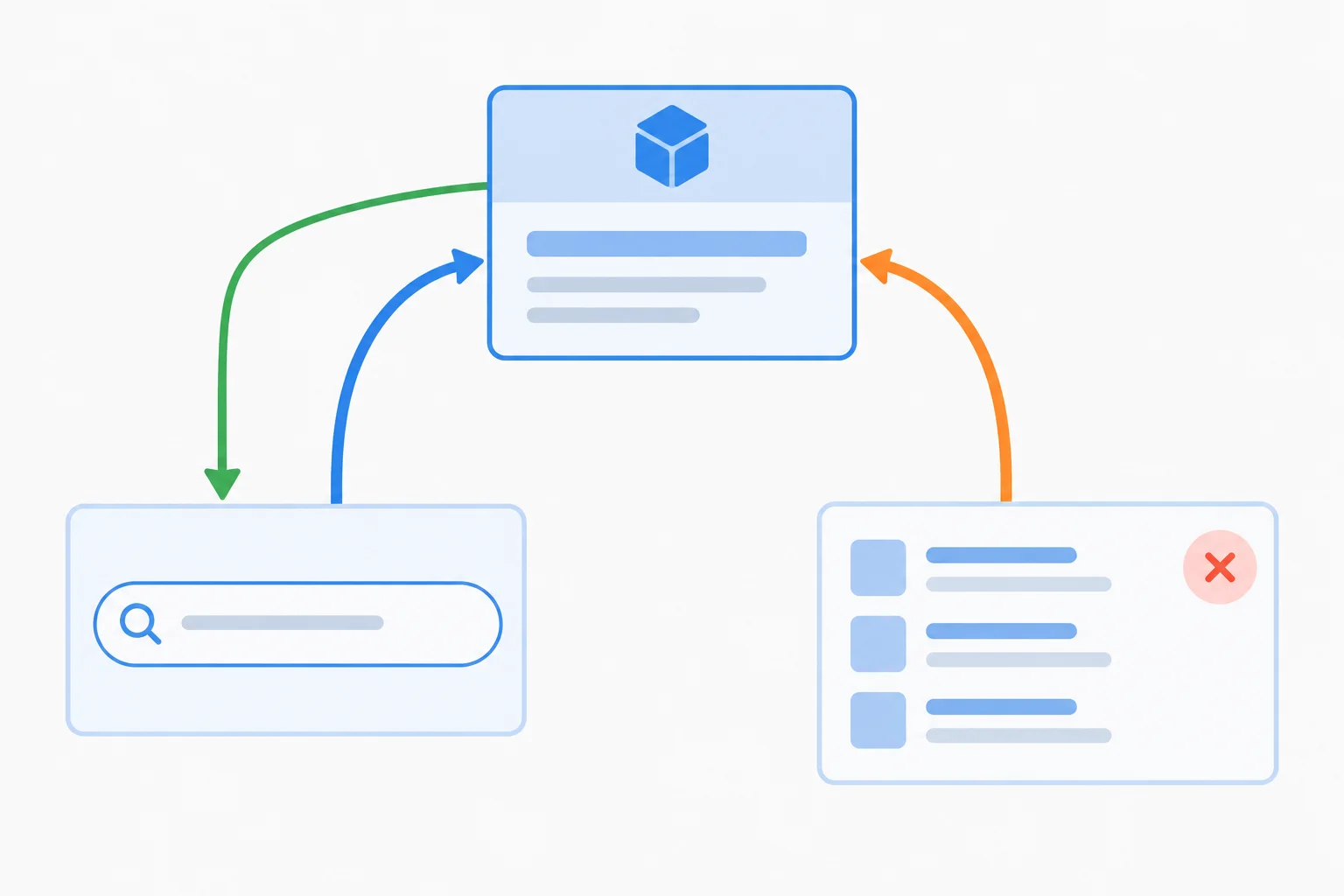
Children request changes through callbacks; the state owner supplies the current value through props.
Tip
Keep the DOM event at the input boundary. SearchControls reads event.currentTarget.value and passes only the next string to its callback. ProductExplorer receives application data, not a DOM event.
This focused excerpt shows the valid scope for the import, Hook, and handlers. The Hook and both handlers belong inside ProductExplorer; its JSX return will pass these handlers to the children.
Focused excerpt from src/App.tsx
import { useState } from 'react';

function ProductExplorer() {
  const [query, setQuery] = useState('');

  function handleQueryChange(nextQuery: string) {
    setQuery(nextQuery);
  }

  function handleClear() {
    setQuery('');
  }

  // Return JSX that passes query and these handlers to child components.
}SearchControlsProps describes a controlled child: it receives the current query and a callback that accepts a string. ResultSummaryProps receives a no-argument callback for its clear action. Neither child receives setQuery itself.
The input adapts its DOM event, while the summary forwards a no-argument request.
type SearchControlsProps = {
  query: string;
  onQueryChange: (nextQuery: string) => void;
};

type ResultSummaryProps = {
  count: number;
  onClear: () => void;
};

function SearchControls({
  query,
  onQueryChange,
}: SearchControlsProps) {
  return (
    <section>
      <label htmlFor='product-search'>Search products</label>
      <input
        id='product-search'
        value={query}
        onChange={(event) => onQueryChange(event.currentTarget.value)}
      />
    </section>
  );
}

function ResultSummary({ count, onClear }: ResultSummaryProps) {
  return (
    <section>
      <p>Results: {count}</p>
      <button type='button' onClick={onClear}>Clear search</button>
    </section>
  );
}Complete the value and callback connections. The surrounding declarations already exist.
function SearchControls({
  query,
  onQueryChange,
}: SearchControlsProps) {
  return (
    <section>
      <label htmlFor='product-search'>Search products</label>
      <input
        id='product-search'
        value={}
        onChange={(event) => (event.currentTarget.value)}
      />
    </section>
  );
}

// In ProductExplorer JSX, resultCount is already available.
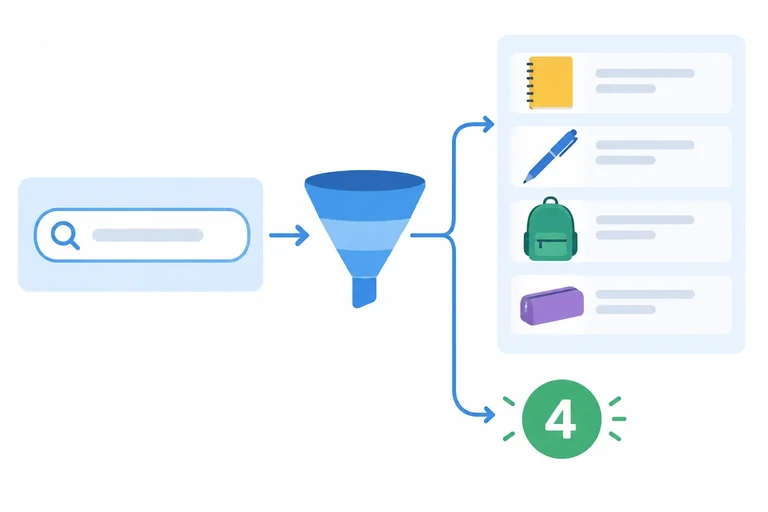
<ResultSummary count={resultCount} onClear={} />Put this shared-query sequence in order. It applies whether a user types in the input or selects Clear search.
Step 3 of 6
Calculate a filtered collection and its count from the parent-owned query, then give each child only the derived output it requires.
query is the minimal editable shared state: SearchControls requests changes, while ProductList and ResultSummary must reflect the same current search.
ProductExplorer is the state owner. It should store query, but it should not store outputs that can be recalculated from query and the fixed products data. Those outputs are derived values.
This keeps one authoritative editable value. ProductList needs the filtered collection, and ResultSummary needs its count—not the raw query.
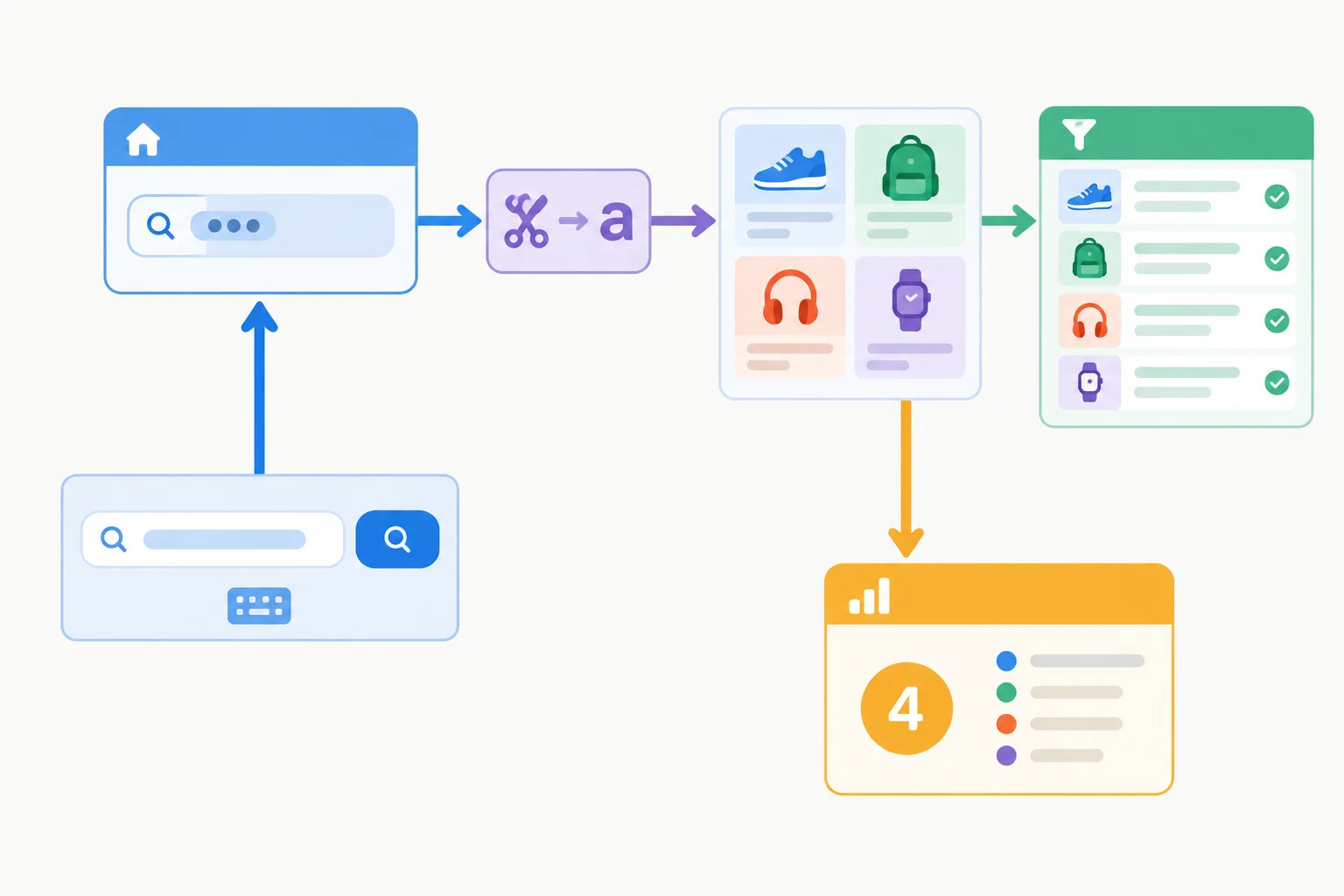
The parent keeps the editable value; the list and summary receive only the derived output they need.
Calculate derived values in ProductExplorer on every render, after the handlers and before the returned JSX. Trimming and lowercasing are used only for matching; the input continues to display the original query value.
Both sibling outputs come from filteredProducts. This means the displayed count cannot disagree with the rendered collection.
Core of ProductExplorer: calculations are render-time values, not additional state.
const normalizedQuery = query.trim().toLowerCase();
const filteredProducts = products.filter((product) =>
  product.name.toLowerCase().includes(normalizedQuery)
);
const resultCount = filteredProducts.length;

return (
  <section>
    <SearchControls
      query={query}
      onQueryChange={handleQueryChange}
    />
    <ProductList products={filteredProducts} />
    <ResultSummary
      count={resultCount}
      onClear={handleClear}
    />
  </section>
);Use these cases to check that the list and count have the same source.
| Query typed | Names rendered | Count | Other result |
|---|---|---|---|
| '' | Notebook, Pen, Pencil, Backpack | 4 | Product list |
| 'pen' | Pen, Pencil | 2 | Product list |
| ' PEN ' | Pen, Pencil | 2 | Product list |
| 'xyz' | None | 0 | Empty state |
Complete the render-time data flow in ProductExplorer so the list, count, and empty state stay consistent for every search query.
const normalizedQuery = query.().toLowerCase();
const filteredProducts = products.((product) =>
  product.name.toLowerCase().includes(normalizedQuery)
);
const resultCount = filteredProducts.;

return (
  <section>
    <SearchControls
      query={query}
      onQueryChange={handleQueryChange}
    />
    <ProductList products={} />
    <ResultSummary
      count={}
      onClear={handleClear}
    />
  </section>
);
Step 4 of 6
Diagnose a stale child-state copy and restore one authoritative search value.
SearchControls, ProductList, and ResultSummary coordinate through one editable search value. ProductExplorer is the state owner because it is their nearest shared parent.
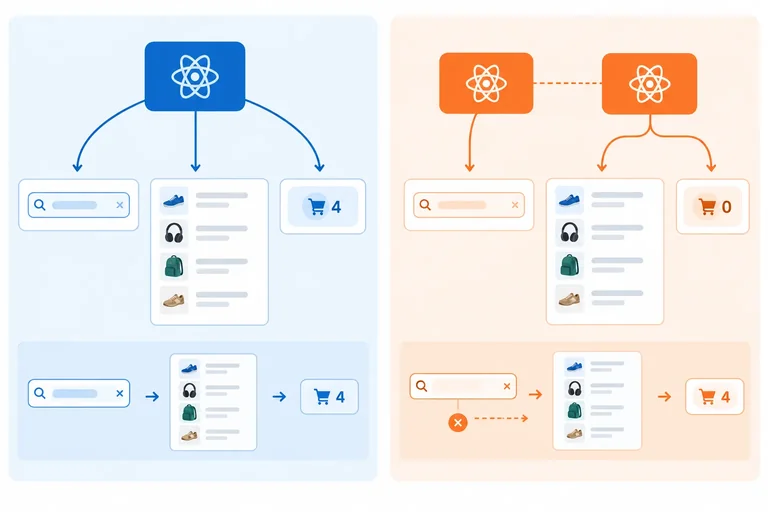
A child can accidentally create a second source of truth by initializing its own state from a prop: useState(query). That call uses the received value only for the child’s initial state. Later prop changes do not replace the child’s stored value.
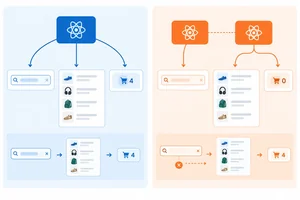
Typing can hide the problem when the child updates both values. A clear request from ResultSummary exposes it: the parent query changes, so the list and count update, while the child’s copied value can remain stale.
The left side has one authoritative value. The warning side shows why a copied child value can disagree after another child requests a change.
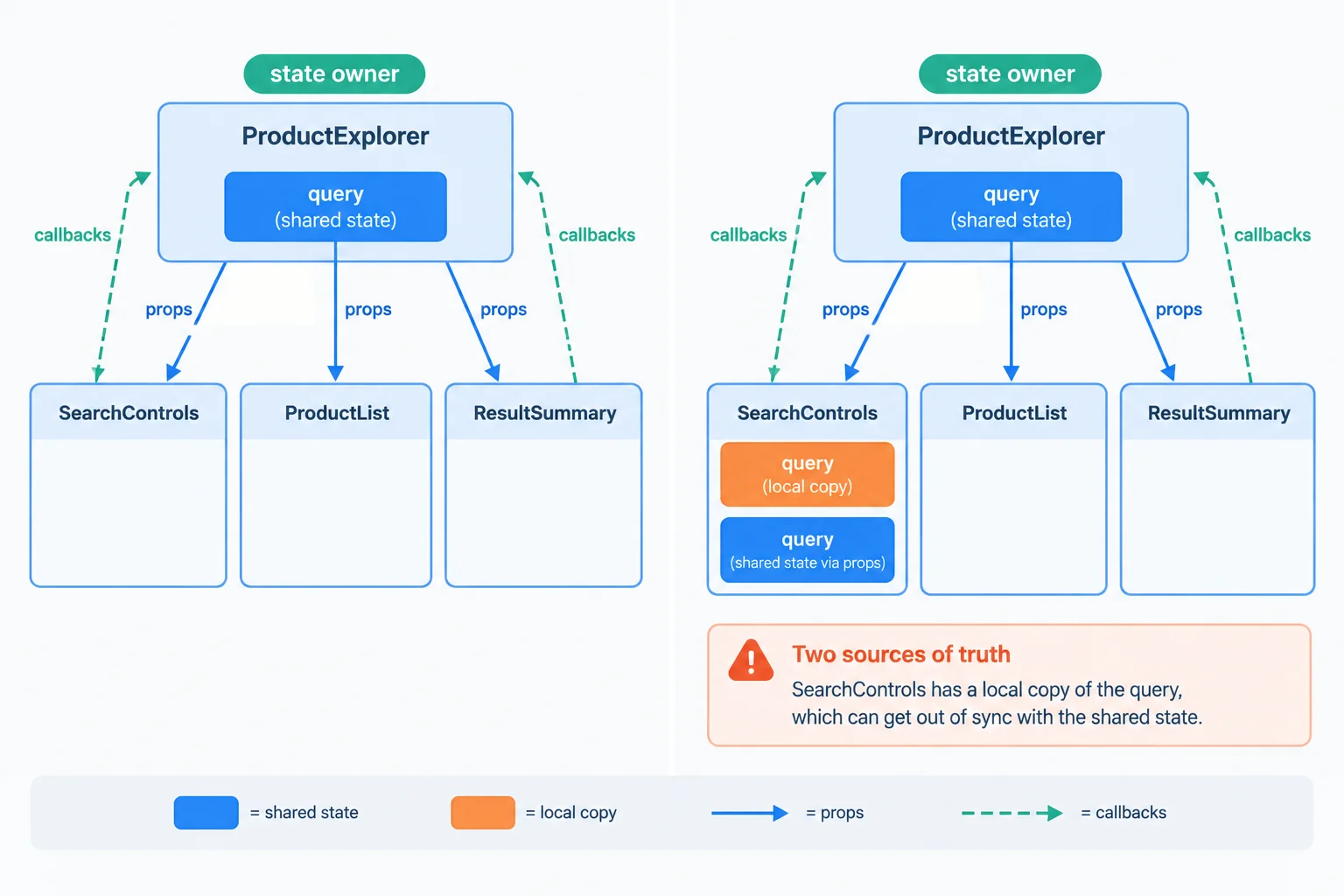
A shared value stays consistent when the state owner supplies the current prop on every render.
This focused example shows the problematic pattern inside SearchControls. The parent still receives each typed value, so the interface seems correct until a sibling changes the parent-owned value.
type SearchControlsProps = {
  query: string;
  onQueryChange: (nextQuery: string) => void;
};

function SearchControls({
  query,
  onQueryChange,
}: SearchControlsProps) {
  const [localQuery, setLocalQuery] = useState(query);

  return (
    <>
      <label htmlFor='product-search'>Search products</label>
      <input
        id='product-search'
        value={localQuery}
        onChange={(event) => {
          const nextQuery = event.currentTarget.value;
          setLocalQuery(nextQuery);
          onQueryChange(nextQuery);
        }}
      />
    </>
  );
}
Warning
When ResultSummary calls the parent clear handler, the parent changes its query to an empty string. ProductList and ResultSummary derive their output from that value, but this input reads localQuery instead. The interface now has competing sources of truth.
Do not add more stored copies to repair this. Remove the copied editable value so the input reads the current prop and asks the state owner to update it.
In the prop-copy pattern, a user types pen and then selects Clear search. What does the interface show immediately afterward?
After removing the child state line that copies a received prop, complete the replacement input. It must display the received current value and send the next string through the received callback.
<input
  id='product-search'
  value=
  onChange={(event) => (event.currentTarget.value)}
/>
Step 5 of 6
Keep the search query shared while preserving an independent help toggle inside the child that uses it.
Only lift state when more than one component must coordinate with it. The editable query affects the input, the product list, and the result summary, so its state owner is ProductExplorer, their nearest shared parent.
The help panel is different: only SearchControls displays it or changes it. Keep showHelp there as local state. A controlled component can receive one value through props while owning another, unrelated value.
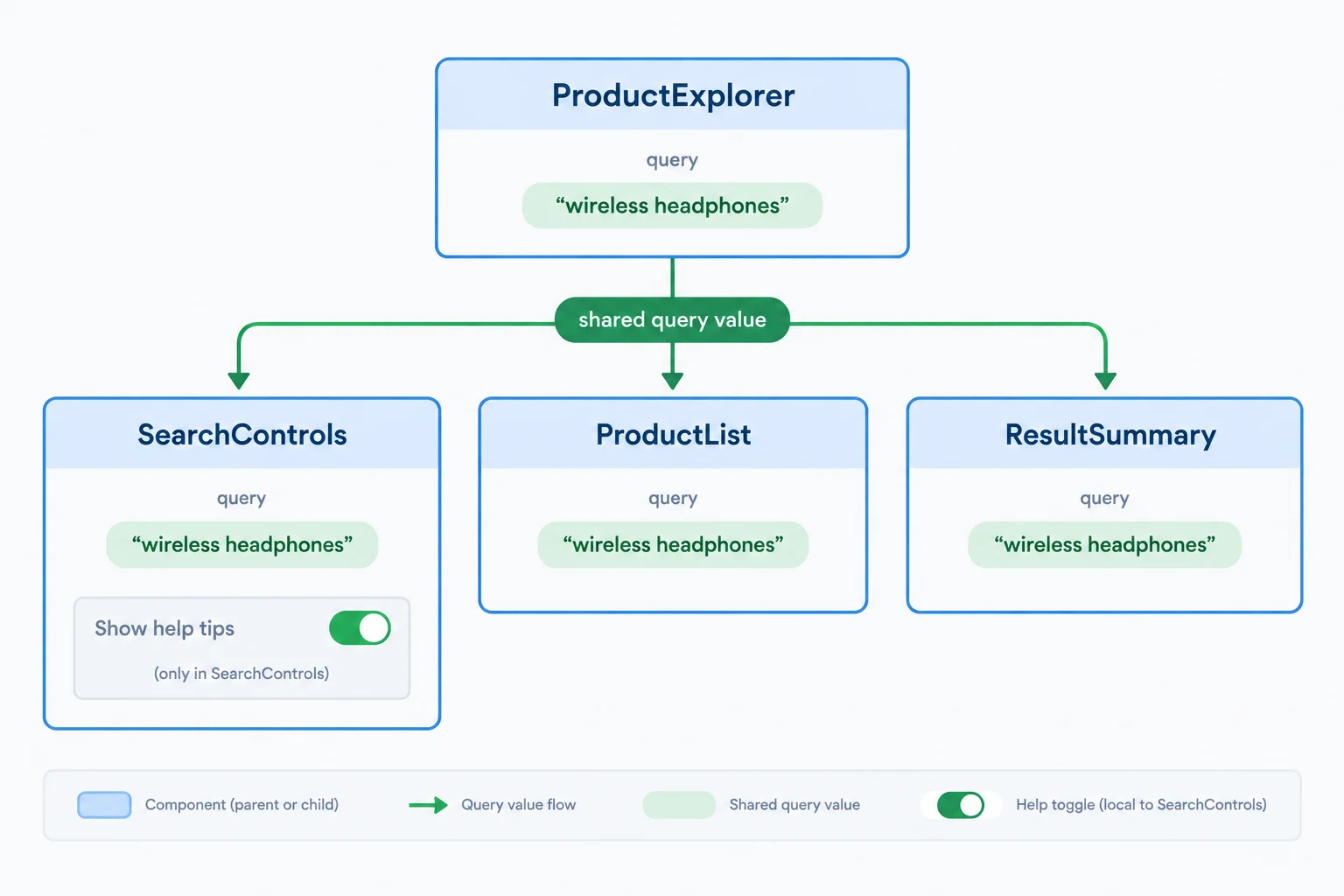
Put a value at the lowest component that can coordinate every part that needs it.
SearchControls receives the current query and requests query changes through its callback. Its help toggle remains local because neither sibling needs to read or change it.
When a search or clear action supplies new props, the same mounted SearchControls continues using its current showHelp value. Updating the shared query does not close help.
The focused component below combines a controlled search input with an independent help toggle.
import { useState } from 'react';

type SearchControlsProps = {
  query: string;
  onQueryChange: (nextQuery: string) => void;
};

function SearchControls({
  query,
  onQueryChange,
}: SearchControlsProps) {
  const [showHelp, setShowHelp] = useState(false);

  return (
    <section>
      <label htmlFor='product-search'>Search products</label>
      <input
        id='product-search'
        value={query}
        onChange={(event) => onQueryChange(event.currentTarget.value)}
      />
      <button
        type='button'
        onClick={() => setShowHelp(!showHelp)}
      >
        {showHelp ? 'Hide search help' : 'Show search help'}
      </button>
      {showHelp && <p>Search by product name.</p>}
    </section>
  );
}Complete the help toggle initializer inside SearchControls.
function SearchControls({
  query,
  onQueryChange,
}: SearchControlsProps) {
  const [showHelp, setShowHelp] = useState();

  return (
    <section>
      <input
        id='product-search'
        value={query}
        onChange={(event) => onQueryChange(event.currentTarget.value)}
      />
      <button
        type='button'
        onClick={() => setShowHelp(!showHelp)}
      >
        {showHelp ? 'Hide search help' : 'Show search help'}
      </button>
    </section>
  );
}Match each item to its role or observable result.
Tap an item and then its matching pair.
Step 6 of 6
Complete and verify a local React refactor that coordinates sibling search components through one authoritative query while keeping independent help state local.
In your local React + TypeScript project, replace src/App.tsx with the two starter sections on this screen, in order. Section 1 is not runnable by itself; section 2 completes the file.
The complete starter intentionally contains two issues to repair: SearchControls keeps a mirrored input value, and ProductExplorer passes the unfiltered product data and its fixed length. Refactor it in your editor before checking the reference. Keep the mounted tree as App → ProductExplorer → SearchControls / ProductList / ResultSummary.
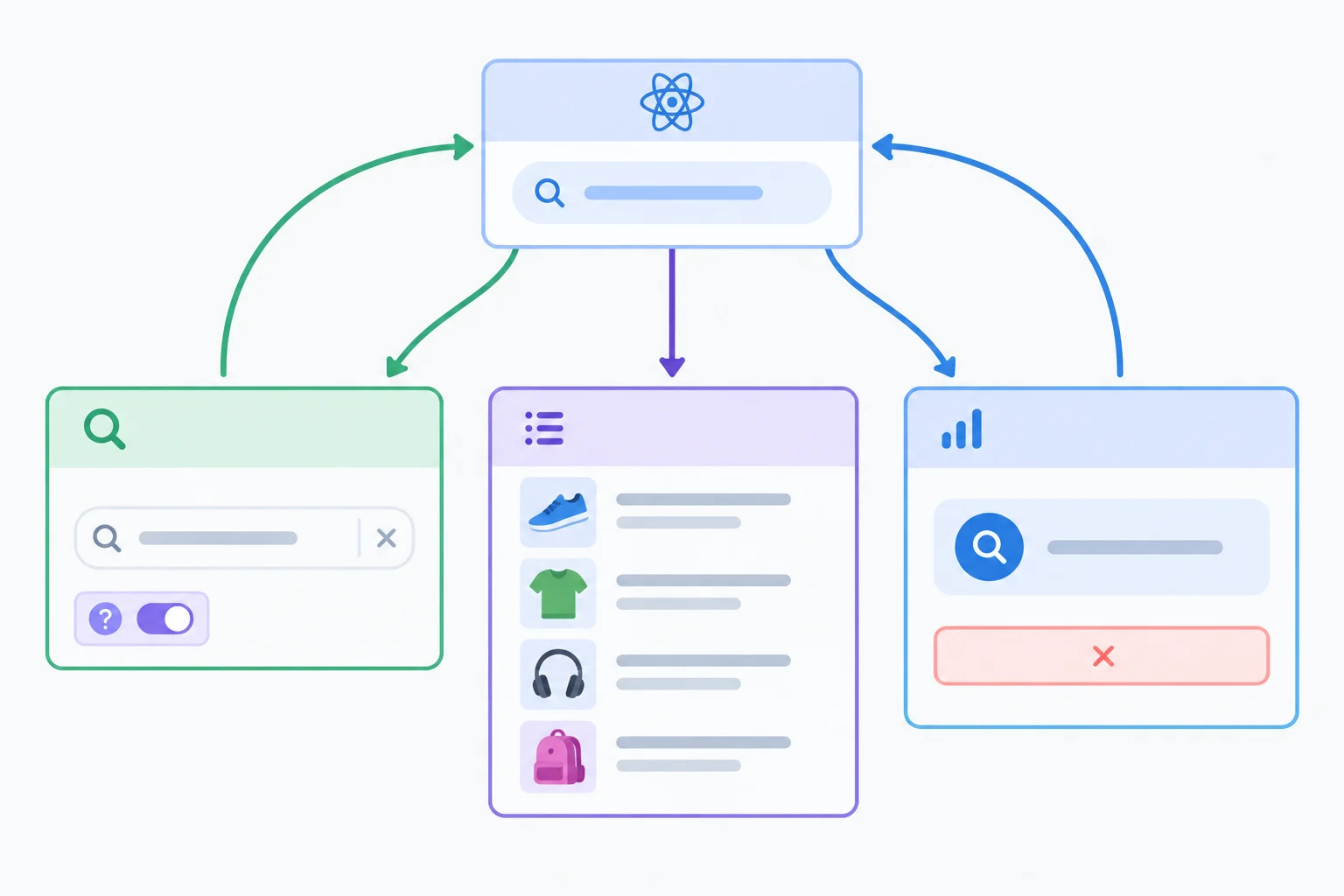
The target has one state owner for the shared search and independent local state for help.
Starter section 1 of 2 — place this first in src/App.tsx. It is a partial file, so do not run it until you add section 2.
import { useState } from 'react';

type Product = { id: string; name: string };

const products: Product[] = [
  { id: 'p1', name: 'Notebook' },
  { id: 'p2', name: 'Pen' },
  { id: 'p3', name: 'Pencil' },
  { id: 'p4', name: 'Backpack' }
];

type SearchControlsProps = {
  query: string;
  onQueryChange: (nextQuery: string) => void;
};

type ProductListProps = {
  products: Product[];
};

type ResultSummaryProps = {
  count: number;
  onClear: () => void;
};

function SearchControls({
  query,
  onQueryChange,
}: SearchControlsProps) {
  const [localQuery, setLocalQuery] = useState(query);
  const [showHelp, setShowHelp] = useState(false);

  return (
    <section>
      <label htmlFor='product-search'>Search products</label>
      <input
        id='product-search'
        value={localQuery}
        onChange={(event) => {
          setLocalQuery(event.currentTarget.value);
          onQueryChange(event.currentTarget.value);
        }}
      />
      <button
        type='button'
        onClick={() => setShowHelp(!showHelp)}
      >
        {showHelp ? 'Hide search help' : 'Show search help'}
      </button>
      {showHelp && <p>Search by product name.</p>}
    </section>
  );
}
Starter section 2 of 2 — append this directly after section 1. Together, the two sections form an executable but intentionally incomplete file.
function ProductList({ products }: ProductListProps) {
  if (products.length === 0) {
    return <p>No products match your search.</p>;
  }

  return (
    <ul>
      {products.map((product) => (
        <li key={product.id}>{product.name}</li>
      ))}
    </ul>
  );
}

function ResultSummary({ count, onClear }: ResultSummaryProps) {
  return (
    <section>
      <p>Results: {count}</p>
      <button type='button' onClick={onClear}>
        Clear search
      </button>
    </section>
  );
}

function ProductExplorer() {
  const [query, setQuery] = useState('');

  function handleQueryChange(nextQuery: string) {
    setQuery(nextQuery);
  }

  function handleClear() {
    setQuery('');
  }

  return (
    <main>
      <SearchControls
        query={query}
        onQueryChange={handleQueryChange}
      />
      <ProductList products={products} />
      <ResultSummary
        count={products.length}
        onClear={handleClear}
      />
    </main>
  );
}

function App() {
  return <ProductExplorer />;
}

export default App;Initial view Results: 4 Notebook Pen Pencil Backpack Intentional starter defects Typing pen or xyz leaves the list and count unchanged. After typing, Clear search can leave the input showing stale text. If help is open, it remains open while typing.
This is expected browser behavior for the intentionally incomplete starter. Use it only to confirm that the file runs before you refactor it.
Use this complete reference only to self-check your local refactor. The completed file removes the child copy, derives both sibling outputs from the parent-owned value, and keeps the help toggle independent.
Reference section 1 of 2 — place this first in src/App.tsx. It is a partial file; section 2 completes the runnable reference.
import { useState } from 'react';

type Product = { id: string; name: string };

const products: Product[] = [
  { id: 'p1', name: 'Notebook' },
  { id: 'p2', name: 'Pen' },
  { id: 'p3', name: 'Pencil' },
  { id: 'p4', name: 'Backpack' }
];

type SearchControlsProps = {
  query: string;
  onQueryChange: (nextQuery: string) => void;
};

type ProductListProps = {
  products: Product[];
};

type ResultSummaryProps = {
  count: number;
  onClear: () => void;
};

function SearchControls({
  query,
  onQueryChange,
}: SearchControlsProps) {
  const [showHelp, setShowHelp] = useState(false);

  return (
    <section>
      <label htmlFor='product-search'>Search products</label>
      <input
        id='product-search'
        value={query}
        onChange={(event) => onQueryChange(event.currentTarget.value)}
      />
      <button
        type='button'
        onClick={() => setShowHelp(!showHelp)}
      >
        {showHelp ? 'Hide search help' : 'Show search help'}
      </button>
      {showHelp && <p>Search by product name.</p>}
    </section>
  );
}
Reference section 2 of 2 — append this directly after section 1. This completes the executable src/App.tsx reference.
function ProductList({ products }: ProductListProps) {
  if (products.length === 0) {
    return <p>No products match your search.</p>;
  }

  return (
    <ul>
      {products.map((product) => (
        <li key={product.id}>{product.name}</li>
      ))}
    </ul>
  );
}

function ResultSummary({ count, onClear }: ResultSummaryProps) {
  return (
    <section>
      <p>Results: {count}</p>
      <button type='button' onClick={onClear}>
        Clear search
      </button>
    </section>
  );
}

function ProductExplorer() {
  const [query, setQuery] = useState('');
  const normalizedQuery = query.trim().toLowerCase();
  const filteredProducts = products.filter((product) =>
    product.name.toLowerCase().includes(normalizedQuery)
  );
  const resultCount = filteredProducts.length;

  function handleQueryChange(nextQuery: string) {
    setQuery(nextQuery);
  }

  function handleClear() {
    setQuery('');
  }

  return (
    <main>
      <SearchControls
        query={query}
        onQueryChange={handleQueryChange}
      />
      <ProductList products={filteredProducts} />
      <ResultSummary
        count={resultCount}
        onClear={handleClear}
      />
    </main>
  );
}

function App() {
  return <ProductExplorer />;
}

export default App;Initial search: '' Results: 4 Notebook Pen Pencil Backpack Search: pen or PEN Results: 2 Pen Pencil After Clear search Input: empty Results: 4 Notebook Pen Pencil Backpack Search: xyz Results: 0 No products match your search. Open help, then change the search Search by product name. remains visible.
This browser-output checklist describes the observable states after each interaction. The input retains the original typed characters, including spaces; matching uses trimmed, lowercase text.
Summary
ProductExplorer is the state owner of query, the shared state used to coordinate siblings.SearchControls owns showHelp as local state because no sibling needs it.filteredProducts and resultCount are derived values calculated during rendering.Run the completed version in your own browser. Confirm the initial four products, then try pen, PEN , Clear search, and xyz. Finally, open search help and change the search text. Compare the input, visible products, count, empty state, and help panel at every point.

The visible list and count change together; clearing restores the initial state, and an open help panel remains visible.
Complete the four missing connections from the final pattern.
<input
  id='product-search'
  value={}
  onChange={(event) => (event.currentTarget.value)}
/>

const resultCount = .length;

<ResultSummary
  count={resultCount}
  onClear={}
/>Report what you observed in your local browser for pen, Clear search, xyz, and an open help panel during a search change. Then justify the design using all four terms: shared state, local state, state owner, and derived value.
Name the component that owns query, the component that owns showHelp, and why the list and count are calculated rather than stored as separately editable values.
Write at least 220 characters (0/220).
Congratulations! You completed: Lift Shared State to a Common Parent
Thousands of online courses in video, ebooks and audiobooks.
To test your knowledge during online courses
Generated directly from your cell phone's photo gallery and sent to your email

Download our app via QR Code or the links below:.



Carry knowledge in your pocket.
Download the Cursa app.
There are hundreds of free courses available, with a free certificate of completion that is saved in your mobile image gallery.
Download the app to access the Course Completion Certificate for Free.


+ 10 million
students

Free and Valid
Certificate

60 thousand free
exercises

4.8/5 rating in
app stores

Free courses in
video and ebooks