
Step 1 of 8
Choose a Route Worth Deferring
Choose a suitable route-level boundary and create the eager Route Lab fixture for later comparison.

Learning path · Level 13 · Tutorial 3
Load selected route components only when needed, retain usable navigation during loading, and verify that the optimized local build performs less initial code loading.

 Choose a Route Worth Deferring
Choose a suitable route-level boundary and create the eager Route Lab fixture for later comparison. 3 min
Choose a Route Worth Deferring
Choose a suitable route-level boundary and create the eager Route Lab fixture for later comparison. 3 min
 Trace What Loads Initially
Trace static and dynamic module paths before converting the Reports route to deferred loading. 3 min
Trace What Loads Initially
Trace static and dynamic module paths before converting the Reports route to deferred loading. 3 min
 Convert Reports to React.lazy
Replace the eager Reports route import with a stable React.lazy declaration backed by a default-exported module. 3 min
Convert Reports to React.lazy
Replace the eager Reports route import with a stable React.lazy declaration backed by a default-exported module. 3 min
 Keep Navigation Outside the Loading Boundary
Place a pathname-keyed Suspense boundary around route content while keeping Route Lab navigation available during lazy route loading. 3 min
Keep Navigation Outside the Loading Boundary
Place a pathname-keyed Suspense boundary around route content while keeping Route Lab navigation available during lazy route loading. 3 min
 Make Delayed Content Usable
Add an announced loading fallback, stable route space, and mount-based heading focus so deferred route content remains usable. 3 min
Make Delayed Content Usable
Add an announced loading fallback, stable route space, and mount-based heading focus so deferred route content remains usable. 3 min
 Handle Route-Code Loading Failures
Contain lazy route-code failures within the route area while preserving navigation and providing an explicit fresh-load action. 4 min
Handle Route-Code Loading Failures
Contain lazy route-code failures within the route area while preserving navigation and providing an explicit fresh-load action. 4 min
 Verify the Optimized Build
Measure the completed lazy route in an optimized local preview, compare it with a controlled eager build, validate route-code failure containment, and restore the lazy final state. 5 min
Verify the Optimized Build
Measure the completed lazy route in an optimized local preview, compare it with a controlled eager build, validate route-code failure containment, and restore the lazy final state. 5 min
 Review and Accept the Route-Loading Change
Review the Route Lab route-loading implementation and decide whether the observed trade-off justifies keeping it. 3 min
Review and Accept the Route-Loading Change
Review the Route Lab route-loading implementation and decide whether the observed trade-off justifies keeping it. 3 min
Step 1 of 8
Choose a suitable route-level boundary and create the eager Route Lab fixture for later comparison.
Route-level deferral is a selective choice, not a rule for every component. Consider three questions: Is the feature substantial enough to matter? Is it visited less often than the initial route? Is it unnecessary for the initial screen to work?
In this lab, Home stays eager because it is the initial route. Reports is the candidate because it represents an occasionally opened workspace. A tiny shared control should usually stay with the initial interface: splitting it adds complexity without a meaningful initial-loading benefit.
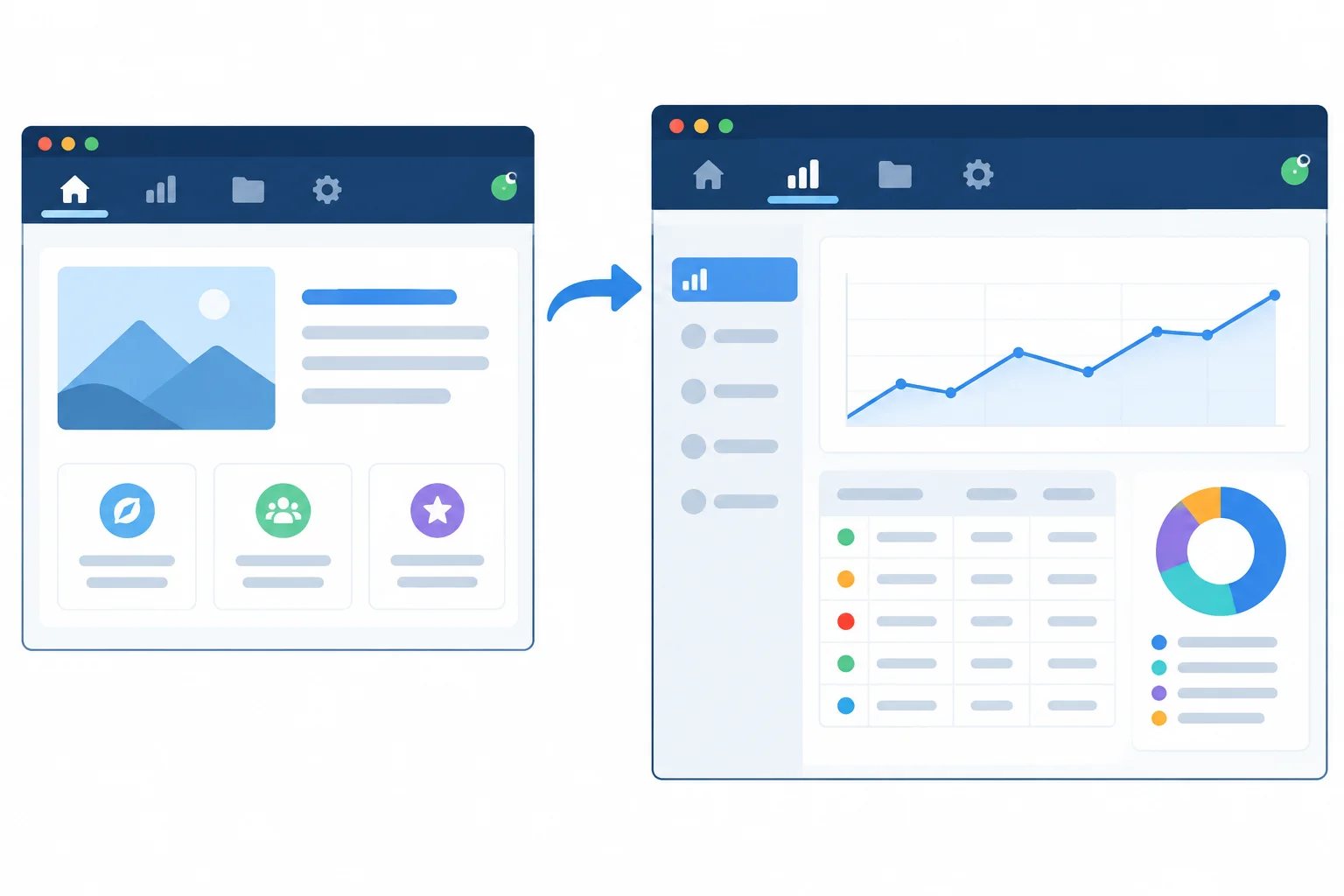
A good route candidate is feature-sized, less frequently visited, and not needed to make the initial route useful.
Use this comparison as a decision guide for the fixture.
| Part | Initial-route relevance | Default decision |
|---|---|---|
| Home route | Needed when the app opens | Keep eager |
| Reports route | Not needed to use Home | Candidate for deferral |
| Tiny shared status badge | Used across the interface | Keep eager |
Create the local Vite React + TypeScript project, install React Router, and start the development server. Then replace the source files shown in this step. The starting version intentionally imports Reports eagerly; it is the comparison point for the later change.
Run these commands in a terminal.
npm create vite@latest route-demand-lab -- --template react-ts
cd route-demand-lab
npm install react-router-dom
npm run dev> route-demand-lab@0.0.0 dev > vite VITE v6.x.x ready in 150 ms ➜ Local: http://localhost:5173/
The create and install messages vary by npm version. The shown server output is the expected shape after the final command.
Replace src/main.tsx. BrowserRouter belongs at the application entry point.
import { StrictMode } from "react";
import { createRoot } from "react-dom/client";
import { BrowserRouter } from "react-router-dom";
import App from "./App";
import "./styles.css";

createRoot(document.getElementById("root")!).render(
  <StrictMode>
    <BrowserRouter>
      <App />
    </BrowserRouter>
  </StrictMode>
);Replace src/App.tsx. Notice that ReportsPage is a normal static import in this baseline.
import { NavLink, Route, Routes } from "react-router-dom";
import HomePage from "./pages/HomePage";
import ReportsPage from "./pages/ReportsPage";

export default function App() {
  return (
    <div className="app-shell">
      <header className="site-header">
        <p className="brand">Route Lab</p>
        <nav aria-label="Primary navigation">
          <NavLink to="/">Home</NavLink>
          <NavLink to="/reports">Reports</NavLink>
        </nav>
      </header>
      <main className="route-slot">
        <Routes>
          <Route path="/" element={<HomePage />} />
          <Route path="/reports" element={<ReportsPage />} />
        </Routes>
      </main>
    </div>
  );
}Create src/pages/HomePage.tsx.
export default function HomePage() {
  return (
    <section aria-labelledby="home-heading">
      <h1 id="home-heading">Home</h1>
      <p>
        Route Lab is a compact application for comparing route-loading behavior.
      </p>
    </section>
  );
}Create src/pages/ReportsPage.tsx. This text-only fixture has no external API or assets.
type ReportRow = {
  month: string;
  orders: number;
};

const reportRows: ReportRow[] = [
  { month: "January", orders: 120 },
  { month: "February", orders: 95 },
  { month: "March", orders: 140 }
];

export default function ReportsPage() {
  return (
    <section aria-labelledby="reports-heading">
      <h1 id="reports-heading">Reports</h1>
      <p>Monthly order totals for the Route Lab demonstration.</p>
      <table>
        <thead>
          <tr>
            <th scope="col">Month</th>
            <th scope="col">Orders</th>
          </tr>
        </thead>
        <tbody>
          {reportRows.map((row) => (
            <tr key={row.month}>
              <td>{row.month}</td>
              <td>{row.orders}</td>
            </tr>
          ))}
        </tbody>
      </table>
    </section>
  );
}Create src/styles.css. The route area already reserves space that will also be useful when a route is delayed later.
:root {
  font-family: Arial, sans-serif;
  color: #172033;
  background: #f5f7fb;
}

body {
  margin: 0;
}

.app-shell {
  max-inline-size: 48rem;
  margin: 0 auto;
  padding: 1.5rem;
}

.site-header {
  display: flex;
  align-items: center;
  justify-content: space-between;
  gap: 1rem;
  border-bottom: 1px solid #c7d0df;
}

.brand {
  font-weight: 700;
}

nav {
  display: flex;
  gap: 1rem;
}

a {
  color: #174ea6;
}

a[aria-current="page"] {
  font-weight: 700;
}

.route-slot {
  min-block-size: 18rem;
  padding-block: 2rem;
}

table {
  border-collapse: collapse;
}

th,
td {
  padding: 0.5rem;
  border: 1px solid #c7d0df;
  text-align: left;
}A product has three parts: an initial Home route used by everyone, a tiny status badge shown in the shared header, and a reporting workspace with filters and tables that managers open about once a month.
Choose the best route-level loading boundary. In one or two sentences, justify your choice using both visit frequency and whether it is needed during initial loading.
Write at least 80 characters (0/80).
Step 2 of 8
Trace static and dynamic module paths before converting the Reports route to deferred loading.
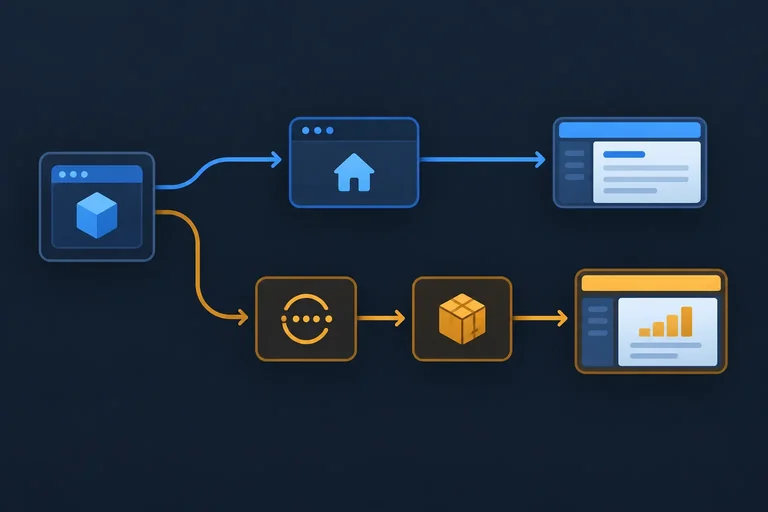
At /, Home is needed immediately, while Reports is a candidate for later loading. The import form determines whether a source module is reachable from the initial dependency graph.
A static import supplies a module immediately to the importing file. By contrast, import() starts module loading asynchronously and returns a Promise for the module. It does not immediately return a rendered React component.
In an optimized Vite build, import() is a code-splitting boundary: Vite can place code reachable only through that boundary in a separately requested chunk.
Study this dynamic import. It creates a promise; nothing in this snippet renders a page.
const reportModule = import("./pages/ReportsPage");

reportModule.then((module) => {
  console.log(module);
});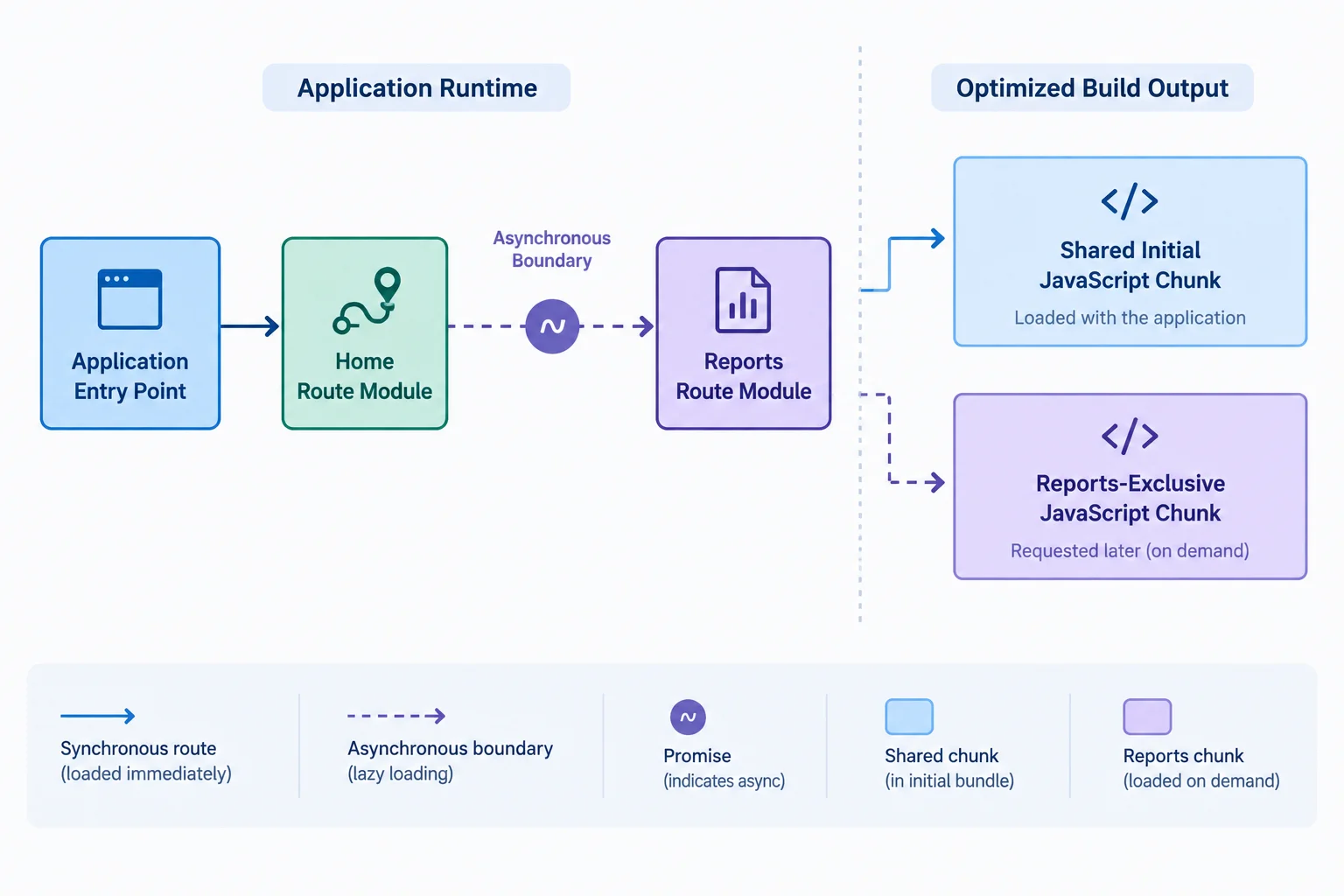
A dynamic import can give Vite a boundary for separating Reports-exclusive code in an optimized build.
A dynamic import cannot undo an eager path. If any file loaded by the initial application graph statically imports Reports, Vite must treat Reports as initially reachable—even if another file also uses import() for it.
Audit the route configuration, shared UI modules, and barrel modules for eager references. Deferral works only when the deferred feature has no static path from the initial route.
Also expect some code to remain initial: a utility or dependency used by both Home and Reports is shared application code, not Reports-exclusive code. Splitting can move only code used exclusively by the deferred feature.
This barrel-module path is eager. Importing ReportsPage from the barrel makes the Reports module reachable through the initial application code.
// src/pages/index.ts
export { default as ReportsPage } from "./ReportsPage";

// src/App.tsx
import { ReportsPage } from "./pages";Use this as a reachability checklist while reading imports in your project.
| Reference to Reports code | Initial-load consequence |
|---|---|
| Static import in App or route configuration | Reports is initially reachable |
| Static re-export through a barrel module | Reports is initially reachable |
| Dynamic import with no eager path | Reports-exclusive code may load later |
| Utility used by Home and Reports | Shared code may remain initial |
Complete the expression that starts loading the module asynchronously.
const reportModule = ("./pages/ReportsPage");Assume App.tsx is loaded for the initial visit to /. Which statement correctly describes this code?
Use this code only to answer the question above.
import ReportsPage from "./pages/ReportsPage";

const reportsModule = import("./pages/ReportsPage");
Step 3 of 8
Replace the eager Reports route import with a stable React.lazy declaration backed by a default-exported module.
lazy turns a promise for a module into a route component React can render later. For this route, the promise comes from import("./pages/ReportsPage").
That pattern expects the imported module’s default export to be the component. Keep HomePage as a normal static import: Home is the initial route and remains eager.
Create the lazy component once at module scope—above App()—so React keeps one stable component identity across renders.
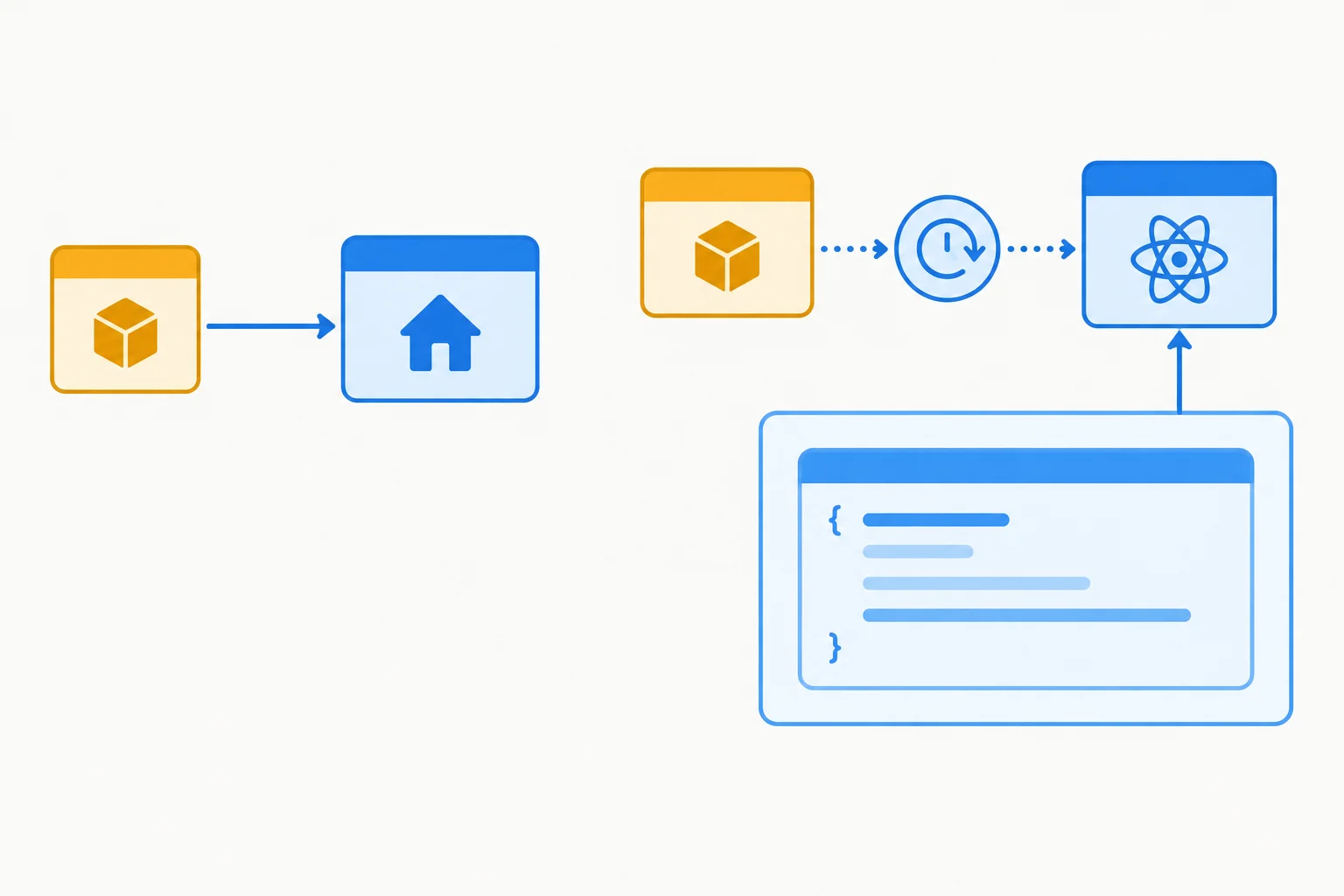
The Reports module is requested dynamically; the resulting lazy component is declared once outside App().
First, confirm that src/pages/ReportsPage.tsx has a default export. This compact text-only fixture stays self-contained; it does not add artificial data or assets just to enlarge a chunk.
Replace src/pages/ReportsPage.tsx with this route component if needed.
type ReportRow = {
  month: string;
  orders: number;
};

const reportRows: ReportRow[] = [
  { month: "January", orders: 120 },
  { month: "February", orders: 95 },
  { month: "March", orders: 140 },
];

export default function ReportsPage() {
  return (
    <section aria-labelledby="reports-heading">
      <h1 id="reports-heading">Reports</h1>
      <p>Monthly order totals.</p>
      <table>
        <thead>
          <tr>
            <th scope="col">Month</th>
            <th scope="col">Orders</th>
          </tr>
        </thead>
        <tbody>
          {reportRows.map((row) => (
            <tr key={row.month}>
              <td>{row.month}</td>
              <td>{row.orders}</td>
            </tr>
          ))}
        </tbody>
      </table>
    </section>
  );
}
Then replace src/App.tsx. The static Reports import is gone, while the existing Reports route element remains the same.
import { lazy } from "react";
import { NavLink, Route, Routes } from "react-router-dom";
import HomePage from "./pages/HomePage";

const ReportsPage = lazy(() => import("./pages/ReportsPage"));

export default function App() {
  return (
    <div className="app-shell">
      <header>
        <nav aria-label="Primary navigation">
          <NavLink to="/">Home</NavLink>
          <NavLink to="/reports">Reports</NavLink>
        </nav>
      </header>

      <main className="route-slot">
        <Routes>
          <Route path="/" element={<HomePage />} />
          <Route path="/reports" element={<ReportsPage />} />
        </Routes>
      </main>
    </div>
  );
}
Tip
Save the files, but do not navigate to Reports yet. The lazy declaration is now ready; the next step adds the pending-state boundary needed when its module is still loading.
Complete the lazy route pattern and the route module export.
import {  } from "react";

const ReportsPage = lazy(() => ("./pages/ReportsPage"));

// src/pages/ReportsPage.tsx
export  function ReportsPage() {
  return <h1>Reports</h1>;
}
Why is declaring the lazy ReportsPage component inside App() inappropriate?

Step 4 of 8
Place a pathname-keyed Suspense boundary around route content while keeping Route Lab navigation available during lazy route loading.
Suspense shows its fallback when a descendant needs code that is still pending. Here, the lazy ReportsPage route component suspends while its module is loading.
Put the boundary around the changing route area—not around the application shell. The header and its links then remain mounted, so the learner can still navigate while Reports is pending.
Give this route boundary key={location.pathname}. A new pathname gives the boundary a fresh pending-state presentation for that route.
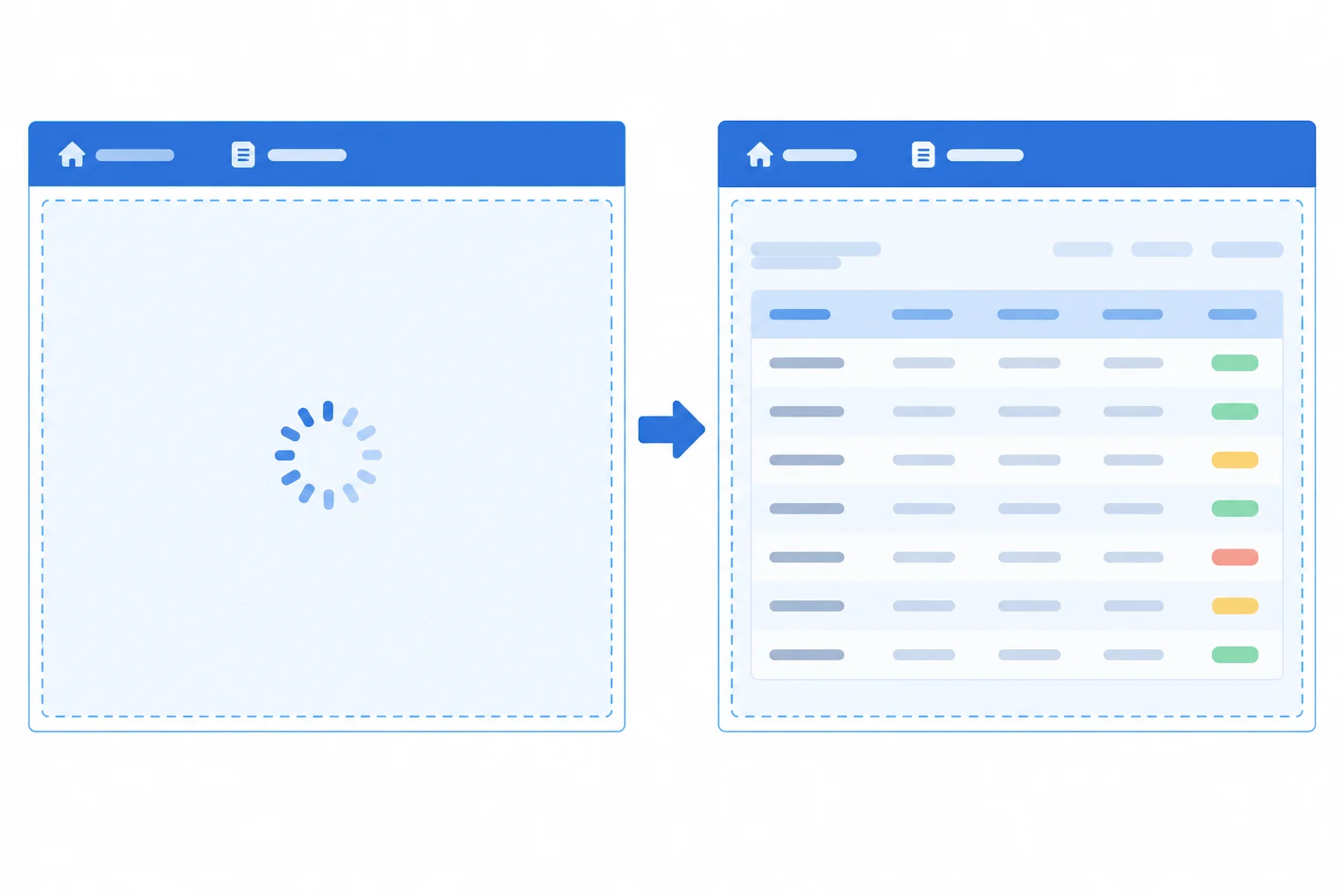
Only the route-content area is replaced while the lazy route module is pending.
Tip
A Suspense fallback handles pending component code; it is not a general screen for fetch calls started later in effects, and it is not a rejected-import error screen. Those failure and usability details are addressed in later steps.
Replace src/App.tsx with this version. It keeps the shared shell outside the pathname-keyed boundary. The simple fallback is intentional for now; the next step improves the loading experience.
import { lazy, Suspense } from "react";
import { Link, Route, Routes, useLocation } from "react-router-dom";
import HomePage from "./pages/HomePage";

const ReportsPage = lazy(() => import("./pages/ReportsPage"));

export default function App() {
  const location = useLocation();

  return (
    <div>
      <header>
        <h1>Route Lab</h1>
        <nav aria-label="Main navigation">
          <Link to="/">Home</Link>
          <Link to="/reports">Reports</Link>
        </nav>
      </header>

      <main>
        <Suspense
          key={location.pathname}
          fallback={<p>Loading page…</p>}
        >
          <Routes>
            <Route path="/" element={<HomePage />} />
            <Route path="/reports" element={<ReportsPage />} />
          </Routes>
        </Suspense>
      </main>
    </div>
  );
}Which arrangement preserves the shared navigation while the Reports route component is loading?
Complete the pathname-keyed route-content Suspense wrapper.
<main>
  <Suspense
    key={}
    fallback={<p>Loading page…</p>}
  >
    <Routes>
      <Route path="/" element={<HomePage />} />
      <Route path="/reports" element={<ReportsPage />} />
    </Routes>
  </Suspense>
</main>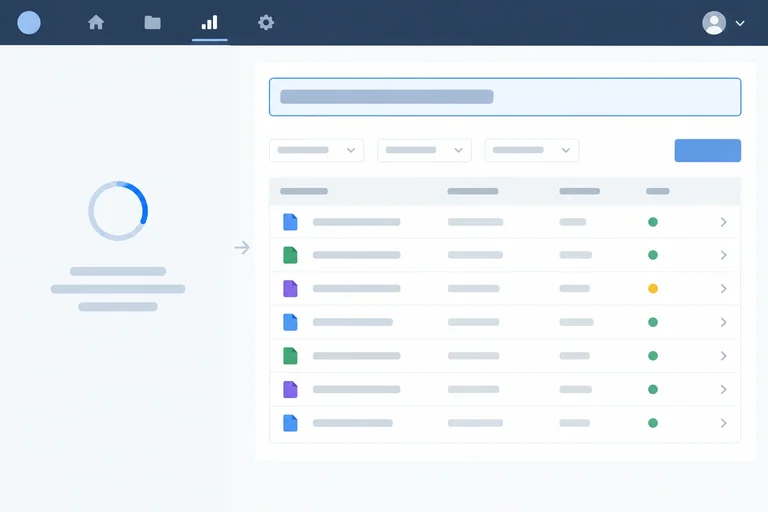
Step 5 of 8
Add an announced loading fallback, stable route space, and mount-based heading focus so deferred route content remains usable.
A spinner alone does not explain a delayed route. Create src/components/RouteLoading.tsx with a short status message. A status region can announce the change without moving keyboard focus away from the navigation link that activated the route.
Both the fallback and loaded route content use .route-slot. Its minimum block size reserves room during replacement, reducing abrupt movement while allowing longer content to grow. Do not focus the temporary fallback: the meaningful destination is the selected route heading after that route mounts.

Only route content is replaced. The temporary status does not receive focus; the loaded route heading does.
Create src/components/RouteLoading.tsx.
export default function RouteLoading() {
  return (
    <div className="route-slot">
      <p role="status">Loading page…</p>
    </div>
  );
}
Replace src/App.tsx. This uses the accessible fallback, retains the pathname key on Suspense, and keeps shared navigation outside the loading boundary.
import { lazy, Suspense } from "react";
import { NavLink, Route, Routes, useLocation } from "react-router-dom";
import RouteLoading from "./components/RouteLoading";
import HomePage from "./pages/HomePage";

const ReportsPage = lazy(() => import("./pages/ReportsPage"));

export default function App() {
  const location = useLocation();

  return (
    <div className="app-shell">
      <header className="site-header">
        <p className="brand">Route Lab</p>
        <nav aria-label="Primary navigation">
          <NavLink to="/">Home</NavLink>
          <NavLink to="/reports">Reports</NavLink>
        </nav>
      </header>

      <main>
        <Suspense key={location.pathname} fallback={<RouteLoading />}>
          <Routes>
            <Route path="/" element={<HomePage />} />
            <Route path="/reports" element={<ReportsPage />} />
          </Routes>
        </Suspense>
      </main>
    </div>
  );
}
A URL change is too early to focus a lazy route: its heading may not exist while the module is pending. Instead, each route component focuses its own meaningful heading in a mount effect.
There is no timer. If someone starts loading Reports and returns Home before Reports resolves, ReportsPage does not mount as the active route. Its effect therefore cannot move focus later to an abandoned route.
Replace src/pages/HomePage.tsx.
import { useEffect, useRef } from "react";

export default function HomePage() {
  const headingRef = useRef<HTMLHeadingElement>(null);

  useEffect(() => {
    headingRef.current?.focus();
  }, []);

  return (
    <section className="route-slot" aria-labelledby="home-heading">
      <h1 id="home-heading" ref={headingRef} tabIndex={-1}>
        Home
      </h1>
      <p>
        Route Lab is a compact application for comparing route-loading behavior.
      </p>
    </section>
  );
}
Replace src/pages/ReportsPage.tsx. Its default export remains compatible with the existing lazy declaration.
import { useEffect, useRef } from "react";

type ReportRow = {
  month: string;
  orders: number;
};

const reportRows: ReportRow[] = [
  { month: "January", orders: 120 },
  { month: "February", orders: 95 },
  { month: "March", orders: 140 },
];

export default function ReportsPage() {
  const headingRef = useRef<HTMLHeadingElement>(null);

  useEffect(() => {
    headingRef.current?.focus();
  }, []);

  return (
    <section className="route-slot" aria-labelledby="reports-heading">
      <h1 id="reports-heading" ref={headingRef} tabIndex={-1}>
        Reports
      </h1>
      <p>Monthly order totals.</p>
      <table>
        <thead>
          <tr>
            <th scope="col">Month</th>
            <th scope="col">Orders</th>
          </tr>
        </thead>
        <tbody>
          {reportRows.map((row) => (
            <tr key={row.month}>
              <td>{row.month}</td>
              <td>{row.orders}</td>
            </tr>
          ))}
        </tbody>
      </table>
    </section>
  );
}
Ensure src/styles.css contains this rule. A minimum size reserves space without clipping longer route content.
.route-slot {
  min-block-size: 18rem;
  padding-block: 2rem;
}
Put these events from a delayed first keyboard visit to Reports in the required order.
Warning
Use browser DevTools Network throttling only long enough to make a first Reports visit observable. It is a visibility aid for this keyboard check, not evidence of real-user performance and not a reason to add an artificial delay to the application.
Complete the heading-focus pattern used inside a mounted route component.
const headingRef = useRef<HTMLHeadingElement>(null);

useEffect(() => {
  headingRef.current?.();
}, []);

return <h1 ref={headingRef} >Reports</h1>;Run two separate checks in your local app.
First, use a fresh document at /, enable Network throttling long enough to expose the first Reports visit, and activate Reports with the keyboard. While the status is visible, tab through the interface. After Reports appears, record whether shared navigation remained keyboard-usable and where focus landed.
Then test abandonment in another fresh document at / before Reports has loaded in that document. Keep DevTools open, disable the cache, enable throttling, activate Reports, and return Home before its module resolves. Wait for the request to finish. Report whether Reports later took focus.
Do not use a repeat Reports visit in the same document for this second check: after the module resolves, lazy normally reuses it and there may be no pending state.
Write at least 100 characters (0/100).

Step 6 of 8
Contain lazy route-code failures within the route area while preserving navigation and providing an explicit fresh-load action.
A lazy route has two different non-content outcomes. While its module promise is pending, Suspense can show the loading fallback. If that promise rejects, it must be handled by an error boundary instead.
Keep both outcomes inside the route area. The shared header and navigation remain mounted, so the learner can still choose another route.
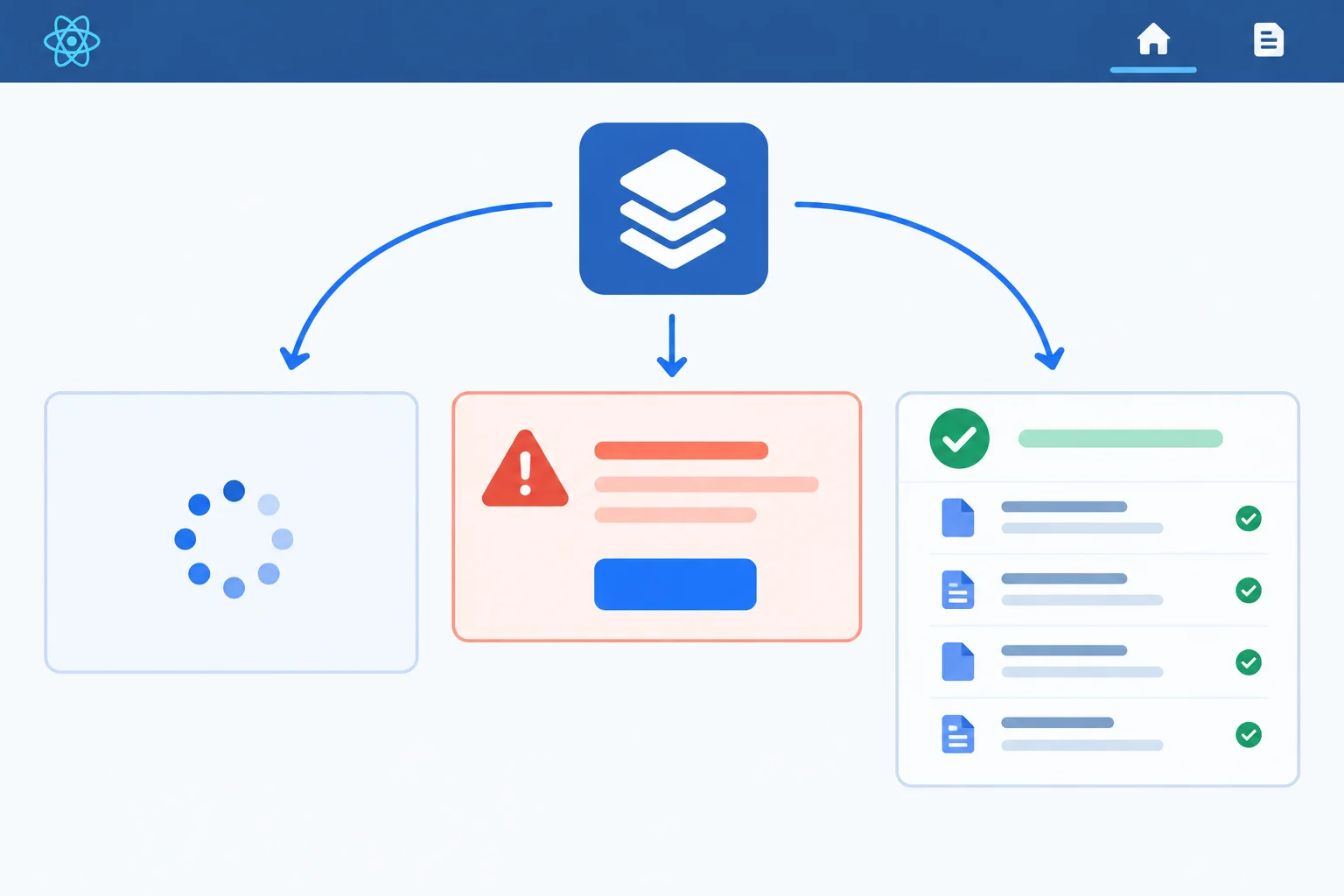
Only the route-content area changes. Loading and failure feedback should not replace shared navigation.
Install the boundary package in the root of route-demand-lab.
npm install react-error-boundaryadded 1 package, and audited 201 packages in 1s found 0 vulnerabilities
The package count, audit count, and funding messages vary by npm version and existing dependencies. Confirm that the command finishes without an error.
Create src/components/RouteLoadError.tsx. Its heading receives focus only after this failure UI mounts. The reload is deliberate: it starts a fresh application attempt rather than pretending that a rejected lazy import has been retried.
import { useEffect, useRef } from "react";

export default function RouteLoadError() {
  const headingRef = useRef<HTMLHeadingElement>(null);

  useEffect(() => {
    headingRef.current?.focus();
  }, []);

  return (
    <section className="route-slot" aria-labelledby="route-load-error-title">
      <h1 id="route-load-error-title" ref={headingRef} tabIndex={-1}>
        This page could not load.
      </h1>
      <p>Check the connection or resource, then start a new page load.</p>
      <button type="button" onClick={() => window.location.reload()}>
        Reload page
      </button>
    </section>
  );
}Update src/App.tsx so the error boundary is outside Suspense, but both remain inside <main>. The existing .route-slot minimum block size applies to both loading and failure feedback, helping the route area stay stable.
The pathname key now belongs to ErrorBoundary. Moving to another pathname creates a fresh boundary presentation, so a failure at one route does not trap the shared shell. However, lazy caches its import promise and result. Resetting only a boundary does not reliably create a new import attempt after rejection; the explicit reload starts a fresh application attempt. It cannot repair an unavailable resource by itself.
Keep the header and navigation above <main>. This complete App.tsx keeps Home eager and defers only the Reports route component.
import { lazy, Suspense } from "react";
import { ErrorBoundary } from "react-error-boundary";
import { NavLink, Route, Routes, useLocation } from "react-router-dom";
import RouteLoadError from "./components/RouteLoadError";
import RouteLoading from "./components/RouteLoading";
import HomePage from "./pages/HomePage";

const ReportsPage = lazy(() => import("./pages/ReportsPage"));

export default function App() {
  const location = useLocation();

  return (
    <>
      <header>
        <p>Route Lab</p>
        <nav aria-label="Main navigation">
          <NavLink to="/">Home</NavLink>
          <NavLink to="/reports">Reports</NavLink>
        </nav>
      </header>
      <main>
        <ErrorBoundary key={location.pathname} fallback={<RouteLoadError />}>
          <Suspense fallback={<RouteLoading />}>
            <Routes>
              <Route path="/" element={<HomePage />} />
              <Route path="/reports" element={<ReportsPage />} />
            </Routes>
          </Suspense>
        </ErrorBoundary>
      </main>
    </>
  );
}
Tip
Do not simulate blocked route requests yet. In the optimized-build exercise, you will first identify the actual deferred chunk and then use controlled request blocking to validate this failure UI. Actual chunk filenames come from your own build.
Match each lazy-module outcome to the UI that should appear in the route area.
Tap an item and then its matching pair.
Complete the route-code failure pattern.
< key={} fallback={<RouteLoadError />}>
  <Suspense fallback={<RouteLoading />}>
    <Routes>
      <Route path="/" element={<HomePage />} />
      <Route path="/reports" element={<ReportsPage />} />
    </Routes>
  </Suspense>
</ErrorBoundary>

// A  import shows RouteLoading.
// A  import shows RouteLoadError.
// A  import renders the chosen route component.

<button type="button" onClick={() => }>
  Reload page
</button>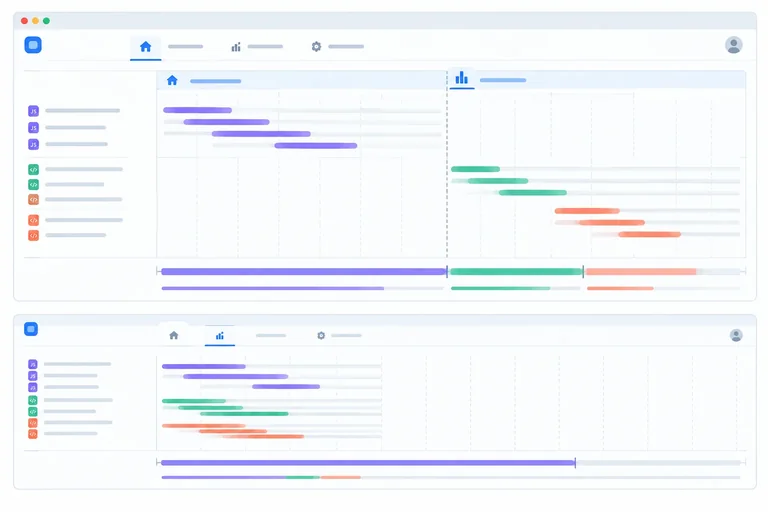
Step 7 of 8
Measure the completed lazy route in an optimized local preview, compare it with a controlled eager build, validate route-code failure containment, and restore the lazy final state.
Begin with the completed lazy implementation from the previous steps. Confirm that src/App.tsx still has the module-scope declaration const ReportsPage = lazy(() => import("./pages/ReportsPage"));.
First collect all lazy-build evidence. Use a fresh document (a full reload or new tab) for initial-load, direct-entry, and blocked-request checks. For repeat navigation, remain in the same document.
Keep viewport, Network throttling choice, cache setting, and local content the same for the lazy and eager fresh-/ runs. Inspect an optimized Vite preview—not npm run dev. Development-module requests do not represent the chunk layout of an optimized build.
From the route-demand-lab project root, build the current lazy version and start its local production preview. Open the local address printed by Vite.
npm run build && npm run preview> route-demand-lab@0.0.0 build > tsc -b && vite build vite vX.X.X building for production... ✓ 42 modules transformed. dist/index.html 0.46 kB │ gzip: 0.30 kB dist/assets/index-a1b2c3d4.css 0.82 kB │ gzip: 0.43 kB dist/assets/index-e5f6g7h8.js 164.21 kB │ gzip: 52.17 kB dist/assets/ReportsPage-i9j0k1l2.js 0.71 kB │ gzip: 0.39 kB ✓ built in 0.84s > route-demand-lab@0.0.0 preview > vite preview ➜ Local: http://localhost:4173/ ➜ press h + enter to show help
Vite version, transformed-module count, filenames, hashes, file sizes, build time, and preview port vary by project and machine. Use the local address printed in your own terminal.
In DevTools Network, filter to JavaScript and clear old entries before each scenario. Record actual request names, transferred size in kB, resource size in kB when DevTools provides it, and relevant elapsed time in ms.
Transferred size is what was delivered for a request and can reflect compression or cache behavior. Resource size is the decoded resource size; it is a different measure.
Run these lazy-build observations in order:
/ and record initial JavaScript./reports. Its route code is required during that initial visit.Disabling HTTP cache does not clear a resolved lazy component or module from JavaScript memory in the current document.
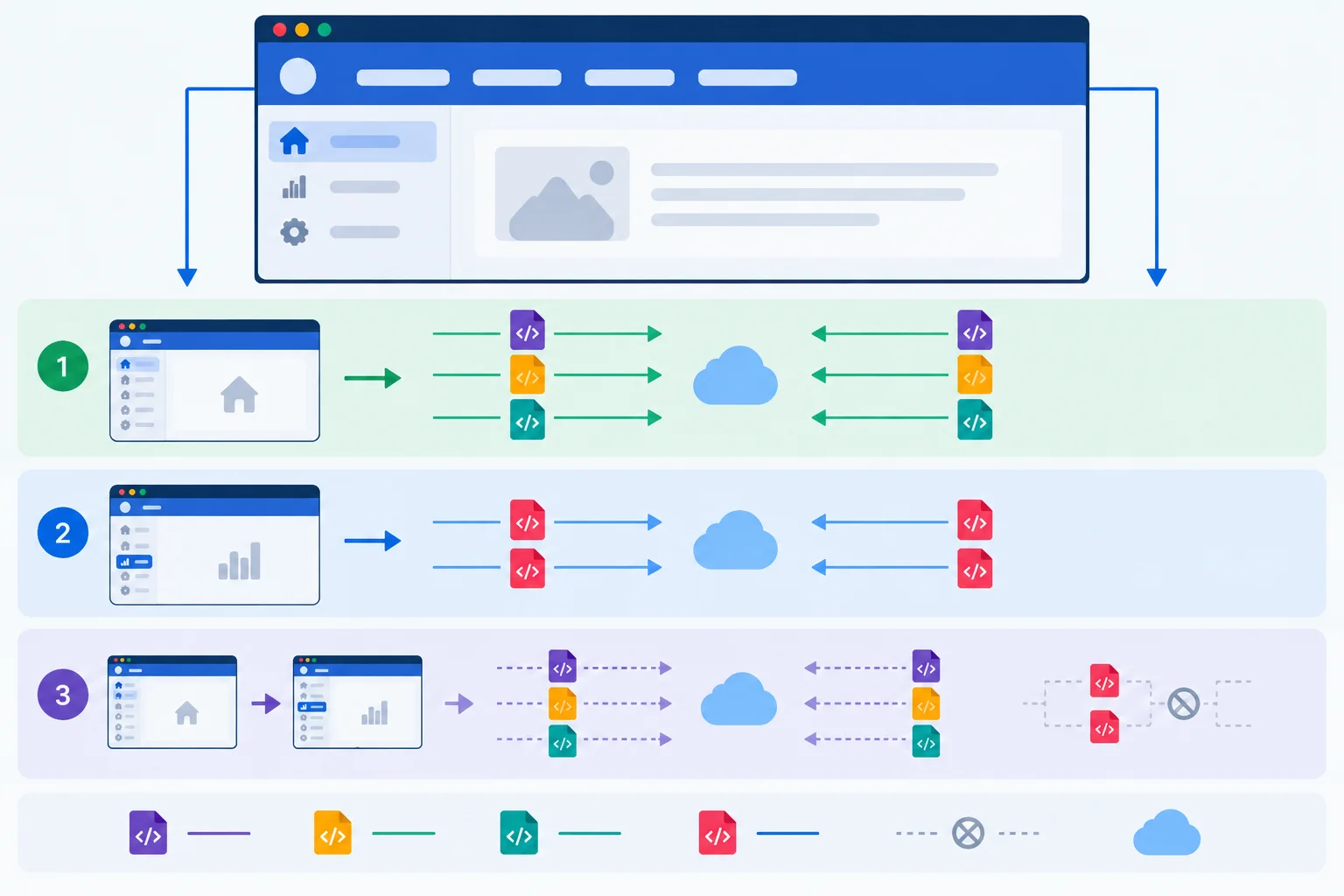
Use the actual Network entries from your build. The number and names of chunks are build-specific.
Use this as a factual worksheet; do not assume a filename such as ReportsPage-[hash].js. Your own optimized build determines filenames and request count.
| Scenario | Record | What it shows |
|---|---|---|
| Fresh `/` | Initial JS names; transferred and resource sizes in kB | Initial route loading |
| First Home → Reports | New JS names; associated chunks; route availability delay in ms | Code requested on first use |
| Return Home → Reports | Whether new route-code requests appeared | Reuse in the same document |
| Fresh direct `/reports` | Initial JS names and sizes in kB | Reports code is required for that entry route |
After identifying the deferred route request during the normal lazy run, validate failure containment while this lazy preview is still running.
/; do not visit Reports first.This page could not load. appears in the route area, its heading receives focus, and shared navigation remains usable.Reload page to begin a fresh application attempt, then verify that Reports can load.A same-document revisit is not a fresh import test after rejection because React.lazy retains its loading promise and result. A full reload starts a new application attempt, but cannot repair an ongoing network or resource problem.
When all lazy scenarios are recorded, stop the preview process with Ctrl+C before beginning the eager comparison.
Warning
Use request blocking only for this controlled optimized-build check. Keep the rule narrow, remove it before selecting Reload page, and retain notes about the failure UI, focus, navigation, and recovery.
Only after completing the lazy scenarios, temporarily change only the Reports import strategy. Keep the same route element, ErrorBoundary, Suspense, RouteLoading, RouteLoadError, styles, fixture content, dependencies, and accessibility behavior.
Build and preview the eager version with the same command used earlier. In a fresh document at /, record initial JavaScript request names and transferred/resource sizes under the matching conditions. Then stop preview.
Finally, restore the lazy version and run a final production build. The project must end this step with the lazy implementation restored.
For the temporary eager comparison, replace the current React import, the current ReportsPage lazy declaration, and its related import area at the top of src/App.tsx with this complete import section. In particular, remove lazy from the React import and remove const ReportsPage = lazy(() => import("./pages/ReportsPage"));. Leave the App() function and its route definitions unchanged.
import { Suspense } from "react";
import { ErrorBoundary } from "react-error-boundary";
import { NavLink, Route, Routes, useLocation } from "react-router-dom";
import RouteLoadError from "./components/RouteLoadError";
import RouteLoading from "./components/RouteLoading";
import HomePage from "./pages/HomePage";
import ReportsPage from "./pages/ReportsPage";After recording the eager fresh-/ result and stopping preview, replace that temporary eager import section with this final lazy import section. This removes the static ReportsPage import and restores the module-scope lazy declaration. Leave the App() function and its route definitions unchanged.
import { lazy, Suspense } from "react";
import { ErrorBoundary } from "react-error-boundary";
import { NavLink, Route, Routes, useLocation } from "react-router-dom";
import RouteLoadError from "./components/RouteLoadError";
import RouteLoading from "./components/RouteLoading";
import HomePage from "./pages/HomePage";

const ReportsPage = lazy(() => import("./pages/ReportsPage"));After restoring the lazy ReportsPage declaration, rebuild the final project state.
npm run build> route-demand-lab@0.0.0 build > tsc -b && vite build vite vX.X.X building for production... ✓ 42 modules transformed. dist/index.html 0.46 kB │ gzip: 0.30 kB dist/assets/index-a1b2c3d4.css 0.82 kB │ gzip: 0.43 kB dist/assets/index-e5f6g7h8.js 164.21 kB │ gzip: 52.17 kB dist/assets/ReportsPage-i9j0k1l2.js 0.71 kB │ gzip: 0.39 kB ✓ built in 0.84s
The Vite version, module count, generated filenames, sizes, and build time vary. A successful build confirms that the final local project was rebuilt after restoring the lazy import strategy.
Write a factual record from your optimized-preview runs. Include:
/ JavaScript request names, plus transferred and resource sizes in kB./reports visit required.Reload page.Do not make a Retain, Revise, or Reject decision yet.
Write at least 300 characters (0/300).

Step 8 of 8
Review the Route Lab route-loading implementation and decide whether the observed trade-off justifies keeping it.
A route-loading change is acceptable only when the whole route experience works—not merely when a lazy() declaration exists.
Review five connected outcomes:
Use observed requests and elapsed time to make the decision. A smaller initial transfer alone is not enough if opening Reports becomes unreasonably delayed.
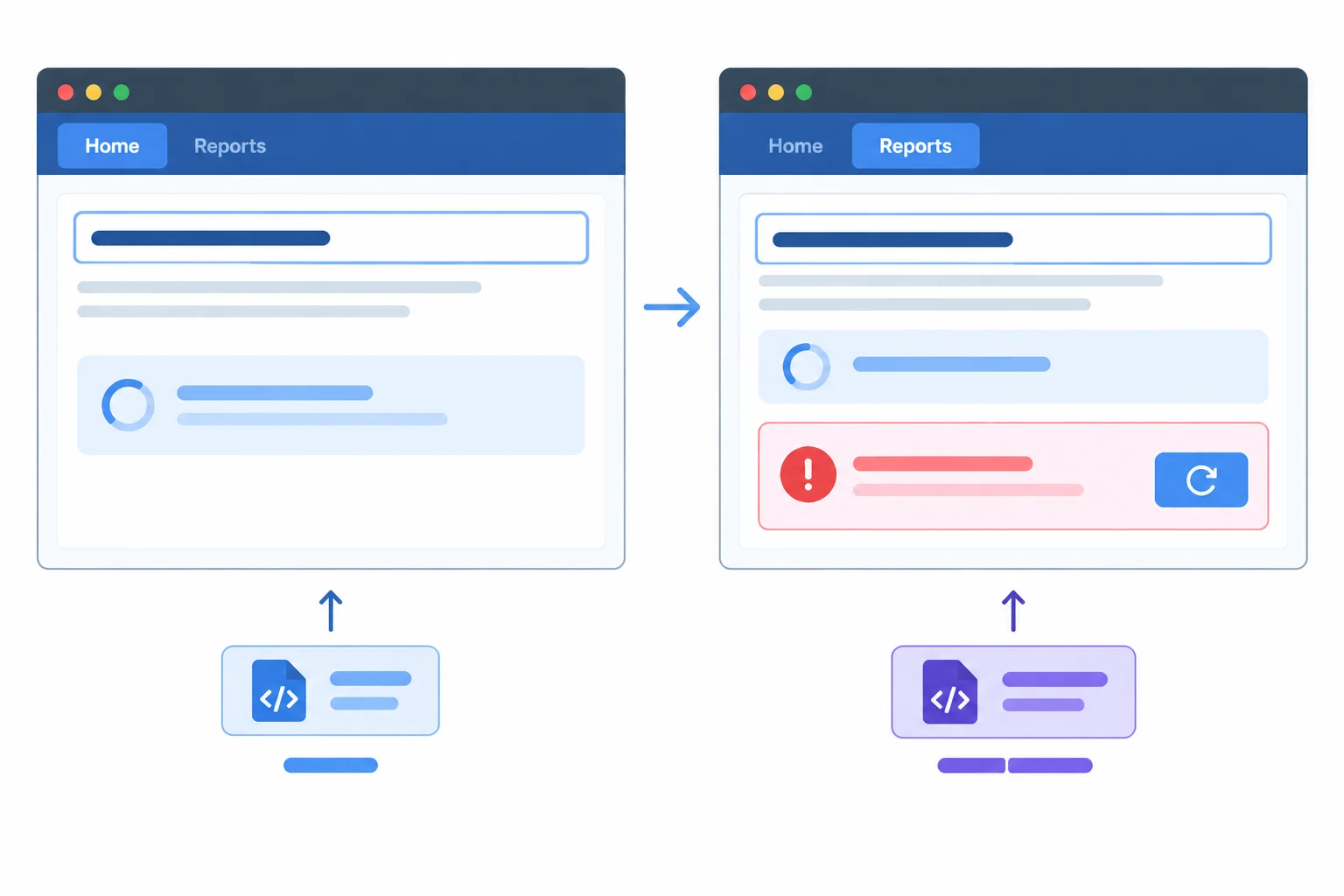
The route area can change state while the shared header and navigation remain available.
Tip
Use this review after testing the optimized build with the same local measurement conditions for the eager and lazy versions. Record both transferred size and, when DevTools provides it, resource size; they answer different questions.
Complete the missing identifier so this route component is loaded from its module only when React needs to render it.
const ReportsPage = (() => import("./pages/ReportsPage"));

<Routes>
  <Route path="/" element={<HomePage />} />
  <Route path="/reports" element={<ReportsPage />} />
</Routes>Use this compact checklist to turn browser observations into an acceptance decision. Do not invent a target number: the small Route Lab fixture may have a small or negligible timing difference.
Compare the eager and lazy builds under matching local conditions.
| Review area | Required observation | Local record |
|---|---|---|
| Initial visit to / | Reports-only code is absent from initial requests in the lazy build | Initial JS request count; transferred kB; resource kB if shown |
| First visit to /reports | The deferred route chunk and any associated chunks are requested | Requested chunk names; transferred kB; visible wait in ms |
| Repeat Reports visit | Returning in the same document reuses resolved module state | Whether a new route-code request occurs |
| Pending state | Navigation remains usable; loading status appears in the route slot | Keyboard navigation result |
| Loaded route | Meaningful route heading receives focus after content commits | Focused element |
| Blocked route chunk | Failure stays in route area; navigation remains; reload is available | Failure and recovery result |
Tip
Choose retain when the initial-loading benefit matters for this route and the first-use cost is acceptable. Choose revise when the implementation is correct but feedback, focus, recovery, or route choice needs improvement. Choose reject when observed benefit does not justify the added first-use delay.
Write an acceptance record for your Route Lab result. Start with Retain, Revise, or Reject. Include: (1) what you observed in initial JavaScript requests or transferred size at /; (2) what loaded and how the first /reports visit felt or timed; (3) whether navigation stayed usable; (4) where focus landed after Reports appeared; and (5) what happened when the route chunk was blocked, including recovery.
Also state why the evidence supports your decision. Use your own local observations; no fixed measurement is expected.
Write at least 300 characters (0/300).
Summary
A route-level loading change is complete when its module boundary, route boundaries, accessible states, recovery behavior, and optimized-build evidence agree.
Congratulations! You completed: Load Route Components on Demand
Thousands of online courses in video, ebooks and audiobooks.
To test your knowledge during online courses
Generated directly from your cell phone's photo gallery and sent to your email

Download our app via QR Code or the links below:.



Carry knowledge in your pocket.
Download the Cursa app.
There are hundreds of free courses available, with a free certificate of completion that is saved in your mobile image gallery.
Download the app to access the Course Completion Certificate for Free.


+ 10 million
students

Free and Valid
Certificate

60 thousand free
exercises

4.8/5 rating in
app stores

Free courses in
video and ebooks