
Step 1 of 8
Set a Routine That Fits Your Capacity
Allocate Cedar Desk’s 180-minute operating budget across publishing preparation, community response windows, weekly review, and contingency time.

Learning path · Level 4 · Tutorial 5
Create a sustainable routine for publishing, responding to the community, and reviewing organic results. Assess where Meta Business Suite can help, with a manual alternative and illustrative metric tables when account access is unavailable. Tables are limited to six columns: define the publishing queue with at most six fields (for example Post, Platform, Publish time (UTC), Method, Owner, Status) and keep approval details in a separate, complementary table rather than adding extra columns.

 Set a Routine That Fits Your Capacity
Allocate Cedar Desk’s 180-minute operating budget across publishing preparation, community response windows, weekly review, and contingency time. 2 min
 Build the Queue and Approval Gates
Turn Cedar Desk’s planned posts into a six-field publishing queue and a separate approval record, then move posts through explicit approval and publication stages. 3 min
 Choose Supported Tools and a Manual Fallback
Choose a publishing and response method by verifying task-specific access and support, then use an authorized manual fallback when appropriate. 3 min
 Check, Publish, and Verify
Use a prepublication check, confirmed scheduling, and live-post verification to release posts safely. 3 min
 Triage Community Messages
Classify community messages, choose proportionate handling, and document ownership in a response log. 3 min
 Reply Clearly and Protect Sensitive Details
3 min
 Review Comparable Native Results
Use bounded native evidence and response-log context to complete a cautious weekly review and assign one next adjustment. 3 min
 Complete Your Weekly Operating Routine
Consolidate Cedar Desk’s publishing, community, and review records into one feasible weekly operating decision. 3 min
Step 1 of 8
Allocate Cedar Desk’s 180-minute operating budget across publishing preparation, community response windows, weekly review, and contingency time.
Start with Cedar Desk’s existing editorial plan; do not rebuild its content strategy. This week already includes two Instagram carousels—Desk reset and Cable check—and one LinkedIn text post—Workspace question.
The operating routine is the work around that plan: preparing publication, being available for community responses, completing a weekly review, and handling exceptions. Posting slots alone are not a sustainable routine.
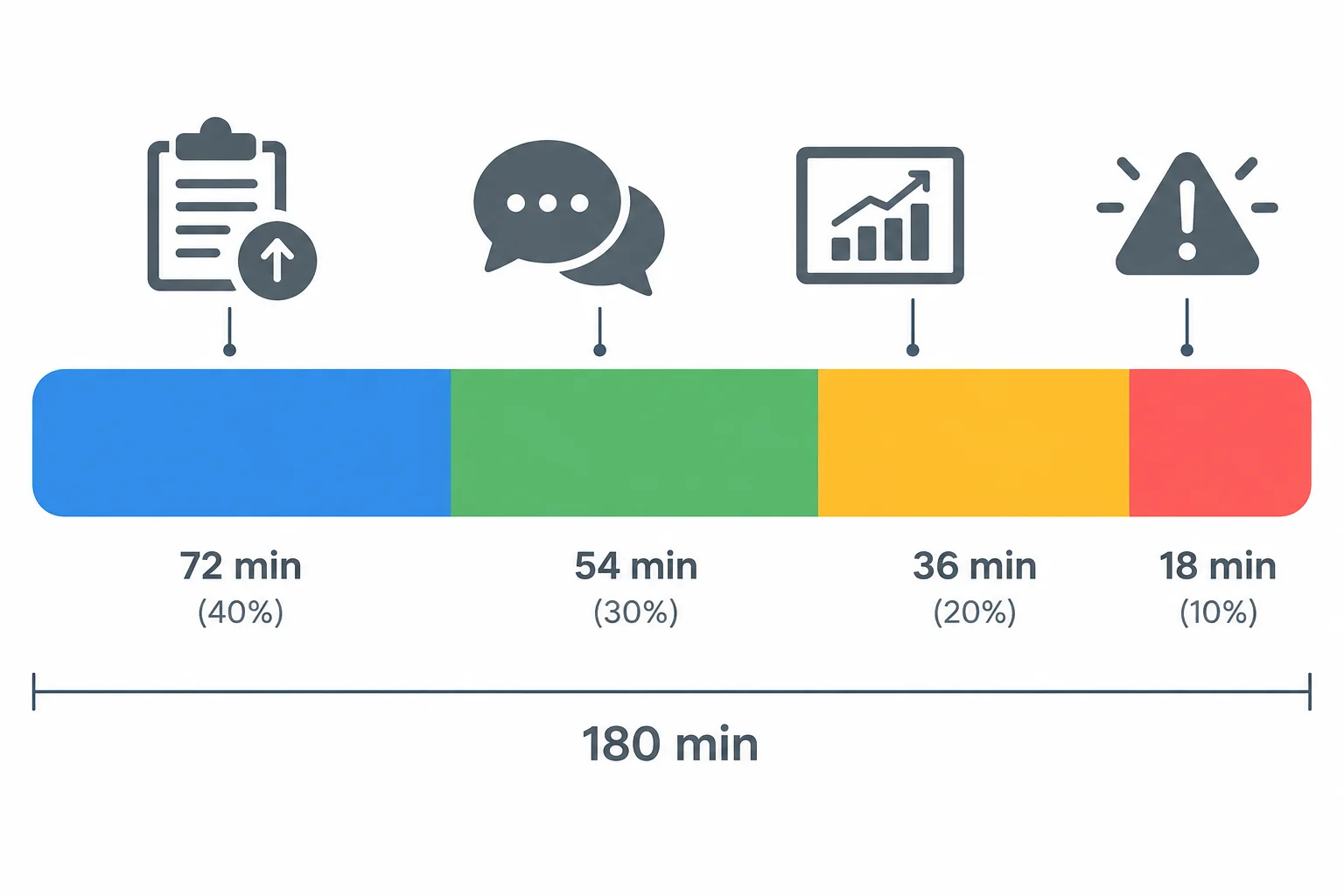
A sustainable routine reserves time for planned work, community coverage, review, and exceptions—not only for publishing.
Tip
You can complete every exercise in this tutorial with this fictional scenario. You do not need a live account, a paid tool, or a public post.
Cedar Desk has an operating budget of 180 min/week, excluding original content production. Use all four categories before deciding that another post can fit.
Community time is bounded rather than continuous monitoring: use planned response windows during staffed time. Contingency is protected time for a late change, an issue, or another exception.
| Routine area | Minutes | Purpose |
|---|---|---|
| Publishing preparation | 60 min | Prepare the three planned posts |
| Community response windows | 45 min | Respond during bounded staffed windows |
| Weekly review | 30 min | Review operations and available results |
| Contingency | 45 min | Absorb exceptions without removing core work |
| Total | 180 min | Fits the weekly operating budget |
Do not solve overload by routinely removing essential checks, community coverage, or the weekly review. Reduce or defer a planned post instead.
For the next decision, assume a 60 min unexpected exception occurs. The 45 min contingency covers most of it, but Cedar Desk still needs 15 min. Cable check is flexible and needs 20 min of publishing-preparation time; Desk reset and Workspace question are time-sensitive.
Cedar Desk has the 180 min allocation shown previously, then receives the 60 min unexpected exception. Which revision is feasible and protects the essential routine?

Step 2 of 8
Turn Cedar Desk’s planned posts into a six-field publishing queue and a separate approval record, then move posts through explicit approval and publication stages.
Cedar Desk already has its weekly calendar: Desk reset and Cable check are Instagram carousels; Workspace question is a LinkedIn text post. The next task is not to redesign those posts. It is to turn them into executable commitments.
A publishing queue gives each planned post one publish time, one method, one owner, and one current status. Maya owns publishing and community responses, so she is the queue owner. Leo records review decisions.
Keep operational work separate from approval detail. This makes it clear what is ready to happen and what still needs a reviewer decision.
The two records connect through the exact same post title, but they answer different questions: “What will be published?” and “What did the reviewer decide?”
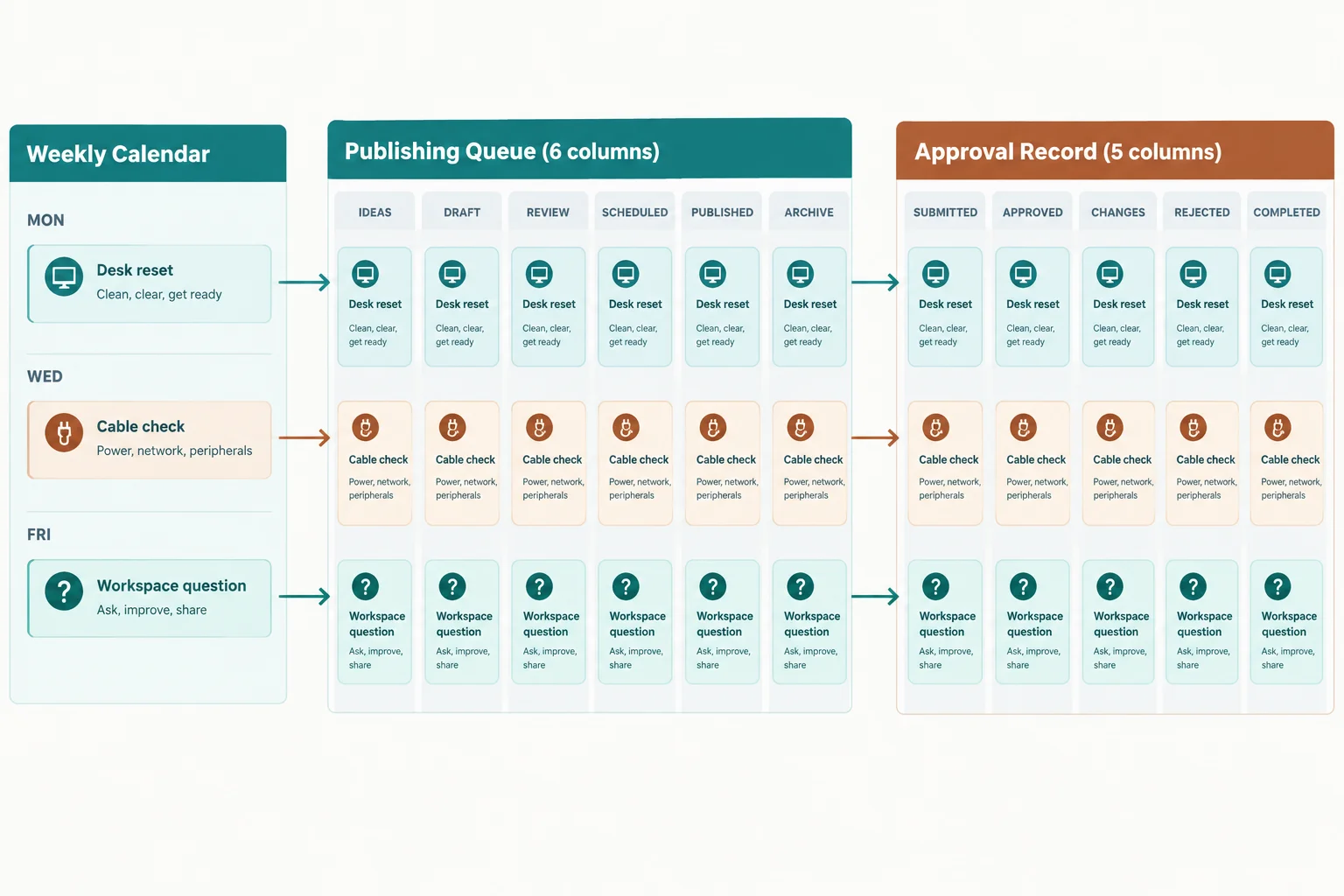
Use the shared Post field to connect records without adding approval fields to the publishing queue.
Illustrative starting state for Cedar Desk’s publishing queue. Method and status are different: a method is how publishing will happen; a status is the post’s present workflow stage.
| Post | Platform | Publish time (UTC) | Method | Owner | Status |
|---|---|---|---|---|---|
| Desk reset | Instagram carousel | 2026-04-13 09:00 | Meta Business Suite | Maya | In review |
| Cable check | Instagram carousel | 2026-04-15 09:00 | Manual | Maya | Draft |
| Workspace question | LinkedIn text post | 2026-04-16 14:00 | Native scheduler | Maya | Approved |
The approval record stays separate. It names Leo as reviewer and stores the decision without expanding the six-field publishing queue.
| Post | Reviewer | Decision | Checks | Blocker |
|---|---|---|---|---|
| Desk reset | Leo | Pending | Review in progress | — |
| Cable check | Leo | Pending | Not started | — |
| Workspace question | Leo | Approved | Review completed | — |
For a post using a confirmed scheduler, the normal route is:
Draft → In review → Approved → Scheduled → Published
Approval is not assumed because Maya completed a draft. Leo must record an approval decision. If Leo requests changes, the post returns to Draft; Maya updates it and sends it through review again.
A material change after approval also requires renewed review. For example, changing the planned post material or its intended destination is not a reason to keep the old approval.
The return paths prevent an old decision from being treated as approval for a changed post.
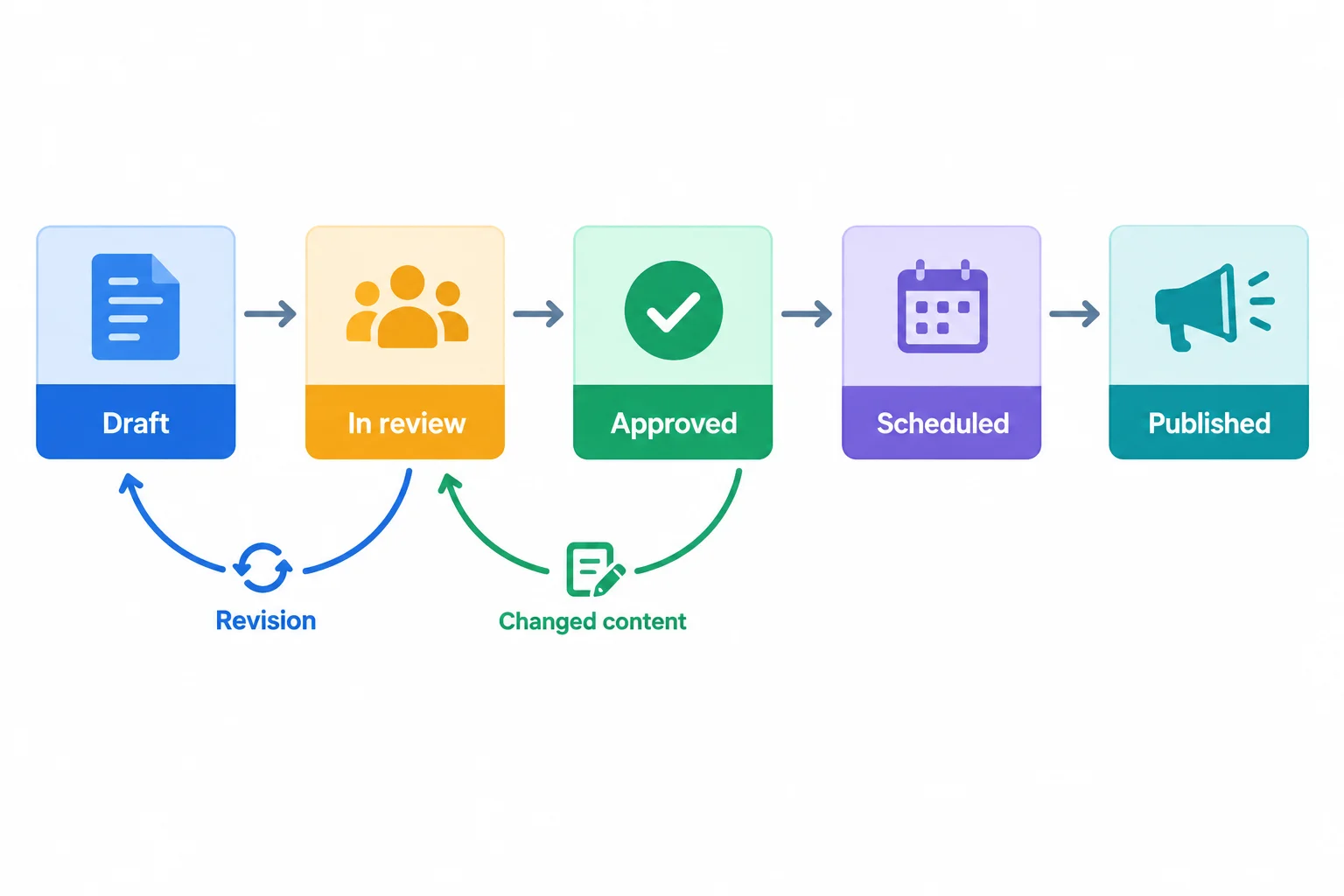
A requested change returns to Draft; a material change after approval returns to In review.
Example
Example: Workspace question
Leo records Approved. Maya then uses the selected publishing method.
A reminder supports manual work; it does not confirm that a scheduling system has accepted a job.
Tip
Do not mark a post Published merely because its planned time has passed. Confirm that publication occurred before changing the queue status.
Put the normal confirmed-scheduler workflow in order.
Arrange the stages from first to last.
True or false: Leo has approved a post, and Maya has set a calendar reminder to publish it manually. The publishing queue can now show Scheduled.
The publishing queue contains Cable check, but the approval record has no row with that exact post title. What should Maya do before treating the post as approved?

Step 3 of 8
Choose a publishing and response method by verifying task-specific access and support, then use an authorized manual fallback when appropriate.
A publishing method is chosen per task—not per habit. Meta Business Suite can be a useful candidate for supported Meta publishing and inbox work, but it is not a universal scheduler or inbox for Instagram, TikTok, LinkedIn, and YouTube.
Start with the intended account, format, and task. Then confirm that Cedar Desk has authorized access and that the needed function is currently supported. Only after those checks should Maya select a method for the publishing queue.
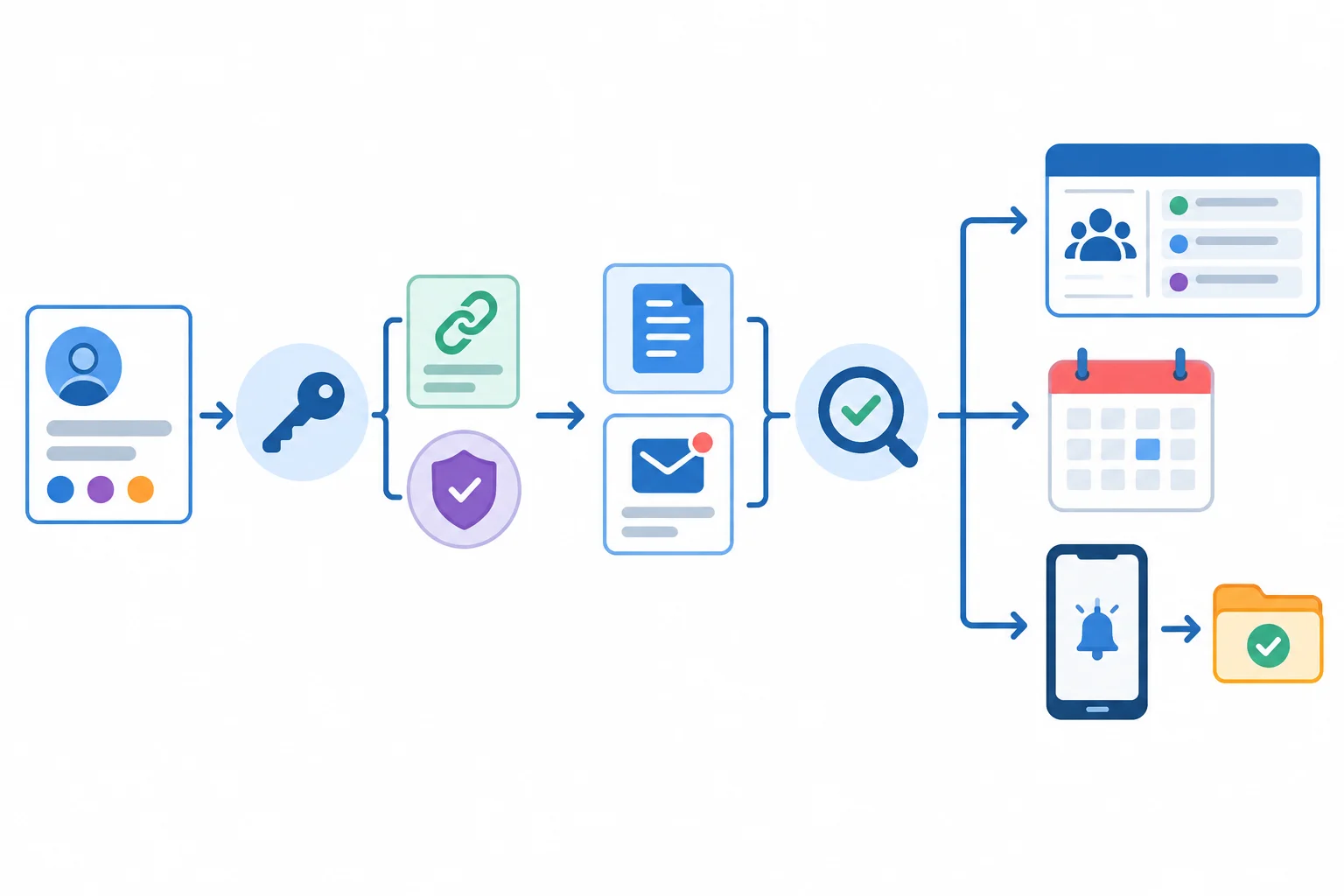
Access and task-specific support are checked before selecting a publishing or response method.
Do not assume that publishing permission also provides access to Instagram comments or messages. Check the intended task separately. Product features, account setup, and permissions can change, so confirm current support without relying on a fixed interface location.
Use these checks for the exact Cedar Desk account and task. A failed or unconfirmed check means that route is not yet authorized or supported.
| Check | Confirm for Cedar Desk | Why it matters |
|---|---|---|
| Instagram eligibility | Professional-account eligibility; relevant Facebook Page connection where required | Meta publishing or inbox work may depend on this setup |
| Correct assets | The intended Instagram account and relevant Page, not a different asset | Avoids publishing or responding from the wrong place |
| Operator authorization | Maya has the required Page or business-asset permission | A tool cannot replace missing authorization |
| Publishing support | The specific Instagram format and required features are supported now | A supported account does not guarantee every format or feature |
| Inbox support | Supported Instagram comments or messages are available for this task | Publishing access and inbox access are separate checks |
When a supported route is unavailable, use an authorized manual fallback. Maya creates a reminder for the planned UTC time, works from the approved post materials, publishes through the authorized account, and verifies that the intended post is live and correct.
For community work, Maya checks the relevant native comments or messages directly and records needed follow-up in the response log. The same written scenario can be practiced without a live account.
For each task, select the narrowest route that is both authorized and supported. Keep the selected method in the publishing queue; a change of method does not remove approval or later publication verification.
| Task situation | Method | What must be confirmed | If unavailable |
|---|---|---|---|
| Instagram carousel; requirements supported | Meta Business Suite | Eligible account, correct assets, Maya's permission, format support | Use Manual if Maya still has authorized direct access |
| LinkedIn text post; scheduling feature available | Native scheduler | Correct LinkedIn account, Maya's authorization, native scheduling availability | Use Manual if Maya has authorized direct access |
| Instagram comments or messages | Meta Business Suite | Supported inbox access for the intended Instagram task | Check the authorized native account directly and use the response log |
| No authorized access to the intended account | No live action | Authorization from the correct account owner or administrator | Use the written scenario; do not attempt publication or response |
Warning
A reminder is not authorization, and it does not make a post scheduled. Likewise, manual publishing does not bypass missing account permissions. If Maya lacks authorized access to the intended account, she must not publish or respond live.
Match each Cedar Desk scenario to the appropriate method or outcome.
Tap an item and then its matching pair.

Step 4 of 8
Use a prepublication check, confirmed scheduling, and live-post verification to release posts safely.
Approval is necessary, but it does not prove that a post is ready to release. Before Maya schedules or publishes, complete a prepublication check on the actual release version:
A problem in any check blocks release. An approved draft is not automatically safe to schedule or publish.
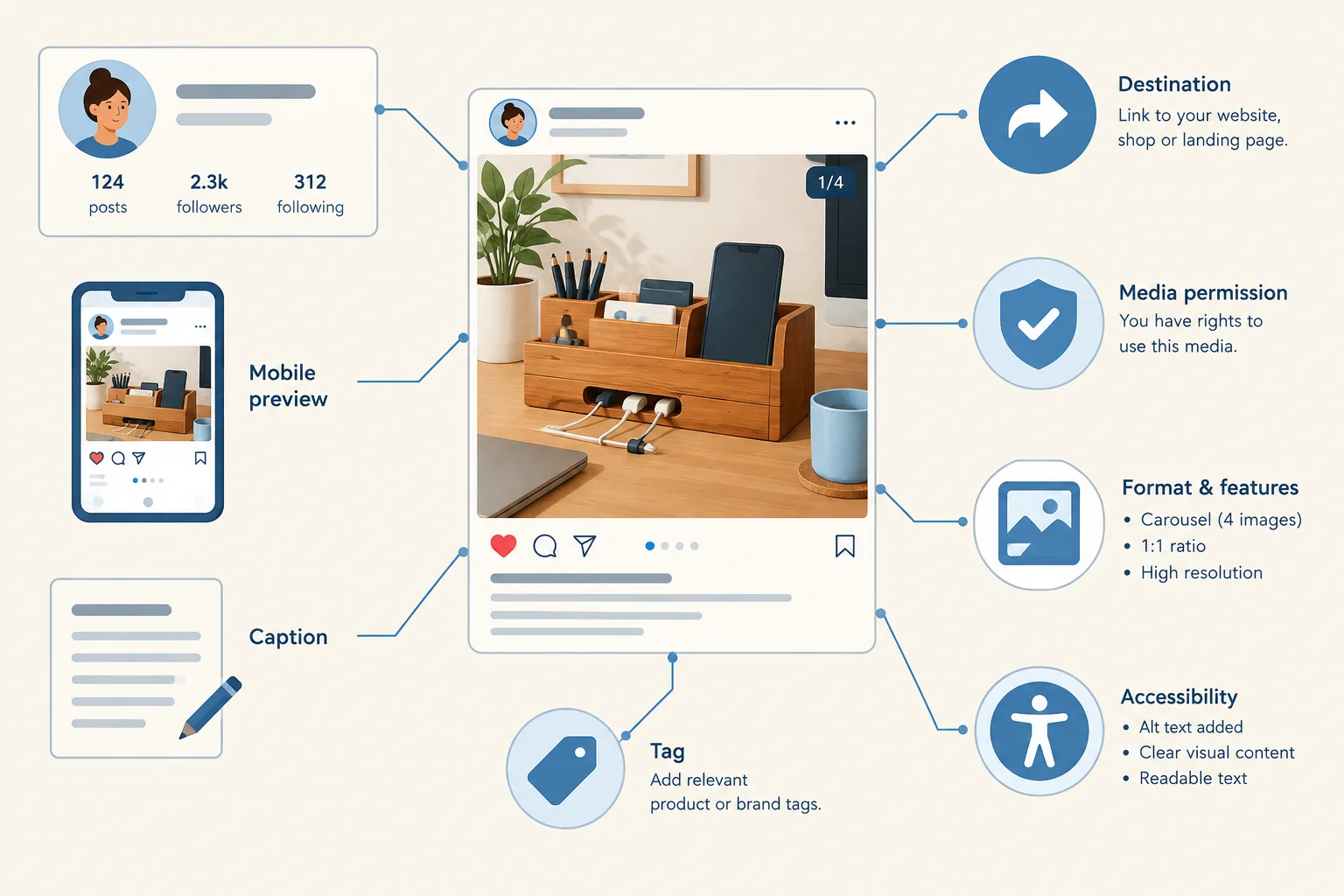
Inspect the release version, not only the approved draft.
Tip
Compare the source material with the platform preview rather than assuming they match. An otherwise approved post can be blocked by a wrong crop, obscured on-screen text, an incorrect destination, or a feature that the selected format does not support. Resolve the issue before release; changing the publishing method does not remove the check.
Reconcile the intended UTC time with the time zone displayed by the tool. Then check the scheduled entry for the correct Cedar Desk account, content, and time.
Use Scheduled only when a scheduler has confirmed the job. A personal reminder is not a scheduled post. If a prepublication check fails, it blocks release even if Maya changes the publishing method. Leo records Changes needed in the approval record, and the affected queue item returns to Draft until Maya corrects it and it receives renewed review.
Example
Maya finds a material preview problem while Desk reset is being reviewed. The two records remain connected by the exact post title: the publishing queue shows the operational state, while the approval record documents Leo’s decision and the blocker.
Publishing queue after the failed prepublication check.
| Post | Platform | Publish time (UTC) | Method | Owner | Status |
|---|---|---|---|---|---|
| Desk reset | Instagram carousel | 2026-04-13 09:00 | Meta Business Suite | Maya | Draft |
Separate approval record for the same post.
| Post | Reviewer | Decision | Checks | Blocker |
|---|---|---|---|---|
| Desk reset | Leo | Changes needed | Account, preview, timing | Preview needs correction |
After the planned time, Maya verifies that the post is actually live on the intended account and is correct in its live form. Only then can the publishing queue move from Scheduled to Published.
If a job appears to fail, Maya first checks whether a live copy already exists. She then investigates the job or the approved fallback before attempting another publication. This owner-led check prevents accidental duplicate posts.
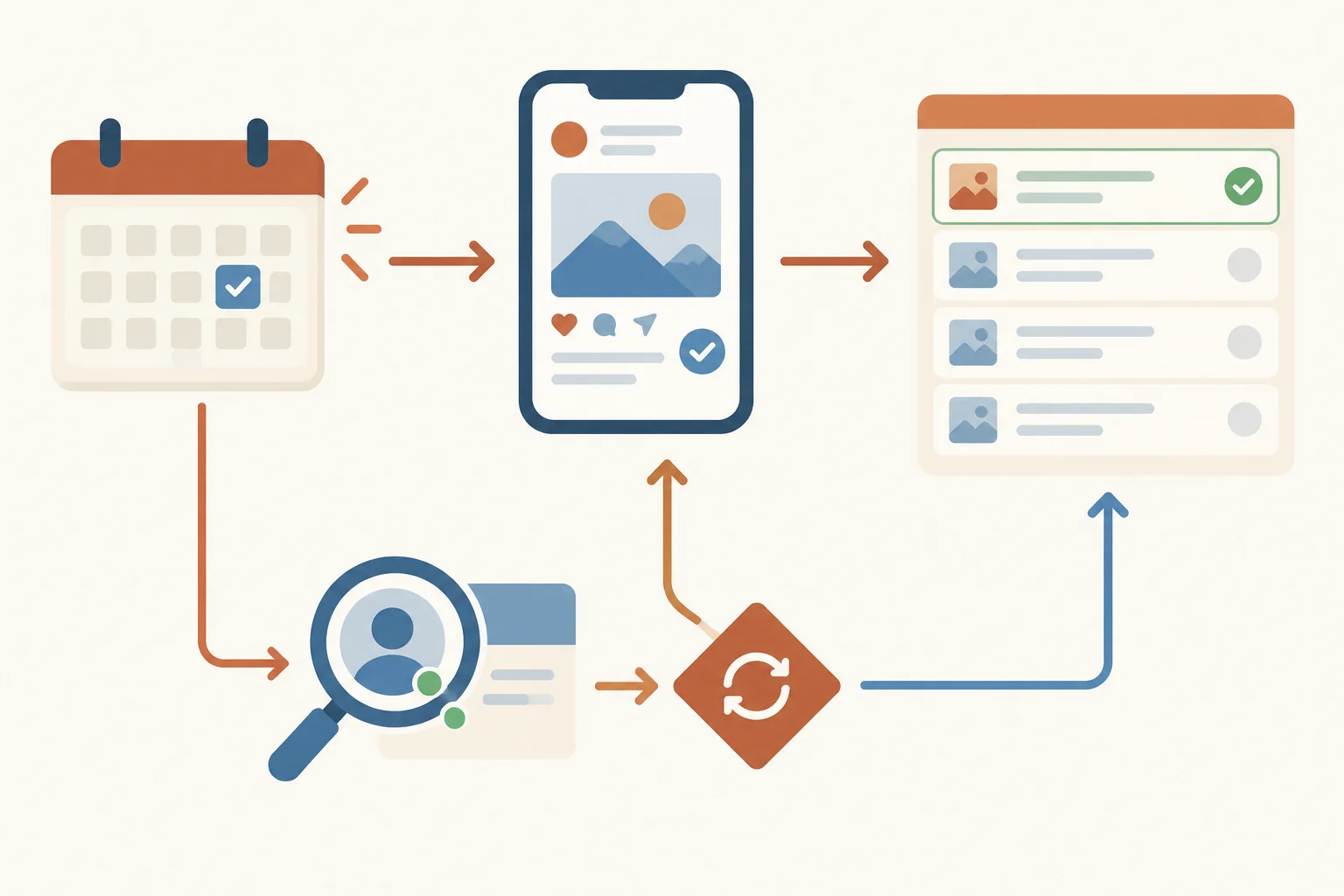
A confirmed job and a verified live post are different checkpoints.
Tip
A notification, calendar entry, or tool status alone is not publication verification. When a release problem occurs, check for an existing live post before retrying through any authorized method.
Desk reset is in review for publication through Meta Business Suite at 2026-04-13 09:00 UTC. Compare the source cover with the final mobile preview before Leo records the release decision.

Compare the source material and the final visible preview.
Based on the final-preview scenario on the previous screen, which option identifies the release-blocking issue and the correct next action and queue status?

Step 5 of 8
Classify community messages, choose proportionate handling, and document ownership in a response log.
Start by classifying the message—not by writing a reply. For Cedar Desk, use these handling categories: question, complaint, spam, harassment, and sensitive or high-risk issue.
A message can fit more than one category. A delivery complaint that exposes personal details, or any credible threat, changes from routine handling to escalation. In contrast, a negative opinion by itself is criticism, not abuse. Do not hide or delete criticism simply because it is unfavorable.
Classification sets the next decision: respond, investigate, use a moderation control under policy, or escalate.
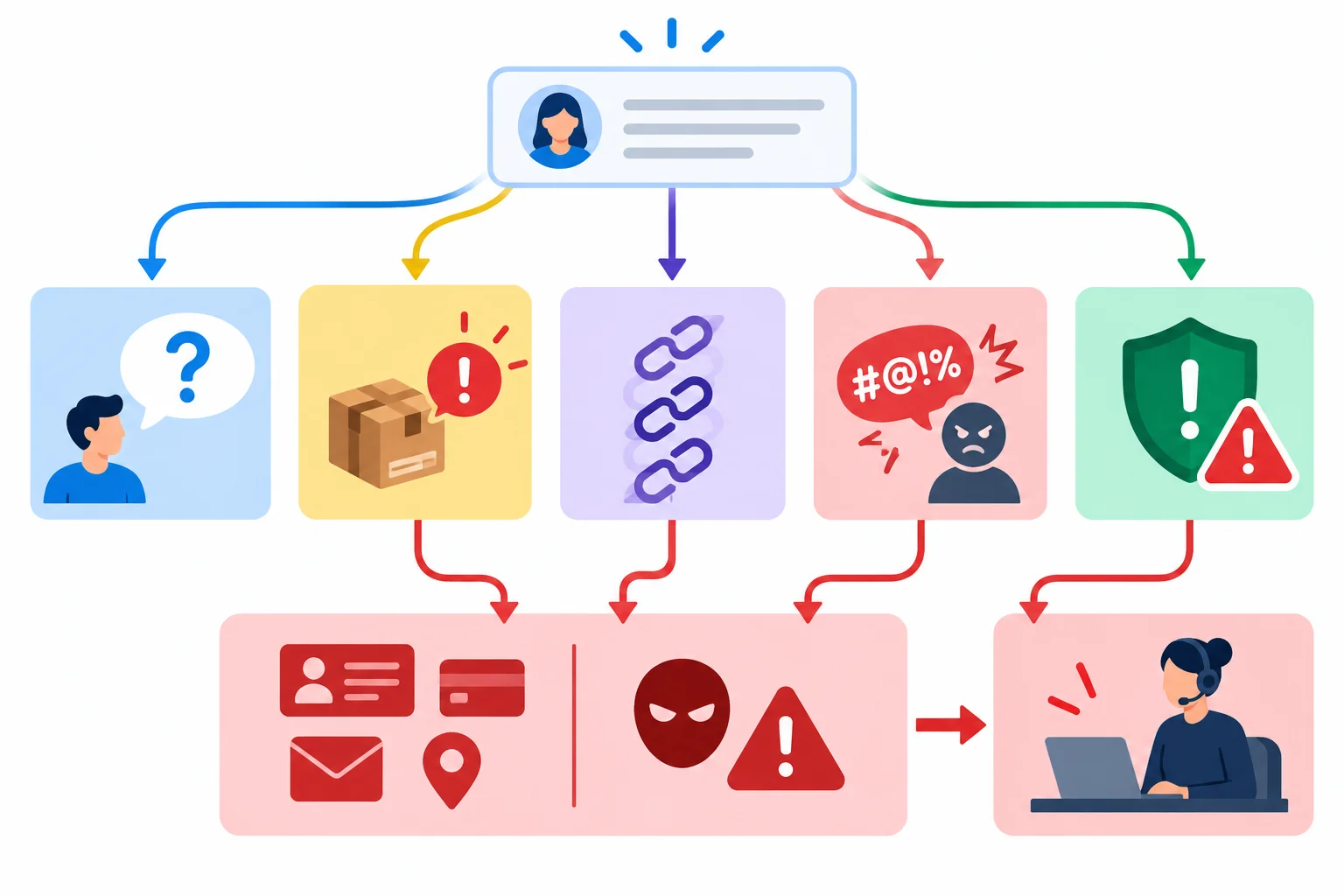
Classify the message first; risk can override the ordinary route.
Tip
Use the bounded community-response windows already reserved in the weekly routine. Maya handles routine work during those staffed windows; this does not imply continuous monitoring. A credible threat or other urgent high-risk case follows established safety procedures immediately rather than waiting for the next window.
Choose a proportionate action after classification. The goal is useful community care and consistent moderation—not removing every negative interaction.
These routes describe decisions, not finished reply wording. Leo owns escalation decisions; Maya owns normal response and policy-based moderation work.
| Message type | Typical signal | Primary action | Owner |
|---|---|---|---|
| Question | Request for factual help | Give verified information or investigate | Maya |
| Legitimate complaint | Specific product or service concern | Acknowledge and investigate | Maya |
| Criticism | Negative opinion without abuse | Leave visible; respond only if useful | Maya |
| Spam | Repeated promotion or irrelevant link | Apply available control under policy | Maya |
| Harassment | Targeted abuse or repeated hostile conduct | Apply policy and available controls | Maya |
| Sensitive or high-risk issue | Exposed personal details or credible threat | Escalate; use urgent procedure when needed | Leo |
Warning
Do not treat criticism as harassment. Conversely, do not treat a credible threat as an ordinary complaint. For spam or harassment, use only the platform controls and moderation actions permitted by the stated policy; hiding, removing, reporting, or blocking may be appropriate depending on the case.
Record the operational decision in the response log without copying unnecessary personal details. Use a neutral thread label, the category, owner, action, status, and a follow-up time in UTC. The log supports follow-through whether Maya works in a native inbox or manually.
A follow-up time is an accountable next check within the routine, not a promise of around-the-clock response.
Illustrative response log for Cedar Desk. Thread labels describe the issue, not the person.
| Thread | Category | Owner | Action | Status | Follow-up (UTC) |
|---|---|---|---|---|---|
| Delivery question | Question | Maya | Verify delivery information and respond | Open | 2026-04-13 14:00 |
| Product concern | Complaint | Maya | Check the concern before responding | Open | 2026-04-13 14:30 |
| Repeated promotion | Spam | Maya | Apply policy-based moderation control | Resolved | 2026-04-13 13:00 |
| Exposed account detail | Sensitive issue | Leo | Review through escalation route | Escalated | 2026-04-13 13:15 |
Match each representative Cedar Desk message to its category, owner, and next action.
Tap an item and then its matching pair.

Step 6 of 8
A public reply should do three things: acknowledge the concern, share only information you can verify, and give one practical next step.
Maya should not argue, guess why something happened, or promise an outcome she cannot authorize. “We will review this” is different from “You will receive a refund today.” The first commits to a process; the second guarantees a resolution.
Keep the reply short and calm. Its purpose is to move the issue toward appropriate handling, not to resolve every detail in public.
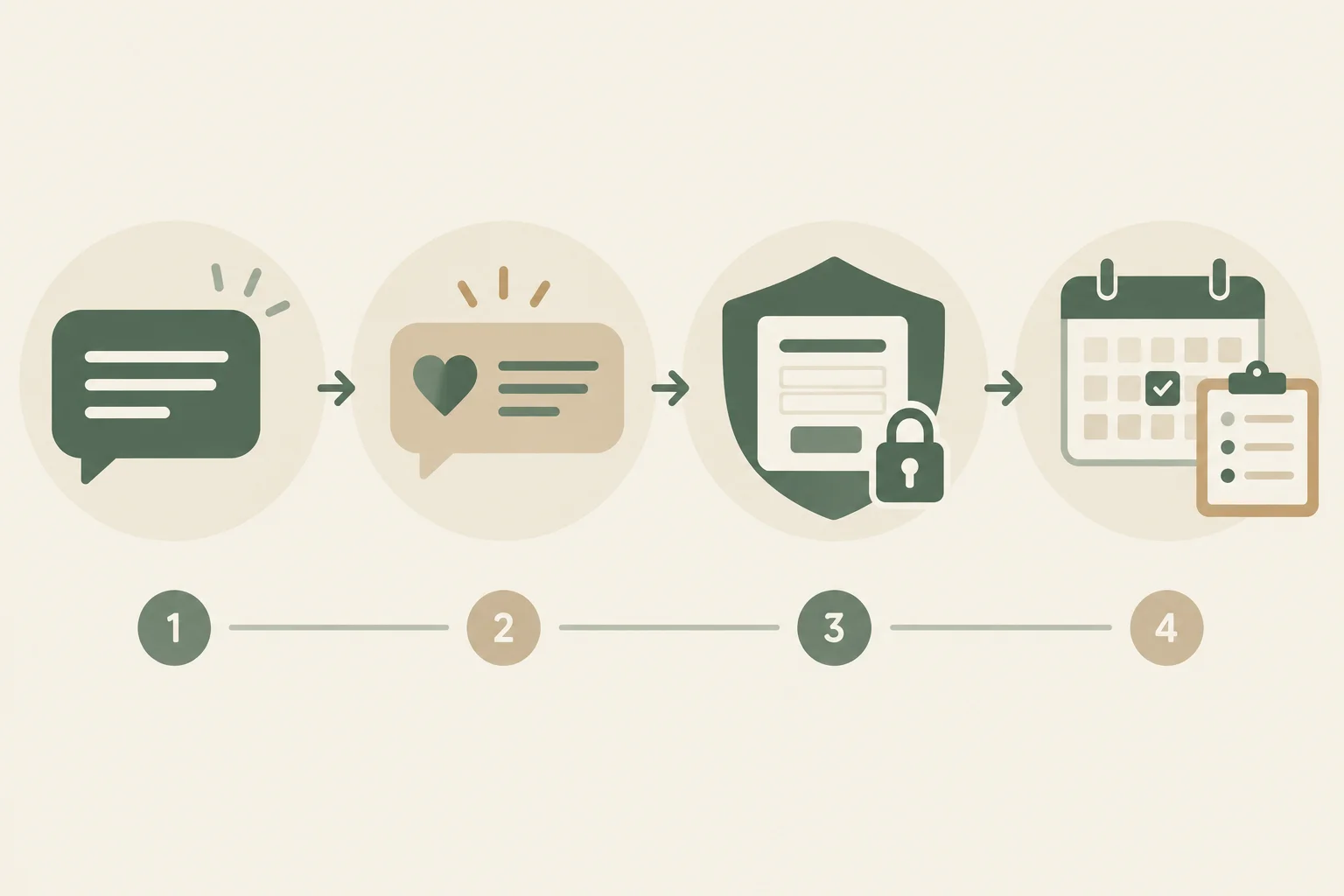
A reply starts the handling process; it does not close the case by itself.
Example
For a public complaint about a damaged item, Maya could write:
“I'm sorry your order arrived in that condition. Please use Cedar Desk’s approved support form so the team can review it securely. Please do not post private account or payment details here.”
This acknowledges the concern, offers a safe next step, and promises a review—not a particular remedy.
Use a private route only when it is approved for the information needed. A direct message is not automatically a secure place for confidential material.
Do not ask for passwords, payment-card details, or similarly sensitive information in comments or direct messages. Do not repeat information a person has already exposed publicly. Instead, direct the person to Cedar Desk’s approved support form and explain only the next safe step.
Warning
A visible complaint may contain more information than the team needs to handle publicly. Preserve only the minimum operational context for the handoff. Follow established safety procedures if the case is urgent or high risk; do not attempt a security or legal determination in a public reply.
If Maya needs a decision outside her authority, she hands the case to Leo. The handoff should contain a neutral thread label, the category, what action has already been taken, and the required follow-up—not copied personal or payment information.
Leo is then accountable for the escalated review. Maya remains responsible for making the public response and recording the handoff accurately.
A sent reply is not case closure. Keep the response log Open while more information or action is needed. When the issue is handed to Leo for review, set the status to Escalated. Mark it Resolved only after the promised next step or outcome is confirmed and the log is updated.
Use neutral thread labels rather than names or confidential details. Record a specific follow-up time so the case does not disappear after the first reply.
Illustrative escalation record. The public reply directed the person to the approved support form; no sensitive details are copied into the log.
| Thread | Category | Owner | Action | Status | Follow-up (UTC) |
|---|---|---|---|---|---|
| Delivery concern | Complaint | Leo | Review via approved support form | Escalated | 2026-04-16 14:00 |
A public Instagram comment says that a Cedar Desk order linked to the “Desk reset” post arrived damaged. The person offers to send sensitive payment information through a direct message. Maya cannot authorize refunds. Cedar Desk’s approved private route is its support form, and Leo reviews escalated cases.
Write 2–4 sentences. Draft Maya’s public reply, name the approved handoff, and state what Maya should enter in the response log: a neutral thread label, owner, action, status, and a follow-up time in UTC. Do not request or repeat confidential information, and do not promise a refund.
Write at least 180 characters (0/180).

Step 7 of 8
Use bounded native evidence and response-log context to complete a cautious weekly review and assign one next adjustment.
A weekly review starts with execution—not performance. First check the publishing queue, unresolved blockers, outstanding response work, and workload pressure against Cedar Desk’s 180 min/week operating budget.
In this illustrative review, all 3 planned posts are verified as Published and there are 0 unresolved publication blockers. One community item remains outstanding: an Escalated delivery case. No total minutes were recorded for this bounded scenario, so workload pressure is unknown; do not claim that the budget was comfortably met without a time record.
Strong post metrics do not offset skipped verification, an unresolved escalation, or a routine that regularly exceeds capacity.

Check operations first, then interpret bounded native evidence.
The response log supplies handling context, not post-level performance attribution. An outstanding escalation signals follow-through work for Leo; it does not prove that a particular post produced a native-metric result. In this bounded example, the response-log count is 1 Escalated, 0 Open, and 0 Resolved threads.
This is a community-handling record, not a post-attributed metric.
| Thread | Category | Owner | Action | Status | Follow-up (UTC) |
|---|---|---|---|---|---|
| Delivery question | Complaint + sensitive details | Leo | Use approved private support route; investigate delivery | Escalated | 2026-04-22 16:00 |
Cedar Desk’s existing objective for its Instagram carousels is to encourage people interested in desk organization to explore Cedar Desk’s profile for further ideas and products. For this weekly review, Profile visits are therefore the meaningful audience action: they connect directly to that objective.
Reach and Saves remain useful supporting evidence, but they answer different questions. Do not treat any one native metric as a universal ranking of posts.
A valid comparison holds constant the platform, format, metric definition, reporting scope, and observation window. Post age is not a reporting window. Keep Instagram carousel evidence separate from LinkedIn text-post evidence.
The following values are illustrative snapshots captured at the same point: First 7 days after publication. If native reporting cannot reproduce a retrospective seven-day snapshot, record the window as unavailable or incomplete. Do not reconstruct it from later totals or assume that a filter exists.
Source: native Instagram post insights viewed individually. Scope: the same Cedar Desk Instagram account and two Instagram carousel posts.
| Post | Format | Reach | Saves | Profile visits |
|---|---|---|---|---|
| Desk reset | Instagram carousel | 1,200 | 48 | 24 |
| Cable check | Instagram carousel | 900 | 18 | 11 |
Source: native LinkedIn post analytics viewed individually. Scope: one LinkedIn text post. Observation window: First 7 days after publication.
Keep this result separate. LinkedIn Impressions are not Instagram Reach, and one LinkedIn post cannot establish a format comparison. If a native value is unavailable, write —, not 0. Use 0 only for a measured zero. Do not present an account-level action as a result of a specific post unless native reporting attributes it to that post.
| Post | Format | Impressions | Comments |
|---|---|---|---|
| Workspace question | LinkedIn text post | 700 | 9 |
Before using two values in a decision, check the comparison conditions: same platform, format, native metric, reporting scope, and observation window. A missing or unreproducible observation window makes the comparison incomplete rather than comparable.
Which comparison is the strongest basis for a tentative adjustment to Cedar Desk’s Instagram carousel routine?
End the weekly review with one tentative, accountable adjustment—not a broad claim about what caused performance. Small samples, timing, different audience exposure, missing metrics, and incomplete windows limit interpretation.
Assign the adjustment to the person who can act on it: Maya for publishing or community work, Leo for review or escalation decisions. Set a next comparable check using the same platform, format, metric, scope, and window. If that window cannot be captured, record the limitation and do not substitute an invented comparison.
Write 5–7 sentences using the illustrative evidence from the previous screens. Select one valid Instagram comparison and name its metric. Reject either an incompatible cross-platform comparison or an incomplete observation-window comparison, explaining why it cannot support the decision. Then propose exactly one tentative content or community-management adjustment, support it with evidence, state one limitation, and name its owner and next comparable check.
Write at least 300 characters (0/300).

Step 8 of 8
Consolidate Cedar Desk’s publishing, community, and review records into one feasible weekly operating decision.
A weekly operating routine is complete only when each handoff is visible: planned content enters the publishing queue, receives a recorded approval decision, passes a prepublication check, is published and verified, community work receives follow-through, and the weekly review selects one next action.
This final scenario consolidates Cedar Desk’s existing posts and records; it does not require a new content strategy. If a scheduling feature is unavailable, the authorized method may change, but approval, checking, and publication verification still apply. No live publication or file submission is required.

The loop closes only when verified results and unfinished work inform a feasible next-week decision.
The operational record and approval record remain separate, connected by the exact Post title. Cedar Desk has completed the three planned posts.
For Cable check, the intended scheduling feature was unavailable. Maya used the authorized Manual method, completed the prepublication check, published through the authorized account, and verified the live carousel before the queue was marked Published. The fallback changed the method—not Leo’s approval requirement or Maya’s verification standard.
Illustrative completed publishing queue. All publish times are UTC.
| Post | Platform | Publish time (UTC) | Method | Owner | Status |
|---|---|---|---|---|---|
| Desk reset | Instagram carousel | 2026-04-13 09:00 | Meta Business Suite | Maya | Published |
| Cable check | Instagram carousel | 2026-04-15 09:00 | Manual | Maya | Published |
| Workspace question | LinkedIn text post | 2026-04-16 14:00 | Native scheduler | Maya | Published |
Illustrative complementary approval record.
| Post | Reviewer | Decision | Checks | Blocker |
|---|---|---|---|---|
| Desk reset | Leo | Approved | Account, preview, caption, destination, accessibility | — |
| Cable check | Leo | Approved | Account, preview, caption, destination, accessibility | — |
| Workspace question | Leo | Approved | Account, preview, caption, destination, accessibility | — |
The existing objective for Cedar Desk’s Instagram carousels is to encourage people interested in desk organization to explore Cedar Desk’s profile for further ideas and products. Profile visits are therefore the meaningful audience action for the carousel comparison. Reach and Saves are supporting evidence, not interchangeable outcomes.
The community handoff also remains visible. It has a designated owner and follow-up time, so it is not silently carried into the next week.
Illustrative response log. This handling record is not a post-attributed native metric.
| Thread | Category | Owner | Action | Status | Follow-up (UTC) |
|---|---|---|---|---|---|
| Delivery question | Complaint + sensitive details | Leo | Use approved private support route; investigate delivery | Escalated | 2026-04-22 16:00 |
Illustrative data. Source: native Instagram post insights viewed individually. Scope: the same Cedar Desk Instagram account and two Instagram carousel posts. The matched observation window is First 7 days after publication.
This comparison can support one tentative content adjustment because platform, format, account scope, metric definitions, and window match. It cannot establish a broad cause: the sample has only two posts, and timing and audience exposure may differ. If native reporting cannot actually provide matched first-seven-day snapshots retrospectively, record that window as unavailable or incomplete rather than reconstructing it from later totals.
| Post | Format | Reach | Saves | Profile visits |
|---|---|---|---|---|
| Desk reset | Instagram carousel | 1,200 | 48 | 24 |
| Cable check | Instagram carousel | 900 | 18 | 11 |
Next week remains planned within Cedar Desk’s 180 min/week operating budget: 60 min for publishing preparation, 45 min for bounded community-response windows, 30 min for the weekly review, and 45 min for contingency. Do not add another post to this allocation.
This is a feasible next-week plan, not proof that the previous week stayed within budget: no total minutes were recorded for the completed week. The unfinished Delivery question has an owner and a dated follow-up; it must be handled within the routine rather than ignored.
Write a 120–180 word weekly decision record using the scenario records on the previous screens. Your record must:
Do not add posts, propose a new content strategy, or present the metric comparison as proof of causation.
Write at least 120 characters (0/120).
Summary
A sustainable routine keeps its standards intact when the publishing method changes. It closes the current week by making ownership, follow-up, evidence limits, and one next action visible.
Congratulations! You completed: Run a Sustainable Social Publishing and Review Routine
You completed this level!
Up next: Analytics and Measurement
 Plan GA4 Events and Key EventsCreate a GA4 measurement plan for a sample business, specifying useful events, key events, access needs, consent safeguards, and feasible no-code setup options without requiring a live website.
Thousands of online courses in video, ebooks and audiobooks.
To test your knowledge during online courses
Generated directly from your cell phone's photo gallery and sent to your email

Download our app via QR Code or the links below:.



Carry knowledge in your pocket.
Download the Cursa app.
There are hundreds of free courses available, with a free certificate of completion that is saved in your mobile image gallery.
Download the app to access the Course Completion Certificate for Free.


+ 10 million
students

Free and Valid
Certificate

60 thousand free
exercises

4.8/5 rating in
app stores

Free courses in
video and ebooks