Step 1 of 8
Understand How Instagram Content Gets Discovered
Learn the possible routes through which a useful Instagram post may be discovered, while keeping distribution claims appropriately cautious.

Learning path · Level 4 · Tutorial 1
Plan Instagram Reels and carousels for a specific audience need, then assess their usefulness using illustrative native-metric summaries. Develop written content plans without needing to publish or access a professional account.

 Understand How Instagram Content Gets Discovered
Learn the possible routes through which a useful Instagram post may be discovered, while keeping distribution claims appropriately cautious. 2 min
 Match the Format to the Audience Need
2 min
 Draft a Focused Reel Brief
Create a concise written Reel brief for a visible small-desk transformation. 3 min
 Build a Carousel Worth Returning To
Plan a five-slide Nook Desk carousel that provides a reusable desk-space checklist and complements the small-desk-reset Reel. 3 min
 Know Which Results You Can Actually See
Learn which Instagram observations may be public, which normally require authorized Instagram Insights access, and why missing data is not zero. 2 min
 Read Reach, Saves, and Audience Actions
Interpret illustrative Instagram Insights metrics by keeping each count within its content-level or account-level reporting scope. 2 min
 Turn Results into a Defensible Adjustment
Use a stated objective and the supplied illustrative results to make one cautious, focused content adjustment. 2 min
 Finalize Your Reel and Carousel Plan
Complete a complementary pair of written content plans and defend one evidence-supported revision without overstating the results. 3 min
Step 1 of 8
Learn the possible routes through which a useful Instagram post may be discovered, while keeping distribution claims appropriately cautious.
Nook Desk sells desk accessories for people working from home at a small desk. Its audience need is making a crowded desk easier to use.
In this tutorial, you will plan useful Instagram content for that need. A post does not need to be seen only by people who already follow the account: people can encounter it through more than one route.
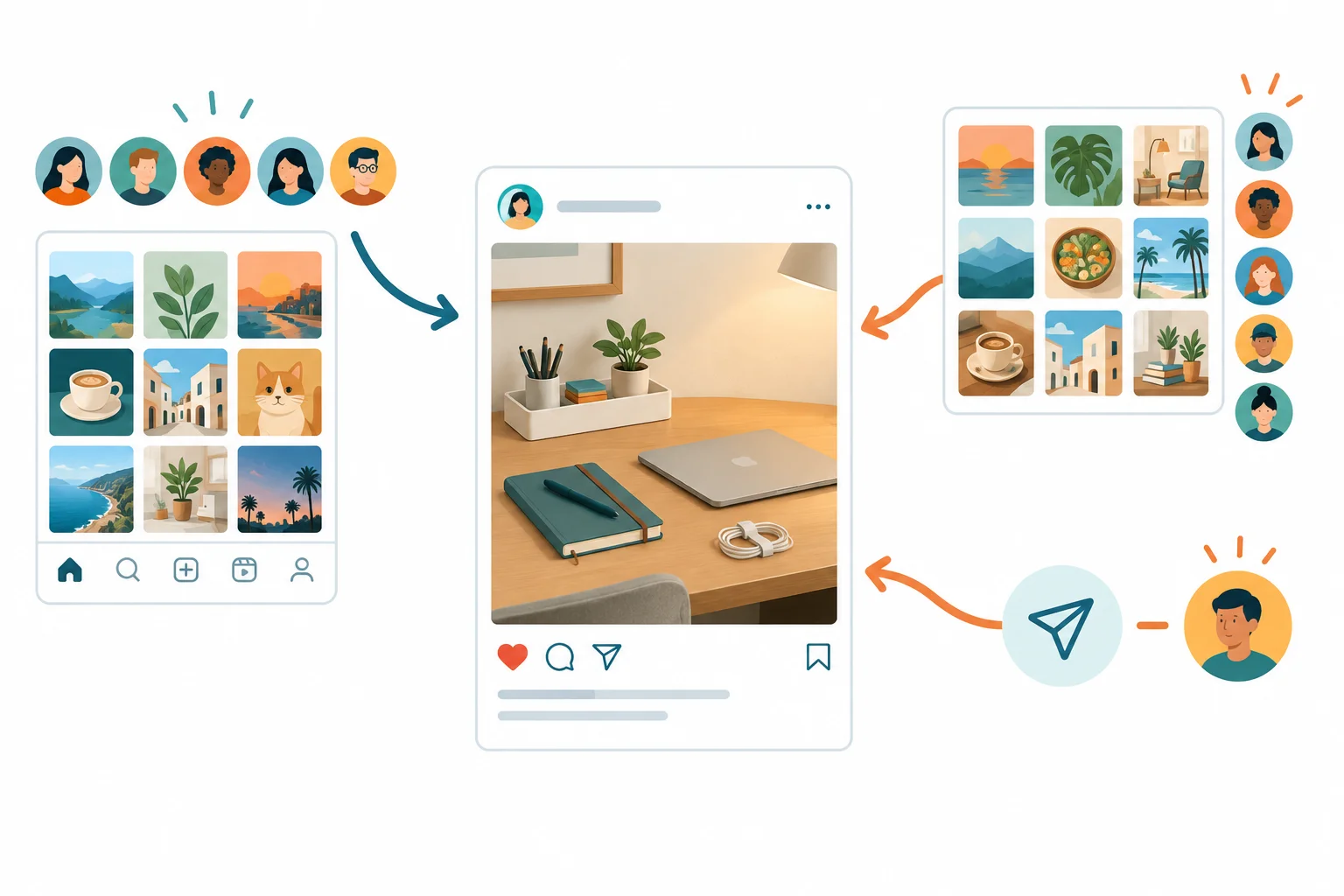
A discovery map shows possible routes to one post—not a promised sequence.
A useful Nook Desk post might be encountered in a follower’s feed. It might also be recommended to someone who does not follow Nook Desk, or passed along when someone shares it with another person.
These are possible discovery routes to the same post. They are not steps that every post travels through, and they do not promise a particular audience size.
Tip
Recommendations can introduce a post to non-followers. But choosing a content format, making a useful post, or receiving an interaction does not guarantee recommendation or reach.
Make plans around a real audience need and a useful message. Treat distribution as uncertain rather than as an outcome you can promise.
Which claim about a useful Nook Desk post is supportable?

Step 2 of 8
Choose the format by asking two questions: What does the audience need to understand now? and What should they be able to do next?
A Reel is useful when seeing motion, a demonstration, or a transformation makes the point clearer. For Nook Desk, a quick small-desk reset can show how a crowded surface becomes easier to use.
A carousel is useful when people benefit from moving through connected ideas at their own pace. It can hold a checklist, comparison, or set of decisions worth revisiting.
A Story is useful for a timely update or direct interaction, such as asking followers a question. Stories normally disappear after 24 hours unless they are retained as Highlights.
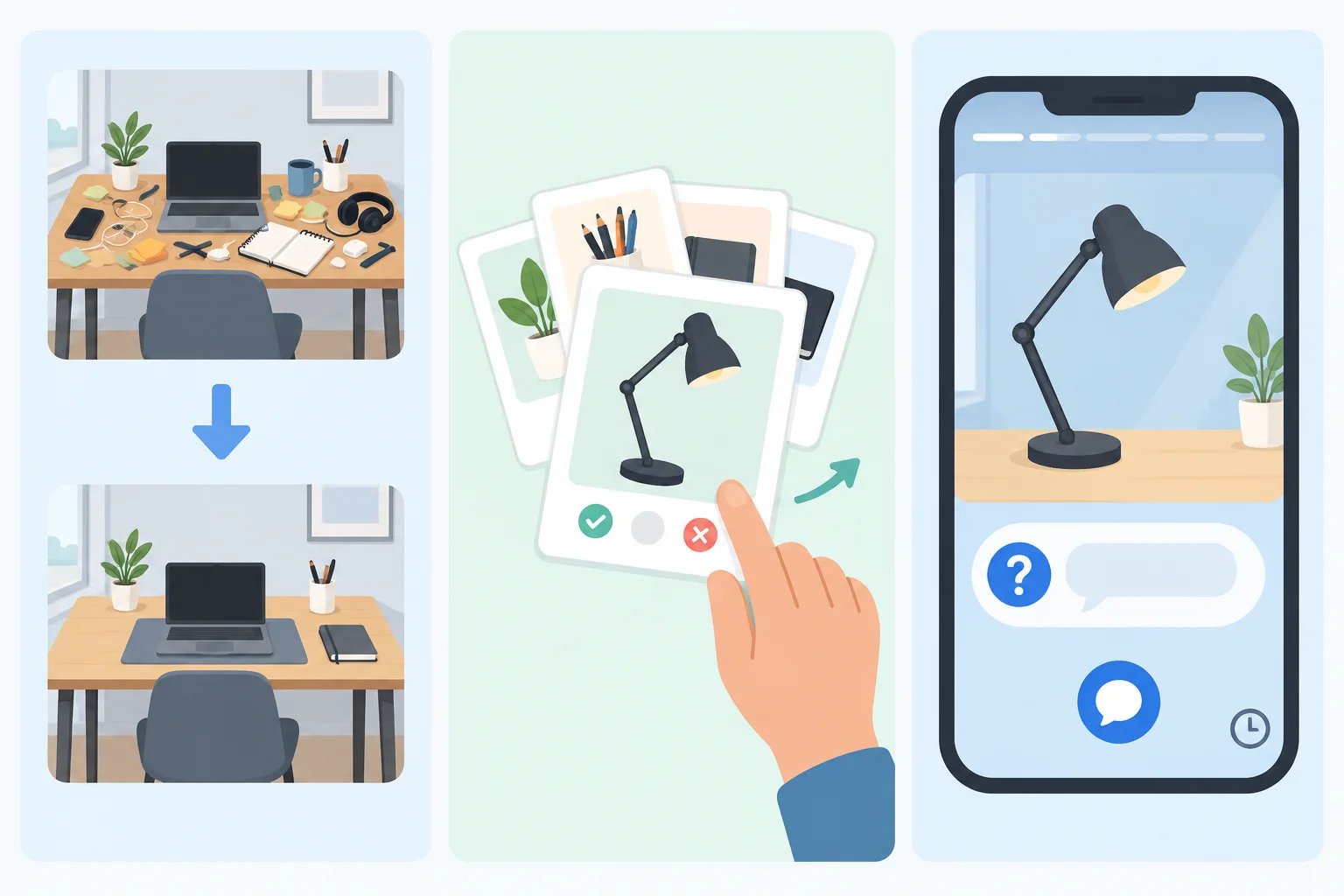
Reel: show change. Carousel: let people progress through connected information. Story: invite a timely response.
There is no automatic winner. A Reel is not guaranteed to be recommended, and a carousel is not guaranteed to earn saves. Use the format that makes the message easiest to act on, then evaluate results in context later.
Use this comparison to select a format for the message in front of you.
| Format | Best when the message needs | Likely audience action |
|---|---|---|
| Reel | A visible action, movement, or before-and-after change | Watch and understand a demonstration |
| Carousel | Connected checks, examples, or decisions at a self-chosen pace | Swipe through and return to useful guidance |
| Story | A current update, quick prompt, or direct interaction | Reply, answer, or respond while the update is timely |
Match each Nook Desk situation to the format and purpose that fit it best.
Tap an item and then its matching pair.

Step 3 of 8
Create a concise written Reel brief for a visible small-desk transformation.
A focused Reel brief is a written planning tool—not a production storyboard. It connects one audience need to one visible transformation, one useful message, and one next action.
For Nook Desk, plan for people working from home at a small desk who need to make a crowded desk easier to use.
Use these five fields in this exact order:
A call to action (CTA) tells an interested viewer what to do next. Keep it specific and low-pressure.
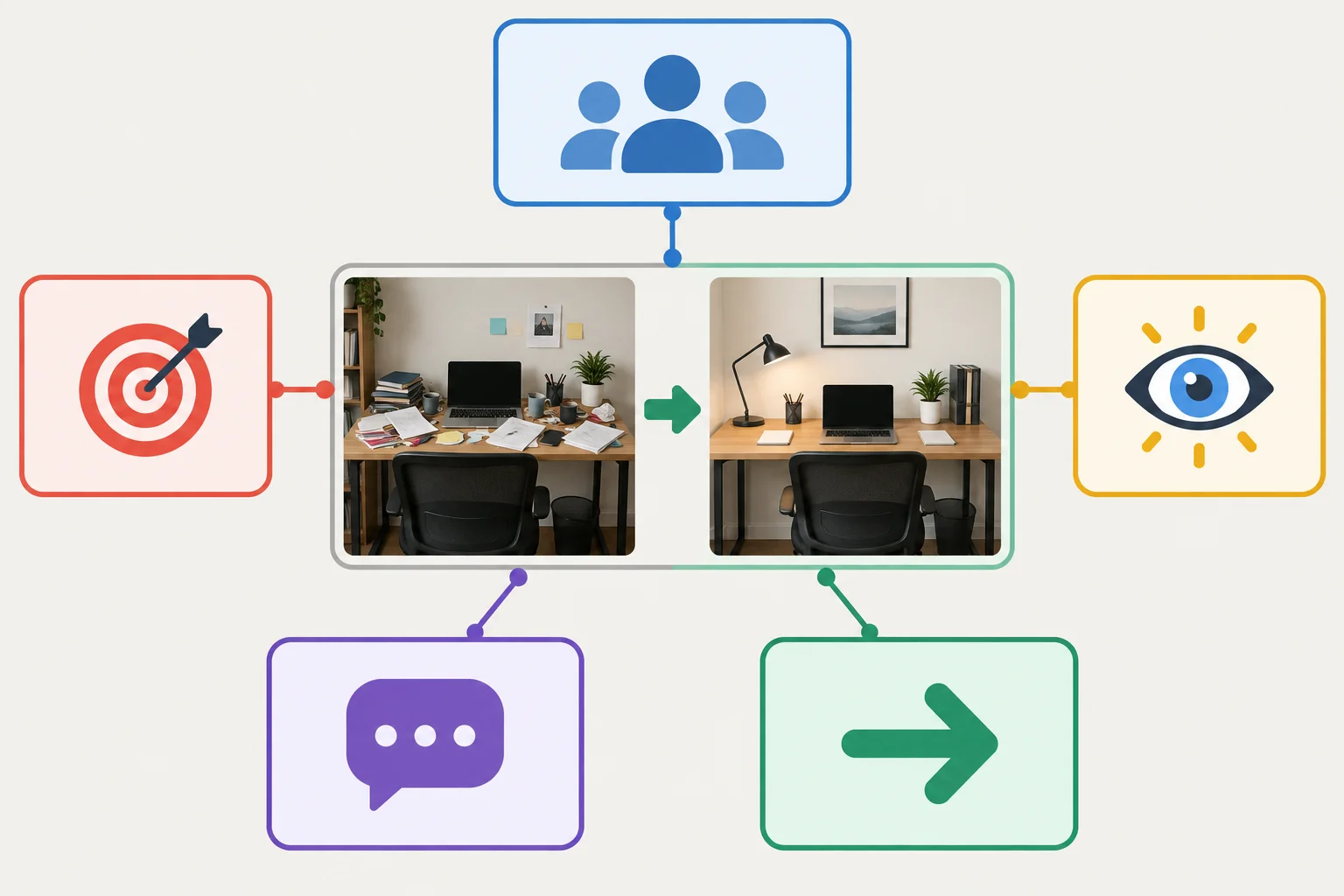
The brief links a real audience need to a visible idea, a clear message, and one appropriate next action.
Tip
The visual idea can be a simple before/action/result sketch:
This is enough to communicate the transformation. You do not need a filming plan, editing software, an Instagram account, or a published Reel.
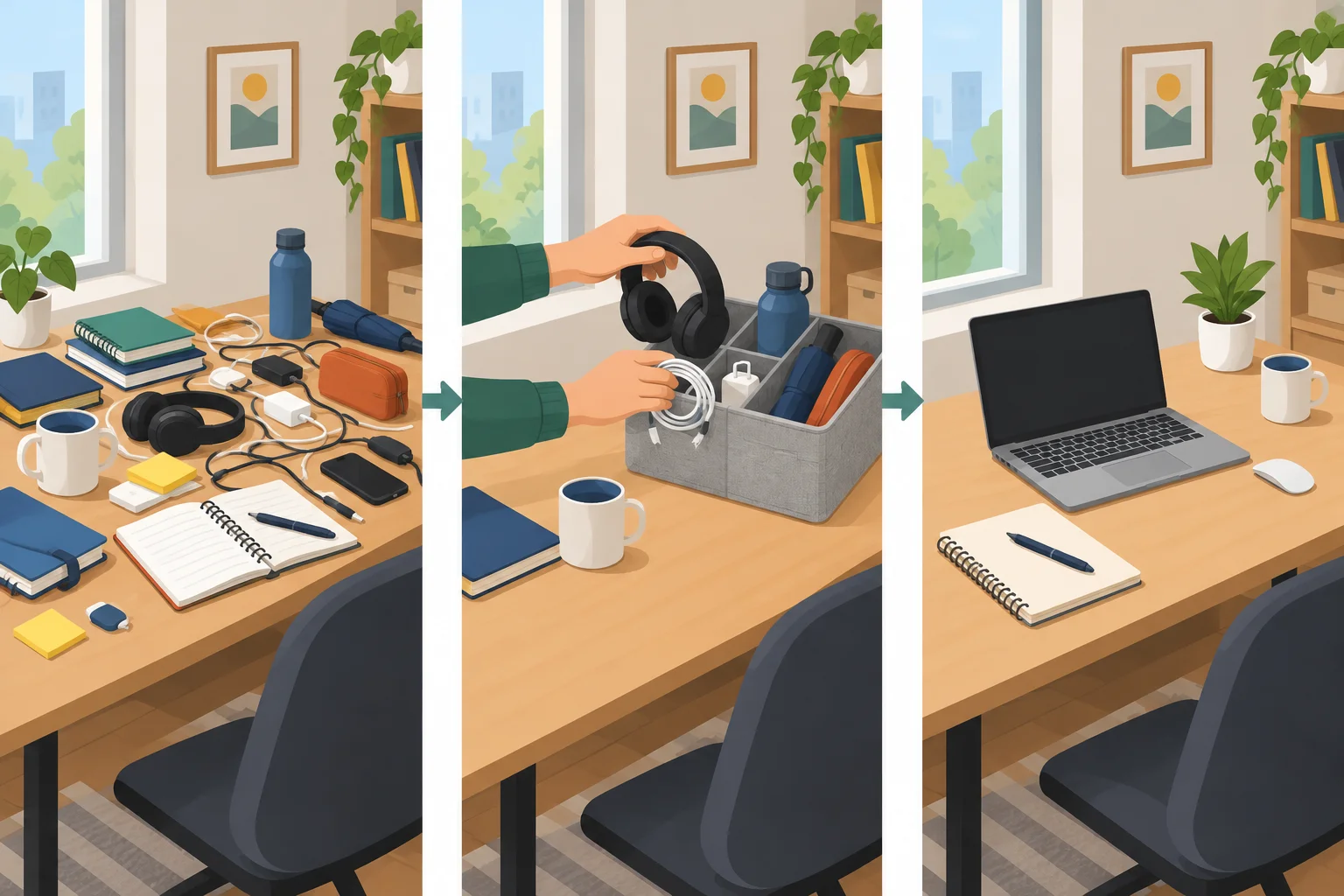
A visible desk reset gives the Reel one understandable transformation, even without sound.
Example
Audience need: Making a crowded desk easier to use.
Objective: Show people working from home at a small desk one quick way to create working space.
Visual idea: Show a crowded desk, move occasional-use items into a nearby organizer, then show the cleared space for a laptop and current task.
Essential message: Keep only today’s work within reach; move occasional-use items off the desk.
CTA: Visit the profile for more small-desk setup guidance.
Tip
Notice the alignment: the transformation demonstrates the message, and the CTA offers related guidance rather than promising a result. Someone who has never seen Nook Desk should still understand the message with the sound off.
Write a concise Reel brief for Nook Desk. Use all five labels in the required order. Plan one visible small-desk reset with a before/action/result visual idea, one useful sound-off message, and one low-pressure CTA that fits your objective.
Do not claim that the Reel will guarantee reach, sales, or a specific outcome.
Write at least 250 characters (0/250).

Step 4 of 8
Plan a five-slide Nook Desk carousel that provides a reusable desk-space checklist and complements the small-desk-reset Reel.
A useful carousel takes someone through one small decision path. Start with a clear cover promise, then provide supporting checks that help the reader act on that promise. End with a CTA that fits the value you delivered.
For Nook Desk, the Reel shows a small-desk reset: a visible transformation. The carousel has a different job: it gives people working from home at a small desk a checklist for deciding which items deserve limited desk space. That makes it useful to revisit later.
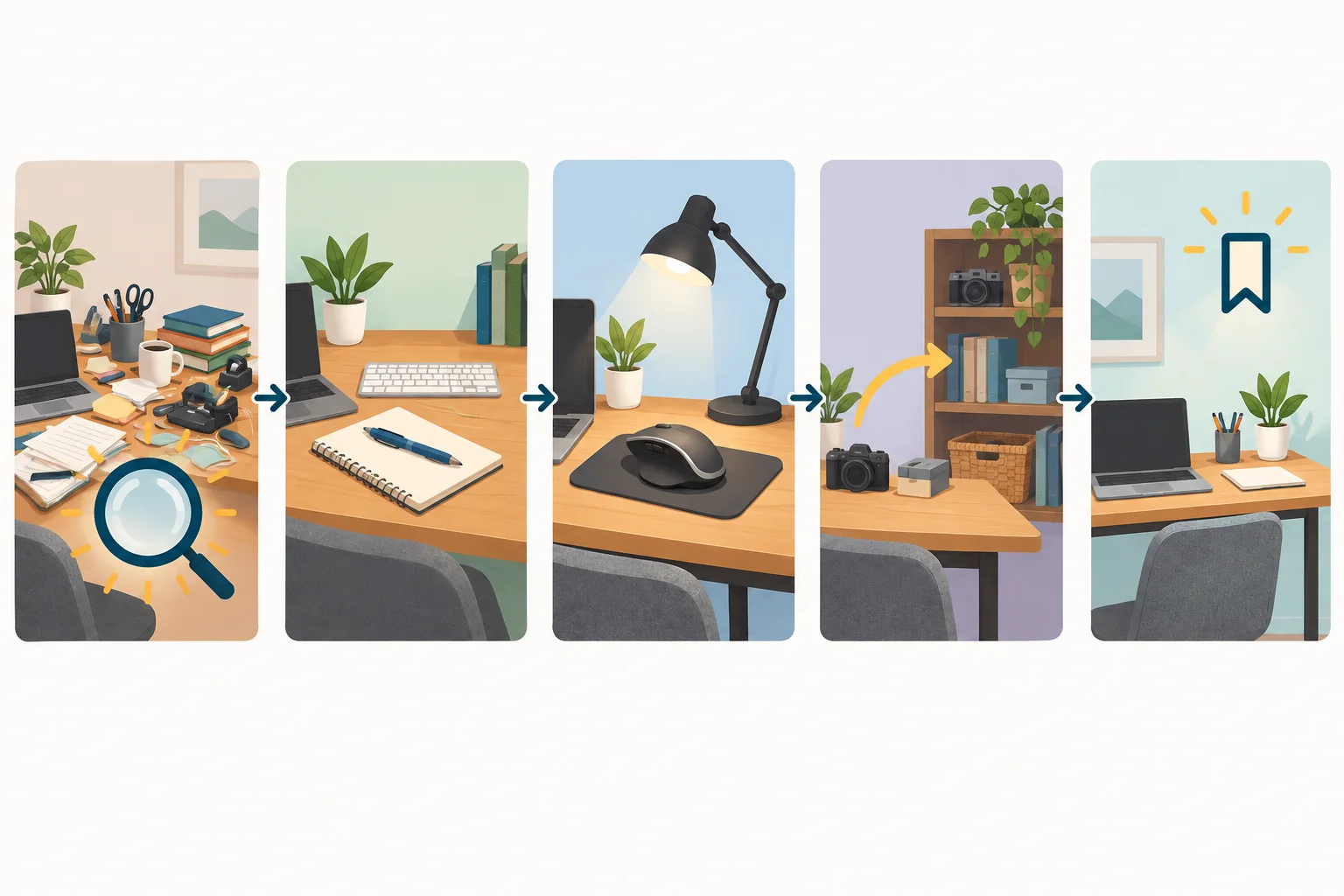
The strip makes the relationship visible: promise first, three distinct checks next, and a relevant save-oriented CTA last.
Tip
Do not turn the carousel into a written version of the Reel. The Reel can make the reset easy to see; the carousel can make a later decision easier to repeat.
Example
This five-slide example delivers a reusable checklist. The checks form a decision sequence: consider frequent use first, then essential support, then whether an item can live elsewhere.
Slide 1 — Cover promise
Which items deserve a spot on your small desk? Use these three checks.
Slide 2 — Check 1
Do you use it every workday? Keep frequent-use tools within reach.
Slide 3 — Check 2
If not, does it support focus or comfort? Give necessary tools priority.
Slide 4 — Check 3
If not, can it live nearby instead? Move occasional extras off the desk.
Slide 5 — CTA
Save this checklist before your next desk reset.
Tip
The cover promises a decision aid, not just a tidy-looking desk. Each check adds a different criterion, so saving the carousel has a practical reason.
Put these carousel cards in the order that creates a coherent decision path.
Create a five-slide Nook Desk carousel for people working from home at a small desk. Write all five labeled lines: a cover promise, three connected checks for deciding what deserves desk space, and a save-oriented CTA.
Make the carousel a reusable reference, not a description of the Reel’s visible reset.
Write at least 180 characters (0/180).

Step 5 of 8
Learn which Instagram observations may be public, which normally require authorized Instagram Insights access, and why missing data is not zero.
A public post view and an account-owner view do not show the same information. A person may see a count displayed on a post, where Instagram chooses to display it. That does not provide the detailed measures available in Instagram Insights.
Detailed Instagram Insights generally require a professional business or creator account plus appropriate ownership or permissions. You do not need to switch account types, publish, or access an account for this tutorial: later activities provide illustrative summaries.
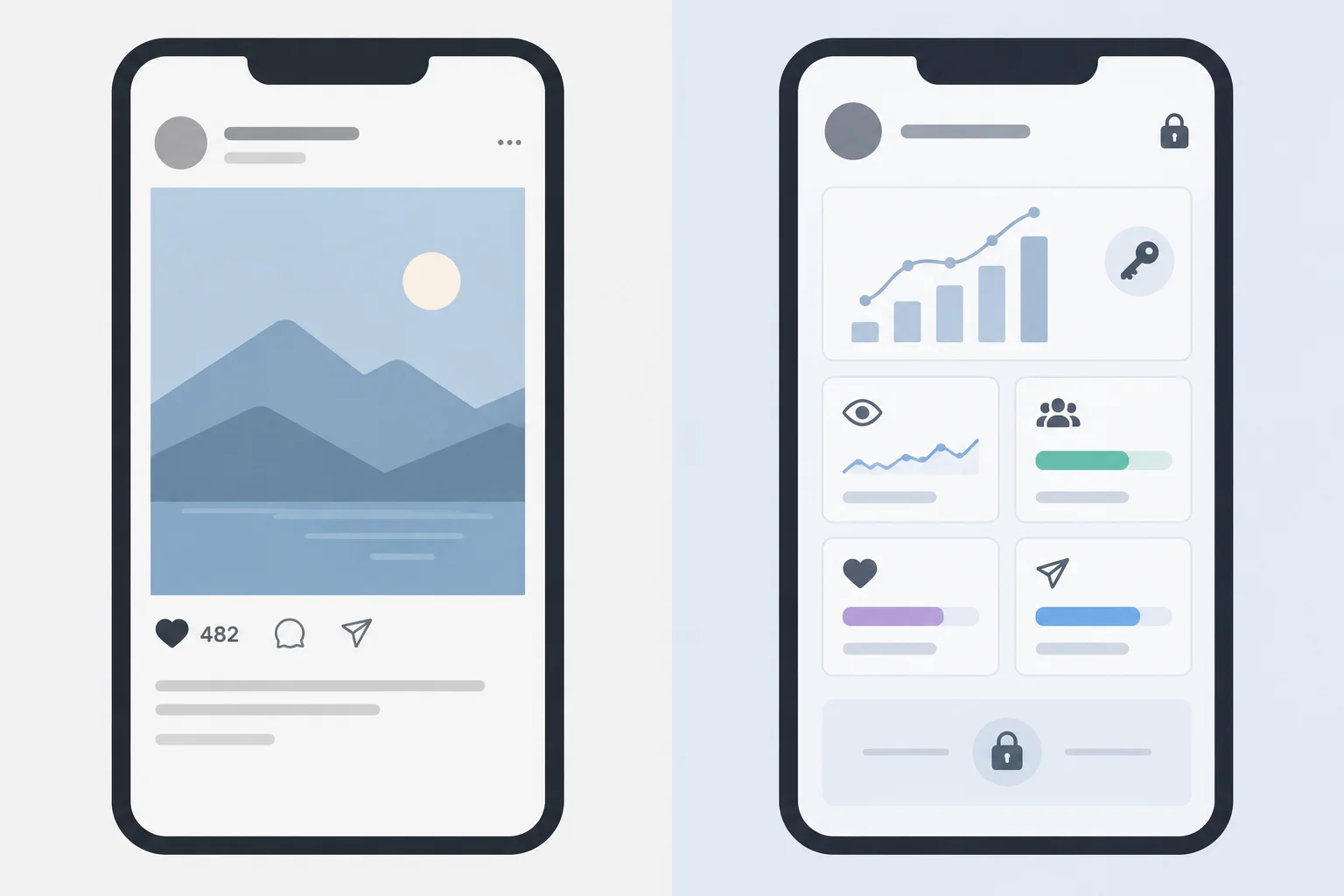
A schematic comparison, not a live Instagram screen.
Think in terms of access and scope before drawing a conclusion. A number shown publicly, if one is displayed, is not a substitute for owner-only reporting. Availability can vary by account, content format, supported feature, and reporting context.
When a supplied summary does not include a measure, record it as unavailable. Do not silently turn missing information into a measured zero.
Use this distinction when reading any supplied Instagram summary.
| Observation | Typical access | What to conclude |
|---|---|---|
| A count displayed on a post, where shown | Public post view | It is not the full Insights record |
| Accounts reached or Saves for a post | Authorized Instagram Insights | Use only when supplied or accessible with permission |
| A measure absent from a summary | Unavailable | It is not a measured zero |
Match each observation to the most appropriate access or data-status category.
Tap an item and then its matching pair.

Step 6 of 8
Interpret illustrative Instagram Insights metrics by keeping each count within its content-level or account-level reporting scope.
Accounts reached is the number of unique accounts reached within the stated content or reporting scope. It is not the same as views.
If Reel A reached 2,400 accounts and Carousel A reached 1,200 accounts, you cannot conclude that 3,600 different accounts were reached. Some people may have encountered both posts.
Saves can suggest that people saw enough value to keep a post for later. They do not show that someone followed the advice, visited a site, or made a purchase.
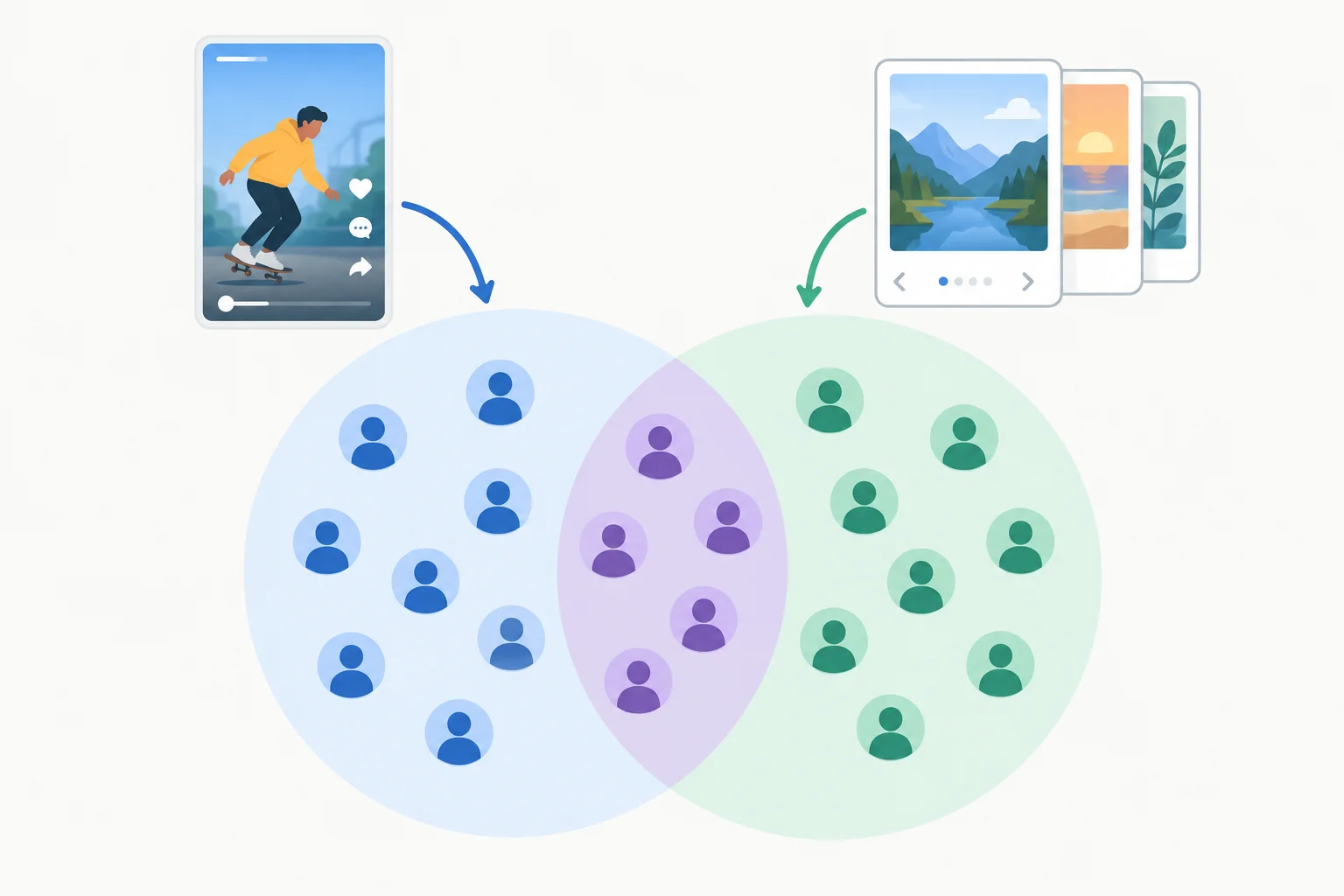
Separate post-level reach counts may overlap, so they are not a deduplicated total audience.
Both example posts were published at the start of the same 7-day reporting window and received no paid distribution. Read the row label before making a claim: content-level results describe a post, while account-level results describe activity across the account during the window.
| Scope | Content or account | Metric | Count |
|---|---|---|---|
| Content-level | Reel A | Accounts reached | 2,400 |
| Content-level | Reel A | Saves | 24 |
| Content-level | Carousel A | Accounts reached | 1,200 |
| Content-level | Carousel A | Saves | 72 |
| Account-level | Nook Desk account | Profile visits | 60 |
| Account-level | Nook Desk account | External link taps | 8 |
Tip
The carousel’s higher save count may support a cautious idea: its checklist-like content may have felt more useful to revisit. It does not prove that the carousel caused sales.
Likewise, the 8 external link taps are an account-level total. This summary does not tell you whether they came from Reel A, Carousel A, another post, or another account surface. Depending on the format and available features, other response measures can include Story replies or contact actions; unavailable measures should be shown as —, not treated as zero.
Match each metric or metric type to the most accurate interpretation.
Tap an item and then its matching pair.
Using the supplied 7-day summary, write 3–5 sentences that:
Write at least 250 characters (0/250).

Step 7 of 8
Use a stated objective and the supplied illustrative results to make one cautious, focused content adjustment.
A defensible adjustment is a reasoned next attempt, not a verdict on which post “won.” Build it as a chain:
Reach and saves answer different questions. More reach can support a visibility objective; more saves can support a reference-value hypothesis. Neither count proves what caused performance or whether anyone purchased.
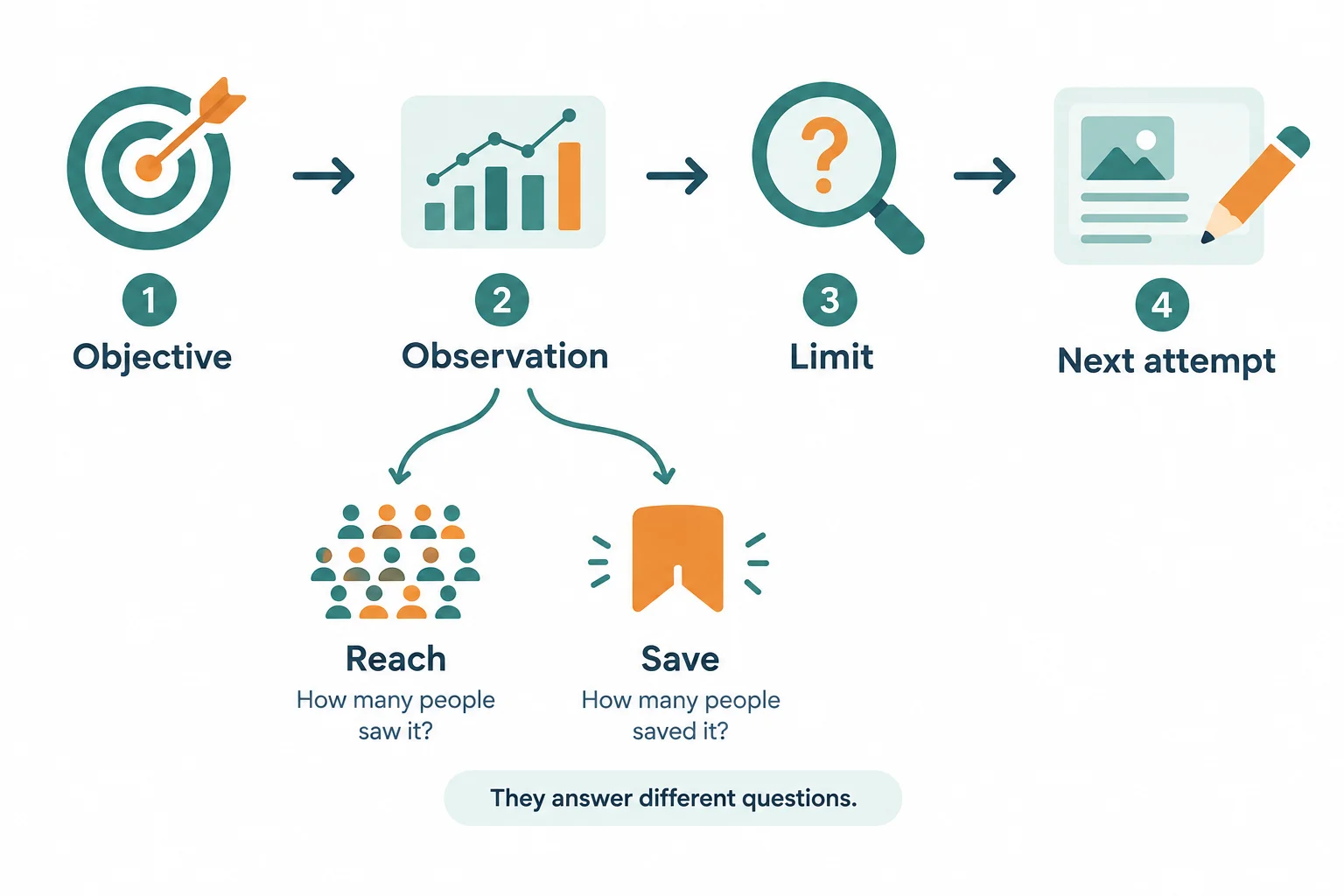
Use the result that fits the objective, then state what the result cannot establish before choosing one focused change.
The posts started at the beginning of the same 7-day reporting window and had no paid distribution. Compare each content-level result with its own purpose; do not assign account totals to either post.
Results supplied for Nook Desk
| Scope | Item | Accounts reached | Saves | Profile visits | External link taps |
|---|---|---|---|---|---|
| Content-level | Reel A | 2,400 | 24 | — | — |
| Content-level | Carousel A | 1,200 | 72 | — | — |
| Account-level | 7-day total | — | — | 60 | 8 |
Example
Objective: Help people working from home at a small desk keep a useful decision checklist.
Observation: Carousel A had 72 saves, compared with 24 saves for Reel A.
Limit: This supports a hypothesis that the carousel has reference value. It does not show that readers used the checklist, purchased a product, or that one specific slide caused the saves.
Next attempt: Keep the five-slide checklist structure and strengthen the cover promise so readers immediately understand it will help them decide which items deserve desk space.
Tip
Choose the part of the plan that matches the objective:
Changing one element gives you a clear, focused next attempt. It does not prove that element caused the earlier result.
Write a defensible adjustment for either Reel A or Carousel A. State the content objective, cite one relevant supplied metric, name one uncertainty, and propose one focused change to the Reel brief or carousel sequence. Do not attribute the account-level totals to either post or claim a sales outcome.
Write at least 220 characters (0/220).

Step 8 of 8
Complete a complementary pair of written content plans and defend one evidence-supported revision without overstating the results.
Your final plan uses two formats for different jobs, not two versions of the same post. For Nook Desk, the Reel makes the small-desk reset visible in seconds. The carousel gives people a reusable way to decide what deserves limited desk space.
Keep the pair connected by the same audience need: making a crowded desk easier to use. Keep it distinct through its purpose, structure, and CTA. This is a written plan: you do not need to film, publish, upload anything, or access an Instagram account.
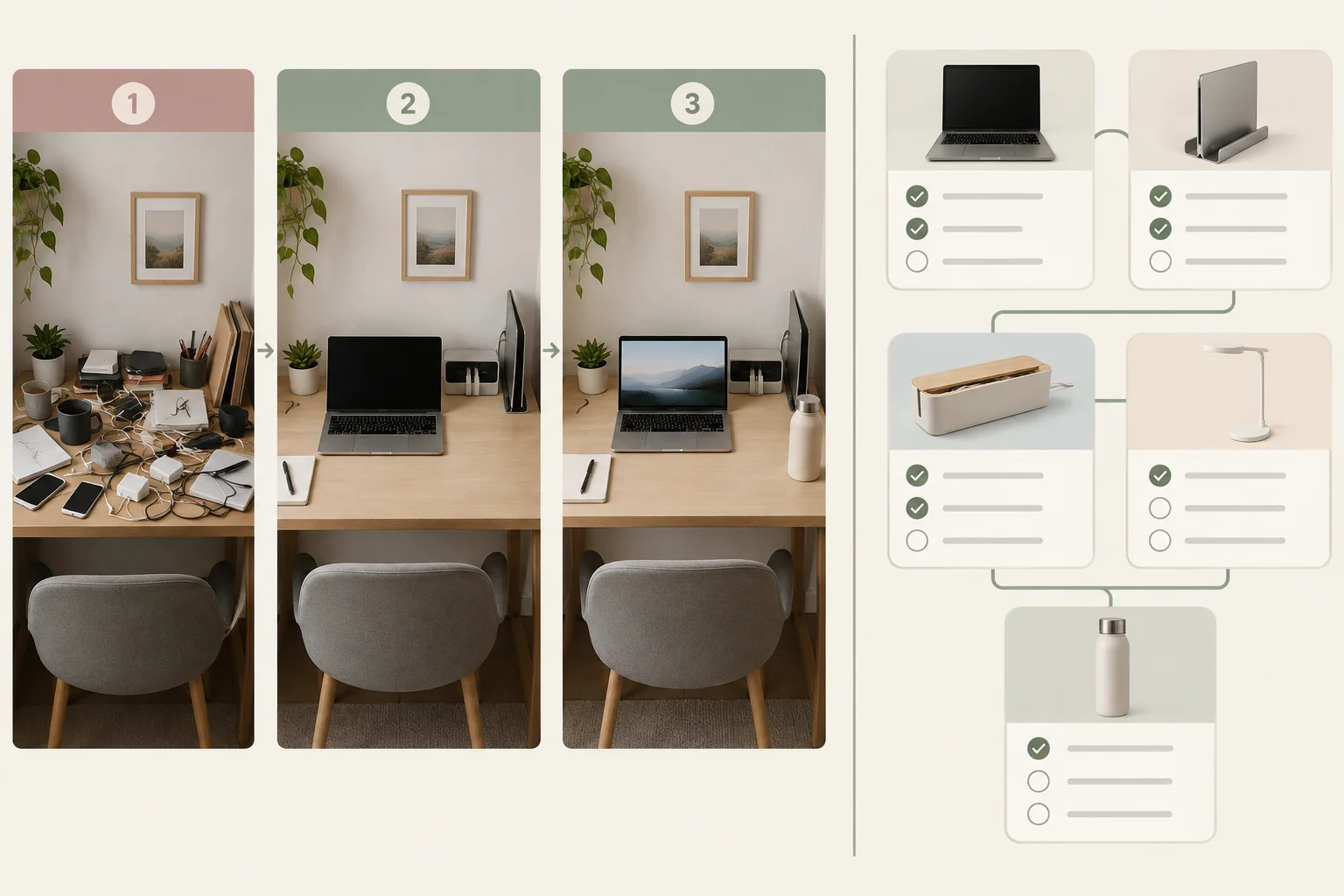
The Reel demonstrates a reset; the carousel provides a decision tool people can revisit.
Use this compact board to check that each format has a distinct job before you finalize it.
| Format | Purpose | Content structure | CTA |
|---|---|---|---|
| Reel | Show a quick, useful small-desk reset. | Audience need: making a crowded desk easier to use; Objective: show one practical reset; Visual idea: before, action, result; Essential message: keep only what supports today’s work visible; CTA: visit the profile for related guidance. | Visit the profile for related small-desk guidance. |
| Carousel | Provide a checklist for deciding which items earn desk space. | Slide 1 — Cover promise; Slide 2 — Check 1; Slide 3 — Check 2; Slide 4 — Check 3; Slide 5 — CTA. Each check helps readers evaluate an item rather than repeating the reset. | Save this checklist for your next desk reset. |
Evidence should support a next attempt, not turn the plan into a certainty. The two example posts began the same 7-day reporting window and had no paid distribution.
The Reel reached more accounts in this illustrative summary. The carousel received more saves. Those observations can support different questions: broad exposure versus possible reference value. The account-level actions are useful context, but this summary does not assign them to either post.
Choose metrics that fit the objective of the change you propose. Keep the reporting scope visible in your wording.
Supplied summary for the Nook Desk scenario. An em dash means that this metric is unavailable or inapplicable in that row, not that it measured zero.
| Scope | Content | Accounts reached | Saves | Profile visits | External link taps |
|---|---|---|---|---|---|
| Content-level | Reel A | 2,400 | 24 | — | — |
| Content-level | Carousel A | 1,200 | 72 | — | — |
| Account-level | Account total | — | — | 60 | 8 |
Warning
A careful revision can be specific without claiming a cause. For example, you might strengthen the part of the plan that best serves its objective, then treat the next result as more evidence—not proof of purchase, advice use, or guaranteed discovery.
Write your final Nook Desk content-plan response in 160–300 words.
Include four labeled parts:
Write as a plan you could use without publishing or accessing an account.
Write at least 600 characters (0/600).
Summary
Congratulations! You completed: Plan Instagram Reels and Carousels
Thousands of online courses in video, ebooks and audiobooks.
To test your knowledge during online courses
Generated directly from your cell phone's photo gallery and sent to your email

Download our app via QR Code or the links below:.



Carry knowledge in your pocket.
Download the Cursa app.
There are hundreds of free courses available, with a free certificate of completion that is saved in your mobile image gallery.
Download the app to access the Course Completion Certificate for Free.


+ 10 million
students

Free and Valid
Certificate

60 thousand free
exercises

4.8/5 rating in
app stores

Free courses in
video and ebooks