
Step 1 of 8
Choose the Lifecycle Purpose and Entry Event
Choose a lifecycle purpose and the event that should begin its contact-specific workflow.

Learning path · Level 8 · Tutorial 3
Map compact welcome, nurture, and post-purchase workflows with clear entry, timing, branching, and stopping rules. Validate them through fictional contact walkthroughs without requiring paid automation features or an integrated store.
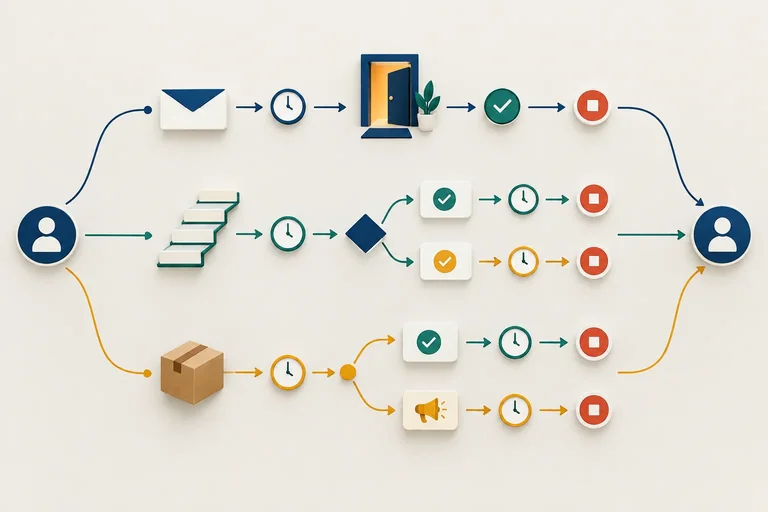
 Choose the Lifecycle Purpose and Entry Event
Choose a lifecycle purpose and the event that should begin its contact-specific workflow. 2 min
 Build a Testable Workflow Specification
Turn lifecycle ideas into compact workflow specifications with explicit checks, branches, holds, and endings. 3 min
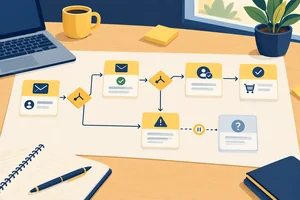 Check What the Workflow Can Actually Know
Identify the minimum evidence behind workflow triggers and conditions, and route unresolved required data safely. 3 min
 Map a Welcome Sequence That Keeps the Signup Promise
Create a compact Welcome workflow for Northstar Paper, from confirmed signup through safe completion or an early exit. 3 min
 Map Nurture Around One Decision Barrier
Build a finite Nurture workflow for Northstar Paper that addresses the declared Routine fit barrier and stops safely when purchase status or relevance changes. 3 min
 Separate Post-Purchase Service from Marketing
Separate confirmed-order service actions from consent-dependent post-purchase marketing in a compact workflow map. 3 min
 Resolve Overlap, Frequency, and Re-entry
Add shared controls that prevent duplicate enrollment, conflicting lifecycle messages, and sends based on outdated eligibility. 4 min
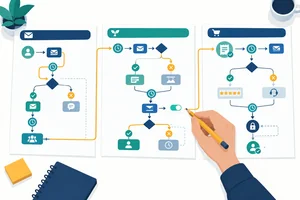 Validate and Finish the Three Workflow Maps
Trace fictional contacts through three lifecycle workflow maps, repair unsafe paths, and finalize internally consistent specifications. 5 min
Step 1 of 8
Choose a lifecycle purpose and the event that should begin its contact-specific workflow.
A one-time campaign is planned around a selected send occasion: for example, one announcement to a chosen audience on a particular date.
A lifecycle workflow is different. Each contact enters when a relevant event happens, then can continue over time. The map is about the contact’s path, not one shared send date.
For Northstar Paper, start by naming one purpose and the event that begins that purpose.
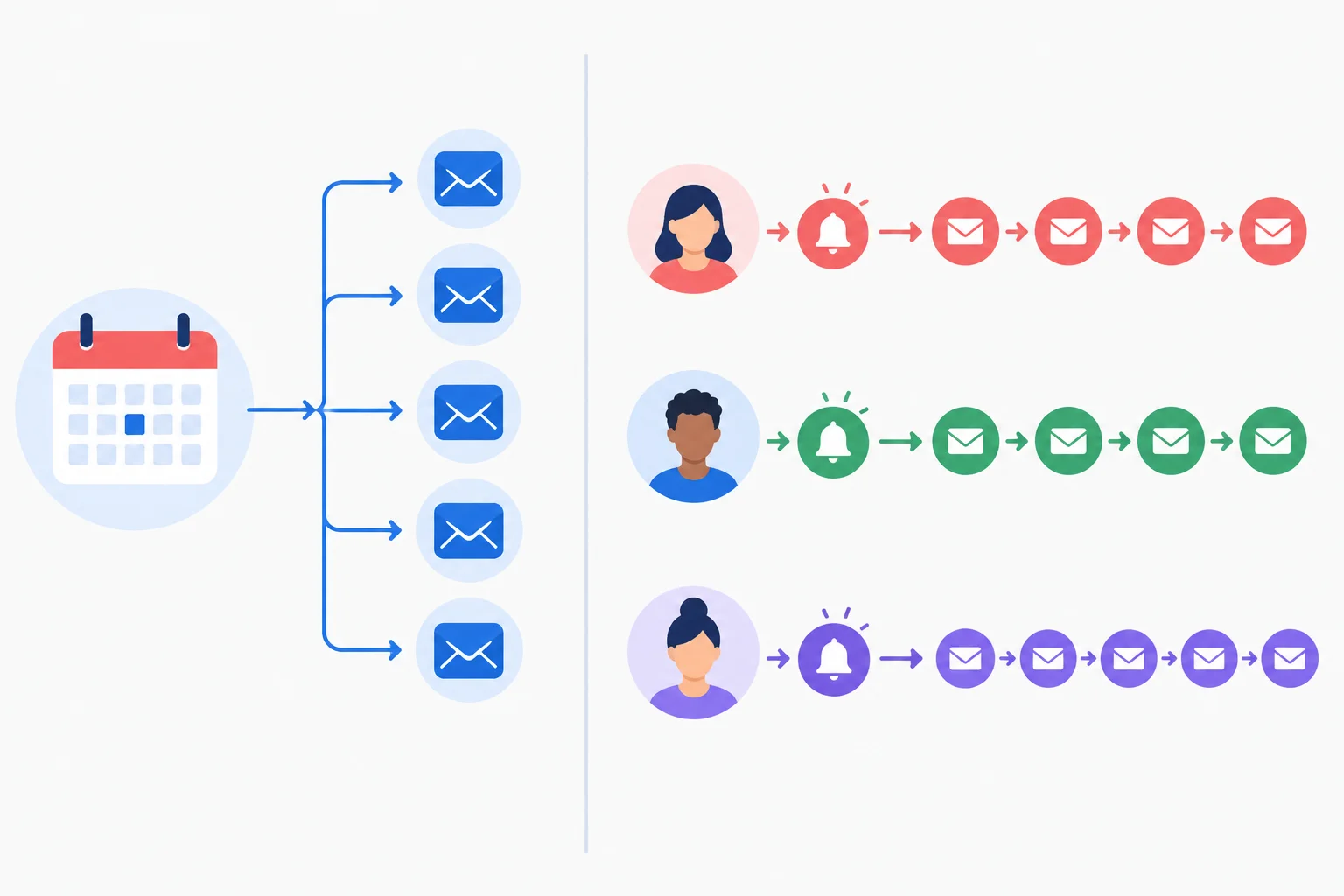
A campaign begins with a chosen occasion; a lifecycle workflow begins separately for each contact when an event occurs.
Choose the lifecycle purpose before drawing a workflow:
Each purpose needs an explicit entry event: something that happened and can place a contact on that path.
Northstar Paper uses these purpose-to-event pairings. They are entry events, not message schedules.
| Workflow | Intended outcome | Entry event |
|---|---|---|
| Welcome | Establish the signup relationship | Signup confirmed |
| Nurture | Address Routine fit for a potential buyer | Welcome completed |
| Post-Purchase | Support the customer after an order | Purchase confirmed |
A segment or record value describes a current state. It does not say when a contact should enter a workflow.
For example, “Marketing eligibility: Eligible” tells you a current status. It is not an entry event. “Signup confirmed” records that something happened, so it can identify an enrollment moment.
Likewise, “Purchase status: No confirmed purchase” is a state; it does not establish a start time for Nurture. An event such as Welcome completed can do that.
Example
You can plan and test these maps in a document—no activated automation tool or connected store is required. Use fictional contact-event records to make the starting point visible.
Example record:
Contact A
Hour 0: Signup confirmed
Marketing eligibility: Eligible
The event gives Welcome a possible start. The eligibility value is a contact state that will matter when the map is developed further.
Match each Northstar Paper scenario to the most accurate label.
Tap an item and then its matching pair.

Step 2 of 8
Turn lifecycle ideas into compact workflow specifications with explicit checks, branches, holds, and endings.
A workflow specification is a testable set of instructions—not just a list of messages. It states what starts enrollment, what information is needed, when a decision is due, and what happens for every relevant outcome.
Use the same headings each time so another person can trace the workflow without guessing. A path should always show where it stops, pauses for missing information, or may later begin again.
Use these headings in every workflow specification.
| Heading | What it defines |
|---|---|
| Trigger | The entry event that starts evaluation. |
| Entry checks | Whether enrollment is appropriate now. |
| Data needed | Records required for decisions. |
| Timing | Entry-relative proposed due times. |
| Conditions | Questions that branch the path. |
| Message purposes | Why each message exists, not full copy. |
| Exclusions | Who or what must not receive a path. |
| Exit rules | How the current sequence ends or pauses. |
| Re-entry | Whether a later event may enroll again. |
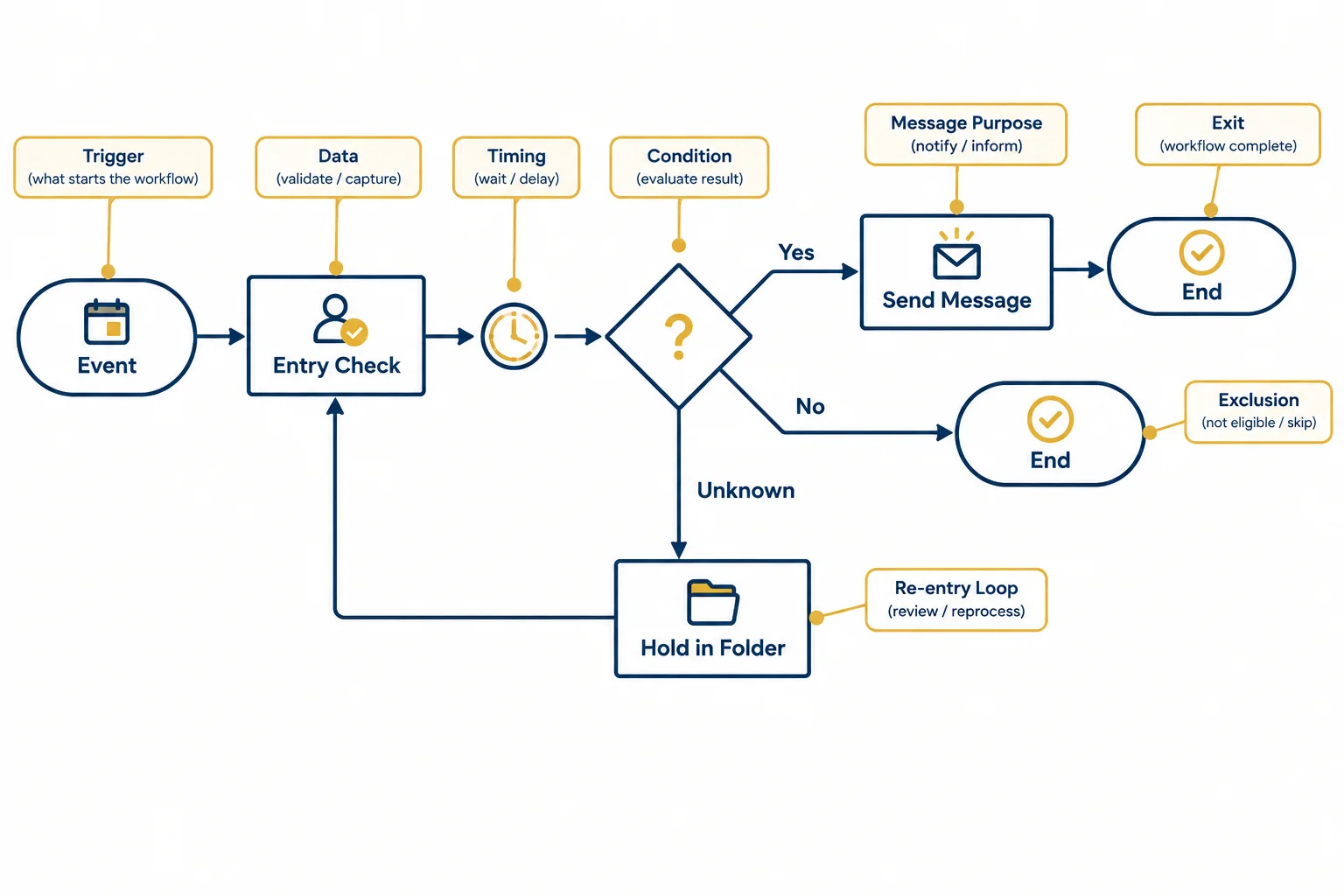
The diagram gives the path; the written specification explains what each shape and branch means.
An entry check answers: “Should this contact enroll when the entry event happens?” A send-time check answers: “Is this scheduled message still appropriate now?”
For example, a contact can pass an entry check at Day 0 and have a different Marketing eligibility record by Day 2. The later check uses the current record. A delay creates a future decision point; it never guarantees that a message will be sent.
Example
Trigger
Signup confirmed
Entry checks
Marketing eligibility is Eligible.
Data needed
Marketing eligibility and Welcome status.
Timing
Day 0: enter. Day 2: proposed decision point.
Conditions
At Day 2, check current Marketing eligibility.
Message purposes
Provide the next promised planning-related guidance.
Exclusions
Do not enroll an Ineligible contact.
Exit rules
Ineligible at the later check -> End sequence. Unknown required value -> Hold for review.
Re-entry
State this explicitly in the finished workflow; this short fragment does not assume a rule.
Tip
A condition needs an explicit route for uncertainty. Do not treat an Unknown record as either Eligible or Ineligible. “Hold for review” preserves the distinction between missing information and a deliberate sequence ending.
A contact passed entry checks as Eligible. At the Day 2 send-time check, Marketing eligibility is now Ineligible. What should the workflow do with the planned Marketing message?
Complete the missing timing, send-time condition, and two ending outcomes in this workflow skeleton.
Trigger: Signup confirmed
Entry checks: Marketing eligibility = Eligible
Data needed: Marketing eligibility
Timing: : proposed Marketing message
Conditions at the proposed time:

  Yes -> Send planned Marketing message ->
  No ->
  Unknown -> Hold for review
Re-entry: State explicitly; do not assume it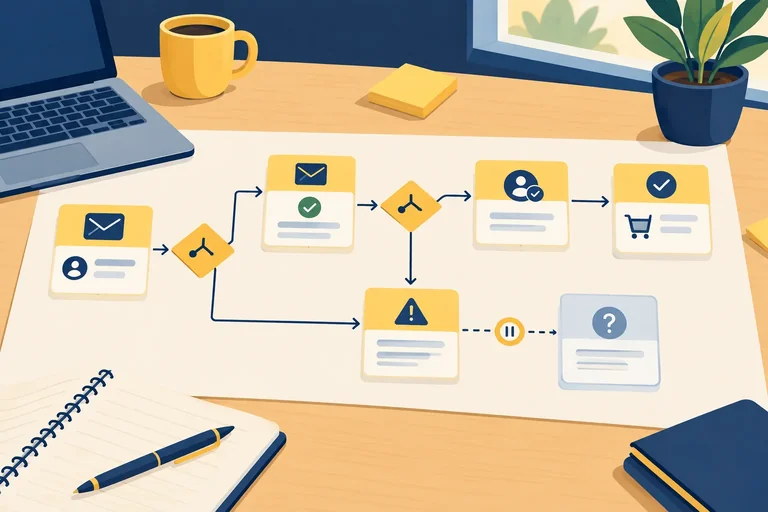
Step 3 of 8
Identify the minimum evidence behind workflow triggers and conditions, and route unresolved required data safely.
A workflow can act only on evidence it can identify. For every Trigger, Entry checks, or Condition, name the record that supplies the answer.
For Northstar Paper, keep the map minimal:
Signup confirmed;Marketing eligibility supports a marketing send-time check;Decision barrier supports barrier-specific relevance;Welcome completed event supports Nurture entry;Purchase confirmed.A segment or elapsed time alone is not evidence that an event happened. The record must answer both what happened and, where relevant, when it happened.
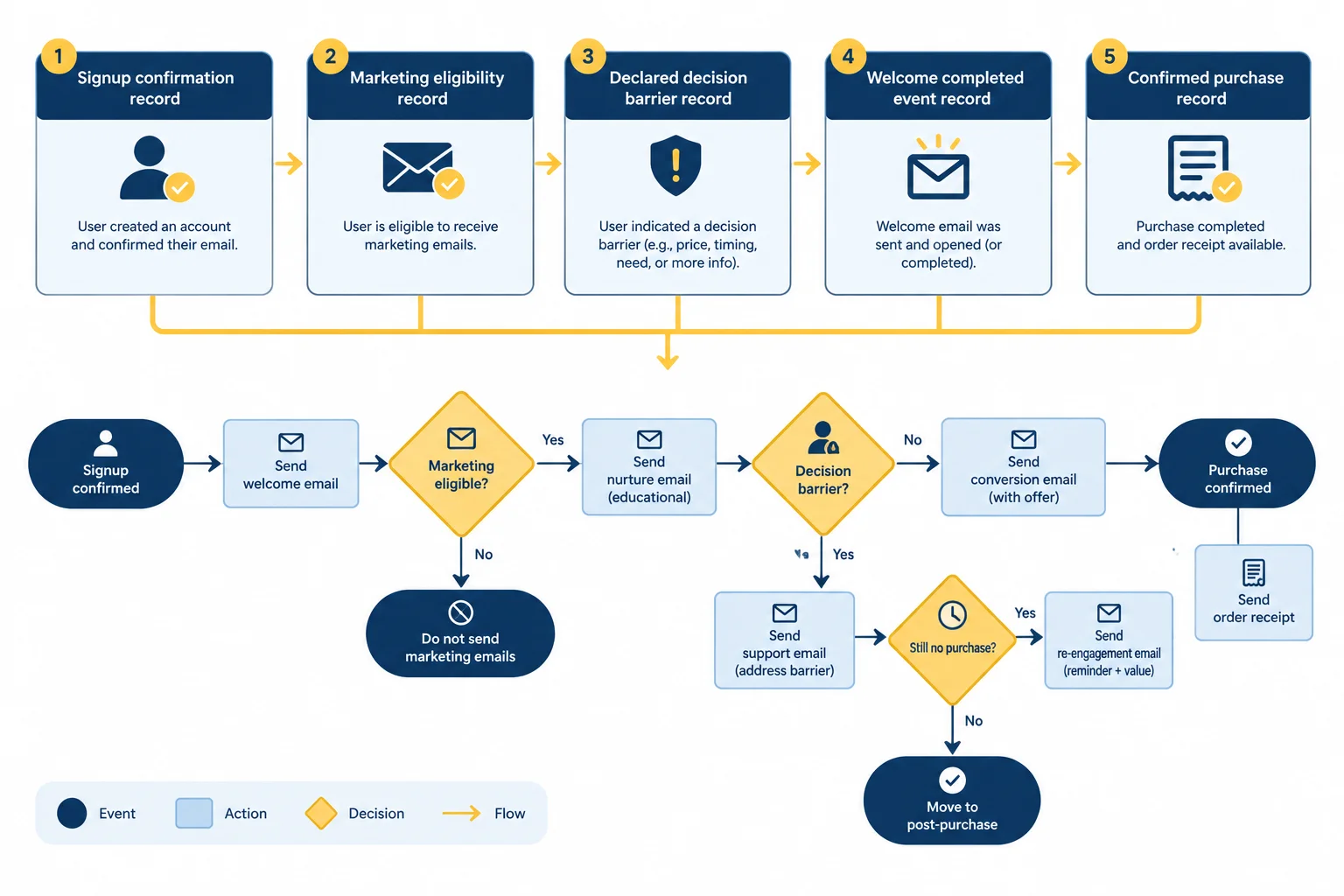
Each workflow decision needs a specific, identifiable source record.
Use explicit preferences and confirmed events as planning signals. Do not use an email open as proof of permission, workflow completion, or product interest.
For a purchase-based decision, the minimum reliable evidence is stronger than a click or a waiting period: the record must match the contact to an order, include an Order ID, and show the purchase event time. For example, Order ID: NP-101 can support a purchase only when it is tied to the correct contact and has a recorded confirmation time.
The fields below are sufficient for this fictional map; collect no extra fields merely because they might be available.
| Record label | Example value | Can support |
|---|---|---|
| Marketing eligibility | Eligible | Marketing send-time check |
| Decision barrier | Routine fit | Nurture relevance |
| Welcome status | Completed | Welcome completed entry event |
| Purchase status | Confirmed purchase | Conversion or post-purchase path |
| Order ID | NP-101 | Match a confirmed order to a contact |
| Last marketing send | Day 0 | Later scheduling review |
No confirmed purchase and Unknown are different records.
Use No confirmed purchase only when a trustworthy, current purchase record was checked and found no matching confirmed order. Use Unknown when the purchase feed is unavailable, stale, or cannot reliably match the contact and order.
Missing information must not quietly become “No.” If an acquisition workflow needs purchase status and that status is Unknown, the affected action goes to Hold for review. It must not continue based on an assumption.
Warning
Apply the same safety rule to permission. A marketing message needs current Marketing eligibility. If the value is Unknown, do not treat it as Eligible; place the affected action in Hold for review.
A supplied contact-event log can simulate these decisions in a text map. In a real process, an authorized manual check can provide an answer. Neither approach creates a live automated event feed, so the workflow should not pretend that unavailable data will update itself.
Example
Contact C has this record at a proposed marketing send-time:
The planned marketing action depends on whether the contact is still on a nonbuyer path. Because purchase status cannot be resolved, the map should route that action to Hold for review, rather than infer that no purchase occurred.
Match each workflow decision or situation to its minimum evidence or safe next action.
Match every item to its correct evidence or action.
Tap an item and then its matching pair.
Step 4 of 8
Create a compact Welcome workflow for Northstar Paper, from confirmed signup through safe completion or an early exit.
A Welcome workflow begins when something happens for one contact: Signup confirmed. It is not triggered merely because someone currently belongs to a segment.
For Northstar Paper, the Day 0 purpose is to acknowledge the signup and deliver on the promise of planning tips and product updates. Before enrollment, check current Marketing eligibility: Eligible can enter; Ineligible ends the sequence; Unknown goes to Hold for review.
Day 0 is the trigger time. Day 2 is 48 hours after that trigger, not two days after a previous send.
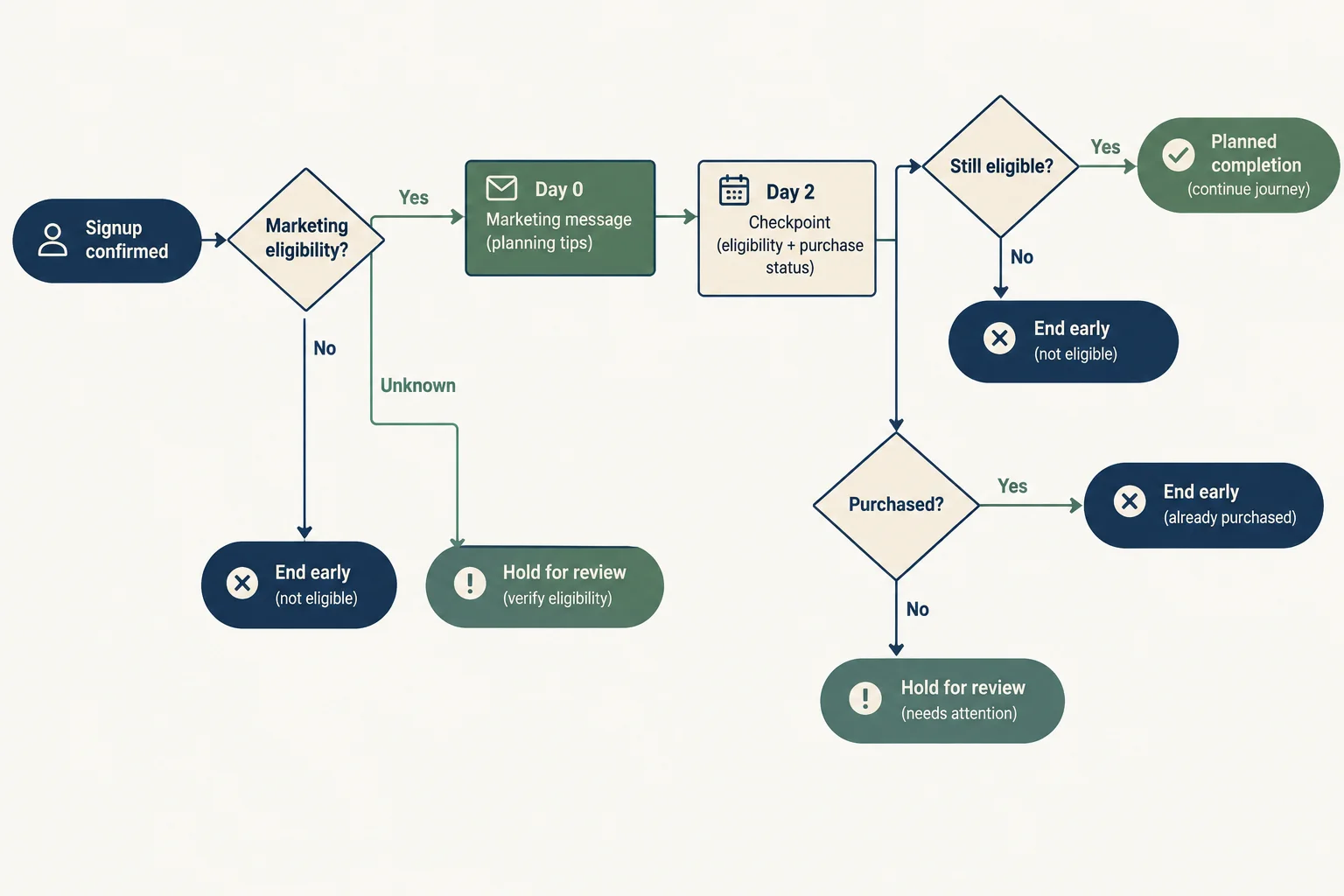
The delayed message is a proposed action, not a guaranteed send: conditions are checked again when Day 2 arrives.
Example
Use the same headings for the written specification and the diagram. This compact draft describes Northstar Paper’s Welcome workflow:
Trigger: Signup confirmed.
Entry checks: Marketing eligibility must be Eligible. Ineligible contacts go to End sequence; Unknown goes to Hold for review.
Data needed: Marketing eligibility, Purchase status, and Welcome status.
Timing: Day 0 and Day 2, measured from Signup confirmed.
Conditions: Before the Day 2 message, recheck current eligibility and Purchase status.
Message purposes: At Day 0, acknowledge the signup and fulfill the promised planning content. At Day 2, guide a relevant first planning action.
Exclusions: Do not enroll a known Ineligible contact.
Exit rules: A confirmed purchase or loss of eligibility before Day 2 ends this acquisition-oriented route. Unknown required data goes to Hold for review. After the Day 2 message, record Welcome completed, then End sequence.
Re-entry: Not set in this draft; shared rules will be added later.
Tip
The Day 2 purpose should still fit the signup promise. It can help a contact try a weekly planning action or explore whether the Weekly Planner fits their routine. It should not become an unrelated sales series.
A confirmed purchase changes the contact’s lifecycle relevance. Do not continue an unchanged first-purchase prompt simply because it was scheduled earlier.
These two paths look similar at entry but have different endings. Contact-event times below use elapsed hours from one shared scenario start.
A planned completion is evidence that this Welcome path finished as designed. An early exit is not completion and must not create the Welcome completed event.
| Contact | Key events | Day 2 outcome | Welcome status |
|---|---|---|---|
| Contact A | Hour 0: Signup confirmed; Eligible. Hour 48: Eligible; No confirmed purchase. | Send the relevant Day 2 message, then end. | Welcome completed |
| Contact B | Hour 0: Signup confirmed; Eligible. Hour 24: Confirmed purchase. | End early; skip the Day 2 acquisition-oriented message. | Not completed |
Warning
If Purchase status is Unknown at the Day 2 check, do not treat it as No confirmed purchase. Use Hold for review until the required status can be resolved.
Complete the missing labels in the Welcome workflow map.
Trigger:

Entry check:
Marketing eligibility Eligible? -> Yes: Enroll
                                  No:
                                  Unknown:

Day 0 -> Marketing message: acknowledge signup and fulfill planning expectations

Day 2 send-time check:
Marketing eligibility Eligible? -> Yes: Purchase status Confirmed purchase?
                                  No: End sequence
                                  Unknown: Hold for review
Purchase status Confirmed purchase? -> Yes:
                                      No: Send Day 2 Marketing message: guide a relevant first planning action
                                      Unknown:

After the Day 2 message -> record -> End sequenceContact D and Contact E both entered Welcome at Hour 0 after Signup confirmed while Marketing eligibility was Eligible. At Hour 24, Contact D’s Purchase status becomes Confirmed purchase. At the same time, Contact E’s Marketing eligibility becomes Ineligible. Their Day 2 messages are due at Hour 48.
In 2–4 sentences, state the expected path for each contact and explain why neither should receive the unchanged Day 2 first-action message.
Write at least 80 characters (0/80).

Step 5 of 8
Build a finite Nurture workflow for Northstar Paper that addresses the declared Routine fit barrier and stops safely when purchase status or relevance changes.
A Nurture workflow is not a generic stream for every nonbuyer. It addresses one declared reason for hesitation: Routine fit—uncertainty about fitting weekly planning into an existing routine.
Trigger: Welcome completed.
Entry checks: Marketing eligibility = Eligible; Decision barrier = Routine fit; Purchase status = No confirmed purchase.
Data needed: Welcome status, Marketing eligibility, Decision barrier, and Purchase status.
Exclusions: Do not enroll contacts who are Ineligible, have a different or no declared barrier, or have a Confirmed purchase. If Purchase status is Unknown, use Hold for review rather than treating it as no purchase.
Re-entry: Not defined in this step; shared enrollment rules are added later.
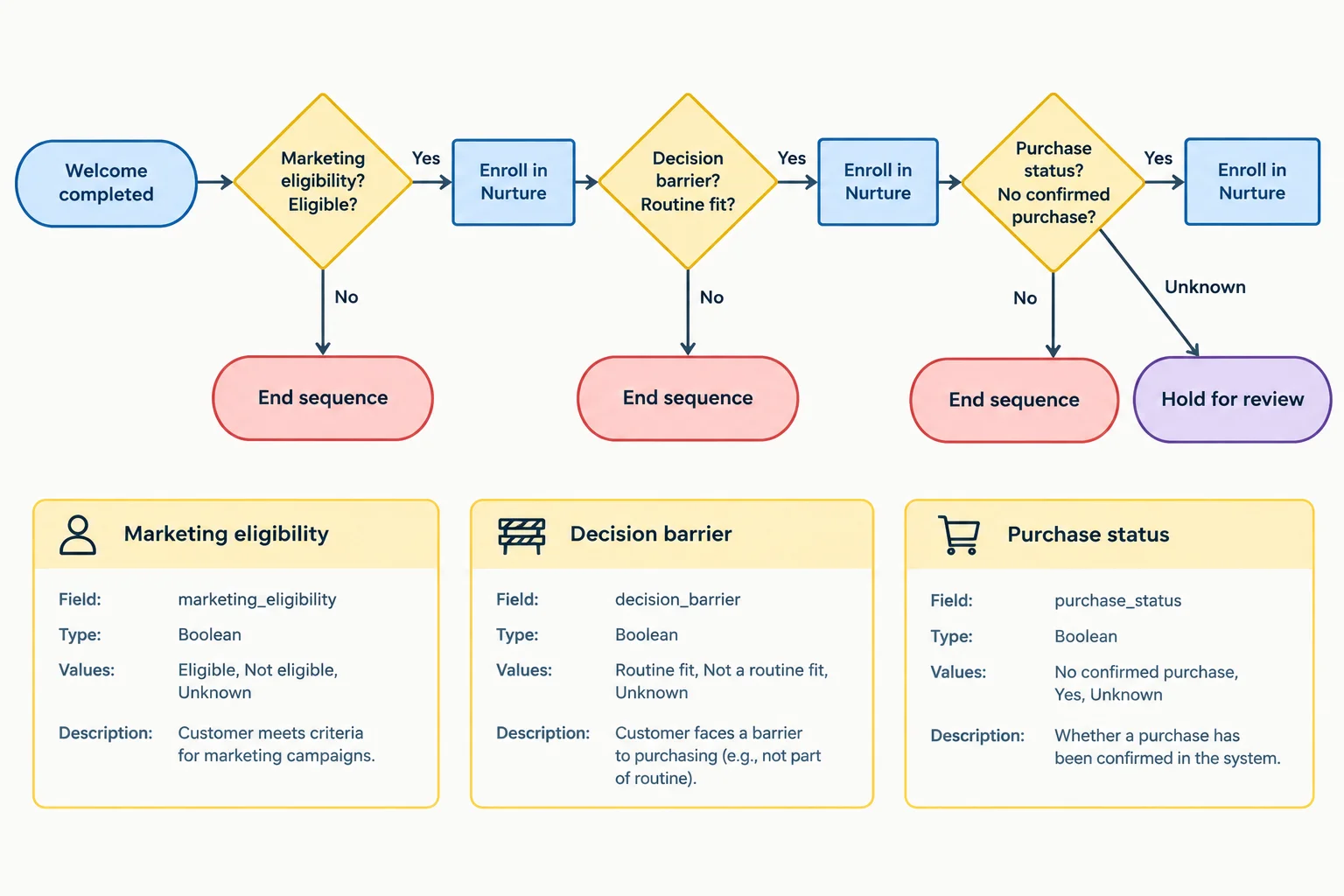
The entry event starts evaluation; it does not automatically enroll every contact.
Timing: Measure both proposed message times from the Welcome completed trigger. Day 1 is 24 hours after that event. Day 4 is 96 hours after that event—not four days after the Day 1 message.
Message purposes:
These are message purposes, not complete email copy. The declared barrier determines relevance: a contact with another barrier should not receive this Routine fit sequence simply because they have not purchased.
A delay is a wait before another decision. Before each proposed Marketing send, check whether current eligibility, barrier relevance, and purchase status still support it.
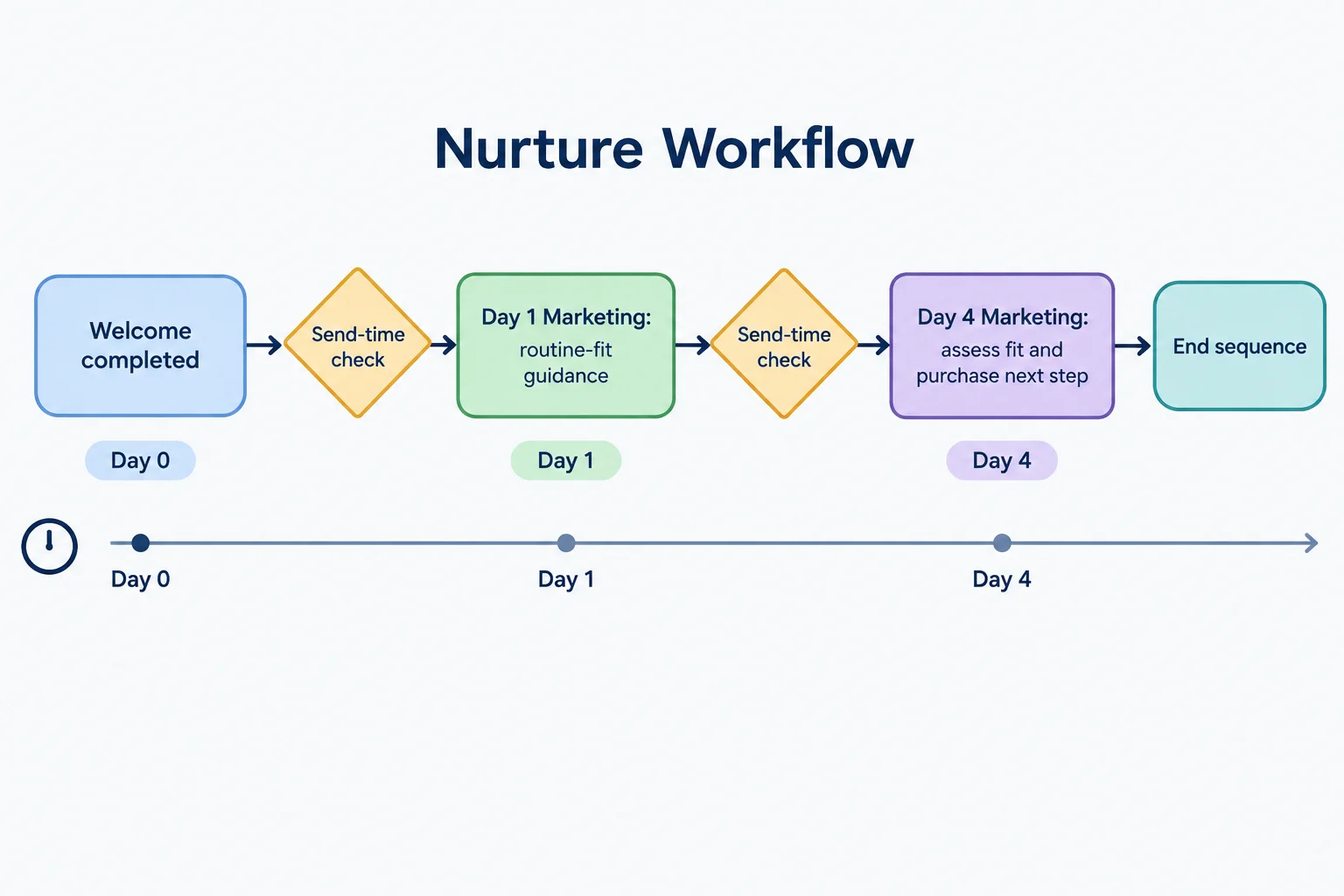
A scheduled slot is only proposed: a send-time check can stop or hold it.
Every changed condition needs a stated path.
Confirmed purchase: This is a conversion exit from acquisition Nurture. If it appears while the contact is waiting for Day 4, the workflow does not continue with its acquisition-oriented message.
Changed relevance: If a preference change means Routine fit is no longer the declared barrier, end this barrier-specific sequence. A separately defined relevant workflow could evaluate the contact later, but Nurture must not continue with mismatched content.
Unknown purchase evidence: If required Purchase status is Unknown at entry or before a proposed message, use Hold for review. Do not infer No confirmed purchase from missing information.
Planned finish: After the Day 4 message is appropriately sent, use End sequence. This finite workflow delivers its planned support rather than looping indefinitely for contacts who have not purchased.
Tip
A changed record does not merely update a label. It changes the path: purchase removes acquisition relevance, a different declared barrier removes barrier relevance, and missing required purchase evidence prevents a safe decision.
A contact is waiting between the Day 1 and Day 4 Nurture slots. Their Purchase status becomes Confirmed purchase. What should happen next?
Write a compact specification for the Nurture workflow. Include:
Use the workflow labels and -> connections.
Write at least 180 characters (0/180).

Step 6 of 8
Separate confirmed-order service actions from consent-dependent post-purchase marketing in a compact workflow map.
A post-purchase workflow starts only when Purchase confirmed can be tied to the correct contact and order. For Northstar Paper, a checkout visit, a cart event, or time passing is not enough evidence.
Use the record labels Purchase status and Order ID. For example: Confirmed purchase plus NP-101 can support post-purchase entry when the record belongs to that contact.
From that point, split the map by purpose:
Do not turn every message after an order into service content merely because it is post-purchase.
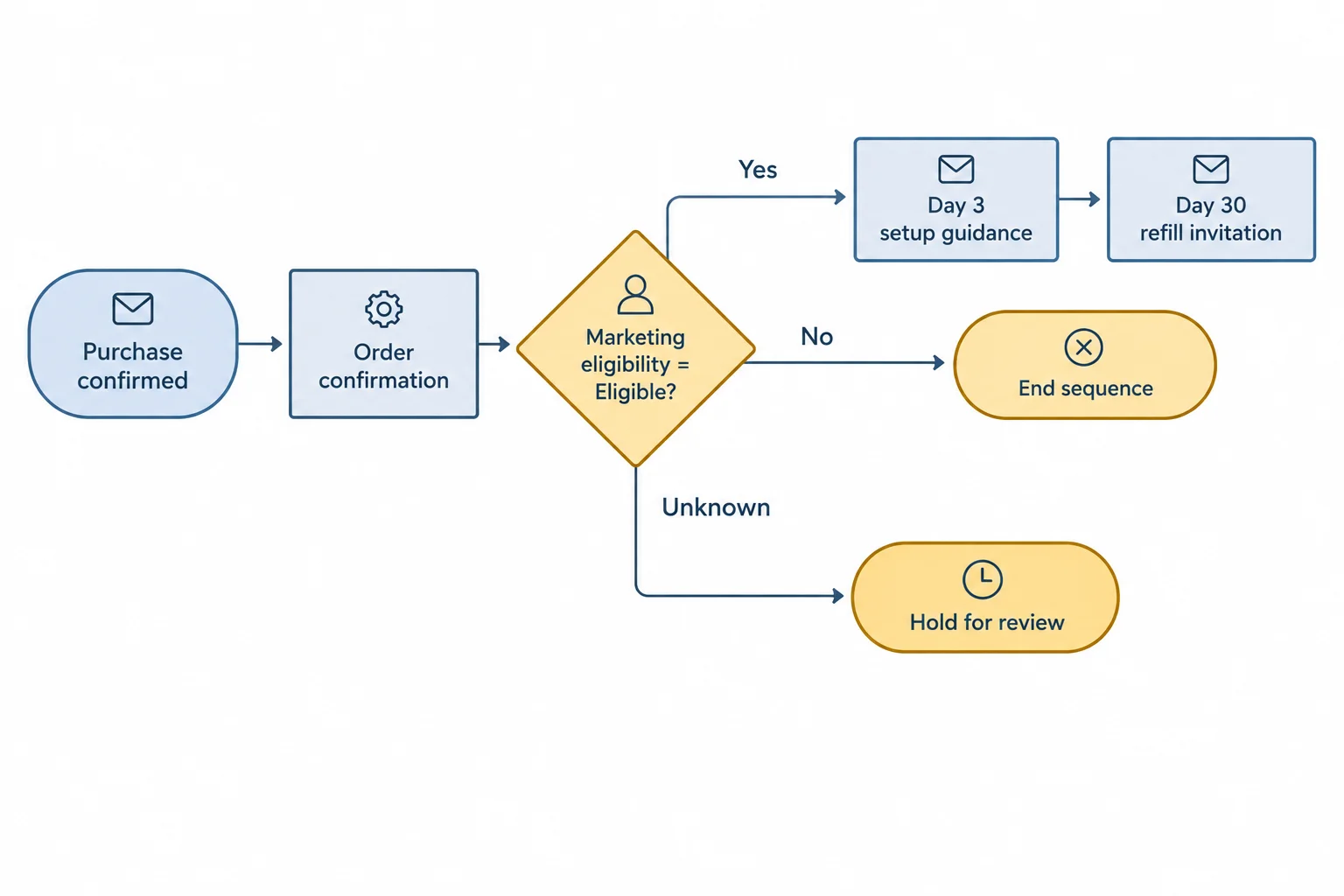
The order event can support an operational purpose, but optional marketing actions require a current eligibility decision.
Write the operational and marketing paths in one specification, but keep their sending grounds distinct. Day numbers are measured from the purchase trigger: Day 3 means 72 hours after Purchase confirmed, not three days after a prior message.
An existing order system may already send the genuine confirmation. In that case, map that existing operational action; do not add a duplicate workflow confirmation. A marketing unsubscribe does not by itself cancel a necessary operational message, but operational sending still needs a legitimate purpose, a valid route, and applicable legal and provider checks.
This compact map uses only facts the workflow can support. A reliable update can make an optional follow-up irrelevant; elapsed time alone never proves delivery or product use.
| Specification heading | Post-Purchase plan |
|---|---|
| Trigger | Purchase confirmed |
| Entry checks | Correct contact-to-order match; Purchase status = Confirmed purchase; Order ID is available |
| Data needed | Purchase status, Order ID, current Marketing eligibility, confirmation-system record |
| Timing | Day 0 confirmation; Day 3 optional setup guidance; Day 30 optional refill invitation |
| Conditions | Existing confirmation sent? Marketing eligibility = Eligible? Follow-up still relevant? |
| Message purposes | Operational: confirm the order. Marketing: help with initial setup; invite a relevant refill consideration |
| Exclusions | Checkout visit; unmatched order; unknown purchase evidence; marketing-ineligible contact for marketing actions |
| Exit rules | Existing operational confirmation completes its action. No eligibility or an irrelevant follow-up -> End sequence. Unknown required data -> Hold for review |
| Re-entry | A later confirmed purchase needs its own reliable order evidence; detailed duplicate-event controls are added later |
Match each Northstar Paper action to its correct path.
Tap an item and then its matching pair.
Trace Contact D through a concise text map using ->.
Contact D record
NP-101; Marketing eligibility Eligible.Ineligible.Include all three proposed message purposes with their category and timing, the send-time decision for messages waiting at Day 3 and Day 30, and the final outcome. Then state how the map would differ if Marketing eligibility had been Ineligible at Hour 0. Do not draft email copy.
Write at least 180 characters (0/180).

Step 7 of 8
Add shared controls that prevent duplicate enrollment, conflicting lifecycle messages, and sends based on outdated eligibility.
A scheduled Marketing message is a proposed send, not a promise. Before releasing every Marketing message—including one that has been waiting—run a send-time check:
If a required record is Unknown, do not turn that into a “No.” Use Hold for review for the affected action. If a check fails, apply the relevant Exit rules. A delay only sets a possible due time; it does not bypass these checks.
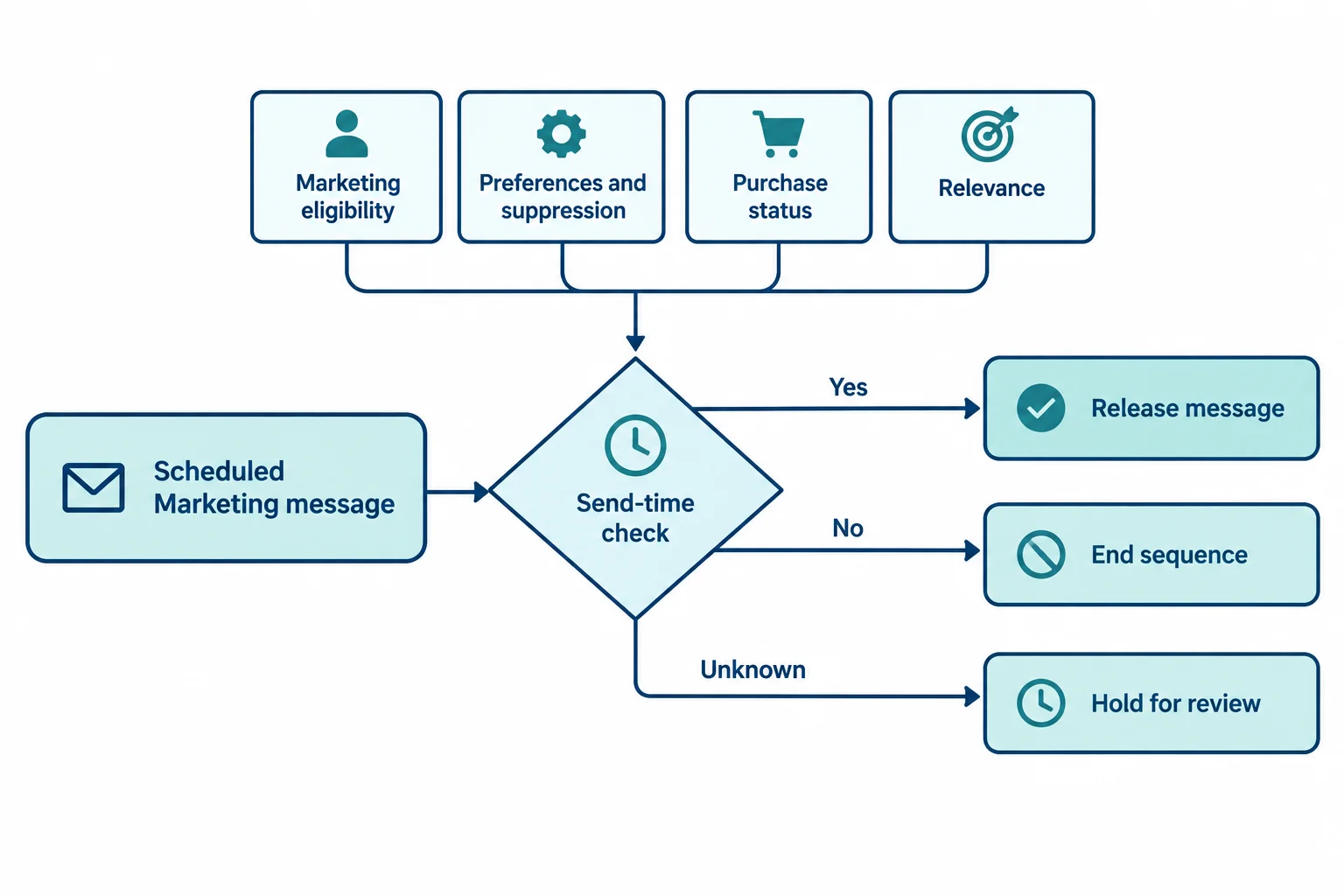
Use this gate at the actual release time, including after any wait.
Northstar Paper uses these shared planning rules for Marketing messages. They apply across campaigns and all three workflows:
This 24-hour limit is an illustrative scenario rule, not a universal recommendation. A necessary Operational confirmation is not placed in the Marketing priority queue or Marketing frequency cap. It still needs a legitimate purpose, a valid route, and applicable legal and provider checks.
Use the contact record label Last marketing send to calculate the rolling limit.
| Situation | Next action | Governing rule |
|---|---|---|
| A Marketing send occurred less than 24 hours ago | Wait and recheck | One Marketing message per rolling 24 hours |
| Two still-relevant Marketing messages are due | Consider the higher-priority message first | Post-Purchase > Welcome > Nurture |
| A confirmed purchase makes acquisition content obsolete | End sequence | Conversion and relevance check |
| Operational order confirmation is needed | Send through its separate path | Not in the Marketing queue or cap |
Re-entry controls prevent a workflow from treating repeated records as new opportunities.
For this example, Welcome and Nurture allow one enrollment per contact. A later import, repeated Signup confirmed event, or other new record must not erase a prior marketing suppression or create another enrollment.
Post-Purchase may enroll once per distinct confirmed order. Store the matched contact and Order ID with its enrollment. If Purchase confirmed arrives again for the same contact and Order ID, such as NP-101, it is a duplicate event: do not start a second Post-Purchase workflow.
A different confirmed order can qualify for its own Post-Purchase enrollment. In all cases, current suppression and send-time checks remain in force.
Tip
A purchase should do more than add a new workflow: it also ends obsolete acquisition paths. When Purchase status becomes Confirmed purchase, a waiting Welcome or Nurture Marketing message should not merely remain queued behind Post-Purchase. Apply its Exit rules and use End sequence for the obsolete acquisition workflow.
At shared Hour 48, resolve all three records below. State the next action and the rule that governs it.
Contact A: Marketing eligibility is Eligible. Purchase status is Confirmed purchase for Order ID NP-101. A Welcome Marketing message is waiting, and optional Post-Purchase setup guidance, also Marketing, is due. Last marketing send was at Hour 30.
Contact B: A Purchase confirmed event arrives for Order ID NP-101. This contact is already enrolled in Post-Purchase for Order ID NP-101.
Contact C: A Nurture Marketing message becomes due after a delay. At Hour 45, the contact unsubscribed and Marketing eligibility became Ineligible.
For Contact A, include the earliest hour when a deferred Marketing message could be reconsidered.
Write at least 180 characters (0/180).
Step 8 of 8
Trace fictional contacts through three lifecycle workflow maps, repair unsafe paths, and finalize internally consistent specifications.
Validation is a replay, not a guess. Take one contact’s timestamped record and move it through a draft map:
entry event -> enrollment check -> wait -> send-time check -> action, hold, deferral, or exit.
At every decision, record both the expected next action and the governing rule. A contact can be waiting without being entitled to a future send, because later events can change the path.
Keep these outcomes distinct:
Use the supplied fictional records only. No email platform, connected store, or previously saved work is needed.
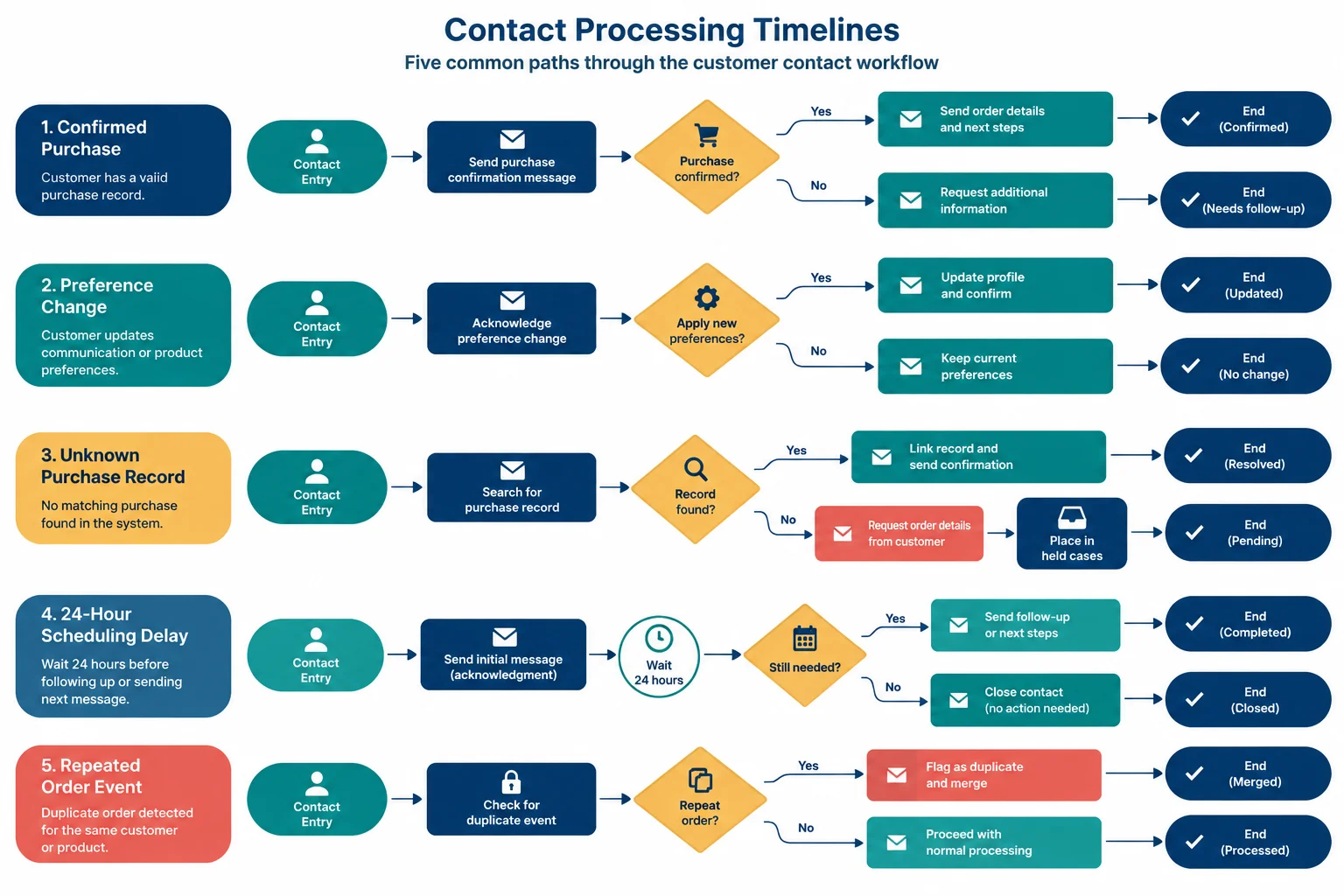
Trace from left to right. A record can change during a wait, so each proposed Marketing message needs a fresh send-time check.
These compact drafts are useful only when their paths are supported by records and shared rules. Trace the question in the last column before repairing each map.
| Workflow | Draft path | Question to test |
|---|---|---|
| Welcome | Signup confirmed -> eligible entry -> Day 0 Marketing acknowledgment of planning tips and product updates -> Day 2 check -> Marketing first planning action -> Welcome completed -> End sequence | What happens if a confirmed purchase arrives during the Day 2 wait? |
| Nurture | Welcome completed -> eligible + Routine fit + No confirmed purchase -> Day 1 Marketing routine-fit guidance -> Day 4 purchase check -> Marketing fit assessment and next step -> End sequence | What should happen if required purchase evidence becomes Unknown before Day 4? |
| Post-Purchase | Purchase confirmed -> Day 0 Operational order confirmation -> Day 3 Marketing setup guidance if eligible -> Day 30 Marketing Refill Pack invitation if eligible -> End sequence | How can the map avoid both a duplicate confirmation and a second enrollment for the same Order ID? |
For each record, create a short trace ledger: current workflow state, expected next action, and governing rule. “No message” is not enough—state whether the contact ended, is held for review, or is waiting for a later recheck.
The timestamps are elapsed time from one shared scenario start. Day-relative due times still belong to each workflow’s own entry event.
The records include normal progression, missing purchase evidence, a purchase during a wait, a preference change, an unsubscribe, a scheduling collision, and a duplicate order event.
| Contact | Timestamped events and current records | Trace focus |
|---|---|---|
| Contact A | Hour 0: Signup confirmed; Marketing eligibility Eligible; Purchase status No confirmed purchase; Decision barrier Routine fit. Hour 48: Welcome Day 2 is due and Welcome completed occurs. Hour 72: Nurture Day 1 is due. Hour 144: Nurture Day 4 is due. | Normal planned progression. |
| Contact B | Hour 0: Signup confirmed with the same initial records as A. Hour 48: Welcome completed. Hour 72: Nurture Day 1 occurs. Hour 100: Purchase status becomes Unknown. Hour 144: Nurture Day 4 is due. | Required purchase evidence disappears during a wait. |
| Contact C | Hour 0: Signup confirmed; Marketing eligibility Eligible. Hour 24: Purchase confirmed; Order ID NP-101; correct contact-to-order match. | A purchase occurs before Welcome Day 2. |
| Contact D | Hour 0: Signup confirmed; Marketing eligibility Eligible; Purchase status No confirmed purchase; Decision barrier Routine fit. Hour 48: Welcome completed. Hour 60: Marketing eligibility becomes Ineligible after a preference change. Hour 72: Nurture Day 1 is due. | A preference change removes Marketing eligibility. |
| Contact E | Hour 0: Purchase confirmed for the correct contact; Order ID NP-101; Marketing eligibility Eligible. The confirmation-system record says confirmation was sent. Hour 1: duplicate Purchase confirmed for NP-101. Hour 60: another Marketing message is sent. Hour 72: Post-Purchase Day 3 setup guidance is due; Marketing eligibility remains Eligible through Hour 79. Hour 80: unsubscribe makes Marketing eligibility Ineligible. Hour 84: next possible frequency recheck. | Operational handling, duplicate prevention, a scheduling collision, and unsubscribe. |
Create the final, corrected lifecycle plan in one concise response.
Keep message descriptions as purposes, not full email copy.
Write at least 900 characters (0/900).
Trigger: Signup confirmed.
Entry checks: Marketing eligibility Eligible? -> Yes: prior Welcome enrollment? Yes -> End sequence; No -> enroll. Ineligible -> End sequence. Unknown -> Hold for review. Welcome status records planned completion; it does not replace enrollment history.
Data needed: Marketing eligibility, Welcome enrollment history, Welcome status, Purchase status, Last marketing send, and current preference or suppression records.
Timing: Day 0 and Day 2 from Signup confirmed.
Conditions: Before each proposed Marketing message, run the send-time check. Confirmed purchase, failed permission, suppression, or known loss of relevance? -> Yes: End sequence. Required record Unknown? -> Hold for review. Marketing sent in the prior 24 hours? -> Yes: Wait and recheck at the next eligible time, then repeat all checks; No: send the due purpose.
Message purposes: Day 0 acknowledges signup and fulfills planning tips and product updates expectations. Day 2 guides a relevant first planning action.
Exclusions: Ineligible contacts and contacts with prior Welcome enrollment.
Exit rules: Known purchase, known ineligibility, suppression, or completed Day 2 path -> End sequence. Only the planned Day 2 path records Welcome completed.
Re-entry: One enrollment per contact; retain suppression across later events.
Trigger: Welcome completed.
Entry checks: Marketing eligibility Eligible, Decision barrier Routine fit, Purchase status No confirmed purchase, and prior Nurture enrollment absent? -> Yes: enroll. Prior enrollment or any known disqualifying result—Ineligible, different or absent barrier, or Confirmed purchase -> End sequence. Any required value Unknown -> Hold for review.
Data needed: Welcome status, Nurture enrollment history, Marketing eligibility, Decision barrier, Purchase status, Last marketing send, and current preference or suppression records.
Timing: Day 1 and Day 4 from Welcome completed.
Conditions: Before each proposed Marketing message, Purchase confirmed? -> Yes: End sequence; No: continue; Unknown: Hold for review. Routine fit relevant and Marketing eligibility Eligible with permission allowed? -> Yes: assess frequency; No: End sequence; Unknown required record: Hold for review. Marketing sent in the prior 24 hours? -> Yes: Wait and recheck, then repeat all checks; No: send the due purpose.
Message purposes: Day 1 addresses uncertainty about fitting weekly planning into an existing routine. Day 4 helps assess fit and take a purchase-related next step.
Exclusions: Prior Nurture enrollment, ineligible contacts, contacts without Routine fit, and confirmed purchasers.
Exit rules: Purchase, lost relevance, ineligibility, suppression, or appropriately sent Day 4 message -> End sequence. Unknown required evidence -> Hold for review.
Re-entry: One enrollment per contact; retain suppression across later events.
Trigger: Purchase confirmed.
Entry checks: Purchase status Confirmed purchase, correct contact-to-order match, and a new Order ID? -> Yes: enroll for that order. Match or order evidence Unknown -> Hold for review. Known unmatched, invalid, or duplicate Order ID -> End sequence for that event.
Data needed: Purchase status, Order ID, contact-to-order match, confirmation-system record, current Marketing eligibility, Last marketing send, and reliable order updates.
Timing: Day 0 confirmation; Day 3 optional setup guidance; Day 30 optional Refill Pack invitation, all from Purchase confirmed.
Conditions: Day 0 is Operational. Existing confirmation sent? -> Yes: retain the existing action; No: send one legitimate order confirmation through its separate Operational path; Unknown: Hold for review. At Day 3 and Day 30, follow-up relevant and Marketing eligibility Eligible with permission allowed? -> Yes: assess frequency; No: End sequence for Marketing follow-ups; Unknown: Hold for review. Marketing sent in the prior 24 hours? -> Yes: Wait and recheck, then repeat all checks; No: send the due Marketing purpose.
Message purposes: Day 0 Operational confirmation; Day 3 Marketing setup guidance; Day 30 Marketing Refill Pack invitation.
Exclusions: Unmatched orders and duplicate Purchase confirmed events for the same contact and Order ID.
Exit rules: Ineligible or irrelevant Marketing follow-ups -> End sequence. After Day 30 -> End sequence. Operational handling remains separate.
Re-entry: Once per distinct confirmed Order ID.
Summary
Use this checklist before considering the maps ready.
Congratulations! You completed: Map Welcome, Nurture, and Post-Purchase Automations
Thousands of online courses in video, ebooks and audiobooks.
To test your knowledge during online courses
Generated directly from your cell phone's photo gallery and sent to your email

Download our app via QR Code or the links below:.



Carry knowledge in your pocket.
Download the Cursa app.
There are hundreds of free courses available, with a free certificate of completion that is saved in your mobile image gallery.
Download the app to access the Course Completion Certificate for Free.


+ 10 million
students

Free and Valid
Certificate

60 thousand free
exercises

4.8/5 rating in
app stores

Free courses in
video and ebooks