
Step 1 of 7
Separate AI Assistance from Marketing Judgment
Learn to distinguish useful AI assistance from the human judgment required for responsible marketing work.

Learning path · Level 9 · Tutorial 1
Choose suitable marketing tasks for AI assistance by weighing likely time savings, quality requirements, information risks, and current free-tier limits. Make a defensible choice without purchasing software or using real customer data.

 Separate AI Assistance from Marketing Judgment
Learn to distinguish useful AI assistance from the human judgment required for responsible marketing work. 1 min
 Identify Tasks That Are Easy to Bound and Check
2 min
 Route Tasks by Risk and Available Safeguards
Route marketing tasks by their consequences, available safeguards, and the authority needed to act. 2 min
 Check Which Inputs May Be Used
Identify information to exclude and select safe fictional replacements before considering an AI tool. 2 min
 Estimate Net Time Saved
Estimate total effort for an AI-assisted marketing draft and see how review time can change the recommended route. 2 min
 Compare Free-Tier Tools Against the Task
Compare fictional free-tier tool profiles with a defined marketing task, then identify the conditions that require current verification before real use. 2 min
 Make and Defend Your Task Selection
Integrate task fit, input eligibility, risk, review, time, and fictional free-tier conditions into a concise Trailside Gear selection record. 3 min
Step 1 of 7
Learn to distinguish useful AI assistance from the human judgment required for responsible marketing work.
Generative AI can help inside an established marketing task. It can produce a first draft, summarize supplied notes, or organize ideas into a usable format.
That help is not marketing judgment. A fluent response is not evidence that every statement is accurate, complete, or current. More output—or faster output—does not guarantee stronger marketing results.
Treat an AI-assisted draft as working material. A person remains responsible for deciding whether it fits the goal and for giving human approval.
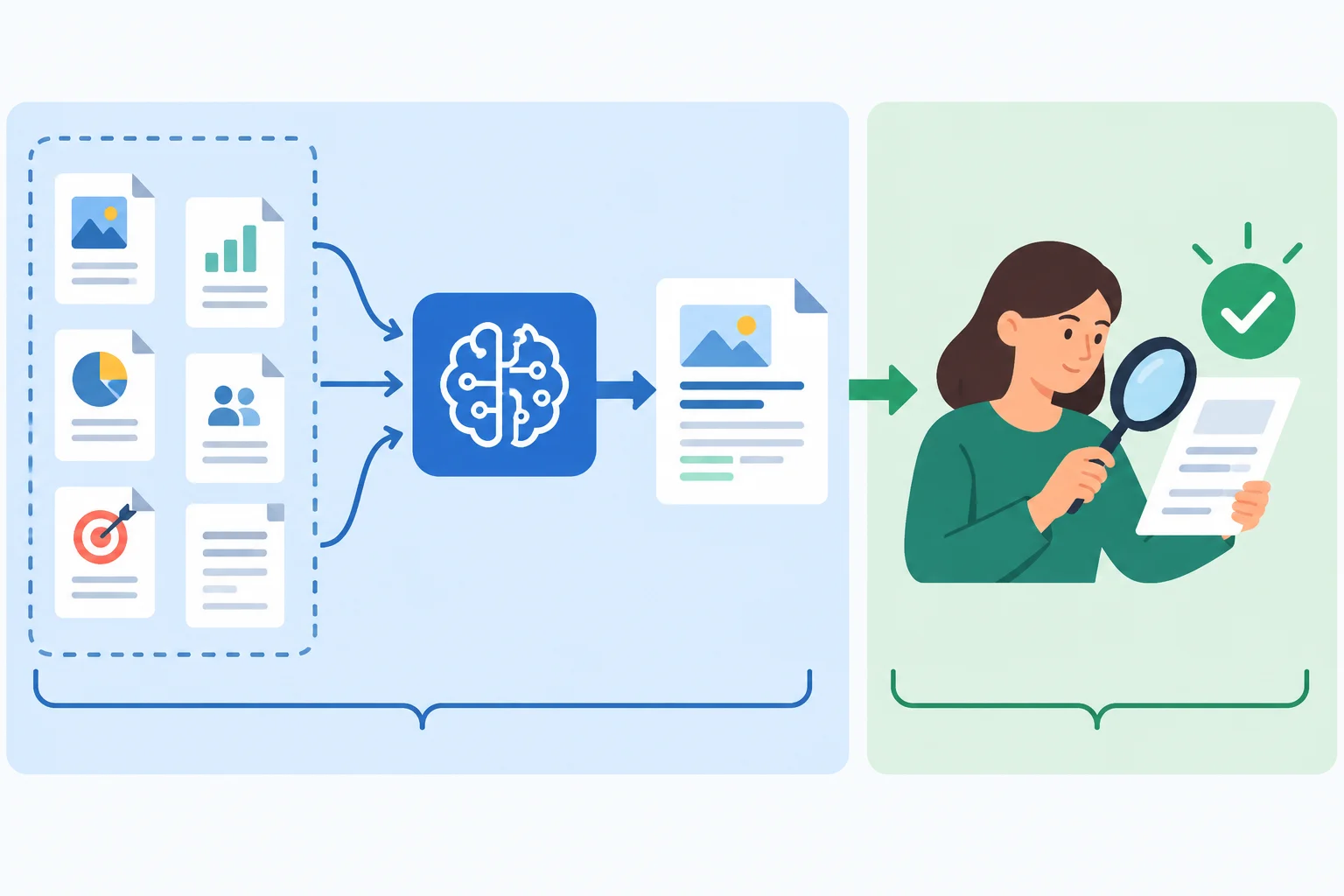
AI can create working material; people check it and decide whether to use it.
Example
Established task: Draft 3 social caption options for the Trailside Daypack, with a maximum of 30 words per caption.
Approved public product facts: 20 L capacity; 2 external pockets.
AI may turn those supplied facts into an AI-assisted draft, organize alternative wording, or summarize notes already provided. It does not independently establish new product facts, prove that the captions will perform well, or authorize publication.
A marketer still uses judgment about the task and gives human approval before use.
Tip
Plausible language can still be wrong. For example, an attractive caption could imply a benefit that was never supplied. Speed only changes how quickly working material appears; it does not remove the need for human judgment.
Which statement correctly describes the boundary between AI assistance and marketing judgment?

Step 2 of 7
Before investing effort in AI assistance, test whether a marketing task is easy to define and check. Use these four suitability criteria:
A task does not become suitable merely because generated wording sounds convincing.
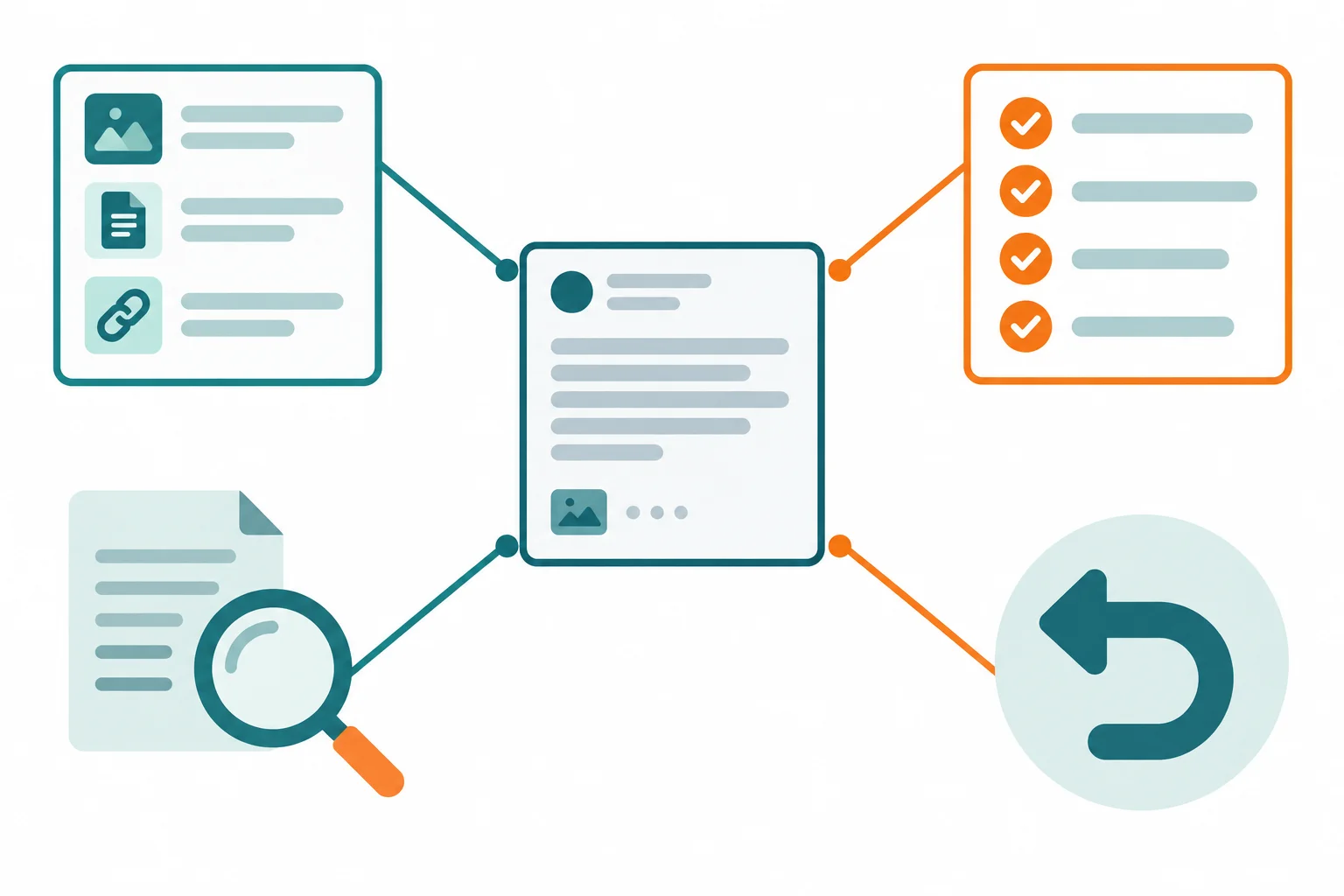
A stronger AI-assisted draft task has defined inputs, assessable requirements, feasible human verification, and a reversible outcome.
Use the matrix before generating. A specific deliverable belongs under clear output requirements: it tells you what must be produced and how you can assess it.
| Criterion | Ask before generating | Strong signal |
|---|---|---|
| Bounded inputs | What material may the draft use? | A small, defined source set |
| Clear output requirements | What deliverable and requirements must it meet? | Count, format, length, and allowed facts are stated |
| Ease of human verification | Can an appropriate reviewer check it with available information? | The reviewer can compare the draft with reliable source material |
| Reversibility | Can the output be changed or discarded before it has an effect? | It remains an editable draft before human approval |
Example
Candidate task: Draft 3 social caption options for the Trailside Daypack, with a maximum of 30 words per caption.
Defined source facts: 20 L capacity; 2 external pockets.
The inputs are bounded by the two supplied facts. The output requirements name three captions and a maximum length. A reviewer can check each AI-assisted draft against the supplied facts and requirements. The result remains a draft: it can be edited or discarded before human review and human approval.
By contrast, “Improve Trailside Gear marketing” does not state a deliverable or requirements that can be checked.
Tip
A task can be clear in one respect and weak in another. For example, a named deliverable may still be unsuitable if nobody can verify its information, or if it immediately sends something to customers. Check all four criteria rather than relying on one positive signal.
Match each candidate-task weakness, or the strong candidate, to the best description.
Tap an item and then its matching pair.

Step 3 of 7
Route marketing tasks by their consequences, available safeguards, and the authority needed to act.
A task can be quick to generate and still carry serious risk. Start with the consequence of an error: could it mislead customers, make an unsupported product claim, exclude people, or reach someone without a human check?
The suitability criteria you already know still matter. But assess risk and available safeguards before considering speed or time saved. A plausible draft is not a reason to lower oversight.
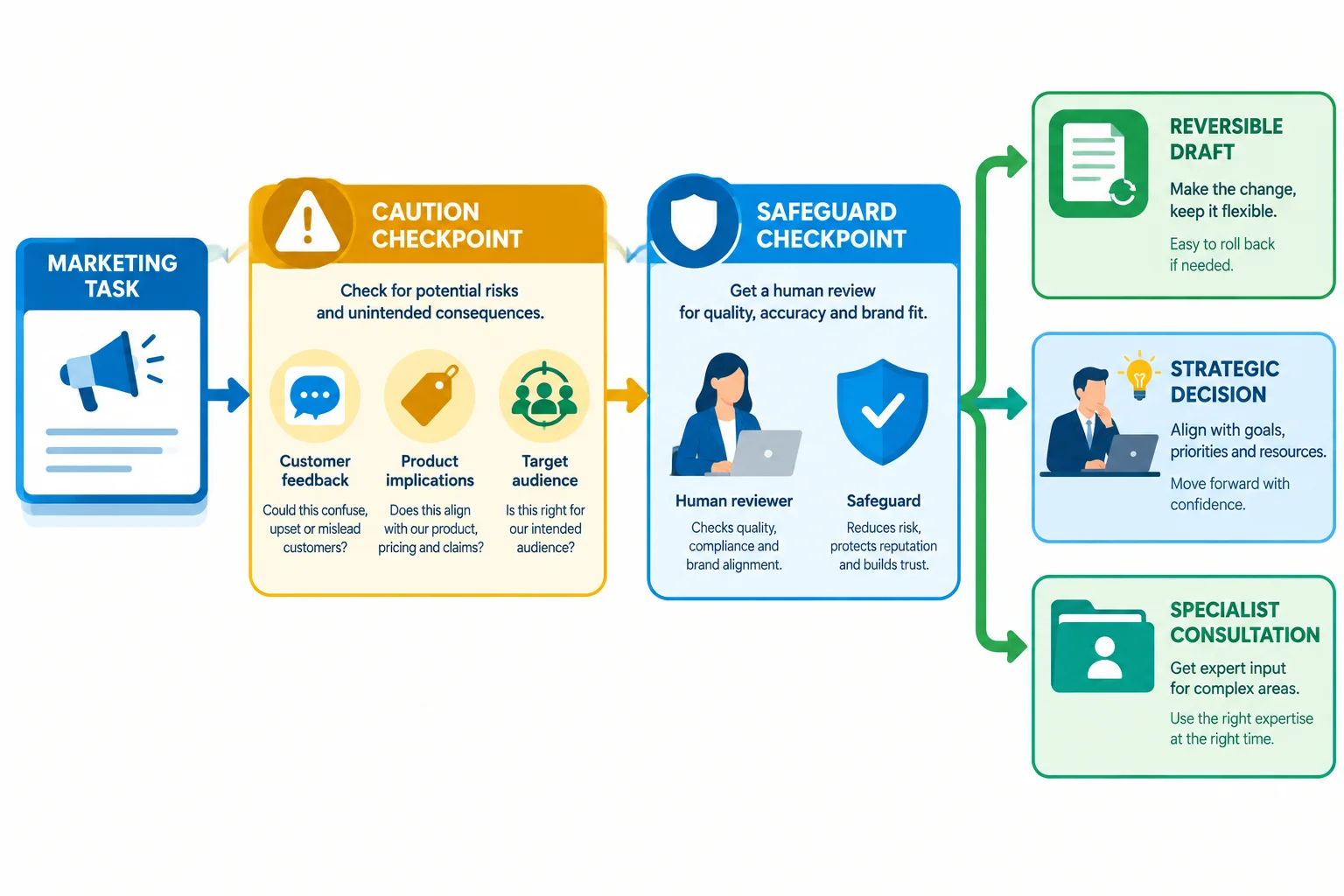
First ask what an error could affect. Then ask whether suitable safeguards and authority are available. Consider productivity only after those checks.
Choose a provisional route based on the task’s consequence and the safeguards that are actually available. These routes are not rankings of importance; they are ways to keep responsibility aligned with risk.
Warning
A manual approach is not a workaround for an unsafe task. If a task requires expertise or authority you do not have, doing it manually does not make it acceptable. Seek specialist review instead. Specialist review can lead to rejection: it is not permission to publish an unsupported claim.
Examples of provisional routes for Trailside Gear
| Decision | When it fits | Example |
|---|---|---|
| AI assistance | Bounded, reversible draft; human review and human approval are available | Draft 3 social caption options, up to 30 words each, using approved public facts |
| Manual approach | Accountable marketing judgment is central | Choose a campaign priority when the team must weigh conflicting business priorities |
| Specialist review | Claims, sensitive uses, or requirements exceed the marketer’s competence or authority | Assess a proposed product claim that could affect customer wellbeing |
A colleague proposes using a generator to write replies to every customer complaint and publishing them automatically, with no human review or human approval. Which factor makes AI assistance unsuitable as proposed?
Choose the best answer.
For each task below, select one label—AI assistance, Manual approach, or Specialist review—and give one concise reason based on consequence and safeguards, not speed.
A. Draft 3 social caption options for the Trailside Daypack. Each caption is no more than 30 words and uses only the approved public facts: 20 L capacity and 2 external pockets. Human review and human approval are available.
B. Decide whether the next campaign should prioritize awareness or conversion when the strategy team has conflicting priorities.
C. Decide whether a proposed claim that the Trailside Daypack “prevents injury” can be used before publication.
Write at least 120 characters (0/120).

Step 4 of 7
Identify information to exclude and select safe fictional replacements before considering an AI tool.
Before considering an external AI tool, screen every input—not only the task.
For this tutorial, eligible practice inputs are:
Use the labels Public, Fictional, Personal, Confidential, and Restricted. Labels can overlap rather than forming exclusive categories. For example, the Trailside Gear practice context is Fictional, while its approved product facts are also Public.
For Trailside Gear, the approved public product facts are 20 L capacity and 2 external pockets. They can support an AI-assisted draft of 3 social caption options, with a maximum of 30 words per caption.
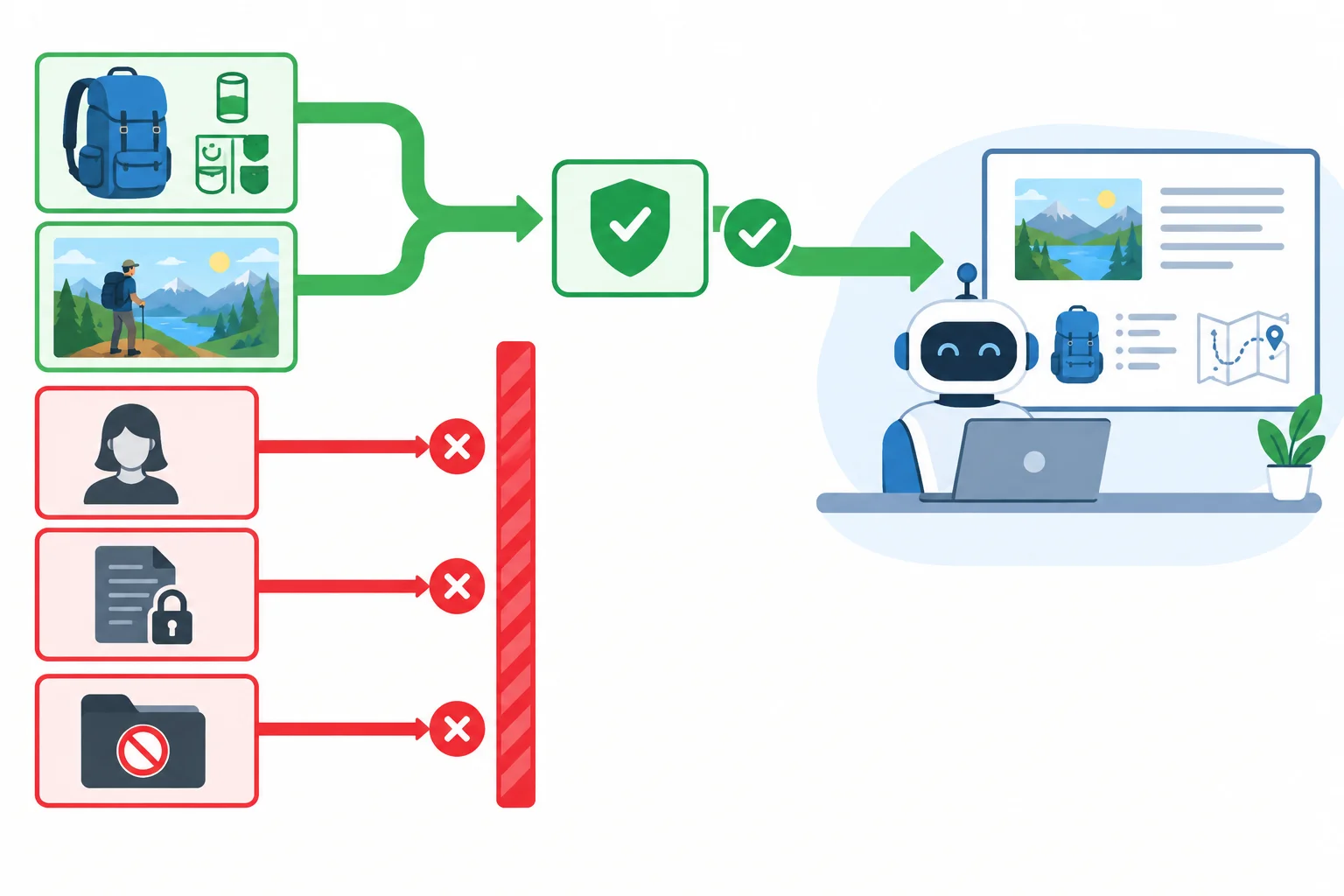
Eligible practice inputs move forward only after they pass an input check.
Exclude Personal, Confidential, and Restricted material from external AI inputs unless an authorized arrangement explicitly permits that use.
Examples to exclude include:
Do not assume that public availability solves every issue. Public material still needs permission for the intended use, and personal information does not become appropriate to upload just because it appears online.
Example
Removing a customer’s name is not the same as creating a fictional example.
Suppose a source says that a customer bought a Trailside Daypack on a particular date, lives in a small named town, and described a specific delivery problem. Even without the name, the remaining details may identify the person or expose confidential service information.
For practice, replace the entire situation with a wholly invented one. Do not try to repair real customer material by deleting a few details.
Warning
If removing ineligible information makes the task impossible, do not upload it to make the task work. Choose an approved Manual approach or seek authorized guidance. AI assistance is not a reason to override information restrictions.
Use this input gate before evaluating a tool:
This check comes before any possible time saving. A fast draft is not useful if its inputs should not be used.
Tip
For the practice caption task, a safe source can be limited to the Trailside Gear name, the product name Trailside Daypack, and the approved public facts: 20 L capacity and 2 external pockets. A later tutorial covers how to structure source material and constraints in a prompt.
For each case, write every applicable input label from this list: Public, Fictional, Personal, Confidential, Restricted. Then state the handling: eligible for practice, exclude from an external AI input, or use a Manual approach or seek authorized guidance.
A. The Trailside Daypack fact sheet supplied for this tutorial: 20 L capacity and 2 external pockets.
B. An invented hiker and an invented comment created solely for practice.
C. A customer service story with the name removed, but a distinctive order date, a small named town, and a specific delivery problem retained.
D. An unpublished internal launch plan marked for restricted internal access.
Write at least 120 characters (0/120).
Step 5 of 7
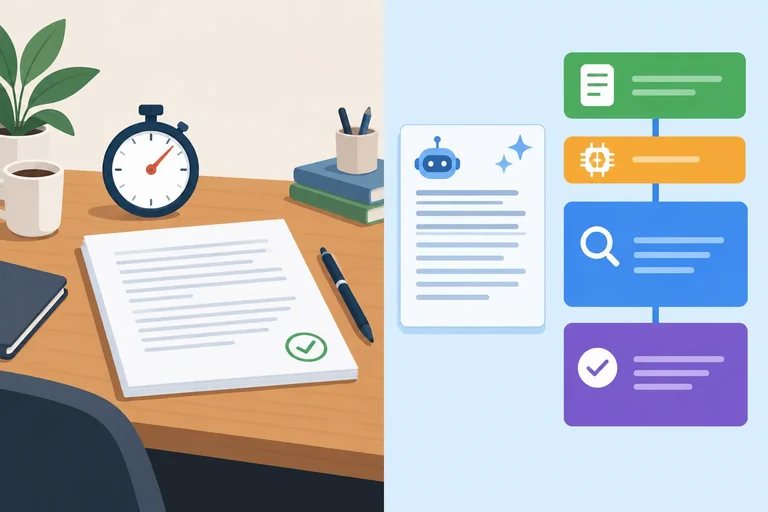
Estimate total effort for an AI-assisted marketing draft and see how review time can change the recommended route.
A time comparison is useful only when both routes aim for the same output and quality standard.
For Trailside Gear, compare drafting 3 social caption options, with a maximum of 30 words per caption, using only the approved public facts: 20 L capacity and 2 external pockets. An AI-assisted draft is working material, not approved copy.
Do not compare a fast unreviewed draft with a careful manual result. Include the effort needed to make either route ready for human approval.
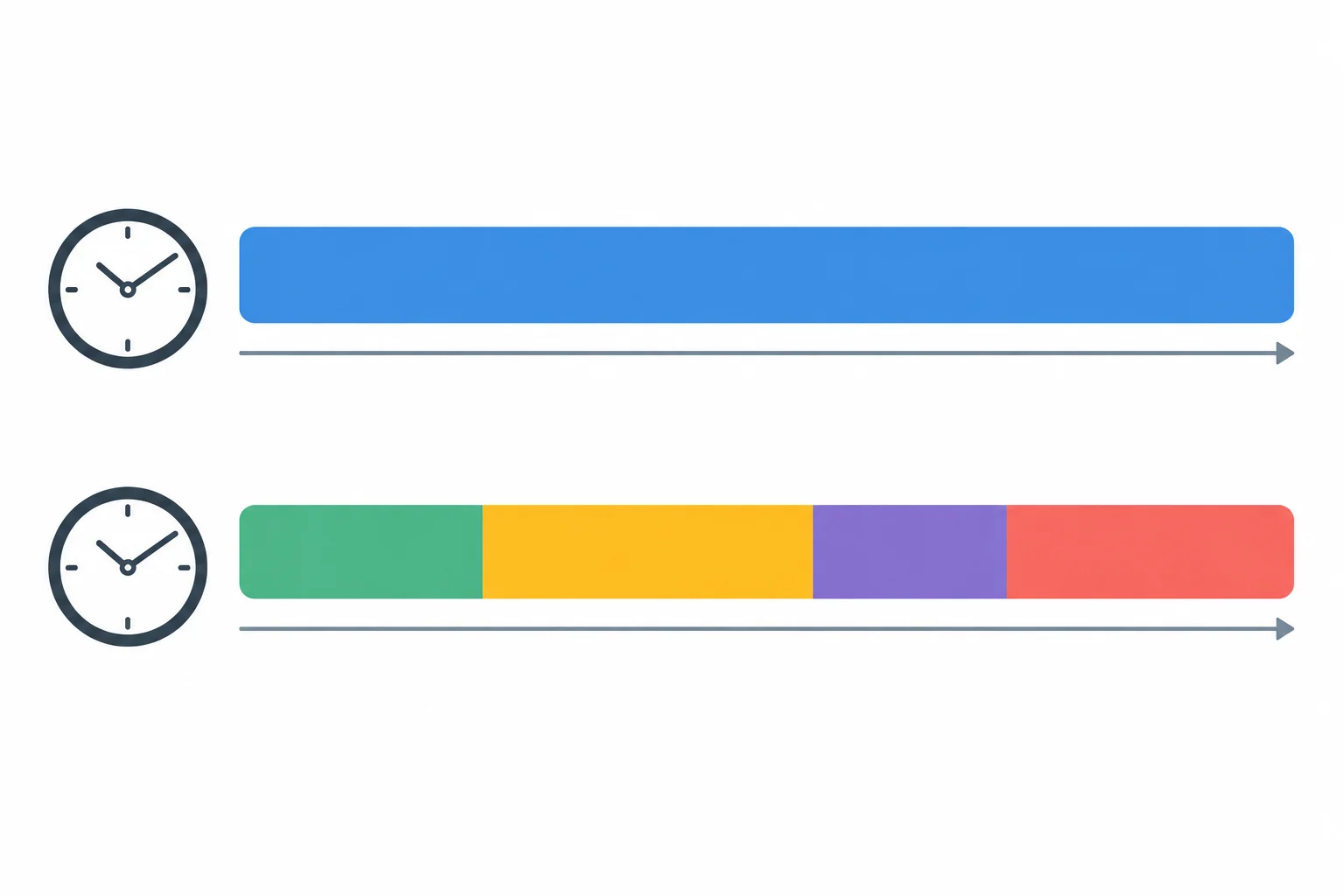
Compare total effort, not just the short generation segment.
Use these formulas for a Scenario estimate:
AI-assisted time = preparation + generation and waiting + checking + revision and approval
Net time saved = manual time - AI-assisted time
Checking is human review of the AI-assisted draft. Approval is human approval to authorize its use. Count both, along with preparation and any necessary revision.
Scenario estimate for the same caption task and quality requirement.
| Route or stage | Time |
|---|---|
| Manual approach | 25 min |
| Preparation | 5 min |
| Generation and waiting | 2 min |
| Checking | 8 min |
| Revision and approval | 5 min |
| AI-assisted total | 20 min |
Example
Scenario estimate
Manual time: 25 min
AI-assisted time: 5 + 2 + 8 + 5 = 20 min
Net time saved: 25 - 20 = 5 min
This estimate supports AI assistance for a draft only if the earlier input, risk, and review safeguards are also satisfied.
A fast first draft does not ensure a time advantage. Strict quality requirements or material that is difficult to verify can raise the human review time.
Use Scenario estimates as a starting point, not proof of productivity. If checking becomes much longer, recalculate before choosing a route.
Scenario estimate — higher review effort: The task and manual estimate stay the same, but checking requires more human review.
| Route or stage | Time |
|---|---|
| Manual approach | 25 min |
| Preparation | 5 min |
| Generation and waiting | 2 min |
| Checking | 14 min |
| Revision and approval | 5 min |
| AI-assisted total | 26 min |
| Net time saved | -1 min |
For the eligible Trailside Gear task, draft 3 social caption options of no more than 30 words each. Assume safeguards are available.
Scenario estimate A: Manual approach: 18 min. AI-assisted stages: 4 min preparation, 2 min generation and waiting, 5 min checking, and 3 min revision and approval.
Scenario estimate B: The task has stricter quality requirements. Keep all figures from A, but checking takes 10 min.
Calculate the AI-assisted time and net time saved for A and B. Then state which route you would choose for each Scenario estimate.
Write at least 55 characters (0/55).
Step 6 of 7
Compare fictional free-tier tool profiles with a defined marketing task, then identify the conditions that require current verification before real use.
Free-tier fit is task-specific. Start with what the task must produce—not with the largest quota.
Candidate task: Draft 3 social caption options for the fictional Trailside Gear product, Trailside Daypack. Each caption may contain up to 30 words. The AI-assisted draft must contain all 3 options in one text response, so it needs capacity for up to 90 words.
Eligible practice inputs:
The task also needs text generation, at least 1 request today, and an account/access route that is acceptable for the intended use.
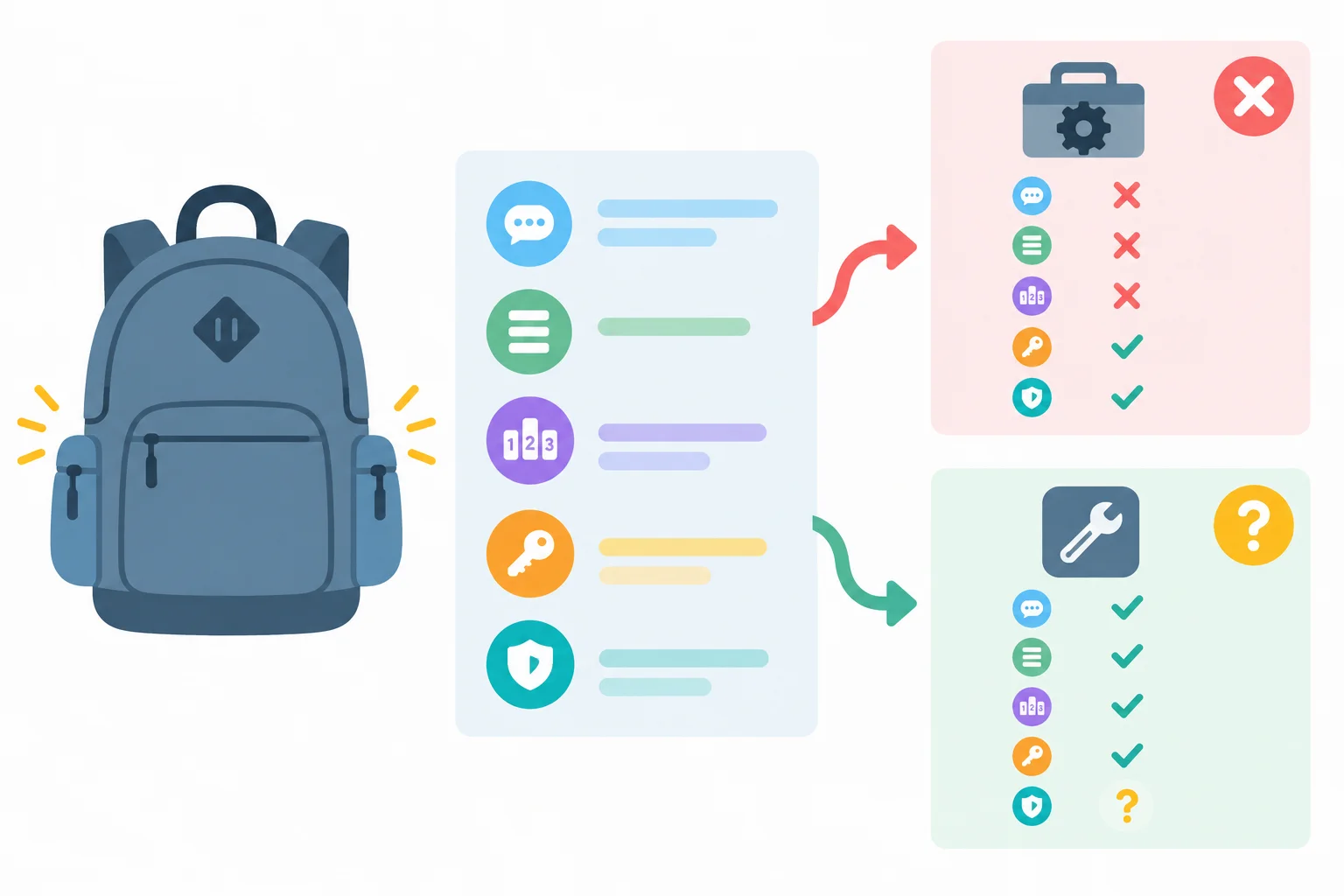
A tool is a possible fit only when its feature, limits, access conditions, and data conditions match the specific task.
Tip
A high quota cannot compensate for a missing required feature or an unacceptable data condition. Treat every unknown as a condition to check, not as a benefit.
Fictional tool profiles — not current provider policies. These profiles are only a practice comparison; do not treat them as facts about any real provider.
| Tool | Output limit | Quota | Account | Data profile | Access |
|---|---|---|---|---|---|
| Tool A | 40 words per request | 10 requests per day | Email sign-in required | Retained 30 days; may be used to improve systems; no free-tier control | Browser where offered |
| Tool B | 120 words per request | 3 requests per day | Email sign-in required | Retained 7 days for abuse prevention; not used for training in this profile; no custom control | Browser where offered |
For the defined task, Tool A's 40-word output limit cannot hold up to 3 captions of 30 words in one response. Its larger quota does not solve that mismatch. Tool B has enough output capacity and quota in this fictional comparison.
Before real use, verify current conditions from the provider's pricing or free-tier page, help documentation, terms, and privacy information. Check the actual feature and output limits, requests per day, account and access requirements, retention, possible training use, available controls, and compatibility with organizational restrictions.
Conditions change. If a required condition is unknown or incompatible, use a Manual approach or obtain authorized clarification; do not assume the tool is suitable.
A provider's current privacy information does not clearly show whether its data handling is compatible with organizational restrictions. What is the sound next step?
Using the fictional profiles from the previous screen, choose Tool A, Tool B, or reject both for the Trailside Daypack caption task. Defend your choice using the output feature, requests per day quota, account/access condition, and data profile. Then name two current conditions that must be verified before real use.
Write at least 180 characters (0/180).
Step 7 of 7
Integrate task fit, input eligibility, risk, review, time, and fictional free-tier conditions into a concise Trailside Gear selection record.
Use this fictional case file to make one defensible selection—without opening an AI tool.
For the caption task, use only the approved Public facts for the fictional Trailside Daypack: 20 L capacity and 2 external pockets. The Trailside Gear context is Fictional, so the usable practice inputs carry both labels: Public and Fictional.
Use the full estimate, not generation speed alone:
AI-assisted time = preparation + generation and waiting + checking + revision and approval
Net time saved = manual time - AI-assisted time
Scenario estimate: 25 min manually versus 5 + 2 + 8 + 5 = 20 min with AI assistance. The estimated net time saved is 5 min.
Do not write or run a prompt in this activity. Your decision comes first.
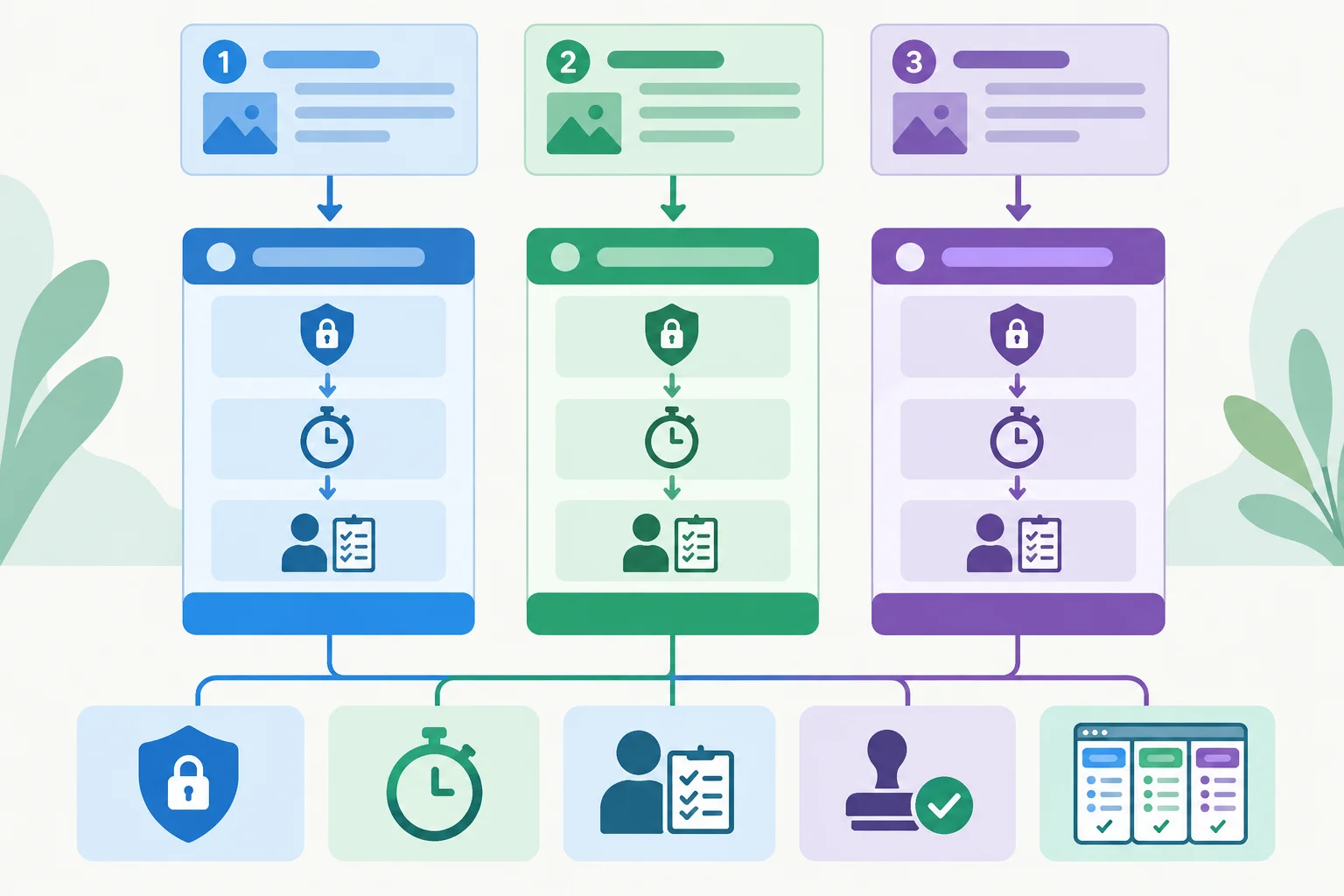
A route is defensible only when the task, inputs, safeguards, time estimate, and tool conditions fit together.
Assess these supplied fictional tasks before selecting a route.
| Task | Output requirements | Input labels | Scenario estimate |
|---|---|---|---|
| Draft 3 social caption options | Maximum 30 words per caption | Public; Fictional | 25 min manual; 20 min AI-assisted |
| Set final wording for a customer-complaint reply | One final customer-facing reply | Fictional | No estimate before routing |
| Approve a performance claim and audience-targeting category | Approval decision | Fictional; Restricted | No estimate before routing |
The caption task needs text generation for all 3 options in one response: up to 90 words total. It also needs at least 1 request today and an acceptable account, browser access, and data-handling condition.
These are practice profiles only. Before any real use, current provider information must be checked. An unknown or incompatible required condition means using a Manual approach or obtaining authorized clarification.
Compare the profiles against the caption task—not against each other in the abstract.
| Tool | Output limit | Quota | Account and access | Data profile |
|---|---|---|---|---|
| Tool A | 40 words per request | 10 requests per day | Email sign-in required; browser where offered | Retained 30 days; may be used to improve systems; no free-tier control |
| Tool B | 120 words per request | 3 requests per day | Email sign-in required; browser where offered | Retained 7 days for abuse prevention; not used for training in this profile; no custom control |
Tip
A larger quota does not repair a missing feature. Tool A cannot provide up to 90 words in one response. Tool B has enough output capacity and an adequate illustrative quota for this task. Its profile is only a provisional fit: current feature limits, requests per day, account/access requirements, retention, training use, controls, and compatibility with organizational restrictions still need verification before real use.
Match each Trailside Gear task to its most appropriate provisional route.
Tap an item and then its matching pair.
Create one concise task-selection record from the case file.
First, route all three tasks using exactly one label each: AI assistance, Manual approach, or Specialist review.
Then make the record for the task selected for AI assistance. Use every heading exactly as shown:
TaskOutput requirementsInput eligibilityRisk and reviewerEstimated net time savedFree-tier fitDecisionReason
Include the eligible inputs, the quality limit, the Scenario estimate, human review and human approval, the fitting fictional tool, a condition that would change the recommendation, and a Manual approach fallback if that condition remains unresolved.
Write at least 450 characters (0/450).
Summary
Congratulations! You completed: Choose Marketing Tasks for AI Assistance
Thousands of online courses in video, ebooks and audiobooks.
To test your knowledge during online courses
Generated directly from your cell phone's photo gallery and sent to your email

Download our app via QR Code or the links below:.



Carry knowledge in your pocket.
Download the Cursa app.
There are hundreds of free courses available, with a free certificate of completion that is saved in your mobile image gallery.
Download the app to access the Course Completion Certificate for Free.


+ 10 million
students

Free and Valid
Certificate

60 thousand free
exercises

4.8/5 rating in
app stores

Free courses in
video and ebooks