
Step 1 of 8
Map the Campaign Structure
Assign the main planning decisions to the campaign, ad-set, and ad levels.

Learning path · Level 7 · Tutorial 2
Draft a Meta campaign structure that connects the business outcome to delivery goals, prospecting audiences, placements, and justified retargeting conditions. Use a text-based plan without creating an account or collecting customer data.

 Map the Campaign Structure
Assign the main planning decisions to the campaign, ad-set, and ad levels. 2 min
 Connect the Outcome to Delivery
Connect Harbor Packs' desired website purchases to a suitable Meta objective, conversion location, performance goal, and optimization event without treating delivery settings as guarantees. 3 min
 Define Prospecting Controls and Suggestions
Define a broad prospecting audience by separating enforceable boundaries from optional delivery suggestions and recording restrictions that require a current check. 4 min
 Choose a Placement Approach
Choose an automated or manual placement approach and record the related creative-format readiness without creating an ad. 2 min
 Evaluate Retargeting Sources and Permissions
Assess engagement, website, and customer-list retargeting proposals using documented evidence, permissions, and eligibility checks. 3 min
 Check Website Retargeting Readiness
Trace the evidence required before a website-retargeting proposal can move beyond a conditional plan. 3 min
 Specify Recency, Exclusions, and Overlap
Write a precise website-retargeting rule, then document what its exclusions and audience boundaries can—and cannot—claim. 3 min
 Complete and Review the Campaign Draft
Synthesize the Harbor Packs planning decisions into a concise, evidence-aware Meta campaign draft without creating or publishing a campaign. 3 min
Step 1 of 8
Assign the main planning decisions to the campaign, ad-set, and ad levels.
Harbor Packs wants more website purchases of its Daypack from adult commuters in the United Kingdom. You will draft the campaign on paper—not create an account, publish anything, add payment details, or collect customer data.
Meta planning uses a three-level hierarchy: Campaign → Ad set → Ad. Each level holds a different kind of decision, so a clear draft prevents decisions from being placed in the wrong location.
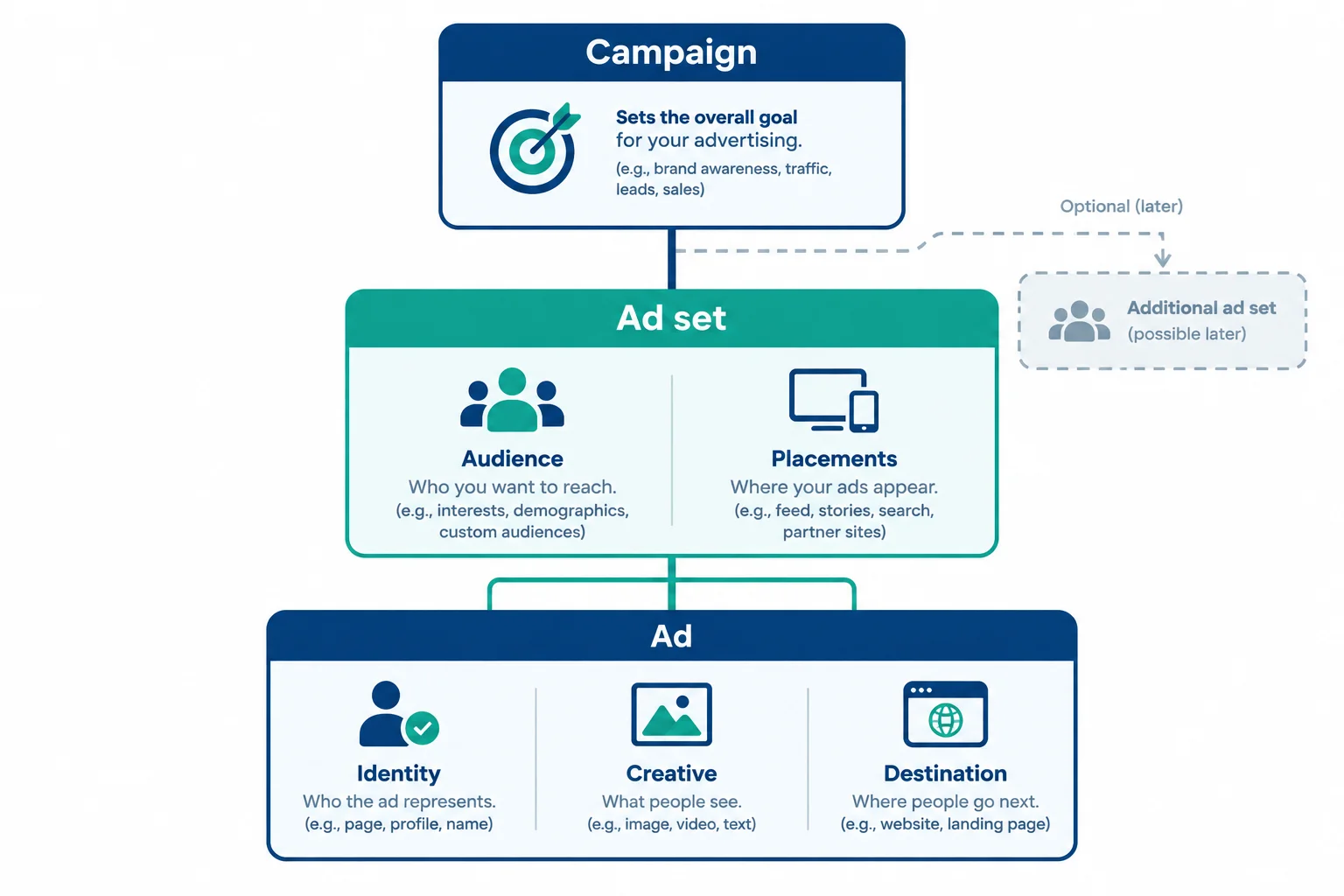
Read the structure from broad planning level to the individual ad: Campaign → Ad set → Ad.
Assign decisions by their role:
The supplied fictional case evidence supports planning. It does not authorize a launch. Keep a decision in the level where it can be managed as part of the hierarchy.
Use this map while drafting. The next steps will define the details of the objective, audience, placements, and any retargeting conditions.
| Level | Main planning responsibility |
|---|---|
| Campaign | Objective |
| Ad set | Audience, placements, applicable delivery settings |
| Ad | Identity, creative, destination |
Example
Campaign: Harbor Packs | Daypack | Sales
Ad set: UK | Prospecting
Ad: Daypack ad
Start with this one campaign, one prospecting ad set, and one ad placeholder. Add UK | Retargeting | 30 days only as an optional branch when later evidence justifies it; do not treat it as automatically required.
Match each planning decision to the level where it belongs.
Tap an item and then its matching pair.
Which outline is the valid minimal starting hierarchy for the Harbor Packs scenario?

Step 2 of 8
Connect Harbor Packs' desired website purchases to a suitable Meta objective, conversion location, performance goal, and optimization event without treating delivery settings as guarantees.
Begin with the business outcome, not the metric that is easiest to observe. A Meta objective is a delivery direction: it helps shape how the system seeks opportunities. It is not a reporting label and does not guarantee results.
The available objective labels and combinations can vary by account and configuration. Use the family that most closely matches the outcome you want.
Use these objective families as an outcome-to-delivery map.
| Objective family | Primary outcome direction |
|---|---|
| Awareness | More awareness among relevant people |
| Traffic | More visits or clicks to a destination |
| Engagement | More interactions with content or a presence |
| Leads | More lead submissions or contacts |
| App promotion | More app installs or in-app actions |
| Sales | More purchase or conversion actions |
Harbor Packs wants more website purchases of the Daypack. Its planning chain is:
Business outcome → campaign objective → conversion location → performance goal → optimization event
For this scenario, the chain is website purchases → Sales → Website → Maximize number of conversions → Purchase. The exact labels are configuration-dependent, but every part should point toward the same outcome.

The outcome, objective, Website location, performance goal, and event should form one connected plan.
Example
Text-only draft notation:
Business outcome: More website purchases of the Daypack
Campaign objective: Sales
Conversion location: Website
Performance goal: Maximize number of conversions
Optimization event: Purchase
The supplied scenario has validated website PageView and Purchase events. That supports using the Purchase event in this draft; it does not promise that ads will produce purchases. If a suitable usable purchase signal were absent, the draft would need a readiness condition instead of an unsupported claim.
A product page can be the destination for more than one delivery direction. That alone does not make a traffic-focused plan equivalent to a purchase-focused plan.
Traffic is appropriate when the primary intended outcome is a visit or click. For Harbor Packs, the intended outcome is a completed purchase, so the plan should use a purchase-aligned Sales direction and the suitable completed-order event.
Neither direction guarantees its outcome. Objectives and performance goals influence delivery; they do not turn every impression, click, or visit into a sale.
Tip
A click can be a necessary step before a purchase, but it is an intermediate action—not the same business outcome. Keep the Daypack product page as the destination while selecting delivery direction based on the desired result.
Warning
If the desired outcome changes, revisit the full chain. Do not keep a purchase-focused event merely because it sounds more valuable, and do not substitute a visit-focused direction merely because the destination is a website.
Harbor Packs wants more completed Daypack orders on its website, and the supplied scenario includes a validated completed-order event. Which text-only plan is aligned with that outcome while making an appropriate claim about results?

Step 3 of 8
Define a broad prospecting audience by separating enforceable boundaries from optional delivery suggestions and recording restrictions that require a current check.
Prospecting means planning delivery toward potential Daypack customers—not deliberately selecting people because they previously visited, engaged, or purchased. It can reach people who are new to Harbor Packs, but it does not guarantee that every person reached is new.
For this scenario, keep one practical, broad prospecting ad set: UK | Prospecting. Start with the service area, then add only supported boundaries and a relevant audience hypothesis. Splitting a small plan into many narrow interest groups can create unnecessary fragmentation.
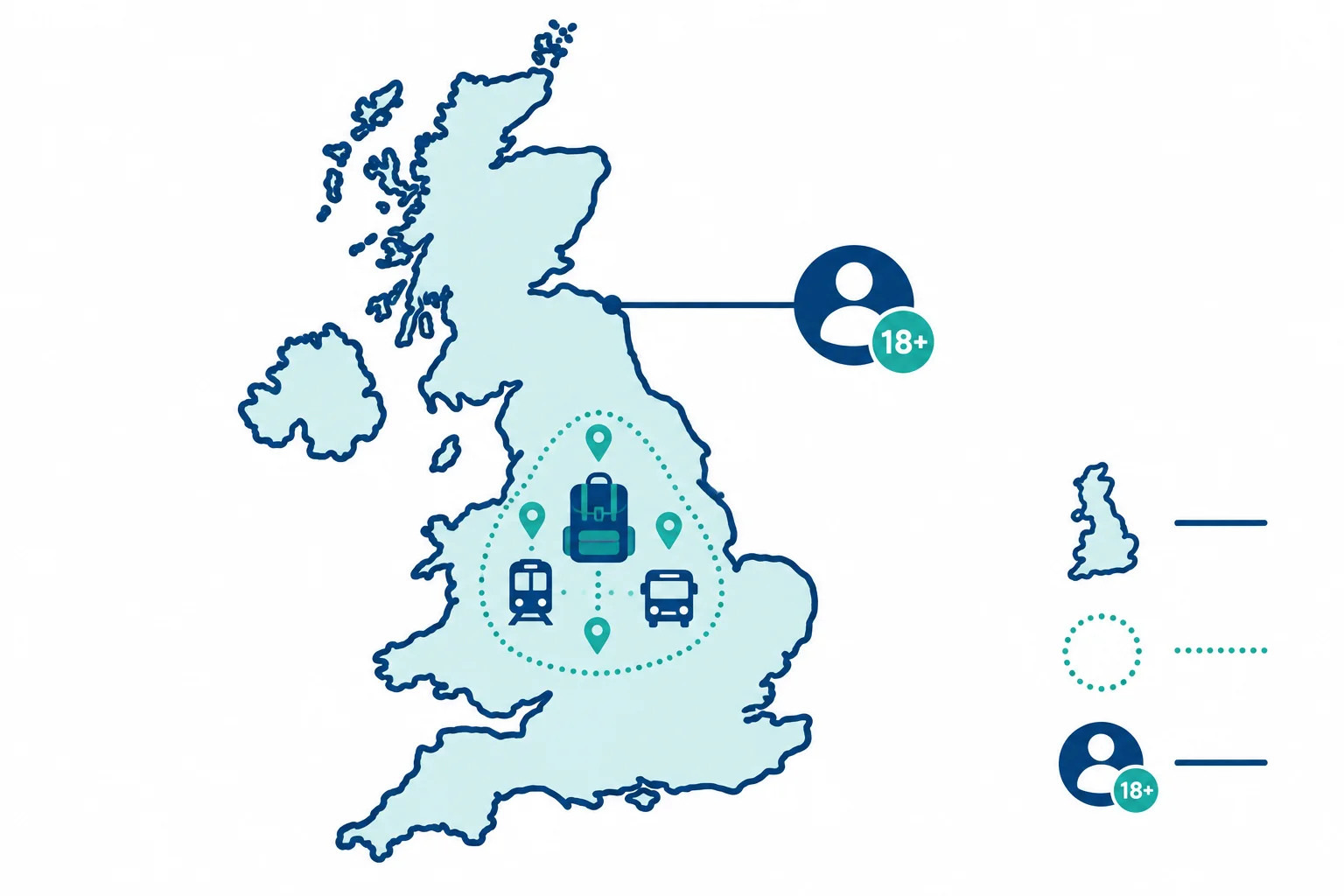
Plan firm boundaries separately from an optional Commuting hypothesis. The hypothesis can help guide delivery when the selected configuration treats it as a suggestion.
A Control is an enforceable boundary when it is available in the selected configuration. A Suggestion is an input that may guide automated delivery but is not a promise that delivery will stay limited to that input.
For Harbor Packs, use the broadest practical eligible audience first. Commuting is a useful audience hypothesis for adult Daypack buyers, not a guaranteed selectable interest and not a required boundary.
Use these labels in the written draft. Exact settings and availability can vary by configuration and current platform rules.
| Input | Planning label | How to state it |
|---|---|---|
| United Kingdom | Control | Required location |
| 18+ | Control | Illustrative minimum age, where supported |
| Commuting | Suggestion | Optional audience hypothesis |
| Extra interests | Suggestion | Add only with a clear relevance reason |
Warning
Before treating any audience setting as usable, check current category and regional restrictions. For example, housing and employment advertising can limit targeting options or advertising availability. Do not use sensitive personal attributes to work around a restriction.
Record this as a planning check, not an assumption: Restriction check: confirm applicable category, regional rules, and available controls before configuration.
Match each planning input to its correct label.
Tap an item and then its matching pair.
Write a concise prospecting definition for UK | Prospecting using the planning inputs from the previous screens. In one or two sentences, state the geography, the supported age requirement, the optional audience hypothesis, and the required restriction check. Keep the audience broad and do not introduce retargeting audiences.
Write at least 140 characters (0/140).

Step 4 of 8
Choose an automated or manual placement approach and record the related creative-format readiness without creating an ad.
A placement is an eligible location where an ad may be delivered across Meta surfaces. It is an ad-set decision, separate from the audience definition.
For this tutorial, examples are Facebook Feed, Instagram Feed, Stories, and Reels. The placements actually available can depend on the objective, ad format, account, and current platform rules. Do not assume every named placement is eligible in every configuration.

Facebook Feed and Instagram Feed are feed-style examples; Stories and Reels are full-screen examples.
Choose the approach based on the plan, not on a personal preference for one surface.
Advantage+ placements lets Meta distribute across eligible placements automatically. It can broaden the opportunities considered, but it does not promise equal delivery across placements or better results in every case.
Manual placements lets the advertiser select a narrower set of eligible placements. Use it when a documented constraint or rationale supports that narrower choice. Selection still depends on what is eligible in the current configuration.
Use either approach only after confirming current eligibility.
| Approach | Planning use | Do not assume |
|---|---|---|
| Advantage+ placements | Automated distribution across eligible placements | Equal delivery or universal improvement |
| Manual placements | A documented constraint supports a narrower eligible selection | That a selected placement is always available |
Feed-style placements present an ad within a scrolling feed. Full-screen placements use a tall, immersive mobile layout. These are high-level layout differences, not fixed specifications.
If the draft uses Advantage+ placements, plan for the Daypack ad placeholder to be ready for both feed-style and full-screen eligible placements. If Manual placements limits delivery to one layout type, record the matching format-readiness need.
Do not create finished assets here. Exact dimensions, safe areas, and placement-specific creative variants are specified later.
Example
Ad set: UK | Prospecting
Placement approach: Advantage+ placements
Readiness note: Confirm eligible placements in the selected configuration. Prepare the Daypack ad placeholder for feed-compatible layouts and full-screen-compatible layouts when those placement types are eligible.
This is a planning record, not a guarantee that every placement will receive delivery.
Hypothetical variation: Harbor Packs has a documented requirement that this ad set run only in Facebook Feed and Instagram Feed. Which draft decision is most appropriate for this variation?

Step 5 of 8
Assess engagement, website, and customer-list retargeting proposals using documented evidence, permissions, and eligibility checks.
Retargeting is a plan to reach people connected to a business through an eligible source. Common source types are engagement with eligible business assets, website activity collected for advertising use, and a customer list with an appropriate documented advertising basis.
A Custom Audience is not automatically usable because a source exists. Each proposal needs a relationship to the business, authorized access, applicable permissions, and platform/source eligibility checks. This is a text-only planning exercise: do not collect, upload, or expose personal data.
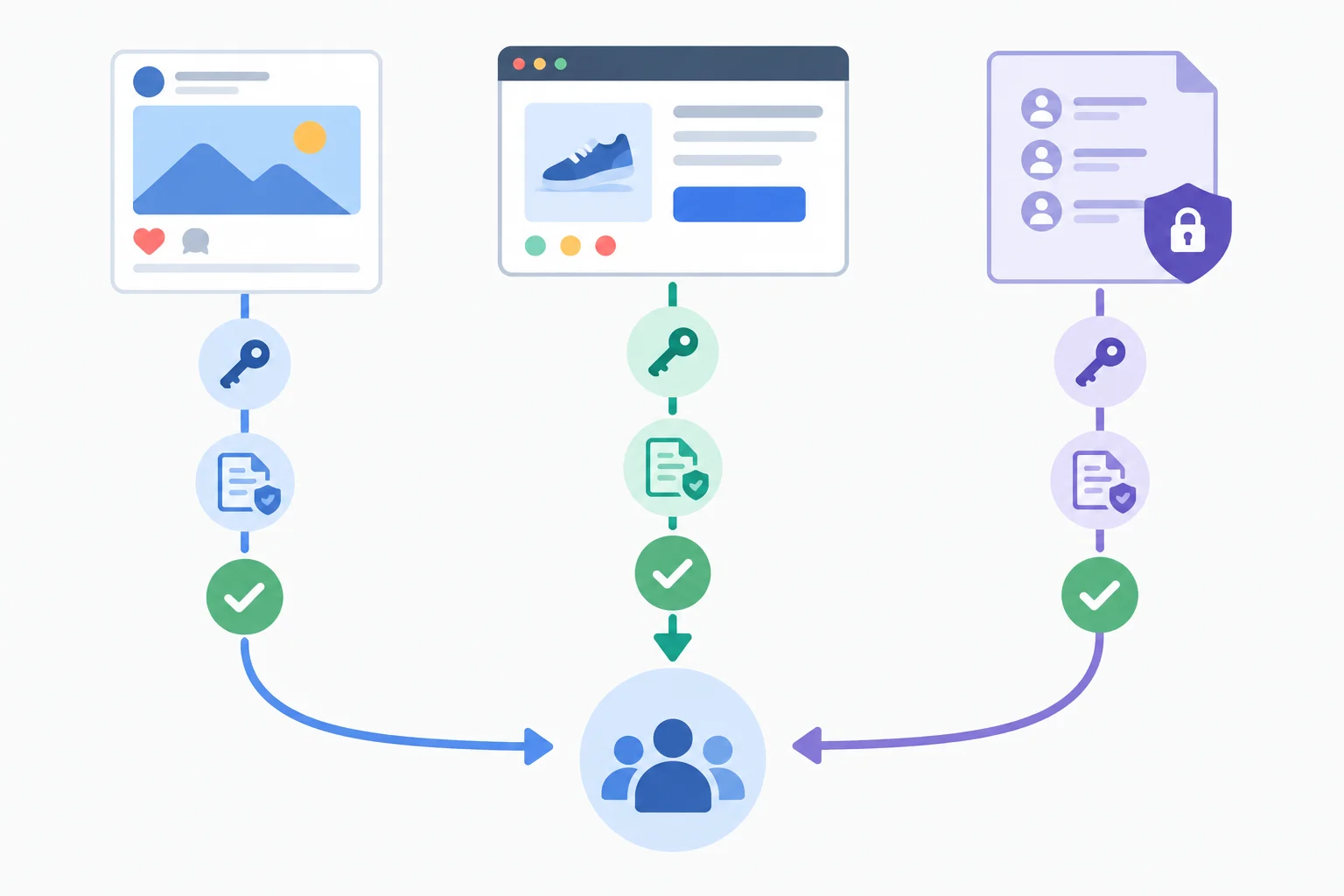
The source type changes the evidence you must document before it can support retargeting.
Tip
A source can be eligible in principle while its resulting audience is still unverified for usable delivery. Do not describe a proposed audience as ready merely because it sounds technically possible.
Use this comparison to document what each proposal represents. Platform options and eligibility can vary by configuration and current rules.
| Source | Relationship represented | Key evidence to document | Eligibility check |
|---|---|---|---|
| Engagement | Actions on eligible business assets | Authorized access; applicable permissions | Eligible asset, action, and platform rules |
| Website | Relevant activity on the business website | Appropriate permissions; valid advertising-event collection | Source eligibility and usable audience status |
| Customer list | Known contact information | Documented basis for advertising use; platform terms | Matching and audience requirements |
Use one status for the complete planning proposal:
An email subscription alone does not establish permission for customer-list advertising. Hashing a list, possessing it, or purchasing contact data also does not substitute for an appropriate documented basis.
Example
Harbor Packs scenario evidence
PageView and Purchase events are validated.Therefore, Instagram-engagement and website proposals are Conditional: their source suitability is verified, but their deliverable audience usability remains unverified. A customer-list proposal is Defer because the advertising permission is undocumented. These are supplied fictional facts; no customer records are needed.
True or false: A hashed customer file can be used for retargeting because hashing itself establishes appropriate advertising permission.
Using the Harbor Packs scenario evidence, assess these proposals without adding personal data:
For each, write Include, Conditional, or Defer and give one evidence-based reason. State the precise unresolved check for any Conditional decision. Explicitly reject unsupported permission assumptions.
Write at least 180 characters (0/180).

Step 6 of 8
Trace the evidence required before a website-retargeting proposal can move beyond a conditional plan.
A website retargeting audience is ready only when every dependency in its chain is supported. Work from access and permissions to event collection, validation, audience-rule matching, and finally audience eligibility.
A missing or unverified link changes the planning decision. Do not treat a website’s existence, a tag’s presence, or recorded activity in another analytics tool as proof that Meta can use the required source.
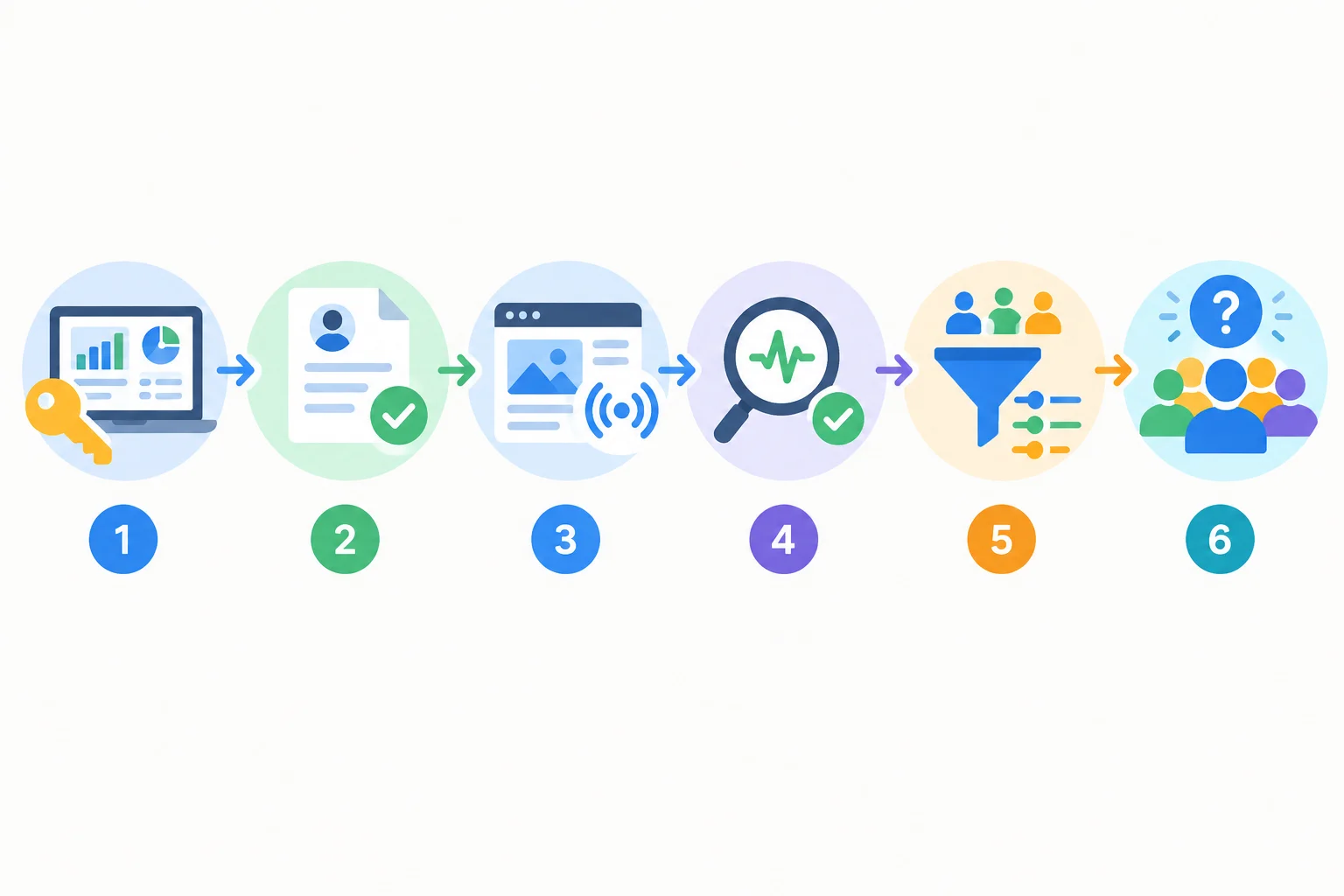
Every checkpoint must support the next one; passing an earlier checkpoint does not prove that the final audience is usable.
Meta Pixel and Conversions API are possible routes for supplying website-event signals to Meta. Their implementation is outside this planning exercise; the key question is whether the relevant events are valid and connected to the intended source.
Server-side collection through Conversions API does not bypass applicable consent or advertising-permission requirements. Likewise, a PageView recorded in GA4 can be useful measurement evidence, but it does not establish that Meta received a valid event or can use it for a Meta website audience.
Example
For Harbor Packs, the fictional scenario already verifies authorized Meta asset access, documented applicable advertising permissions for the website source, validated PageView and Purchase events, and source eligibility for website audiences.
However, the deliverable audience size is Unverified. Valid events and an eligible source do not guarantee a sufficiently populated, usable audience or delivery. Therefore, keep the proposed website retargeting branch Conditional until audience usability is checked. There is no universal audience-size threshold or delivery guarantee.
Put these website-retargeting readiness checks in dependency order.
Hypothetical variation: A business has authorized asset access and documented applicable permissions. Its website records PageView activity in GA4, but there is no evidence that valid website events reach Meta. There is also no evidence that the proposed audience rule produces an eligible, usable audience.
In 3–5 sentences, list the readiness checks in order. Choose Conditional or Defer for the website-retargeting proposal, explain why the website or GA4 activity alone is insufficient, and name the evidence that must be verified.
Write at least 250 characters (0/250).

Step 7 of 8
Write a precise website-retargeting rule, then document what its exclusions and audience boundaries can—and cannot—claim.
A retargeting rule needs three explicit parts:
For Harbor Packs, the source is the eligible website audience. The qualifying visitor action is a recorded page view. The window is a planning choice: it expresses how recent the relationship should be, not a universal best setting.
Write exclusions with the same precision. An exclusion should state who is removed and for what window.
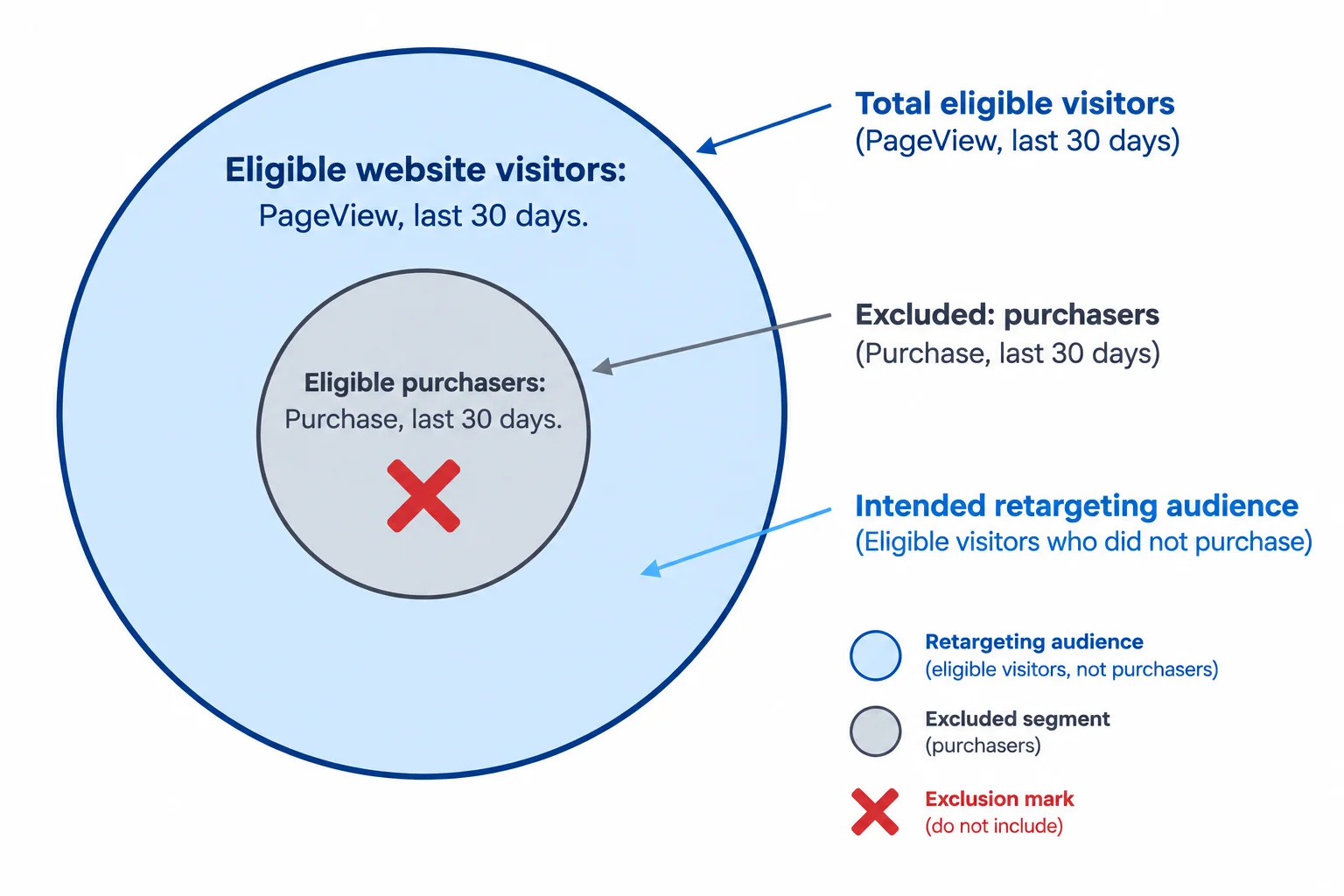
The intended audience is the eligible visitor set after the eligible purchaser set is excluded.
Example
Running rule for UK | Retargeting | 30 days
This is a scenario decision, not a recommendation for every business. A different buying cycle or an audience that is too small to be usable could justify a different window or a deferred branch.
The scenario has verified eligible website-source access, documented applicable permissions, and validated PageView and Purchase events. Deliverable audience size remains Unverified.
A purchaser exclusion is limited to the people represented by the eligible exclusion audience and its stated window. It cannot support the claim “all purchasers are excluded.” For example, it may not represent a purchaser outside that audience, outside the window, or someone not matched in the configured audience.
Likewise, a supported Custom Audience exclusion can reduce unnecessary overlap; it does not promise perfect separation or control how often someone sees ads.
Do not substitute an interest for a Custom Audience exclusion. Commuting is an audience hypothesis and may be a Suggestion. It is not a list of purchasers or a reliable exclusion boundary.
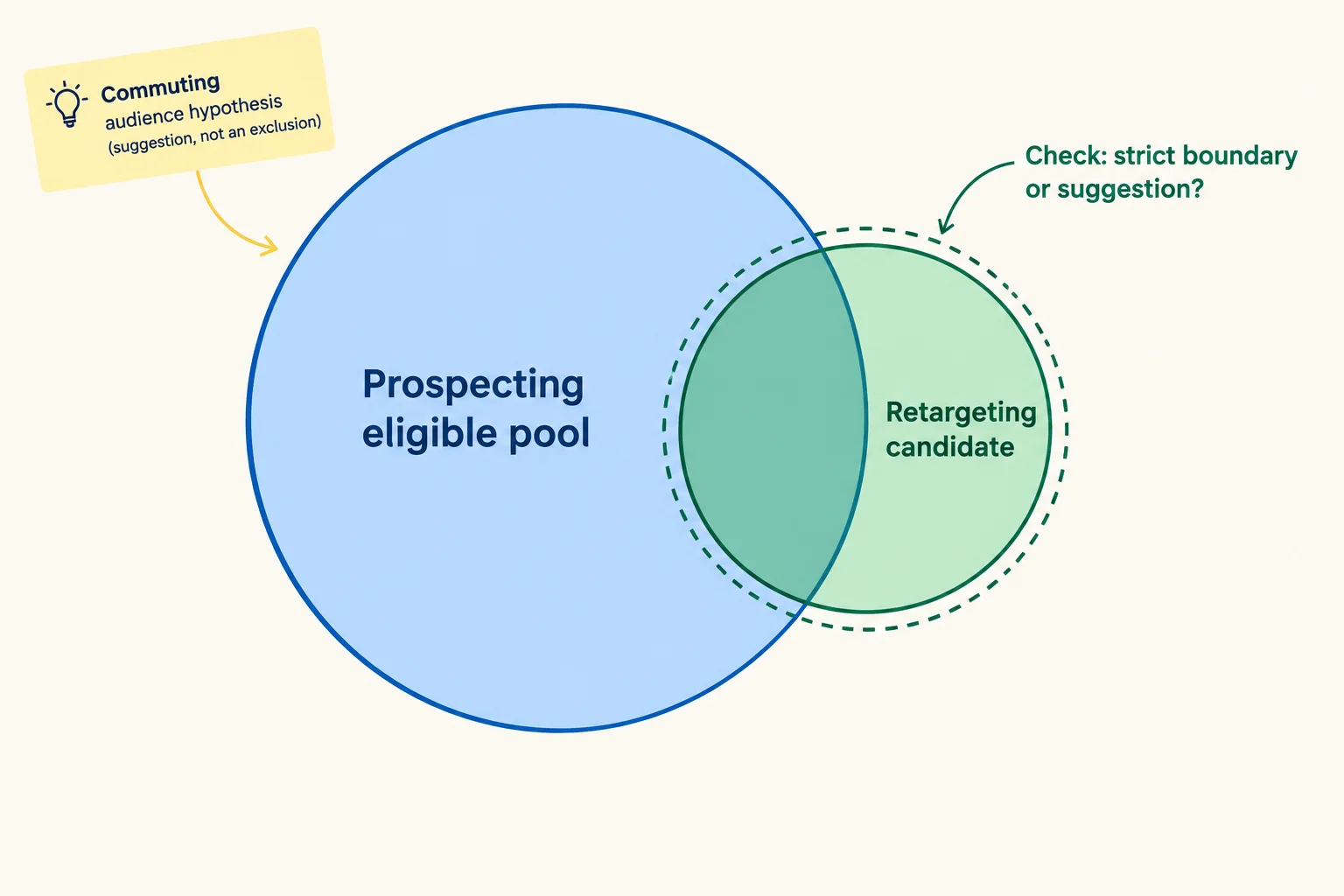
Even a carefully written plan must check how included Custom Audiences and exclusions operate in the selected configuration.
Tip
Before describing delivery as “retargeting-only,” check whether the included Custom Audience acts as a strict boundary or as a suggestion in the selected audience setup. Availability and effects are configuration-dependent.
If an eligible Custom Audience exclusion is available, the prospecting ad set may exclude the retargeting audience to reduce overlap. Record that as a supported planning action—not as a guarantee that no person can appear in both delivery paths.
Complete the retargeting rule using the stated lookback window.
Include eligible website visitors from the last __; exclude eligible purchasers from the last __.
Consider this planning case: a person viewed the Daypack product page 12 days ago, purchased 5 days ago, and also fits the broad eligible prospecting population.
In 2–4 sentences, identify the potential overlap. Then explain why the purchaser exclusion cannot promise that all purchasers are excluded and why the draft cannot promise retargeting-only delivery under every configuration.
Write at least 120 characters (0/120).

Step 8 of 8
Synthesize the Harbor Packs planning decisions into a concise, evidence-aware Meta campaign draft without creating or publishing a campaign.
A completed draft is a decision record, not a live campaign. Organize it under these headings: Business outcome, Campaign, Ad sets, Ad placeholders, Retargeting decision, and Readiness conditions.
Keep the case facts consistent: Harbor Packs wants more website purchases of the Daypack. Its delivery chain is Sales → Website → Maximize number of conversions → Purchase. The hierarchy is Campaign → Ad set → Ad: Harbor Packs | Daypack | Sales contains UK | Prospecting, the optional UK | Retargeting | 30 days, and Daypack ad placeholders that lead to the Daypack product page.
The prospecting draft uses United Kingdom and 18+ as controls where supported, with Commuting as a suggestion. It uses Advantage+ placements and records format readiness rather than finished creative.
Website and engagement permissions, asset access, and relevant website events are verified in this scenario. Deliverable audience size and whether the included Custom Audience acts as a strict boundary in the selected setup remain unverified. Customer-list advertising permission is undocumented.
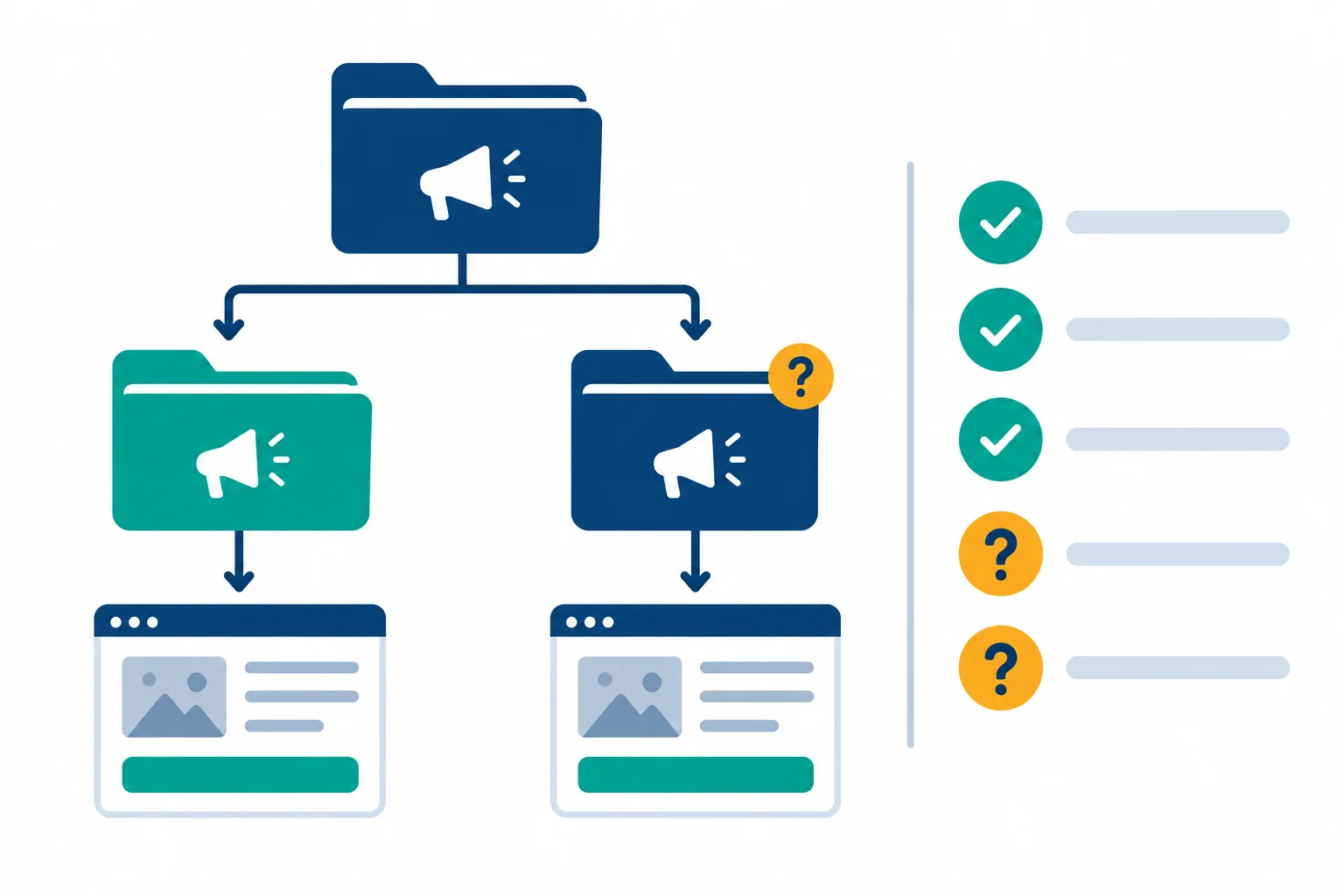
The structure stays stable while the retargeting branch remains conditional until its unresolved readiness checks are confirmed.
Tip
Use Include for a supported choice, Conditional when a choice depends on an unresolved check, and Defer when evidence or permission is missing. A polished plan may still be conditional; it is not authorization to publish, spend money, or collect customer data.
Write the first part of your text-only draft in a short labeled outline. State the business outcome and the complete outcome-to-delivery chain. Then show the required hierarchy, using the prescribed campaign, ad-set, and ad-placeholder names. Make clear that every ad placeholder uses the same specified destination.
Do not describe account setup or finished creative.
Write at least 250 characters (0/250).
Add the prospecting and placement portion of the same draft in no more than 140 words.
Separate enforceable audience boundaries from the audience hypothesis. Explain why the audience hypothesis is not a promise of strict delivery, and note the required restriction check. Choose the planned placement approach, give a business rationale, and state the resulting format-readiness implication without inventing finished assets.
Write at least 300 characters (0/300).
Complete the Retargeting decision and Readiness conditions sections, then add a line beginning with Review:.
Use the planning-decision vocabulary to state whether the proposed retargeting branch can be used now. Defend that decision with the supplied evidence: permissions, event collection, source eligibility, audience recency, and the purchaser exclusion. Distinguish verified evidence from unresolved usability or configuration checks. Address the separate customer-list permission issue without using customer data.
In your Review: line, confirm that your full draft contains the outcome-to-delivery chain, hierarchy, audience controls versus suggestions, placement rationale, and all remaining conditions.
Write at least 500 characters (0/500).
Summary
You can now produce a coherent Meta campaign draft that connects a business outcome to delivery, structure, prospecting, placements, and evidence-aware retargeting conditions.
Your draft is complete as an educational planning artifact. It is not a published campaign and does not require an account, payment details, a live website, or customer records. The next stage is to specify creative variants that are appropriate for the planned placements and destination.
Congratulations! You completed: Draft a Meta Ads Campaign
20 XP
Thousands of online courses in video, ebooks and audiobooks.
To test your knowledge during online courses
Generated directly from your cell phone's photo gallery and sent to your email

Download our app via QR Code or the links below:.



Carry knowledge in your pocket.
Download the Cursa app.
There are hundreds of free courses available, with a free certificate of completion that is saved in your mobile image gallery.
Download the app to access the Course Completion Certificate for Free.


+ 10 million
students

Free and Valid
Certificate

60 thousand free
exercises

4.8/5 rating in
app stores

Free courses in
video and ebooks