
Step 1 of 8
Map the Full Data Lifecycle
Trace personal data across the Northstar Repairs workflow, including the main transfers, separate storage locations, logs, and possible connected-service copies.

Learning path · Level 8 · Tutorial 2
Create an evidence-backed privacy and security checklist for a fictional AI workflow, covering its full data lifecycle, provider arrangements, and the response to an incident.
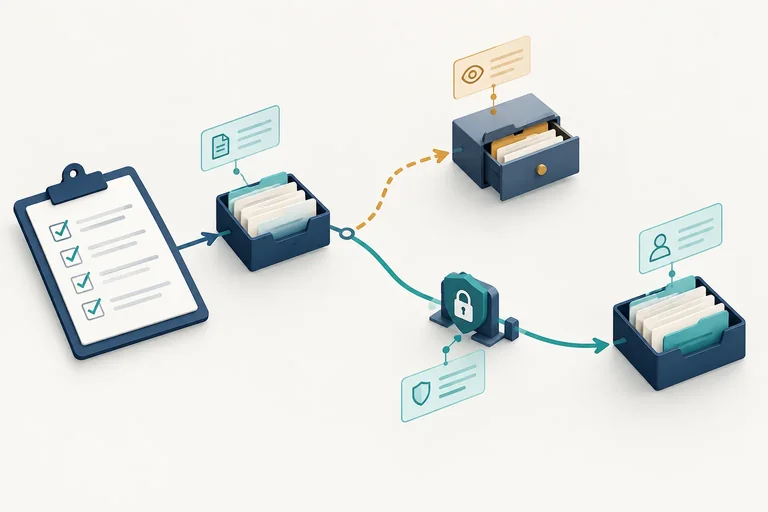
 Map the Full Data Lifecycle
Trace personal data across the Northstar Repairs workflow, including the main transfers, separate storage locations, logs, and possible connected-service copies. 3 min
 Record Purpose and Permission
Document a bounded purpose and record whether the available evidence actually supports the intended use of personal data. 2 min
 Send Only Necessary Information
Choose which case fields belong at the DraftAI boundary, transform free text carefully, and recognize remaining identification risk. 2 min
 Assign Access and Retention Responsibilities
Review access and retention coverage across source material, outputs, logs, and provider-held copies in the Northstar Repairs workflow. 3 min
 Check Provider Terms Against Settings
Review fictional provider terms and settings for the Northstar Repairs workflow, keeping documented protections, confirmed mismatches, and unanswered questions distinct. 3 min
 Turn Findings into Evidence-Backed Entries
Turn provider, policy, and configuration findings into scoped, evidence-backed checklist entries with justified statuses and accountable follow-up. 3 min
 Plan the Incident Escalation
Respond proportionately to an unintended disclosure while keeping facts, uncertainty, and responsibilities clear. 2 min
 Complete and Defend Your Checklist
Consolidate the Northstar Repairs case findings into a dated, evidence-backed checklist and justify its readiness and incident-escalation decision. 4 min
Step 1 of 8
Trace personal data across the Northstar Repairs workflow, including the main transfers, separate storage locations, logs, and possible connected-service copies.
Northstar Repairs uses this connected workflow:
Helpdesk → FlowBridge → DraftAI → Review Queue → Helpdesk
It categorizes repair requests and drafts replies. A Reply Reviewer must approve each draft before the reply is sent.
A data-lifecycle map begins at the case boundary: it follows personal data through every connected location, not only through DraftAI. The map is a record of where information enters, travels, may persist, and eventually needs a deletion check.
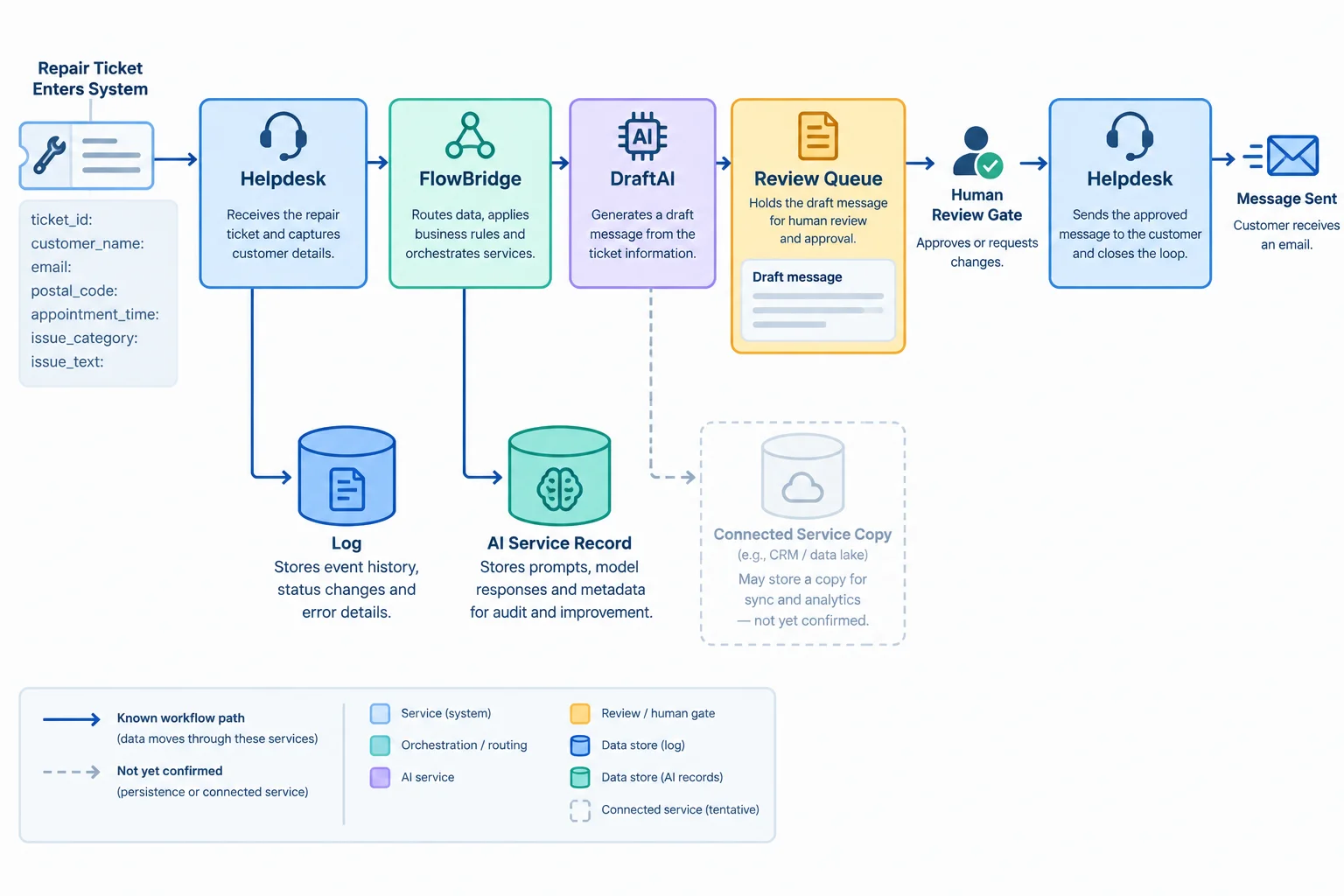
The main arrows show the task sequence. Side branches help reveal separate places where personal data may persist.
Do not treat an arrow as proof that information disappears from the previous location. One repair request can exist in several places at once: as a source ticket, a transferred payload, a draft, and an execution record.
For every location, ask what lifecycle activity occurs there. This makes the map useful later when creating each checklist entry.
Use these activity labels while drawing the data-lifecycle map.
| Activity | Question to record | Case example |
|---|---|---|
| Collection | Where does personal data enter? | Helpdesk repair ticket |
| Transfer | Which destination receives it next? | FlowBridge, DraftAI, Review Queue |
| Storage | Where can a source or output remain? | Helpdesk ticket; Review Queue draft |
| Logging | What execution record could persist? | FlowBridge run logs |
| Reuse | Could content be used again elsewhere? | Check; do not infer permission |
| Deletion | What happens at each separate location? | Not yet confirmed |
A strong map distinguishes an observed workflow fact from an unanswered question.
Known in this case: the workflow transfers a repair request through FlowBridge and DraftAI, places a draft in the Review Queue, and requires human approval before sending.
Mark as Not yet confirmed: whether FlowBridge run logs retain particular fields; whether DraftAI keeps service records; and whether retries, backups, or connected services create copies. Unknown does not mean absent, deleted, or protected.
Example
Known path
Helpdesk source ticket → FlowBridge → DraftAI → Review Queue draft → Helpdesk approved reply
Branches to include beside that path
This first map does not decide permission, necessary fields, retention periods, or provider commitments. It makes those later checks possible without overlooking a location.
Tip
A privacy and security checklist must cover the source, transfers, outputs, logs, and connected-service copies. Reviewing DraftAI alone would leave important parts of the workflow outside the map.
A partial map shows only: Helpdesk → FlowBridge → DraftAI → Review Queue → Helpdesk.
Match each location or addition to its lifecycle role. Include the branches that the main arrows would otherwise omit.
Tap an item and then its matching pair.

Step 2 of 8
Document a bounded purpose and record whether the available evidence actually supports the intended use of personal data.
A purpose statement is a bounded description of what the workflow is meant to do. It names the task, the affected people, the intended use, and the boundary.
For Northstar Repairs, the stated workflow purpose is to categorize a repair request and draft a repair reply. A Reply Reviewer must approve the draft before it returns to Helpdesk for sending. The affected people include the customer and anyone identified in the repair request.
That purpose does not automatically cover a different use, such as building marketing themes, training material, or a new customer list. Treat a changed purpose as a new question to review.
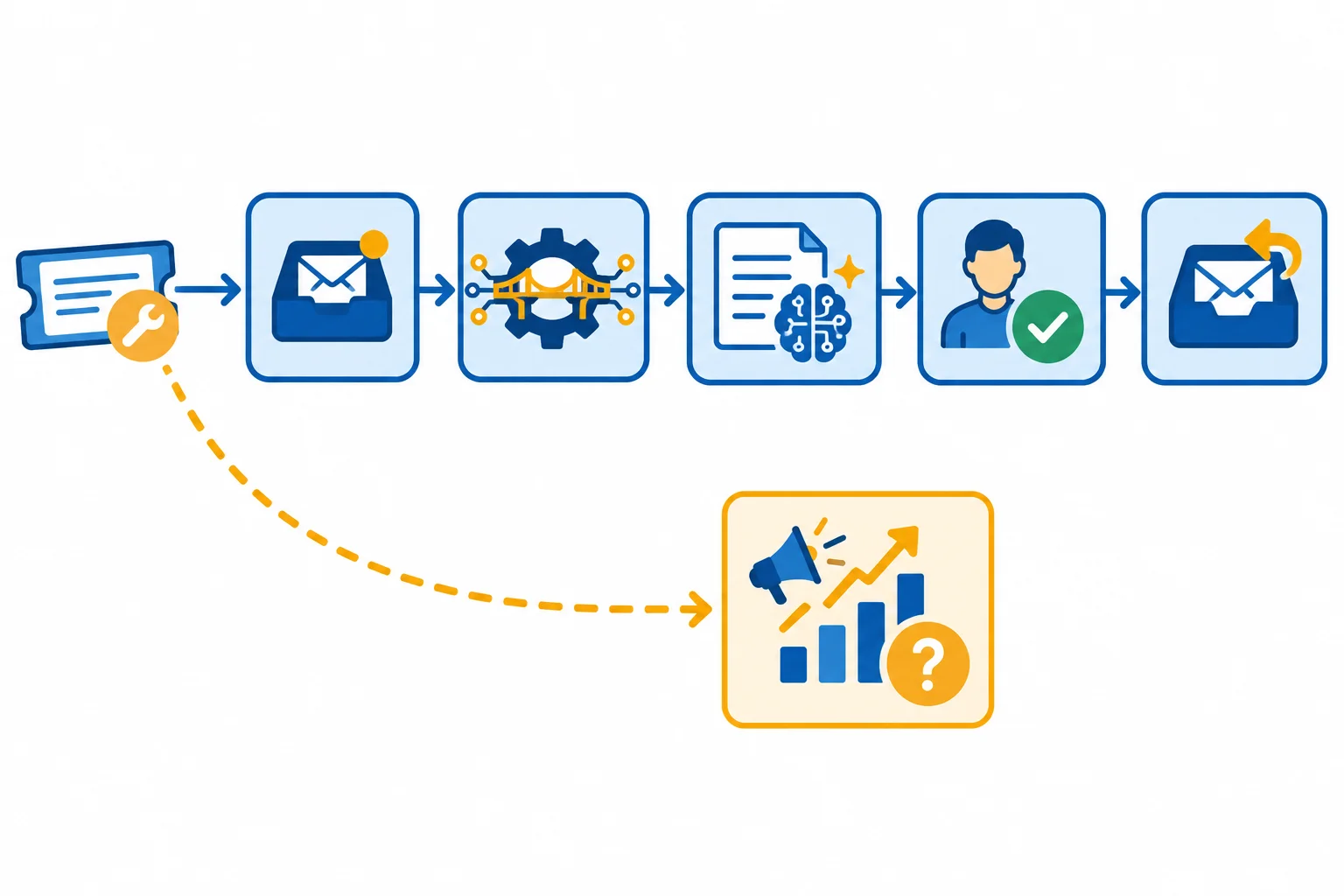
The solid path represents the repair-support workflow. A new reuse of personal data sits outside that purpose boundary and needs its own review.
A purpose-and-permission record links a proposed use to what actually supports it. Record the data source, the permitted use and restrictions, cited evidence, review date, and responsible contact.
Consent may be relevant evidence in some situations, but it is not automatically the applicable authorization. Even where consent exists, it does not replace required organizational approval or other obligations. This tutorial does not make a legal determination: use Not yet confirmed when the available evidence does not answer the question, and route it to the Privacy Contact.
Likewise, access to a Helpdesk ticket is not proof that an employee may transfer its personal data to DraftAI, FlowBridge, or another destination.
Example
This worked record is limited to the existing repair-support purpose. It records what the cited material supports and leaves unanswered authorization visible rather than turning it into an assumption.
Example record for the existing workflow
| Record element | Recorded detail |
|---|---|
| Purpose | Categorize a repair request and draft a reply for human approval before sending. |
| Affected people | Customer and any person described in the repair request. |
| Data source | Northstar Repairs Helpdesk repair request. |
| Permitted use | Repair support within Helpdesk → FlowBridge → DraftAI → Review Queue → Helpdesk. |
| Restriction | No unrelated reuse of personal data. |
| Consent or other applicable authorization | Not yet confirmed; review is needed if the available policy does not answer the question. |
| Evidence | Fictional case evidence: Internal Data Policy — Customer support processing. |
| Scope and date | Existing repair-support workflow; 2026-03-01. |
| Responsible contact | Workflow Owner; Privacy Contact for unclear authority. |
Which fact best supports sending personal data to DraftAI to draft a repair reply in the documented Northstar Repairs workflow?
On 2026-03-01, a Northstar Repairs staff member proposes exporting ticket_id, email, and issue_text from Helpdesk to create marketing audience themes. The available record cites Fictional case evidence: Internal Data Policy — Customer support processing. It describes repair support, but does not mention marketing or this proposed export.
Write a 4–6 line purpose-and-permission record. Include: purpose and affected people; data source; permitted use or restriction; evidence and date; consent or other applicable authorization; and the responsible contact with next action. State whether the available record authorizes the proposed export.
Write at least 180 characters (0/180).

Step 3 of 8
Choose which case fields belong at the DraftAI boundary, transform free text carefully, and recognize remaining identification risk.
Northstar Repairs uses Helpdesk → FlowBridge → DraftAI → Review Queue → Helpdesk to categorize repair requests and draft replies. A Reply Reviewer must approve a draft before Helpdesk sends it.
At the DraftAI boundary, test each field against one question: Does DraftAI need this field for the approved categorization and repair-reply task? A field may be useful elsewhere but unnecessary in the AI prompt. For example, FlowBridge can use ticket_id to return a draft to its source record without exposing that identifier to DraftAI.
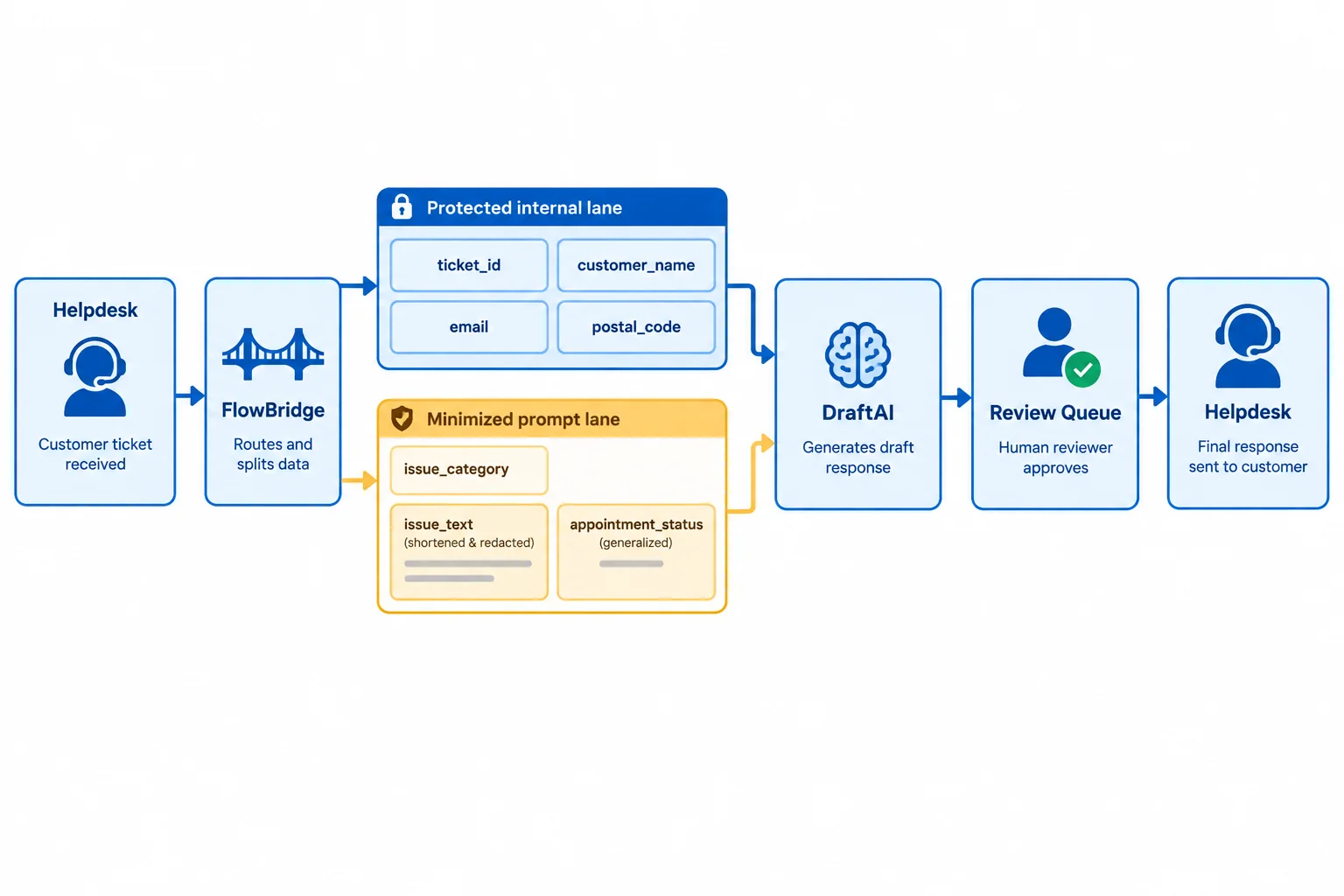
Fictional case evidence — The boundary separates information retained in approved Helpdesk or FlowBridge handling from the minimized prompt sent to DraftAI.
Use one of three choices for each field:
Removing customer_name alone does not make a prompt anonymous. A name-free issue_text can still contain a street address, a rare event, a location, an appointment detail, or a combination that links back to a customer. Minimization reduces exposure; it does not guarantee anonymity.
Fictional case evidence — boundary decisions for the approved categorization and repair-reply task. These are task-specific choices, not universal rules.
| Source field | Decision at the DraftAI boundary | Reason |
|---|---|---|
| ticket_id | Keep out | FlowBridge can link the draft to Helpdesk. |
| customer_name | Keep out | The reviewer can personalize after approval. |
| Keep out | Helpdesk uses it for delivery, not DraftAI. | |
| postal_code | Keep out | It is not needed for this draft task. |
| appointment_time | Transform | Use only an appointment-status statement. |
| issue_category | Send unchanged | It provides approved repair context. |
| issue_text | Transform | Keep the symptom; remove unnecessary identifiers. |
Example
Raw issue_text: “Please repair the heater at my exact address after the unusual inspection incident. My appointment is at a specific time.”
Minimized issue_text for DraftAI: “The heater does not start after an inspection. The customer requests repair.”
If the draft needs scheduling context, transform appointment_time into a limited statement such as “An appointment is already scheduled,” rather than sending the exact time. The symptom remains useful, while unnecessary identifying detail is removed.
Match each selected source field to its appropriate treatment at the DraftAI boundary.
Tap an item and then its matching pair.
For the Northstar Repairs case, write a two-part boundary decision.
ticket_id, customer_name, email, postal_code, appointment_time, issue_category, and issue_text — as send unchanged, transform before sending, or keep out of the DraftAI prompt.issue_text could still identify or be linked to a customer.Write at least 180 characters (0/180).

Step 4 of 8
Review access and retention coverage across source material, outputs, logs, and provider-held copies in the Northstar Repairs workflow.
An access review asks who can read, change, administer, or share personal data at every location in the data-lifecycle map. It also identifies the role responsible for checking that access.
For Northstar Repairs, do not inspect only the DraftAI prompt. Include Helpdesk source tickets, the FlowBridge connection and run logs, DraftAI drafts, the shared Review Queue, sent replies, and any backups or provider-held copies.
An existing permission is not automatically appropriate: compare it with the documented repair-reply purpose. The review records what must be checked; it does not grant new access.
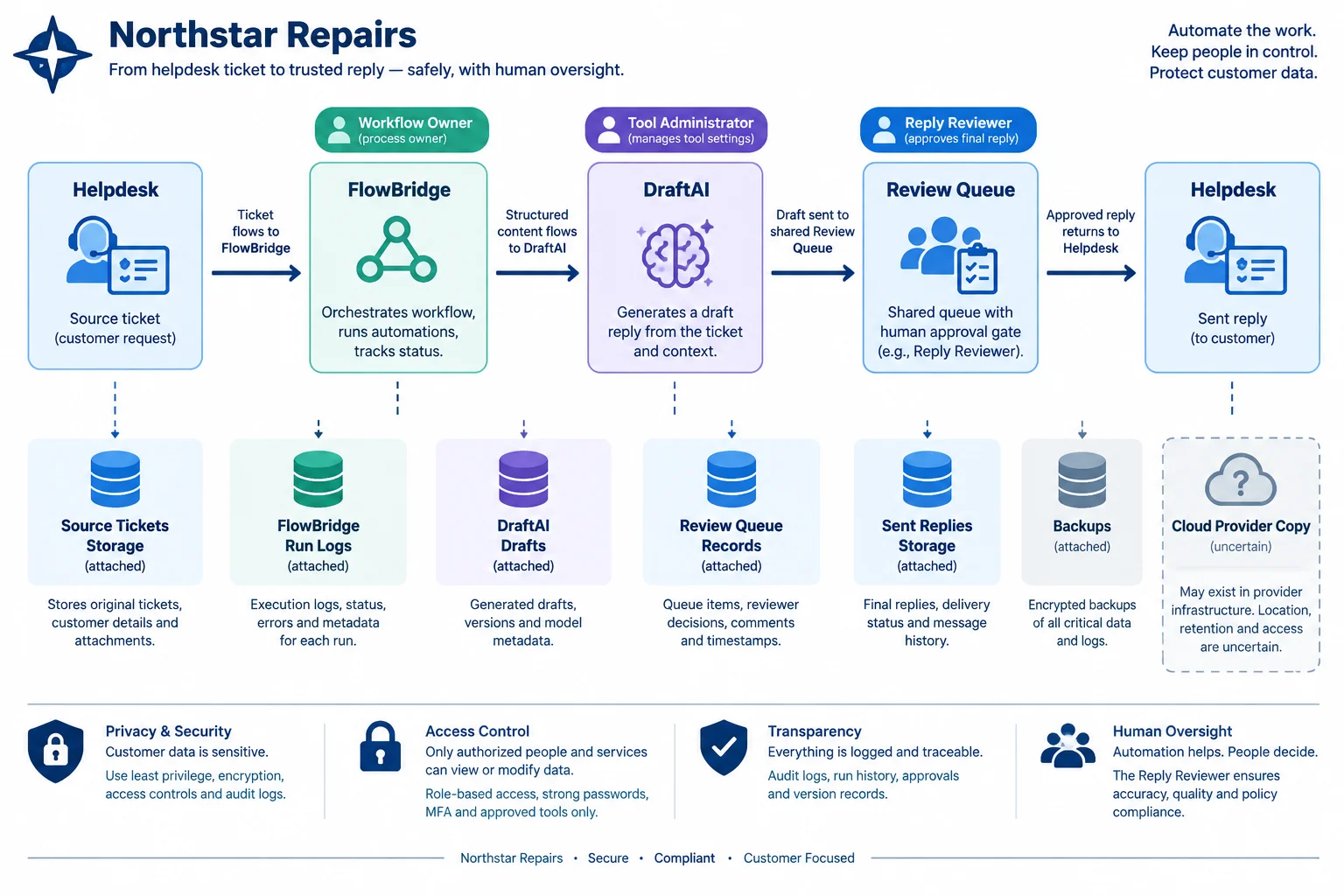
Review access at each data location, including shared queues, logs, service accounts, and copies whose details are not yet confirmed.
For each location, record the listed access activities and the role accountable for the review. These are review prompts, not claims that a role already has the permission.
| Data location | Access to review | Responsible role |
|---|---|---|
| Helpdesk source tickets | Read, change, share | Workflow Owner |
| FlowBridge connection and run logs | Service-account transfer, administer, share | Tool Administrator |
| DraftAI drafts | Read, administer, share | Reply Reviewer; Tool Administrator |
| Review Queue | Read, approve, change, share | Reply Reviewer |
| Backups and provider-held copies | Read, delete, or restrict access | Workflow Owner; Tool Administrator |
Tip
A service account can transfer personal data even when no individual opens the record. Include its permissions and destination in the access review. For a provider-held copy with unknown access or deletion behavior, write Not yet confirmed rather than assuming it is covered.
A retention record answers six practical questions: where the personal data is, why it is kept, how long it may remain, what event starts the period, which role handles deletion, and what evidence verifies the outcome.
Different locations can have different answers. Deleting a visible Helpdesk ticket or DraftAI conversation does not prove deletion of a generated draft, FlowBridge run log, backup, or provider-held copy.
The case limit for FlowBridge run logs is a case-specific decision, not a universal legal rule. Retention decisions remain subject to applicable obligations and responsible review.
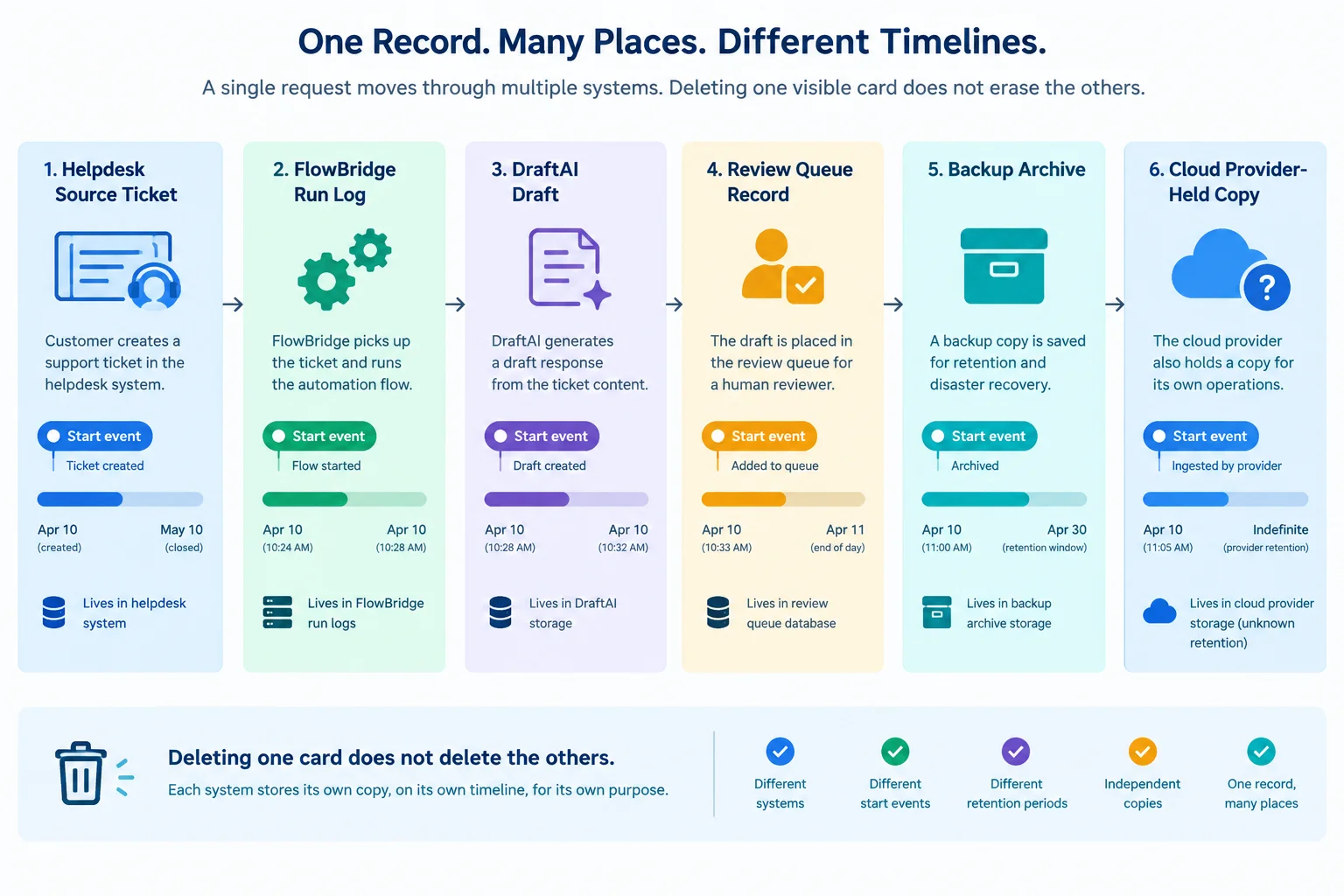
A deletion action at one location is evidence only for that location unless downstream copies are separately verified.
Example
Worked record format for the case:
| Field | Record |
|---|---|
| Location | FlowBridge run logs |
| Keep purpose | Troubleshoot failed runs |
| Retention period | At most 7 days |
| Starting event | Run completion |
| Deletion responsibility | Tool Administrator |
| Evidence and outcome | Fictional case evidence — Internal Data Policy, Run logs. Deletion verification: Not yet confirmed. |
The policy supports the maximum period. It does not by itself prove that deletion occurred. Record a deletion result or keep the verification fact as Not yet confirmed.
This partial Access and Retention Register was reviewed on 2026-03-01. It lists several locations, but a complete review must also capture how data moves through connected services.
| Location | Access recorded | Retention recorded |
|---|---|---|
| Helpdesk source tickets | Reply Reviewer can read approved tickets | Source-ticket period recorded |
| DraftAI drafts | Reply Reviewer can read before sending | Draft-retention period recorded |
| FlowBridge run logs | Tool Administrator can administer logs | At most 7 days recorded |
Which addition identifies the most important missing access coverage in this partial register?
Complete the missing parts of this Access and Retention Register update for FlowBridge run logs.
Known record: keep purpose is troubleshooting; retention period is at most 7 days; evidence is Fictional case evidence — Internal Data Policy, Run logs.
In your response, name the missing access coverage and supply a starting event, responsible role, and deletion-verification requirement. Do not treat a provider-held copy as deleted without separate evidence.
Write at least 120 characters (0/120).

Step 5 of 8
Review fictional provider terms and settings for the Northstar Repairs workflow, keeping documented protections, confirmed mismatches, and unanswered questions distinct.
Northstar Repairs uses connected services in this workflow: Helpdesk → FlowBridge → DraftAI → Review Queue → Helpdesk. Review DraftAI Team and FlowBridge Basic separately. For each source, record the applicable plan, workspace or account scope, section or setting name, and review date.
Check evidence about model training or improvement use, retention, deletion, human access, additional service providers, and processing locations.
A setting records a configuration state at a point in time. Terms describe stated commitments, limits, or exceptions. Do not stretch either source beyond what it says. A training setting set to off, for example, does not by itself prove zero retention, no human access, deletion from connected services, or a particular processing location.
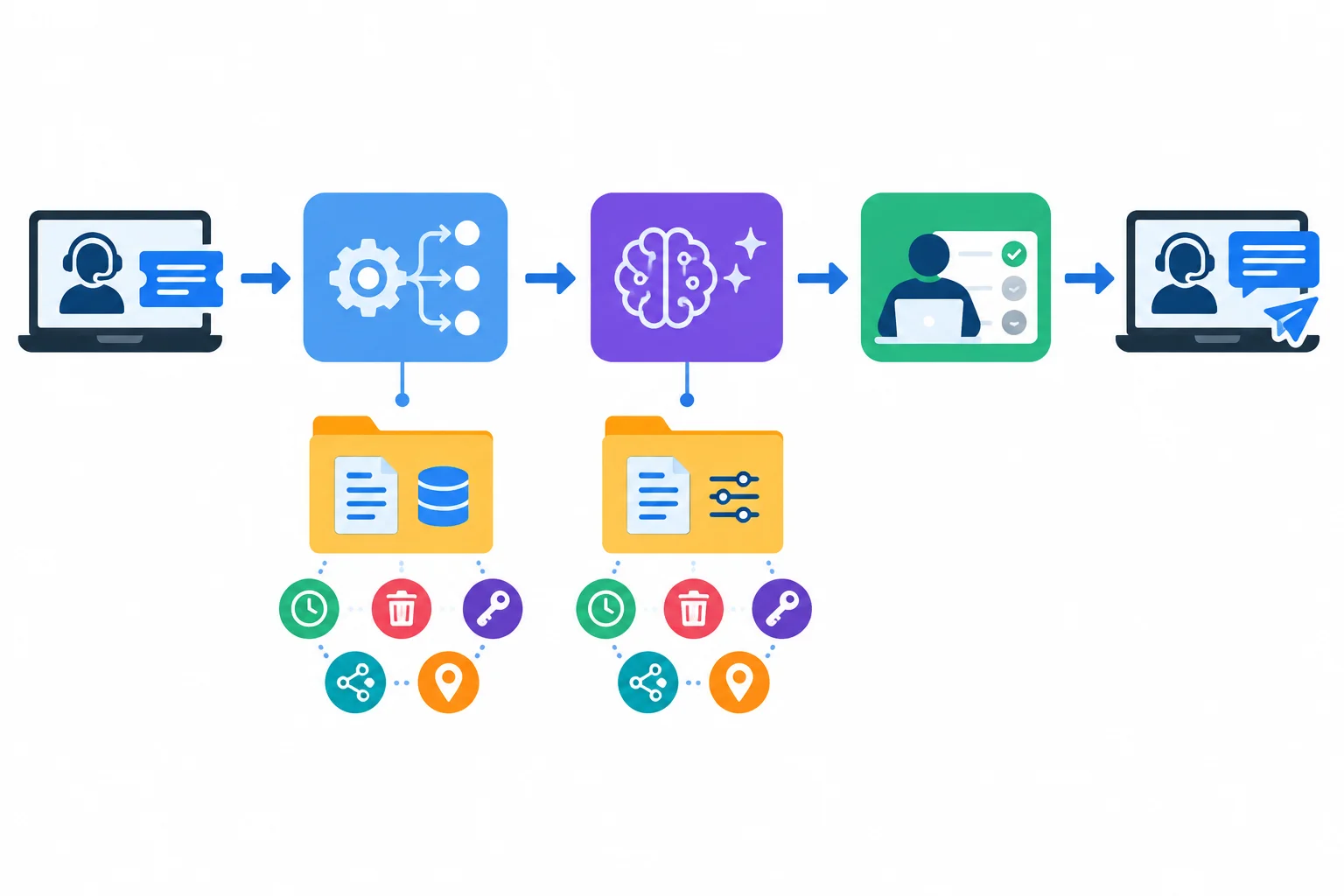
A protection documented for DraftAI Team does not automatically apply to FlowBridge Basic.
The excerpts below were reviewed on 2026-03-01. Read a document title and named section or setting together with its stated scope.
A stated protection can support a narrow finding. For example, a training-related setting supports a finding about that setting in its observed workspace. A term allowing limited support access is evidence about that stated access condition; it is not evidence that no one can access data.
When a source does not answer a relevant question, record Not yet confirmed. Do not substitute a marketing claim, a different provider's term, or an assumption for evidence.
Fictional case evidence reviewed on 2026-03-01.
| Source and section or setting | Scope | Fictional case evidence | Review reading |
|---|---|---|---|
| DraftAI Team Terms — Model improvement | DraftAI Team | Customer content is not used to train or improve models. | Supports a training-use claim only. |
| DraftAI Workspace Settings — Model improvement | DraftAI Team workspace | Model improvement: Off. | Documents an observed setting state. |
| DraftAI Team Terms — Human access | DraftAI Team | Authorized support personnel may access customer content to resolve a support request. | Confirms limited stated human access; do not claim no human access. |
| DraftAI Team Terms — Processing locations | DraftAI Team | Processing locations are not identified in the available excerpt. | Not yet confirmed. |
| Internal Data Policy — Run logs | Northstar Repairs workflow | FlowBridge run logs may remain for at most 7 days. | Internal retention requirement. |
| FlowBridge Basic Terms — Run log retention | FlowBridge Basic | Run logs are retained for 30 days. | Conflicts with the 7 days requirement. |
| FlowBridge Basic Terms — Deletion and access | FlowBridge Basic | Deletion of provider-held copies and provider human-access conditions are not identified. | Not yet confirmed. |
| FlowBridge Basic Terms — Additional service providers | FlowBridge Basic | Additional service providers are not identified in the available excerpt. | Not yet confirmed. |
Example
Fictional case evidence — worked review note
Requirement: FlowBridge run logs must remain no longer than 7 days.
Evidence: Internal Data Policy — Run logs; FlowBridge Basic Terms — Run log retention.
Scope and date: Northstar Repairs workflow and FlowBridge Basic; 2026-03-01.
The stated 30-day provider retention conflicts with the internal maximum. This is a confirmed mismatch, not an assumption.
Keep separate questions separate: the available FlowBridge Basic Terms do not identify deletion of provider-held copies, provider human-access conditions, or additional service providers. Those facts are Not yet confirmed. Likewise, a DraftAI Team finding does not fill these FlowBridge Basic gaps.
Use these short excerpts of Fictional case evidence, reviewed 2026-03-01:
DraftAI Workspace Settings — Model improvement, DraftAI Team workspace: “Model improvement: Off.”DraftAI Team Terms — Human access: “Authorized support personnel may access customer content to resolve a support request.”DraftAI Team Terms — Processing locations: the available excerpt does not identify locations.Internal Data Policy — Run logs: at most 7 days. FlowBridge Basic Terms — Run log retention: 30 days.FlowBridge Basic Terms — Deletion and access: the available excerpt does not identify deletion of provider-held copies or provider human-access conditions.FlowBridge Basic Terms — Additional service providers: the available excerpt does not identify them.Which review summary is accurate?

Step 6 of 8
Turn provider, policy, and configuration findings into scoped, evidence-backed checklist entries with justified statuses and accountable follow-up.
A checklist entry is a small, auditable claim. Start with a requirement that can be tested, not a vague aim such as “make AI safe.”
Then show exactly what supports the claim: cite a document title plus a section or setting name. Record the plan, service, location, or workflow segment covered and the review date. Evidence supports only that stated scope; a current setting in one workspace does not prove a protection in another connected service.
Finish every entry with a permitted status, one accountable role, and a concrete follow-up. The owner is accountable for moving the item forward, even if another role performs part of the work.

Use the same six labels in every checklist entry so that a reviewer can trace a claim, its evidence, its scope, and its follow-up.
Choose a status from the evidence—not from optimism. A dated configuration observation can support a requirement only for the observed account and setting. A conflicting provider term is evidence of a known problem, not an uncertainty.
For an unknown, write Not yet confirmed in the evidence record and keep it visible. Give the accountable role a next action with a date. A mandatory requirement that is Not met or Unresolved prevents a positive readiness decision until responsible review resolves it; it must not be silently checked off.
Use only these four statuses in the checklist.
| Status | Use when | What the entry needs |
|---|---|---|
| Supported | Current, relevant evidence directly supports the requirement | Precise evidence reference and scope |
| Unresolved | The relevant answer is missing or not yet confirmed | Owner, question, and follow-up date |
| Not met | Evidence shows the requirement is not satisfied | Owner and corrective action with due date |
| Not applicable | The requirement truly does not apply | A documented reason for exclusion |
Example
Fictional case evidence — worked pattern
Requirement: Only fields needed to draft a repair reply are sent to DraftAI.
Evidence: Internal Data Policy — Data minimization section; documented field-mapping check.
Scope and date: Helpdesk → FlowBridge → DraftAI draft input, reviewed 2026-03-01.
Status: Supported.
Owner: Workflow Owner.
Next action and due date: Recheck the mapping before any workflow-field change; 2026-03-08.
This does not claim that every provider copy is covered. Its evidence is limited to the stated prompt-input mapping.
Tip
A useful next action changes the evidence position: request a written answer, change a configuration, replace a conflicting arrangement, or route a decision to the accountable role. “Monitor this” without a specific check and date is not enough.
Create three compact checklist entries, one for each finding below. For every entry, use these exact labels: Requirement, Evidence, Scope and date, Status, Owner, and Next action and due date.
Fictional case evidence, reviewed 2026-03-01
DraftAI Workspace Settings — Model improvement: Off for the DraftAI Team workspace.Internal Data Policy — FlowBridge run logs may remain for at most 7 days. FlowBridge Basic Terms — run-log retention is 30 days.FlowBridge Basic Terms do not answer whether deletion includes provider-held copies. Record this fact as Not yet confirmed.Assign one permitted status and one accountable role to each entry. Give each a concrete next action and a due date after the review date. Do not extend a setting or term beyond its stated scope.
Write at least 400 characters (0/400).

Step 7 of 8
Respond proportionately to an unintended disclosure while keeping facts, uncertainty, and responsibilities clear.
On 2026-03-01, an unreviewed draft containing customer details was sent by the connector to an unintended shared inbox. The normal workflow is Helpdesk → FlowBridge → DraftAI → Review Queue → Helpdesk, and a Reply Reviewer must approve a reply before it is sent.
Treat this as an incident signal. Do not assume who opened the inbox, which records persist, or whether any external notification is required. Those are Not yet confirmed until responsible contacts assess them.
The immediate objective is to limit further exposure, preserve a small secure record, and escalate promptly—not to complete an investigation alone.
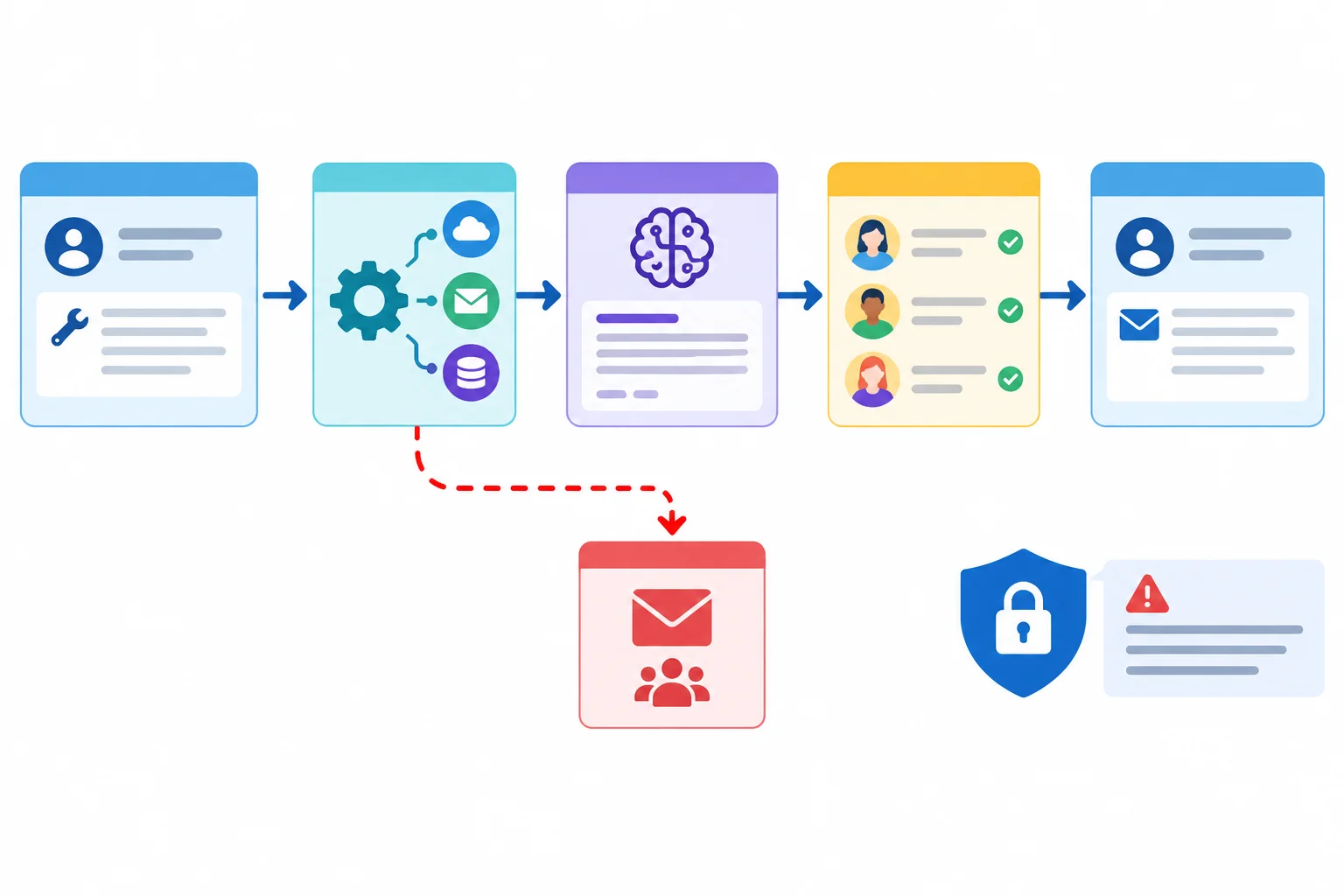
The incident route bypasses the required human review. The first concern is stopping additional sends while preserving only the records needed to assess this event.
1. Contain. Pause affected runs if that is within your authority. Where an access restriction or revocation is needed, request it through the authorized route; do not make unauthorized changes.
2. Preserve a limited record securely. Keep relevant times, run references, intended and actual destinations, known data categories, and actions taken. Do not paste the draft or raw issue_text into broad messages, and do not delete relevant logs merely to make the problem disappear.
3. Escalate promptly. Notify the Security Contact and Privacy Contact using the established route. Do not wait for every unknown to be resolved before notifying them.
Example
Example: structure of an initial Incident Note
Observed fact: An unreviewed draft containing customer details was sent by the connector to an unintended shared inbox.
Known actions: Record only actions already taken, such as a pause of affected runs or a request for authorized access restriction.
Records preserved securely: Relevant time, run reference, destinations, and confirmed data categories. Avoid copying the raw draft.
Not yet confirmed: Exact run reference; whether the inbox was accessed; whether further copies persist; which people may be affected.
Escalation: State that the Security Contact and Privacy Contact were notified through the established route.
An initial note records facts and uncertainty. It does not declare the incident resolved or invent a reporting deadline.
Match each incident action to its primary purpose.
Tap an item and then its matching pair.
Write an initial Incident Note in 3–5 sentences for this simulated event: an unreviewed draft containing customer details was sent by the connector to an unintended shared inbox.
Separate observed facts from Not yet confirmed information. Include one containment action that respects authority, the limited records to preserve without copying raw customer content, and prompt notification to the responsible contacts. Do not declare the incident resolved.
Write at least 280 characters (0/280).

Step 8 of 8
Consolidate the Northstar Repairs case findings into a dated, evidence-backed checklist and justify its readiness and incident-escalation decision.
Before making a final decision, run a coverage check, not just an AI-prompt check. Your dated checklist must represent the full data-lifecycle map:
A Reply Reviewer approval gate matters, but it does not remove the need to account for each place where personal data travels, persists, or remains Not yet confirmed.
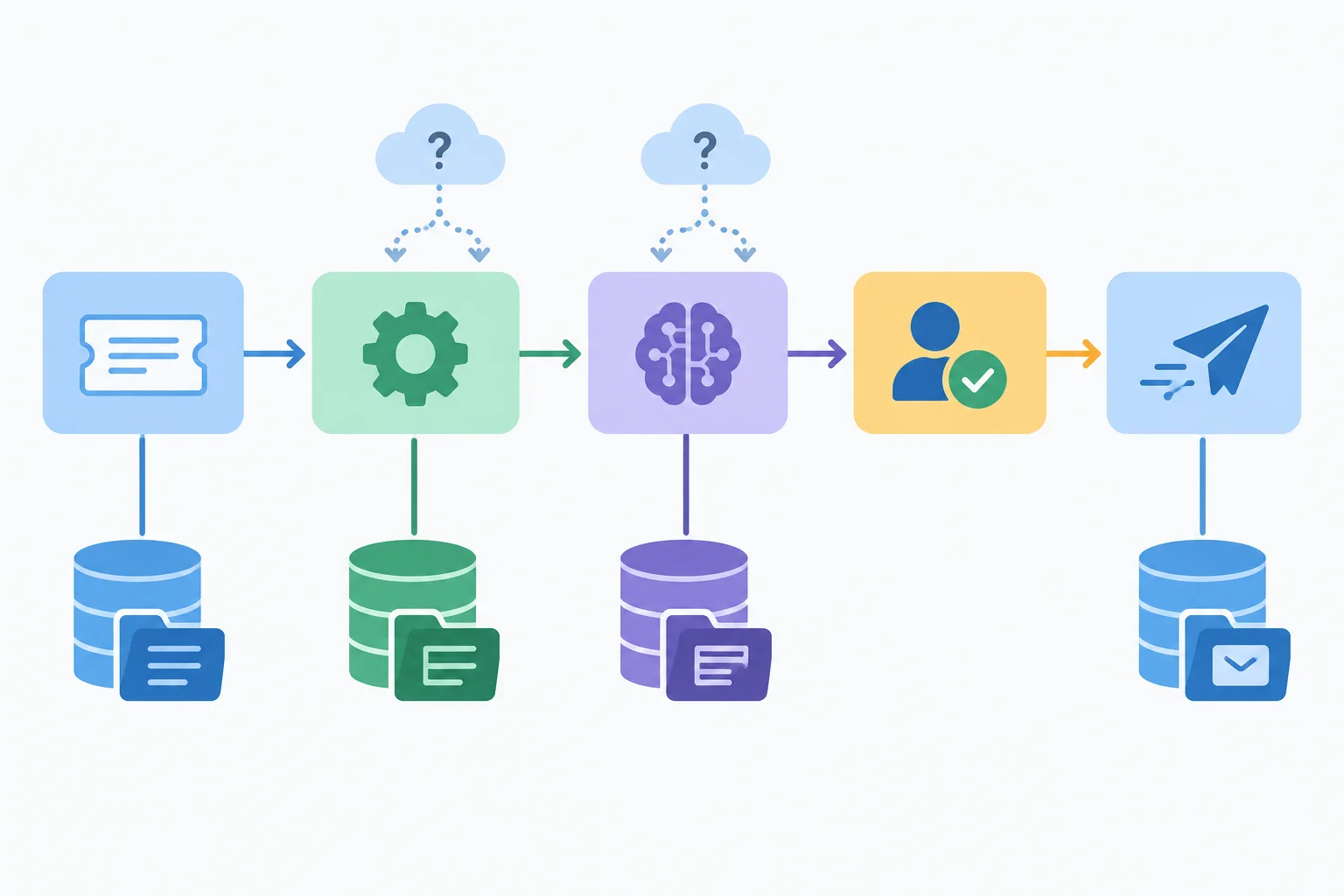
A data-lifecycle map covers the visible route and every separate location where personal data may persist or remain Not yet confirmed.
A final decision follows the evidence and any outstanding mandatory requirement—not the number of positive entries.
Use Hold when a mandatory requirement is Not met or Unresolved. Use Ready for owner review only when no mandatory requirement remains blocking. Neither label certifies security, deletion, safety, or legal compliance.
Read each source narrowly. Evidence for DraftAI Team does not answer a FlowBridge Basic question. Likewise, a repair-support purpose statement does not automatically establish the applicable authorization for a transfer. Preserve Not yet confirmed where the available case evidence does not answer a question.
Fictional case evidence reviewed on 2026-03-01. Each row supplies the first three fields of a compact checklist entry. Keep the stated finding visible when you complete the remaining fields.
| Entry | Requirement | Evidence | Scope and date | Finding to preserve |
|---|---|---|---|---|
| 1 | The data-lifecycle map, purpose record, and Access and Retention Register cover the repair-support workflow and identify applicable authorization evidence. | Access and Retention Register — data-lifecycle map and access-review coverage; Internal Data Policy — Customer support processing. | Helpdesk, FlowBridge, DraftAI, Review Queue, returned replies, logs, and provider-held copies; 2026-03-01. | Known locations are represented. Consent or other applicable authorization for transfer is Not yet confirmed; provider-held-copy details remain Not yet confirmed. |
| 2 | Only necessary approved information is sent to DraftAI, and access responsibilities are recorded for workflow locations. | Internal Data Policy — Data minimization section; documented field-mapping check; Access and Retention Register — access-review coverage. | Helpdesk → FlowBridge → DraftAI input and Review Queue; 2026-03-01. | The mapping keeps routing and direct-contact fields out, transforms appointment context and issue_text, and retains issue_category. Access or deletion behavior for provider-held copies is Not yet confirmed. |
| 3 | FlowBridge run logs remain for no longer than the internal maximum. | Internal Data Policy — Run logs; FlowBridge Basic Terms — Run log retention. | FlowBridge Basic run logs; 2026-03-01. | The policy allows at most 7 days; FlowBridge Basic states 30 days. This is a confirmed mismatch. |
| 4 | DraftAI Team arrangements are documented for model improvement, retention, deletion, human access, additional service providers, and processing locations. | DraftAI Team Terms — Model improvement; DraftAI Workspace Settings — Model improvement; DraftAI Team Terms — Human access; available DraftAI Team case excerpts. | DraftAI Team plan and observed workspace; 2026-03-01. | Model improvement is Off in the observed workspace, and terms allow authorized support access for a support request. Retention, deletion of provider-held copies, additional service providers, and processing locations are Not yet confirmed. |
| 5 | FlowBridge Basic arrangements are documented for model improvement, retention, deletion, human access, additional service providers, and processing locations. | FlowBridge Basic Terms — Run log retention; FlowBridge Basic Terms — Deletion and access; FlowBridge Basic Terms — Additional service providers; available FlowBridge Basic case excerpts. | FlowBridge Basic; 2026-03-01. | Retention is stated as 30 days. Model-improvement use, deletion of provider-held copies, human-access conditions, additional service providers, and processing locations are Not yet confirmed. |
| 6 | The simulated disclosure has a documented containment and escalation response. | Incident Note — Initial facts. | Unreviewed draft containing customer details sent to an unintended shared inbox; 2026-03-01. | Whether affected runs were paused, access was restricted, the inbox was accessed, or further copies persist is Not yet confirmed. |
Complete the remaining fields for the six numbered partial entries on the previous screen. For each number, write only:
Status: one permitted statusOwner: one accountable roleNext action and due date: a concrete action and a date after 2026-03-01
Then add:
Decision: one final decision label
Incident: one concise immediate response to the unreviewed draft sent to an unintended shared inbox. Use the incident-response elements taught in the previous step.
Keep the 30-day versus 7-day retention conflict and every Not yet confirmed provider question visible. Base the decision on mandatory findings, not on the number of supported details.
Write at least 700 characters (0/700).
Summary
Congratulations! You completed: Creating an AI Privacy and Security Checklist
Thousands of online courses in video, ebooks and audiobooks.
To test your knowledge during online courses
Generated directly from your cell phone's photo gallery and sent to your email

Download our app via QR Code or the links below:.



Carry knowledge in your pocket.
Download the Cursa app.
There are hundreds of free courses available, with a free certificate of completion that is saved in your mobile image gallery.
Download the app to access the Course Completion Certificate for Free.


+ 10 million
students

Free and Valid
Certificate

60 thousand free
exercises

4.8/5 rating in
app stores

Free courses in
video and ebooks