Step 1 of 9
Recognize Bounded Choice
Distinguish predefined workflow routing from an agent selecting its next permitted action based on the goal and observed results.

Learning path · Level 7 · Tutorial 4
Configure or simulate an agent that consults approved reference material and prepares a draft. Give it a narrow goal, a small set of permitted operations, limited task state, and explicit stopping and escalation rules rather than unrestricted autonomy.
 Recognize Bounded Choice
Distinguish predefined workflow routing from an agent selecting its next permitted action based on the goal and observed results. 1 min
 Define the Goal and the Finish
Express a bounded Cedar Rooms assignment and observable completion conditions for a supported review draft. 2 min
 Specify Two Permitted Tools
Define the two permitted Cedar Rooms operations with explicit inputs, expected results, and permission boundaries. 3 min
 Separate Requests from Results
Learn to separate an agent’s proposed tool request from an actual observed result or a human-supplied simulated result. 2 min
 Limit What the Agent Can Remember
Define a small task-scoped state record, separate proposals from external facts, and reset the record safely for the next task. 2 min
 Set Stops and Escalation Rules
Define distinct active, paused, stopped, completed, and escalated states for a bounded Cedar Rooms agent, including precedence when limits overlap. 3 min
 Preserve Approval Across Agent Choices
Keep the save approval gate intact across all choices a bounded agent can make. 2 min
 Assemble the Configuration Brief
Assemble a self-contained Cedar Rooms configuration brief and choose an execution mode that does not overstate what actually occurs. 3 min
 Trace and Review a Bounded Run
Trace one Cedar Rooms bounded run from approved evidence through an approval-gated simulated save, then distinguish its observable final outcome from an external action. 3 min
Step 1 of 9
Distinguish predefined workflow routing from an agent selecting its next permitted action based on the goal and observed results.
In the earlier conditional workflow, routes and actions were designed in advance. A workflow can branch on any defined field—including an AI classification or another meaning-derived result—but every available route is still prewired.
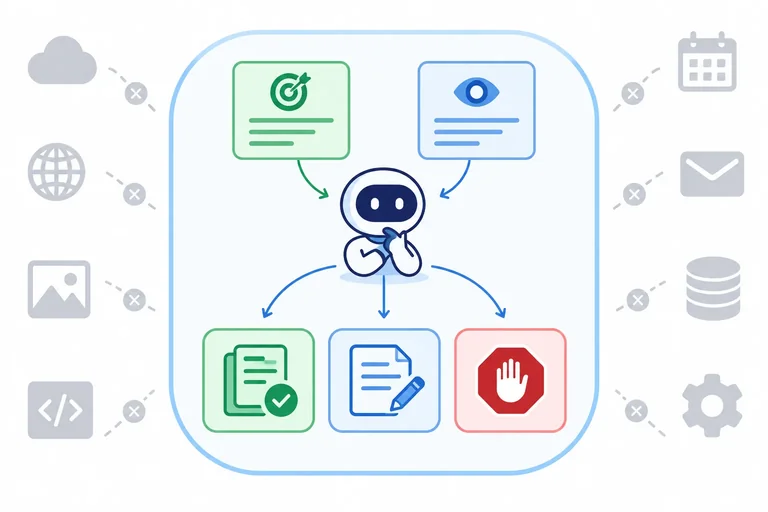
A bounded agent has a narrow goal and an allowlisted set of actions. At runtime, it selects its next permitted action using the goal and its observed results. It may adapt its choice, but it cannot create a route, tool, or authority outside that boundary.
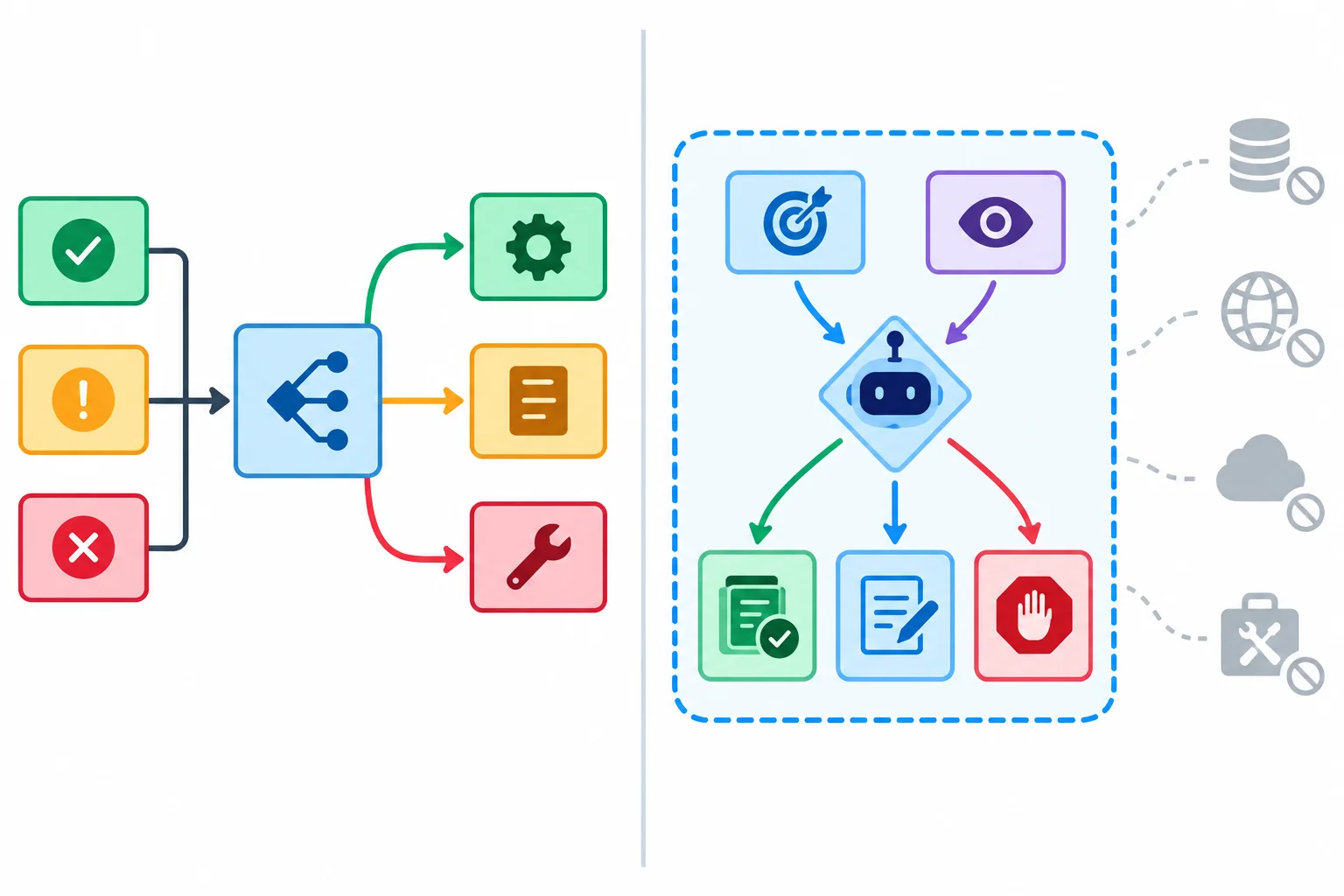
A workflow’s possible routes are predefined. A bounded agent chooses its next action at runtime, but only from permitted options.
A bounded agent uses a short goal–action–observation loop:
The loop provides limited adaptation, not unrestricted autonomy. The agent can respond to missing or sufficient evidence, but its goal remains the Cedar Rooms reply draft. It cannot expand the assignment to confirm availability, book a room, send a message, or use a new tool.
Example
The task request is: “Can six colleagues use a meeting room, and what details must we provide?”
Suppose the agent has this observed result: [Rooms: Capacity] — “A room accommodates up to 8 attendees.” That supports the capacity part of the reply, but not the request details.
The agent can select another approved reference to seek the missing evidence. If the approved references cannot support a needed part, it can stop rather than invent an answer. Once the evidence supports both parts, it can prepare one short reply draft. Its next action depends on what it has observed, not on a mandatory fixed sequence.
Tip
Selecting an action does not change the boundary. Reading another approved reference is adaptation; adding a booking-confirmation operation or broadening the goal is not.
After reading capacity evidence, the agent still lacks the request details needed for the Cedar Rooms reply. In 1–3 sentences, identify a permitted next action that demonstrates agent choice. Then explain why selecting that action does not authorize new tools or a broader goal.
Write at least 80 characters (0/80).

Step 2 of 9
Express a bounded Cedar Rooms assignment and observable completion conditions for a supported review draft.
A narrow goal makes the agent useful without giving it authority to do everything. Define four boundaries:
For Cedar Rooms, the draft must answer whether six colleagues fit and what request details are needed. It may state only what the approved references support.
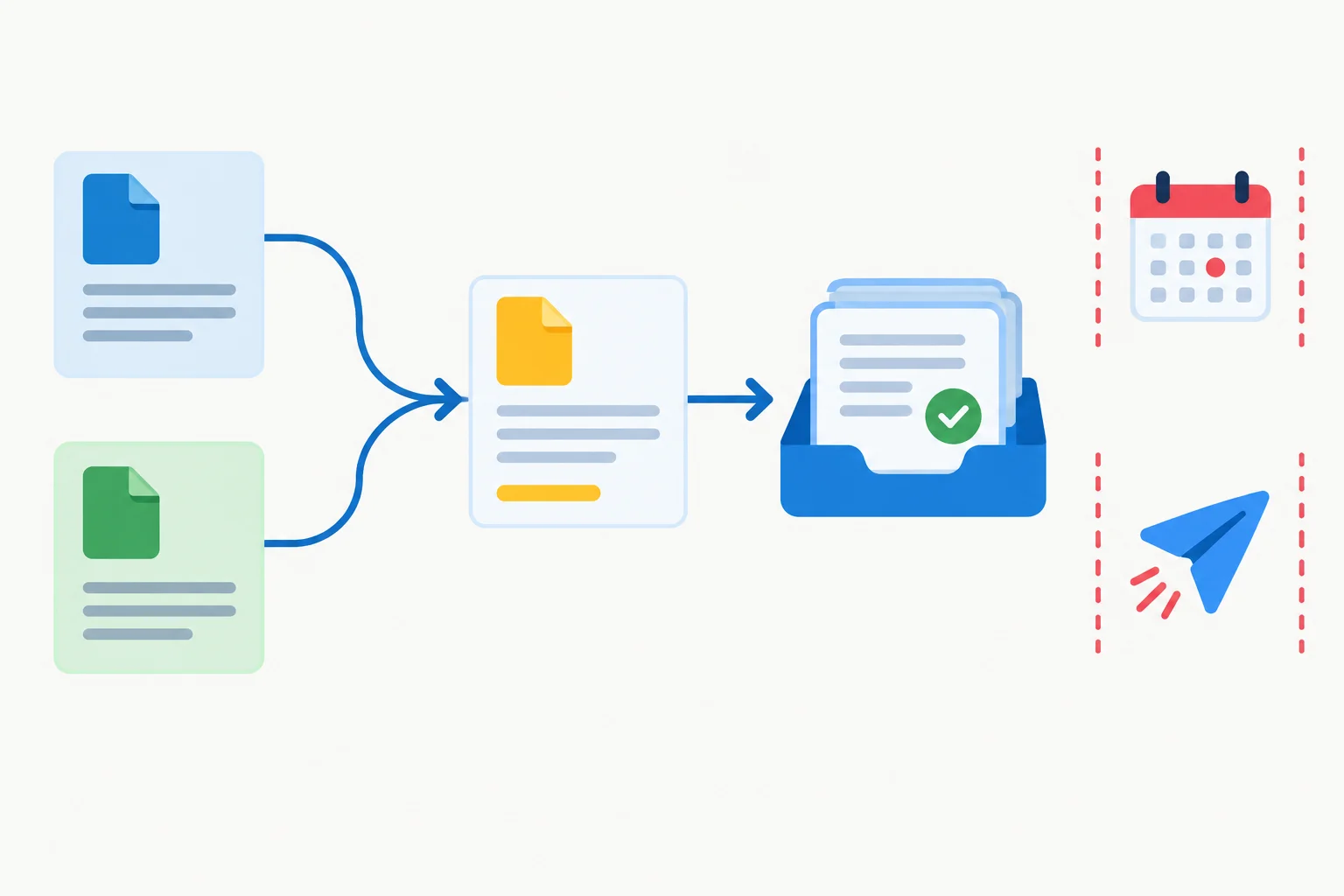
The output is a supported draft for review—not a confirmed booking or a sent reply.
Completion must be observable. A draft is ready only when it answers both parts of the request, cites the approved references, stays within the word limit, and does not claim availability is confirmed.
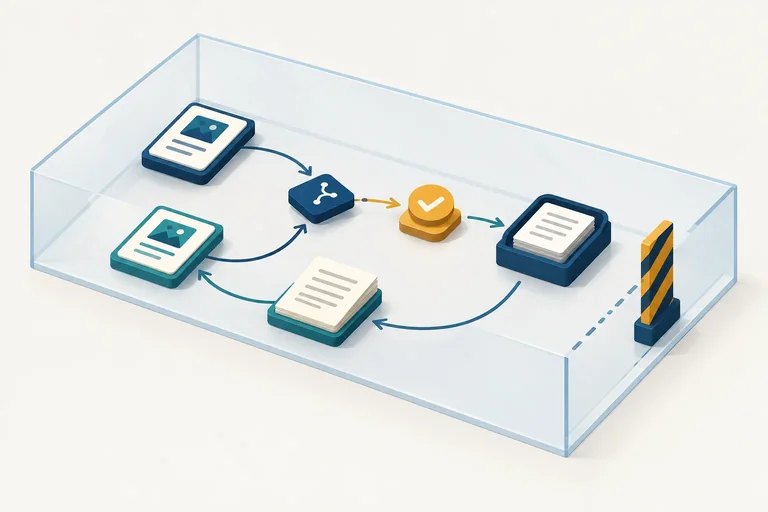
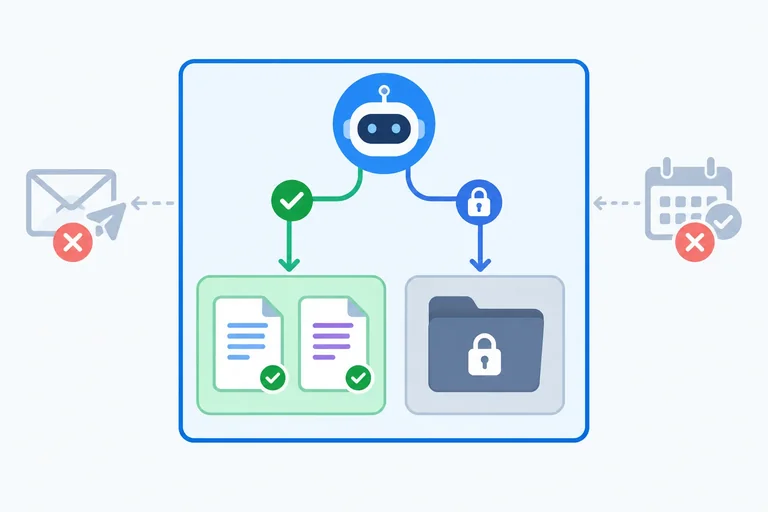
Preparing those words is not the whole handoff. The finished draft must be staged in Review Drafts after approval by a human reviewer. A successful connected save is evidence of staging; in a manual route, record an explicitly labeled simulated save. Neither one turns the draft into a booking or a sent message.
Example
Goal
Prepare one reply draft of no more than 100 words for: “Can six colleagues use a meeting room, and what details must we provide?” Use only [Rooms: Capacity] and [Rooms: Requests]. Do not confirm availability, book a room, or send a message.
Approved references
[Rooms: Capacity]: A room accommodates up to 8 attendees.
[Rooms: Requests]: Requests require a date and headcount; only the booking team confirms availability.
Completion
The draft answers both questions, cites both approved references, and makes no availability claim. It is staged in Review Drafts only after a human reviewer approves the save and an observed save or explicitly labeled simulated save is recorded.
Approval
A human reviewer decides whether the specified draft may be staged for review.
Draft example
Six colleagues can use a Cedar Rooms meeting room because a room accommodates up to 8 attendees [Rooms: Capacity]. Please provide the date and headcount for the request [Rooms: Requests]. The booking team confirms availability [Rooms: Requests].
Write two plain-text labeled sections for the Cedar Rooms request:
Goal — state the supported review-draft assignment, including its key exclusion.
Completion — state what must be true of the draft and what observable staging event is required. Make clear that this is not a confirmed booking or a sent reply.
Write at least 180 characters (0/180).
Step 3 of 9
Define the two permitted Cedar Rooms operations with explicit inputs, expected results, and permission boundaries.
A bounded agent does not receive a vague permission such as “handle room requests.” It receives a small tool specification for each external operation:
For Cedar Rooms, the agent may compose a reply draft itself. Composition is not a third external tool. Reading a reference and saving a draft are the only permitted operations.
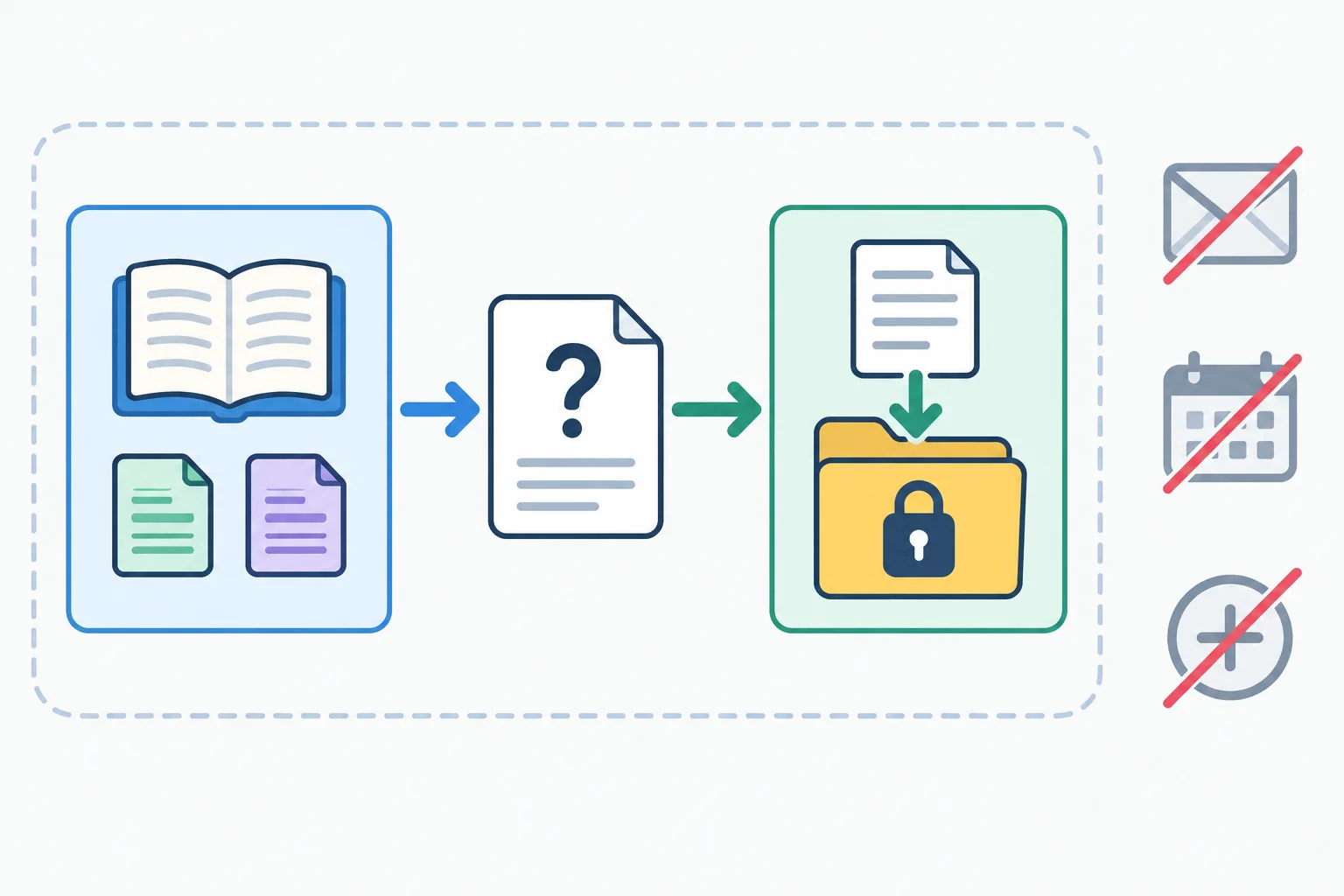
The boundary allows two external operations only. Draft composition stays inside the agent’s permitted work.
Approved references
Permitted tools
Read reference
Purpose: retrieve evidence for the Cedar Rooms question.
Required inputs: one approved reference name and the task question.
Expected result: a labeled passage, no matching evidence, or an error.
Permission condition: it may read only [Rooms: Capacity] or [Rooms: Requests].
Save review draft
Purpose: stage the finished reply for review.
Required inputs: the exact draft text, its source references, and the fixed destination Review Drafts.
Expected result: a save outcome and the destination.
Permission condition: a human reviewer must approve the save. The destination cannot change.
Use the specification as a checklist: inputs describe what the agent submits; the expected result describes what it may rely on afterward; permission conditions prevent scope from expanding.
| Tool | Required inputs | Expected result | Permission condition |
|---|---|---|---|
| Read reference | Approved name; task question | Labeled passage, no matching evidence, or error | Only the two approved references |
| Save review draft | Exact draft; source references; Review Drafts | Save outcome and destination | Human reviewer approval; fixed destination |
The agent may draft a reply using evidence it has read. It may not send that reply, confirm a booking, or add a new tool. Those are outside the Cedar Rooms tool set.
A manual route needs no connector or paid feature. Put the complete approved passages in your own notes, then have a supervising human provide explicit simulated outcomes. A simulated outcome demonstrates the decision process; it is not an external execution.
Example
Execution mode: MANUAL SIMULATION
Task question: Can six colleagues use a meeting room, and what details must we provide?
Approved inline reference:
[Rooms: Capacity] A room accommodates up to 8 attendees.
PROPOSED ACTION
Read reference
Reference name: [Rooms: Capacity]
Task question: Can six colleagues use a meeting room, and what details must we provide?
SIMULATED RESULT
[Rooms: Capacity] “A room accommodates up to 8 attendees.”
The simulated result is supplied by the supervisor. It is evidence for drafting, not proof that a connected service ran.
Tip
For a manual save, the supervisor must first approve the exact draft, its cited references, and Review Drafts. Only then may the supervisor provide a labeled SIMULATED RESULT such as a simulated save outcome. Do not describe this as a sent message or a confirmed booking.
Match every operation to its complete contract or boundary.
Tap an item and then its matching pair.

Step 4 of 9
Learn to separate an agent’s proposed tool request from an actual observed result or a human-supplied simulated result.
A bounded agent follows a short action–observation loop:
A tool request is only a proposal. In CONNECTED mode, an execution attempt becomes a completed operation only when it returns the expected OBSERVED RESULT. In MANUAL SIMULATION, the human reviewer must supply a SIMULATED RESULT; the agent must never invent one.
Different results can support another approved lookup, drafting from sufficient evidence, or stopping. This is bounded choice—not a fixed workflow that always follows the same route.
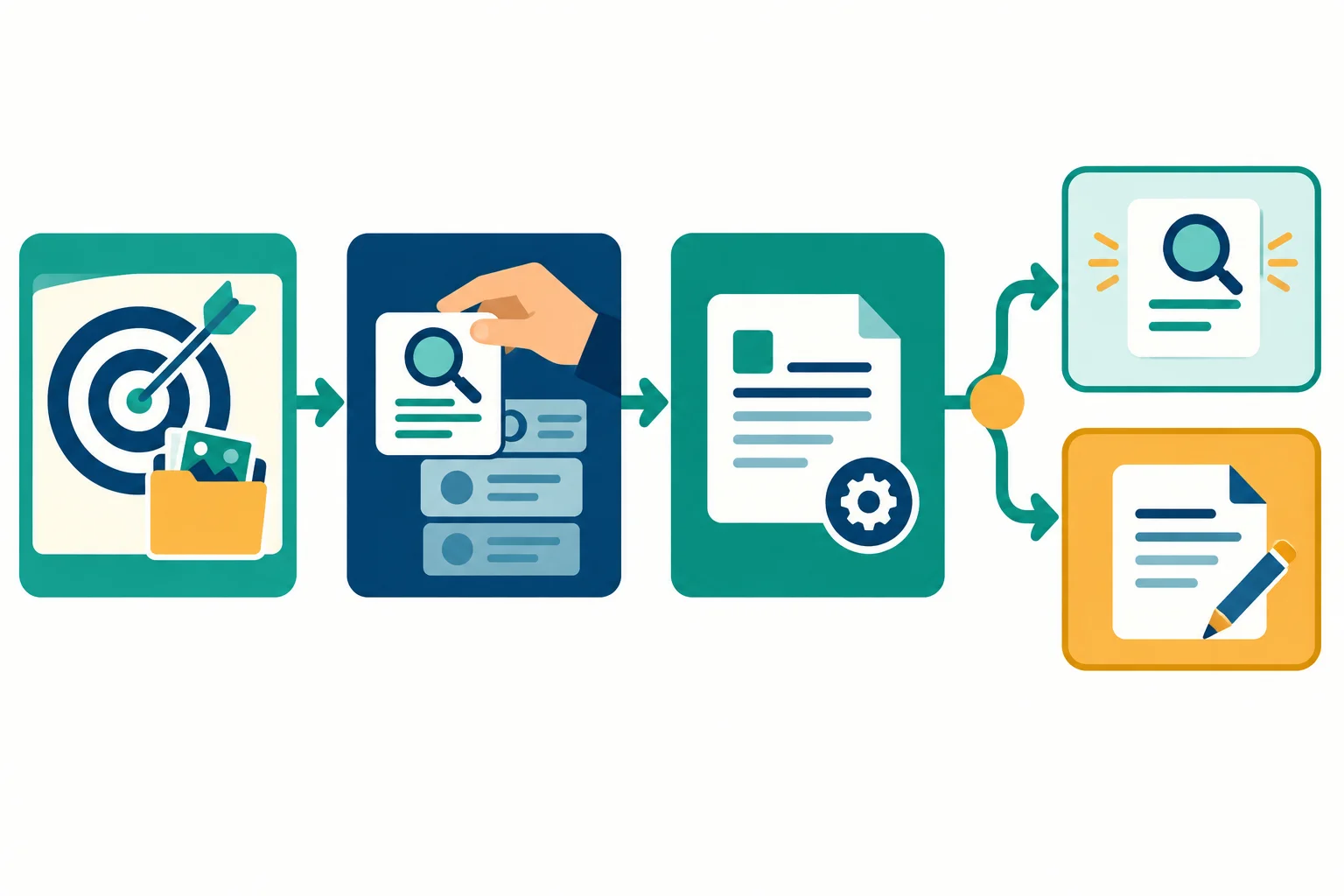
The agent may select the next permitted action, but it must base the next choice on a result that was actually observed or explicitly simulated.
Example
Execution mode: MANUAL SIMULATION
Goal check
The task asks: “Can six colleagues use a meeting room, and what details must we provide?” Current evidence is empty.
PROPOSED ACTION
Tool request: Read reference
Reference: [Rooms: Capacity]
Question: Can six colleagues use a meeting room?
No external read has happened yet. The request only identifies the permitted operation and its input.
SIMULATED RESULT
The human reviewer supplies:
[Rooms: Capacity] — observed passage: “A room accommodates up to 8 attendees.”
The result has the expected form: a labeled passage from an approved reference. The agent may now use this evidence, but it still needs the request-details evidence.
Action summary: Read [Rooms: Capacity]; relevant evidence shows capacity up to 8; next permitted choice may be another approved lookup.
Match each trace card to its correct label.
Tap an item and then its matching pair.
Put this short MANUAL SIMULATION lookup loop in the only valid order.

Step 5 of 9
Define a small task-scoped state record, separate proposals from external facts, and reset the record safely for the next task.
A bounded agent uses task state: a small, explicit working record for one request. It is not unrestricted memory and it is not a place where new instructions gain authority.
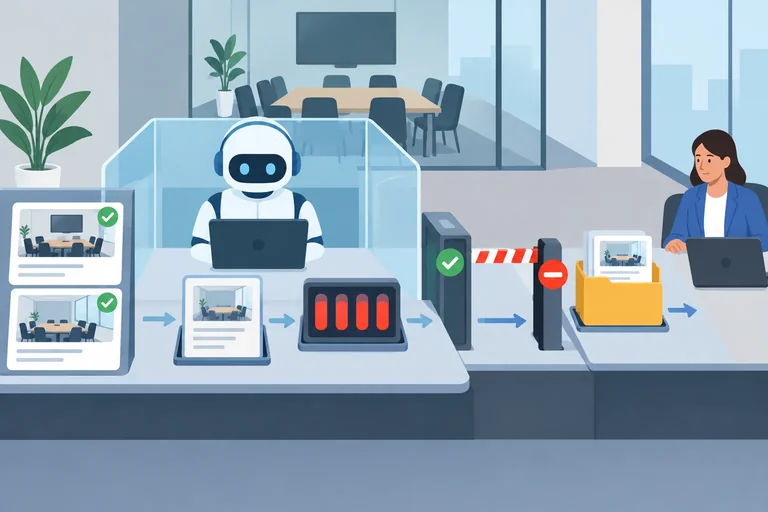
For Cedar Rooms, the agent reads the current task_request and approved evidence, then may propose a draft_text or pending_action. The host or supervising learner—not the agent—records tool outcomes, maintains counters, and commits status changes from observed events.
This separation matters: a proposed tool request is still only a proposal until an outside result confirms what happened.
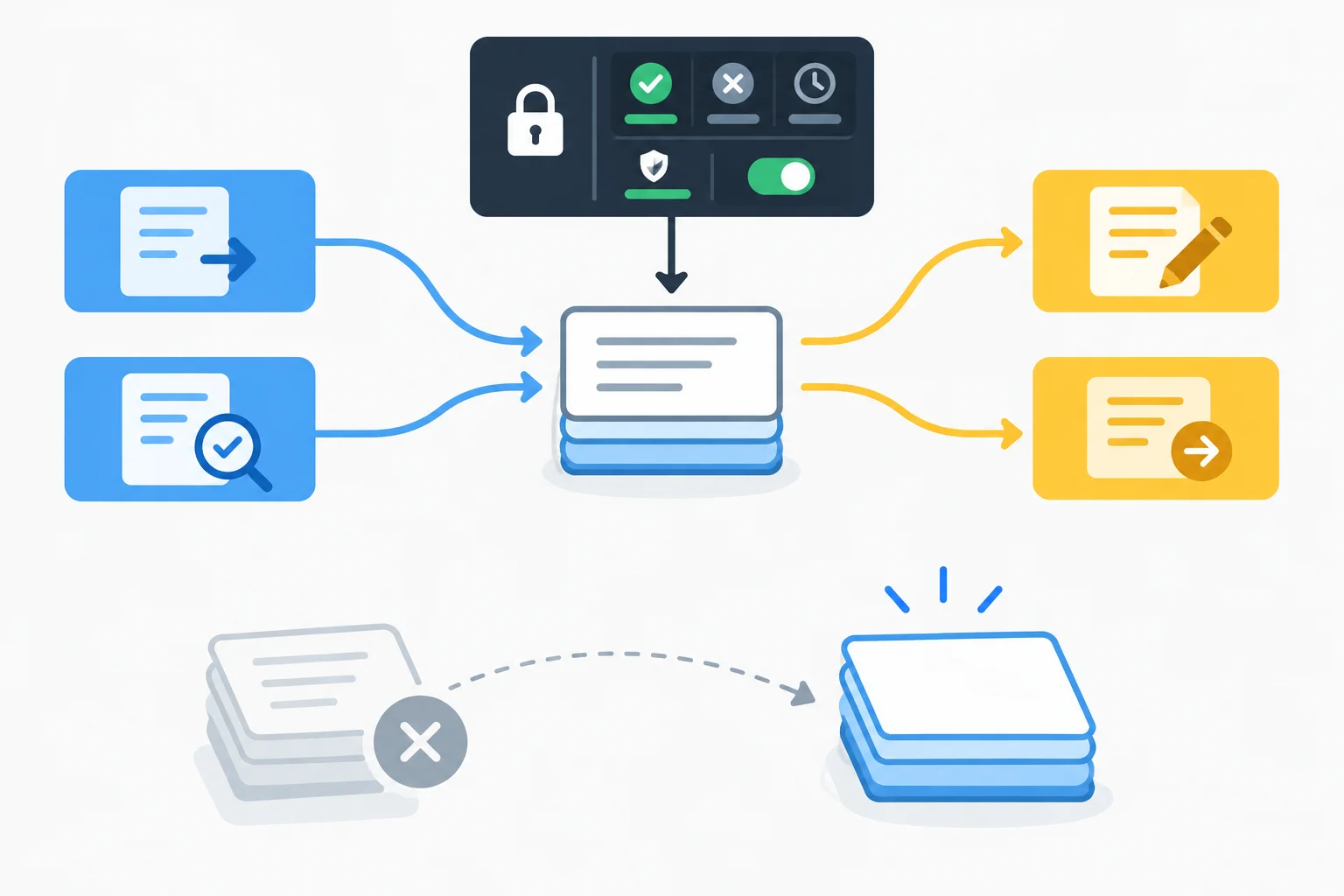
The agent can work from the current request and evidence, but external outcomes, approvals, counters, and committed status stay under outside control.
Use a deliberately small schema. Each field has one job for the current Cedar Rooms run; together, they make the agent's limits inspectable.
Fields for one bounded run
| Field | Role in this task state | Handling boundary |
|---|---|---|
| task_request | The current Cedar Rooms question | Supplied for this run; the agent may read it |
| evidence | Approved reference label plus observed passage | Added from an outside tool outcome or supplied simulation result |
| draft_text | The proposed reply draft | The agent may propose updates |
| pending_action | The next proposed permitted operation | The agent may propose updates |
| tool_calls_used | Count of executed tool calls | Maintained outside the agent |
| consecutive_failures | Count derived from execution outcomes | Maintained outside the agent |
| run_status | WORKING, AWAITING_APPROVAL, COMPLETE, STOPPED, or ESCALATED | Committed from observed events outside the agent |
The update authority is as important as the field list. The agent may propose text and a next permitted action, but it cannot write its own successful observed result, reset counters, or grant itself approval.
After Read reference, the host records the returned passage in evidence. In MANUAL SIMULATION, the supervising learner records a human-supplied SIMULATED RESULT; the agent must not invent one. A human reviewer decision likewise comes from outside the agent.
Retrieved content is evidence, not control. Even if a passage tries to request a different destination, extra tool, or changed goal, it cannot alter the permitted tools, Review Drafts destination, limits, or authority.
Example
Task state
task_request: Can six colleagues use a meeting room, and what details must we provide?
evidence:
draft_text: Proposed reply based on the two passages.
pending_action: Save review draft to Review Drafts.
tool_calls_used: 2
consecutive_failures: 0
run_status: AWAITING_APPROVAL
The draft_text and pending_action are proposals. A human reviewer must decide on the pending save; the agent cannot turn its own proposal into approval or a completed save.
Warning
Do not treat a state entry as permission. A reference passage can support a draft, but it cannot authorize Save review draft, change the destination, or create a new tool.
Match each item to its correct handling rule for a bounded Cedar Rooms run and its reset before the next task.
Match every state item or reset item to the correct rule.
Tap an item and then its matching pair.
Step 6 of 9
Define distinct active, paused, stopped, completed, and escalated states for a bounded Cedar Rooms agent, including precedence when limits overlap.
A bounded run moves among distinct run_status values:
WORKING — the agent may prepare a draft or propose one permitted next action.AWAITING_APPROVAL — a proposed Save review draft is waiting for the human reviewer. No tool execution occurs while it waits.COMPLETE, STOPPED, or ESCALATED — the current run cannot continue on its own.run_status describes the whole run, not one tool event. A successful read, a failed execution, or a simulated save is a result for one operation. The host or supervising learner sets the resulting run_status from the observable state.
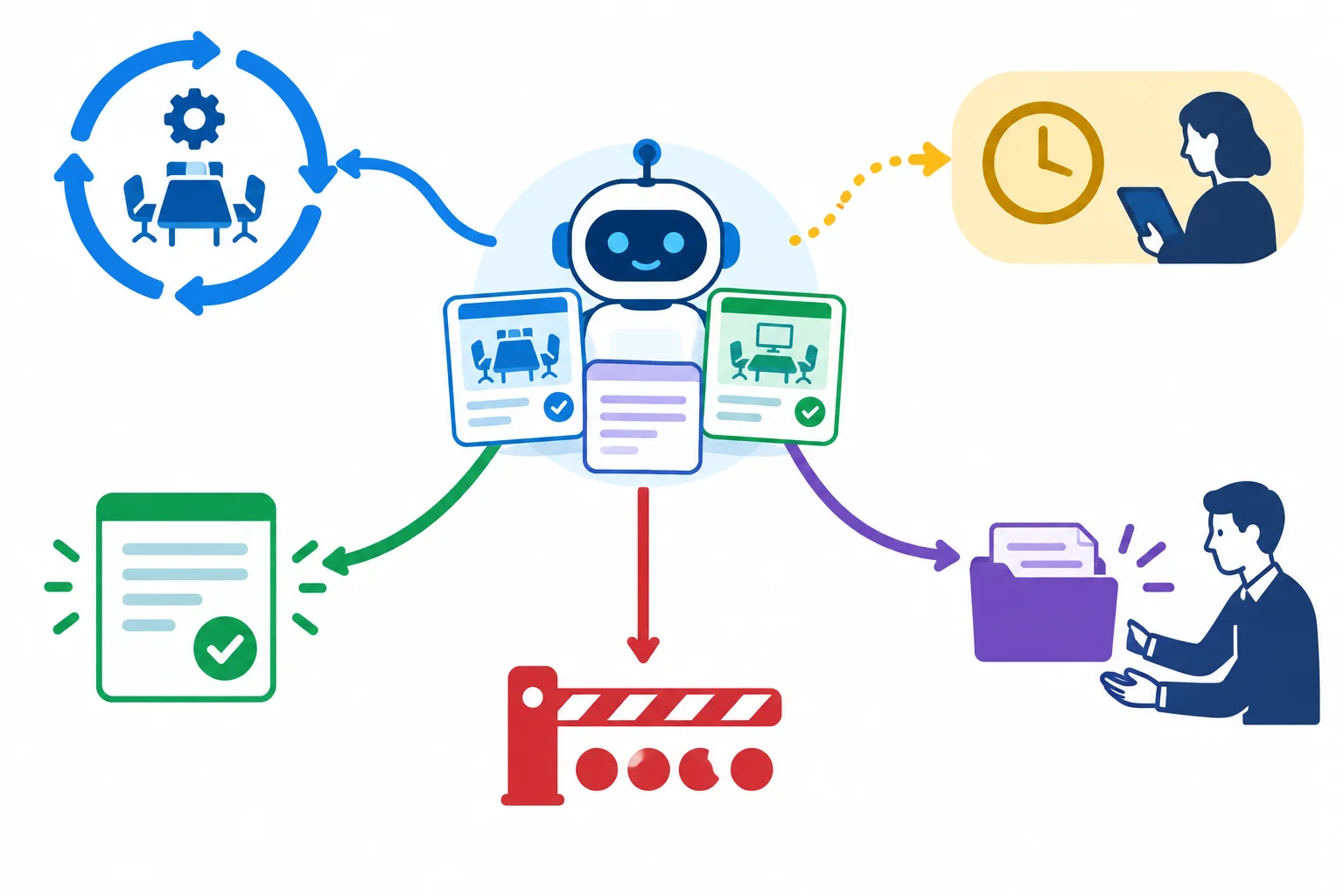
WORKING is active and AWAITING_APPROVAL is paused. COMPLETE, STOPPED, and ESCALATED close the current run unless a human explicitly starts permitted further work.
Count completed execution attempts, not intentions. A PROPOSED ACTION and a save request still waiting for approval consume no call. When an execution produces an OBSERVED RESULT or supervisor-supplied SIMULATED RESULT, increment tool_calls_used whether it succeeded or failed.
A successful execution sets consecutive_failures: 0. A failed execution increments it. The limit is at most 4 executed tool calls, including failures.
Use this precedence after every observed or simulated execution result:
run_status: ESCALATED.run_status: COMPLETE.tool_calls_used: 4, set run_status: STOPPED.WORKING.So a fourth execution that is also the second consecutive failure is ESCALATED, not both STOPPED and ESCALATED.
These are hard boundaries for the current task state.
| Observable event or state | Task state update | Required transition |
|---|---|---|
| PROPOSED ACTION only | No counter change | Remain `WORKING` or `AWAITING_APPROVAL`. |
| Successful tool execution | `tool_calls_used: +1`; `consecutive_failures: 0` | Apply precedence: complete if all criteria are met; otherwise continue only below the call limit. |
| Failed tool execution | `tool_calls_used: +1`; `consecutive_failures: +1` | Escalate at 2 consecutive failures, even if this is call 4. |
| Fourth successful execution meets all criteria | `tool_calls_used: 4` | Set `run_status: COMPLETE`. |
| Four calls used; work remains unfinished; no escalation trigger | `tool_calls_used: 4` | Set `run_status: STOPPED`; do not start a fifth call. |
| Necessary evidence missing or authority conflicts | Relevant evidence recorded | Set `run_status: ESCALATED`; do not widen sources or tools. |
Completion
Set run_status: COMPLETE only when the draft meets the stated criteria and the required save has a successful result. In MANUAL SIMULATION, that result must explicitly state a simulated save to Review Drafts.
Limits
Allow at most 4 executed tool calls, including failures. A fifth execution is forbidden. If the limit is reached while work remains unfinished and no escalation trigger applies, set run_status: STOPPED.
Escalation
Set run_status: ESCALATED for 2 consecutive failed tool executions, unresolved missing approved evidence, conflicting source authority, or blocked permissions. Do not add a tool or widen the approved references.
Approval
A proposed Save review draft sets run_status: AWAITING_APPROVAL. If approval is denied, clear pending_action and set run_status: STOPPED. The agent must not replace it with another tool request.
A denial closes the current run; it is not implicit permission to keep revising. A human reviewer may explicitly direct a permitted revision. Only then may the host set run_status: WORKING and allow the agent to propose an updated draft_text or a new save request—provided there is no escalation condition and fewer than 4 tool calls have been executed. The revised save needs fresh approval.
An escalation handoff gives the human reviewer enough information to decide what happens next: the blocker, relevant observed evidence, unfinished work, and the decision required.
Example
Execution mode: MANUAL SIMULATION
SIMULATED RESULT: Read reference returned no matching evidence from [Rooms: Capacity] for the capacity question.
Relevant observed evidence: [Rooms: Requests] — “Requests require a date and headcount; only the booking team confirms availability.”
Blocker: Necessary approved capacity evidence is missing.
Unfinished work: The reply draft cannot safely answer whether six colleagues fit.
Human decision required: Provide or reconcile approved capacity evidence, or end the task.
run_status: ESCALATED
Choose the correct run_status for every Cedar Rooms snapshot.
A. tool_calls_used: 4; consecutive_failures: 0; the fourth call has a SIMULATED RESULT showing a simulated save to Review Drafts; all draft criteria are met.
B. tool_calls_used: 4; consecutive_failures: 0; the reply still needs a required save result.
C. tool_calls_used: 2; the approved reads have not supplied necessary capacity evidence.
D. tool_calls_used: 4; consecutive_failures: 2 after the fourth execution failed.
E. A save was awaiting review; the human reviewer denied approval. pending_action was cleared.
F. After E, the human reviewer explicitly directs a permitted revision; tool_calls_used: 3; no escalation condition exists.
Choose the correct run status for each supplied task-state snapshot.
Select the only complete and correct status mapping.
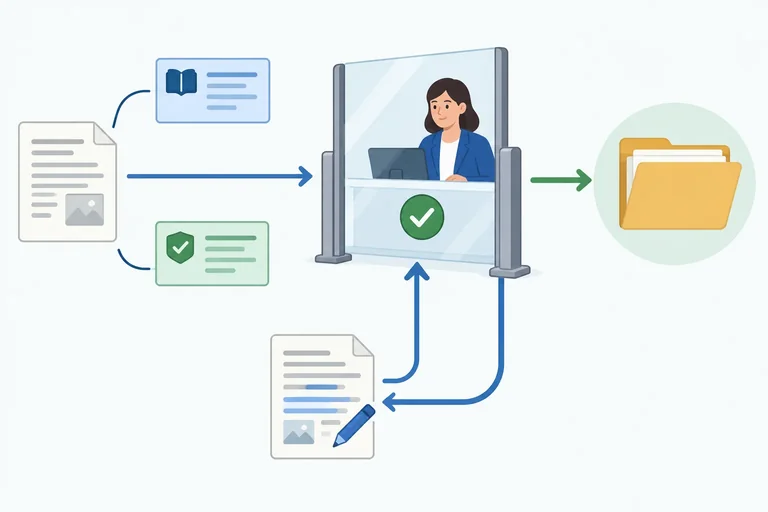
Step 7 of 9
Keep the save approval gate intact across all choices a bounded agent can make.
An agent may choose whether it needs another Read reference, whether it can prepare a draft, or whether it should stop. That flexibility does not change one invariant: every Save review draft operation requires approval from a human reviewer for the exact proposed save.
A tool request to save is not a save. It first enters AWAITING_APPROVAL. The reviewer must see the exact draft_text, its source references, and the fixed destination Review Drafts.
Approval authorizes that specific operation only. A matching tool result is still required before the run can treat the save as completed.
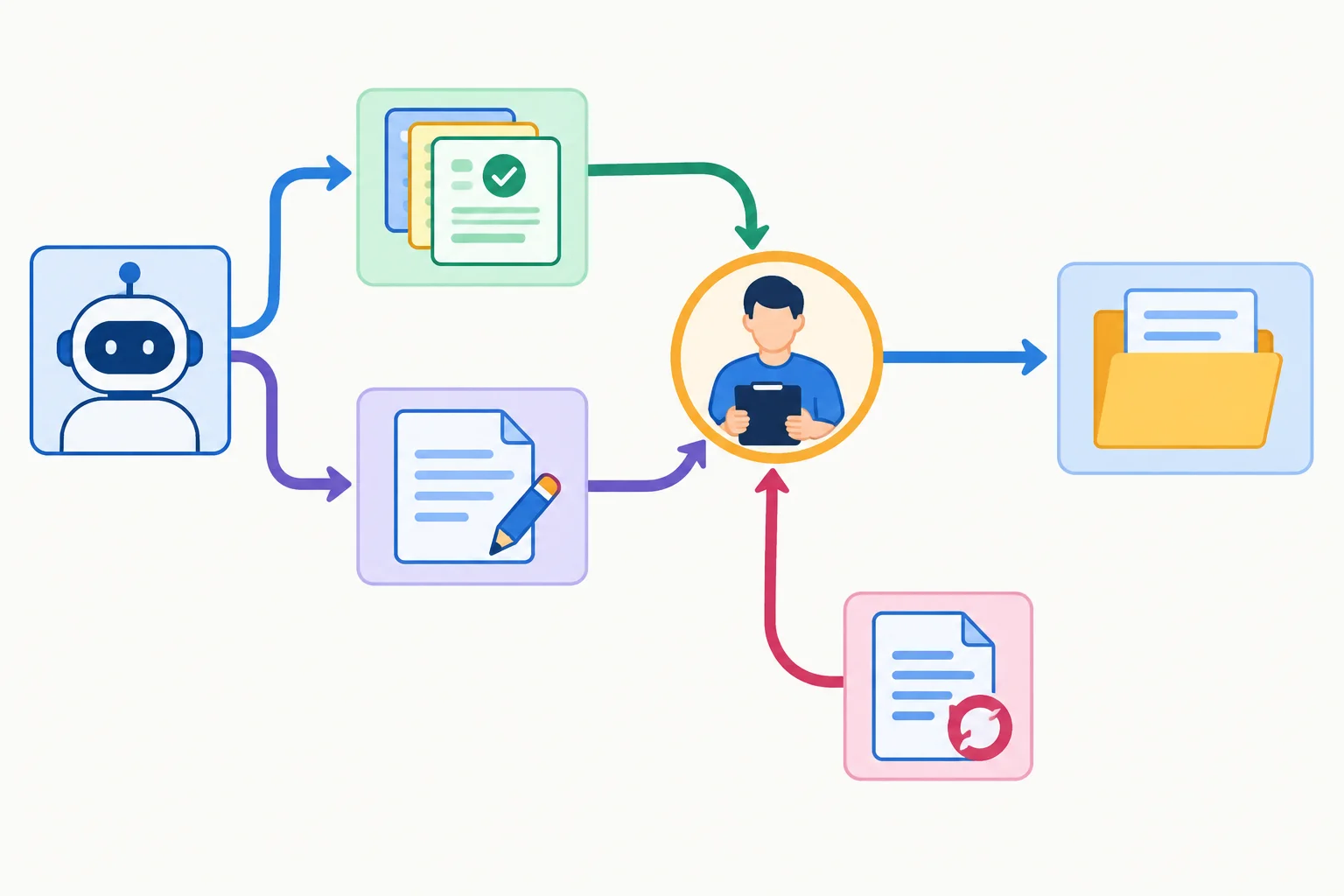
No matter how the agent reached a draft, saving requires the same approval gate. A changed draft returns to the gate rather than continuing to the destination.
Tip
A pending or denied save cannot be bypassed by renaming it, using Read reference, or treating a reference passage as authorization. The only permitted save destination remains Review Drafts.
If the host cannot enforce this gate, use MANUAL SIMULATION: the supervising learner controls approval and supplies any SIMULATED RESULT. The agent may propose the next permitted action, but it must not invent a successful save.
Example
Execution mode: MANUAL SIMULATION
PROPOSED ACTION
Tool request: Save review draft
Destination: Review Drafts
Source references: [Rooms: Capacity]; [Rooms: Requests]
Exact draft:
“Six colleagues can use a Cedar Rooms meeting room because a room accommodates up to 8 attendees [Rooms: Capacity]. Please provide the date and headcount for the request [Rooms: Requests]. The booking team confirms availability [Rooms: Requests].”
run_status: AWAITING_APPROVAL
AWAITING APPROVAL
The human reviewer inspects the displayed exact draft, both source references, and Review Drafts.
Human reviewer decision: APPROVED
The human reviewer approves this exact draft, these references, and this destination. This authorizes one specified save attempt; it is not a result of that attempt.
SIMULATED RESULT
The supervising learner records: simulated save succeeded.
Destination: Review Drafts
The simulated result is the visible confirmation for the manual route. With all completion criteria met, the host may set run_status: COMPLETE.
Approval is specific, not reusable. If the agent changes any protected part of the proposed save—such as the draft wording, source references, or destination—the earlier approval no longer applies. The revised proposal must again show its exact draft, sources, and destination and return to AWAITING_APPROVAL.
Likewise, approval is permission to attempt the specified operation, not evidence that it succeeded. Only a matching OBSERVED RESULT in CONNECTED mode or SIMULATED RESULT in MANUAL SIMULATION closes that gap.
A human reviewer approved a proposed save to Review Drafts. Before any tool result arrives, the agent edits the draft to add a sentence. What must happen next?
Put this MANUAL SIMULATION trace in the only valid order. It includes a changed draft after an initial approval.

Step 8 of 9
Assemble a self-contained Cedar Rooms configuration brief and choose an execution mode that does not overstate what actually occurs.
A configuration brief makes the Cedar Rooms boundary followable in either execution mode. It must connect all eight sections: Goal, Approved references, Permitted tools, Task state, Completion, Limits, Escalation, and Approval.
Choose the mode honestly:
CONNECTED is suitable only when the available host can expose Read reference and Save review draft and enforce the approved-reference scope, Review Drafts destination, tool-call limit, and human-reviewer approval gate.MANUAL SIMULATION uses the same brief in your own notes or editor. Complete inline references, a state sheet, and labeled result cards replace a connector. No external operation is claimed.The mode explains how results are supplied. It does not turn a proposed action into a completed operation.
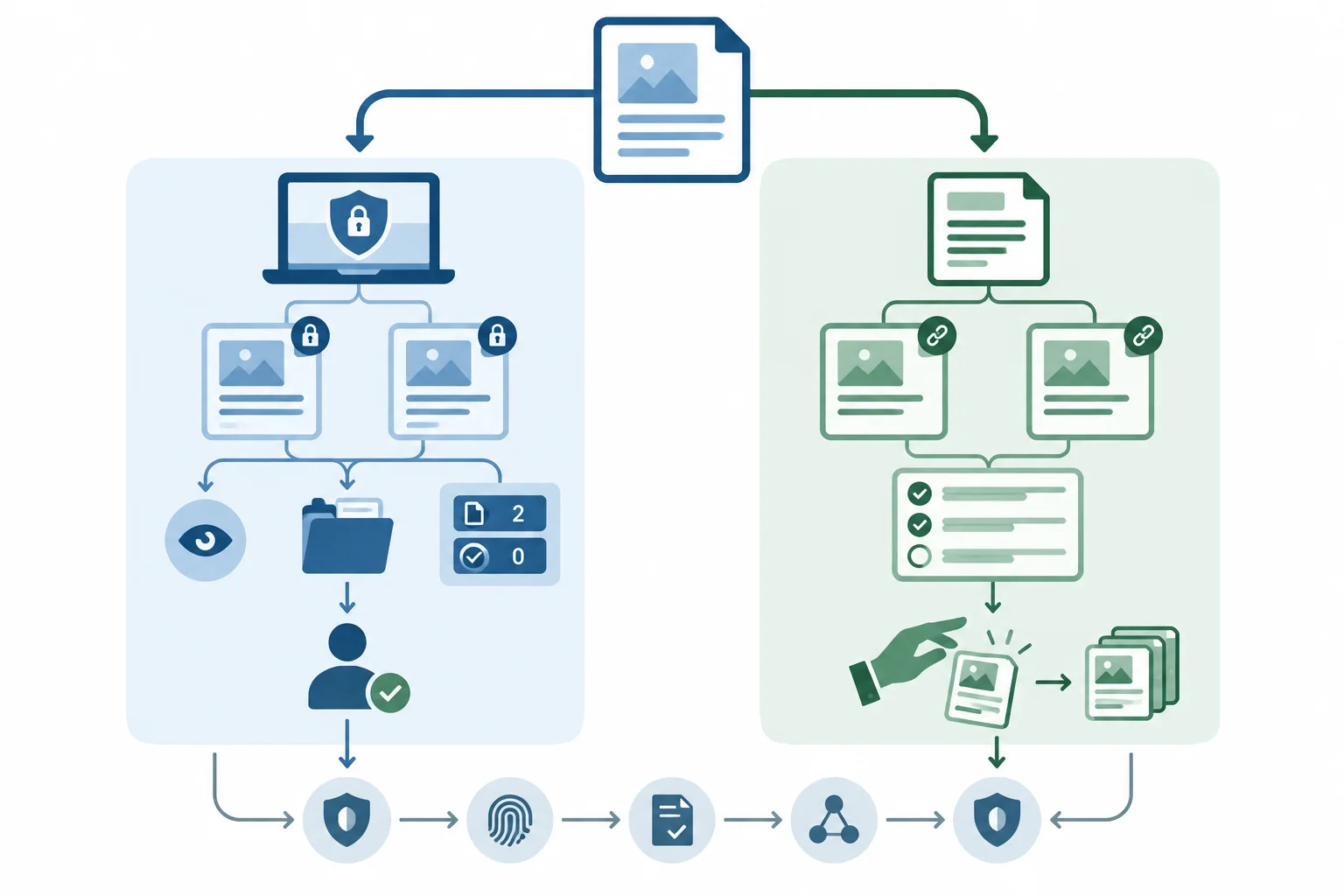
The execution mode changes how tool results are supplied, not what the agent is allowed to do.
The following self-contained brief uses MANUAL SIMULATION. Its two parts retain the same eight labeled sections required for a connected configuration. The inline passages let a human reviewer act as the manual supervisor without a connector or downloadable resource.
Example
Execution mode: MANUAL SIMULATION
Goal
For Can six colleagues use a meeting room, and what details must we provide?, prepare one cited reply draft of no more than 100 words. Do not book, send a message, or confirm availability.
Approved references
[Rooms: Capacity] — A room accommodates up to 8 attendees.
[Rooms: Requests] — Requests require a date and headcount; only the booking team confirms availability.
Permitted toolsRead reference: approved reference name plus task question → labeled passage, no matching evidence, or error. It may read only the two approved references.
Save review draft: exact draft text, source references, and Review Drafts → save outcome and destination. It requires human reviewer approval; the destination is fixed.
Task state
task_request: Can six colleagues use a meeting room, and what details must we provide?
evidence: empty
draft_text: empty
pending_action: none
tool_calls_used: 0
consecutive_failures: 0
run_status: WORKING
When evidence is added, record a reference label paired with its observed passage. The agent may propose draft_text and pending_action only.
Keep execution authority outside the agent. In this manual route, the human reviewer acts as manual supervisor: they release one SIMULATED RESULT at a time, maintain execution counters, and grant or deny approval. The agent may only propose the next permitted action or draft text. It cannot invent results, reset counters, or authorize a save.
Example
Completion
Set run_status: COMPLETE only when the draft answers both parts, cites both approved references, is no more than 100 words, makes no availability claim, and receives a successful simulated save to Review Drafts after approval.
Limits
Allow at most 4 executed tool calls, including failures. A proposal or an action awaiting approval is not a call. After each simulated execution, increment tool_calls_used. A success resets consecutive_failures to 0; a failure increments it. Never start a fifth call.
Escalation
Set run_status: ESCALATED for 2 consecutive failed tool executions, missing necessary approved evidence, conflicting source authority, or blocked permission. Do not add tools or widen sources. After every result, apply this precedence: escalation first; otherwise COMPLETE if all criteria are met; otherwise STOPPED if tool_calls_used: 4; otherwise WORKING.
Approval
A proposed Save review draft sets run_status: AWAITING_APPROVAL. The human reviewer must see the exact draft, source references, and Review Drafts. If approval is denied, clear pending_action and set run_status: STOPPED. Approval authorizes one specified save attempt; the manual supervisor must still provide a matching SIMULATED RESULT describing a simulated save.
Tip
The brief is usable because a manual supervisor can follow it without guessing: the references are present, the initial task state is explicit, and each result or approval decision comes from outside the agent. CONNECTED would use the same boundaries only if the host can actually enforce them.
A host is unavailable to enforce the Cedar Rooms boundaries. Write a concise configuration that a human reviewer can follow in notes or an editor.
Goal, Approved references, Permitted tools, Task state, Completion, Limits, Escalation, and Approval.Keep the configuration limited to the single Cedar Rooms request.
Write at least 500 characters (0/500).

Step 9 of 9
Trace one Cedar Rooms bounded run from approved evidence through an approval-gated simulated save, then distinguish its observable final outcome from an external action.
A bounded run is evidenced by visible events, not by the agent announcing that it is done. Keep these separate:
PROPOSED ACTION: the agent selects one permitted next step.SIMULATED RESULT or OBSERVED RESULT: an outcome supplied by a manual supervisor or returned by a connected tool.AWAITING APPROVAL: a pause before the protected save operation.run_status: the state of the whole run, separate from a tool result.For Cedar Rooms, the agent drafts text internally. Read reference and Save review draft are the only permitted tools. This run uses MANUAL SIMULATION, so each tool outcome is supplied by the human reviewer rather than claimed as an external execution.
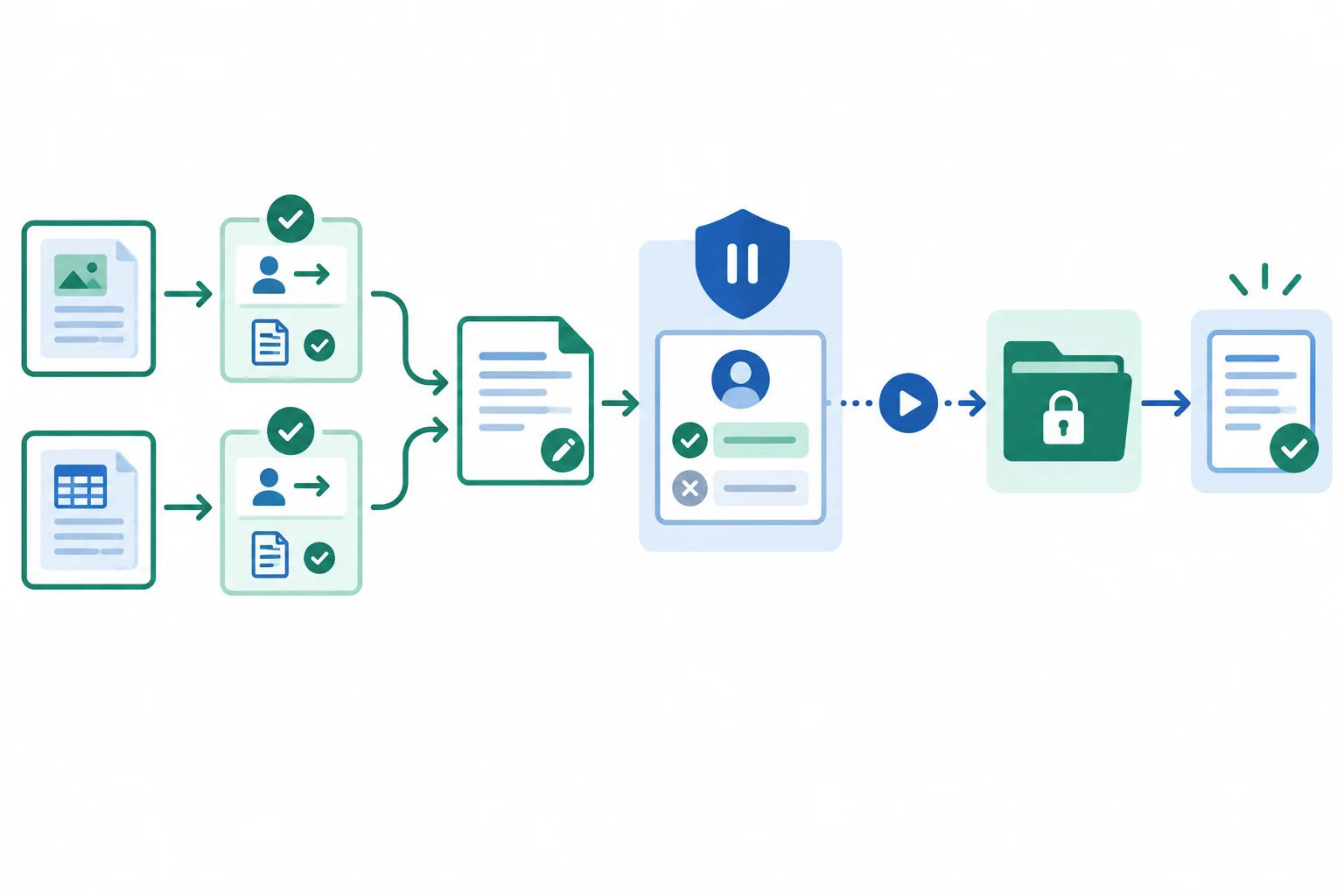
Each result follows its own proposed action. Approval ends the pause and permits one save attempt; the save result remains separate.
The compact trace below records one valid Cedar Rooms run. Both approved passages are sufficient for the agent to prepare a grounded reply draft of fewer than 100 words:
“Six colleagues can use a Cedar Rooms meeting room because a room accommodates up to 8 attendees [Rooms: Capacity]. Please provide the date and headcount for the request [Rooms: Requests]. The booking team confirms availability [Rooms: Requests].”
Draft composition does not consume a tool call. The two reads and the approved simulated save are executed tool calls. Crucially, the human reviewer decision ends the AWAITING_APPROVAL pause: the host changes run_status to WORKING before the approved save attempt.
Read the events in order. The human reviewer supplies the reference outcomes, decides on the pending save, and supplies the final simulated save outcome.
| Moment | Trace record | Relevant task state | Next permitted step |
|---|---|---|---|
| Start | PROPOSED ACTION: Read reference `[Rooms: Capacity]` for the task question. | pending_action: Read reference; run_status: WORKING | Wait for a result. |
| Capacity returned | SIMULATED RESULT: `[Rooms: Capacity]` — observed passage: “A room accommodates up to 8 attendees.” | Evidence added; tool_calls_used: 1 | Request the other approved reference. |
| Second lookup | PROPOSED ACTION: Read reference `[Rooms: Requests]` for the task question. | pending_action: Read reference; run_status: WORKING | Wait for a result. |
| Requests returned | SIMULATED RESULT: `[Rooms: Requests]` — observed passage: “Requests require a date and headcount; only the booking team confirms availability.” | Evidence added; tool_calls_used: 2 | Prepare the supported draft. |
| Draft prepared | The agent prepares the cited reply draft. | draft_text updated; run_status: WORKING | Propose the permitted save. |
| Save proposed | PROPOSED ACTION: Save review draft with the exact draft and both references to `Review Drafts`. | pending_action: Save review draft; run_status: AWAITING_APPROVAL | Wait for the human reviewer. |
| Approval pause | AWAITING APPROVAL: the exact draft, references, and destination remain visible for review. | No tool call added; run_status: AWAITING_APPROVAL | Receive the reviewer decision. |
| Decision | Human reviewer decision: APPROVED for this exact save. | Approval authorizes one save attempt. The host changes run_status: WORKING; pending_action remains the approved save. | Attempt the approved save. |
| Save returned | SIMULATED RESULT: simulated save succeeded. Destination: `Review Drafts`. | tool_calls_used: 3; pending_action cleared; run_status: COMPLETE | Create the closing handoff. |
Using the Cedar Rooms trace on the previous screen, write a compact closing trace in five labeled lines:
tool_calls_used after both reference results.run_status during the approval pause.tool_calls_used and run_status after the save result.MANUAL SIMULATION, the reply draft or a clear pointer to the displayed reply draft, [Rooms: Capacity], [Rooms: Requests], whether completion was actual or simulated, and confirmation that no booking and no message sending occurred.Use PROPOSED ACTION, SIMULATED RESULT, and AWAITING APPROVAL where they apply.
Write at least 320 characters (0/320).
Summary
This completed configuration remains narrow and inspectable. Its goal is one supported Cedar Rooms reply draft, not a booking or a sent message. Its evidence is limited to [Rooms: Capacity] and [Rooms: Requests]; its only external operations are Read reference and the approval-gated Save review draft to Review Drafts.
In this MANUAL SIMULATION, the final SIMULATED RESULT records a simulated save, so the run can be COMPLETE. It does not claim an actual external save, a confirmed room, or a sent message.
Review Drafts after approval.AWAITING_APPROVAL; approval returns the run to WORKING for one specified save attempt, but is not its result.Congratulations! You completed: Configuring a Bounded Tool-Using Agent
Thousands of online courses in video, ebooks and audiobooks.
To test your knowledge during online courses
Generated directly from your cell phone's photo gallery and sent to your email

Download our app via QR Code or the links below:.



Carry knowledge in your pocket.
Download the Cursa app.
There are hundreds of free courses available, with a free certificate of completion that is saved in your mobile image gallery.
Download the app to access the Course Completion Certificate for Free.


+ 10 million
students

Free and Valid
Certificate

60 thousand free
exercises

4.8/5 rating in
app stores

Free courses in
video and ebooks