
Step 1 of 8
Turn the Specification into an Assembly Map
Convert the Cedar Hub specification into a bounded assembly map with executable components or explicit manual equivalents.

Learning path · Level 10 · Tutorial 2
Assemble the specified solution in your own tools or as a faithful text-only simulation. Use reusable prompts and authorized source excerpts, resolve component handoff mismatches, and preserve a reproducible prototype without requiring coding or paid features.

 Turn the Specification into an Assembly Map
Convert the Cedar Hub specification into a bounded assembly map with executable components or explicit manual equivalents. 2 min
 Prepare the Reusable Build Bundle
Prepare a complete, portable set of prompts and authorized source excerpts for the selected assembly route. 4 min
 Agree on the Handoff Record
Create a canonical handoff record that preserves field meaning, evidence, units, and human approval authority across Cedar Hub components. 3 min
 Connect the Stages and Preserve the Checkpoint
3 min
 Find and Repair a Broken Handoff
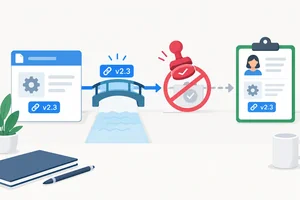
Find the first faulty transfer in a handoff record, repair its mapping rule, and preserve source traceability and Reviewer authority. 3 min
 Make the Simulation Faithful and Its Limits Visible
Preserve workflow-level behavior in a manual or hybrid route, and label each demonstrated operation or untested capability precisely. 3 min
 Save a Reconstructable Prototype Snapshot
Save the exact configuration and execution context needed to reconstruct the Cedar Hub prototype without relying on chat history or memory. 3 min
 Run One End-to-End Integration Smoke Check
Trace one permitted request through the saved prototype and report precisely what the completed flow does and does not demonstrate. 4 min
Step 1 of 8
Convert the Cedar Hub specification into a bounded assembly map with executable components or explicit manual equivalents.
The approved build target is the fictional Cedar Hub room-inquiry assistant. For request R-001, a person asks whether Maple can accommodate 8 people for 60 min.
The prototype prepares a human-approved reply for manual use. It does not check a calendar, reserve Maple, or send a message.
Use two fictional practice sources:
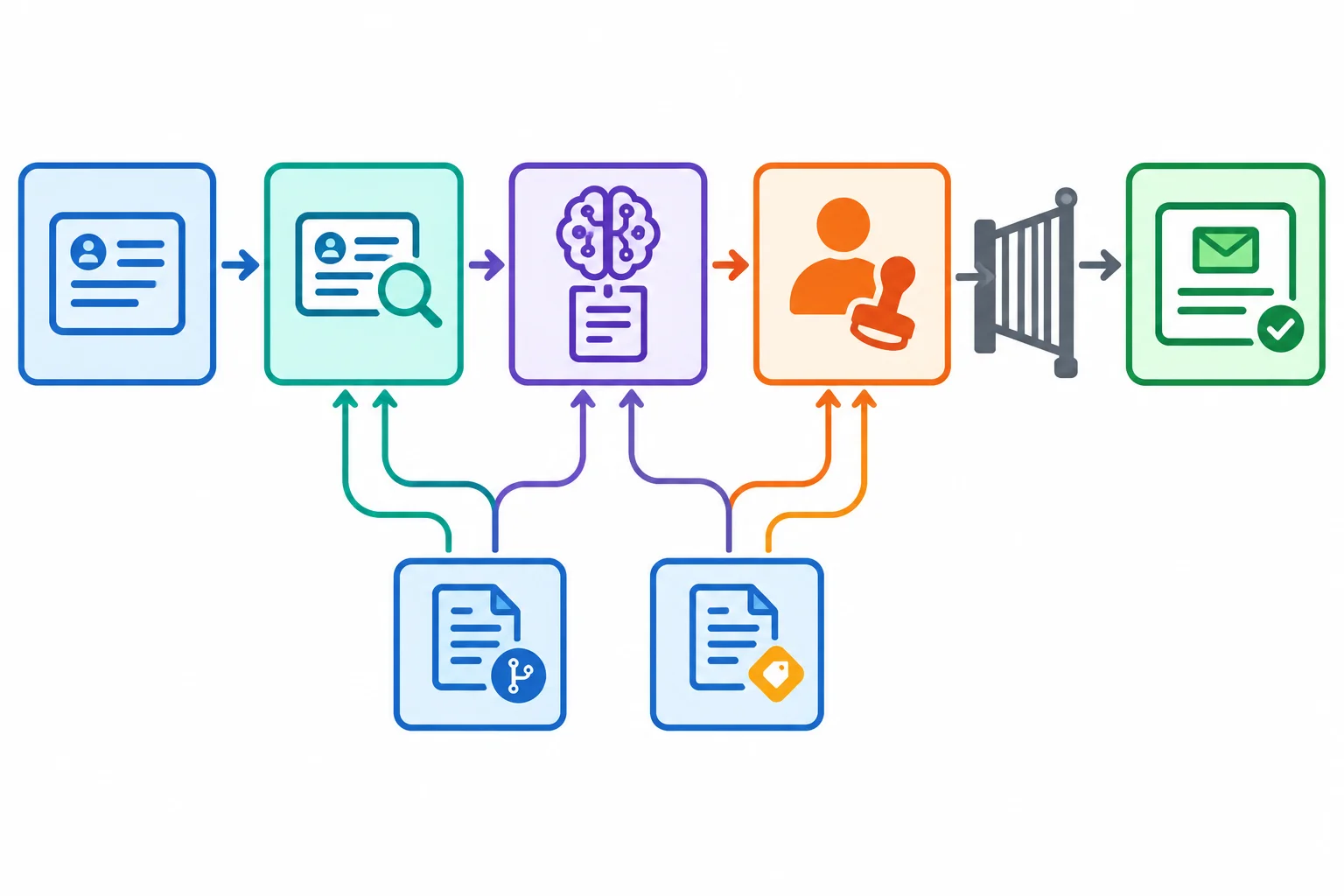
S1-v1: Maple has capacity for 12 people and a maximum session duration of 90 min.S2-v1: staff confirm availability separately and approve replies before release preparation.The required stage order is: Intake → Source selection → Drafting → Human review → Release preparation. Treat this specification as the build target; do not add capabilities while assembling it.
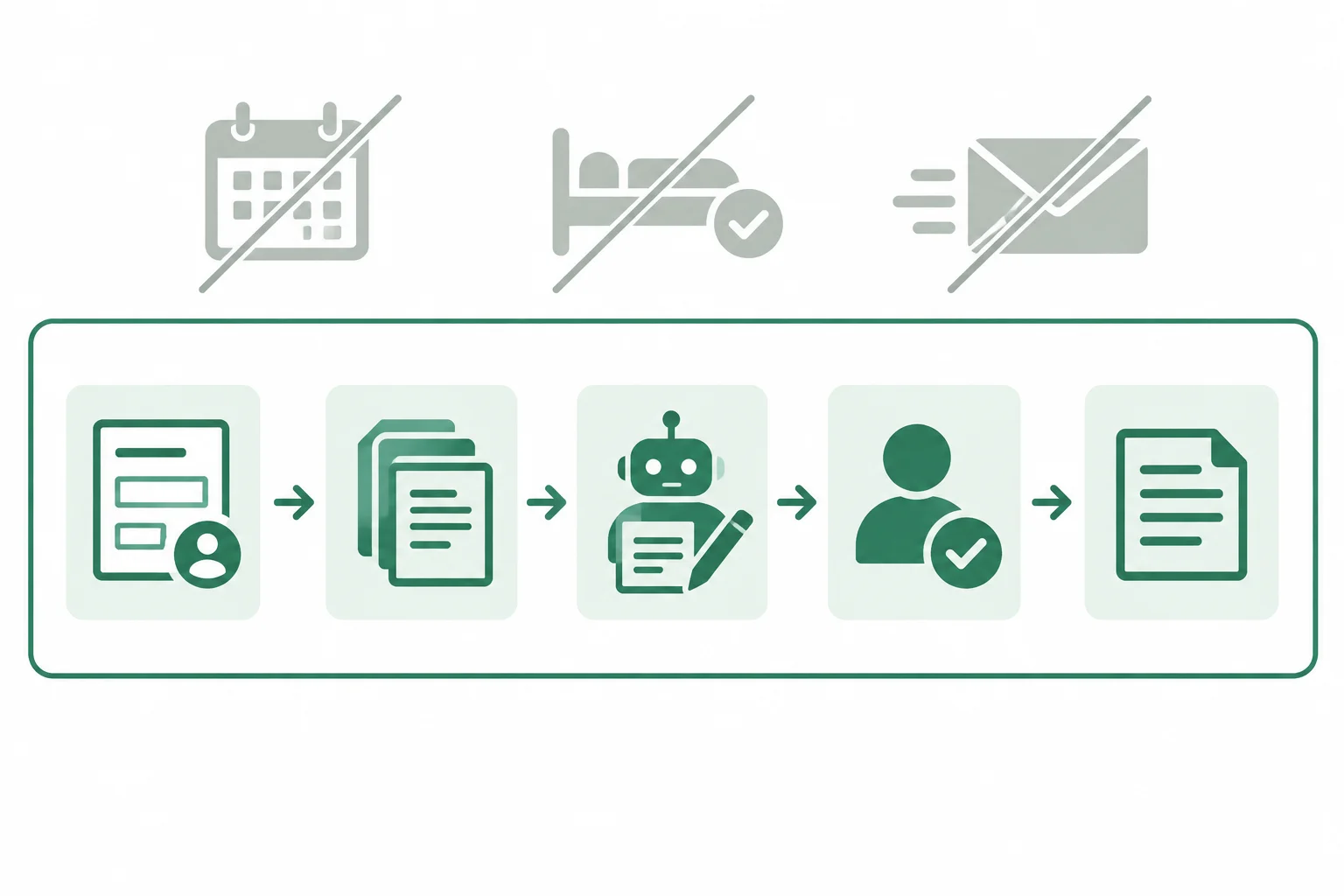
The assembly map must preserve the five stages while keeping external actions outside the prototype boundary.
An assembly map makes a specification executable. For every stage, name the authorized input, the prompt or deterministic rule, the execution method, the output, and the responsible role.
This reference map uses an available Assistant with manual handoffs. Operator performs assembly and transfers, Assistant performs AI processing, and Reviewer makes the human decision. The complete source identifiers travel with the selected excerpts.
The reference route uses an Assistant only for the two prompt-driven transformations. A manual rule can still be an executable component when the Operator applies it exactly as written.
| Stage | Authorized input | Prompt or rule | Method | Output | Responsible |
|---|---|---|---|---|---|
| Intake | R-001 request | P1-intake-v1 | Assistant runs prompt | Normalized request details | Assistant |
| Source selection | S1-v1, S2-v1 | Source-selection rule | Operator applies rule | Selected source excerpts with IDs | Operator |
| Drafting | Normalized request + selected excerpts | P2-draft-v1 | Assistant runs prompt | Grounded reply draft | Assistant |
| Human review | Draft + selected excerpts | Review rule | Human decision | Approved reply or revision request | Reviewer |
| Release preparation | Reviewed reply + decision | Release gate rule | Operator applies rule | Reply prepared for manual use | Operator |
Choose one route you can actually perform. The route changes the execution method in your assembly map, not the required stage order, source limits, human checkpoint, or prototype boundary.
For the guided reference map, use the first route. If it is unavailable, use either explicit equivalent and record that choice in your own notes.
All routes can produce the same bounded deliverable when their rules and transfers are preserved.
| Route | How components run | What remains manual |
|---|---|---|
| Available Assistant | Assistant runs P1-intake-v1 and P2-draft-v1 | Transfers, source selection, review, release preparation |
| Existing no-code tool | Configured steps run available prompts or rules | Reviewer approval and any unsupported transfer |
| Text-only manual simulation | Operator applies prompt and rule text as written | All transfers and transformations |
Match each assembly-map label to its correct reference fragment.
Tap an item and then its matching pair.

Step 2 of 8
Prepare a complete, portable set of prompts and authorized source excerpts for the selected assembly route.
A self-contained build bundle is a portable set of short text blocks that lets you run—or faithfully simulate—the two AI stages without relying on chat history, uploads, paid features, or hidden workspace content.
For Cedar Hub, keep together: complete reusable prompts, complete authorized source excerpts, fixed workflow rules, and reference component outputs. The sources in this tutorial are fictional practice sources, not real organizational policies.
A local text editor is enough. If you use an existing Assistant workspace, paste the same blocks there; do not treat that workspace as the only copy.
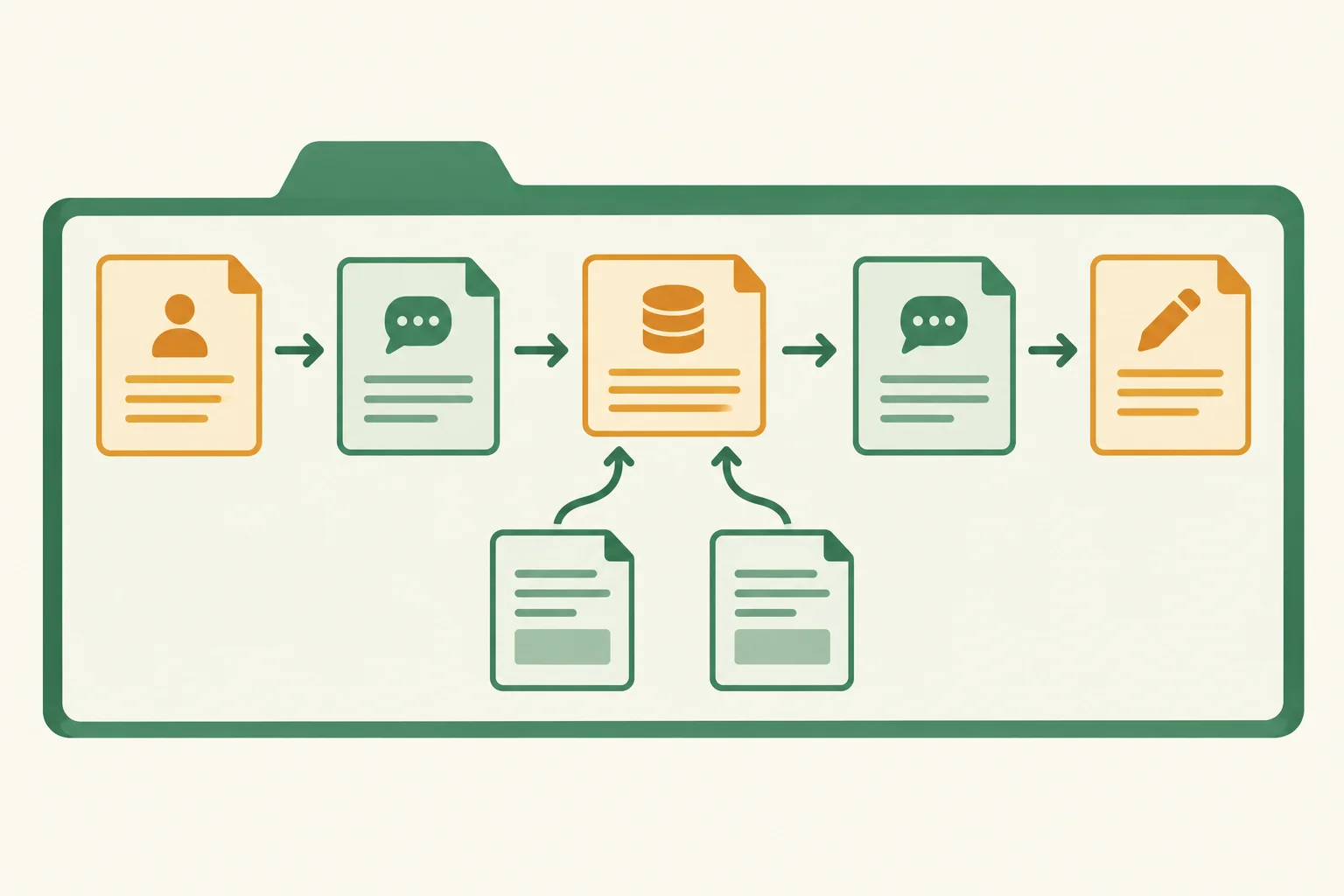
Keep each prompt with the inputs it requires. The same bundle supports an Assistant route or a text-only simulation.
Tip
A bundle is complete only when another person can see what each prompt receives, the permitted source text, and the fixed rules that constrain the output. A reference output is a simulation fixture: it shows the expected shape of a manual simulation, not evidence that an actual model produced it.
Keep fixed instructions separate from replaceable input slots. The prompt core remains stable; only the double-brace slots change for a particular request.
P1-intake-v1 receives the request and produces normalized request fields. P2-draft-v1 receives that normalized request plus selected source excerpts and produces a draft with traceable source references.
The bound R-001 inputs below demonstrate how to use each reusable core. They are invocation examples, not extra instructions to add to the prompt.
Reusable prompt core and a bound R-001 invocation
P1-intake-v1:
Turn {{request_text}} into key: value fields: request_id, request_text, room, attendees, duration_min. Use whole-number minutes. Do not infer availability, approval, or release. Use not_provided only for missing values.

Bound R-001 value for {{request_text}}:
request_id: R-001
request_text: Can Maple accommodate 8 people for 60 min?request_id: R-001 request_text: Can Maple accommodate 8 people for 60 min? room: Maple attendees: 8 duration_min: 60
This is a reference output fixture for a text-only simulation. It is not evidence of an actual Assistant run.
Reusable prompt core and a bound R-001 invocation
P2-draft-v1:
Using {{normalized_request}} and only {{source_excerpts}}, prepare a reply for manual use. State suitability from the sources, say availability requires staff confirmation, and do not approve, release, reserve, or send. Return draft_text and source_refs with full source identifiers.
Bound R-001 value for {{normalized_request}}:
request_id: R-001
request_text: Can Maple accommodate 8 people for 60 min?
room: Maple
attendees: 8
duration_min: 60
Bound R-001 value for {{source_excerpts}}:
S1-v1: Fictional practice source. Maple capacity: 12 people. Maximum session duration: 90 min.
S2-v1: Fictional practice source. Staff must confirm availability separately and approve replies before release preparation.draft_text: Maple can accommodate 8 people for 60 min under its documented capacity and duration limits. Staff must confirm availability separately. source_refs: S1-v1, S2-v1
This is a reference output fixture for a text-only simulation. It is not evidence of an actual Assistant run.
For R-001, select both excerpts. S1-v1 supports the suitability statement; S2-v1 requires separate staff availability confirmation and approval before release preparation. Keep each complete identifier, including -v1, attached to the excerpt and to the drafting result.
The reference outputs on the previous screen are simulation fixtures. They let the Operator perform the same transformations in a text-only route, but they do not prove an Assistant generated the wording.
Complete fictional practice sources and fixed workflow rules
S1-v1: Fictional practice source. Maple capacity: 12 people. Maximum session duration: 90 min.

S2-v1: Fictional practice source. Staff must confirm availability separately and approve replies before release preparation.

Fixed workflow rules:
- For R-001, select S1-v1 and S2-v1.
- Keep complete source identifiers attached to the selected excerpts and to the drafting output.
- The Operator may manually transfer the defined text blocks between stages.
- A draft is prepared for human review and manual use; it is not a reservation or a sent message.
Warning
Do not label a fixture as observed model output. A fixture makes the text-only route reproducible because the Operator can apply the stated prompt instructions and source excerpts manually. It does not establish model behavior, tool behavior, or availability of Maple.
You choose a text-only manual simulation. Your local folder contains: the full cores of P1-intake-v1 and P2-draft-v1; the fixed workflow rules; the full S2-v1 excerpt; reference outputs for both prompts; and this note: “Maple capacity 12; maximum session 90 min.” The note has no source identifier or version.
In 5–7 lines, state: (1) what replaces the input slot of P1 and what P1 returns; (2) what replaces each input slot of P2 and what P2 returns; (3) whether this folder is sufficient to execute or faithfully simulate both AI stages; and (4) the exact missing block or correction needed.
Write at least 220 characters (0/220).

Step 3 of 8
Create a canonical handoff record that preserves field meaning, evidence, units, and human approval authority across Cedar Hub components.
A canonical handoff record is the shared interface between components. Every stage receives the current record, reads the fields it needs, and adds or updates only fields it owns.
For Cedar Hub, use these canonical fields exactly:request_id, request_text, room, attendees, duration_min, source_refs, draft_text, approval_status, reviewer, review_note, and release_status.
This prevents a useful value from becoming ambiguous when one component calls it length, another calls it duration, and a third expects duration_min. Preserve four things at every transfer: request identity, units, source evidence, and approval authority.
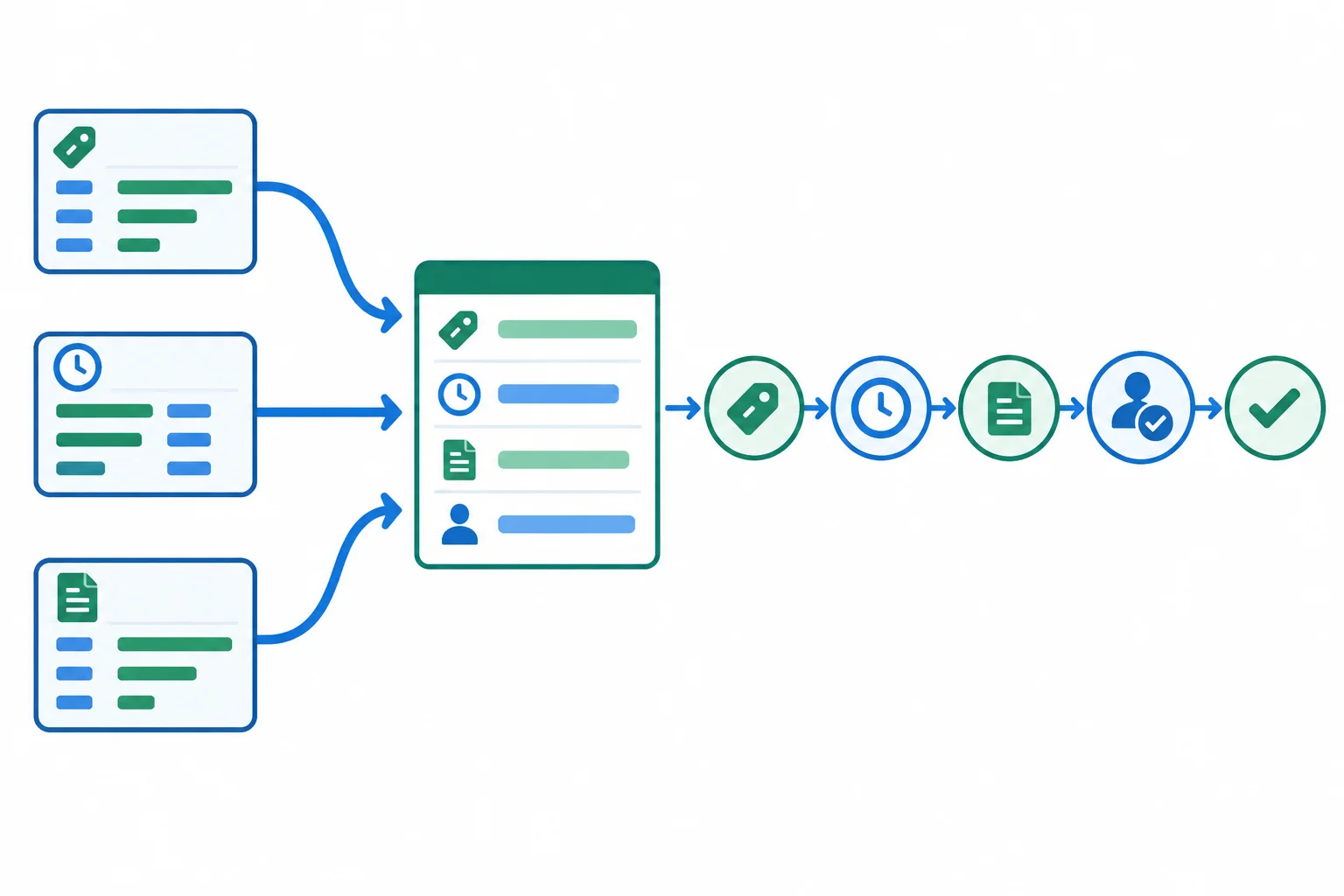
Map incoming labels into canonical fields before the next stage reads the record.
The record is transferred in this stage order. “Reads” means the stage relies on an existing value. “Adds or updates” means it is responsible for writing that value; it must not replace unrelated fields.
| Stage | Reads | Adds or updates |
|---|---|---|
| Intake | request_text | request_id, room, attendees, duration_min |
| Source selection | room, attendees, duration_min | source_refs |
| Drafting | request fields, source_refs | draft_text |
| Human review | draft_text, source_refs | approval_status, reviewer, review_note |
| Release preparation | approval_status, required fields | release_status |
Example
Before repair — intentionally inconsistent
Incoming Drafting output:ticket: R-001duration: 1 hourevidence_id: S1-v1status: done
A receiving component must not guess that status: done means approval. Its explicit mapping is:
ticket → request_id, preserving R-001 exactly.duration: 1 hour → duration_min: 60; the canonical unit is a whole-number minute.evidence_id → source_refs, preserving the complete identifier S1-v1.status: done describes processing completion, not a human decision. Keep approval_status: pending_review until the Reviewer records a decision.S1-v1 and S2-v1 are fictional practice sources, not real organizational policies.
Tip
Only the Reviewer can set approval_status to approved or needs_revision, and record reviewer plus review_note. The Assistant may create draft_text; it cannot authorize a reply.
Use not_provided only to state that a value is missing. It is never evidence and never an approval state. An intentionally blank optional value, such as an empty review_note, is different from an absent or unknown required field. Keep release_status: held while approval is still pending.
Match each incoming field/value to the correct canonical field/value.
Tap an item and then its matching pair.
Reconcile this incoming fragment into the canonical record fields shown below.
Incoming values:duration: 1 hourevidence_id: S1-v1assistant_status: draft_complete
request_id: R-001
duration_min:
source_refs:
approval_status: 
Step 4 of 8
A connected prototype passes one current handoff record forward; it does not create a separate, disconnected output at each stage. The Operator makes each transfer explicit and includes the authorized source excerpts needed by the receiving stage.
For Cedar Hub, the required route is:
Intake receives the request. Source selection receives the current record and the complete fictional practice sources S1-v1 and S2-v1. Drafting receives the normalized record plus the selected excerpts. Human review receives the record, draft, and traceable evidence needed to check it. Release preparation receives the reviewed record and checks that the gate conditions are satisfied.
Transfer the current handoff record at every seam, along with the evidence needed by the receiving stage.
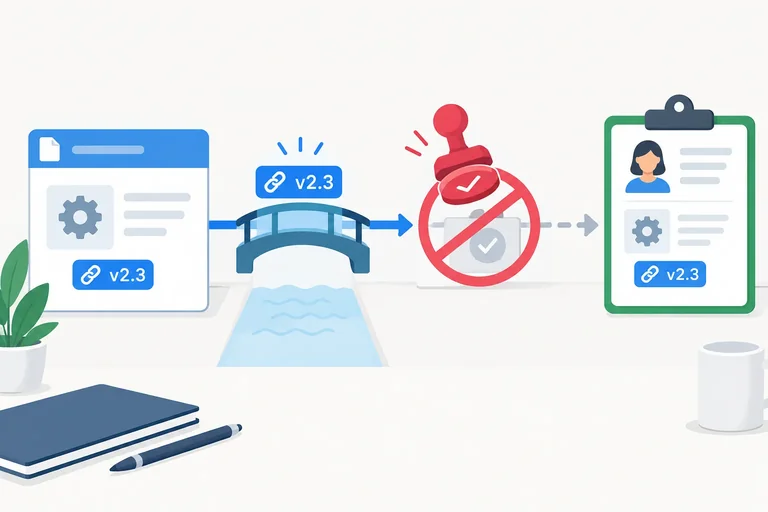
Use a merge rule at every handoff: copy only the permitted new or updated fields into the existing handoff record. Never replace the entire record with the latest Assistant response.
For example, Drafting may add or update draft_text, but it must retain request_id, normalized request fields, and complete source_refs. Only the Reviewer may set approval_status, reviewer, and review_note. Assistant wording such as “approved” is draft content, not authorization.
Release preparation checks that required request fields, source_refs, and draft_text remain intact and that explicit Reviewer approval exists. If a required field is absent, or approval is still pending or needs revision, release_status remains held. With intact fields and Reviewer approval, it can become ready_for_manual_use.
This final stage prepares a reply for manual use. It does not send a message, check live availability, or reserve Maple.
Example
Handoff record after Drafting
request_id: R-001
request_text: Can Maple accommodate 8 people for 60 min?
room: Maple
attendees: 8
duration_min: 60
source_refs: S1-v1, S2-v1
draft_text: Maple can accommodate 8 people for 60 min under its documented capacity and duration limits. Staff must confirm availability separately.
approval_status: pending_review
reviewer: not_provided
review_note: not_provided
release_status: held
The complete source identifiers remain attached. The fictional practice sources support suitability facts and the requirement for separate availability confirmation; they are not real organizational policies.
Put these connected operations in the required order for the Cedar Hub prototype.
R-001 has completed Drafting. Its required request fields and source_refs are intact, but no Reviewer approval has been recorded.
In two lines, write:
release_status.Use the stage names and status value exactly.
Write at least 60 characters (0/60).
Step 5 of 8
Find the first faulty transfer in a handoff record, repair its mapping rule, and preserve source traceability and Reviewer authority.
An integration seam is the transfer between two stages where usable output can lose meaning, evidence, or authority. A component may produce a reasonable draft, yet the transfer can still damage the workflow.
For Cedar Hub, inspect the handoff from Drafting to Human review field by field. Compare the sending record with the record received by the next stage. Find the first field that changes, disappears, or gains a meaning it was not authorized to gain.
Two fields are especially consequential:
source_refs must retain complete identifiers such as S1-v1 and S2-v1.approval_status remains pending_review until the Reviewer records a decision.A generic statement that drafting is complete describes processing, not human approval.
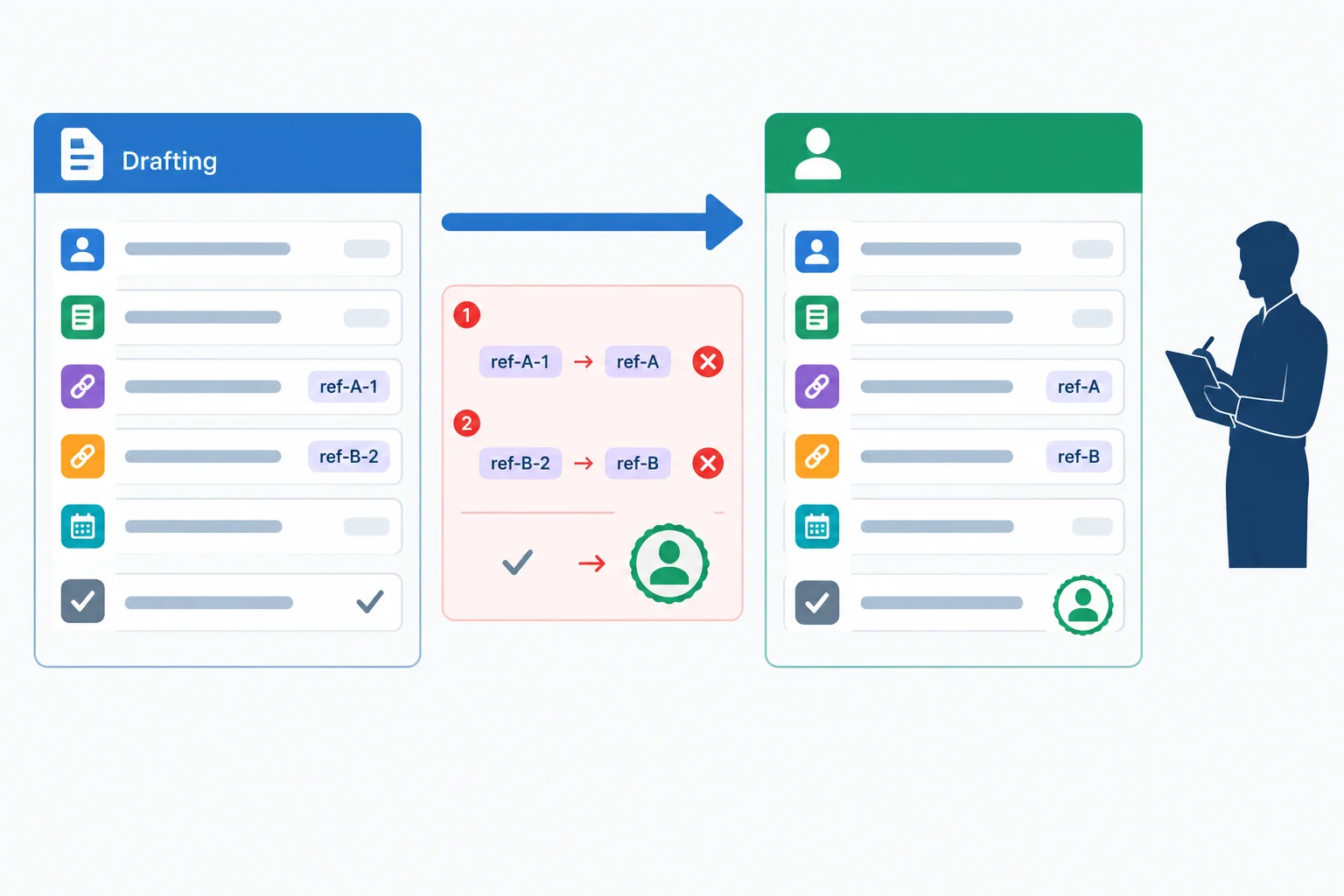
At a seam, preserve evidence exactly and do not turn component completion into a human decision.
Example
The following records show a defective transfer. Both synthetic sources are fictional practice sources, not real organizational policies.
Sending record — Drafting
request_id: R-001
request_text: Can Maple accommodate 8 people for 60 min?
room: Maple
attendees: 8
duration_min: 60
source_refs: S1-v1, S2-v1
draft_text: Maple accommodates up to 12 people and allows sessions up to 90 min. Staff must confirm availability separately.
approval_status: pending_review
reviewer: not_provided
review_note: not_provided
release_status: held
The drafting component also emits a non-authoritative processing note: draft_complete. That note says only that its drafting task ended.
Example
Before repair — receiving record at Human review
request_id: R-001
request_text: Can Maple accommodate 8 people for 60 min?
room: Maple
attendees: 8
duration_min: 60
source_refs: S1, S2
draft_text: Maple accommodates up to 12 people and allows sessions up to 90 min. Staff must confirm availability separately.
approval_status: approved
reviewer: not_provided
review_note: not_provided
release_status: held
The receiving component treated draft_complete as though it authorized approval. It also shortened the source identifiers during transfer. The draft wording itself is not the first problem; the transfer altered evidence and authority.
Compare the sender and receiver rather than guessing from the final draft.
| Field or signal | Sending side | Before repair | Why it fails |
|---|---|---|---|
| source_refs | S1-v1, S2-v1 | S1, S2 | Versions are lost |
| drafting signal | draft_complete | used as approval | Completion is not a Reviewer decision |
| approval_status | pending_review | approved | Authority was invented |
| release_status | held | held | This value remains consistent |
Repair the transfer rule, not the missing evidence after the fact.
source_refs unchanged: S1-v1, S2-v1 remains exactly that.draft_complete only as a local processing signal. It does not write approval_status.approval_status: pending_review, reviewer: not_provided, and review_note: not_provided until the Reviewer acts.If the original complete identifiers were genuinely absent, do not reconstruct them from memory or label them as evidence. Repair the mapping at the sender-to-receiver seam and replay from the intact sending record.
Example
Replayed receiving record — Human review
request_id: R-001
request_text: Can Maple accommodate 8 people for 60 min?
room: Maple
attendees: 8
duration_min: 60
source_refs: S1-v1, S2-v1
draft_text: Maple accommodates up to 12 people and allows sessions up to 90 min. Staff must confirm availability separately.
approval_status: pending_review
reviewer: not_provided
review_note: not_provided
release_status: held
The same input now reaches Human review with traceability intact. This replay verifies the seam preserves the pending-review state; it does not perform approval.
Tip
Only the Reviewer may change approval_status to approved or needs_revision and fill in reviewer and review_note. Release preparation must not infer that decision from an Assistant output or a transfer signal.
A transfer from Drafting to Human review produces the following Before repair receiving record. The sending record contained source_refs: S1-v1, S2-v1 and approval_status: pending_review. Its component signal was draft_complete.
request_id: R-001
source_refs: S1, S2
approval_status: approved
reviewer: not_provided
review_note: not_provided
release_status: held
Identify the earliest faulty transfer, state the corrected mapping or transfer rule, and write the corrected values that the receiving record must retain for source_refs and approval_status. Explain why no approval can be inferred yet.
Write at least 180 characters (0/180).

Step 6 of 8
Preserve workflow-level behavior in a manual or hybrid route, and label each demonstrated operation or untested capability precisely.
A manual simulation is faithful when it preserves the workflow’s behavior, not when it merely produces a plausible reply. Keep the same input, five-stage order, transformation rules, branch conditions, approval gate, and required output fields.
For Cedar Hub, the sequence remains: Intake → Source selection → Drafting → Human review → Release preparation. An Operator may perform a transfer manually, but may not skip the source-selection rule or turn a draft into an approved release.
The prototype boundary still ends at a human-approved reply prepared for manual use. It does not check a live calendar, reserve Maple, or send a message.
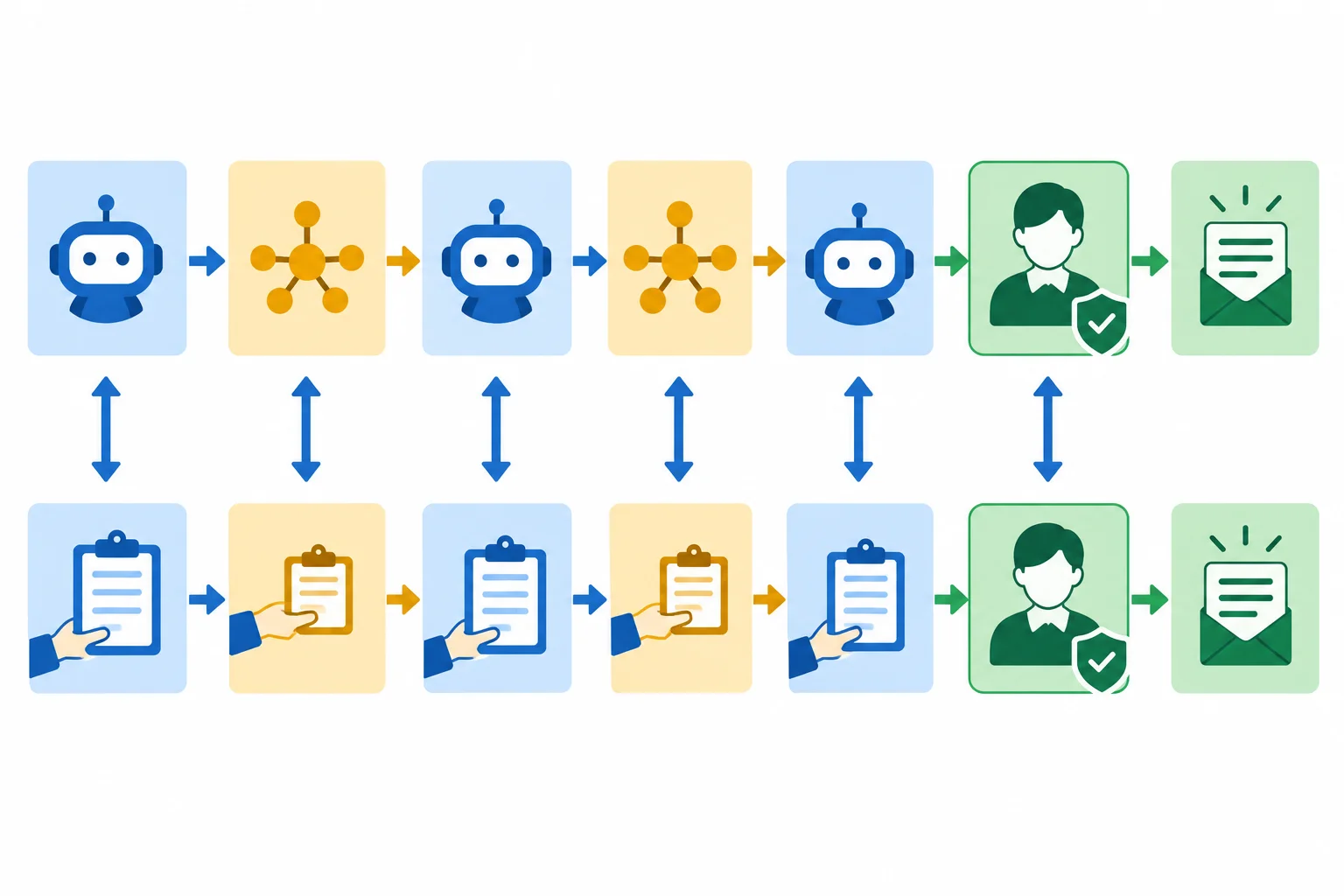
A manual substitute is acceptable only when it retains the same stage sequence, information flow, and approval condition.
Apply evidence labels to individual operations or capability claims—not to the prototype as a whole. “Observed” means the stated operation actually occurred. It does not mean that a related automated capability was proven.
Use the label that matches the specific operation performed.
| Operation or claim | Evidence label | What this does not establish |
|---|---|---|
| An Assistant actually runs P2-draft-v1 and returns a draft | observed | Model quality across other requests |
| Operator manually copies the current handoff record between stages | simulated | Connector reliability, timing, or capacity |
| Reviewer personally checks the draft and records a decision | observed | Automated permission enforcement |
| A calendar availability connector is not run | untested | Whether Maple is available |
| Message delivery is not attempted | untested | Whether a reply can be sent |
Example
Consider this hybrid route for R-001. It is faithful because every required condition remains visible:
No live availability lookup or message sending occurred, so those capabilities remain untested.
Warning
A shortcut can still sound useful while changing the workflow. For example, an Operator who writes a reply from remembered room facts, skips Source selection and Human review, then labels it ready for manual use has not simulated the specified prototype. The source traceability and authoritative approval gate are gone.
Do not compensate by inventing evidence. A manual route may substitute for an automated connector, but it may not substitute an assumed approval, an unsupported availability claim, or missing source evidence.
Two routes are proposed for R-001.
Route A: The Operator performs Intake and Source selection using S1-v1 and S2-v1. An Assistant actually runs P2-draft-v1. The Operator manually transfers the complete handoff record to the Reviewer. The Reviewer records approval_status: approved, and Release preparation occurs afterward.
Route B: The Operator writes a reply from remembered room facts and moves it directly to Release preparation, without Source selection or a Reviewer action.
Which assessment is accurate?
Step 7 of 8
Save the exact configuration and execution context needed to reconstruct the Cedar Hub prototype without relying on chat history or memory.
A prototype snapshot is a rebuild record, not a chat transcript or a memory aid. It preserves the exact reusable configuration and procedure needed to assemble the Cedar Hub prototype again.
Capture the complete text of P1-intake-v1 and P2-draft-v1; the complete fictional practice-source excerpts S1-v1 and S2-v1; canonical handoff fields; repaired mapping rules; branch and approval rules; and the five-stage assembly order. Also record the execution route, capture date, tool and model names exactly as displayed, and relevant settings.
A later generative run may use the same configuration yet produce different wording. Reproducibility means that someone can reconstruct the configuration and follow the procedure—not that a model must return identical text.
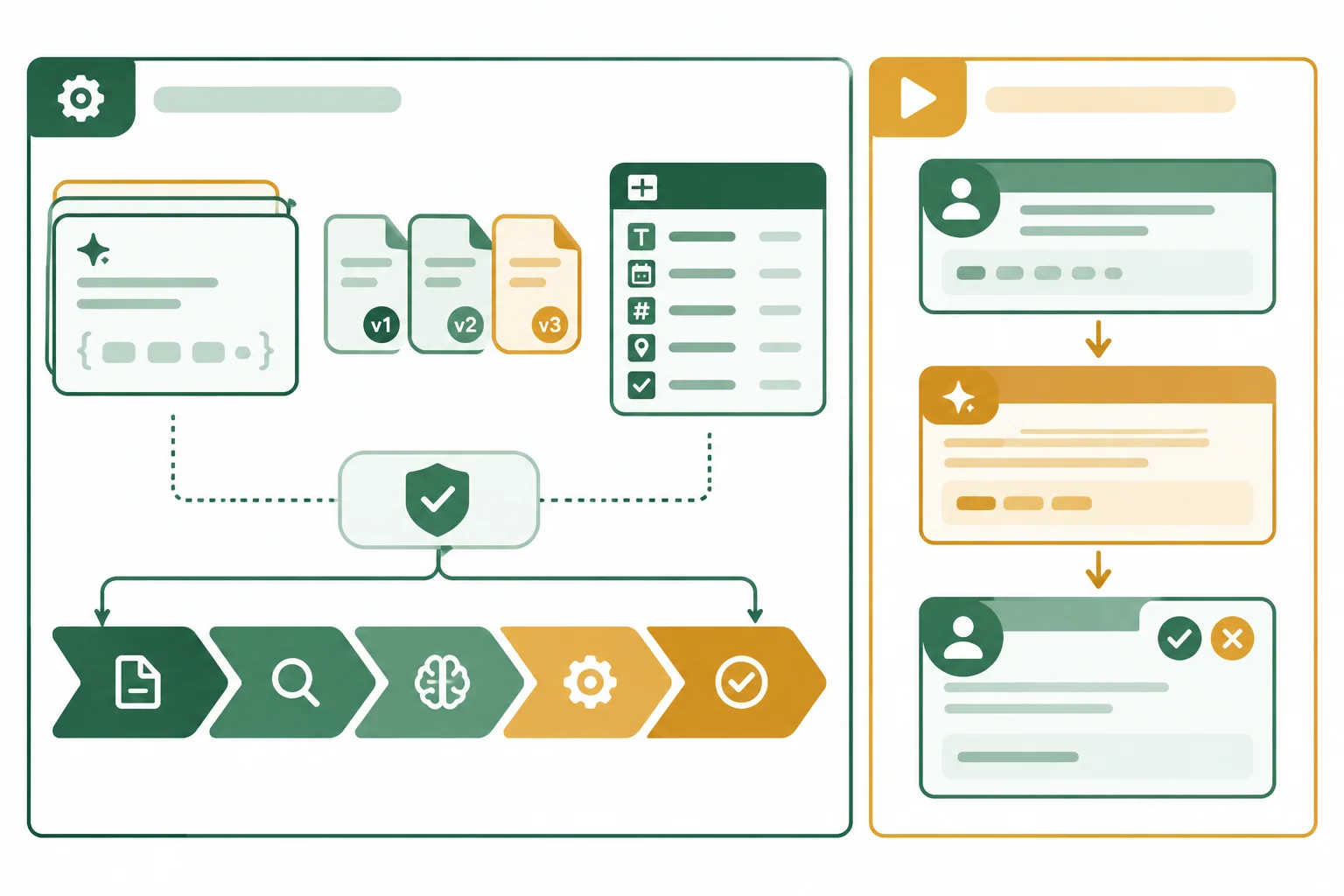
Keep what rebuilds the prototype separate from what happened in one run.
Tip
Start the saved configuration as Cedar-prototype-v1. After saving a configuration change—such as changing a prompt or transfer rule—increase the suffix rather than silently overwriting the earlier snapshot.
Record a tool or model name exactly as it appears in the route you used. For a setting that is hidden or unavailable to inspect, write not_exposed; do not guess its value. Evidence labels belong to a particular run, not to the reusable configuration.
A snapshot has two distinct sections. The reusable configuration tells another Operator how to rebuild the prototype. A run record documents what happened for one particular request. A convenient input, a generated draft, or a Reviewer action must never replace the reusable prompt, source, or rule text.
For a tool-based route, copy tool and model names exactly as displayed. In a text-only manual simulation, record unavailable tool, model, and setting values as not_exposed. In the run record, label each operation: observed only when it actually occurred, simulated for a manual substitute, and untested for a capability not attempted. A Reviewer action is observed only when a real Reviewer performed it.
Use this separation in one local text document.
| Reusable configuration | Particular run |
|---|---|
| Exact prompt text and placeholder slots | Request input and normalized handoff record |
| Complete S1-v1 and S2-v1 excerpts | Draft text produced or simulated for that request |
| Fields, repaired mappings, branch rules, stage order | Reviewer identity, review note, approval and release status |
| Route, displayed tool/model names, relevant settings | Operation-level evidence labels and known gaps |
Copy these lines into a local text document. Replace only the angle-bracket notes with facts from your own route; preserve the prompt text and placeholders exactly.
snapshot_id: Cedar-prototype-v1
captured_on: <YYYY-MM-DD>
execution_route: <Available Assistant | existing no-code tool | text-only manual simulation>
tool_name_as_displayed: <exact displayed name or not_exposed>
model_name_as_displayed: <exact displayed name or not_exposed>
relevant_visible_settings: <exact displayed settings or not_exposed>
hidden_or_unavailable_settings: not_exposed

P1-intake-v1:
Turn {{request_text}} into key: value fields: request_id, request_text, room, attendees, duration_min. Use whole-number minutes. Do not infer availability, approval, or release. Use not_provided only for missing values.

P2-draft-v1:
Using {{normalized_request}} and only {{source_excerpts}}, prepare a reply for manual use. State suitability from the sources, say availability requires staff confirmation, and do not approve, release, reserve, or send. Return draft_text and source_refs with full source identifiers.Add the complete authorized excerpts and fixed rules. These lines are reusable configuration, not a summary of the sources.
S1-v1: Fictional practice source. Maple capacity: 12 people. Maximum session duration: 90 min.

S2-v1: Fictional practice source. Staff must confirm availability separately and approve replies before release preparation.

Fixed workflow rules:
- For R-001, select S1-v1 and S2-v1.
- Keep complete source identifiers attached to the selected excerpts and to the drafting output.
- The Operator may manually transfer the defined text blocks between stages.
- A draft is prepared for human review and manual use; it is not a reservation or a sent message.Add the interface, repaired transfer rules, and an optional separate record for one run. The run section may be empty when you first save the configuration.
handoff_fields: request_id; request_text; room; attendees; duration_min; source_refs; draft_text; approval_status; reviewer; review_note; release_status
mapping_rules:
- Copy the current handoff record at every transfer; merge permitted updates only.
- Normalize duration to duration_min as a whole-number minute value.
- Preserve source_refs with complete version suffixes; never shorten S1-v1 or S2-v1.
- Treat draft_complete only as a processing signal; it never changes approval_status.
- Only Reviewer sets approval_status, reviewer, and review_note.
branch_rules:
- approval_status: pending_review, approved, or needs_revision.
- release_status: held unless approval_status is approved and required fields, source_refs, and draft_text are intact.
- If permitted, release_status: ready_for_manual_use. Do not send a message, check live availability, or reserve a room.
assembly_order: Intake > Source selection > Drafting > Human review > Release preparation

run_record:
request_input: <particular input or not_provided>
generated_or_simulated_draft: <particular output or not_provided>
reviewer_action: <actual Reviewer action or not_provided>
operation_evidence: <operation: observed | simulated | untested>
Example
A local plain-text document is sufficient; no export feature is required. Keep complete prompt and source wording rather than replacing either with a summary. The workflow rules make Reviewer authority explicit, while S2-v1 remains the same fictional practice-source excerpt used in the build bundle.
Create or audit your local Cedar-prototype-v1 using the template. Then submit a compact 6–10 line audit.
State whether it contains the complete P1 and P2 prompt text, S1-v1, S2-v1, all handoff fields, repaired mapping rules, branch rules, assembly order, route, ISO capture date, displayed tool/model names, and settings treatment. Write reconstruction_gap: none only if every reconstruction-critical element is present. Otherwise, list each missing prompt, source version, mapping rule, or relevant setting and say why it blocks faithful reconstruction.
Also distinguish a setting recorded as not_exposed from a value you simply failed to record. End by explaining why a future reply may differ in wording even when the reconstructed prototype is the same.
Write at least 500 characters (0/500).

Step 8 of 8
Trace one permitted request through the saved prototype and report precisely what the completed flow does and does not demonstrate.
An integration smoke check follows one permitted request through the assembled flow to establish basic end-to-end connectivity. Its claim is deliberately narrow: for this run, the stages carry the required information and respect the approval gate. It does not establish overall model quality, calendar reliability, or whole-solution acceptance.
Use your saved prototype snapshot and the fixed request: R-001 asks whether Maple can accommodate 8 people for 60 min. The deliverable is a human-approved reply prepared for manual use—not a reservation and not a sent message.

Trace one current handoff record through Intake, Source selection, Drafting, Human review, and Release preparation.
Tip
Keep the boundary visible. S1-v1 and S2-v1 are fictional practice sources. The check may support a suitability statement from those excerpts, but it must not claim that Maple is available unless availability was separately confirmed—which this prototype does not do.
Record a compact trace as you run the saved configuration. S1-v1 supports the suitability check: Maple has capacity for 12 people and a maximum session duration of 90 min, so R-001 fits those documented limits. S2-v1 requires separate staff availability confirmation and Reviewer approval before release preparation.
A sound draft can therefore state suitability for the requested size and duration while leaving availability unconfirmed. Before an actual Reviewer action, the record remains approval_status: pending_review and release_status: held. A manual simulation may stand in for a transfer or an unavailable automated operation; it may never stand in for approval.
Use this minimum structure in your local notes. Apply an evidence label to each operation or capability claim, not to the prototype as a whole.
| Stage | Record evidence to capture | Evidence-label rule |
|---|---|---|
| Intake | request_id; room; attendees; duration_min | observed if the configured operation ran; simulated if manually substituted |
| Source selection | source_refs with full versions | observed or simulated, according to the operation actually performed |
| Drafting | draft_text; source-grounded suitability | observed for an actual Assistant run; simulated for a manual substitute |
| Human review | approval_status; reviewer; review_note | observed only for an actual Reviewer action; never simulated |
| Release preparation | release_status; prepared reply; no send | only after observed Reviewer approval; otherwise held |
Example
A completed text-only trace can look like this when a real person performs the review:
snapshot_id: Cedar-prototype-v1
Intake — request_id: R-001; room: Maple; attendees: 8; duration_min: 60; evidence: simulated
Source selection — source_refs: S1-v1, S2-v1; evidence: simulated
Drafting — draft_text: Maple fits 8 people for 60 min under S1-v1. Staff must confirm availability separately.; evidence: simulated
Human review — approval_status: approved; reviewer: Reviewer; review_note: Suitability supported; no availability claim.; evidence: observed
Release preparation — release_status: ready_for_manual_use; deliverable: approved reply prepared for manual use; evidence: simulated
known_gap: availability was not checked
untested: calendar lookup, reservation, message delivery
The Human review line is valid only if a real person acting as Reviewer checked the draft and recorded that decision. If no real review occurs, retain pending_review and held; the smoke check stops at that checkpoint rather than reporting a prepared release.
A broken run is useful evidence. First retain the original trace and name the first blocking seam. Then repair only the local mapping or transfer rule, without inventing evidence or approval. Repeat the same input, R-001, after the repair so the comparison remains meaningful.
When a saved configuration changes, increment the snapshot suffix. For example, after repairing Cedar-prototype-v1, save Cedar-prototype-v2. Keep the earlier failed observation alongside the repeated result; do not overwrite it. If no configuration changed, keep the same snapshot identifier and add the new run observation separately.
Warning
Do not convert generic processing language into approval or reconstruct shortened source identifiers from memory. A repair preserves what the sending record actually contained. It also cannot replace a missing actual Reviewer action: without it, the correct result remains pending review and held.
These blocking seams require a mapping repair, not a fabricated successful result.
| Mismatch | Retain as evidence | Repair and rerun |
|---|---|---|
| Version loss | Before repair: source_refs: S1, S2 | Carry full identifiers unchanged: S1-v1, S2-v1. |
| False approval | Before repair: draft_complete was treated as approval and approval_status became approved | Keep approval_status: pending_review until an actual Reviewer records a decision. |
| Rule | What it means |
|---|---|
| One-run scope | A smoke check establishes basic connectivity, not whole-solution acceptance. |
| Traceability | Tie the run to a snapshot and preserve request details plus full source references. |
| Human checkpoint | Only an actual Reviewer action, labeled observed, can support approved release preparation. |
| Evidence labels | Use observed for an operation actually performed, simulated for a manual substitute, and untested for a capability not attempted. |
| Repair history | Keep the failure location and earlier observation when repairing and repeating R-001. |
Tip
Formal acceptance work will examine broader requirements and evidence in the next tutorial. For now, make a precise claim about this one configured route and this one recorded run.
Produce a compact integration smoke-check report for your current saved prototype and R-001.
In 8–14 lines, include the snapshot identifier and outcome; each required stage in execution order; the request fields; complete source_refs; the draft’s suitability conclusion and its availability boundary; approval and release states; and operation-level evidence labels.
If the run reaches Release preparation, identify the actual Reviewer action that was observed and show how it authorized that transition. If no actual Reviewer action occurred, report the checkpoint as the blocking point and keep the applicable approval and release states. If another seam blocked the run, retain the earlier observation, identify the first seam, state the local repair and revised snapshot identifier if configuration changed, then report the repeated-run outcome. End with one known gap and one untested capability.
Write at least 350 characters (0/350).
Congratulations! You completed: Assembling a Small AI Solution Prototype
Thousands of online courses in video, ebooks and audiobooks.
To test your knowledge during online courses
Generated directly from your cell phone's photo gallery and sent to your email

Download our app via QR Code or the links below:.



Carry knowledge in your pocket.
Download the Cursa app.
There are hundreds of free courses available, with a free certificate of completion that is saved in your mobile image gallery.
Download the app to access the Course Completion Certificate for Free.


+ 10 million
students

Free and Valid
Certificate

60 thousand free
exercises

4.8/5 rating in
app stores

Free courses in
video and ebooks