Create outlines and textures; use high-res painting and fix mirrored UV/parallax issues
Set up eye/helmet shaders: transparency blend mode, stable highlights, apply rotation, robust nodes
About the free online course
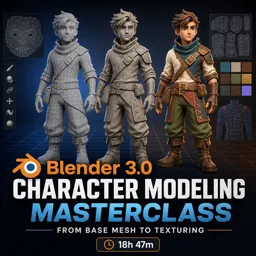
Bring a full character workflow into your Blender skillset and learn how to go from a simple base mesh to a finished, textured model that’s ready for games, animation, or portfolio presentation. This free online course follows a practical, production-style process that helps you build confidence with the tools that matter most in character creation, while also teaching you how to avoid common mistakes that lead to messy topology, shading issues, or frustrating bakes.
You’ll start by shaping a clean, symmetrical base and setting up references the right way, so proportions and silhouettes stay under control from the beginning. From there, you’ll push the model into a high-poly version to add refinement and surface quality, using Blender features that improve form quickly and keep edits non-destructive until you’re ready to commit. Along the way, you’ll learn how to fix face direction problems, keep seams welded during mirroring, and correct shading artifacts so the character reads well under lighting.
Once the high-poly is complete, the course guides you into retopology with a clear goal: a lighter, animation-friendly or game-ready mesh that keeps the silhouette while removing unnecessary density. You’ll practice creating clean edge flow, keeping parts aligned for baking, and using projection techniques to ensure the low-poly adheres to the sculpted shape. This step is essential for real-time work, and it’s also where many beginners get stuck—so the focus stays on decisions that produce reliable results rather than overly complicated theory.
You’ll then move into UV mapping with a workflow built for character assets: placing seams strategically, unwrapping cleanly, and organizing islands to make texturing and baking predictable. With your UVs prepared, you’ll bake surface detail from high to low poly, creating maps that preserve the sculpt’s definition without the performance cost. The course also addresses quality issues like fuzzy edges and explains practical fixes so your normal maps and outlines look crisp.
Finally, you’ll texture and polish the model, including stylized details such as eye materials, highlights, and transparency setups that behave correctly under rotation and mirroring. By the end, you’ll have a strong understanding of how the major stages connect—from modeling choices to baking outcomes—so you can repeat the pipeline on new characters with better speed and consistency.
Course content
Video class: [#01] Blender 3.0 Character Modeling Tutorial - Beginner Friendly [2022]07m
Exercise: After creating the high poly mesh, what is the next major step used to prepare the character for a clean low poly version with baked detail?
Video class: [#02] Blender 3.0 Character Modeling Tutorial - Reference Setup [2022]14m
Exercise: When setting up reference images in a new Blender scene, what is the quickest method described to bring the images into the viewport as image planes?
Video class: [#03] Blender 3.0 Character Modeling Tutorial - Base Mesh Modeling 1 [2022]17m
Exercise: When setting up symmetrical poly modeling for the character, what does enabling the Mirror modifier’s Clipping option primarily prevent?
Video class: [#04] Blender 3.0 Character Modeling Tutorial - Base Mesh Modeling 2 [2022]18m
Exercise: When scaling the duplicated cylinder to increase thickness without changing its height, which shortcut setup is used?
Video class: [#05] Blender 3.0 Character Modeling Tutorial - Base Mesh Modeling 3 [2022]21m
Exercise: What Blender add-on is enabled to access tools like Relax for smoothing and improving edge loop spacing?
Video class: [#06] Blender 3.0 Character Modeling Tutorial - Base Mesh Modeling 4 [2022]24m
Exercise: Which modifier is used to fit the helmet mesh onto the icosphere to get a cleaner, more spherical shape?
Video class: [#07] Blender 3.0 Character Modeling Tutorial - Base Mesh Modeling 5 [2022]22m
Exercise: When mirroring a duplicated ear by scaling it on the X axis with a negative value, what step ensures the face directions are corrected afterward?
Video class: [#08] Blender 3.0 Character Modeling Tutorial - Base Mesh Modeling 6 [2022]17m
Exercise: When creating a quick hair indication mesh that conforms to the character’s head, which snapping setup ensures moved vertices stick to the surface from any view?
Video class: [#09] Blender 3.0 Character Modeling Tutorial - High Poly Modeling 1 [2022]24m
Exercise: Before starting sculpting detail, which modifier is applied so the mirroring becomes part of the mesh?
Video class: [#10] Blender 3.0 Character Modeling Tutorial - High Poly Modeling 2 [2022]24m
Exercise: Which action was used to increase mesh density so finer sculpted details could be added without manually adding geometry?
Video class: [#11] Blender 3.0 Character Modeling Tutorial - High Poly Modeling 3 [2022]14m
Exercise: After adding a Subdivision Surface modifier to the helmet, what technique is used to restore sharper edges where needed?
Video class: [#12] Blender 3.0 Character Modeling Tutorial - High Poly Modeling 4 [2022]27m
Exercise: When converting part of the hand into a thumb with clean topology after deleting the lower half, which tool is used to fill the open area?
Video class: [#13] Blender 3.0 Character Modeling Tutorial - High Poly Modeling 5 [2022]16m
Exercise: Which tool and follow-up action are used to create a cut around the foot area and then combine two vertices into one?
Video class: [#14] Blender 3.0 Character Modeling Tutorial - High Poly Modeling 6 [2022]24m
Exercise: When creating a cut-out section in the neck ring, which Blender tool is used to subtract one cylinder from the ring mesh?
Video class: [#15] Blender 3.0 Character Modeling Tutorial - High Poly Modeling 7 [2022]25m
Exercise: When adding a Subdivision Surface modifier caused shading artifacts, what was used to fix the shading by recalculating normals?
Video class: [#16] Blender 3.0 Character Modeling Tutorial - High Poly Modeling 8 [2022]15m
Exercise: After copying the lower pants detail to the other side, which step is used to fix the flipped surface direction?
Video class: [#17] Blender 3.0 Character Modeling Tutorial - High Poly Modeling 9 [2022]24m
Exercise: When fitting the modeled hair strand to the head, which modifier is used to bend it into shape?
Video class: [#18] Blender 3.0 Character Modeling Tutorial - High Poly Modeling 10 [2022]18m
Exercise: When the character’s legs looked too thin, which shortcut was used to quickly inflate them for more volume?
Video class: [#19] Blender 3.0 Character Modeling Tutorial - High Poly Modeling 11 [2022]20m
Exercise: Which tool/shortcut is used to add multiple loop cuts on the arm ring detail by increasing the number of cuts with the scroll wheel?
Video class: [#20] Blender 3.0 Character Modeling Tutorial - Retopology 01 [2022]23m
Exercise: Why is retopology commonly done after creating a high-poly character model for games?
Video class: [#21] Blender 3.0 Character Modeling Tutorial - Retopology 02 [2022]25m
Exercise: When preparing multiple body parts to bake as one, what is the recommended step before joining objects with Ctrl+J?
Video class: [#22] Blender 3.0 Character Modeling Tutorial - Retopology 03 [2022]35m
Exercise: When creating a symmetrical detail from a plane, what is the key reason to delete one half and add a Mirror modifier with Clipping enabled?
Video class: [#23] Blender 3.0 Character Modeling Tutorial - Retopology 04 [2022]33m
Exercise: When reducing a detailed mesh for a game-ready version, why is it acceptable to delete many edge loops while keeping the silhouette intact?
Video class: [#24] Blender 3.0 Character Modeling Tutorial - Retopology 05 [2022]44m
Exercise: When adjusting a mirrored mesh, which Mirror modifier option prevents vertices from being pulled apart at the center seam because they snap together?
Video class: [#25] Blender 3.0 Character Modeling Tutorial - Retopology 06 [2022]32m
Exercise: When refining the leg’s low-poly topology, what is suggested as an easy way to reduce too many loops while keeping the mesh smooth?
Video class: [#26] Blender 3.0 Character Modeling Tutorial - Retopology 07 [2022]49m
Exercise: When retopologizing and using a Shrinkwrap with a Mirror on a non-symmetrical mesh, what modifier order is recommended?
Video class: [#27] Blender 3.0 Character Modeling Tutorial - Retopology 08 [2022]44m
Exercise: When moving the foot/leg to fix intersections, what must be done to keep the low and high resolution meshes aligned for baking?
Video class: [#28] Blender 3.0 Character Modeling Tutorial - Retopology 09 [2022]46m
Exercise: Which Blender tool was used to snap the updated low-resolution helmet parts onto the high-resolution helmet surface?
Video class: [#29] Blender 3.0 Character Modeling Tutorial - Retopology 10 [2022]20m
Exercise: When shrinkwrapping a duplicated mesh piece onto a target, which Shrinkwrap setting was suggested as an alternative to Nearest Surface Point to potentially get a better result?
Video class: [#30] Blender 3.0 Character Modeling Tutorial - UV Mapping 01 [2022]42m
Exercise: When starting UV mapping, what is the first key step to help Blender unwrap a mesh cleanly?
Video class: [#31] Blender 3.0 Character Modeling Tutorial - UV Mapping 02 [2022]49m
Exercise: Which Blender UV unwrap tool is used to straighten a strip of quads after selecting one face that is already straight?
Video class: [#32] Blender 3.0 Character Modeling Tutorial - UV Mapping 03 [2022]19m
Exercise: When packing UVs for complex character parts, what feature is used to keep stacked islands (like fingers) packed together as a single group?
Video class: [#33] Blender 3.0 Character Modeling Tutorial - Texture Baking [2022]18m
Exercise: Why is it recommended to triangulate the low-poly mesh before baking and exporting to another application?
Video class: [#34] Blender 3.0 Character Modeling Tutorial - Outlines [2022]29m
Exercise: Why is it important to apply shrinkwrap (and similar deforming) modifiers before deleting the high-res objects?
Video class: [#35] Blender 3.0 Character Modeling Tutorial - Texturing 01 [2022]25m
Exercise: How can you eliminate fuzzy/unclean edges in a baked normal map?
Video class: [#36] Blender 3.0 Character Modeling Tutorial - Texturing 02 [2022]32m
Exercise: When painting black-and-white outline textures, what was the main reason given for increasing the image resolution to 4096×4096?
Video class: [#37] Blender 3.0 Character Modeling Tutorial - Texturing 03 [2022]27m
Exercise: When creating the white part of the eye, what requirement must be met for the Grid Fill tool to work correctly?
Video class: [#38] Blender 3.0 Character Modeling Tutorial - Texturing 04 [2022]40m
Exercise: To enable transparency when mixing an Emission shader with a Transparent shader for the eye plane, which material setting must be changed?
Video class: [#39] Blender 3.0 Character Modeling Tutorial - Texturing 05 [2022]42m
Exercise: How can you fix a mirrored eye where the parallax/texture shift moves in the wrong direction due to flipped UVs?
Video class: [#40] Blender 3.0 Character Modeling Tutorial - Texturing 06 [2022]13m
Exercise: What change fixes the eye highlight/shading so it stays correct even when the object is flipped upside down?
Video class: [#41] Blender 3.0 Character Modeling Tutorial - Texturing 07 [2022]20m
Exercise: Why was the object rotation applied (Ctrl+A → Apply Rotation) when setting up the helmet eye-like shader?
Video class: [#42] Blender 3.0 Character Modeling Tutorial - Texturing 08 [2022]07m
Exercise: Which node setup fixes the effect so it works even when the face is not pointing forward?
Video class: [#Final] Blender 3.0 Character Modeling Tutorial - Final Cleanup [2022]23m
Exercise: What is the main reason the eye line was changed from a mesh element to a painted texture?