It teaches a staged workflow: block clear poses and timing first, refine body mechanics and arcs, then polish curves, secondary action, and details in the Graph Editor.

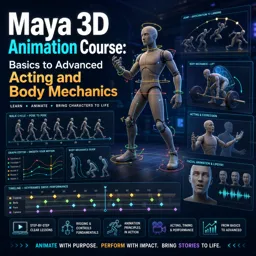
Duration of the online course: 8 hours and 32 minutes
New
Animate believable characters in Maya—body mechanics, acting, and lip‑sync. Learn pro workflow in a free online course with practical exercises and tools.
Bring your characters to life in Autodesk Maya by learning the same animation thinking used in professional pipelines, from your first keyframes to advanced performance. This free online course guides you through a complete progression: getting comfortable inside Maya, building clean animation curves, and developing strong timing so motion feels intentional rather than floaty or mechanical. You will practice a repeatable workflow that helps you block ideas quickly, then refine them with confidence using the Graph Editor and clear camera reads.
As you advance, the focus shifts from simple motion to believable physicality. You will train your eye for weight, balance, and contact so walks, runs, jumps, and settles feel grounded. You will learn how to prevent common problems like foot sliding, mushy impacts, and inconsistent spacing, and you will make smarter polishing choices by understanding when to hold, when to snap, and how to shape curves for clarity. Along the way, you will also handle typical animation setup needs, including constraints that let props follow a hand while still giving you control over timing.
With a solid mechanics foundation, you will move into acting: creating readable poses, communicating mood through posture, and crafting pantomime that reads instantly from silhouette. The course then deepens into facial animation and dialogue, showing you how to time mouth shapes for believable lip-sync, add accents and gestures, and organize your work so performance, staging, and polish support each other. By the end, you will have a practical, production-minded approach to Maya animation that strengthens both your technical control and your ability to tell a story through motion.

Explore free online 3D animation courses with certificates and learn essential skills in 3D modeling, character animation, rigging, texturing, lighting, rendering, and visual effects. Study at your own pace, build portfolio-ready projects, and gain practical expertise for careers in animation, games, film, and digital design.

Explore free online Character Animation courses designed to help you master expressive movement, acting, timing, posing, and storytelling for 2D and 3D characters. Learn practical animation techniques at your own pace, build job-ready creative skills, and earn a certificate upon completion to showcase your achievement.

8 hours and 32 minutes of online video course

Digital certificate of course completion (Free)

Exercises to train your knowledge

100% free, from content to certificate
What Maya animation workflow does the course teach for polishing a shot?
It teaches a staged workflow: block clear poses and timing first, refine body mechanics and arcs, then polish curves, secondary action, and details in the Graph Editor.
How does the course prevent foot sliding in Maya walk and run cycles?
It covers using appropriate stepped or flat tangent treatment on planted-foot translation curves, especially Translate Y and front-to-back Translate Z, to keep feet locked to the ground.
Does this Maya course cover dialogue lip-sync and character acting?
Yes. It progresses from posture, posing, and pantomime silhouettes to facial animation, lip-sync timing, gestures, monologues, and two-character dialogue scenes.
Ready to get started?Download the app and get started today.
Install the app now
to access the course
Over 5,000 free courses
Programming, English, Digital Marketing and much more! Learn whatever you want, for free.

Study plan with AI
Our app's Artificial Intelligence can create a study schedule for the course you choose.

From zero to professional success
Improve your resume with our free Certificate and then use our Artificial Intelligence to find your dream job.
You can also use the QR Code or the links below.



Free CourseBlender 3.0 basics course
5

(9)

4h48m

23 exercises
Free CourseBlender Tutorials
5
(1)
9h21m
27 exercises
Free CourseBlender 3D Animation for Beginners: Complete Tutorial Series
5
(1)
3h27m
14 exercises
Free Course3D modeling
4.8
(69)
27h29m
23 exercises
Free CourseCharacter Animation in Cinema 4D
New
3h22m
5 exercises
Free CourseMoho 14 Animation Masterclass: Beginner to Expert
New
6h08m
36 exercises
Free CourseBlender 3.0 Character Modeling Masterclass: From Base Mesh to Texturing
New
18h47m
43 exercises
Free CourseCinema 4D Essentials: 3D Modeling, Animation and Rendering Course
New
15h12m
30 exercises
Free CourseBlender Fundamentals: Learn Modeling, Shading, Lighting, Rendering, Rigging and Animation
New
4h59m
39 exercises
Free CourseBlender 4.0 Beginner Donut Tutorial: Modeling, Shading, Geometry Nodes and Rendering
New
4h55m
13 exercises
Carry knowledge in your pocket.
Download the Cursa app.
There are hundreds of free courses available, with a free certificate of completion that is saved in your mobile image gallery.
Download the app to access the Course Completion Certificate for Free.


+ 10 million
students

Free and Valid
Certificate

60 thousand free
exercises

4.8/5 rating in
app stores

Free courses in
video and ebooks