INTRODUCTION
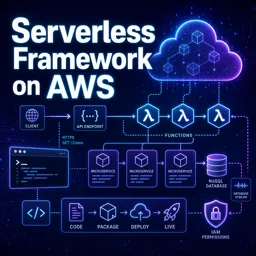
Serverless computing is transforming how modern web applications are built and deployed. By abstracting server management and allowing developers to focus purely on code, serverless platforms such as AWS Lambda, Google Cloud Functions, and Azure Functions are reshaping traditional IT infrastructure and workflows. But why should organizations consider serverless for their next web project? Let’s explore the top benefits.
1. REDUCED OPERATIONAL COMPLEXITY
One of the key advantages of serverless is eliminating manual server management. Developers no longer need to provision, patch, scale, or maintain servers. Instead, they can focus on writing business logic, boosting productivity, and reducing human error. This simplicity enables faster deployment cycles and more reliable applications.
2. AUTOMATIC AND SEAMLESS SCALABILITY
Traditional web servers often require careful configuration to handle traffic spikes. Serverless platforms automatically provision resources: functions scale up in response to user activity and scale down when traffic drops. This elasticity ensures consistent performance regardless of workload fluctuations.
3. COST EFFICIENCY
Serverless operates on a pay-as-you-go model. Organizations are billed only for the actual execution time and resources consumed by function invocations, rather than idle server time. This minimizes costs, especially for applications with variable or unpredictable traffic patterns, and reduces overhead expenses.
4. ENHANCED SECURITY
Cloud providers handle security patches and server updates, reducing the burden on internal IT teams. Serverless architectures isolate application components, decreasing the attack surface. Centralized role and permission management ensures fine-grained access control for improved security.
5. FASTER TIME-TO-MARKET
Serverless enables rapid prototyping and iteration. Developers can deploy functions independently, test new features, and roll back changes instantly. Integration with event-driven services or APIs becomes straightforward, accelerating delivery timelines and helping businesses remain competitive.
USE CASES FOR SERVERLESS WEB APPLICATIONS
Serverless is ideal for many scenarios, including:
- Building REST APIs
- Handling background jobs
- Real-time data processing
- Integrating with third-party services
Examples include e-commerce platforms, SaaS applications, chatbots, IoT backends, and content management systems.
CHALLENGES AND CONSIDERATIONS
While serverless offers many benefits, developers must account for cold starts, vendor lock-in, and limitations on execution time or memory. Careful planning and architecture design are essential to maximize performance and minimize drawbacks.
CONCLUSION
Adopting serverless solutions allows web developers to innovate faster, scale effortlessly, and optimize costs. As cloud computing evolves, serverless is becoming a strategic driver for businesses seeking agility and operational excellence in the digital era.