Introduction
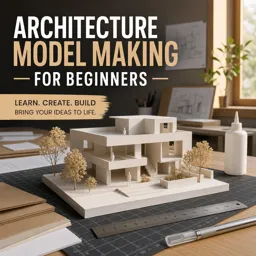
Architecture model making is an essential skill in architectural design, bridging the gap between abstract concepts and tangible forms. Whether you are a student, professional, or enthusiast, understanding the different materials and techniques available can significantly enhance your design process and presentation skills.
Choosing the Right Materials
The selection of materials has a profound impact on the quality and purpose of the architectural model. Here are some popular choices:
- Cardboard and Paperboard: Ideal for quick studies and conceptual models due to their affordability and ease of use.
- Foam Board: Lightweight and easy to cut, making it a favorite for both conceptual and detailed models.
- Balsa Wood: Offers a realistic finish and is excellent for structural studies, but requires careful handling.
- Acrylic and Plastic Sheets: Suitable for modern, sleek designs and transparent elements.
- 3D Printed Components: Increasingly popular for complex or repetitive elements that require precision.
Essential Techniques
Mastery of model making tools and techniques ensures a professional and expressive result. Some essential methods include:
- Cutting and Scoring: Accurate cutting is fundamental—use sharp blades and metal rulers for clean edges.
- Gluing: Different adhesives serve different purposes; white glue for paper, superglue for plastics, and hot glue for rapid assembly.
- Folding and Bending: Scoring along fold lines prevents cracking in card and plastic sheets.
- Painting and Finishing: Acrylic paints, markers, and sprays can bring models to life—use masking techniques for neatness.
- Landscaping and Detailing: Add texture and context with model foliage, textured paints, or even found objects.
Presenting Your Model
A great model not only conveys your architectural vision but also tells a story. Consider lighting, base design, and scale figures to enhance your model’s visual narrative. Effective presentation will help communicate your ideas clearly to clients, tutors, or collaborators.
Conclusion
Architecture model making is both an art and a discipline, offering endless possibilities for creativity and experimentation. By understanding material properties and mastering construction techniques, you can take your architectural designs to the next level.