If you have started learning languages such as Java, Python or C#, you have probably heard the term object-oriented programming, often shortened to OOP. It is one of the most widely used ways of organizing code, and understanding it makes large programs far easier to write, read and maintain. This guide explains the core ideas in plain language, with examples you can relate to everyday life.
What is object-oriented programming?
Object-oriented programming is a style of programming that organizes software around objects instead of just functions and lines of logic. An object bundles together data (information about something) and behavior (things that something can do). Instead of scattering variables and functions all over a program, you group related ones together, the same way real things combine properties and actions.
Think about a car. It has properties such as color, brand and current speed. It also has actions: accelerate, brake and turn. In OOP, you model this idea with a class that describes the car, and then you create individual car objects from it.
Classes and objects
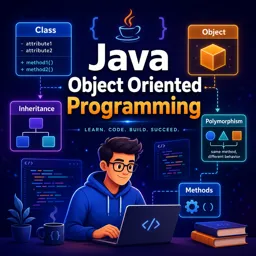
A class is a blueprint. It defines what data and behavior something will have, but it is not a specific thing by itself. An object (also called an instance) is a concrete thing created from that blueprint. If “Car” is the class, then a red hatchback and a blue pickup truck are two different objects, each with its own values.
| Concept | Meaning | Everyday example |
|---|---|---|
| Class | Blueprint describing data and behavior | The design for a house |
| Object | A concrete instance of a class | The house on your street |
| Attribute | A piece of data stored in an object | Number of rooms, color |
| Method | A function that belongs to an object | Open the door, turn on the lights |
| Constructor | Special method that sets up a new object | Building the house from the design |
The four pillars of OOP
Most introductions to OOP are organized around four main principles. They work together to keep code organized and flexible.
1. Encapsulation
Encapsulation means keeping an object’s internal data protected and exposing only what is necessary through controlled methods. A bank account object, for example, should not let other parts of the program change its balance directly. Instead, it offers methods such as “deposit” and “withdraw” that check the rules first. This protects the data from accidental or invalid changes and lets you change the inner workings later without breaking the rest of the program.
2. Abstraction
Abstraction means showing only the essential features of something and hiding the complexity behind it. When you drive, you use a steering wheel and pedals without needing to know how the engine injects fuel. In code, a well-designed class gives you simple methods to call while hiding the details of how the work is done.
3. Inheritance
Inheritance lets one class build on another. A “Vehicle” class might define speed and a method to move. A “Bicycle” class and a “Truck” class can inherit from Vehicle, reusing that shared code and adding their own features. This reduces duplication and expresses real relationships: a truck is a vehicle. Use inheritance carefully, though, since deep chains of classes can become hard to follow.
4. Polymorphism
Polymorphism means “many forms.” Different objects can respond to the same method call in their own way. If Dog and Cat both inherit from Animal and each has a “makeSound” method, calling “makeSound” on a list of animals produces a bark for the dog and a meow for the cat. The calling code does not need to know which specific type it is dealing with.
A simple example in pseudocode
class Animal:
    name
    method makeSound()

class Dog extends Animal:
    method makeSound(): print "Woof"

class Cat extends Animal:
    method makeSound(): print "Meow"

animals = [Dog("Rex"), Cat("Mia")]
for each animal in animals:
    animal.makeSound()
The loop treats every animal the same way, yet each one behaves differently. That is polymorphism and inheritance working together, while each class keeps its own details encapsulated.
Why OOP is useful
- Organization: related data and behavior live together, which makes large projects easier to navigate.
- Reuse: classes and inheritance reduce repeated code.
- Maintenance: changes can often be made inside one class without affecting the rest of the program.
- Teamwork: different developers can work on different classes with clear boundaries between them.
- Modeling: software can mirror real concepts such as customers, orders and products.
Common beginner mistakes
New programmers often create classes that do too many things at once. A good rule of thumb is that each class should have one clear responsibility. Another common mistake is overusing inheritance when a simple relationship, such as one object holding another, would be cleaner. Finally, leaving every attribute public defeats encapsulation, so practice keeping data private and using methods to access it.
How to practice
Pick small, familiar subjects: a library with books and members, a shopping cart, a school with students and teachers. Sketch the classes on paper first, listing attributes and methods, and then write the code. Even a few small projects like these help the four pillars feel natural instead of abstract.
Conclusion
Object-oriented programming is a way of thinking as much as a set of tools: model things as objects, hide the complexity, share behavior wisely and let different objects respond in their own way. Once these ideas click, languages like Java, Python and C# become much easier to learn. To keep building your skills with guided exercises, take a look at the programming courses available at Cursa.