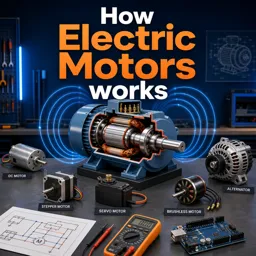
Every robotics project eventually reaches the same question: which motor should move this thing? Pick the wrong one and you spend weeks fighting a problem that the right choice would have removed entirely. This guide walks through the three motor types that dominate hobby and educational robotics, how each actually works, and the situations where each one wins.
The brushed DC motor
This is the simplest of the three and probably the first motor you ever took apart. Apply voltage across two terminals and the shaft spins. Reverse the polarity and it spins the other way. Increase the voltage and it spins faster.
Internally, a set of coils on the rotor is fed current through carbon brushes pressing against a segmented ring called the commutator. As the rotor turns, the commutator switches which coil is energised, keeping the magnetic push going in the same rotational direction. It is an elegantly mechanical solution to an electrical problem, and it is also the source of the motor’s main weaknesses: the brushes wear out, they generate electrical noise, and they waste some energy as friction.
The critical thing to understand is that a plain DC motor has no idea where it is. It spins. It does not count, it does not report position, and it does not hold a specific angle. If you need to know how far the wheel has turned, you must add something that measures it — usually an encoder.
Where DC motors shine
- Driving wheels on a mobile robot, where continuous rotation matters more than exact position.
- Fans, pumps, conveyor belts and anything that just needs to keep turning.
- Projects where cost and simplicity outrank precision.
The hobby servo
A hobby servo is not really a different kind of motor — it is a small DC motor packaged with three extra parts: a gearbox to trade speed for torque, a position sensor (traditionally a potentiometer) attached to the output shaft, and a small control board that constantly compares the actual position against the commanded one.
You send it a target angle and it does the work of getting there and staying there. If something pushes the arm out of place, the control board detects the error and drives the motor back. That closed loop is the entire value proposition.
The limitation is range. A standard servo rotates roughly 180 degrees, not continuously. There are continuous-rotation variants, but in those you give up position control and are effectively commanding speed instead. Precision is also finite: inexpensive servos typically hunt slightly around the target position rather than settling perfectly still.
Where servos shine
- Robot arm joints, grippers and pan-tilt camera mounts.
- Steering mechanisms and control surfaces.
- Any project where you want a specific angle with the least possible wiring and code.
The stepper motor
A stepper works on a completely different principle. Instead of a continuous push, its stator has multiple coil groups that are energised in a repeating sequence. Each pulse in that sequence pulls the rotor forward by a fixed, precisely known angle — a step. A very common specification is 1.8 degrees per step, which means 200 steps make one full revolution.
Because the step size is a property of the motor’s physical construction, you can move an exact distance without any sensor at all: count the pulses you sent and you know where the shaft is. This is called open-loop positioning, and it is why steppers dominate 3D printers, CNC machines and laser cutters.
The catch is right there in the word “open-loop.” If the load is too heavy or the acceleration too aggressive, the rotor can fail to keep up and skip steps. The controller has no way to notice, so from that point on its idea of position is silently wrong. Steppers also draw current even when holding still, and they lose torque as speed increases.
Most stepper setups also use a driver board that supports microstepping — subdividing each full step electrically to smooth motion and increase apparent resolution.
Where steppers shine
- Anything that must move to an exact coordinate: printers, plotters, camera sliders, linear stages.
- Applications needing strong holding torque at rest.
- Repeatable, slow, controlled motion.
Side by side
| Feature | Brushed DC | Hobby servo | Stepper |
|---|---|---|---|
| Position feedback | None built in | Built in | None, but position is inferred from step count |
| Rotation range | Continuous | Usually limited | Continuous |
| Holding torque at rest | Very low | Good | Very good |
| Top speed | High | Moderate | Low to moderate |
| Wiring complexity | Two wires plus driver | Three wires | Four or more wires plus driver |
| Typical cost | Lowest | Low | Moderate |
| Main failure mode | Brush wear | Gear stripping, jitter | Skipped steps |
A decision path
Work through these questions in order:
- Does the shaft need to turn continuously? If no, a servo is usually the fastest path. If yes, continue.
- Do you need to know or command exact position? If no, use a DC motor. If yes, continue.
- Is the load predictable and the motion relatively slow? If yes, a stepper gives you precision with simple control. If the load varies unpredictably or you need high speed, use a DC motor with an encoder and a closed-loop controller.
Two things beginners consistently underestimate
Power supply. Motors draw far more current at startup and under load than their idle figures suggest. Powering them from the same regulator that feeds your microcontroller is a reliable way to cause mysterious resets. Give motors their own supply and share only ground.
Gearing. Torque and speed trade against each other. A motor that seems too weak often just needs a reduction gearbox; a motor that seems too slow may be over-geared. Before replacing a motor, check whether the mechanical ratio is the real problem.
Building the intuition
The fastest way to internalise these differences is to drive all three from the same microcontroller and watch how the code changes. A DC motor needs a driver and a speed value. A servo needs one signal line and an angle. A stepper needs a driver, a step pin and a direction pin. Feeling those differences in your own project makes the trade-offs obvious in a way that no comparison table can.
If you would like a structured route into this, Cursa hosts free courses on robotics, Arduino and electronics fundamentals that cover motor control, drivers and sensor integration from the ground up.