Download Xcode from the Mac App Store, install it on a Mac, and launch it from the Applications folder.

Duration of the online course: 2 hours and 34 minutes
New
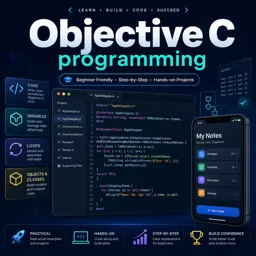
Build iOS-ready coding skills with a free Objective-C course: set up Xcode, write clean logic, use loops and objects, and earn a certificate.
Strengthen your foundation in Apple development by learning Objective-C from the ground up in a practical, beginner-friendly way. This free online course guides you from setting up your workspace in Xcode to writing real programs that compile, run, and evolve as your skills grow. If you want to understand how classic iOS and macOS codebases are built, or you are preparing to maintain legacy apps, Objective-C remains a valuable language to know.
You will start by getting comfortable with the tools and workflow on a Mac, including installing and launching Xcode and understanding how a basic program is organized. From there, you will learn how code communicates intent through clear structure and helpful comments, and how to work with essential data types so your programs can store and manipulate information accurately.
As you progress, you will gain confidence with the core logic used in app development: arithmetic and operators, comparisons, and decision-making with if, else, and else if. You will also practice controlling program flow using loops, including for, while, and do-while patterns, and learn how break and continue change execution. Along the way, you will see how user input can influence what your program does, making your code more interactive and realistic.
The course then brings you into an object-oriented mindset, introducing objects and methods in Objective-C and helping you understand how behavior and data work together. You will learn why getters and setters matter, how accessors can be generated, and how the dot syntax is used to set and retrieve values cleanly. By comparing instance variables with local variables, you will develop a clearer mental model for scope and state, which is crucial for debugging and building maintainable apps.
With short videos paired with quick checks and exercises, you can measure progress as you learn. Finish with a stronger grasp of Objective-C fundamentals, an improved ability to read and write code in Xcode, and skills you can apply to app maintenance, coursework, or your next step into iOS development.

2 hours and 34 minutes of online video course

Digital certificate of course completion (Free)

Exercises to train your knowledge

100% free, from content to certificate
Where can I download and set up Xcode for Objective-C programming?
Download Xcode from the Mac App Store, install it on a Mac, and launch it from the Applications folder.
What is the difference between a while loop and a do-while loop in Objective-C?
A while loop checks its condition before running; a do-while loop runs its body once before checking the condition.
How do getters, setters, and the dot operator work in Objective-C?
Getters read property values and setters update them. The dot operator provides shorthand syntax for calling these accessor methods.
Ready to get started?Download the app and get started today.
Install the app now
to access the course
Over 5,000 free courses
Programming, English, Digital Marketing and much more! Learn whatever you want, for free.

Study plan with AI
Our app's Artificial Intelligence can create a study schedule for the course you choose.

From zero to professional success
Improve your resume with our free Certificate and then use our Artificial Intelligence to find your dream job.
You can also use the QR Code or the links below.




Free CourseDart and Flutter Developer course
5

(3)

20h47m

6 exercises

Free CourseFlutter for complete beginners
5
(2)
1h45m
6 exercises

Free CourseBuild Your First Universal React Native App
5
(1)
1h23m
9 exercises

Free CourseAndroid for beginners
4.9
(361)
10h47m
52 exercises

Free CourseIonic for Beginners
4.8
(17)
5h04m
22 exercises

Free CourseFlutter tutorial for beginners
4.8
(5)
4h23m
8 exercises
Free CourseMobile App Development
4.7

(7)
21h40m
14 exercises

Free CourseiOS
4.7
(40)
22h35m
13 exercises

Free CourseiOS Development
4.7
(6)
4h51m
29 exercises
Free CourseApps
4.7
(54)
5h47m
28 exercises
Carry knowledge in your pocket.
Download the Cursa app.
There are hundreds of free courses available, with a free certificate of completion that is saved in your mobile image gallery.
Download the app to access the Course Completion Certificate for Free.


+ 10 million
students

Free and Valid
Certificate

60 thousand free
exercises

4.8/5 rating in
app stores

Free courses in
video and ebooks