WHAT IS MONGODB?
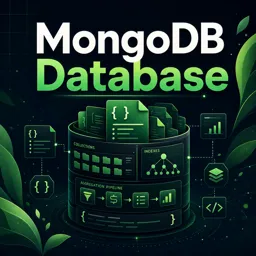
MongoDB is a leading open-source NoSQL database designed to manage large amounts of unstructured or semi-structured data. Unlike traditional relational databases, MongoDB uses a document-oriented approach, storing data in JSON-like documents with flexible schemas. This makes it especially valuable for projects that require scalability, speed, and rapid development cycles.
HOW MONGODB DIFFERS FROM RELATIONAL DATABASES
MongoDB breaks away from the rigid structure of relational databases in several key ways:
- Schema-less Design → Collections can contain documents with varying structures, enabling faster and more adaptable development.
- Document-Oriented → Data is stored in BSON (Binary JSON), ideal for representing complex relationships.
- Horizontal Scaling → Supports sharding, distributing data across multiple servers for large-scale deployments.
- No Joins Needed → Encourages embedding related data within documents, reducing reliance on foreign keys and joins.
CORE CONCEPTS OF MONGODB
- Document → A record in MongoDB, similar to a row in relational databases, but more flexible.
- Collection → A group of documents, comparable to a table in SQL systems.
- Database → A container for collections, used to organize related datasets.
MAIN FEATURES & BENEFITS
MongoDB has become popular because of its wide range of features:
- Scalability → Handles massive datasets and high traffic via sharding and replication.
- Performance → Fast read/write operations for real-time applications.
- Developer-Friendly → Flexible schemas and a rich query language.
- Replication & Failover → Replica sets ensure availability and data protection.
COMMON USE CASES FOR MONGODB
MongoDB powers a variety of modern applications, including:
- Content management systems.
- Real-time analytics and big data platforms.
- Mobile and web applications with evolving data models.
- IoT (Internet of Things) solutions.
GETTING STARTED WITH MONGODB
To begin using MongoDB, you can:
- Install locally → Download the server from the official site.
- Use the cloud → Deploy a cloud-based instance with MongoDB Atlas.
- Connect with drivers → Popular languages like Python, JavaScript, and Java have robust drivers for working with MongoDB.
- Manage databases → Use the
mongoshell or tools like MongoDB Compass for a user-friendly interface.
CONCLUSION
MongoDB’s flexibility, scalability, and developer-friendly features make it a cornerstone of modern application development. By mastering its concepts, you can build powerful applications capable of handling complex and evolving data needs.