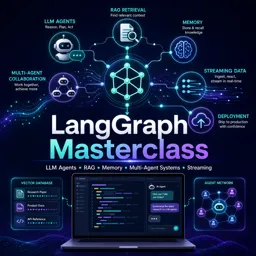
Free online course LangGraph Masterclass: Build LLM Agents, RAG, Memory, Multi-Agent Systems and Streaming
Duration of the online course: 8 hours and 42 minutes
New
Build reliable LLM agents with graphs, memory, RAG and streaming. Take this free online course and learn human-in-the-loop workflows plus deployment-ready patterns.
In this free course, learn about
Why LangGraph is used vs LangChain alone: explicit control, state, cycles, and complex agent workflows
LLM autonomy levels; core agent ideas incl. ReAct loop (think/act/observe repeat) and common failure modes
Limits of ReAct agents/chains and how LangGraph prevents runaway loops via graph control and termination logic
Reflection and Reflexion agents: generate/criticize/revise alternation to improve outputs and correctness
Structured LLM outputs using Pydantic schemas, tool/function calling, and validation of fields and types
MessageGraph basics: what nodes receive (messages) and return (messages/updates) within a graph workflow
StateGraph: custom state benefits, manual vs annotated state transforms, and maintaining history over runs
ReAct rebuilt in LangGraph: remove opaque executor, define Reason/Act nodes, intermediate_steps, and END conditions
Tool execution details: tool_call_id usage, executing tools without ToolExecutor, and tracing what ACT does
Chatbots in LangGraph: stateless vs memoryful behavior; why follow-ups fail without persisted conversation state
Persistence with checkpointers (MemorySaver/SqliteSaver): required config and resuming conversations after restart
Human-in-the-loop: interrupt vs input(), Command for control flow, resume with memory, and tool-call approvals
RAG patterns: retriever role, classification-driven retrieval/off-topic handling, and query rewriting for multi-step RAG
Multi-agent & production: subgraphs with differing schemas, supervisor routing with Command, streaming/SSE + deployment
About the free online course
Designing LLM applications that work once is easy; making them reliable, debuggable, and safe to run in production is the real challenge. In this free online course, you’ll learn how to build agentic systems with LangGraph, a graph-based approach that gives you precise control over how an AI system thinks, acts with tools, retries, and stops. Instead of hoping a chain behaves, you’ll structure behavior as explicit nodes and edges, creating workflows you can trace, test, and evolve.
You’ll progress from core ideas like autonomy levels and ReAct-style reasoning to more advanced patterns that improve answer quality through critique and revision loops. Along the way, you’ll see how structured outputs reduce ambiguity, how tool calls can be executed safely, and how state management changes everything when your app needs consistent behavior across turns. By introducing custom state, you gain a clearer contract for what your system knows, what it should remember, and what gets updated at each step.
The course also tackles the practical reality of building assistants people actually use: memory and persistence. You’ll learn why checkpointing matters, how to resume conversations after restarts, and how to create human-in-the-loop flows where a person can approve actions before tools run. Tracing and observability are treated as first-class concerns, helping you understand what happened inside the graph and why a run produced a particular outcome.
On the retrieval side, you’ll work with RAG patterns that go beyond basic similarity search, including routing and question rewriting for multi-step reasoning. You’ll also explore multi-agent architectures where specialized agents collaborate under a supervisor, enabling more scalable problem-solving for complex tasks.
Finally, you’ll connect these ideas to real product implementation: streaming responses for great UX, a fullstack capstone built around a production-style chat experience, and deployment considerations so your agent can move from notebook to live app. If you want a practical path to building robust, controllable LLM agents, this course will give you the architecture and mindset to do it.
Course content
Video class: LangGraph Crash Course #1 - Introduction04m
Exercise: According to the course overview, what is the main reason for learning LangGraph instead of only using LangChain?
Video class: LangGraph Crash Course #2 - Levels of Autonomy in LLM applications16m
Video class: LangGraph Crash Course #3 - Agents05m
Exercise: In the ReAct agent pattern, what is the correct loop of steps used to solve a problem?
Video class: LangGraph Crash Course #4 - Agents30m
Exercise: Why did the agent initially fail when asked to create a tweet about today’s weather, and what fixed it?
Video class: LangGraph Crash Course #5 - Drawbacks of React Agents09m
Exercise: Why does LangGraph come into the picture compared to ReAct agents and chains?
Exercise: In a reflection agent system, what is the main purpose of alternating between the generate node and the reflect node?
Video class: LangGraph Crash Course #9.5 - Structured LLM Outputs15m
Exercise: Which approach is described as the first way to force an LLM to return structured output and also perform validation on required fields and data types?
Exercise: In the execute_tools node, what is the main purpose of using the tool_call_id when creating the final ToolMessage?
Video class: LangGraph Crash Course #14 - Reflexion Agent - Building Graph20m
Exercise: In a reflexion agent graph, what is the purpose of counting ToolMessages in the event loop?
Video class: LangGraph Crash Course #15 - What is StateGraph?11m
Exercise: In a LangGraph StateGraph, what is the main benefit of using a custom state instead of a MessageGraph?
Video class: LangGraph Crash Course #16 - Manual State Transformation04m
Exercise: When adding a history list to a custom state, how is the latest count appended to the existing list?
Video class: LangGraph Crash Course #17 - Declarative Annotated State Transformation04m
Video class: LangGraph Crash Course #18 - ReAct using LangGraph - Overview13m
Exercise: When rebuilding a ReAct agent with LangGraph, what is the main component being eliminated to gain full control over the LLM-tool looping and avoid infinite loops?
Video class: LangGraph Crash Course #19 - ReAct using LangGraph - Reasoning Runnable03m
Exercise: When building a ReAct agent reasoning runnable, which inputs are required by the create_react_agent method?
Video class: LangGraph Crash Course #20 - ReAct using LangGraph - State06m
Exercise: Which three state properties are needed to build the described ReAct agent system?
Video class: LangGraph Crash Course #21 - ReAct using LangGraph - Building Nodes03m
Exercise: In a ReAct-style LangGraph setup, what is appended to intermediate_steps after the ACT node runs a tool?
Video class: LangGraph Crash Course #21.5 - ToolExecutor (Deprecated)02m
Exercise: In the updated ACT node implementation, how is a tool executed without using the deprecated ToolExecutor?
Video class: LangGraph Crash Course #22 - ReAct using LangGraph - Final Graph06m
Exercise: In a ReAct-style LangGraph using a conditional edge after the Reason node, when should the graph transition to the END state?
Video class: LangGraph Crash Course #23 - ReAct using LangGraph - LangSmith Tracing03m
Exercise: In a ReAct-style LangGraph agent trace, what does the ACT node primarily do after the reason node outputs an agent action?
Video class: LangGraph Crash Course #24 - Chatbot - Introduction01m
Exercise: What is the key characteristic of the first basic chatbot being built?
Video class: LangGraph Crash Course #25 - Chatbot - Basic10m
Exercise: Why does the basic LangGraph chatbot fail to answer a follow-up like What’s my name? after you previously said Hi I’m Harish?
Video class: LangGraph Crash Course #26 - Chatbot - With Tools15m
Exercise: In a tool-enabled LangGraph chatbot, what does it usually mean when the LLM response has empty content but includes a non-empty tool_calls field?
Video class: LangGraph Crash Course #27 - Chatbot - With Memory (What is Checkpointer?)15m
Exercise: What two things are needed to add persistence (memory) to a LangGraph chatbot across invocations?
Video class: LangGraph Crash Course #28 - Chatbot - With SqliteSaver Checkpointer07m
Exercise: What change enables true persistence so a conversation can be resumed after closing and reopening the app?
Video class: LangGraph Crash Course #29 - Human In The Loop - Introduction12m
Exercise: Why is LangGraph’s interrupt preferred over Python’s input() for serious human-in-the-loop workflows?
Video class: LangGraph Crash Course #30 - Human In The Loop - Command Class04m
Exercise: In LangGraph, what is the main purpose of returning a Command from a node?
Video class: LangGraph Crash Course #31 - Human In The Loop - Resume Graph10m
Exercise: In an interrupted LangGraph run, why is a memory/checkpointer (e.g., MemorySaver) needed?
Video class: LangGraph Crash Course #32 - Human In The Loop - Review Tool Calls09m
Exercise: What is the primary purpose of using interrupt_before in the compile step when building a human-in-the-loop tool approval flow?
Video class: LangGraph Crash Course #33 - Human In The Loop - Multi-turn Conversations06m
Exercise: In the multi-turn LinkedIn post agent, what causes the graph to stop looping and reach the end node?
Video class: LangGraph Crash Course #34 - RAGs - Introduction11m
Exercise: In a basic RAG pipeline, what is the main job of the retriever component?
Exercise: In a LangGraph agent setup with a retriever tool and an off-topic tool, what condition determines whether the flow goes to the tools node or ends?
Exercise: In a FastAPI streaming chat endpoint using Server-Sent Events (SSE), what media type must be set on the StreamingResponse to follow the SSE protocol?
Exercise: In the NextJS chat UI, which browser API is used to connect to a Server-Sent Events (SSE) endpoint and receive streamed chunks from the agent?
Video class: LangGraph Crash Course #45 - Capstone Project - Final Deployment12m
Exercise: In the deployment workflow shown, what is the main purpose of pushing the Docker image to Docker Hub before deploying on a cloud platform like Render?
You will build LLM agents, reflection and reflexion workflows, tool-using chatbots, RAG systems, human-in-the-loop flows, multi-agent systems, and a streamed full-stack chat app.
How does LangGraph help prevent uncontrolled ReAct agent loops?
LangGraph exposes the reasoning, tool-execution, and conditional routing steps as graph nodes, so you can define explicit stop conditions and limit looping.
How does the course add persistent memory to a LangGraph chatbot?
It uses a checkpointer such as SqliteSaver and a thread identifier in the graph configuration to save and resume conversation state across sessions.
Ready to get started?Download the app and get started today.