Configure Django API endpoints and CORS, then call the backend from React using its deployed or local API URL.

Duration of the online course: 9 hours and 19 minutes
New
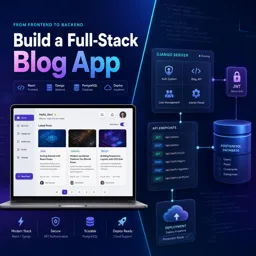
Build a full-stack blog app with Django & React. Learn JWT auth, routing, APIs, and deployment in a free course with hands-on practice and real project flow.
Create a modern blog application end to end and learn how full-stack development works in a real workflow. This course guides you through building a production-style web app using Django for the backend and React for the frontend, focusing on the skills employers expect: clean project structure, reusable components, reliable data fetching, secure authentication, and a UI that feels polished on desktop and mobile.
You will start by setting up both sides of the project and building core interface pieces like navigation and page layouts, then progress into client-side routing for a true multi-page experience. As you enhance the user experience, you will add light and dark themes that persist across refreshes, helping you understand state, storage, and practical UI patterns that users actually notice.
On the backend-to-frontend connection, you will learn how to move from a disconnected interface to a fully integrated application: consuming Django endpoints from React, handling asynchronous requests, and managing server state with React Query. Pagination and detail pages are implemented in a way that mirrors real content sites, so you get experience building features that scale beyond a handful of posts.
User accounts are a central part of the project. You will implement registration and JWT-based authentication, then protect routes so only authorized users can access sensitive screens. You will also handle login/logout flows properly and display user-specific data securely. From there, you will build CRUD features for blog posts, including image uploads using FormData, editing via modals, and permission-aware controls so edit and delete options appear only when appropriate.
To round out the experience, you will create dynamic profile pages tied to each user through routing, add profile updates, and finish with deployment. You will learn the practical tweaks needed after going live so the frontend can successfully fetch data from the backend, preparing you to ship full-stack apps with confidence.

Explore free online Django courses with certificates and learn to build secure, scalable web applications using Python. Master Django fundamentals, models, views, templates, databases, APIs, authentication, and deployment through flexible lessons designed for beginners and aspiring developers. Start learning Django online for free and earn a certificate.

Explore the best free online React JS courses and learn to build fast, interactive web applications with hands-on lessons for beginners and aspiring developers. Study React components, hooks, state, props, routing, and modern front-end development at your own pace. Enroll today for free training and earn a certificate to showcase your React JS skills.

Explore free online JWT Authentication courses and learn how to secure web applications, create and validate JSON Web Tokens, manage sessions, and implement role-based access control. Study at your own pace with practical lessons for beginners and developers, and earn a certificate to showcase your authentication skills.

9 hours and 19 minutes of online video course

Digital certificate of course completion (Free)

Exercises to train your knowledge

100% free, from content to certificate
How do you connect a Django backend to a React blog frontend?
Configure Django API endpoints and CORS, then call the backend from React using its deployed or local API URL.
Why use FormData when creating a blog post with an image in Django and React?
FormData sends text fields and image files together as multipart form data, allowing Django to receive the uploaded image.
How do protected routes work with JWT authentication in a React blog app?
A Protected Route checks for a valid JWT before rendering a page and redirects unauthenticated users to the login page.
Ready to get started?Download the app and get started today.
Install the app now
to access the course
Over 5,000 free courses
Programming, English, Digital Marketing and much more! Learn whatever you want, for free.

Study plan with AI
Our app's Artificial Intelligence can create a study schedule for the course you choose.

From zero to professional success
Improve your resume with our free Certificate and then use our Artificial Intelligence to find your dream job.
You can also use the QR Code or the links below.




Free CourseProgressive Web Application PWA for Beginners
5

(5)

3h24m

15 exercises

Free CourseLaravel
5
(2)
4h04m
20 exercises

Free CoursePHP for Beginners: Learn PHP, MySQL and Login Systems
5
(3)
10h49m
29 exercises

Free CourseLearn Laravel in 30 Days: Beginner to Pro
5
(1)
17h00m
30 exercises

Free CoursePHP for Beginners: Learn PHP, MySQL, MVC, Routing, Authentication and Testing
5
(1)
10h45m
49 exercises

Free CourseLaravel Full Course: Build, CRUD, Auth, Email and Deploy to Live Server
5
(1)
3h52m
15 exercises

Free CourseWeb Development Foundations: HTML, CSS, Git and Command Line
5
(3)
14h11m
37 exercises

Free CourseCSS Complete Tutorial
5
(1)
8h30m
49 exercises

Free CourseJavaScript for beginners
4.9
(27)
1h40m
2 exercises

Free CourseUmbraco CMS
4.9
(22)
6h21m
19 exercises
Carry knowledge in your pocket.
Download the Cursa app.
There are hundreds of free courses available, with a free certificate of completion that is saved in your mobile image gallery.
Download the app to access the Course Completion Certificate for Free.


+ 10 million
students

Free and Valid
Certificate

60 thousand free
exercises

4.8/5 rating in
app stores

Free courses in
video and ebooks





