Duration of the online course: 6 hours and 51 minutes
4
(2)
Build a smarter, safer home: master Home Assistant, MQTT, Zigbee and automation workflows in a free online course with hands-on practice and a certificate option.
In this free course, learn about
Why Home Assistant is used as the core platform; ecosystem benefits and architecture basics
Smart home planning: requirements, device selection, wiring, safety, and layout considerations
Build a smart power distribution box: switch inputs, channel limits, and panel voltage needs
Install Home Assistant OS via eMMC/CM4 and handle prerequisites for Raspberry Pi/CM4 setups
Use Samba add-on to access Home Assistant files; understand HA file structure and config paths
Configure Home Assistant integrations vs add-ons; install mobile app and enable location services
Set up MQTT with Mosquitto; integrate KC868-Server via MQTT and understand message flow
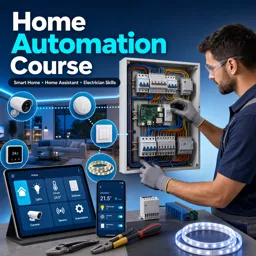
Turn everyday electrical know-how into real smart-home skills. This free online Home Automation course is designed for electricians and hands-on professionals who want to design, install and maintain modern automation systems with confidence. Instead of abstract theory, you will learn how a complete smart-home stack is planned and brought to life, from the control cabinet to the mobile app, with a focus on reliability, safety and serviceability.
You will work around Home Assistant as a central platform and understand how to prepare devices, structure your system, and make clean integrations that scale. Along the way, you will connect common building blocks used in the field: switch panels, relays and expanded I/O, infrared and RF control, temperature and level sensing, local cameras, and lighting such as addressable LED strips. You will also gain practical insight into popular connectivity approaches including MQTT messaging, ESPHome-based devices, Zigbee networks, and RS-485/Modbus equipment commonly found in curtain motors and industrial-style accessories.
This course emphasizes the decisions that separate a quick demo from a professional installation: choosing architecture, planning zones and loads, preventing messy wiring, validating voltages, and making automations that are easy to debug later. You will see how to add remote access with a secure approach, integrate voice and ecosystem options like HomeKit, and send meaningful notifications for safety and convenience. You will also explore workflow tools such as Node-RED to build automation logic that clients can actually depend on.
By the end, you will be able to deliver a smarter home experience that feels seamless to the user while remaining clear and manageable for the installer. Whether you want to expand your services, reduce call-backs, or confidently bid on smart-home jobs, this training gives you a practical path from basic setup to real-world automation projects.
Course content
Video class: ?home automation training -1?Course introduction03m
Exercise: Why is the home assistant chosen as the core software platform in smart home automation lessons?
Video class: ?home automation training -2?Preparations before building a smart home32m
Exercise: What should be considered when designing a smart home?
Video class: ?home automation training -3?Make a smart power distribution box24m
Exercise: What is the maximum number of channels available for switch panel input in the smart power distribution box?
Video class: ?home automation training -4?Install Home Assistant OS by eMMC14m
Exercise: What is required to install Home Assistant OS on a Raspberry Pi using a CM4 module?
Video class: ?home automation training -5?Add-on Samba and file structure of home assistant11m
Exercise: What is the primary function of the "samba" tool in the context of Home Assistant?
Video class: ?home automation training -6?Configure integration of home assistant11m
Exercise: What is the main distinction between Home Assistant integrations and add-ons?
Video class: ?home automation training -7?install home assistant mobile phone application10m
Exercise: How can you enable location services in Home Assistant on a mobile device?
Video class: ?home automation training -8?install Mosquitto broker on home assistant08m
Exercise: What is MQTT used for in this setup?
Video class: ?home automation training -9?integrate KC868-Server to home assistant by MQTT21m
Exercise: How does MQTT facilitate communication in the integration process described?
Video class: ?home automation training -10?install wall switch panel and double click mode13m
Exercise: What is the voltage requirement for the touch mode switch panel installed in the video?
Video class: ?home automation training -11?how to use by own 433MHz RF / infrared remoter10m
Exercise: What is necessary for the ESP32 module to function with an IR remote?
Video class: ?home automation training -12?integrate KC868-Uair to home assistant22m
Exercise: What is a key feature of the KC868UL integration with Home Assistant using ESPHome?
Video class: ?home automation training -13?integrate KC868-AG to home assistant08m
Exercise: How can you control air conditioning using the KC-868 AG?
Video class: ?home automation training -14?integrate temperature sensor to home assistant07m
Exercise: Which GPIO pin is used for the DS18B20 sensor in the ESP32 configuration?
Video class: ?home automation training -15?control IR device by Infrared extender cable05m
Exercise: What is the purpose of using the IR extender cable in the setup?
Video class: ?home automation training -16?integrate device to home assistant by Zigbee2MQTT13m
Exercise: How to integrate a Zigbee sensor with HK868 server using a USB dongle?
Video class: ?home automation training -17?integrate USB local camera to home assistant06m
Exercise: How can you integrate a USB camera with Home Assistant?
Video class: ?home automation training -18?ZigBee motion sensor control light in home assistant11m
Exercise: How do you automate a lamp using a Zigbee PIR motion sensor in a home assistant setup?
Video class: ?home automation training -19?water level sensor for automation in home assistant07m
Exercise: What is the primary function of the analog water level sensor in home automation?
Video class: ?home automation training -20?extend digital output10m
Exercise: What is the A16 board used for in a home automation setup?
Video class: ?home automation training -21?Install Raspbian OS on KC868-Server (raspberry pi CM4)13m
Exercise: What is necessary to initialize the Raspberry Pi OS installation on the KC868 server?
Video class: ?home automation training -22?add RGBW LED strip to home assistant by ESPHome08m
Exercise: What is a key feature of the WS2812 LED strip mentioned?
Video class: ?home automation training -23?any controller's input trigger any controller's output05m
Exercise: How many digital input channels are achieved by integrating additional components?
Video class: ?home automation training -24?home assistant remote access by FREE DuckDNS09m
Exercise: How can you enable remote access for Home Assistant using mobile networks?
Video class: ?home automation training -25?how to use Apple HomeKit by home assistant05m
Exercise: How do you integrate Apple HomeKit to control a device using Home Assistant?
Video class: ?home automation training -26?send email notifications by sensors09m
Exercise: How can you configure email notifications in Home Assistant?
Video class: ?home automation training -27?Notifications for Android TV in home assistant10m
Exercise: What is a primary feature of integrating a TV with Home Assistant?
Video class: ?home automation training -28?How to debug RS485 MODBUS curtain motor09m
Exercise: How can the curtain motor be controlled using RS-485?
Video class: ?home automation training -29?config manual push button for switches and LED strip24m
Exercise: How to control an LED strip using a server and Home Assistant?
Video class: ?home automation training -30?install Node-Red on home assistant02m
Exercise: What is the primary function of Node-RED in Home Assistant?
Video class: ?home automation training -31?control modbus relay by Node-Red12m
Exercise: How to integrate RS-485 devices using Node-RED for control?
Video class: ?home automation training -32?multi function button set by ESPHome17m
Exercise: What is the total number of channel outputs available with the E16 board setup mentioned in the video?
Video class: Home Assistant 3D dashboard for Smart Power Distribution Box07m
Exercise: What device is used to control the 3D dashboard in Home Assistant?
Video class: how to add Zigbee3.0 IoT products to home assistant by ZHA09m
Exercise: How can you integrate a Zigbee 3.0 sensor into Home Assistant using a gateway?
Video class: how to study RF signal and send it in home assistant by ESPHome09m
Exercise: How can an ESP32 be used in place of a remote?
Video class: how to study RF signal and send it in home assistant by ESPHome09m
Exercise: How can an ESP32 be used in place of a remote?
How do I install Home Assistant OS on a Raspberry Pi CM4 for home automation?
The course shows how to prepare the CM4/eMMC hardware, flash Home Assistant OS, and complete the initial setup on a KC868-Server or Raspberry Pi-based controller.
How can I connect Zigbee, MQTT, RF, and infrared devices to Home Assistant?
You will use Zigbee2MQTT or ZHA for Zigbee devices, Mosquitto for MQTT communication, and ESPHome-enabled ESP32 modules to learn and transmit RF or IR signals.
How do I automate lights, curtains, sensors, and notifications in Home Assistant?
The course covers automations for Zigbee motion sensors, water-level and temperature sensors, RGBW LED strips, RS-485 Modbus curtain motors, and email or Android TV alerts.
Ready to get started?Download the app and get started today.