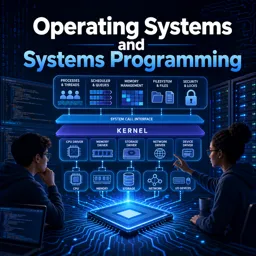
Free Course Image Operating Systems and Systems Programming

Free online courseOperating Systems and Systems Programming

Duration of the online course: 38 hours and 48 minutes

5

StarStarStarStarStar

(1)

Build real OS skills fast with this free online course: processes, threads, memory, filesystems, and networking—finish stronger and earn a certificate.

In this free course, learn about

  • OS roles: abstractions, resource management, isolation, protection, and system services
  • Kernel vs user mode, system calls, and hardware privilege mechanisms for protection
  • Threads vs processes, fork/exec model, and basics of IPC via pipes and sockets
  • File and I/O abstractions: descriptors, dup/dup2 redirection, buffering, and device I/O concepts
  • Concurrency control: mutual exclusion, locks, semaphores, monitors, and atomic instructions
  • Tradeoffs like busy waiting vs blocking; fairness, deadlock avoidance, and forward progress
  • CPU scheduling policies: FCFS vs RR, real-time constraints, and key scheduling metrics
  • Deadlock: necessary conditions, detection/prevention/avoidance, and Banker's Algorithm purpose
  • Virtual memory: address translation, TLBs/caches, multi-level page tables, and demand paging
  • Page replacement algorithms (e.g., Clock) and their practical performance implications
  • Storage performance: SSD vs HDD differences, queueing theory, and burstiness effects on latency
  • Filesystem design: inodes, buffer cache benefits, reliability, and transactional techniques
  • Distributed systems principles: end-to-end argument, TCP reliability over best-effort networks
  • Distributed coordination/storage: 2PC, NFS/AFS concepts, and DHTs (Chord) scalability benefits

Course Description

Understanding how an operating system works changes the way you code. Instead of treating your laptop or server as a black box, you start recognizing why programs slow down, how concurrency bugs happen, what the kernel actually does when a process starts, and how storage and networks influence performance. This free online course is designed to help you develop that foundation and turn it into practical systems programming intuition that you can apply in real projects, technical interviews, and day-to-day engineering work.

You will explore the core ideas that make modern computing reliable and efficient: the separation between user code and the kernel, the abstractions that let software share hardware safely, and the lifecycle of threads and processes. From there, the course connects concepts to the tools and mechanisms you meet in Unix-like environments, including system calls and the models used for communication between programs. Along the way, you will learn why synchronization primitives exist, how to reason about mutual exclusion and waiting, and how monitors and other coordination techniques shape correct concurrent programs.

The course also strengthens your ability to think like the OS when performance matters. Scheduling policies reveal trade-offs between responsiveness and throughput, while deadlock discussions teach you how systems get stuck and how engineers design to avoid it. Memory management topics tie together address translation, virtual memory, caching behavior, and the practical impact of demand paging. These ideas directly influence how you write scalable software, troubleshoot resource issues, and interpret what operating system metrics are telling you.

Finally, you will connect storage, file systems, and reliability concepts to real-world engineering constraints, then extend that mindset into networking and distributed systems. You will see how systems maintain consistency, why protocols exist for coordination, and how design principles influence end-to-end reliability. By the end, you will have a coherent mental model of how applications, kernels, and hardware collaborate—making you more effective whether you are targeting backend services, embedded environments, IT support paths, or deeper systems roles.

Course content

  • Video class: CS162 Lecture 1: What is an Operating System? 1h23m
  • Exercise: Which of the following statements best describes the role of an operating system in modern computing environments?
  • Video class: CS162 Lecture 2: Four Fundamental OS Concepts 1h22m
  • Exercise: What mechanism does an operating system use to ensure that user programs cannot directly perform hardware operations that should only be performed by the system kernel?
  • Video class: CS162 Lecture 3: Abstractions 1: Threads and Processes 1h27m
  • Exercise: In the context of operating systems, what is the primary distinction between a thread and a process?
  • Video class: CS162 Lecture 4: Abstractions 2: Files and I/O 1h28m
  • Exercise: In the context of system programming, what is the primary purpose of using the `dupe` system call?
  • Video class: CS162 Lecture 5: Abstractions 3: IPC, Pipes and Sockets 1h26m
  • Exercise: What is the main purpose of the fork system call in Unix-like operating systems?
  • Video class: CS162: Lecture 6: Synchronization 1: Concurrency and Mutual Exclusion 1h30m
  • Exercise: What is the primary reason for using locks in concurrent programming within operating systems?
  • Video class: CS162: Lecture 6.5: Concurrency and Mutual Exclusion (Supplemental) 47m
  • Exercise: What is the primary purpose of using locks in the context of concurrent programming?
  • Video class: CS162 Lecture 7: Synchronization 2: Semaphores (Con't), Lock Implementation, Atomic Instructions 1h27m
  • Exercise: In a multi-threaded environment within an operating system, which of the following synchronization techniques is used to ensure that a thread yields control and is no longer consuming CPU cycles while waiting for a resource to become available?
  • Video class: CS162 Lecture 8: Synchronization 3: Atomic Instructions (Con't), Monitors, Readers/Writers 1h28m
  • Exercise: What is one major downside of using busy waiting in synchronization mechanisms?
  • Video class: CS162 Lecture 9: Synchronization 4: Monitors and Readers/Writers (Con't), Process Structure 1h29m
  • Exercise: In an operating system, how can a monitor be described in terms of concurrency control?
  • Video class: CS162 Lecture 10: Scheduling 1: Concepts and Classic Policies 1h28m
  • Exercise: In the context of CPU scheduling, what is a key advantage of using Round-Robin (RR) scheduling over First-Come, First-Served (FCFS) scheduling?
  • Video class: CS162 Lecture 11: Scheduling 2: Case Studies, Real Time, and Forward Progress 1h27m
  • Exercise: What key aspect differentiates real-time scheduling from conventional scheduling in operating systems?
  • Video class: CS162 Lecture 12: Scheduling 3: Deadlock 1h26m
  • Exercise: Which of the following is NOT a condition that must be present to potentially cause a deadlock in a system?
  • Video class: CS162 Lecture 13: Memory 1: Address Translation and Virtual Memory 1h28m
  • Exercise: What is the main purpose of implementing the Banker's Algorithm in a system's operating system?
  • Video class: CS162 Lecture 14: Memory 2: Virtual Memory (Con't), Caching and TLBs 1h24m
  • Exercise: What is a primary advantage of having multiple levels of page tables in virtual memory systems?
  • Video class: CS162 Lecture 15: Memory 3: Caching and TLBs (Con't), Demand Paging 1h27m
  • Exercise: In a caching system, what is a major advantage of a two-level page table with a 32-bit address space and 4-byte page table entries?
  • Video class: CS162 Lecture 16: Memory 4: Demand Paging Policies 1h29m
  • Exercise: In the context of page replacement algorithms, which of the following statements is true?
  • Video class: CS162 Lecture 17: Demand Paging (Finished), General I/O, Storage Devices 1h24m
  • Exercise: In the context of virtual memory and page replacement algorithms, which of the following statements is true about the Clock algorithm?
  • Video class: CS162 Lecture 18: General I/O (Con't), Storage Devices, Performance 1h27m
  • Exercise: In the context of storage devices, what is one key difference between 'solid state drives (SSDs)' and 'hard disk drives (HDDs)'?
  • Video class: CS162 Lecture 19: Filesystems 1: Performance (Con't), Queueing Theory, Filesystem Design 1h28m
  • Exercise: In queueing theory, what effect does an increase in burstiness of arrivals have on the average queuing time in a system that has constant average arrival rate?
  • Video class: CS162 Lecture 20: Filesystems 2: Filesystem Design (Con't), Filesystem Case Studies 1h29m
  • Exercise: What is the primary advantage of the inode structure used in Unix-like file systems?
  • Video class: CS162 Lecture 21: Filesystems 3: Case Studies (Con't), Buffering, Reliability, and Transactions 1h26m
  • Exercise: What is a significant advantage of using a buffer cache in a file system?
  • Video class: CS162 Lecture 22: Transactions (Con't), End-to-End Arguments, Distributed Decision Making 1h27m
  • Exercise: In the context of distributed systems, which statement best describes the 'end-to-end argument'?
  • Video class: CS162 Lecture 23: Distributed Decision Making (Con't), Networking and TCP/IP 1h27m
  • Exercise: In the context of distributed systems and networking, what is a critical component for ensuring reliable communication across a network that inherently provides best-effort service?
  • Video class: CS162 Lecture 24: Networking and TCP/IP (Con't), RPC, Distributed File Systems 1h28m
  • Exercise: What is the main purpose of the Two-Phase Commit protocol in distributed systems?
  • Video class: CS162 Lecture 25: Distributed Storage, NFS and AFS, Key Value Stores 1h30m
  • Exercise: What is the primary advantage of using a distributed hash table (DHT) like Chord in key-value stores over a centralized approach?
  • Video class: CS162 Lecture 26 (Optional): Key Value Stores (Con't), Chord, DataCapsules, Quantum Computing 1h34m

This free course includes:

38 hours and 48 minutes of online video course

Digital certificate of course completion (Free)

Exercises to train your knowledge

100% free, from content to certificate

Ready to get started?Download the app and get started today.

Install the app now

to access the course
Icon representing technology and business courses

Over 5,000 free courses

Programming, English, Digital Marketing and much more! Learn whatever you want, for free.

Calendar icon with target representing study planning

Study plan with AI

Our app's Artificial Intelligence can create a study schedule for the course you choose.

Professional icon representing career and business

From zero to professional success

Improve your resume with our free Certificate and then use our Artificial Intelligence to find your dream job.

You can also use the QR Code or the links below.

QR Code - Download Cursa - Online Courses

More free courses at Hardware, Operating Systems and IT Support

Free Ebook + Audiobooks! Learn by listening or reading!

Download the App now to have access to + 5000 free courses, exercises, certificates and lots of content without paying anything!

  • 100% free online courses from start to finish

    Thousands of online courses in video, ebooks and audiobooks.

  • More than 60 thousand free exercises

    To test your knowledge during online courses

  • Valid free Digital Certificate with QR Code

    Generated directly from your cell phone's photo gallery and sent to your email

Cursa app on the ebook screen, the video course screen and the course exercises screen, plus the course completion certificate