A logo is a visual identifier, while branding is the broader system of messaging, personality, visuals, and customer experience that shapes how a business is perceived.

Duration of the online course: 54 minutes
New
Create standout logos in Adobe Illustrator: learn modern marks, shapes and typography with a free online course and earn a certificate-ready skillset.
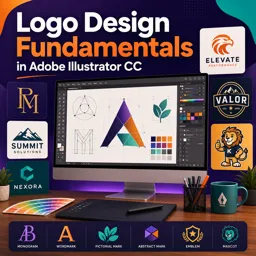
Great logos are more than attractive icons. They communicate personality, build recognition, and help people trust a business at a glance. This free online course in graphic design focuses on the fundamentals of logo creation in Adobe Illustrator CC, guiding you from the purpose of a logo to the practical decisions that make a mark clear, memorable, and scalable across real-world uses.
You will learn how to think like a logo designer before you draw anything: defining what a logo is, understanding the elements that make it effective, and separating the role of a logo from the wider idea of branding. That foundation matters, because the strongest concepts usually come from clarity about what the brand needs to say, who it needs to reach, and how the logo must perform in different contexts such as social profiles, packaging, websites, and print.
Inside Illustrator, you will practice building clean forms using geometric construction, proportion, and simple guides, creating marks that feel balanced and intentional. You will also develop confidence with typography-driven solutions, shaping letterforms into refined wordmarks and creating minimal monograms suitable for initials or compact brand applications. Along the way, you will explore when different logo types make the most sense, including lettermarks, wordmarks, pictorial and abstract marks, mascots, combination marks, and emblem-style badges.
By the end, you will be able to approach a logo brief with a structured process: choosing an appropriate logo style, designing with restraint, and translating an idea into precise vector artwork. Whether you are starting a design career, building brand assets for your own project, or upgrading your Illustrator skills, this course helps you produce professional logo outcomes with practical methods you can reuse on future brands.
Explore free online Adobe Illustrator courses designed for beginners, aspiring designers, and creative professionals. Learn essential tools, vector illustration, logo design, typography, and advanced techniques at your own pace. Each course is free and includes a certificate, helping you build practical skills, strengthen your portfolio, and advance your design career.

Explore free online Logo Design courses and learn to create memorable brand identities, professional logos, and polished visual concepts. Build practical skills in typography, color theory, composition, and popular design tools through flexible, beginner-friendly lessons. Enroll today, study at your own pace, and earn a certificate upon completion.

54 minutes of online video course

Digital certificate of course completion (Free)

Exercises to train your knowledge

100% free, from content to certificate
What is the difference between a logo and branding?
A logo is a visual identifier, while branding is the broader system of messaging, personality, visuals, and customer experience that shapes how a business is perceived.
When should a business use a monogram, wordmark, or pictorial logo?
Use a monogram for long or recognizable names, a wordmark when the business name should be central, and a pictorial mark when a memorable symbol can represent the brand.
Which Adobe Illustrator tools are useful for creating geometric logo designs?
Key tools include the Ellipse Tool, Pen Tool, Direct Selection Tool, Scissors Tool, Smart Guides, and Shape Builder for constructing and refining vector logo forms.
Ready to get started?Download the app and get started today.
Install the app now
to access the course
Over 5,000 free courses
Programming, English, Digital Marketing and much more! Learn whatever you want, for free.

Study plan with AI
Our app's Artificial Intelligence can create a study schedule for the course you choose.

From zero to professional success
Improve your resume with our free Certificate and then use our Artificial Intelligence to find your dream job.
You can also use the QR Code or the links below.



Free CourseCanva Video Editor
4.9

(14)

21m

5 exercises
Free CoursePro Logo Design
4.9
(9)
10h16m
45 exercises
Free CourseBeginners guide to Graphic Design
4.8
(289)
6h26m
22 exercises
Free CourseGame artist using Krita
4.8
(9)
8h54m
31 exercises
Free CourseGraphic design for Beginners
4.8

(12)
11h12m
Free CourseAdobe illustrator
4.7
(54)
5h32m
20 exercises
Free CourseCorelDRAW for Beginners: Complete Graphic Design and Vector Tools Training
4.7
(3)
8h03m
46 exercises
Free CourseAnimation
4.6
(8)
31m
5 exercises
Free CourseCanva tool for beginners
4.6
(36)
32m
11 exercises
Free CourseGraphic design Basics
4.6
(20)
48m
8 exercises
Carry knowledge in your pocket.
Download the Cursa app.
There are hundreds of free courses available, with a free certificate of completion that is saved in your mobile image gallery.
Download the app to access the Course Completion Certificate for Free.


+ 10 million
students

Free and Valid
Certificate

60 thousand free
exercises

4.8/5 rating in
app stores

Free courses in
video and ebooks