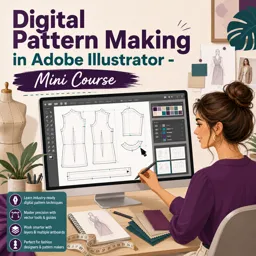
Free online course Digital Pattern Making in Adobe Illustrator - Mini Course
Duration of the online course: 4 hours and 4 minutes
New
Turn Illustrator into a pattern-making studio with this free course—draft, edit, measure, add seam allowance, and export PDFs fast for sewing projects.
In this free course, learn about
Set up Illustrator docs for full-scale patterns: artboard size, rulers, navigation, cutting table accuracy
Build and save a custom patternmaking workspace: toolbars, panels (Stroke/Layers/Pathfinder), shortcut editing
Control fill/stroke conventions: swap fill/stroke (X) and apply line weights for guides, seams, cut lines
Import, protect, and save pattern files: duplicate blocks, required formats, export AI/SVG/PDF options
Organize pattern pieces: layers, paste-remembers-layers, grouping, align, and layout for multi-page PDFs
Measure accurately in AI: Document Info lengths, measure along curves, and use Move dialog for exact distances
Draft patterns with points: create point size, move points horizontally/diagonally, join/close paths cleanly
Create new panels/facings: trace, use Pathfinder actions (Unite/Divide/Trim) to cut and combine shapes
Reflect and rotate pattern elements: mirror across CF/fold, manipulate darts and add dart caps via rotation
Add production details: notches (straight/curved), seam allowances via Offset Path and variable-width methods
Label patterns: type on a path, add grainlines kept perfectly vertical, and manage artboards for output
Prepare patterns for printing/fabric output: A4 tiling workflow, top-left placement, and direct-to-fabric benefits
About the free online course
Move from paper-based drafting to a clean, flexible digital workflow using Adobe Illustrator as your pattern-making studio. This free mini course is designed for fashion and sewing enthusiasts who want more control, speed, and precision when creating, adjusting, and preparing patterns for cutting and printing. Instead of feeling lost in a general design tool, you will learn to set up an Illustrator workspace that actually supports pattern work, so the tools you need are always within reach and your files stay organized from the first line to the final export.
Through short, focused lessons, you will build practical confidence with the core Illustrator actions that matter most for pattern cutting: selecting and editing anchor points, drawing accurate straight and curved lines, measuring lengths, aligning pieces, and working with layers so complex projects remain easy to manage. You will also learn how to create reliable pattern details such as notches, grain lines, labels, and darts, and how to manipulate panels with transformations like reflect and rotate to keep symmetry and fit consistent.
The course emphasizes accuracy and repeatable methods. You will practice working full scale, protecting your original blocks/templates, and making controlled edits using precise values rather than guesswork. By the end, you will know how to add seam allowance with the right commands, split and unite shapes when creating new sections, and prepare patterns for real-world use—whether that means saving editable working files, exporting clean SVGs, or laying pieces out for multi-page PDF printing at home.
Ideal for anyone aiming to modernize their fashion design process, this mini course helps you create patterns that are easier to revise, share, and reproduce—supporting everything from quick garment sampling to more professional digital pattern output.
Course content
Video class: 1/49 Create a Pattern Making Space - Digital Pattern Making in Ai #patternmaking #fashiondesign00m
Exercise: When setting up a new document for digital pattern making, what document size is recommended to give enough space for editing a full-scale pattern?
Video class: 2/49 Adding Left Toolbar #patternmaking Tools - Digital Pattern Making #fashiondesign #sewing00m
Exercise: What is the main purpose of creating a custom workspace/toolbar for digital pattern making in Adobe Illustrator?
Video class: Unlock Digital Pattern Making in Adobe Illustrator - Short Courses #adobeillustrator #patternmaking00m
Exercise: What is the main purpose of breaking the Adobe Illustrator pattern-making lessons into one-minute sections?
Video class: 3/49 Key #patternmaking Tools on the Left Toolbar - Digital Pattern Making in Ai #fashiondesign00m
Video class: 4/49 Adding Pattern Making Tools to the Right ToolBar - Digital Pattern Making in Ai #patternmaking00m
Exercise: How do you add the Stroke panel/tool to your workspace for digital pattern making in Adobe Illustrator?
Video class: 5/49 Key Pattern Making Tools on the Right Toolbar - Digital Pattern Making in Ai #patternmaking00m
Exercise: How can you add panels like Layers or Pathfinder to your workspace in Adobe Illustrator?
Video class: 6/49 Adding Pattern Making Tools to the Right ToolBar - Digital Pattern Making in Ai #patternmaking01m
Exercise: What is the main benefit of saving your pattern-making tools as a custom workspace in Adobe Illustrator?
Video class: 7/49 Using the Selection Tools - Digital Pattern Making in Ai #adobeillustrator #patternmaking01m
Exercise: What is the main difference between the Selection Tool and the Direct Selection Tool in Adobe Illustrator?
Video class: 8/49 Using the Pen Tools - Digital Pattern Making in Ai #adobeillustrator #patternmaking01m
Exercise: Which tool is used to manage the curve of an existing curved line or add a new curve to an existing line?
Video class: 9/49 Using the Line Tool - Digital Pattern Making in Ai #adobeillustrator #patternmaking00m
Exercise: What does holding down the Shift key do when drawing with the Line Tool in Adobe Illustrator?
Video class: 10/49 Using the Rectangle Tool - Digital Pattern Making in Ai #adobeillustrator #patternmaking01m
Exercise: When drawing a square in Adobe Illustrator with the Rectangle Tool, which key combination creates the square from its center?
Video class: 11/49 Using the Ellipse Tool - Digital Pattern Making in Ai #fashiondesign #patternmaking01m
Exercise: How do you create a circle from its center using the Ellipse tool in Adobe Illustrator?
Video class: 12/49 Using the Eyedropper Tool - Digital Pattern Making in Ai #patternmaking #fashiondesign00m
Video class: 13/49 Using the Scissor Tool - Digital Pattern Making in Ai #patternmaking #adobeillustrator00m
Video class: 15/49 Using the Type Tool - Digital Pattern Making in Ai #patternmaking #fashiondesign00m
Exercise: How do you create text along a curved line for labeling a pattern in Adobe Illustrator?
Video class: 16/49 Using the Fill01m
Exercise: What does pressing the keyboard shortcut X do when working with fill and stroke colors?
Video class: 17/49 Using the Stroke Tool - Digital Pattern Making in Ai #patternmaking #fashiondesign01m
Exercise: Which stroke weights are used for guidelines, pattern lines, and cut lines?
Video class: 18/49 Using the Layer Tool - Digital Pattern Making in Ai #patternmaking #fashiondesign01m
Exercise: What does enabling the “Paste Remembers Layers” option do in Adobe Illustrator when copying and pasting pattern pieces into a new document?
Video class: 19/49 Using the Path Finder Tool - Digital Pattern Making in Ai #patternmaking #fashiondesign00m
Exercise: What is the main purpose of the Pathfinder Unite tool in digital pattern making?
Video class: 20/49 Using the Alignment Tool - Digital Pattern Making in Ai #patternmaking #fashiondesign00m
Video class: 21/49 Using the Document Info Tool - Digital Pattern Making in Ai #patternmaking #fashiondesign00m
Exercise: Which tool can you use to check the length of a straight or curved line in Adobe Illustrator?
Video class: 22/49 Using the Navigation Tools - Digital Pattern Making #patternmaking #fashiondesign #sewing00m
Exercise: Which keyboard shortcut lets you quickly move around the page in Adobe Illustrator while working on a digital pattern?
Video class: 23/49 Adding Rulers00m
Exercise: How do you display both horizontal and vertical rulers in Adobe Illustrator when setting up a digital pattern?
Video class: 24/49 Importing a Pattern - Digital Pattern Making in Ai #patternmaking #fashiondesign00m
Exercise: Which file formats are required for a pattern file to work properly in Adobe Illustrator?
Video class: 25/49 Saving a Patterns - Digital Pattern Making in Ai #patternmaking #fashiondesign #sewing01m
Exercise: When starting a new pattern project, what is the best way to protect your original block/template in Adobe Illustrator?
Video class: 26/49 Copying, Pasting01m
Exercise: Which keyboard shortcuts correctly copy and paste a pattern in Adobe Illustrator?
Video class: 27/49 Group00m
Exercise: Why is it important to group all elements of a pattern in Adobe Illustrator when working on digital pattern making?
Video class: 28/49 Measuring Lines00m
Exercise: How can you measure a specific distance along a curved line in Adobe Illustrator?
Video class: 29/49 Creating a Point Digital - Pattern Making in Adobe Illustrator #patternmaking #sewing #fashion00m
Exercise: When creating a point in Adobe Illustrator for digital pattern drafting, what size is recommended for the ellipse?
Video class: 30/49 Moving Points - Digital Pattern Making in Adobe Illustrator #patternmaking #sewing #fashion00m
Exercise: In Adobe Illustrator, how do you move a selected point by an exact horizontal measurement using the Move dialog?
Video class: 31/49 Moving Points Diagonally - Digital Pattern Making in Adobe Illustrator #patternmaking #sewing01m
Exercise: How can you move a point exactly 5 cm so it ends up positioned along a diagonal line in Adobe Illustrator?
Video class: 32/49 Drafting Patterns with Points - Digital Pattern Making in #adobeillustrator #patternmaking00m
Exercise: When joining points with the Pen tool, what indicates you are about to close and complete a panel?
Video class: 33/49 Joining lines and completing patterns - Digital #patternmaking in #adobeillustrator00m
Exercise: How do you join two open endpoints of pattern lines in Adobe Illustrator?
Video class: 34/49 Tracing Panels from Patterns - Digital #patternmaking in #adobeillustrator #fashiondesign00m
Exercise: Which Pathfinder action is used after selecting both the panel lines and the pattern outline to create new facings or panels?
Video class: 35/49 Reflecting Patterns - Digital #patternmaking in #adobeillustrator #fashiondesign00m
Exercise: When reflecting a pattern panel across a center front or fold line in Adobe Illustrator, which Reflect option is typically used?
Video class: 37/49 Rotating Darts - Digital #patternmaking in #adobeillustrator #patterncutting00m
Exercise: Which sequence correctly creates a new dart placement in Adobe Illustrator?
Video class: 38/49 Adding a Dart Cap - Digital #patternmaking in #adobeillustrator #patterncutting01m
Exercise: When rotating the dart template to close and reopen the dart, what point should be set as the point of rotation?
Video class: 39/49 Adding Notches - Digital #patternmaking in #adobeillustrator #patterncutting #fashiondesign01m
Exercise: When creating a notch, what length should you input if your seam allowance is about 1 cm?
Video class: 40/49 Adding Notches Along a Curve - Digital #patternmaking in #adobeillustrator #patterncutting01m
Exercise: When adding a notch on a curved line (e.g., an armhole), what values are entered for the notch using the Line Tool?
Video class: 41/49 Adding Seam Allowance - Digital #patternmaking in #adobeillustrator #patterncutting00m
Exercise: Which Illustrator command is used to add seam allowance to a selected pattern outline?
Video class: 42/49 Adding Seam Allowance - Digital #patternmaking in #adobeillustrator #patterncutting #fashion00m
Exercise: Which Illustrator command is used to create seam allowances of different widths from a pattern outline?
Video class: 43/49 Creating Labels - Digital #patternmaking in #adobeillustrator #patterncutting #fashiondesign01m
Exercise: When adding a grain line to a pattern label, what should you do to keep the line perfectly vertical while drawing it?
Video class: 44/49 Resizing Artboards - Digital #patternmaking in #adobeillustrator #patterncutting #fashion00m
Exercise: What is the purpose of the artboard in Adobe Illustrator when creating a digital pattern?
Video class: 45/49 Saving Your Pattern as an SVG Pattern - Digital #patternmaking in #adobeillustrator #fashion00m
Exercise: When saving a pattern as an SVG, which format option should be selected?
Video class: 46/49 Saving Your Pattern as an Ai Pattern - Digital #PatternMaking in #AdobeIllustrator00m
Exercise: When saving a digital pattern in Adobe Illustrator as an AI file, which Illustrator version is recommended for compatibility?
Video class: 47/49 Creating multi-page PDF Patterns - Digital #patternmaking in #adobeillustrator #patterncutting00m
Exercise: What is the main purpose of arranging grouped pattern pieces starting in the top left corner of the template?
Video class: 48/49 Using Keyboard Shortcuts - Digital #patternmaking in #adobeillustrator #patterncutting00m
Exercise: Which keyboard shortcut selects the Pen Tool in Adobe Illustrator for drafting pattern lines?
Video class: 49/49 Customising keyboard shortcuts - Digital #patternmaking in #adobeillustrator #patterncutting00m
Exercise: How do you open the dialog box to create or edit custom keyboard shortcuts in Adobe Illustrator?
Video class: Set Up a Pattern Making Workspace in Adobe Illustrator!13m
Exercise: What file format allows a fully editable PatternLab pattern to be customized in Adobe Illustrator?
Video class: An overview of the cutting table08m
Exercise: After downloading the cutting table file, what must you check and set each time before working so measurements are accurate?
Video class: Measuring patterns in Adobe Illustrator - Digital pattern cutting16m
Exercise: When placing a point an exact distance away using Illustrator’s Move dialog, what should you do to keep the measured distance accurate?
Video class: Using the pen tool to draft patterns in Adobe Illustrator - Digital pattern cutting tutorial09m
Exercise: When creating a curve with the Pen Tool, how do you make the curve more acute (tighter) in Adobe Illustrator?
Video class: Group patterns in Adobe illustrator - Pattern making tutorial09m
Exercise: In Adobe Illustrator, which tool is best for selecting and moving an entire pattern piece (as one whole element) without picking individual points or lines?
Video class: Master Dart Manipulation in Adobe Illustrator in Adobe Illustr29m
Exercise: When using the slash-line method to split a block into panels, which step ensures the line can be used to cut the shape with Pathfinder?
Video class: Adding seam allowance to a pattern - Digital pattern making tutorials18m
Exercise: After applying a seam allowance brush, which command allows you to edit and delete the unwanted inner line?
Video class: Creating PDF sewing patterns - Digital pattern making tutorial13m
Exercise: When placing a bodice block onto an A4 multi-page PDF print template in Adobe Illustrator, what should you do first to avoid losing lines or elements while moving/rotating it?
Video class: Pattern Making in Adobe Illustrator - Adding Seam Allowance with the Offset Path Tool10m
Exercise: Which Adobe Illustrator command is used for quickly adding seam allowance to a pattern outline?
Video class: Square Neck Puff Sleeve Top - Pattern Making in Adobe Illustrator1h03m
Exercise: Which Adobe Illustrator feature is used to split a pattern piece into multiple sections for spreading (slash-and-spread) when creating a puffy sleeve?
Video class: Print Patterns Directly to Fabric - Half Garment Sampling Time!08m
Exercise: What is the main advantage of printing digital sewing patterns directly onto violin interlining using a large-format printer?
This free course includes:
4 hours and 4 minutes of online video course
Digital certificate of course completion (Free)
Exercises to train your knowledge
100% free, from content to certificate
How do I add seam allowance to a digital sewing pattern in Adobe Illustrator?
Use Object > Path > Offset Path to create an offset outline, then set the required seam-allowance width.
What is the difference between the Selection Tool and Direct Selection Tool for pattern making in Illustrator?
The Selection Tool moves or transforms an entire pattern piece, while the Direct Selection Tool edits individual anchor points and path segments.
How can I save an Adobe Illustrator pattern for printing as a multi-page PDF?
Arrange grouped pattern pieces on a tiled print template, then save or export the document as a PDF for page-by-page printing.
Ready to get started?Download the app and get started today.