Why Mindset Matters in Digital Forensics
Digital forensics is not only a set of tools and procedures; it is a way of thinking under constraints. Your mindset determines what you notice, what you document, and how defensible your work will be when questioned by a manager, a client, internal audit, or a court. A good investigation mindset is deliberate: you form hypotheses, test them with evidence, track uncertainty, and avoid jumping to conclusions. At the same time, you operate inside legal and ethical guardrails that define what you are allowed to access, how you are allowed to collect it, and how you must protect it.
Beginners often focus on “finding the artifact” and forget that the real deliverable is a reliable narrative supported by verifiable facts. That narrative must be reproducible by another examiner and explainable to non-technical stakeholders. This chapter focuses on the mental habits and guardrails that make your work trustworthy, even when the technical details are complex.
The Investigation Mindset: Think Like a Tester, Not a Storyteller
Separate Observations, Inferences, and Conclusions
Train yourself to label what you see versus what you think it means. An observation is a direct fact from a source (for example, a timestamp, a file path, a log entry). An inference is a plausible explanation that connects observations (for example, “this login likely came from a VPN endpoint”). A conclusion is a decision you are prepared to defend (for example, “the account was accessed by an unauthorized party”). Mixing these too early creates bias and weakens defensibility.
- Observation: “Event log shows successful logon type 10 at 02:14 UTC from IP X.”
- Inference: “Logon type 10 suggests Remote Desktop; IP X may be a jump host.”
- Conclusion: “Remote access occurred via RDP from the jump host; attribution requires additional corroboration.”
Use Competing Hypotheses to Reduce Bias
Instead of building one story and collecting only supporting evidence, list multiple plausible explanations and try to disprove them. This approach reduces confirmation bias and helps you recognize when the evidence is ambiguous. For example, if you see a suspicious executable, competing hypotheses might include: legitimate admin tool, malware, penetration testing artifact, or a developer utility. Your job is to test these possibilities using additional sources and context.
A practical habit is to keep a “hypothesis table” in your case notes: each hypothesis, supporting evidence, contradicting evidence, and what you still need to check. This makes your reasoning transparent and easier to review.
- Listen to the audio with the screen off.
- Earn a certificate upon completion.
- Over 5000 courses for you to explore!

Download the app
Assume You Will Be Challenged
Work as if every action and statement will be questioned. This does not mean being paranoid; it means being precise. When you record a claim, include: where it came from, how you extracted it, what time zone you used, and what limitations exist. If you ran a tool, record the version, parameters, and output location. If you made a judgment call, document why.
Prioritize Safety, Containment, and Minimal Harm
In incident response and internal investigations, you may be asked to “just take a quick look” on a live system. Your mindset should include risk awareness: actions can destroy evidence, tip off an adversary, or disrupt business operations. Prefer minimal, reversible actions; coordinate with system owners; and avoid “exploratory clicking” that changes state. When you must act quickly, document what you did and why, and preserve what you can before making changes.
Legal and Ethical Guardrails: What Keeps Your Work Admissible and Trustworthy
Authority: Do You Have the Right to Access This Data?
The first guardrail is authority. You need a clear basis to access and examine data. In corporate settings, that basis may be policy, employment agreements, acceptable use policies, and written authorization from leadership or legal counsel. In criminal contexts, it may be a warrant, consent, or another lawful authority. In civil matters, it may be a court order, discovery agreement, or client authorization.
Never assume that “IT access” equals “investigation authority.” Admin credentials allow access technically, but not necessarily legally or ethically. Before collecting data, confirm who owns the device or account, what policies apply, what jurisdictions are involved, and whether you need additional approvals.
Scope: Stay Inside the Box
Scope defines what you are allowed to collect and analyze: which systems, which accounts, which time range, and which data types. Scope creep is a common failure mode: you start investigating a phishing incident and end up browsing unrelated employee communications. Even if you find something concerning, exceeding scope can create legal exposure and can invalidate the investigation.
Write scope in operational terms. Example: “Collect email headers and message bodies for user A from dates X to Y; collect authentication logs for tenant Z for dates X to Y; collect endpoint artifacts from device serial number S.” If you discover evidence suggesting a broader issue, pause and request a scope expansion in writing.
Necessity and Proportionality
Ethical investigations collect what is necessary and proportionate to the question. If you only need to confirm whether a file was exfiltrated, you may not need full content of personal photos or unrelated chat history. Proportionality reduces privacy impact and reduces the amount of sensitive data you must protect.
Use a “least intrusive” approach: start with metadata and logs, then escalate to content only if required. Document why each escalation was necessary.
Privacy and Sensitive Data Handling
Investigations often touch personal data, health information, financial records, customer data, or attorney-client communications. Your guardrails should include: access controls, encryption at rest and in transit, need-to-know sharing, and careful redaction in reports. If your organization has a privacy officer or data protection team, involve them early when personal data is in scope.
Practical rule: if you would be uncomfortable seeing the data printed on paper and left on a desk, treat it as sensitive and protect it accordingly. Store evidence in controlled locations, restrict permissions, and avoid copying data into personal notes or unsecured messaging apps.
Data Integrity and Chain of Custody (Mindset Level)
Even when you are not in a courtroom, you should behave as if you might end up there. Integrity means you can show that evidence was not altered and that you can reproduce your results. Chain of custody means you can account for who had access, when, and why. The mindset component is consistency: always record transfers, always record hashes when applicable, and always record where evidence is stored.
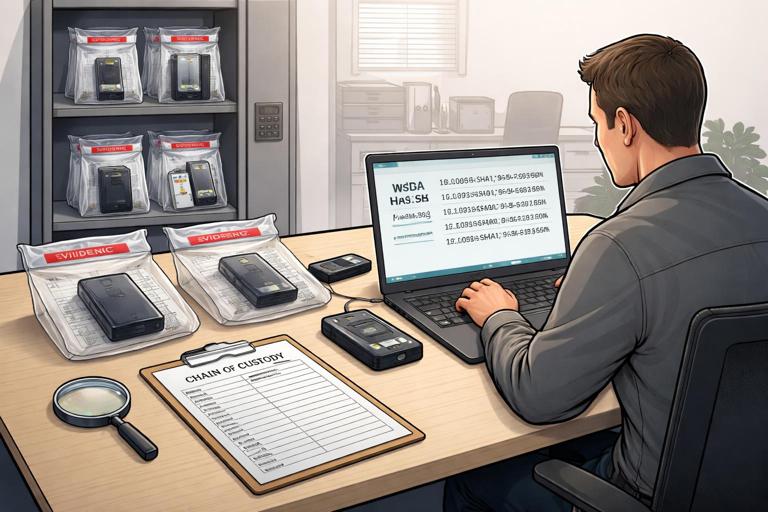
When evidence is digital, integrity also includes protecting original sources from accidental modification. Prefer read-only access where possible, and avoid running tools that write to the target unless you have a justified reason.
Transparency and Reproducibility
Ethical guardrails include being honest about limitations. If a log source is incomplete, say so. If timestamps may be affected by clock drift, say so. If you used a tool that parses artifacts in a particular way, record it. Reproducibility is a fairness issue: another examiner should be able to follow your steps and reach the same observations, even if they interpret them differently.
Professional Boundaries: Avoid “Hacking” Your Own Case
Beginners sometimes try to “prove” something by attempting password guessing, exploiting vulnerabilities, or accessing accounts beyond authorization. Even if your intent is investigative, these actions can be illegal, can violate policy, and can contaminate evidence. If you need access you do not have, escalate through proper channels (legal counsel, HR, system owners, or law enforcement) and obtain written authorization.
Practical Workflow: A Guardrailed Investigation Checklist
The following step-by-step workflow is designed to keep you inside legal-ethical boundaries while maintaining an investigator’s mindset. Adapt it to your environment, but keep the structure.
Step 1: Define the Question You Are Answering
Write a one-sentence investigation question that is testable. Examples: “Did account A access confidential folder B between dates X and Y?” or “Was device D used to upload data to unauthorized cloud storage?” Avoid vague goals like “find out what happened.” A clear question helps you decide what is necessary and proportionate.
Step 2: Confirm Authority and Get Written Authorization
Before touching data, confirm who is authorizing the work and what policy or legal basis applies. Capture authorization in a ticket, email, or case management system. Include: systems in scope, time range, and permitted actions (for example, “collect logs,” “acquire image,” “review mailbox content”). If you are a consultant, ensure the statement of work and client authorization match the requested actions.
Step 3: Define Scope and Boundaries in Operational Terms
Translate authorization into a scope statement you can follow. Include explicit exclusions. Example: “Do not review personal folders unless evidence indicates business data is stored there and scope is expanded.” This protects you and the organization.
Step 4: Build a Hypothesis List and Identify Required Evidence Types
Create 2–5 competing hypotheses and list what evidence would support or refute each. This prevents tunnel vision. Also list “high value, low intrusion” sources first (for example, authentication logs, file access logs, email headers) and “high intrusion” sources later (full content review, full disk acquisition), to align with proportionality.
Step 5: Plan Collection to Minimize Change and Exposure
Decide how you will collect data while minimizing impact. Consider: will collection disrupt operations, alert a suspect, or overwrite logs? Plan secure storage locations and access controls. Decide naming conventions and where you will record metadata (collector, time, tool versions). If you must collect from multiple jurisdictions or cloud regions, consult legal/privacy teams before moving data across borders.
Step 6: Collect and Log Every Action
During collection, keep a running activity log: what you accessed, when, from where, and what you exported. Record tool names, versions, and parameters. If you make a mistake (for example, you clicked a file), record it; hiding errors is worse than making them. Your notes should allow someone else to reconstruct your actions.
Step 7: Validate Integrity and Maintain Controlled Access
After collection, validate that the evidence is complete and unchanged according to your process (for example, verify hashes where applicable, verify export counts, verify timestamps of exports). Store evidence in controlled repositories with least-privilege permissions. Track who has access and why.
Step 8: Analyze with a “Prove or Disprove” Approach
As you analyze, continuously test your hypotheses. When you find an artifact that seems to confirm a story, actively look for disconfirming evidence. For example, if you see a suspicious login, check whether it aligns with known maintenance windows, VPN logs, device posture, or travel records (if authorized). Keep observations separate from interpretation in your notes.
Step 9: Handle Sensitive Findings Carefully
You may encounter unrelated misconduct or private information. Do not expand your investigation on your own. Preserve what you have already lawfully collected, document where it was found, and escalate to the authorized decision-makers for scope guidance. If you suspect imminent harm or legal obligations to report, follow your organization’s escalation policy and involve legal counsel.
Step 10: Report with Precision and Restraint
Write reports that are factual, scoped, and reproducible. Use clear language, define terms, and include time zone handling. Avoid attributing intent unless you have strong corroboration. Include limitations and alternative explanations when appropriate. Provide enough detail for validation without exposing unnecessary sensitive content; use redaction and summaries when possible.
Common Pitfalls and How to Avoid Them
Pitfall: Confirmation Bias
If you start with “the employee did it,” you will interpret every artifact as guilt. Countermeasure: competing hypotheses, peer review, and explicit separation of observation versus inference.
Pitfall: Over-Collection
Collecting “everything” feels safe, but it increases privacy risk, storage risk, and review burden. Countermeasure: necessity and proportionality, staged collection, and documented justification for escalation.
Pitfall: Scope Creep During Analysis
It is easy to drift into unrelated data because it is available. Countermeasure: keep scope visible in your notes, and stop to request written scope expansion when needed.
Pitfall: Uncontrolled Sharing
Sending evidence via email, chat, or personal drives can create breaches and chain-of-custody gaps. Countermeasure: controlled repositories, access logs, and approved transfer methods.
Pitfall: Overstating Certainty
Digital artifacts can be incomplete, spoofed, or misinterpreted. Countermeasure: state confidence levels, list limitations, and corroborate across sources.
Practical Examples of Guardrails in Action
Example 1: Investigating a Suspicious Login Without Overreaching
Scenario: Security alerts show a successful login to a corporate account from an unusual location. A guardrailed approach starts with authorization and scope: confirm you are permitted to review authentication logs and account activity for that user and time window. Collect only the relevant sign-in logs and related metadata first. Build hypotheses: legitimate travel, VPN exit node, compromised credentials, or automated service behavior. Test each hypothesis by checking device identifiers, MFA prompts, conditional access outcomes, and known IP ranges. Only if logs indicate likely compromise do you request scope expansion to review mailbox rules or file access, and you document why the escalation is necessary.

Example 2: Handling Personal Data Found During a Workplace Investigation
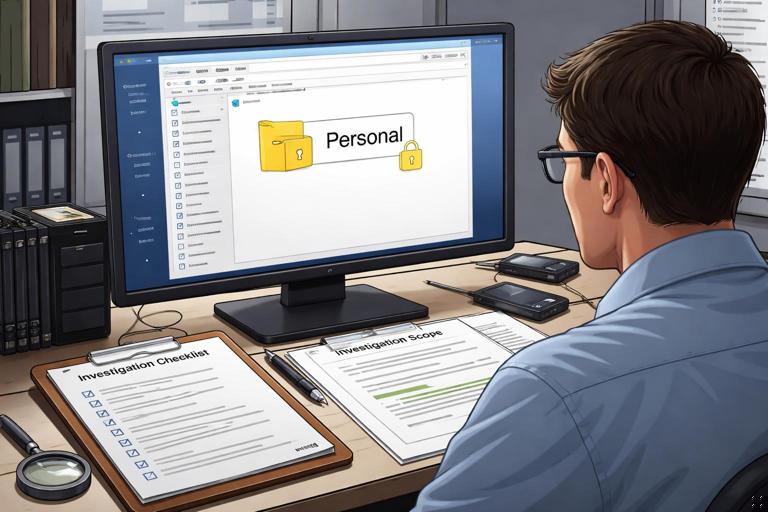
Scenario: While reviewing a work laptop for data leakage indicators, you encounter a folder containing personal documents. Even if you have technical access, proportionality and privacy guardrails apply. Do not browse the folder out of curiosity. Record that you encountered potentially personal content, note the path and context, and continue with in-scope indicators (for example, filenames matching sensitive project codes, known exfiltration tools, or relevant time windows). If the personal folder appears directly relevant (for example, it contains company confidential files), pause and request written guidance to expand scope, and involve HR/legal as required.
Example 3: Responding to Pressure for a Quick Answer
Scenario: A manager asks, “Can you confirm today whether this was an insider?” The investigation mindset resists premature conclusions. Provide what you can support: “We have confirmed access to folder B from account A at time T; we have not yet confirmed whether the access was authorized or who was at the keyboard.” Offer a plan: what evidence you will check next, how long it will take, and what decisions can be made now (for example, temporary access suspension) without claiming certainty you do not have.
Documentation Habits That Support Both Mindset and Guardrails
Use a Structured Case Notebook
Keep notes in a consistent structure: scope and authorization, hypotheses, collection log, analysis notes, and reporting drafts. Each entry should include date/time, your name, and what changed. This structure makes it easier to demonstrate discipline and reduces the chance of missing key details.
Write “Audit-Friendly” Notes
Assume a third party will read your notes without your verbal explanation. Avoid shorthand that only you understand. Record time zones explicitly. When you reference a log entry, include the source name and the exact field values you relied on. When you interpret something, label it as interpretation and list what would change your mind.
Track Decisions and Approvals
Many investigations hinge on decisions: expanding scope, involving HR, notifying customers, or preserving additional systems. Record who approved what and when. This is part of ethical accountability and helps prevent later disputes about why actions were taken.
Ethical Communication During an Investigation
Communicate Uncertainty Clearly
Stakeholders often want yes/no answers. Your job is to communicate what is known, what is likely, and what is unknown. Use careful language: “consistent with,” “suggests,” “cannot rule out,” and “confirmed by.” This protects credibility and prevents decisions based on overconfidence.
Avoid Attribution Without Evidence
Attribution (who did it) is harder than describing what happened. Many artifacts identify accounts or devices, not people. If you must discuss attribution, explain the gap: “Account A performed action X; we do not yet have evidence linking account use to a specific individual.” This is both ethical and practical, especially in workplace contexts.
Maintain Professional Neutrality
Do not become an advocate for a particular outcome. Your role is to present evidence and analysis within scope. Neutrality improves accuracy and reduces the risk of unfairly targeting individuals. If you feel pressured to change findings, escalate through appropriate channels and document the pressure.