Purpose of This Chapter: Reinforcement Tools You Can Reuse
This chapter is a set of learning tools you can keep using after you finish the course: a practical glossary, a few “mental model” diagrams you can redraw on paper, mini-quizzes to self-check understanding, and skills reinforcement exercises that build speed and confidence. The focus is not on introducing new investigative topics, but on helping you organize what you already learned into a working toolkit you can apply under pressure.
Glossary: A Working Vocabulary for Digital Forensics
Use this glossary as a quick reference while you practice. The goal is consistent language: when you write notes, talk to a teammate, or explain a finding, you want the same terms to mean the same things every time.
Core Investigation Terms
- Artifact: A file, record, log entry, database row, or other data object that can support an investigative question (for example, “Which account logged in?” or “What executed?”).
- Indicator: A specific observable that suggests a condition or event (for example, a suspicious domain, a known-bad hash, or an unusual scheduled task name). Indicators are not proof by themselves; they are leads.
- Finding: A defensible statement supported by evidence (for example, “User X accessed file Y at time Z”), typically backed by multiple artifacts.
- Hypothesis: A testable explanation of what happened. In forensics, you form hypotheses and try to disprove them using evidence.
- Scope: The boundaries of what you will collect and analyze (systems, accounts, time range, data sources). Scope changes should be documented.
- Timeline: An ordered sequence of events derived from artifacts. A timeline is a model, not the ground truth; it improves as you add sources and reconcile conflicts.
- Attribution: Linking actions to an actor (user, process, device, or account). Attribution is stronger when supported by multiple independent artifacts.
- Corroboration: Confirming a claim using at least one additional, independent source (for example, matching a browser download record with a file system timestamp and an email attachment log).
- False positive: A signal that looks suspicious but is benign. Good workflows include steps to reduce false positives.
- False negative: Missing a real event because the signal was absent, overwritten, filtered out, or never collected.
Data Source and Environment Terms
- Endpoint: A user device such as a Windows laptop, desktop, or mobile phone.
- Host: A system that runs workloads (a workstation, server, or virtual machine).
- Cloud tenant: The organization’s cloud environment (for example, a Microsoft 365 tenant) containing identities, policies, and audit logs.
- Identity: A user or service account used to authenticate. In cloud investigations, identity evidence is often as important as device evidence.
- Telemetry: Collected operational/security data (endpoint logs, audit logs, EDR events). Telemetry helps reconstruct events when local artifacts are missing.
- Retention: How long data is kept before being deleted or aged out. Retention affects what you can prove later.
- Time normalization: Converting timestamps from different sources into a consistent reference (for example, UTC) so events can be compared accurately.
Analysis and Reporting Terms
- Triaging: Rapidly assessing what likely happened and what to collect next, prioritizing speed and preservation of key evidence.
- Deep-dive analysis: Detailed examination to validate hypotheses, reduce uncertainty, and produce defensible findings.
- Lead: A clue worth following (a username, file path, IP, domain, device name). Leads become findings only after validation.
- Assumption: Something you treat as true without direct proof. Assumptions should be explicitly labeled and minimized.
- Confidence level: Your assessment of how strongly the evidence supports a finding (for example, low/medium/high), based on corroboration and data quality.
- Reproducibility: The ability for another examiner to follow your steps and arrive at the same result using the same data.
- Negative evidence: The absence of expected artifacts. It can be meaningful, but it is weaker than positive evidence and must be interpreted carefully (for example, “No log entries were found” may mean “logs were cleared” or “logging was disabled”).
- Data quality: A practical assessment of completeness, consistency, and reliability (for example, missing logs, clock drift, partial acquisitions).
Diagrams You Can Redraw: Mental Models for Consistent Work
Diagrams are useful because they compress a workflow into a picture you can recall quickly. The diagrams below are intentionally simple so you can redraw them in your notebook and annotate them for each case.
Diagram 1: Evidence-to-Finding Pipeline
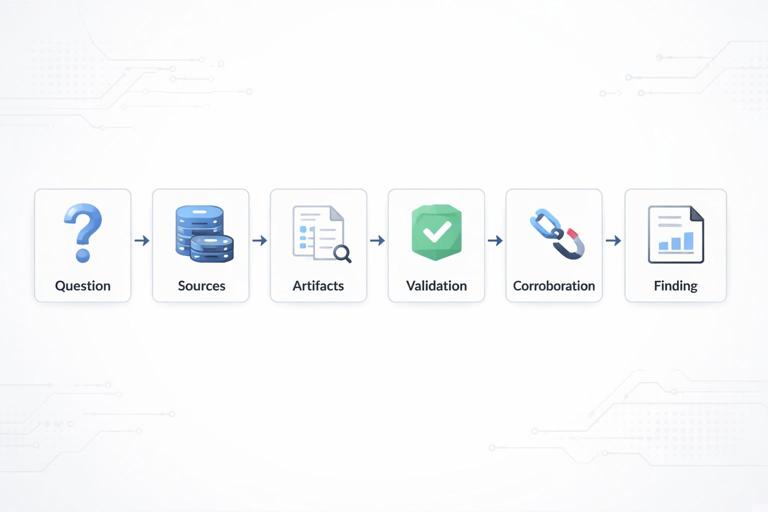
Use this pipeline to avoid jumping from a single artifact to a strong claim. The key idea is that artifacts become findings only after validation and corroboration.
[Question] → [Sources] → [Artifacts] → [Validation] → [Corroboration] → [Finding] → [Report Note]- Question: Write the investigative question in one sentence.
- Sources: List where the answer could exist (endpoint, cloud audit logs, email logs, browser data, etc.).
- Artifacts: Extract the specific records/files that might answer the question.
- Validation: Check for parsing errors, time zone issues, duplicates, and context (is the artifact actually relevant?).
- Corroboration: Find at least one independent source that supports the same event.
- Finding: Write a precise statement with who/what/when/where.
- Report Note: Add supporting references (paths, record IDs, screenshots, export names) so it can be reviewed.
Diagram 2: Timeline Confidence Ladder
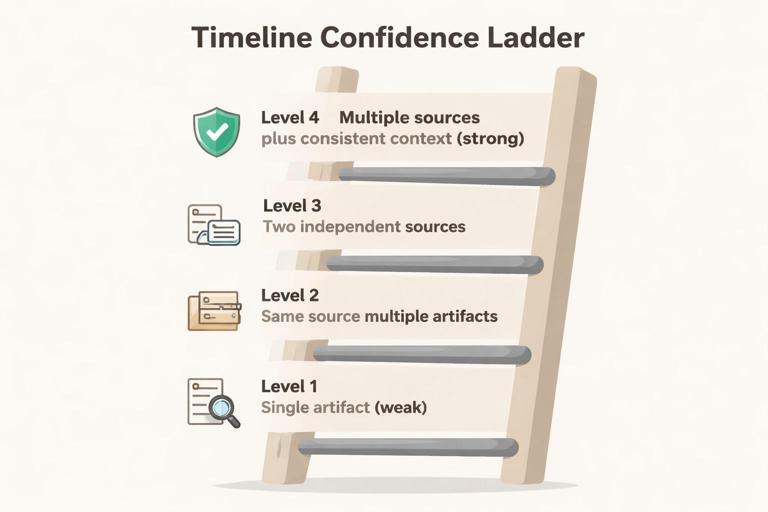
This ladder helps you label how strong a timeline event is. It is common to have partial evidence; the ladder helps you communicate uncertainty clearly.
- Listen to the audio with the screen off.
- Earn a certificate upon completion.
- Over 5000 courses for you to explore!

Download the app
Level 1: Single artifact (weak) → Level 2: Same source, multiple artifacts → Level 3: Two independent sources → Level 4: Multiple sources + consistent context (strong)- Example use: If you have a single log entry showing a sign-in, that may be Level 1. If you also have device activity consistent with that sign-in and a second log source confirming it, you move up the ladder.
Diagram 3: “Three Planes” of Modern Investigations
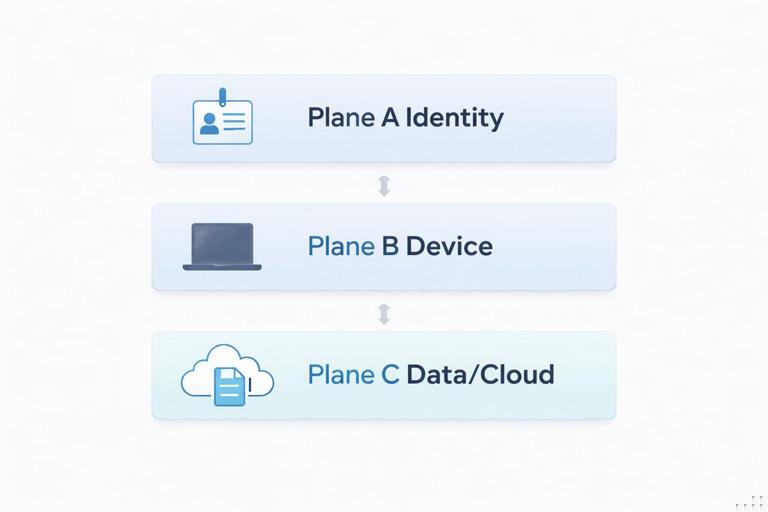
Many beginner mistakes come from focusing on only one plane. Redraw this as three stacked layers and map your evidence to each layer.
Plane A: Identity (accounts, authentication, access) ↔ Plane B: Device (endpoint artifacts) ↔ Plane C: Data/Cloud (files, mail, SaaS logs)- Identity plane: Who authenticated, from where, and with what method.
- Device plane: What executed, what was accessed, and what traces exist locally.
- Data/Cloud plane: What data was accessed, shared, downloaded, or modified in cloud services.
Diagram 4: Mini Decision Tree for “What Do I Do Next?”
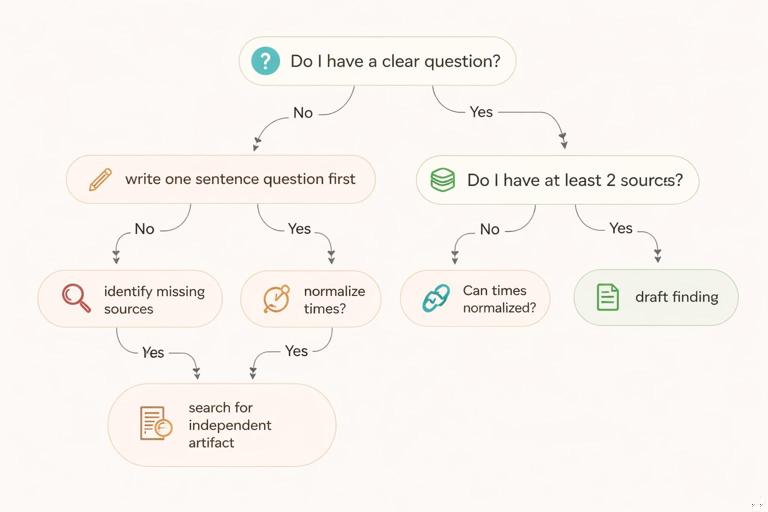
When you feel stuck, use a decision tree to choose the next action based on what you have and what you lack.
Do I have a clear question? No → write one sentence question first. Yes → Do I have at least 2 sources? No → identify missing sources. Yes → Are times normalized? No → normalize times. Yes → Can I corroborate? No → search for independent artifact. Yes → draft finding.Mini-Quizzes: Quick Checks You Can Do in 5–10 Minutes
Mini-quizzes are most effective when you answer from memory first, then check your notes. Treat them like “muscle memory” drills: short, frequent, and focused on decision-making rather than memorization.
Quiz 1: Vocabulary Precision
Instructions: For each item, choose the best term: artifact, indicator, finding, hypothesis, corroboration, or assumption.
- 1) “A scheduled task named ‘UpdateCheck’ exists, but I haven’t confirmed what it runs.”
- 2) “I believe the attacker used the user’s mailbox rules to forward messages.”
- 3) “Two independent logs show the same sign-in from the same IP within 30 seconds.”
- 4) “User A downloaded file B at 14:03 UTC, supported by browser history and a cloud audit event.”
- 5) “Because I don’t see a log entry, the event did not happen.”
Quiz 2: Timeline Reasoning
Instructions: Answer in one sentence each.
- 1) What is the risk of mixing local time and UTC in a timeline?
- 2) What does it mean if two sources disagree on the time of the same event?
- 3) Name one way to increase confidence in a timeline event.
Quiz 3: Corroboration Choices
Instructions: For each scenario, list one independent corroborating source you would look for.
- 1) You have a cloud audit record showing a file download.
- 2) You have a local trace suggesting a program executed.
- 3) You have evidence of a suspicious sign-in.
Quiz 4: Reporting Discipline
Instructions: Mark each statement as “good” or “needs improvement,” then rewrite the ones that need improvement.
- 1) “It looks like the user stole data.”
- 2) “A file named budget.xlsx was accessed.”
- 3) “Based on the available artifacts, it is likely that…”
- 4) “No evidence was found.”
Answer Key (Keep It Honest and Practical)
Use the answer key after you attempt the quizzes. If you missed items, don’t just note the correct answer—write a one-line rule that would help you get it right next time.
Quiz 1 Answers
- 1) Indicator (it suggests something; not yet validated).
- 2) Hypothesis (a testable explanation).
- 3) Corroboration (independent confirmation).
- 4) Finding (specific, time-bounded, supported by evidence).
- 5) Assumption (absence of evidence is not evidence of absence).
Quiz 2 Answers
- 1) You can mis-order events and create a false narrative if timestamps are not normalized.
- 2) It may indicate clock drift, different logging semantics, delayed ingestion, or that the events are related but not identical.
- 3) Add an independent source that records the same event, and document the time basis for each source.
Quiz 3 Example Answers
- 1) Corroborate with endpoint download traces, browser records, or file presence on disk (choose a source independent from the cloud log).
- 2) Corroborate with another execution trace, application logs, or a second telemetry source.
- 3) Corroborate with device sign-in artifacts, conditional access logs, or additional authentication records.
Quiz 4 Guidance
- 1) Needs improvement: it asserts intent. Rewrite as: “Artifacts indicate data access and transfer consistent with exfiltration; intent cannot be determined from the available evidence.”
- 2) Needs improvement: missing who/when/where and evidence references. Rewrite as: “On DEVICE, user ACCOUNT accessed C:\path\budget.xlsx at TIME (source: ARTIFACT A; corroborated by ARTIFACT B).”
- 3) Good if you follow it with what evidence supports “likely” and what gaps remain.
- 4) Needs improvement: too absolute. Rewrite as: “Within the collected scope and available retention, no artifacts were identified that support X; limitations: Y.”
Skills Reinforcement Exercises: Practice Like an Examiner
These exercises are designed to be repeated. The goal is not to “finish” them once, but to build habits: consistent terminology, careful claims, and fast navigation from question to evidence to finding.
Exercise 1: Build a One-Page Case Map (15–20 minutes)
Goal: Convert a messy scenario into a structured plan using the diagrams above.
Step-by-step:
- 1) Write a one-sentence investigative question (for example, “Did any account access and export sensitive files during the last 7 days?”).
- 2) Draw the “Three Planes” diagram and list at least three possible sources per plane (identity, device, data/cloud).
- 3) Draw the Evidence-to-Finding pipeline and fill in the “Sources” and “Artifacts” boxes with what you would collect or query.
- 4) Add a “Constraints” box: time window, retention limits, missing devices, or unavailable logs.
- 5) Add a “Next actions” list of exactly three items. Keep it short to force prioritization.
Exercise 2: Corroboration Drill (20–30 minutes)
Goal: Practice turning a single artifact into a defensible finding by adding independent support.
Step-by-step:
- 1) Choose one event statement (for example, “A file was downloaded,” “A program executed,” or “A sign-in occurred”).
- 2) Write down one artifact that could support it (your “primary” source).
- 3) List two independent corroborating sources. Independence means they are not simply two views of the same underlying record.
- 4) For each corroborating source, write what you expect to see if the event is real, and what you might see if it is a false positive.
- 5) Assign a confidence level using the Timeline Confidence Ladder and write one sentence explaining why.
Exercise 3: Timestamp Normalization Worksheet (15 minutes)
Goal: Build the habit of documenting time basis and conversions so your timeline is reviewable.
Step-by-step:
- 1) Create a small table in your notes with columns: Source, Original timestamp, Time zone/basis, Converted timestamp (UTC), Notes.
- 2) Pick three different sources you commonly use and fill the table with example timestamps (real or simulated).
- 3) Add a “time caveats” note for each source (for example, “recorded at ingestion time,” “device clock may drift,” “rounded to seconds”).
- 4) Write one rule you will follow in every case (for example, “All reported times in UTC; local time shown in parentheses when needed”).
Exercise 4: Write Findings Without Overclaiming (25–30 minutes)
Goal: Practice writing findings that are specific, testable, and appropriately scoped.
Step-by-step:
- 1) Take three vague statements and rewrite them as findings. Use this template: “On [date/time], [actor] performed [action] on [object] on/in [system], supported by [evidence], corroborated by [evidence].”
- 2) Add a “limitations” line for each finding (for example, missing logs, partial acquisition, retention gaps).
- 3) Add a “what would change my mind” line: one artifact that, if found, would weaken or disprove the finding.
Exercise 5: Mini Peer Review Checklist (10–15 minutes)
Goal: Learn to review your own work the way another examiner would.
Step-by-step:
- 1) Pick one page of your notes or one draft finding.
- 2) Check for: unclear terms, missing time basis, missing scope, and missing evidence references.
- 3) Underline every adjective that implies intent (for example, “malicious,” “stole,” “hid”). Replace with observable actions unless intent is directly supported.
- 4) Ensure each key claim has at least one corroborating reference or is explicitly labeled as a hypothesis.
Exercise 6: Speed Run—From Question to Plan (10 minutes)
Goal: Build rapid planning skills for real-world time pressure.
Step-by-step:
- 1) Set a 10-minute timer.
- 2) Write one question, list five likely sources, and choose the top two based on expected value and availability.
- 3) Write a minimal collection/analysis plan in six bullets: what you will check, what you expect, and what you will do if it is missing.
- 4) Stop when the timer ends. The constraint is the point.
Reusable Templates (Copy/Paste Into Your Notes)
These templates are designed to reduce cognitive load. When you are tired or rushed, templates keep your work consistent.
Template 1: Artifact Note
Artifact: [name/type] Location/Source: [path/log/portal] Extract method: [tool/query] Time basis: [UTC/local/other] Key fields: [user, host, IP, file, action] Relevance: [what question it supports] Caveats: [limitations/possible false positives]Template 2: Finding Statement
Finding: On [UTC time], [actor] [action] [object] in/on [system]. Evidence: [primary artifact reference]. Corroboration: [independent artifact reference]. Scope/Limitations: [what was collected, what was not]. Confidence: [low/medium/high] with reason.Template 3: Open Questions List
Open question → Why it matters → Best source → Backup source → Status (not started/in progress/resolved) → Next action