What “Testing a Hypermedia App” Means in Practice
In a hypermedia-driven app built with HTMX and small Alpine.js sprinkles, most behavior emerges from server-rendered HTML fragments, predictable HTTP responses, and DOM swaps. Testing, therefore, is less about asserting client-side state machines and more about verifying three things: (1) templates render the right HTML for a given input, (2) HTMX swaps integrate correctly with the surrounding page and lifecycle events, and (3) end-to-end user flows work across real HTTP, real HTML, and real browser behavior. A practical testing strategy mirrors that structure: template unit tests for fast feedback, swap integration tests for correctness at the fragment boundary, and end-to-end tests for confidence in full workflows.
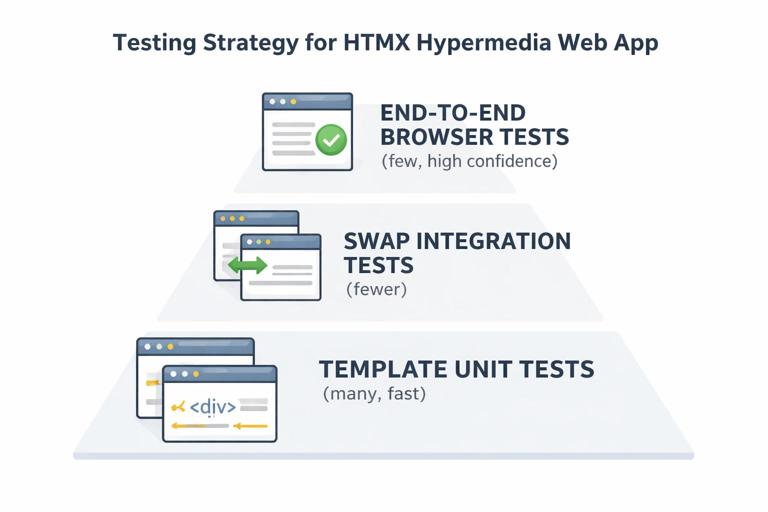
Test Pyramid for Hypermedia: Where to Spend Your Time
A useful pyramid for HTMX apps is: many template unit tests (cheap, fast), fewer swap integration tests (medium cost, high value), and a small set of end-to-end tests (expensive, highest confidence). Template unit tests catch regressions in rendering logic and conditional markup. Swap integration tests catch “it renders, but breaks when swapped” issues: missing wrapper elements, duplicate IDs, wrong out-of-band swaps, or Alpine components not re-initializing. End-to-end tests validate that the app behaves correctly in a real browser with real navigation, cookies, CSRF, and timing.
Template Unit Tests: Verifying HTML Output Without a Browser
Template unit tests treat templates as pure functions: given data and context, they produce HTML. The goal is to assert structure and semantics, not pixel-perfect snapshots. Focus on stable selectors, ARIA attributes, form field names, and the presence or absence of key elements. Avoid brittle tests that assert exact whitespace or full-document snapshots unless you have a strong reason.
What to Assert in Template Unit Tests
Good assertions for server-rendered fragments include: the correct root element for swapping, stable IDs only when necessary, correct form action and method, correct input names and values, correct error message placement, correct hx-* attributes, and correct accessibility attributes. Also assert that conditional blocks render correctly: empty states, permission-based controls, and validation errors.
Step-by-Step: A Language-Agnostic Template Test Pattern
Even though frameworks differ, the pattern is consistent. Step 1: render the template with a minimal context. Step 2: parse the HTML into a DOM-like structure (an HTML parser, not regex). Step 3: query for elements and assert attributes and text. Step 4: add a second test for a non-happy-path context (errors, empty list, permission denied). Step 5: add a test for “swap safety”: ensure the fragment has exactly one intended root container or a known structure compatible with your hx-target.
- Listen to the audio with the screen off.
- Earn a certificate upon completion.
- Over 5000 courses for you to explore!

Download the app
// Pseudocode: template unit test pattern (framework-agnostic) const html = renderTemplate("partials/todo_item", { todo: { id: 42, title: "Buy milk", done: false }, canEdit: true }) const dom = parseHTML(html) assert(dom.query("[data-testid='todo-item']").attr("data-id") === "42") assert(dom.query("input[name='done']").attr("type") === "checkbox") assert(dom.query("button[hx-delete]").exists()) assert(dom.query("button[hx-delete]").attr("hx-target") === "closest li")Prefer Semantic Queries Over Full Snapshots
Snapshot tests can be useful for large fragments, but they tend to be noisy when markup changes for non-functional reasons. Prefer semantic queries: “there is a form with action X,” “there is an error summary,” “the submit button is disabled when state says so,” and “the fragment includes hx-swap-oob for the flash area.” If you do use snapshots, keep them scoped to fragments and normalize whitespace.
Testing hx-* Attributes as Contract Tests
In hypermedia apps, hx-* attributes are part of the contract between server-rendered HTML and the HTMX runtime. Unit tests should assert the presence and correctness of these attributes because they encode behavior: hx-get/hx-post endpoints, hx-target selectors, hx-swap strategy, hx-include, hx-vals, and hx-trigger. Treat these as API surface. If you change an endpoint path or target selector, tests should fail early.
// Pseudocode: assert hx contract const html = renderTemplate("partials/search_form", { q: "tea" }) const dom = parseHTML(html) const form = dom.query("form[data-testid='search-form']") assert(form.attr("hx-get") === "/items") assert(form.attr("hx-target") === "#results") assert(form.attr("hx-push-url") === "true") assert(dom.query("input[name='q']").attr("value") === "tea")Swap Integration Tests: Testing Fragments in Their Real Page Context
Template unit tests can’t catch issues that only appear when a fragment is swapped into an existing page: duplicate IDs, missing surrounding containers, scripts that should not re-run, Alpine components that need initialization, or focus management hooks that depend on events. Swap integration tests sit between unit and end-to-end: they simulate an HTMX request to an endpoint, then apply the swap to a base HTML page, and finally assert the resulting DOM and events.
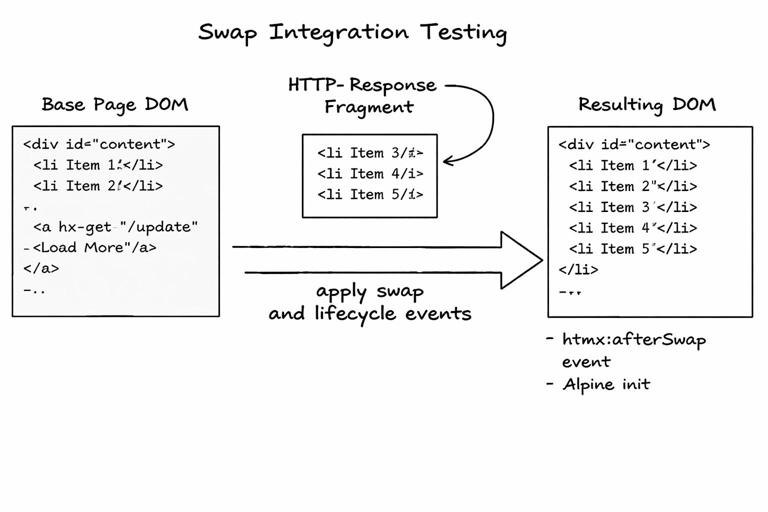
What Swap Integration Tests Catch
These tests are ideal for: verifying that hx-target selectors actually match an element in the base page, ensuring the fragment’s root matches the expected swap strategy (innerHTML vs outerHTML), validating out-of-band swaps update secondary regions (like flash messages or counters), checking that Alpine components are initialized after swap, and confirming that the server returns the correct status codes and headers for HTMX requests.
Step-by-Step: Building a Swap Integration Harness
Step 1: define a base page HTML fixture that resembles the real page (layout, targets, and key containers). Step 2: issue an HTTP request to the fragment endpoint with HTMX headers (at minimum HX-Request: true; optionally HX-Target, HX-Trigger, HX-Current-URL). Step 3: take the response HTML and apply the swap algorithm you use (innerHTML, outerHTML, beforeend, etc.) to the base DOM. Step 4: run any post-swap hooks you rely on (for example, dispatch an htmx:afterSwap event). Step 5: assert the final DOM state and any event-driven side effects.
// Pseudocode: swap integration test harness const base = parseHTML(loadFixture("pages/items_index.html")) const res = http.get("/items?partial=results&q=tea", { headers: { "HX-Request": "true" } }) assert(res.status === 200) const fragment = parseHTML(res.body) // Apply swap: replace #results innerHTML with fragment body base.query("#results").setInnerHTML(fragment.rootHTML()) // Simulate lifecycle event dispatchEvent(base.window, "htmx:afterSwap", { target: base.query("#results") }) // Assertions assert(base.queryAll("#results [data-testid='item-row']").length > 0) assert(base.query("#results").text().includes("tea"))Testing Out-of-Band Swaps (hx-swap-oob)
Out-of-band swaps are powerful, but they can silently fail if IDs don’t match or the OOB element is missing in the base page. Integration tests should verify that OOB content lands where intended. The harness needs to scan the fragment for elements marked with hx-swap-oob, locate matching targets in the base DOM, and apply the specified swap. Then assert both the main target and the OOB targets changed.
// Pseudocode: apply OOB swaps const oobNodes = fragment.queryAll("[hx-swap-oob]") for (const node of oobNodes) { const id = node.attr("id") const mode = node.attr("hx-swap-oob") || "outerHTML" const target = base.query(`#${id}`) assert(target.exists()) applySwap(target, node, mode) } // Assert flash updated assert(base.query("#flash").text().includes("Saved"))Testing Alpine.js Re-Initialization After Swaps
When fragments include Alpine components, a common failure mode is “it works on first page load but not after an HTMX swap.” Your integration test should verify that Alpine directives are present and that initialization occurs after swap. Depending on your setup, you might call Alpine.initTree on the swapped container or rely on an event listener that does it. The test should assert observable behavior: a component’s default state is applied, a button toggles a region, or a computed class appears.
// Pseudocode: verify Alpine init after swap // After applying swap to #modal-body: Alpine.initTree(base.query("#modal-body").node) const panel = base.query("#modal-body [x-data]") assert(panel.exists()) // Simulate click that toggles x-show region base.query("#modal-body [data-testid='toggle-advanced']").click() assert(base.query("#modal-body [data-testid='advanced-section']").isVisible())Headers and Status Codes: HTMX-Specific Response Contracts
Swap integration tests are also the right place to assert HTMX response contracts: correct 200/204/422 status codes, redirects handled via HX-Redirect or standard Location, and trigger headers like HX-Trigger. If you use HX-Trigger to notify Alpine components or to refresh other regions, assert that the header is present and contains expected event names and payload shape.
// Pseudocode: assert HX-Trigger header const res = http.post("/items", { title: "Tea" }, { headers: { "HX-Request": "true" } }) assert(res.status === 201) assert(res.headers["HX-Trigger"].includes("items:changed"))End-to-End Coverage: A Small Set of High-Confidence Browser Tests
End-to-end tests run a real browser against a running server and validate user-visible behavior: clicking buttons triggers requests, fragments swap into place, focus moves appropriately, and navigation/history behaves as expected. Because hypermedia apps rely heavily on server responses, E2E tests are especially valuable for catching mismatches between markup, routing, authentication, and deployment configuration. Keep the suite small and stable by focusing on critical flows and by using robust selectors.
Choosing E2E Scenarios That Pay Off
Pick scenarios that cross boundaries: authentication + a core CRUD action, a search/filter flow that updates results, a multi-step flow that includes validation errors, and a permission-based action that should be blocked. For each scenario, assert both the visible UI and the underlying network behavior when it matters (for example, that a click triggers an XHR/fetch with HX-Request header). Avoid testing every permutation; rely on unit and integration tests for combinatorics.
Step-by-Step: Writing a Stable E2E Test for an HTMX Swap
Step 1: seed test data in a known state. Step 2: navigate to the page. Step 3: locate the control using data-testid attributes. Step 4: perform the action (click, type, submit). Step 5: wait for the DOM to update by observing the target container, not by sleeping. Step 6: assert that the updated fragment contains expected content and that unrelated parts of the page remain intact.
// Example in Playwright-style pseudocode test("search updates results via HTMX", async ({ page }) => { await seedItems(["Green tea", "Black coffee"]) await page.goto("/items") await page.getByTestId("search-input").fill("tea") await page.getByTestId("search-form").dispatchEvent("submit") const results = page.getByTestId("results") await expect(results).toContainText("Green tea") await expect(results).not.toContainText("Black coffee") })Asserting That HTMX Requests Happened (Without Over-Specifying)
Sometimes you want to ensure an interaction is truly hypermedia-driven (an HTMX request) rather than a full page reload. In E2E tests you can listen for network requests and assert the presence of the HX-Request header, while still keeping the test resilient. Don’t assert exact timing or every header; assert the minimum contract.
// Playwright-style pseudocode: assert HX-Request header const [req] = await Promise.all([ page.waitForRequest(r => r.url().includes("/items") && r.method() === "GET"), page.getByTestId("search-input").fill("tea") ]) expect(req.headers()["hx-request"]).toBe("true")Testing History and URL Updates
If your UI updates the URL as part of interactions, E2E tests should verify that the address bar reflects the new state and that back/forward restores the previous view. The key is to assert user-observable outcomes: URL changes, results change, and back returns to prior results. Keep assertions focused on the contract: the URL includes the query, and the results match it.
// Pseudocode: URL and back/forward await page.goto("/items") await page.getByTestId("search-input").fill("tea") await page.getByTestId("search-submit").click() await expect(page).toHaveURL(/\?q=tea/) await expect(page.getByTestId("results")).toContainText("tea") await page.goBack() await expect(page).not.toHaveURL(/\?q=tea/) await expect(page.getByTestId("results")).not.toContainText("tea")Test Data and Determinism: Keeping Hypermedia Tests Reliable
Flaky tests usually come from nondeterministic data, timing assumptions, or shared state. For hypermedia apps, determinism means: stable fixtures, predictable IDs, controlled clocks, and explicit waits for DOM changes. Use database transactions or per-test databases, reset state between tests, and avoid relying on ordering unless the UI guarantees it. When testing fragments, ensure the server returns consistent markup for the same input.
Step-by-Step: Seeding Data for Fragment and E2E Tests
Step 1: create a test helper that inserts records with explicit fields (including timestamps if they affect rendering). Step 2: return identifiers so tests can assert on stable content. Step 3: avoid random titles unless the test asserts only on presence. Step 4: for E2E, seed via direct DB access or a test-only HTTP endpoint protected by environment checks.
// Pseudocode: deterministic seeding function seedItems(titles) { const now = "2026-01-01T00:00:00Z" return titles.map((t, i) => db.insert("items", { id: 1000 + i, title: t, created_at: now })) }Selectors and Markup Contracts: data-testid as a Testing API
Hypermedia UIs can change markup frequently as you refine templates. To keep tests stable, introduce a small “testing API” in your HTML: data-testid attributes on key elements like forms, results containers, row items, and action buttons. Avoid selecting by deep CSS paths or text that may be localized. In template unit tests, assert that these data-testid hooks exist; in E2E tests, use them as primary selectors.
Step-by-Step: Adding Test Hooks Without Polluting UX
Step 1: identify interactive elements and swap targets. Step 2: add data-testid attributes to those elements only. Step 3: standardize names (kebab-case, consistent prefixes). Step 4: in unit tests, fail fast if a hook disappears. Step 5: in E2E tests, avoid mixing testid selectors with brittle CSS selectors.
<div id="results" data-testid="results"> <ul> <li data-testid="item-row" data-id="42">...</li> </ul></div>Common Failure Modes and Targeted Tests
Some bugs are disproportionately common in HTMX apps and deserve targeted tests. Duplicate IDs after swapping a fragment that includes a layout wrapper. Missing root container causing outerHTML swaps to replace the wrong node. OOB swaps not applying because the base page lacks the target ID. Validation fragments returning 200 instead of 422 (or vice versa), causing client logic to mis-handle errors. Alpine components not re-initializing after swap. For each failure mode, create one integration test that reproduces it and locks in the fix.
Step-by-Step: A “Duplicate ID” Integration Test
Step 1: load a base page fixture containing an element with id="item-42". Step 2: request a fragment that also includes id="item-42" but is intended to replace the existing element. Step 3: apply the swap. Step 4: assert that there is exactly one element with that ID after the swap. This catches cases where you accidentally used innerHTML instead of outerHTML, leaving the old node in place.
// Pseudocode: ensure unique IDs after swap const base = parseHTML(loadFixture("pages/items_index.html")) assert(base.queryAll("#item-42").length === 1) const res = http.get("/items/42", { headers: { "HX-Request": "true" } }) const fragment = parseHTML(res.body) applySwap(base.query("#item-42"), fragment.query("#item-42"), "outerHTML") assert(base.queryAll("#item-42").length === 1)Putting It Together: A Minimal, Effective Coverage Plan
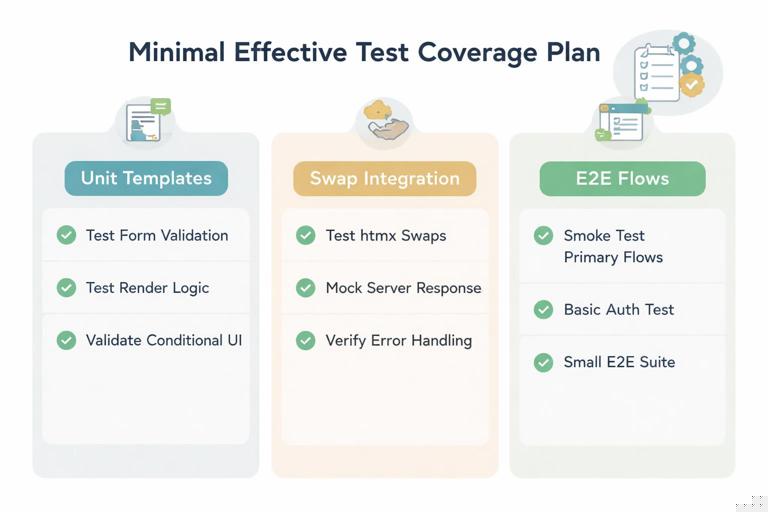
A practical plan is to define: (1) template unit tests for each reusable partial and each form state (normal + error), (2) swap integration tests for each major swap target and each OOB region, and (3) E2E tests for a handful of critical flows. Write unit tests first to lock in markup contracts, add integration tests when you introduce a new swap target or OOB behavior, and add E2E tests only for flows that would be costly to debug in production.