Reference Implementation Overview
Goal and scope: In this chapter you’ll build a reference “Task Manager” implementation that combines authentication, task CRUD, and a responsive layout using HTMX for server-driven updates and Alpine.js for small client-side behaviors. The emphasis is on how the pieces fit together in a cohesive, maintainable structure: routes, templates, fragments, and a few Alpine components for UI state.
What you will implement: (1) Auth pages and session-aware layout, (2) a tasks index with create/read/update/delete, (3) task detail and inline editing, (4) responsive layout with a mobile drawer and a desktop sidebar, (5) a consistent fragment strategy so every interaction has a full-page and partial rendering path.
Assumptions: You already have a server framework and templating system in place. The examples below use generic endpoint names and pseudo-template syntax; adapt them to your stack (Django, Rails, Laravel, Express, Go, etc.).
Project Structure and Template Map
Folder layout: Organize templates so full pages and fragments share the same building blocks. A practical structure is: templates/layout/ for the base shell, templates/auth/ for login/register, templates/tasks/ for pages and fragments, and templates/components/ for reusable UI pieces like the task row, flash messages, and empty states.
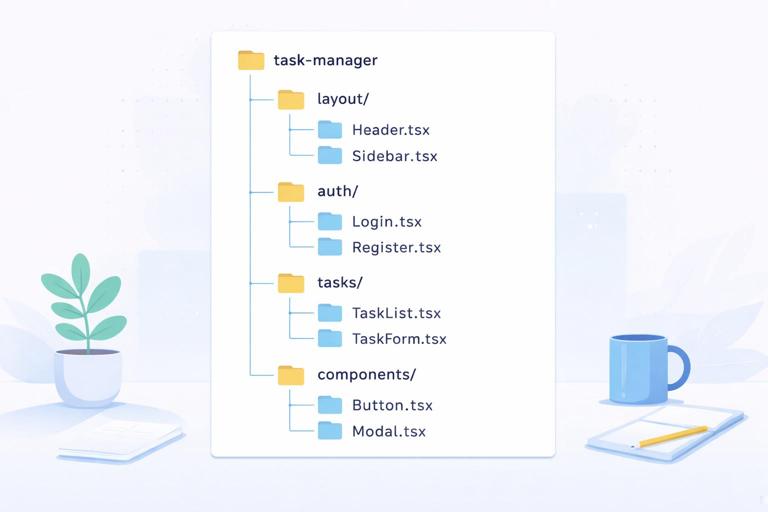
Template responsibilities: Keep a single “shell” layout that renders navigation, user menu, and a content slot. Then create page templates that extend the shell and include fragments. Fragments should be renderable on their own (for HTMX swaps) and also includable in pages (for first load). This prevents divergence between “HTMX view” and “normal view.”
- Listen to the audio with the screen off.
- Earn a certificate upon completion.
- Over 5000 courses for you to explore!

Download the app
Fragment naming convention: Use a suffix like _fragment or a partials/ folder. For example: tasks/index.html (page), tasks/_list.html (fragment), tasks/_row.html (fragment), tasks/_form.html (fragment), tasks/_detail.html (fragment).
Data Model and Authorization Rules
Task model: Keep it intentionally small but realistic: id, user_id, title, notes, status (open/done), due_at, created_at, updated_at. Add an index on (user_id, status, due_at) if your DB supports it to keep list queries fast.
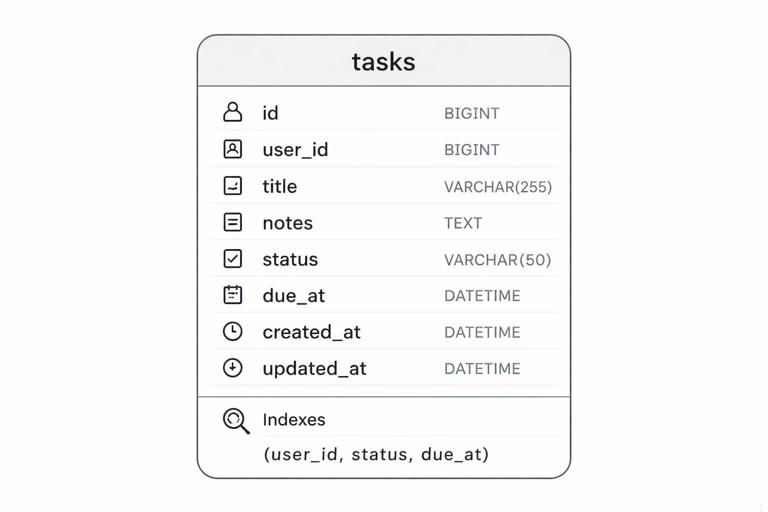
Authorization: Every task belongs to a user. All task queries must be scoped by user_id. For write operations, load the task by id and user_id together to avoid insecure direct object references. Define a single helper like current_user() and a guard like require_auth() for task routes.
Validation rules: Title required, max length (e.g., 200). Notes optional. Due date optional but must be a valid date. Status must be one of allowed values. Keep validation errors in a structured map keyed by field name so you can re-render the form fragment with inline errors.
Routes and Rendering Strategy
Endpoint inventory: You’ll implement a small set of predictable routes. Auth: GET /login, POST /login, POST /logout, optionally GET /register, POST /register. Tasks: GET /tasks (index), POST /tasks (create), GET /tasks/:id (detail), GET /tasks/:id/edit (edit fragment), PATCH /tasks/:id (update), DELETE /tasks/:id (delete), plus a small toggle endpoint POST /tasks/:id/toggle for done/open.
One handler, two render modes: For each route, decide whether to return a full page or a fragment based on the request context (for example, a header like HX-Request). The same controller action can branch: if HTMX request, render a fragment; otherwise render the full page that includes that fragment. This keeps behavior consistent and reduces duplication.
Swap targets: Standardize a few IDs in your layout: #main for the main content area, #flash for messages, and within tasks pages #task-list and #task-detail. When you always know where a fragment lands, your templates become simpler and your UI becomes predictable.
Base Layout with Responsive Navigation (Alpine + HTMX)
Shell layout: The layout renders a header with app name, a user menu, and a navigation area. On desktop, show a sidebar. On mobile, use a drawer that opens and closes with Alpine state. The content area should be a single container where pages render their main content.
Mobile drawer with Alpine: Alpine is ideal for local UI state like “drawer open.” Keep it minimal: a boolean, a click handler, and a few classes. The drawer should not depend on HTMX; it should work even if no swaps occur.
<div x-data="{ navOpen: false }" class="min-h-screen flex"> <aside class="hidden md:block w-64 border-r"> <nav> <a href="/tasks" class="block p-3">Tasks</a> </nav> </aside> <div class="flex-1"> <header class="flex items-center justify-between p-3 border-b"> <button class="md:hidden" @click="navOpen = true">Menu</button> <div class="font-semibold">Task Manager</div> <form method="post" action="/logout"> <button type="submit">Logout</button> </form> </header> <div id="flash"><!-- flash messages --></div> <main id="main" class="p-4">{{ content }}</main> </div> <div class="md:hidden" x-show="navOpen" @click.self="navOpen = false" style="display:none"> <div class="w-64 bg-white h-full shadow"> <nav> <a href="/tasks" class="block p-3" @click="navOpen = false">Tasks</a> </nav> </div> </div></div>HTMX navigation inside the shell: If you want “app-like” navigation, you can progressively enhance links to load into #main. Keep standard href so full navigation still works. Add HTMX attributes to the link or wrap with a small component. For example, the Tasks link can request /tasks and swap into #main while also updating history.
<a href="/tasks" hx-get="/tasks" hx-target="#main" hx-push-url="true" class="block p-3">Tasks</a>Authentication Pages and Session-Aware UI
Login page: Render a simple form with email and password. On invalid credentials, re-render the same page with an error message. On success, redirect to /tasks. Keep the login page outside the authenticated shell or use the same shell with a minimal header; either is fine as long as it’s consistent.
Session-aware layout: The shell should show different navigation based on whether a user is logged in. For example, show “Login” when not authenticated and “Logout” when authenticated. This is mostly server-side conditional rendering, but it matters for HTMX swaps: if a session expires and a request returns a login fragment, you want it to land in #main cleanly.
Handling expired sessions during HTMX requests: A practical approach is: if an HTMX request hits an authenticated endpoint but the user is not logged in, return the login page fragment with a 401 status and include a message. The client will swap it into #main. If you prefer a redirect, ensure your framework handles redirects for HTMX in a way that results in content being swapped rather than a full navigation.
Tasks Index Page: Two-Panel Responsive Layout
Desktop vs mobile layout: On desktop, show a two-panel view: list on the left, detail on the right. On mobile, show only one panel at a time: the list, then navigate to detail. You can implement this with CSS breakpoints and by choosing different swap targets depending on viewport, but a simpler approach is to keep the same markup and let CSS stack panels on mobile.
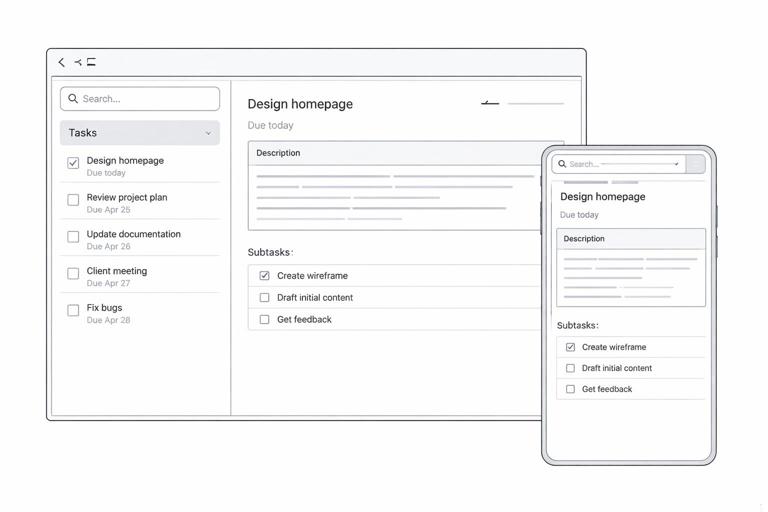
Index page composition: The index page includes: a “New Task” form at the top, filters (optional), the task list container (#task-list), and a detail container (#task-detail) that shows either an empty state or the selected task.
<section class="grid md:grid-cols-2 gap-4"> <div> <h3>Create Task</h3> <div id="task-create">{{ include('tasks/_form.html', { mode: 'create' }) }}</div> <h3>Your Tasks</h3> <div id="task-list">{{ include('tasks/_list.html') }}</div> </div> <div> <h3>Details</h3> <div id="task-detail">{{ include('tasks/_detail_empty.html') }}</div> </div></section>List fragment: Render tasks as rows. Each row includes a title, due date, status indicator, and actions. The row should be clickable to load details into #task-detail on desktop, while still being a normal link for mobile navigation.
<ul class="divide-y"> {% for task in tasks %} {{ include('tasks/_row.html', { task: task }) }} {% endfor %}</ul><li class="p-3 flex items-center justify-between"> <div class="min-w-0"> <a href="/tasks/{{task.id}}" hx-get="/tasks/{{task.id}}" hx-target="#task-detail" hx-push-url="true" class="font-medium truncate">{{task.title}}</a> <div class="text-sm text-gray-600">{% if task.due_at %}Due {{task.due_at}}{% endif %}</div> </div> <div class="flex items-center gap-2"> <button hx-post="/tasks/{{task.id}}/toggle" hx-target="closest li" hx-swap="outerHTML"> {% if task.status == 'done' %}Undo{% else %}Done{% endif %} </button> </div></li>Create Task: Inline Form that Resets on Success
Create form fragment: The create form posts to /tasks. On validation errors, return the same form fragment with errors and keep user input. On success, return two things: a fresh empty form fragment (to reset the form) and an updated list fragment (to show the new task). You can do this with an out-of-band swap for the list while the form target swaps normally.
Form markup: Target the form container for replacement. Include a small error summary and field-level errors. Keep names consistent with your server’s expected payload.
<form hx-post="/tasks" hx-target="#task-create" hx-swap="outerHTML" class="space-y-2"> <label class="block"> <span>Title</span> <input name="title" value="{{form.title}}" class="border p-2 w-full" /> {% if errors.title %}<div class="text-red-600 text-sm">{{errors.title}}</div>{% endif %} </label> <label class="block"> <span>Due date</span> <input type="date" name="due_at" value="{{form.due_at}}" class="border p-2 w-full" /> </label> <button type="submit" class="border px-3 py-2">Add</button></form>Server response pattern: On success, render the empty create form fragment as the main response, and include an updated list fragment marked for out-of-band swap into #task-list. This keeps the UI in sync without client-side orchestration.
<div id="task-create">{{ include('tasks/_form.html', { mode: 'create', form: emptyForm }) }}</div><div id="task-list" hx-swap-oob="true">{{ include('tasks/_list.html', { tasks: tasks }) }}</div>Task Detail: Read View with Inline Edit
Detail fragment: The detail view shows title, notes, due date, status, and action buttons. The “Edit” button loads an edit form fragment into the same #task-detail container. This keeps the user in context and avoids modal complexity for a reference implementation.
<div class="border p-4 rounded"> <div class="flex items-start justify-between gap-3"> <div> <h3 class="font-semibold">{{task.title}}</h3> <p class="text-sm text-gray-700">{{task.notes}}</p> <p class="text-sm">{% if task.due_at %}Due {{task.due_at}}{% else %}No due date{% endif %}</p> </div> <div class="flex gap-2"> <button hx-get="/tasks/{{task.id}}/edit" hx-target="#task-detail">Edit</button> <button hx-delete="/tasks/{{task.id}}" hx-target="#task-detail" hx-swap="innerHTML">Delete</button> </div> </div></div>Edit form fragment: The edit form submits a PATCH (or POST with method override) to update the task. On success, return the read-only detail fragment and also update the corresponding row in the list using an out-of-band swap keyed by a stable row ID like task-row-{{id}}.
<form hx-patch="/tasks/{{task.id}}" hx-target="#task-detail" class="space-y-2 border p-4 rounded"> <label class="block"> <span>Title</span> <input name="title" value="{{form.title}}" class="border p-2 w-full" /> {% if errors.title %}<div class="text-red-600 text-sm">{{errors.title}}</div>{% endif %} </label> <label class="block"> <span>Notes</span> <textarea name="notes" class="border p-2 w-full">{{form.notes}}</textarea> </label> <label class="block"> <span>Due date</span> <input type="date" name="due_at" value="{{form.due_at}}" class="border p-2 w-full" /> </label> <div class="flex gap-2"> <button type="submit">Save</button> <button type="button" hx-get="/tasks/{{task.id}}" hx-target="#task-detail">Cancel</button> </div></form>Row IDs for targeted updates: In the row fragment, wrap the row with an ID so it can be replaced precisely. Then, on update, include an out-of-band fragment for that row.
<li id="task-row-{{task.id}}" class="p-3 flex items-center justify-between"> ...</li><div id="task-row-{{task.id}}" hx-swap-oob="true">{{ include('tasks/_row.html', { task: task }) }}</div>Delete Task: Coordinated List and Detail Updates
Delete behavior: When a task is deleted from the detail panel, you want to (1) remove the row from the list, (2) replace the detail panel with an empty state or a “Select a task” message, and (3) optionally show a flash message. You can do this with a normal swap into #task-detail plus out-of-band swaps for the list row and flash.
Server response example: Return an empty-state detail fragment as the main response. Include an out-of-band swap that removes the row by replacing it with nothing (or a comment) and another out-of-band swap for #flash.
<div id="task-detail">{{ include('tasks/_detail_empty.html') }}</div><div id="task-row-{{task.id}}" hx-swap-oob="true"></div><div id="flash" hx-swap-oob="true"> <div class="border p-2">Task deleted.</div></div>Status Toggle: Fast Interaction with Minimal Payload
Toggle endpoint: A dedicated toggle route keeps the interaction small. The button in the row posts to /tasks/:id/toggle and targets the closest list item for replacement. The server flips status and returns the updated row fragment only.
Keeping detail in sync: If the toggled task is currently open in the detail panel, you may also want to update #task-detail. A simple approach is: when toggling from the list, only update the row. When toggling from the detail view, update the detail and include an out-of-band row update. This keeps each interaction focused and avoids extra work.
Flash Messages and Error Surfaces
Flash container: Put #flash in the shell so any endpoint can update it. For example, after creating a task, you can include an out-of-band flash message. After a validation error, you typically avoid a flash and keep errors near the form.
Consistent error rendering: Use the same error rendering partial in both create and edit forms. This ensures that validation feedback looks identical across the app and reduces template drift.
Step-by-Step Build Plan (Reference Checklist)
Step 1: Create the shell layout: Implement the base layout with #main and #flash, plus responsive navigation. Add Alpine state for the mobile drawer. Verify that normal navigation works without HTMX enhancements.
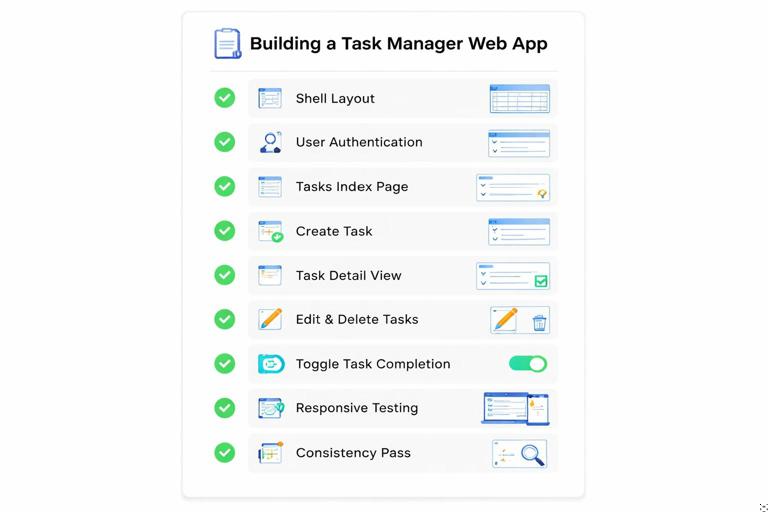
Step 2: Implement auth routes and templates: Add login form rendering and session creation. Ensure the shell shows the correct navigation state. Confirm that unauthenticated users cannot access task routes.
Step 3: Implement tasks index page: Build GET /tasks to render the full page with create form, list fragment, and empty detail fragment. Populate tasks scoped to the current user.
Step 4: Implement create flow: Build POST /tasks to validate and create. On error, return the create form fragment with errors. On success, return a reset create form plus an out-of-band list update.
Step 5: Implement detail flow: Build GET /tasks/:id to return either a full page (mobile navigation) or a detail fragment (desktop panel). Ensure the same fragment is used in both contexts.
Step 6: Implement edit and update: Build GET /tasks/:id/edit to return the edit form fragment. Build PATCH /tasks/:id to validate and update. On success, return the read-only detail fragment plus an out-of-band row update.
Step 7: Implement delete: Build DELETE /tasks/:id to delete and return the empty detail fragment, plus out-of-band removal of the list row and a flash message.
Step 8: Implement toggle: Build POST /tasks/:id/toggle to flip status and return the updated row fragment. Add a toggle button in the row and optionally in the detail view.
Step 9: Responsive verification: Test the two-panel layout on desktop and stacked layout on mobile. Ensure that clicking a task works as a normal link and also enhances into a detail swap when HTMX is active.
Step 10: Consistency pass: Confirm every fragment can be rendered in isolation and included in a page. Confirm every action returns either a full page or a fragment depending on request type, without duplicating business logic.