Why routing changes the offline story
In a traditional multi-page website, navigation usually means requesting a new HTML document from the server. In a Progressive Web App, navigation can mean several different things depending on your architecture: a full document navigation (server-rendered pages), a client-side route change (single-page app), or a hybrid where some routes are handled by the client and others by the server. Offline behavior must be designed for all of these cases.
Routing is the set of rules that maps a URL to a response. When the network is unavailable, the browser still tries to resolve navigations. If you do nothing, a document navigation will fail with a generic browser error page. A PWA should instead provide a controlled experience: either serve a cached page, serve an offline fallback page, or redirect to a safe route that can render with cached data.
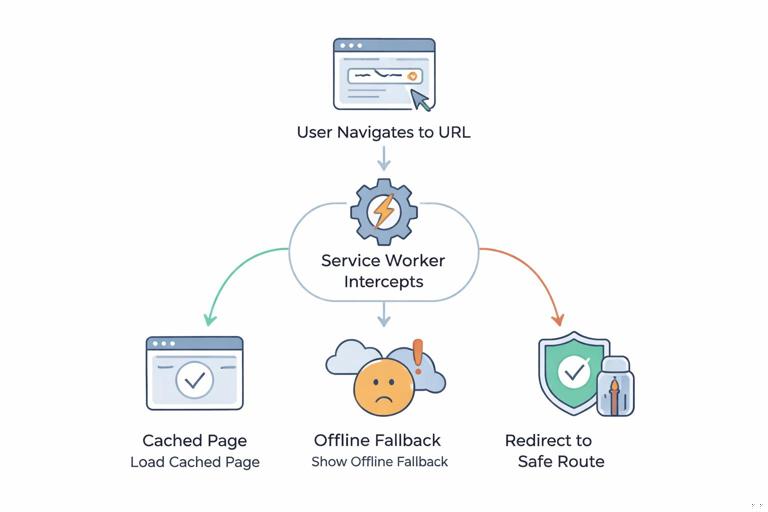
This chapter focuses on navigation requests (HTML documents) and how to handle them in a service worker: distinguishing route types, providing navigation fallbacks, and building offline pages that are helpful rather than dead ends.
Key terms: route, navigation request, fallback
Route
A route is a URL pattern your app supports, such as /, /products, /products/123, or /settings. Routes can be static (known at build time) or dynamic (contain IDs, slugs, or query parameters).
Navigation request
A navigation request is a fetch for an HTML document triggered by entering a URL, clicking a link, using the back/forward buttons, or opening the app from an installed icon. In the service worker, you can detect these requests using request.mode === 'navigate' or by checking the Accept header for text/html.
- Listen to the audio with the screen off.
- Earn a certificate upon completion.
- Over 5000 courses for you to explore!

Download the app
Navigation fallback
A navigation fallback is what you return when the requested document cannot be fetched (usually due to being offline) or when you intentionally want to serve a single HTML shell for many routes (common in SPAs). A fallback can be a cached page, an offline page, or a redirect response.
Choosing a routing model for offline navigation
Before implementing code, decide which of these models matches your app. The service worker behavior differs.
Model A: SPA with a single HTML shell
All routes are handled client-side. The server typically returns index.html for any route that is not a static asset. Offline, you want to serve index.html from cache for navigations, then let the client router render the correct view. This is often called an “app shell navigation route.”
Model B: Multi-page app (MPA) with multiple HTML documents
Each route corresponds to a distinct HTML document, possibly server-rendered. Offline, you may want to cache some documents (e.g., recently visited pages) and fall back to an offline page for others.
Model C: Hybrid
Some routes are SPA-style (e.g., /app/*), while marketing pages or checkout flows are server-rendered. Offline, you might serve the SPA shell for /app/* and a different fallback for the rest.
Detecting navigations and separating them from assets and APIs
Navigation fallbacks should apply only to document requests. If you accidentally return HTML for an API request, your app will break in confusing ways (for example, JSON parsing errors). The first step is to gate your logic carefully.
In a service worker fetch handler, a robust navigation check looks like this:
self.addEventListener('fetch', (event) => { const { request } = event; const isNavigation = request.mode === 'navigate'; if (!isNavigation) return; // navigation handling goes here});If you need compatibility with older patterns or want to be extra defensive, you can also check the Accept header:
const acceptHeader = request.headers.get('accept') || '';const wantsHTML = acceptHeader.includes('text/html');Use one primary check (usually mode === 'navigate') and keep the rest as safeguards.
Building an offline page that is actually useful
An offline page is not just a “you are offline” message. It is a route-safe document that can be served when a navigation cannot be fulfilled. A good offline page should:
- Explain what happened in plain language.
- Offer actions: retry, go to home, open cached sections, view saved items.
- Be lightweight and fully self-contained (no external fonts, no third-party scripts).
- Use the same base styling as your app shell if possible, but avoid depending on network-only assets.
Practical structure for an offline page:
- A short message: “You’re offline.”
- A list of available offline destinations (e.g., “Home”, “Saved”, “Recently viewed”).
- A retry button that reloads the current URL.
Example /offline.html (simplified):
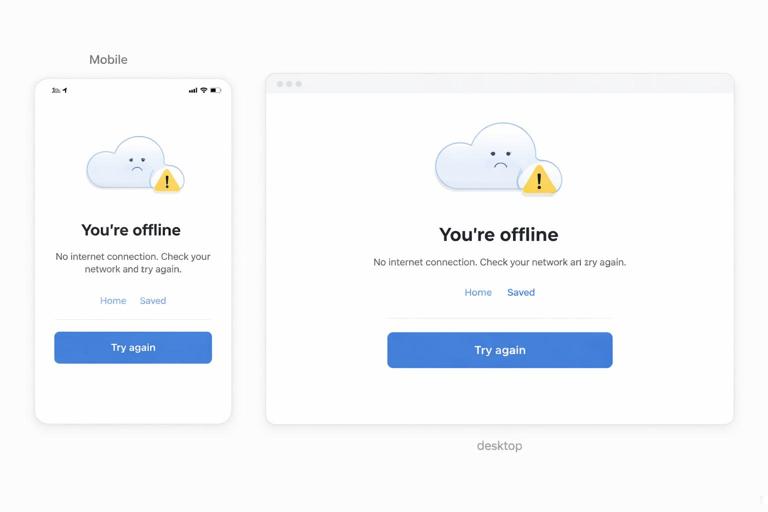
<!doctype html><html lang="en"><meta charset="utf-8"><meta name="viewport" content="width=device-width,initial-scale=1"><title>Offline</title><style> body{font-family:system-ui,Arial,sans-serif;margin:0;padding:24px} .card{max-width:720px;margin:0 auto;border:1px solid #ddd;border-radius:12px;padding:20px} button{padding:10px 14px;border-radius:10px;border:1px solid #ccc;background:#fff} a{display:inline-block;margin-right:12px}</style><body> <div class="card"> <h1>You’re offline</h1> <p>This page isn’t available without a connection. You can still use parts of the app that were saved for offline use.</p> <p> <a href="/">Home</a> <a href="/saved">Saved</a> </p> <button id="retry">Try again</button> </div> <script> document.getElementById('retry').addEventListener('click', () => location.reload()); </script></body></html>Even if your main app is an SPA, keeping a dedicated offline document is valuable: it provides a predictable fallback when the shell cannot load or when a route requires network-only data.
Step-by-step: implement a navigation fallback in the service worker
This section shows a practical, framework-agnostic approach. It assumes you already have a service worker registered and you are caching assets according to your chosen strategies. Here we focus only on navigations and offline pages.
Step 1: ensure the offline page is cached
The offline page must be available offline, which means it must be cached during installation or otherwise guaranteed to be in the cache before it’s needed.
const STATIC_CACHE = 'static-v1';const OFFLINE_URL = '/offline.html';self.addEventListener('install', (event) => { event.waitUntil( caches.open(STATIC_CACHE).then((cache) => cache.addAll([OFFLINE_URL])) );});If your offline page depends on local CSS or images, include them in the same addAll list.
Step 2: handle navigation requests with a network-first approach
For document navigations, a common pattern is: try the network (so users get the latest HTML), fall back to cache if available, and finally fall back to the offline page.
self.addEventListener('fetch', (event) => { const { request } = event; if (request.mode !== 'navigate') return; event.respondWith((async () => { try { // Try the network first. const networkResponse = await fetch(request); // Optionally cache successful navigations for later. const cache = await caches.open('pages-v1'); cache.put(request, networkResponse.clone()); return networkResponse; } catch (err) { // If network fails, try cached page. const cachedResponse = await caches.match(request); if (cachedResponse) return cachedResponse; // Otherwise serve the offline page. return caches.match(OFFLINE_URL); } })());});This pattern works well for MPAs and hybrid apps. For SPAs, you may want to serve index.html for most navigations instead; that is covered below.
Step 3: prevent caching of “bad” navigations
Not every HTML response should be cached. For example, you may not want to cache:
- Personalized pages that could leak between users on shared devices.
- Authentication pages that change frequently.
- Error pages (404/500) returned by the server.
Add checks before caching:
const networkResponse = await fetch(request);if (networkResponse.ok && networkResponse.headers.get('content-type')?.includes('text/html')) { const cache = await caches.open('pages-v1'); cache.put(request, networkResponse.clone());}return networkResponse;SPA routing: serving the app shell for navigations
In an SPA, the server typically returns the same HTML shell for many routes. Offline, you want to do the same: return the cached shell so the client router can render the correct view.
The simplest approach is: for navigations, respond with cached /index.html (or your shell document). If the shell is missing, fall back to /offline.html.
const SHELL_URL = '/index.html';self.addEventListener('fetch', (event) => { const { request } = event; if (request.mode !== 'navigate') return; event.respondWith((async () => { // If the request is for a file (e.g., /logo.png), let it pass through. const url = new URL(request.url); const looksLikeFile = url.pathname.includes('.') ; if (looksLikeFile) return fetch(request); const shell = await caches.match(SHELL_URL); if (shell) return shell; return caches.match('/offline.html'); })());});The looksLikeFile check prevents accidentally serving index.html for real files. Without it, a request to /styles/main.css might return HTML, causing hard-to-debug styling failures.
In a hybrid app, you can scope this to a prefix:
const APP_PREFIX = '/app/';self.addEventListener('fetch', (event) => { const { request } = event; if (request.mode !== 'navigate') return; const url = new URL(request.url); if (!url.pathname.startsWith(APP_PREFIX)) return; event.respondWith(caches.match('/index.html').then(r => r || caches.match('/offline.html')));});Navigation fallbacks for dynamic routes (detail pages)
Dynamic routes like /products/123 are common. Offline, you have three realistic options:
- Serve the cached document for that exact URL if it exists (good for MPAs or SSR).
- Serve the SPA shell and let the client attempt to render from cached data (good for SPAs).
- Serve an offline page that explains the content is unavailable and offers alternatives.
The best choice depends on whether the route can render meaningfully without fresh data. For example, a product detail page might be usable if you cache product data; a checkout page might not be safe offline.
A practical hybrid approach is to allow offline rendering for “read-only” routes and force offline fallback for “transactional” routes.
Example: allowlist and blocklist route patterns
const OFFLINE_ALLOWLIST = [ /^\/$/, /^\/products(\/.*)?$/, /^\/saved$/];const OFFLINE_BLOCKLIST = [ /^\/checkout(\/.*)?$/, /^\/account(\/.*)?$/];function matchesAny(pathname, patterns) { return patterns.some((re) => re.test(pathname));}self.addEventListener('fetch', (event) => { const { request } = event; if (request.mode !== 'navigate') return; event.respondWith((async () => { const url = new URL(request.url); if (matchesAny(url.pathname, OFFLINE_BLOCKLIST)) { try { return await fetch(request); } catch { return caches.match('/offline.html'); } } if (matchesAny(url.pathname, OFFLINE_ALLOWLIST)) { try { return await fetch(request); } catch { return (await caches.match(request)) || (await caches.match('/offline.html')); } } // Default: SPA shell or offline page, depending on your app model. return (await caches.match('/index.html')) || (await caches.match('/offline.html')); })());});This gives you explicit control over which routes should be usable offline and which should not.
Handling query parameters and URL variants
Navigation caching can be undermined by URL variants. For example, /products?page=2 and /products?page=3 are different URLs. If you cache every variant, you may fill storage quickly; if you ignore query parameters, you might serve the wrong page.
Practical options:
- Cache exact URLs for a limited set of routes (safe but can grow).
- Normalize URLs before caching (advanced; must ensure correctness).
- Do not cache list pages with many variants; rely on an offline fallback.
If you choose to normalize, do it only for routes where it is safe. Example: ignore tracking parameters like utm_source while keeping functional parameters like page.
function normalizeURL(url) { const u = new URL(url); ['utm_source','utm_medium','utm_campaign'].forEach((k) => u.searchParams.delete(k)); return u.toString();}To use normalization for caching, you would need to create a new Request with the normalized URL for cache.match and cache.put. Be careful: changing the URL changes the cache key, and you must ensure you still return the correct content for the user’s original request.
Offline pages for “partial offline” states
Offline is not binary. Users may have:
- A flaky connection where the HTML loads but API calls fail.
- A captive portal where requests succeed but return unexpected content.
- A slow connection where timeouts feel like offline.
Navigation fallbacks handle the case where the document cannot be fetched. But you should also design route-level offline UI within the app for when the shell loads but data does not. A practical pattern is:
- Let navigation succeed (serve shell or cached page).
- In the route component/page, detect data fetch failure and show an inline offline state with a retry button and cached content if available.
Even without discussing API caching details, you can implement a simple retry UI pattern:
async function loadWithRetry(fetchFn, { retries = 1 } = {}) { try { return await fetchFn(); } catch (e) { if (retries <= 0) throw e; await new Promise(r => setTimeout(r, 800)); return loadWithRetry(fetchFn, { retries: retries - 1 }); }}This keeps the offline page as a last resort for navigations, while most offline UX happens inside the app’s routes.
Testing routing and fallbacks locally
Navigation fallbacks can appear correct in a normal refresh but fail in edge cases like deep links or hard reloads. Test systematically.
Checklist: what to test
- Hard reload on a deep link (e.g., open
/products/123directly) while online. - Hard reload on the same deep link while offline.
- Click internal links while offline (client-side navigation vs full navigation).
- Back/forward navigation while offline.
- Opening the installed app from the home screen to a deep link (if your OS restores the last URL).
- Routes that should be blocked offline (e.g., checkout) to confirm they show the offline page.
Practical steps in DevTools
- Open Application panel, verify the service worker is controlling the page.
- Use Network panel to toggle “Offline”.
- Use “Disable cache” carefully: it affects HTTP cache, not Cache Storage, but it can confuse results.
- Simulate a slow connection (e.g., “Slow 3G”) to see if your fallback triggers too aggressively.
If you see your offline page when you expected the SPA shell, check whether the shell is actually cached and whether your navigation handler is returning it for that route.
Common pitfalls and how to avoid them
Serving HTML for non-HTML requests
If your navigation handler is too broad, you may return index.html for scripts, styles, images, or API calls. Symptoms include “Unexpected token < in JSON” or broken styling. Always gate on request.mode === 'navigate' and add a file-extension check when serving a shell.
Offline page depends on network assets
If /offline.html loads a remote font, analytics script, or CDN stylesheet, it may render poorly or hang. Keep it self-contained or ensure all dependencies are cached.
Caching authenticated pages
If you cache HTML that contains user-specific data, you risk showing the wrong user’s content after logout/login or on shared devices. Use route blocklists, avoid caching sensitive navigations, or vary caching by session (which is complex and often not worth it).
Not handling 404s correctly in SPAs
In an SPA, returning the shell for unknown routes is normal, but you still need a client-side 404 page. Offline, users may land on a route that never existed; the shell will load, but the router should show a “Not found” view rather than a blank screen.
Ignoring base paths and service worker scope
If your app is served from a subpath (e.g., /myapp/), your shell URL and offline URL must match that base path, and your route checks should use the correct prefixes. A mismatch can cause your fallback to work on / but fail on deep links.
Putting it together: a practical navigation routing recipe
If you want a balanced default that works for many apps, use this recipe:
- Cache
/offline.htmland your SPA shell (/index.html) in the static cache. - For navigations under your app prefix, serve the shell from cache (SPA behavior).
- For other navigations, use network-first and fall back to cached page or offline page (MPA behavior).
- Blocklist sensitive routes from offline caching and from offline access.
Example combined handler:
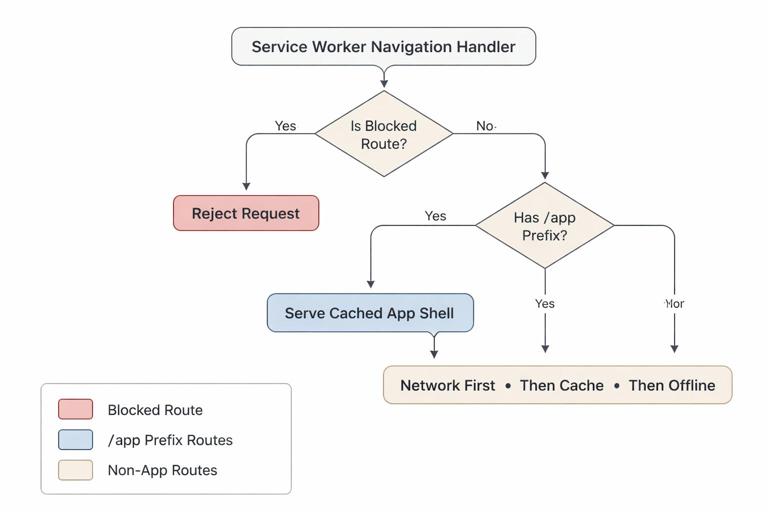
const STATIC_CACHE = 'static-v1';const PAGES_CACHE = 'pages-v1';const OFFLINE_URL = '/offline.html';const SHELL_URL = '/index.html';const APP_PREFIX = '/app/';const BLOCKLIST = [/^\/app\/checkout/, /^\/app\/account/];function isBlocked(pathname) { return BLOCKLIST.some((re) => re.test(pathname));}self.addEventListener('fetch', (event) => { const { request } = event; if (request.mode !== 'navigate') return; event.respondWith((async () => { const url = new URL(request.url); if (isBlocked(url.pathname)) { try { return await fetch(request); } catch { return caches.match(OFFLINE_URL); } } if (url.pathname.startsWith(APP_PREFIX)) { const shell = await caches.match(SHELL_URL); return shell || caches.match(OFFLINE_URL); } // Non-app pages: try network, then cache, then offline. try { const res = await fetch(request); if (res.ok) { const cache = await caches.open(PAGES_CACHE); cache.put(request, res.clone()); } return res; } catch { return (await caches.match(request)) || (await caches.match(OFFLINE_URL)); } })());});This gives you predictable behavior for deep links, a controlled offline experience, and a clear separation between SPA routes and other pages.