Why data storage is a separate decision from caching
In an offline-first PWA, you typically need to store two different kinds of things: (1) network responses (HTML, JS, CSS, images, API responses) so they can be reused without re-downloading, and (2) application data (user-generated content, drafts, settings, domain objects) so the app can function without a network and can reconcile later. These two needs overlap, but they are not the same. Cache Storage is optimized for storing Request/Response pairs. IndexedDB is optimized for structured data and queries. localStorage is a simple key/value store for small, non-sensitive values.
Choosing the right storage is mostly about: data shape (binary vs structured), access patterns (query vs lookup), size limits, transactional guarantees, and which thread you can access it from (main thread vs service worker). In practice, most PWAs use a combination: Cache Storage for HTTP responses, IndexedDB for app data and metadata, and localStorage (or better, IndexedDB) for tiny preferences.
Cache Storage: what it is and when to use it
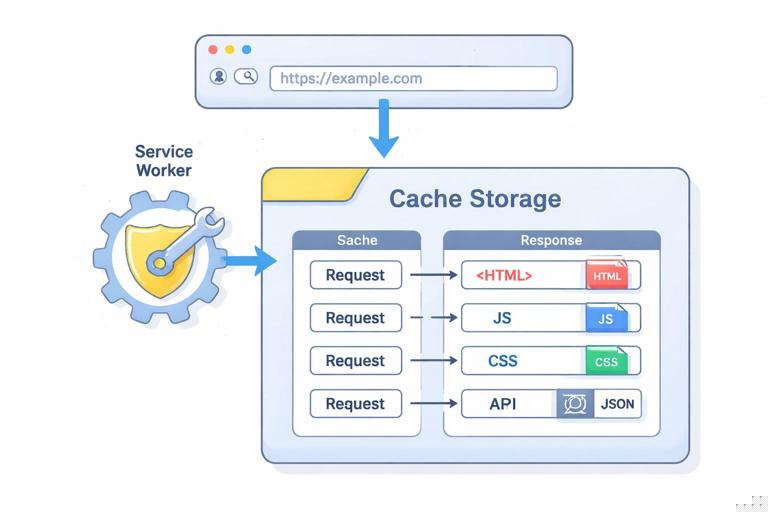
Cache Storage (the Cache API) stores HTTP responses keyed by requests. It is available in the window context and in service workers. It is ideal for:
- Static assets: JS bundles, CSS, icons, fonts.
- Media and images that are fetched via URL.
- API responses when you want to reuse the exact response body and headers later.
- Offline availability of previously visited pages or resources.
Cache Storage is not ideal for: querying by fields, partial updates, or storing complex relational data. You can store JSON responses in Cache Storage, but you cannot efficiently query inside them; you can only retrieve by request URL (and some request properties).
Key properties and constraints
- Keyed by Request: you retrieve by a URL/request, not by an object ID.
- Opaque responses: cross-origin no-CORS requests can result in opaque responses; they can be cached but are limited in inspectability.
- Storage eviction: browsers may evict caches under storage pressure. You should assume caches are not permanent.
- Versioning by cache name: you typically create caches like
app-static-v3and delete old ones during activation.
Step-by-step: caching and reading an API response
This example shows a simple “cache then network” approach for a JSON API endpoint. It is intentionally focused on data storage mechanics rather than routing patterns.
- Listen to the audio with the screen off.
- Earn a certificate upon completion.
- Over 5000 courses for you to explore!

Download the app
// In a service worker fetch handler (simplified example) self.addEventListener('fetch', (event) => { const url = new URL(event.request.url); if (url.origin === self.location.origin && url.pathname === '/api/articles') { event.respondWith(cacheApiResponse(event.request)); }}); async function cacheApiResponse(request) { const cache = await caches.open('api-v1'); const cached = await cache.match(request); const networkPromise = fetch(request).then(async (response) => { // Only cache successful, same-origin JSON responses if (response.ok) { await cache.put(request, response.clone()); } return response; }).catch(() => null); // If cached exists, return it immediately; update in background if (cached) { // Trigger network update but don't block response networkPromise; return cached; } // Otherwise fall back to network (or error) const network = await networkPromise; if (network) return network; return new Response(JSON.stringify({ items: [] }), { headers: { 'Content-Type': 'application/json' }, status: 200 }); }What this gives you: fast repeat loads and offline access to the last successful response. What it does not give you: the ability to query articles by tags, update a single article record, or merge local edits. For that, IndexedDB is the better tool.
Practical guidance: what to store in Cache Storage
- Store immutable or versioned resources (hashed filenames, versioned API URLs) to avoid stale content issues.
- Store “read-only snapshots” of API responses when you can tolerate showing slightly stale data offline.
- Don’t store user secrets in cached responses (e.g., responses containing tokens). Prefer server-side session cookies with appropriate flags, and avoid caching authenticated responses unless you fully understand the implications.
IndexedDB: the primary database for offline app data
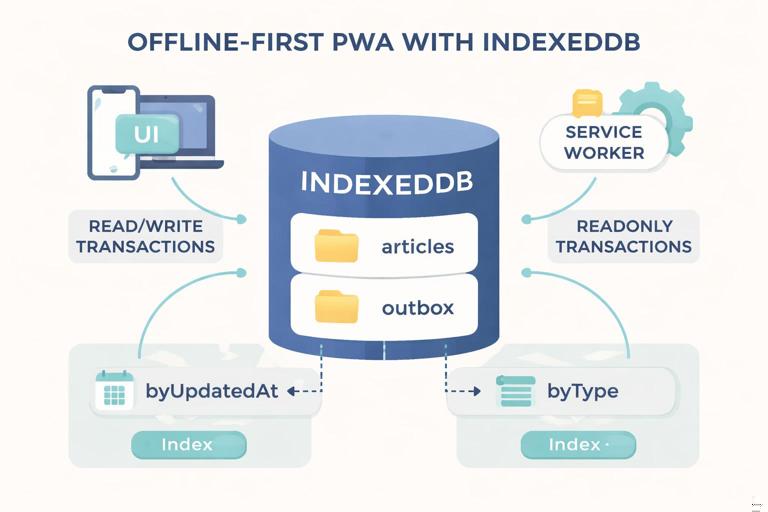
IndexedDB is a transactional, asynchronous, object store database built into the browser. It is designed for structured data, large amounts of data, and offline-first use cases. It works in the window context and (in modern browsers) in service workers as well, which makes it suitable for background sync-like workflows and for persisting data during fetch handling.
IndexedDB is ideal for:
- User-generated content: drafts, notes, form submissions queued for later.
- Domain entities: products, articles, messages, tasks, etc.
- Metadata about cached resources: timestamps, ETags, “last synced” markers.
- Search and filtering: indexes let you query by fields (e.g., by
status,updatedAt,categoryId).
IndexedDB is not ideal for: tiny values where simplicity matters more than robustness (though it still works), or scenarios where you need SQL-like joins (you model relationships manually).
Core concepts you must understand
- Database: named container with a version number.
- Object store: like a table; stores objects keyed by a primary key.
- Index: secondary lookup for querying by a property.
- Transaction: read-only or readwrite; ensures consistency.
- Upgrade: schema changes happen in the
upgradeneededphase when you bump the version.
Step-by-step: create a database and stores
The native IndexedDB API is verbose. You can use it directly, but many teams wrap it with a small helper. Below is a minimal native setup to create two stores: articles and outbox (for queued writes).
function openDb() { return new Promise((resolve, reject) => { const request = indexedDB.open('pwa-db', 1); request.onupgradeneeded = () => { const db = request.result; // Articles store: key by id const articles = db.createObjectStore('articles', { keyPath: 'id' }); articles.createIndex('byUpdatedAt', 'updatedAt'); // Outbox store: auto-increment for queued operations const outbox = db.createObjectStore('outbox', { keyPath: 'queueId', autoIncrement: true }); outbox.createIndex('byType', 'type'); outbox.createIndex('byCreatedAt', 'createdAt'); }; request.onsuccess = () => resolve(request.result); request.onerror = () => reject(request.error); }); }Schema design tip: keep records small and normalize large blobs if needed. For example, store article metadata separately from large content fields if you frequently list items but rarely open full content.
Step-by-step: write and read records with transactions
Writing an article record:
async function putArticle(article) { const db = await openDb(); return new Promise((resolve, reject) => { const tx = db.transaction(['articles'], 'readwrite'); tx.oncomplete = () => resolve(); tx.onerror = () => reject(tx.error); tx.objectStore('articles').put(article); }); }Reading by primary key:
async function getArticle(id) { const db = await openDb(); return new Promise((resolve, reject) => { const tx = db.transaction(['articles'], 'readonly'); const req = tx.objectStore('articles').get(id); req.onsuccess = () => resolve(req.result || null); req.onerror = () => reject(req.error); }); }Querying via an index (e.g., get most recently updated):
async function listArticlesByUpdatedAt(limit = 20) { const db = await openDb(); return new Promise((resolve, reject) => { const tx = db.transaction(['articles'], 'readonly'); const index = tx.objectStore('articles').index('byUpdatedAt'); const results = []; // Open cursor in reverse order for newest first const req = index.openCursor(null, 'prev'); req.onsuccess = () => { const cursor = req.result; if (!cursor || results.length >= limit) { resolve(results); return; } results.push(cursor.value); cursor.continue(); }; req.onerror = () => reject(req.error); }); }Practical pattern: “outbox” queue for offline writes
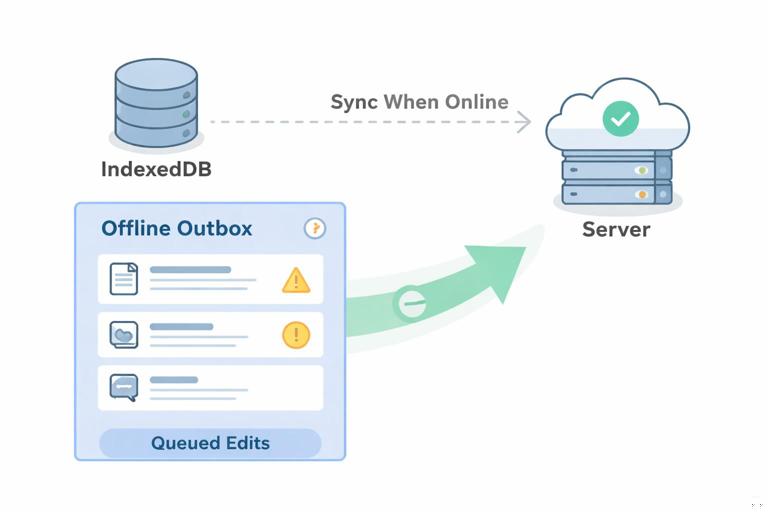
A common offline-first requirement is letting users create or edit data while offline, then syncing later. IndexedDB is the natural place to store a durable queue of pending operations. The queue items should include enough information to replay the request later and to resolve conflicts.
Example outbox item shape:
// Example record stored in the 'outbox' store { type: 'UPDATE_ARTICLE', createdAt: Date.now(), payload: { id: 'a1', title: 'New title', body: '...' }, // Optional: optimistic concurrency control token from server ifMatch: 'W/"etag-value"' }Step-by-step: enqueue an operation when offline (or when you choose to always queue writes):
async function enqueueOutbox(item) { const db = await openDb(); return new Promise((resolve, reject) => { const tx = db.transaction(['outbox'], 'readwrite'); const store = tx.objectStore('outbox'); const req = store.add(item); req.onsuccess = () => resolve(req.result); req.onerror = () => reject(req.error); }); }Step-by-step: process the queue (you can call this when connectivity returns, on app start, or from a background-capable context when available):
async function processOutbox() { const db = await openDb(); const items = await new Promise((resolve, reject) => { const tx = db.transaction(['outbox'], 'readonly'); const req = tx.objectStore('outbox').getAll(); req.onsuccess = () => resolve(req.result); req.onerror = () => reject(req.error); }); for (const item of items) { try { if (item.type === 'UPDATE_ARTICLE') { const res = await fetch(`/api/articles/${item.payload.id}`, { method: 'PUT', headers: { 'Content-Type': 'application/json', ...(item.ifMatch ? { 'If-Match': item.ifMatch } : {}) }, body: JSON.stringify(item.payload) }); if (!res.ok) throw new Error('Sync failed'); } // Remove item after success await new Promise((resolve, reject) => { const tx = db.transaction(['outbox'], 'readwrite'); tx.oncomplete = () => resolve(); tx.onerror = () => reject(tx.error); tx.objectStore('outbox').delete(item.queueId); }); } catch (e) { // Stop on first failure to avoid hammering the network break; } } }Important: this is a minimal example. In a real app you’ll likely need retry policies, backoff, idempotency keys, and conflict handling (e.g., server returns 409 or ETag mismatch). IndexedDB gives you the durable local state needed to implement those behaviors.
IndexedDB best practices for PWAs
- Keep one open connection per tab and reuse it if possible. Opening repeatedly is fine for small apps but can add overhead.
- Use indexes intentionally: create indexes for the queries you actually need (e.g., by status, by updatedAt). Avoid indexing large text fields.
- Store sync metadata:
lastSyncedAt,serverVersion,etag, anddirtyflags help you reconcile. - Plan migrations: when you change record shapes, bump DB version and migrate in
onupgradeneeded. - Consider a small wrapper: a helper that promisifies requests reduces boilerplate and mistakes.
localStorage: simple, synchronous, and easy to misuse
localStorage is a synchronous string key/value store available on the main thread. It is easy to use for tiny bits of data, but it has important limitations that make it a poor fit for most offline-first data needs.
localStorage is best for:
- Small UI preferences: theme choice, last selected tab, dismissible banner flags.
- Non-sensitive feature toggles or simple counters.
localStorage is risky or unsuitable for:
- Large data (size limits are small and vary by browser).
- Anything performance-sensitive (it blocks the main thread).
- Structured data that needs querying (you’d have to serialize entire objects).
- Data that must be accessed from a service worker (service workers cannot access localStorage).
- Sensitive data (localStorage is accessible to any script running on your origin; XSS can expose it).
Step-by-step: safe usage for small preferences
Because localStorage stores strings, you should explicitly serialize and validate. Keep values small and handle missing or malformed data.
function setThemePreference(theme) { // theme should be 'light' or 'dark' localStorage.setItem('pref:theme', theme); } function getThemePreference() { const value = localStorage.getItem('pref:theme'); return value === 'dark' ? 'dark' : 'light'; }For small JSON objects, serialize carefully and guard parsing:
function setUiPrefs(prefs) { localStorage.setItem('pref:ui', JSON.stringify(prefs)); } function getUiPrefs() { try { const raw = localStorage.getItem('pref:ui'); if (!raw) return { compactMode: false }; const parsed = JSON.parse(raw); return { compactMode: Boolean(parsed.compactMode) }; } catch { return { compactMode: false }; } }If you find yourself storing lists of items, drafts, or anything that grows over time, move it to IndexedDB.
How to choose: a decision matrix
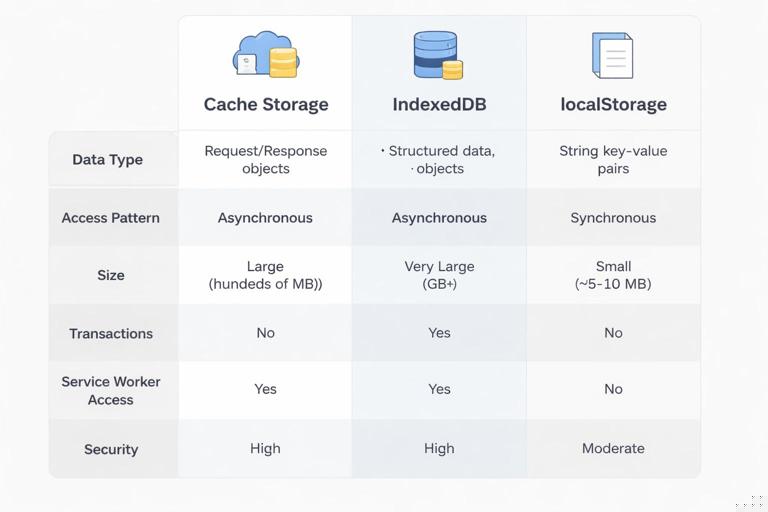
Use Cache Storage when
- You are storing HTTP responses and want to replay them later.
- You need access from the service worker and want to respond to fetches with cached responses.
- Your lookup key is naturally the URL/request.
Use IndexedDB when
- You need structured data with fields and indexes.
- You need transactions and partial updates.
- You need to store offline writes and sync state.
- You need to store large datasets or many records.
- You need to access data from both window and service worker contexts (where supported).
Use localStorage when
- The data is tiny, non-sensitive, and main-thread only.
- You want the simplest possible persistence for a preference.
Combining storages: practical architectures
Architecture A: Cache API for reads, IndexedDB for app state
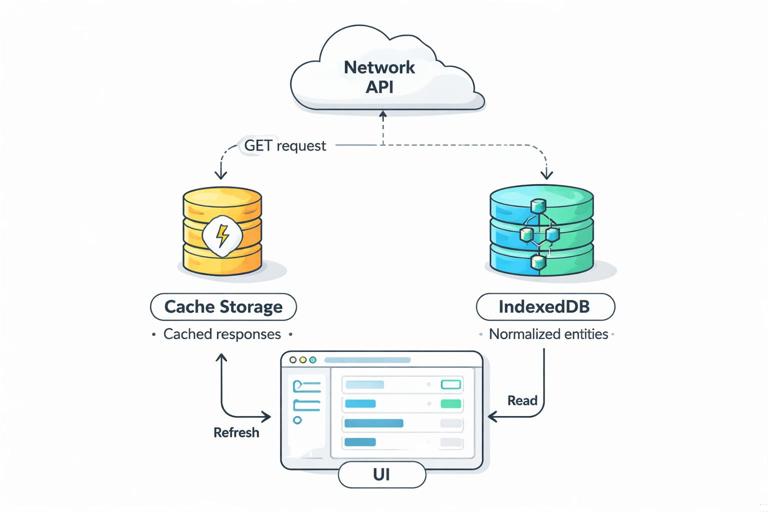
A common approach is to cache API responses for fast offline reads, while also extracting and storing normalized entities in IndexedDB for richer UI and querying. For example:
- Cache Storage stores
GET /api/articlesresponse. - IndexedDB stores each article by
idand an index byupdatedAt. - The UI reads from IndexedDB first (fast, queryable), then refreshes from network and updates both Cache Storage and IndexedDB.
This dual-write approach costs a bit more code, but it gives you the best of both worlds: offline replay of raw responses and a queryable local database.
Step-by-step: hydrate IndexedDB from a cached response
If you already have a cached API response, you can use it to populate IndexedDB on startup (useful after a reload while offline).
async function hydrateArticlesFromCache() { const cache = await caches.open('api-v1'); const res = await cache.match('/api/articles'); if (!res) return; const data = await res.json(); if (!Array.isArray(data.items)) return; const db = await openDb(); await new Promise((resolve, reject) => { const tx = db.transaction(['articles'], 'readwrite'); tx.oncomplete = () => resolve(); tx.onerror = () => reject(tx.error); const store = tx.objectStore('articles'); for (const item of data.items) { store.put(item); } }); }Note the trade-off: you’re duplicating storage (cached response plus normalized records). Decide based on your needs: if you never query locally and only need “last response,” Cache Storage alone may be enough.
Architecture B: IndexedDB as source of truth, Cache Storage for assets only
For apps with complex offline behavior (editing, conflict resolution, search), treat IndexedDB as the source of truth for domain data. Use Cache Storage primarily for static assets and perhaps some read-only media. The UI loads from IndexedDB immediately, and network sync updates IndexedDB. This reduces duplication and makes state management clearer.
Operational concerns: quotas, eviction, and durability
Storage quotas and eviction
All three mechanisms are subject to browser storage policies. Cache Storage and IndexedDB share the same origin storage pool in most browsers, and they can be evicted when the device is low on space. localStorage also has limits and can be cleared by the user. You should design with the assumption that local data can disappear.
- Cache Storage: easiest to evict; treat as a performance and offline convenience layer.
- IndexedDB: more durable in practice, but still not guaranteed; treat as the offline database but implement recovery (re-sync) paths.
- localStorage: small and synchronous; avoid using it as a database.
Requesting persistent storage (when appropriate)
Some browsers support requesting persistent storage to reduce eviction likelihood. This is not a guarantee, but it can help for data-heavy offline apps.
async function requestPersistence() { if (!navigator.storage || !navigator.storage.persist) return false; const already = await navigator.storage.persisted(); if (already) return true; return await navigator.storage.persist(); }Use this sparingly and only when you have a clear user benefit (e.g., offline maps, field data collection). You should still handle data loss gracefully.
Security and privacy considerations
Don’t store secrets in web storage
localStorage and IndexedDB are accessible to JavaScript running on your origin. If your app has an XSS vulnerability, attackers can read these stores. Avoid storing access tokens or sensitive personal data unless you have a strong threat model and mitigations. Prefer secure cookies for session management when possible, and minimize what you persist.
Be careful caching authenticated responses
If you cache responses that include user-specific data, ensure your caching logic does not accidentally serve one user’s cached response to another user on shared devices. Consider partitioning caches by user identifier (and clearing on logout), or avoid caching authenticated API responses in Cache Storage and instead store only the minimal necessary data in IndexedDB with explicit logout clearing.
Clear data on logout
Implement a clear-data routine that removes user-specific records from IndexedDB and deletes relevant caches. This is both a privacy measure and a way to prevent stale state.
async function clearUserData() { // Clear IndexedDB stores (example: delete database) indexedDB.deleteDatabase('pwa-db'); // Clear caches const keys = await caches.keys(); await Promise.all(keys.map((k) => caches.delete(k))); // Clear localStorage prefs if they are user-specific localStorage.removeItem('pref:ui'); }Common pitfalls and how to avoid them
Pitfall: using localStorage for offline queues
Because localStorage is synchronous and string-only, queues become slow and fragile as they grow. Use IndexedDB for any queue, even if it starts small.
Pitfall: caching API responses without invalidation metadata
If you cache API responses, you need a plan for freshness. Even if you don’t implement complex invalidation, store timestamps (in IndexedDB or in a small metadata store) so you can decide when to refresh.
Pitfall: storing huge blobs in IndexedDB without considering UI performance
IndexedDB can store blobs, but reading large blobs frequently can still be expensive. Consider storing thumbnails separately, paging large datasets, and keeping list views lightweight.
Pitfall: forgetting that Cache Storage keys include request details
cache.match() matches by request; query strings, headers, and request mode can affect matching. Standardize your request URLs and consider using explicit URLs (strings) for matching when appropriate.
Practical checklist: mapping app needs to storage
- App settings (theme, language): localStorage (or IndexedDB if you want one storage system).
- Static assets: Cache Storage.
- Read-only API snapshots for offline viewing: Cache Storage, optionally mirrored into IndexedDB for querying.
- Editable content, drafts, and forms: IndexedDB.
- Pending writes and sync state: IndexedDB outbox pattern.
- Large lists with filtering/sorting: IndexedDB with indexes.