What a Forensic Report Is (and What It Is Not)
Purpose and audience: A forensic report is a structured explanation of what you did, what you observed, and what those observations mean in relation to specific questions. It is written for multiple audiences at once: technical reviewers (other examiners), decision-makers (management, HR, legal), and potentially a court. Your job is to make your work reproducible and your reasoning transparent without overstating certainty.
Report vs. case notes: Case notes are your working record: messy, chronological, and exhaustive. The report is curated: it highlights the relevant steps, the validated findings, and the limitations. A common mistake is pasting raw tool output into the report. Instead, summarize the meaning, then attach or reference the raw output as an exhibit when needed.
Report vs. narrative argument: A forensic report is not a persuasive essay. It should not assume motive, intent, or guilt. It should not use emotionally loaded language. It should separate observations (facts) from interpretations (inferences) and clearly label each.
Core Structure: A Template You Can Reuse
Recommended sections: A beginner-friendly structure that scales to expert review includes: (1) Administrative details (case ID, examiner, dates), (2) Scope and questions to be answered, (3) Evidence examined (items, sources), (4) Tools and versions, (5) Methods (high-level, reproducible), (6) Findings (organized by question), (7) Validation and quality checks, (8) Limitations and assumptions, (9) Exhibits (screenshots, logs, exports), (10) Glossary (optional for non-technical audiences).
Write to questions, not to artifacts: Organize findings around the investigative questions (e.g., “Was data exfiltrated?” “Which account accessed the mailbox?”) rather than around artifact types. This prevents “artifact dumping” and helps readers understand relevance.
- Listen to the audio with the screen off.
- Earn a certificate upon completion.
- Over 5000 courses for you to explore!

Download the app
Use consistent identifiers: Every evidence source and every exhibit should have a stable identifier (e.g., “E01: Laptop-01”, “CLOUD-03: M365 Audit Export”, “EX-12: Screenshot of event record”). Consistency is what makes cross-referencing possible during review or testimony.
Writing Findings: Observations, Inferences, and Confidence
Separate fact from interpretation: A practical pattern is: Observation → Support → Interpretation → Confidence. Example: “Observation: The file Budget.xlsx was copied to removable media. Support: File system metadata shows copy operation at time X; USB device serial Y was connected at time X. Interpretation: The user likely copied the file to the connected USB device. Confidence: Moderate (copy mechanism inferred; direct copy log not present).”
Use calibrated language: Avoid absolute statements unless the evidence truly supports them. Prefer “consistent with,” “indicates,” “suggests,” “no evidence observed,” and explicitly state what would increase confidence. Calibrated language is a hallmark of expert-ready writing.
Quantify where possible: Replace vague phrases with measurable details: number of files, sizes, timestamps with time zone, account IDs, IP addresses, message IDs, device identifiers, and log record IDs. Quantification makes findings testable.
Findings Validation: Why It Matters
Validation is not re-analysis: Validation is the process of checking that a finding is accurate, reproducible, and not an artifact of a tool, parsing assumption, or misinterpretation. It is especially important when findings will drive disciplinary action, legal steps, or public reporting.
Common failure modes validation catches: Misread time zones, clock drift, duplicated events, tool parsing bugs, stale artifacts from previous user sessions, and confusing “accessed” with “opened.” Validation is how you prevent a plausible story from becoming a wrong story.
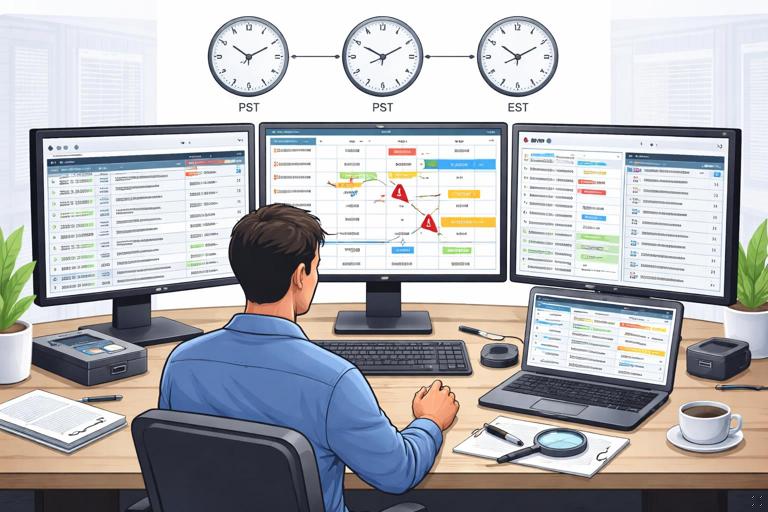
Document validation steps: Validation should be visible in the report: what you cross-checked, what matched, what did not, and how you resolved discrepancies. This is part of being “expert-ready.”
Step-by-Step: A Practical Validation Workflow
Step 1: Restate the claim as a testable proposition: Turn a narrative into a checkable statement. Example: “User A uploaded File F to Cloud Service S from Device D on Date T.” This forces you to identify required elements: actor, action, object, destination, device, time.
Step 2: Identify primary and secondary sources: Primary sources directly record the action (e.g., a cloud audit event for an upload). Secondary sources are supporting context (e.g., local file presence, sync client logs, browser history). A strong finding usually has at least one primary source plus corroboration.
Step 3: Cross-check time and identity fields: Verify time zone, timestamp format, and whether the time is event time or ingestion time. Verify identity fields: user principal name, SID, device ID, session ID, OAuth app ID, mailbox ID, or phone identifier. Mismatched identity fields are a common reason findings collapse under scrutiny.
Step 4: Reproduce with an independent method: Use a second tool, a different parser, or a raw export review. For example, if a GUI tool shows an event, confirm it in the underlying exported JSON/CSV or raw log record. Independent reproduction is more convincing than “Tool X said so.”
Step 5: Check for alternative explanations: Ask “What else could produce this artifact?” Examples: automated sync, background indexing, antivirus scanning, shared accounts, remote sessions, or system processes. You do not need to eliminate every alternative, but you must address reasonable ones.
Step 6: Record validation results and confidence: For each key finding, note what corroborated it, what was missing, and your confidence level. If evidence is ambiguous, say so and explain why.
Handling Conflicts and Gaps in Evidence
When sources disagree: Conflicts are normal. Treat them as a signal to refine your understanding. Create a discrepancy table: Source A says time X, Source B says time Y; possible reasons include time zone differences, clock drift, log delay, or different event types. Then state which time you rely on and why.
When evidence is missing: Missing evidence is not evidence of absence. State the gap and the likely reasons: retention limits, log disabled, device offline, encryption, app privacy constraints, or collection scope. Then describe what additional data would be needed to confirm or refute the hypothesis.
Be explicit about assumptions: If you assume a device clock is accurate, or that an account was controlled by a specific person, label it as an assumption and explain its basis (e.g., HR assignment records, device enrollment, badge logs). Assumptions should be visible so reviewers can challenge them.
Exhibits and Traceability: Making Your Report Auditable
Exhibits should be minimal but sufficient: Include only what supports a finding. Each exhibit should have: an identifier, a short description, the source (which evidence item), and what it demonstrates. Avoid dumping hundreds of screenshots; prefer a small number of high-value exhibits plus an export file list.
Use “path to proof” referencing: A reader should be able to trace a statement back to its support. A practical method is to append bracketed references: “The account authenticated from IP X at time T [EX-05, EX-06].” This is not academic citation; it is auditability.
Preserve context in screenshots: If you use screenshots, capture enough context to show the record ID, the time zone, and the tool view that indicates the source. Cropped screenshots that omit headers and filters are hard to defend.
Expert-Ready Writing: Style, Precision, and Neutrality
Use plain language first, technical detail second: For mixed audiences, lead with a plain-language sentence, then provide the technical specifics. Example: “A removable storage device was connected during the period of interest. The device reported serial number Y and was first observed at time T.” This keeps decision-makers aligned while still satisfying technical reviewers.
Avoid legal conclusions: Do not write “the suspect stole data” or “this proves unauthorized access.” Instead: “Evidence indicates the account accessed and downloaded files outside normal business hours.” Let legal stakeholders map facts to legal standards.
Define terms once: If you use specialized terms (e.g., “token,” “session,” “ingestion time”), define them briefly the first time. A short glossary can prevent misunderstandings without bloating the report.
Be careful with attribution: Distinguish between “account activity” and “person activity.” Many incidents involve shared credentials, delegated access, or compromised accounts. Write: “The account performed action X” unless you have strong evidence tying the account to a person at that moment (e.g., MFA device confirmation, device enrollment plus presence evidence).
Building a Findings Table That Survives Review
Why tables help: A findings table forces clarity and reduces narrative drift. It also helps reviewers quickly see what is proven, what is inferred, and what remains unknown.
Suggested columns: Finding ID, Question addressed, Summary statement, Key timestamps (with time zone), Actor identifier, Source(s), Validation method, Alternative explanations considered, Confidence, Exhibit references.
Example (simplified):
F-03 | Was data uploaded to cloud storage? | Account A uploaded File F to Site S | 2026-01-05 21:14 UTC | user@org | Cloud audit export row 1842 | Verified in raw CSV + portal view | Could be sync client | High | EX-07, EX-08
Quality Control Checks Before You Finalize
Consistency checks: Ensure consistent time zone notation everywhere (e.g., always “UTC” or always “Local (UTC-05:00)”). Ensure consistent naming of devices, accounts, and evidence items. Ensure the same event is not counted twice due to overlapping sources.
Reproducibility checks: Confirm that another examiner could follow your method section and reach the same key outputs. If you used filters, queries, or specific export settings, record them. If you used a custom script, include it as an exhibit or describe its logic.
Numerical sanity checks: If you claim “20 files were exfiltrated,” verify the count and list criteria. If you claim “large transfer,” state size thresholds and totals. Small arithmetic errors can undermine credibility.
Language checks: Remove speculation, adjectives, and rhetorical phrasing. Replace “clearly” with evidence. Replace “obviously” with a reference. If a statement cannot be supported by an exhibit or a described method, rewrite or remove it.
Communicating Limitations Without Undermining Your Work
Limitations are expected: Every investigation has constraints: partial logs, retention windows, device encryption, app sandboxing, or incomplete access. Stating limitations does not weaken your report; it strengthens trust by showing you understand the boundaries of your evidence.
Write limitations as impact statements: Instead of listing generic issues, explain impact: “Because audit logs were retained for 30 days, activity prior to Date X could not be evaluated.” This helps stakeholders decide next steps (e.g., expanding retention, requesting provider exports).
Separate limitations from excuses: Keep the tone neutral and factual. Avoid blaming systems or teams. Focus on what was available, what was not, and what that means for the questions.
Preparing for Expert Review or Testimony: Practical Habits
Maintain a “defense file” for each key finding: For every major finding, keep a small bundle: the raw export, the relevant excerpt, your notes on how you interpreted it, and the validation cross-check. This makes it easier to respond to challenges without redoing the entire case.
Anticipate cross-examination questions: Reviewers often ask: “How do you know it was this account?” “Could it be automated?” “What is the error rate?” “What did you not examine?” “What would change your opinion?” Build short, evidence-based answers into your report where appropriate.
Be transparent about tool limitations: Tools can parse incorrectly or omit fields. If a tool is known to have constraints (e.g., cannot parse a certain log type), state that you relied on raw exports or alternative parsing. Your credibility comes from method, not brand names.
Example: Turning Raw Events Into an Expert-Ready Finding
Raw inputs (typical): You have a cloud audit CSV row indicating a file download, a local sync client log showing activity near the same time, and a device sign-in record with an IP address.
Expert-ready write-up pattern: Start with a one-sentence summary, then list supporting points, then validation, then limitations. Example: “The account user@org downloaded ClientList.csv from the organization’s cloud repository at 2026-01-05 21:14 UTC. This is supported by the audit event record ID 1842 showing a download action and the associated object ID for the file [EX-07]. The sign-in record for the same account shows an active session from IP X within the same minute [EX-08]. Validation was performed by confirming the event fields in the raw export and matching the file object ID to the repository item metadata [EX-09]. The evidence does not, by itself, prove the file was opened locally after download.”

Step-by-Step: Editing Passes That Improve Reports Fast
Pass 1 (structure): Ensure every section exists and is in the same order across cases. Move “interesting” but irrelevant details into an appendix or remove them.
Pass 2 (traceability): For each key sentence in Findings, ask: “Where is the support?” Add exhibit references or rewrite the sentence to reflect what is actually supported.
Pass 3 (neutrality): Replace intent language (“attempted,” “hid,” “stole”) with observable actions (“deleted,” “renamed,” “accessed,” “downloaded”). If you must discuss intent, label it as a hypothesis and explain what evidence would be needed.
Pass 4 (clarity): Convert long paragraphs into shorter ones. Put the most important sentence first. Define acronyms. Ensure timestamps include time zone.
Pass 5 (peer check): Have another person read only the Findings and Exhibits. Ask them to restate the story and point out where they had to “assume.” Those are the places to strengthen validation or clarify limitations.