Why queued requests matter in offline-first PWAs
Offline-first is not only about reading cached pages and assets. Manye applications also need to write data: posting a comment, submitting a form, uploading a photo, sending a “like”, or recording a field inspection. When the network is unavailable or flaky, these write operations fail unless you design for it.
Queued requests are a pattern where you capture outgoing network operations, store them locally, and replay them later when connectivity returns. Background Sync is a browser capability that lets a service worker schedule a retry in the background, even if the user closes the tab, so the queue can drain as soon as the device is back online.
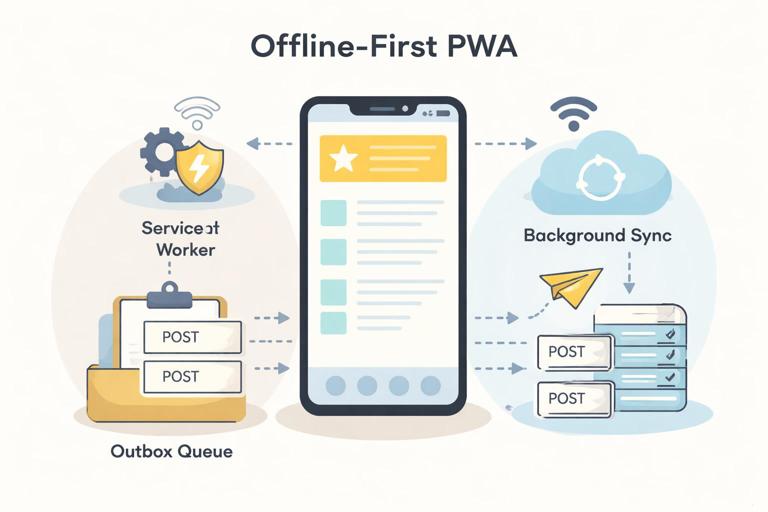
This chapter focuses on how to implement a robust “queue and replay” pipeline for POST/PUT/PATCH/DELETE requests using a service worker and Background Sync, including how to handle authentication, idempotency, conflicts, and user feedback.
Core concept: capture, persist, replay
A queued request system has three moving parts:
- Capture: Intercept an outgoing request (often in the service worker
fetchhandler) and decide whether to send it immediately or queue it. - Persist: Store enough information to reconstruct the request later (URL, method, headers, body, metadata like timestamps and retry count).
- Replay: When connectivity is available, attempt to send queued requests in a controlled order, handling failures and removing successful items from the queue.
Background Sync adds a scheduling mechanism: instead of relying on the page being open to trigger replay, the service worker can register a sync event. When the browser detects connectivity, it wakes the service worker and fires a sync event, where you drain the queue.
- Listen to the audio with the screen off.
- Earn a certificate upon completion.
- Over 5000 courses for you to explore!

Download the app
Background Sync in practice: constraints and expectations
Background Sync is not a guarantee that your request will be sent immediately when online. The browser decides when to run sync based on power, connectivity, and other heuristics. Treat it as “best effort” and always provide a fallback path (for example, attempt replay when the app opens).
Key practical constraints:
- Support varies: Background Sync is available in Chromium-based browsers; other browsers may not support it. Build a progressive enhancement path.
- Service worker must be installed and controlling the page: Sync events are delivered to the active service worker for the scope.
- Payload size and serialization: You must store request bodies locally. Binary uploads require extra care (e.g., storing Blobs in IndexedDB).
- Authentication: Requests often require tokens/cookies. You need a strategy to refresh tokens or avoid storing sensitive headers.
Designing the queue: what to store
To replay a request, you need to reconstruct it. A typical queue record might include:
id: unique identifier (UUID).url: request URL (absolute or relative to origin).method: POST/PUT/PATCH/DELETE.headers: a safe subset of headers needed for the server (e.g.,Content-Type, custom idempotency header). Avoid storing short-lived auth tokens if possible.body: serialized body (string for JSON; Blob for files).createdAt,lastTriedAt,attempts.clientRequestId: an idempotency key or correlation id to deduplicate on the server.dependsOn(optional): for ordering constraints (e.g., create entity before uploading attachments).
Even if you already use local storage for app data, treat the request queue as its own concern: it is about transport reliability and replay semantics, not just storing domain entities.
Step-by-step: implement queued POST requests with Background Sync
Step 1: Decide which requests are queueable
Not every request should be queued. A good starting rule:
- Queue mutations (POST/PUT/PATCH/DELETE) to your own API origin.
- Do not queue requests to third-party origins you don’t control.
- Do not queue requests that are not safe to replay (e.g., payment submissions) unless you have strong idempotency and server-side safeguards.
In the service worker, you can filter by method and URL pattern.
Step 2: Create a queue store
You need a persistent store accessible from the service worker. IndexedDB is the usual choice because it can store structured objects and Blobs. Below is a minimal queue helper using the idb library (a small promise wrapper). If you prefer not to add a dependency, you can write raw IndexedDB code, but the logic is the same.
// sw-queue.js (imported by your service worker)import { openDB } from 'idb';const DB_NAME = 'pwa-request-queue';const STORE = 'queue';async function db() { return openDB(DB_NAME, 1, { upgrade(db) { if (!db.objectStoreNames.contains(STORE)) { const store = db.createObjectStore(STORE, { keyPath: 'id' }); store.createIndex('createdAt', 'createdAt'); } } });}export async function enqueue(item) { const d = await db(); await d.put(STORE, item);}export async function listAll() { const d = await db(); return d.getAllFromIndex(STORE, 'createdAt');}export async function remove(id) { const d = await db(); await d.delete(STORE, id);}export async function update(id, patch) { const d = await db(); const item = await d.get(STORE, id); if (!item) return; await d.put(STORE, { ...item, ...patch });}Step 3: Serialize requests safely
A Request object is a stream; you can’t read the body twice unless you clone it. When intercepting, clone the request, read the body, and store it. For JSON APIs, storing a string is enough.
// sw-serialize.jsexport async function serializeRequest(request) { const headers = {}; for (const [k, v] of request.headers.entries()) { // Keep only headers you need; avoid Authorization if possible. if (k.toLowerCase() === 'content-type' || k.toLowerCase().startsWith('x-')) { headers[k] = v; } } let body = null; const contentType = request.headers.get('content-type') || ''; if (request.method !== 'GET' && request.method !== 'HEAD') { if (contentType.includes('application/json')) { body = await request.clone().text(); } else if (contentType.includes('text/')) { body = await request.clone().text(); } else { // For form-data or binary, store as Blob. body = await request.clone().blob(); } } return { url: request.url, method: request.method, headers, body };}export function deserializeRequest(data) { const init = { method: data.method, headers: data.headers }; if (data.body != null) init.body = data.body; return new Request(data.url, init);}For file uploads, storing a Blob works, but be mindful of storage limits. Consider compressing images client-side or using chunked uploads if your use case demands it.
Step 4: Intercept fetch and queue on failure (or when offline)
In your service worker fetch handler, attempt the network request. If it fails due to connectivity, enqueue it and return a synthetic response to the page so the UI can proceed.
// service-worker.jsimport { enqueue } from './sw-queue.js';import { serializeRequest } from './sw-serialize.js';self.addEventListener('fetch', (event) => { const req = event.request; const url = new URL(req.url); const isApi = url.origin === self.location.origin && url.pathname.startsWith('/api/'); const isMutation = ['POST', 'PUT', 'PATCH', 'DELETE'].includes(req.method); if (!isApi || !isMutation) return; event.respondWith(handleMutation(event));});async function handleMutation(event) { try { // Try network first for mutations. return await fetch(event.request); } catch (err) { const serialized = await serializeRequest(event.request); const id = crypto.randomUUID(); const clientRequestId = crypto.randomUUID(); await enqueue({ id, ...serialized, clientRequestId, createdAt: Date.now(), attempts: 0 }); // Register background sync (best effort). if ('sync' in self.registration) { try { await self.registration.sync.register('sync-outbox'); } catch (e) { // Sync registration can fail; rely on app-open replay fallback. } } // Respond with 202 Accepted to indicate queued. return new Response(JSON.stringify({ queued: true, id, clientRequestId }), { status: 202, headers: { 'Content-Type': 'application/json' } }); }}This pattern makes the app feel responsive: the user action is accepted locally, and the network send is deferred.
Step 5: Drain the queue in the sync event
When the browser fires the sync event, process queued items. Use event.waitUntil() so the service worker stays alive while you work.
// service-worker.js (continued)import { listAll, remove, update } from './sw-queue.js';import { deserializeRequest } from './sw-serialize.js';self.addEventListener('sync', (event) => { if (event.tag === 'sync-outbox') { event.waitUntil(drainQueue()); }});async function drainQueue() { const items = await listAll(); for (const item of items) { try { await update(item.id, { attempts: (item.attempts || 0) + 1, lastTriedAt: Date.now() }); const req = deserializeRequest(item); // Add idempotency/correlation header so server can dedupe. const headers = new Headers(req.headers); headers.set('X-Client-Request-Id', item.clientRequestId); const replayReq = new Request(req, { headers }); const res = await fetch(replayReq); if (res.ok) { await remove(item.id); await notifyClients({ type: 'OUTBOX_SENT', id: item.id }); } else if (res.status >= 400 && res.status < 500) { // Client errors usually won't succeed on retry; keep or move to a dead-letter queue. await remove(item.id); await notifyClients({ type: 'OUTBOX_FAILED', id: item.id, status: res.status }); } else { // 5xx: keep for retry. throw new Error('Server error ' + res.status); } } catch (e) { // Stop early to avoid hammering network; next sync will retry. break; } }}async function notifyClients(message) { const clients = await self.clients.matchAll({ type: 'window', includeUncontrolled: true }); for (const client of clients) client.postMessage(message);}Important choices here:
- Ordering: processing in creation order avoids surprising server state. If you have independent operations, you can parallelize, but start with sequential replay for correctness.
- Retry behavior: stop on the first transient failure to avoid repeated failures for later items when the network is still unstable.
- Dead-letter handling: for permanent failures (often 4xx), remove from the queue and surface an error to the user so they can fix data or re-authenticate.
Step 6: Provide an app-open fallback replay
Because Background Sync may not run (unsupported browser, user disabled background activity, OS restrictions), add a fallback: when the app starts or regains connectivity, ask the service worker to drain the queue.
From the page:
// app.jsnavigator.serviceWorker?.addEventListener('message', (event) => { if (event.data?.type === 'OUTBOX_SENT') { // Update UI: mark item as synced. } if (event.data?.type === 'OUTBOX_FAILED') { // Show error state and allow user action. }});window.addEventListener('online', async () => { const reg = await navigator.serviceWorker.ready; reg.active?.postMessage({ type: 'DRAIN_OUTBOX' });});In the service worker:
self.addEventListener('message', (event) => { if (event.data?.type === 'DRAIN_OUTBOX') { event.waitUntil(drainQueue()); }});Idempotency: making replays safe
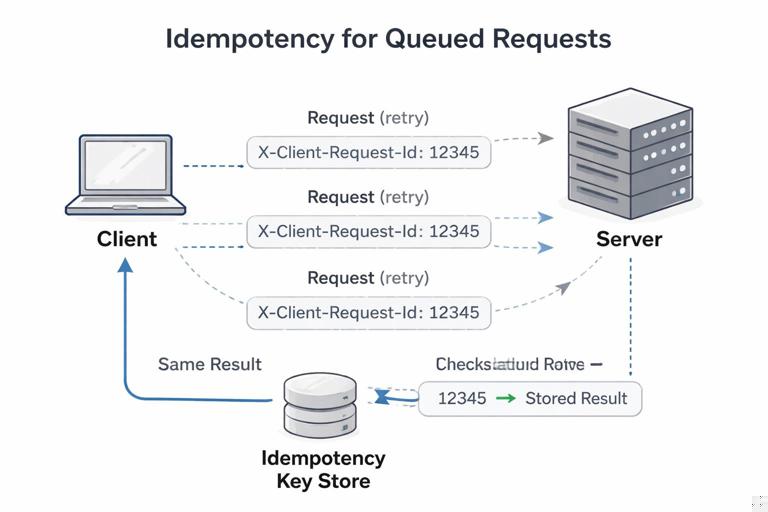
Queued requests can be sent more than once: the browser might retry a sync, the service worker might crash mid-drain, or the server might process the request but the response never reaches the client. Without idempotency, duplicates can create double orders, duplicate comments, or repeated inventory deductions.
Practical techniques:
- Client-generated idempotency key: Generate a unique
X-Client-Request-Idper mutation and send it with the request. The server stores processed keys for a time window and returns the same result for duplicates. - Use PUT with stable resource IDs: If the client can choose the resource ID (UUID), a replayed PUT to
/api/items/{id}is naturally idempotent. - Server-side upsert: For create operations, accept a client-provided ID and treat duplicates as updates/no-ops.
Even if you implement client-side dedupe, the server must be the source of truth for preventing duplicates, because the client can crash or lose state.
Authentication and sensitive headers
Many APIs require an Authorization header or rely on cookies. Storing auth tokens inside the queued record is risky (tokens expire, and persisting them increases exposure if the device is compromised). Prefer these approaches:
- Cookie-based sessions: If your API uses same-site cookies, you often don’t need to store auth headers; the replayed fetch will include cookies automatically (subject to your cookie settings).
- Short-lived bearer tokens: Avoid persisting the token in the queue. Instead, when draining, obtain a fresh token (for example, via a refresh flow) or let the request fail with 401 and notify the client to re-authenticate.
- Encrypt-at-rest (advanced): If you must store sensitive data, consider encrypting queue payloads with a key derived from user credentials. This adds complexity and key management concerns.
Also consider what happens when the user logs out: you should clear the queue or partition it per user to avoid sending one user’s queued actions under another user’s session.
Conflict handling: when offline edits meet server reality
Queued requests assume the server will accept the mutation later. In real systems, the server state may change while the user is offline. Typical conflict scenarios:
- The resource was deleted on the server while the user edited it offline.
- The resource was modified by another user, and your update is based on stale data.
- Validation rules changed (server now rejects a field value).
Practical strategies:
- Optimistic concurrency control: Include a version field or ETag in the request (e.g.,
If-Match). If the server returns 412/409, mark the queued item as failed and prompt the user to resolve. - Patch with intent: Prefer PATCH operations that describe the user’s intent (e.g., “set status to DONE”) rather than sending entire stale objects.
- Merge on the server: For some domains, the server can merge changes (e.g., append-only logs).
In the queue record, store enough context to help the UI resolve conflicts later (e.g., the local draft values and the entity ID).
User experience: showing queued state and sync progress
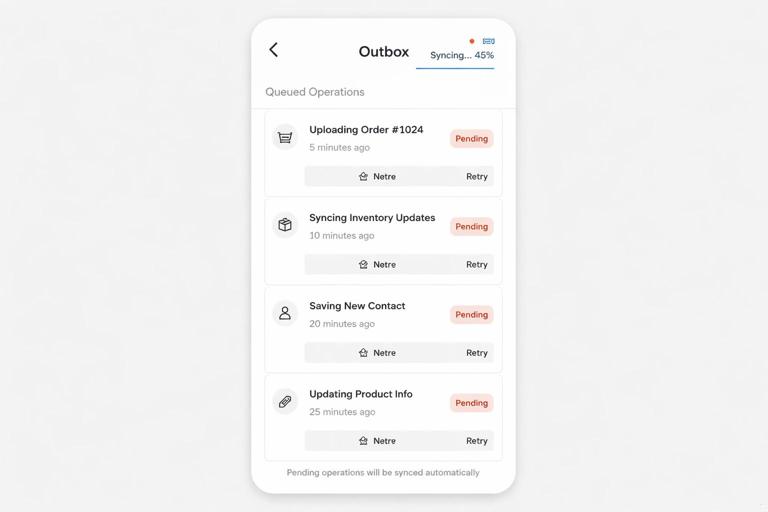
Queued requests are invisible unless you surface them. Users need to know whether their action is saved locally, whether it is pending sync, and whether it failed permanently.
Common UI patterns:
- Pending badge: Mark items created offline with a “pending” indicator until the server confirms.
- Retry action: For failed items, provide a “retry” button that triggers
DRAIN_OUTBOXor re-enqueues a corrected request. - Outbox screen: For apps with frequent offline work, provide an “Outbox” list showing queued operations and their status.
Technically, you can keep a lightweight “status map” in your app state keyed by clientRequestId or entity ID, and update it when the service worker posts messages like OUTBOX_SENT or OUTBOX_FAILED.
Advanced: batching, prioritization, and backoff
As your queue grows, you may need more control:
- Prioritization: Send critical operations first (e.g., “submit report”) before low-priority telemetry. Add a
priorityfield and sort before replay. - Batching: If your API supports it, send multiple queued operations in one request to reduce overhead. Store operations as a list and replay as a batch endpoint.
- Exponential backoff: Track
attemptsand delay retries. Background Sync doesn’t let you schedule exact times, but you can decide to skip items untilnextAttemptAt. - Dead-letter queue: Move permanently failing items to a separate store for inspection instead of deleting silently.
Example of a simple backoff check during drain:
const now = Date.now();if (item.nextAttemptAt && item.nextAttemptAt > now) continue;try { // fetch...} catch { const attempts = (item.attempts || 0) + 1; const delay = Math.min(60_000 * Math.pow(2, attempts), 60 * 60_000); await update(item.id, { attempts, nextAttemptAt: now + delay }); break;}Testing queued requests and sync behavior
To validate your implementation, test both functional correctness and resilience:
- Offline simulation: Use DevTools to set the network to Offline, perform a mutation, and confirm you receive a 202 response and a queue entry is created.
- Replay: Switch back online and ensure the sync event drains the queue. If sync doesn’t fire, verify the app-open fallback works.
- Duplicate protection: Force a replay twice (e.g., by crashing mid-drain) and confirm the server does not create duplicates when the same
X-Client-Request-Idis resent. - 401/403 handling: Expire credentials and ensure queued items fail in a user-visible way rather than retrying forever.
- Large payloads: Queue a request with a Blob body and confirm it persists and replays correctly.
Also test service worker updates: a new service worker version should be able to read and drain an existing queue. Keep your queue schema versioned and write upgrade logic if you change record formats.