What “Product Goals” Mean for a PWA
A Progressive Web App is not a feature you “add” to a website; it is a product approach that changes how users experience reliability, speed, and engagement. “PWA product goals” are the measurable outcomes you want from adopting PWA capabilities (offline support, installability, background updates, push messaging where appropriate) and the constraints you must respect (security, privacy, performance budgets, operational complexity). A readiness checklist is the practical tool that verifies whether your product, team, and infrastructure can deliver those outcomes without creating hidden costs.
Good PWA goals are framed around user value and business value, not around implementation details. For example, “Users can complete key tasks during a commute with spotty connectivity” is a product goal; “Implement a service worker” is an implementation step. Your checklist should connect the two: each technical capability should map to a user-facing promise and to a measurable metric.
Typical PWA goal categories
- Reliability goals: core screens load and core actions work under poor or no connectivity; predictable error handling; no data loss.
- Performance goals: fast startup; fast navigation; minimal jank; controlled bundle size; caching strategy aligned with content freshness.
- Engagement goals: increased return visits; install adoption; optional push notifications; better retention on mobile.
- Operational goals: safe rollout; monitoring; ability to debug service worker issues; controlled caching invalidation; manageable support burden.
- Compliance goals: HTTPS everywhere; privacy and consent; secure storage; data retention policies; accessibility.
Define PWA Product Goals: A Step-by-Step Workshop
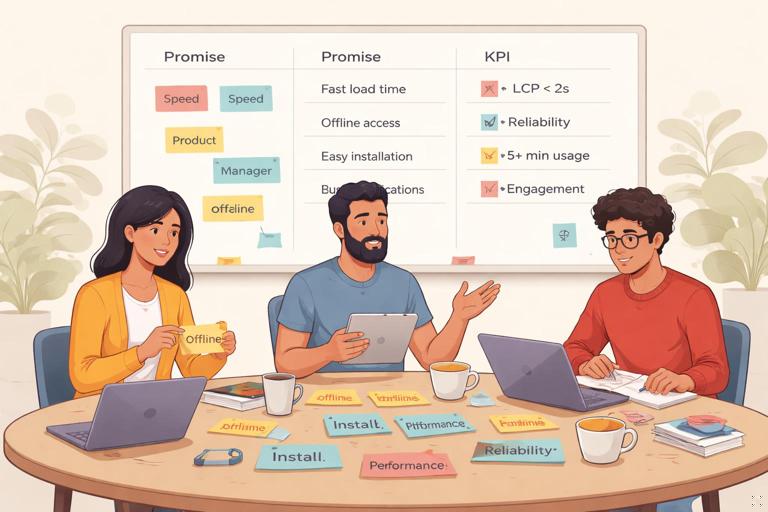
Step 1: Identify the “top tasks” and their contexts
Start with 3–7 user tasks that matter most. For each task, specify the context where a PWA advantage matters: low connectivity, low-end devices, limited storage, intermittent sessions, or high frequency usage. This prevents building offline support for rarely used pages while ignoring the real bottlenecks.
- Example (retail): browse products, view product details, add to cart, view cart, checkout.
- Example (field service): open today’s jobs, view job details, capture photos, fill forms, sync updates.
- Example (media): open home feed, open article, save for later, continue reading offline.
Step 2: Choose an offline-first promise per task
Offline-first is not “everything works offline.” Decide what “works” means for each task. Use a simple scale:
- Offline tolerant: UI loads; user can read cached content; actions are disabled with clear messaging.
- Offline capable: user can perform actions; data is queued locally; sync happens later.
- Offline complete: full experience without network, with local data set and later reconciliation.
Write the promise as a user story with acceptance criteria. Example: “As a user, I can open the cart and see the last known items even when offline; if I try to checkout offline, I see a message explaining that payment requires connectivity.”
- Listen to the audio with the screen off.
- Earn a certificate upon completion.
- Over 5000 courses for you to explore!

Download the app
Step 3: Define freshness and correctness requirements
PWAs trade off speed and offline access against data freshness. For each content type, decide how stale is acceptable and what must always be current.
- Static shell: can be cached aggressively; update in background.
- Catalog/listings: can be stale for minutes/hours depending on domain.
- Prices/availability: often must be fresh; show “last updated” timestamps if needed.
- User-specific data: must be correct; handle auth expiration and account switching carefully.
Turn these into measurable requirements: “Product list may be up to 30 minutes stale; price must be validated at checkout; show a banner when data is older than 30 minutes.”
Step 4: Pick success metrics and guardrails
Metrics should include both outcomes and safety guardrails:
- Outcome metrics: install rate, repeat visits, conversion, task completion rate under poor connectivity, reduced bounce rate.
- Performance metrics: LCP/INP/CLS targets, time-to-interactive, JS bundle size budgets.
- Reliability metrics: offline page load success rate, queued action success rate, sync conflict rate.
- Operational metrics: service worker update failure rate, cache storage usage, error logs, support tickets tagged “offline” or “install.”
Guardrails prevent “winning” by breaking something else. Example: “Increase install rate by 10% without increasing crash rate or support tickets; keep total storage under 50MB on typical devices.”
Step 5: Decide what you will not do
Explicitly list non-goals to keep scope realistic. Examples: “No offline checkout,” “No push notifications in phase 1,” “No background sync for large media uploads,” or “No support for legacy browsers.” This is part of readiness because it aligns stakeholders and reduces last-minute scope creep.
PWA Readiness Checklist (Product + Engineering + Operations)
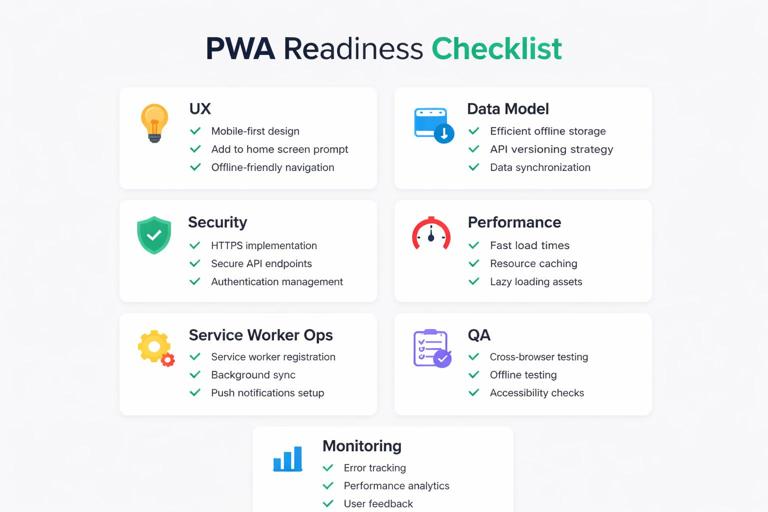
Use the checklist below as a gate before you commit to a PWA launch. It is intentionally cross-functional: a PWA can fail due to unclear product promises, not just technical bugs.
1) User experience readiness
- Top tasks defined: 3–7 tasks documented with user journeys and target devices.
- Offline behavior specified: for each top task, define offline tolerant/capable/complete behavior.
- Empty/error states designed: clear messaging for offline, stale data, auth expired, sync pending, sync failed.
- Loading strategy: skeleton screens or placeholders; avoid spinners that block indefinitely.
- Install UX: when and how you prompt; avoid aggressive prompts; provide a settings toggle if you use notifications later.
- Accessibility: offline banners and status messages announced to assistive tech; keyboard navigation works; color contrast maintained.
2) Content and data model readiness
- Data classification: identify what can be cached publicly vs user-specific vs sensitive.
- Freshness rules: per endpoint/content type, define max staleness and revalidation behavior.
- Conflict strategy: if offline edits are allowed, define conflict resolution (last-write-wins, merge UI, server authority).
- Queueable actions: list actions that can be queued offline (e.g., form submissions) and those that cannot (e.g., payments).
- Idempotency: server endpoints support idempotent retries where needed (e.g., using request IDs).
3) Security and privacy readiness
- HTTPS everywhere: all app routes and assets served securely; no mixed content.
- Auth model supports offline: define what happens when tokens expire offline; avoid storing long-lived secrets in insecure storage.
- Data at rest: decide what is stored in Cache Storage/IndexedDB; avoid caching sensitive responses; consider encryption if appropriate.
- Consent and transparency: if using notifications or background behaviors, ensure consent flows and settings are clear.
- Logout/account switching: on logout, clear user-specific caches and local data; prevent data leakage between accounts.
4) Performance readiness
- Performance budget: set budgets for JS/CSS/image sizes and runtime cost; enforce in CI.
- Critical path optimized: minimize render-blocking resources; code-split routes; prefetch carefully.
- Cache strategy aligned: app shell cached for fast startup; dynamic data uses appropriate strategies (e.g., network-first for critical freshness).
- Low-end device testing: test on throttled CPU/network; verify memory usage and storage growth.
5) Service worker operational readiness
- Update strategy defined: how new versions activate; how you notify users; how you handle breaking changes.
- Cache versioning plan: naming conventions; cleanup on activate; limits to prevent unbounded growth.
- Offline fallback routes: dedicated offline page; fallback for images/fonts if needed; graceful degradation.
- Debugging plan: team knows how to inspect service worker state, caches, and fetch events in devtools.
- Rollback plan: ability to disable/replace a faulty service worker quickly (e.g., serving a no-op SW and forcing update).
6) Quality assurance readiness
- Test matrix: browsers (Chrome, Edge, Safari), platforms (Android, iOS, desktop), and key device classes.
- Connectivity scenarios: offline, flaky, slow 3G, captive portal; verify behavior for each top task.
- Storage scenarios: low storage, eviction, private browsing limitations; verify app recovers gracefully.
- Upgrade scenarios: old SW to new SW; schema migrations for IndexedDB; ensure no infinite reload loops.
- Automated checks: lighthouse/CI audits, unit tests for caching logic, integration tests for offline flows.
7) Analytics and monitoring readiness
- Offline-aware analytics: events queued and sent later where appropriate; avoid losing key funnel events.
- Service worker logging: capture SW errors and update events; correlate with app version.
- Health dashboards: track offline success rate, cache hit ratio, sync failures, and install funnel.
- Alerting: alerts for spikes in SW errors, fetch failures, or update loops.
Turning the Checklist into a Release Gate
A checklist is most useful when it becomes a gate with clear pass/fail criteria. Convert each section into “must-have” and “nice-to-have” items for your first PWA release. Then define a release candidate process.
Release gate template
- Must-have: items that protect users from broken experiences (offline fallback, cache cleanup, logout clears data, update strategy).
- Should-have: items that improve quality but can be iterated (advanced prefetching, richer offline UI, background sync for non-critical actions).
- Won’t-have (this release): explicitly deferred items with owners and revisit dates.
Assign an owner to each item (product, engineering, QA, security). A checklist without ownership becomes a document, not a process.
Practical Examples: Goals and Readiness Mapped to Features
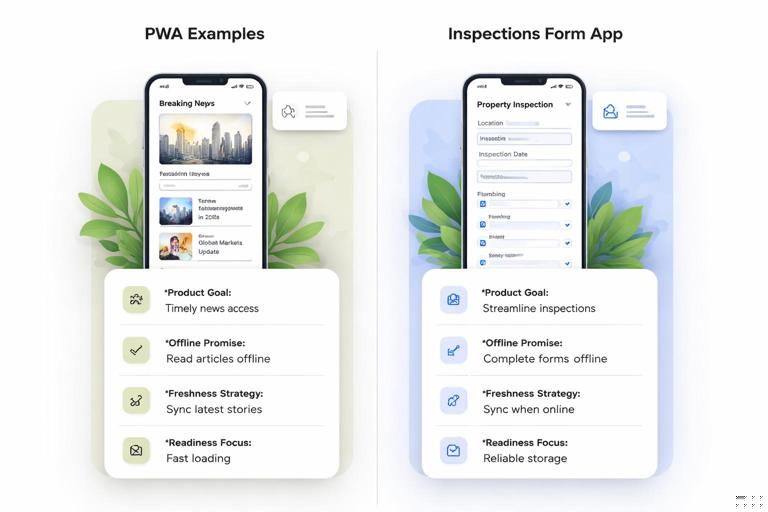
Example A: Content-heavy app (news/knowledge base)
Product goals: fast repeat visits; reading works on trains; reduce bounce rate from slow networks.
- Offline promise: offline tolerant for home feed; offline capable for saved articles; offline complete for reading saved items.
- Freshness: home feed network-first with short timeout; article pages stale-while-revalidate; saved items cache-first.
- Readiness focus: cache size limits; eviction strategy; clear “saved” UI; monitoring cache growth.
Example B: Form-based workflow (inspections)
Product goals: complete inspections without connectivity; prevent data loss; sync reliably when back online.
- Offline promise: offline capable for form entry; queue submissions; show sync status per record.
- Freshness: reference data (checklists) cached with versioning; user submissions authoritative locally until synced.
- Readiness focus: conflict strategy; idempotent server APIs; IndexedDB schema migrations; QA upgrade testing.
Step-by-Step: Build Your PWA Readiness Document (One Pager)
Step 1: Write the PWA promise
In 2–3 sentences, describe what users will reliably be able to do and under what constraints. Example: “The app loads instantly on repeat visits and supports browsing previously viewed items offline. Users can add items to cart offline, but checkout requires connectivity.”
Step 2: Create a task-to-capability table
Make a small table in your product doc (you can keep it in markdown internally). Each row is a top task; columns include offline behavior, freshness requirement, and failure UI.
Task | Offline behavior | Freshness | Failure UI
Browse list | Offline tolerant | 30 min stale ok | Show offline banner + cached list
View details | Offline tolerant | 24h stale ok | Show cached details + last updated
Add to cart | Offline capable | Must not lose | Queue locally + sync badge
Checkout | Not supported offline | Must be live | Disable + explain requirement
Step 3: Define acceptance tests per task
Turn each row into testable scenarios QA can run. Keep them concrete and repeatable.
- With airplane mode enabled, open the app: home screen loads within X seconds and shows offline banner.
- Open a previously visited detail page offline: content renders; images show fallback if missing; no infinite spinners.
- Add to cart offline: item appears in cart immediately; sync badge indicates pending; after reconnect, badge clears and server reflects change.
Step 4: Define update and rollback behavior
Write down what happens when a new version is available. Decide whether you will:
- Activate immediately and reload (risk: disrupts in-progress work), or
- Wait until next launch, or
- Prompt the user to refresh when safe.
Also define rollback: who can trigger it, how quickly, and what the user impact is.
Step 5: Add operational thresholds
Set thresholds that trigger investigation:
- Service worker error rate > 0.5% of sessions.
- Offline task completion rate drops by > 5% week-over-week.
- Cache storage median exceeds 40MB.
- Sync failure rate > 1% of queued actions.
Common Readiness Gaps (and How to Catch Them Early)
Unclear offline scope
Teams often say “make it work offline” without specifying which tasks and what “work” means. Catch this by requiring an offline promise per top task and by writing acceptance tests that explicitly include offline conditions.
Cache growth and stale content complaints
Without cache limits and cleanup, storage grows until eviction happens unpredictably. Without freshness rules, users see outdated data and lose trust. Catch this by adding cache size budgets, cleanup logic, and UI indicators for stale data where it matters.
Account switching leaks data
If you cache user-specific responses and do not clear them on logout, the next user on a shared device may see previous data. Catch this with a checklist item: “logout clears user caches and IndexedDB stores,” and add a QA test for it.
Service worker update loops
Bad update logic can cause repeated reloads or broken states. Catch this by testing upgrade scenarios and by implementing a safe update strategy with clear activation rules and monitoring for update-related errors.
Checklist You Can Copy into Your Backlog
Use the following as backlog items (each should have an owner and a definition of done):
- Document top tasks and offline promises; add acceptance tests for offline and flaky network.
- Define freshness rules per endpoint; implement and verify with throttling tests.
- Implement logout/account switch data clearing; add regression test.
- Set performance budgets; add CI checks for bundle size and key web vitals.
- Define SW update strategy and rollback plan; test upgrade from previous version.
- Add monitoring for SW errors, cache usage, and offline task completion; create alerts.
- Run a pre-release QA matrix including iOS Safari limitations and storage eviction scenarios.