What “project setup” means for an offline-first web app
Project setup for an offline-first web app is more than creating a folder and running a dev server. You are preparing the codebase, tooling, and runtime boundaries so that offline behavior is predictable, testable, and safe. “Offline-first” means the app is designed to work without a network connection by default, and then progressively enhances when connectivity exists. In practice, that implies: a clear separation between the app shell (UI, routes, static assets) and data (API responses, user-generated content), a caching strategy that matches each resource type, and a development workflow that makes it easy to simulate offline conditions early.
This chapter focuses on setting up a project so you can implement service workers, caching, and offline data flows without fighting your tooling. It covers directory structure, local development constraints, HTTPS and origins, service worker registration boundaries, environment configuration, and a minimal offline-first baseline you can build on.
Choose a baseline stack and keep it boring
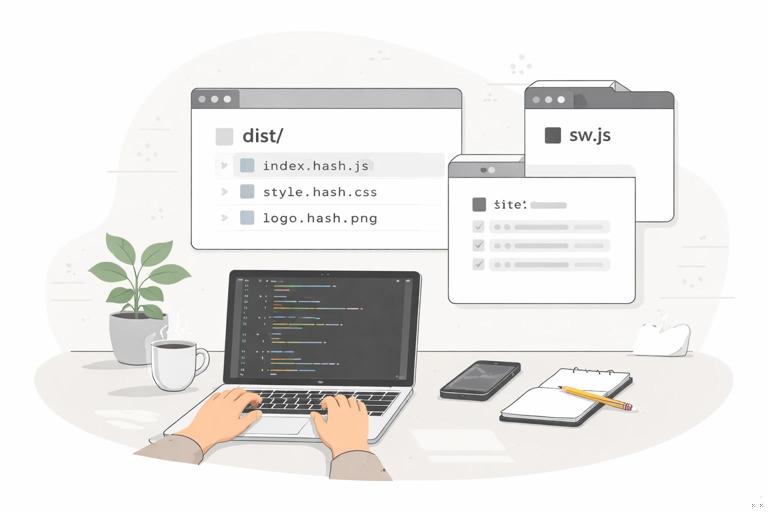
Offline-first PWAs work with many stacks, but project setup is easiest when you start with a predictable build pipeline that can output: (1) hashed static assets for long-term caching, (2) a stable service worker file served from the site root, and (3) a web app manifest and icons. You can do this with a framework (React/Vue/Svelte), a meta-framework (Next/Nuxt/SvelteKit), or “vanilla” with a bundler. For offline-first, the key is not the UI library; it’s whether you can control the output paths and caching headers.
A practical baseline is Vite (or similar) because it produces a clean dist/ folder with hashed assets and supports service worker plugins. If you already have an existing app, you can still apply the same setup principles: ensure a root-level service worker, stable asset URLs or hashed filenames, and a clear separation between runtime config and build-time config.
Minimum requirements your setup should satisfy
- Service worker file is served from the app’s origin and as close to the root as possible (usually
/sw.js) so it can control all routes. - Build outputs include content-hashed filenames for JS/CSS so you can cache them aggressively.
- Static assets (icons, fonts, images) are in a predictable location and can be pre-cached.
- API base URL and feature flags are configurable per environment without changing code.
- Local dev supports HTTPS (or at least
localhost) and can simulate offline and slow networks.
Project structure for offline-first: separate shell, data, and worker
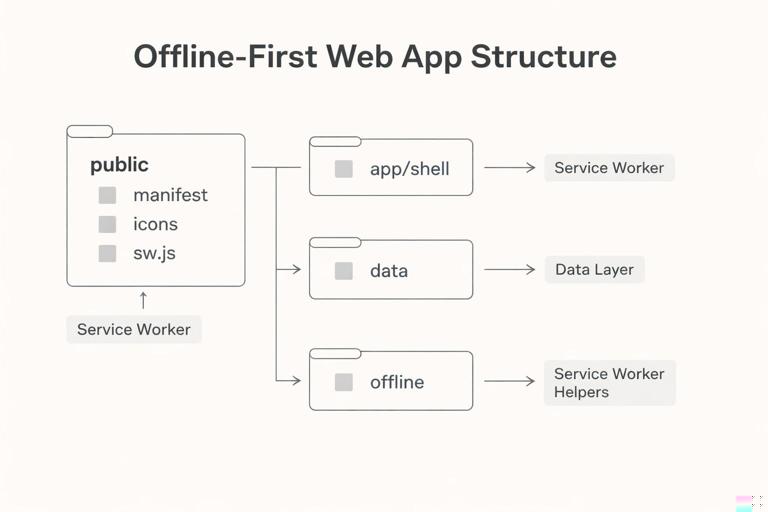
A common reason offline-first projects become fragile is that service worker logic, caching rules, and data access are scattered across the app. A setup that scales keeps responsibilities explicit. The following structure is a practical starting point:
- Listen to the audio with the screen off.
- Earn a certificate upon completion.
- Over 5000 courses for you to explore!

Download the app
my-offline-first-app/ package.json vite.config.js public/ manifest.webmanifest icons/ icon-192.png icon-512.png sw.js src/ main.ts app/ routes/ components/ shell/ data/ apiClient.ts repositories/ sync/ offline/ cacheNames.ts precacheList.ts swRegistration.ts styles/Key ideas in this structure:
public/sw.jsis emitted to the site root as/sw.js. Keeping it inpublic/avoids bundler path surprises and ensures the scope is correct.src/data/contains the “online” data access layer (fetching, repositories). You can later add offline persistence behind the same interfaces.src/offline/contains app-side helpers: cache name constants, pre-cache manifest generation (if you do it manually), and service worker registration code.src/app/shell/is where you keep the app shell components (layout, navigation, route skeletons) that should render even without data.
Set up the web app manifest and icons early
Even though offline-first is primarily about caching and data resilience, the manifest influences installability and how users return to your app. Setting it up early prevents later refactors to paths and icons that can break caching assumptions.
Create public/manifest.webmanifest:
{ "name": "Offline-First Notes", "short_name": "Notes", "start_url": "/?source=pwa", "scope": "/", "display": "standalone", "background_color": "#ffffff", "theme_color": "#0f172a", "icons": [ { "src": "/icons/icon-192.png", "sizes": "192x192", "type": "image/png" }, { "src": "/icons/icon-512.png", "sizes": "512x512", "type": "image/png" } ]}Then reference it in your HTML template (for Vite, typically index.html):
<link rel="manifest" href="/manifest.webmanifest" /><meta name="theme-color" content="#0f172a" />Keep start_url and scope aligned with where your service worker will control. If your app is deployed under a subpath (for example /app/), the manifest and service worker scope must match that deployment reality.
Service worker placement and scope: get this right before writing logic
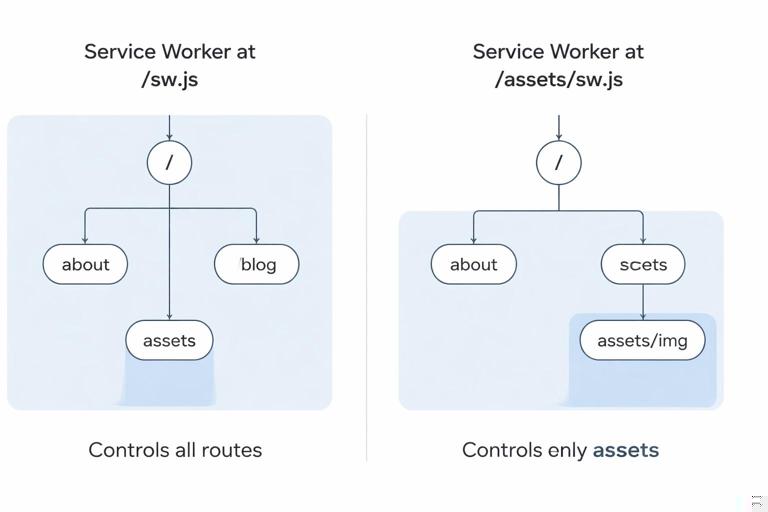
Service workers only control pages under their scope. Scope is determined by the service worker script URL by default. If you register /sw.js, it can control the entire origin (/ and below). If you register /assets/sw.js, it will only control /assets/ unless you explicitly set a broader scope (which may be blocked depending on headers and browser rules).
For most offline-first apps, you want the service worker at the root. That is why the earlier structure puts sw.js in public/ so it is served as /sw.js.
Step-by-step: add a minimal registration module
Create src/offline/swRegistration.ts:
export async function registerServiceWorker() { if (!('serviceWorker' in navigator)) return; try { const reg = await navigator.serviceWorker.register('/sw.js'); // Optional: listen for updates and prompt user later reg.addEventListener('updatefound', () => { const installing = reg.installing; if (!installing) return; installing.addEventListener('statechange', () => { // You can hook UI here when state becomes 'installed' }); }); } catch (err) { // In early setup, log to console; later, route to telemetry console.error('SW registration failed', err); }}Call it from your entry file (for example src/main.ts):
import { registerServiceWorker } from './offline/swRegistration';registerServiceWorker();At this stage, your service worker can be a no-op file that simply installs and activates. The goal is to validate scope and lifecycle behavior before adding caching rules.
Create a minimal service worker skeleton
Create public/sw.js with a minimal lifecycle implementation. This gives you a stable place to add caching later and lets you verify that install/activate events fire as expected.
/* eslint-disable no-restricted-globals */const VERSION = 'v1';self.addEventListener('install', (event) => { // Keep it simple for now; later you will pre-cache the app shell self.skipWaiting();});self.addEventListener('activate', (event) => { event.waitUntil((async () => { // Claim clients so the SW starts controlling open pages immediately await self.clients.claim(); })());});During setup, avoid adding a fetch handler immediately. First confirm that registration works, the service worker controls the page, and updates behave as you expect. You can check control status in the browser devtools Application panel.
Environment configuration: plan for offline and online endpoints
Offline-first apps often need multiple “base URLs” and modes: local dev API, staging API, production API, and sometimes a mock API for offline testing. If you hardcode endpoints, you’ll end up with service worker caching rules that are environment-specific and brittle.
Use environment variables for:
- API base URL (e.g.,
VITE_API_BASE_URL) - Build version (e.g., git commit hash) to help with cache invalidation
- Feature flags (e.g., enable background sync, enable mock data)
Example .env.development:
VITE_API_BASE_URL=http://localhost:3001VITE_BUILD_ID=devExample .env.production:
VITE_API_BASE_URL=https://api.example.comVITE_BUILD_ID=2026-01-08In your data client (src/data/apiClient.ts):
const API_BASE_URL = import.meta.env.VITE_API_BASE_URL;export async function apiFetch(path: string, init?: RequestInit) { const url = new URL(path, API_BASE_URL); const res = await fetch(url.toString(), { ...init, headers: { 'Content-Type': 'application/json', ...(init?.headers || {}) } }); if (!res.ok) throw new Error(`API error ${res.status}`); return res;}This separation matters later when you decide which requests are cacheable and how to handle offline fallbacks for API calls.
Build output and caching: ensure filenames are cache-friendly
Offline-first relies on caching static assets aggressively. That only works safely when assets are content-hashed (so a new build produces new filenames). Most modern bundlers do this by default for production builds. Verify it now, because it affects how you write your pre-cache list and how you configure server caching headers.
Run a production build and inspect the output folder:
npm run build# then inspect dist/assets for hashed filenamesYou should see filenames like index-ABC123.js and style-DEF456.css. If your build outputs non-hashed filenames, you must be more conservative with caching and update strategies, which makes offline-first harder.
Local development: HTTPS, service worker debugging, and avoiding “sticky” caches
Service workers are powerful but can be confusing during development because they persist across reloads and can serve cached content even after you change code. Your setup should include a predictable way to reset state.
Recommended dev workflow settings
- Use
localhostfor development. Browsers treathttp://localhostas a secure context for service workers. - In devtools, enable “Update on reload” for the service worker while iterating.
- Know how to unregister the service worker and clear site data (Application panel).
- Consider disabling service worker registration in development until you explicitly test offline behavior.
A practical pattern is to register the service worker only in production builds (or behind a flag):
export async function registerServiceWorker() { if (!('serviceWorker' in navigator)) return; const enabled = import.meta.env.PROD; if (!enabled) return; await navigator.serviceWorker.register('/sw.js');}When you are ready to test offline behavior in development, flip the condition to a flag:
const enabled = import.meta.env.PROD || import.meta.env.VITE_SW_DEV === 'true';Then set VITE_SW_DEV=true locally when needed.
Server configuration: headers and routing for offline-first
Offline-first depends on two server behaviors: correct caching headers for static assets, and correct routing for single-page apps (if applicable). If the server returns 404 for deep links, your offline shell caching won’t help because navigation requests won’t resolve properly.
Static asset caching headers
For hashed assets (e.g., /assets/index-ABC123.js), configure long-lived caching:
Cache-Control: public, max-age=31536000, immutableFor HTML (e.g., /index.html), use a short cache or no-cache so updates are discovered:
Cache-Control: no-cacheThis division prevents the “stale shell” problem where users get an old HTML file that references new hashed assets that aren’t cached yet.
SPA fallback routing
If you use client-side routing, configure the server to serve index.html for unknown paths. This ensures navigation requests work online and gives your service worker a consistent document to cache for offline navigation fallback later.
Step-by-step: establish an offline-first baseline (app shell + offline page)
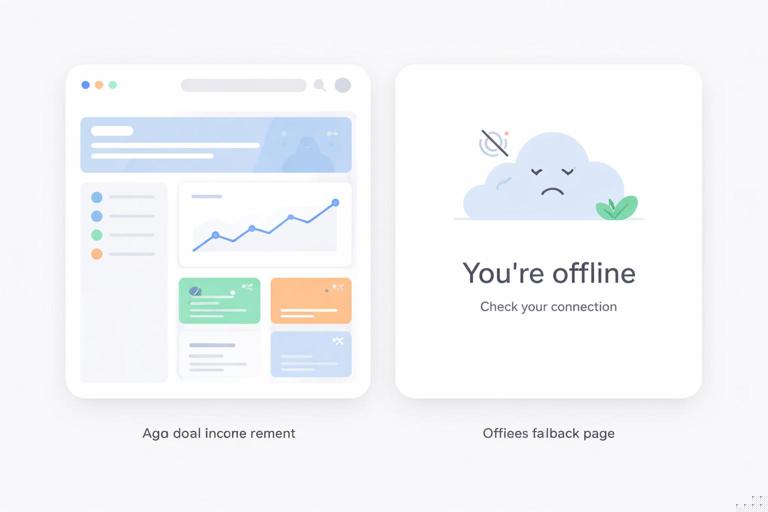
Before you implement sophisticated caching strategies, set up a baseline offline experience: the app shell loads, and navigation shows a friendly offline screen when data is unavailable. This baseline is part of project setup because it influences routing and asset organization.
1) Create a simple offline fallback page
Create public/offline.html:
<!doctype html><html lang="en"><head> <meta charset="UTF-8" /> <meta name="viewport" content="width=device-width, initial-scale=1.0" /> <title>Offline</title> <style> body { font-family: system-ui, sans-serif; padding: 2rem; } .card { max-width: 520px; margin: 0 auto; border: 1px solid #e5e7eb; border-radius: 12px; padding: 1.25rem; } </style></head><body> <div class="card"> <h1>You’re offline</h1> <p>This app can still show saved content. Try again when you’re back online.</p> </div></body></html>This file is intentionally standalone and not dependent on your JS bundle. It’s useful as a navigation fallback when the app shell isn’t available yet or when a navigation request fails.
2) Pre-cache the offline page and core assets
Now add a minimal pre-cache list in public/sw.js. At setup time, keep it small and explicit:
const VERSION = 'v1';const CACHE_NAME = `app-shell-${VERSION}`;const PRECACHE_URLS = [ '/', '/index.html', '/offline.html', '/manifest.webmanifest', '/icons/icon-192.png', '/icons/icon-512.png'];self.addEventListener('install', (event) => { event.waitUntil((async () => { const cache = await caches.open(CACHE_NAME); await cache.addAll(PRECACHE_URLS); self.skipWaiting(); })());});self.addEventListener('activate', (event) => { event.waitUntil((async () => { const keys = await caches.keys(); await Promise.all(keys .filter((k) => k.startsWith('app-shell-') && k !== CACHE_NAME) .map((k) => caches.delete(k))); await self.clients.claim(); })());});Note that pre-caching / and /index.html can behave differently depending on your server and build output. In some setups, caching / is enough; in others, you want to cache the actual HTML file. Validate what your server returns for each URL.
3) Add a navigation fallback for offline
Add a fetch handler that only targets navigation requests (document loads). This avoids interfering with API calls and static assets while you are still in setup mode:
self.addEventListener('fetch', (event) => { const req = event.request; if (req.mode === 'navigate') { event.respondWith((async () => { try { // Prefer network for HTML so updates are discovered const fresh = await fetch(req); return fresh; } catch (e) { const cache = await caches.open(CACHE_NAME); const cachedOffline = await cache.match('/offline.html'); return cachedOffline || Response.error(); } })()); }}This gives you an immediate offline behavior: if the user navigates while offline, they see offline.html. Later, you can evolve this into an “app shell” model where cached index.html loads the UI and routes to an offline-aware screen.
Data layer setup: design for offline without implementing it yet
Offline-first becomes much easier when your UI does not call fetch directly. Instead, route all data access through a small set of repository functions. During setup, you can keep these repositories online-only, but the boundary is what matters: later you can add caching, IndexedDB persistence, and background sync without rewriting components.
Step-by-step: create a repository interface
Example for a notes app. Create src/data/repositories/notesRepo.ts:
import { apiFetch } from '../apiClient';export type Note = { id: string; title: string; body: string; updatedAt: string; };export async function listNotes(): Promise<Note[]> { const res = await apiFetch('/notes'); return res.json();}export async function getNote(id: string): Promise<Note> { const res = await apiFetch(`/notes/${id}`); return res.json();}export async function saveNote(note: Partial<Note> & { title: string; body: string }): Promise<Note> { const res = await apiFetch('/notes', { method: 'POST', body: JSON.stringify(note) }); return res.json();}In the UI, call listNotes() rather than calling fetch directly. When you later add offline persistence, you can keep the same function signatures and change the implementation to “cache then network” or “local-first then sync.”
Testing setup: simulate offline early and automate checks
Offline-first features can regress easily. Add lightweight checks to your setup so you catch issues before shipping.
Manual checks you should be able to perform after setup
- Load the app once online, then switch devtools to “Offline” and reload. You should see either the app shell or
offline.html. - Verify the service worker controls the page (devtools Application panel shows “controlled by service worker”).
- Verify that updating
public/sw.jschanges the service worker version and triggers an update. - Verify that clearing site data resets the app to a clean state.
Optional: add a simple script to bump SW version
During early development, forgetting to update cache names can cause confusion. A simple approach is to tie VERSION to a build id. If you don’t have a build pipeline yet, you can manually bump it. If you do, inject a build id at build time (exact approach depends on your bundler). The key setup principle is: cache names must change when the pre-cached asset set changes.
Common setup pitfalls and how to avoid them
Registering the service worker from the wrong path
If you register ./sw.js from a nested route, it may resolve to a nested URL and reduce scope. Always use an absolute path like /sw.js unless you intentionally deploy under a subpath and have accounted for it.
Caching HTML too aggressively
Offline-first does not mean “cache everything forever.” If you cache index.html with a cache-first strategy, users may never receive updates. In setup, prefer network-first for navigations with an offline fallback, and keep HTML caching conservative until you implement a robust update flow.
Mixing API caching into the initial service worker
Start with navigation fallback only. Once that is stable, add runtime caching for static assets, then add API caching with clear rules. This staged approach keeps setup debuggable.
Not planning for storage limits and eviction
Browsers can evict caches under storage pressure. Your setup should assume caches are not permanent. That’s another reason to keep a small, essential pre-cache list and treat offline data as a separate concern (often stored in IndexedDB with a sync strategy).