What “progressive enhancement workflow” means in an HTMX + Alpine.js project
Progressive enhancement is a workflow where you build the user interface so it works as plain HTML first, then you add layers of interactivity without breaking the baseline experience. In practice, this means you start with server-rendered pages that are fully usable with normal navigation and form submissions, then you introduce HTMX attributes to upgrade specific interactions (partial updates, inline validation, live search), and finally you add Alpine.js for small client-side behaviors (toggling, local state, keyboard handling) that do not require a full SPA framework.
The key idea is not “no JavaScript”; it is “JavaScript is optional.” Your UI should remain functional if HTMX fails to load, if Alpine.js is blocked, or if a user is on a constrained device. This approach reduces risk: you can ship value early with plain HTML, then iterate safely by enhancing the most important flows first.
Why start HTML-first instead of designing the JavaScript behavior upfront
HTML-first forces you to clarify what the user can do and what the server must accept. You design the forms, links, and page structure so the application is usable without any client scripting. That baseline becomes your safety net: every enhancement you add must preserve the original semantics. This also improves accessibility because native elements (forms, buttons, links) already support keyboard navigation, focus behavior, and assistive technology expectations.
Another practical reason is debugging and maintainability. When a feature is built as a normal page flow first, you can test it with simple tools: load the page, submit the form, follow redirects, verify server-side validation. Only after that works do you add HTMX to make it faster or smoother. If the enhanced version breaks, you can temporarily remove the HTMX attributes and still have a working feature while you fix the enhancement.
Workflow overview: three layers you build in order
Layer 1: Baseline HTML and server behavior
Start with standard routes that return full pages. Use links for navigation and forms for data changes. Ensure validation errors render on the page and that successful actions redirect appropriately. At this stage, you are not thinking about partial updates; you are thinking about correct behavior and clear UI.
- Listen to the audio with the screen off.
- Earn a certificate upon completion.
- Over 5000 courses for you to explore!

Download the app
Layer 2: HTMX upgrades for network-driven interactivity
Once the baseline works, add HTMX attributes to the exact elements that benefit from partial updates. The goal is to reduce page reloads and keep the user’s context (scroll position, open panels, input focus) when possible. You should still keep the original href and action attributes so the baseline remains intact.
Layer 3: Alpine.js for local UI state and micro-interactions
After the server-driven interactions feel good, add Alpine.js for behaviors that are purely client-side: toggling menus, showing and hiding details, optimistic UI for small state, keyboard shortcuts, and managing local component state. Alpine should not replace server validation or core business logic; it should make the interface more pleasant while staying optional.
Step-by-step example: enhancing a “Create Project” form
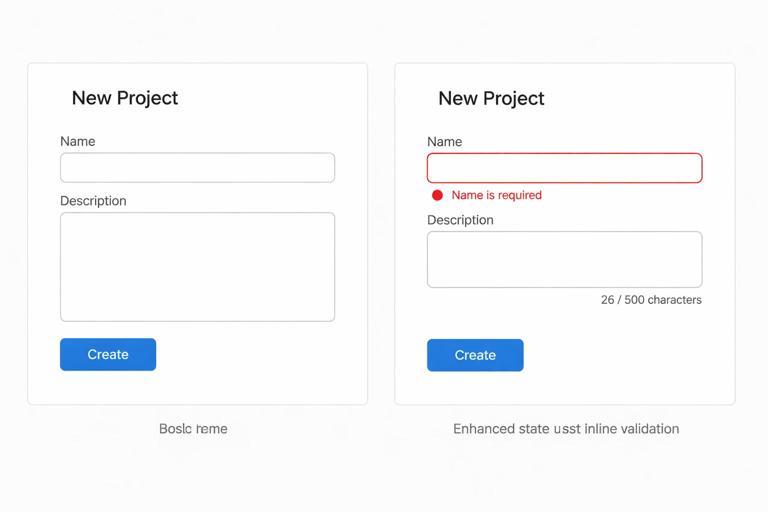
Step 1: Build the baseline page and form
Create a page that shows a form with a name and description. The form posts to a server endpoint, which validates input and either re-renders the page with errors or redirects to the new project page. This is the non-negotiable foundation.
<h2>New Project</h2> <form method="post" action="/projects"> <label>Name</label> <input name="name" value="{{ old.name }}" required /> {% if errors.name %}<p>{{ errors.name }}</p>{% endif %} <label>Description</label> <textarea name="description">{{ old.description }}</textarea> {% if errors.description %}<p>{{ errors.description }}</p>{% endif %} <button type="submit">Create</button> </form>At this point, the feature is complete. Users can create projects even with no JavaScript. Your server responses are predictable: on error, return the same page with errors; on success, redirect to the project detail page.
Step 2: Add an HTMX enhancement for inline error updates (without breaking baseline)
Now you can enhance the form so that submission updates only the form area instead of reloading the whole page. The trick is to keep method and action so the form still works normally, and add HTMX attributes that activate only when HTMX is present.
<div id="project-form"> <form method="post" action="/projects" hx-post="/projects" hx-target="#project-form" hx-swap="outerHTML"> <label>Name</label> <input name="name" value="{{ old.name }}" required /> {% if errors.name %}<p>{{ errors.name }}</p>{% endif %} <label>Description</label> <textarea name="description">{{ old.description }}</textarea> {% if errors.description %}<p>{{ errors.description }}</p>{% endif %} <button type="submit">Create</button> </form> </div>On the server, you can keep the same validation logic. The only change is that when the request comes from HTMX, you return just the fragment for #project-form (the wrapper div) instead of the entire page. If HTMX is not present, the server returns the full page as before. This is progressive enhancement in practice: same URL, same semantics, different response shape depending on the client capability.
Step 3: Add Alpine.js for “dirty state” and submit button behavior
Next, enhance the UX with local state: disable the submit button until the user changes something, show a “You have unsaved changes” hint, or add a character counter. These are client-side conveniences that should not be required for correctness.
<div id="project-form" x-data="{ dirty: false, name: '{{ old.name }}', desc: `{{ old.description }}` }"> <form method="post" action="/projects" hx-post="/projects" hx-target="#project-form" hx-swap="outerHTML" @input="dirty = true"> <label>Name</label> <input name="name" x-model="name" required /> <label>Description</label> <textarea name="description" x-model="desc"></textarea> <p x-show="dirty">Unsaved changes</p> <button type="submit" :disabled="!dirty">Create</button> </form> </div>Notice what did not change: the server still validates, the form still posts, and the feature still works without Alpine. Alpine only improves feedback and prevents accidental empty submissions in a friendly way, but it is not the source of truth.
Step-by-step example: enhancing a list view with filters and live updates
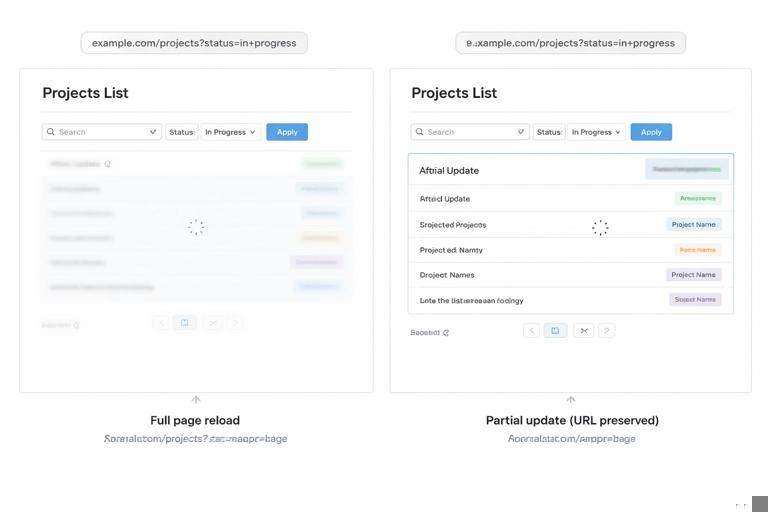
Step 1: Baseline list with query-string filters
Build a normal list page with a filter form that uses GET. This is important: GET-based filters are naturally shareable and bookmarkable. The baseline should work by submitting the form and reloading the page with query parameters.
<h2>Projects</h2> <form method="get" action="/projects"> <input type="search" name="q" value="{{ q }}" placeholder="Search" /> <select name="status"> <option value="">All</option> <option value="active" {% if status=='active' %}selected{% endif %}>Active</option> <option value="archived" {% if status=='archived' %}selected{% endif %}>Archived</option> </select> <button type="submit">Apply</button> </form> <div id="project-list"> {% for p in projects %} <div><a href="/projects/{{ p.id }}">{{ p.name }}</a></div> {% endfor %} </div>This baseline already has good properties: it works without JavaScript, it’s linkable, and it’s easy to test. Now you can enhance it.
Step 2: HTMX enhancement for “filter without full reload”
Add HTMX to submit the filter form and replace only the list container. Keep the form’s method and action so it still works normally. The enhanced behavior should preserve the URL query string so users can refresh or share the filtered view.
<form method="get" action="/projects" hx-get="/projects" hx-target="#project-list" hx-swap="innerHTML" hx-push-url="true"> <input type="search" name="q" value="{{ q }}" placeholder="Search" /> <select name="status"> ... </select> <button type="submit">Apply</button> </form> <div id="project-list">...</div>On the server, when the request is from HTMX, return only the HTML for the list items (the inside of #project-list), not the whole page. Without HTMX, the server returns the full page as usual. This keeps one canonical route while enabling a smoother experience.
Step 3: Alpine.js enhancement for “auto-submit on change” and debounce
Auto-submitting filters can be done with HTMX triggers, but Alpine can help coordinate local UI state like “show a clear button when there is text” or “debounce typing before submitting.” The progressive enhancement principle still applies: the Apply button remains, so users without JavaScript can submit manually.
<form method="get" action="/projects" hx-get="/projects" hx-target="#project-list" hx-swap="innerHTML" hx-push-url="true" x-data="{ q: '{{ q }}' }"> <input type="search" name="q" x-model="q" @input.debounce.300ms="$el.form.requestSubmit()" placeholder="Search" /> <button type="button" x-show="q.length" @click="q=''; $nextTick(()=>$el.form.requestSubmit())">Clear</button> <select name="status" @change="$el.form.requestSubmit()"> ... </select> <button type="submit">Apply</button> </form>Here, Alpine is not responsible for fetching or rendering; it only decides when to submit the form. HTMX handles the request and swap. If Alpine is absent, the user can still type and click Apply. If HTMX is absent, the form submits normally and reloads the page.
Practical checklist: how to design enhancements that don’t break the baseline
Keep native semantics intact
Use real links for navigation and real forms for submissions. Avoid turning everything into div click handlers. When you add HTMX, do not remove href from anchors or action from forms. When you add Alpine, do not replace submit buttons with custom JavaScript-only controls.
Make the enhanced path optional, not required
Ask: “If HTMX fails to load, can the user still complete the task?” and “If Alpine fails to load, does anything become impossible?” Enhancements should improve speed, reduce friction, or add convenience, but they should not be the only way to perform critical actions.
Prefer server-rendered truth, client-rendered hints
Validation, permissions, and business rules should remain server-enforced. Alpine can show hints like “password strength” or “unsaved changes,” but the server must still validate. HTMX can update fragments, but the server should still render the correct state after each action.
Enhance one interaction at a time
Progressive enhancement works best when you upgrade a single element or region, verify it, then move on. For example, enhance only the filter form first, then enhance pagination links, then enhance inline editing. This reduces the blast radius of bugs and makes it easier to reason about behavior.
Common progressive enhancement patterns with HTMX + Alpine.js
Pattern: “Clickable row” with a real link inside
For a table or list, you can use Alpine to make the row clickable for convenience, but keep a real <a> link inside so keyboard users and no-JS users have the canonical navigation element.
<div class="row" x-data @click="$refs.link.click()"> <a x-ref="link" href="/projects/123">Project Alpha</a> </div>Pattern: Modal that degrades to a normal page
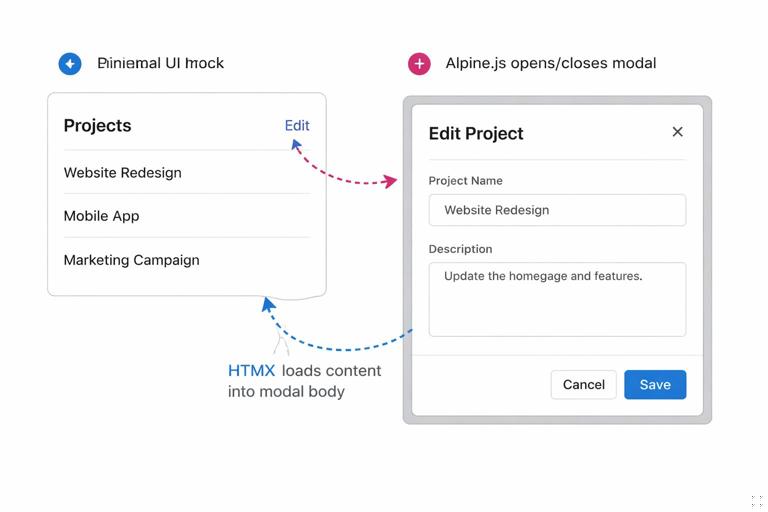
Build the “edit” screen as a normal page first. Then enhance it so clicking “Edit” loads the form into a modal via HTMX, and Alpine controls opening and closing the modal. If JavaScript is unavailable, the user simply navigates to the edit page.
<a href="/projects/123/edit" hx-get="/projects/123/edit" hx-target="#modal-body" hx-trigger="click" @click.prevent="open=true">Edit</a> <div x-data="{ open:false }" x-show="open"> <div id="modal-body"></div> <button type="button" @click="open=false">Close</button> </div>The baseline is the edit page. The enhancement is the modal. You are not creating a separate “modal-only” endpoint; you are reusing the same server-rendered form.
Pattern: Inline edit that falls back to full-page edit
Start with a “View” page that has an Edit link. Then enhance a small region so the edit form can be swapped in-place. If the enhancement fails, the user still has the Edit link.
<div id="project-name"> <h3>{{ project.name }}</h3> <a href="/projects/123/edit" hx-get="/projects/123/edit" hx-target="#project-name" hx-swap="outerHTML">Edit</a> </div>Testing the workflow: verify baseline first, then enhancements
Baseline tests: no HTMX, no Alpine
Before you celebrate the enhanced UX, validate the core flows with JavaScript disabled. You should be able to navigate, submit forms, see validation errors, and complete tasks. This is also where you catch missing name attributes, incorrect form methods, and server-side validation gaps.
HTMX tests: partial updates and state continuity
Enable HTMX and verify that enhanced interactions update only the intended region. Check that focus behavior remains reasonable after swaps, that error messages appear in the right place, and that URLs remain meaningful when you intend them to be shareable. If an enhanced request fails, the user should still be able to retry or fall back to normal navigation.
Alpine tests: micro-interactions don’t block completion
Enable Alpine and verify that local behaviors do not prevent form submission or navigation. For example, if you disable a submit button based on local state, ensure there is still a path to submit when the form is valid. Alpine should never be the only gatekeeper for critical actions.
How to decide whether a feature needs HTMX, Alpine, both, or neither
Use neither when the baseline is already good
If a page is rarely used, or the interaction is simple and a full reload is acceptable, keep it plain. Progressive enhancement is not mandatory everywhere; it is a tool to apply where it improves user experience meaningfully.
Use HTMX when the interaction is server-driven
If the user action needs server data, server validation, or server-rendered output, HTMX is usually the right enhancement. Examples include filtering lists, submitting forms, loading details panels, and updating counters that depend on server state.
Use Alpine when the interaction is local and immediate
If the behavior is purely presentational or local state, Alpine is a good fit. Examples include toggling visibility, managing tabs, handling keyboard shortcuts, and showing client-side hints. Alpine can also orchestrate when to trigger HTMX requests, but it should not duplicate server logic.
Use both when you want server updates plus local polish
Many of the best experiences combine them: HTMX handles the request and HTML swap; Alpine handles local state like “modal open,” “currently selected item,” or “show spinner.” The progressive enhancement workflow keeps these responsibilities clear and prevents you from accidentally building a fragile mini-SPA.