Why Persisted Queries Exist in Production
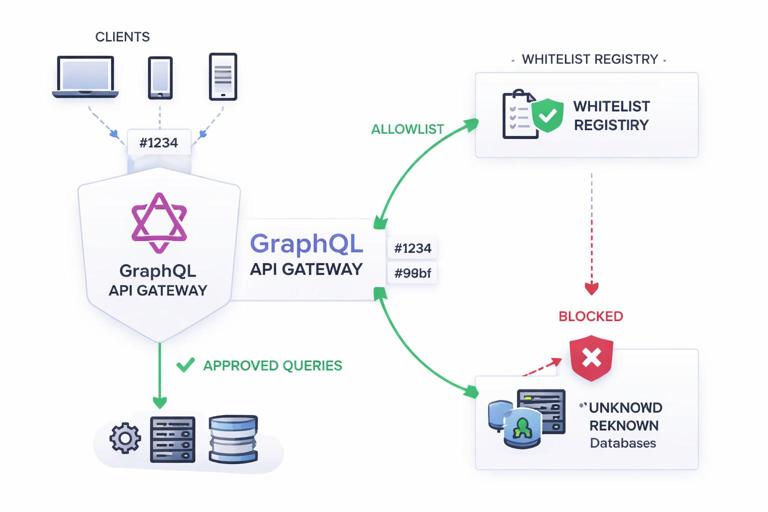
Persisted queries are a production control technique where clients send a stable identifier (often a hash) instead of sending the full GraphQL document on every request. The server only executes operations that are already known and approved. This reduces request size, improves cacheability at the edge, and—most importantly—creates an allowlist-style gate that blocks unexpected operations from reaching your resolvers and data sources.
In a typical “send the full query text” setup, any client (or attacker) can submit arbitrary operations as long as they can reach your endpoint. Even if your schema is well designed, production risk often comes from operational behavior: sudden query shape changes, expensive nested selections, or a flood of unique queries that bypass CDN caching. Persisted queries shift control from “any valid query” to “only pre-registered queries,” which is a powerful safety lever for production traffic.
Two Common Models: Automatic Persisted Queries vs Pre-Registered Allowlists
Automatic Persisted Queries (APQ)
APQ is a handshake protocol popularized by Apollo. The client first sends only a hash of the query. If the server recognizes the hash, it executes the stored query. If not recognized, the server responds with an error indicating the query is not found, and the client retries with the full query text plus the hash. The server stores it for next time. APQ reduces bandwidth after the first request and improves cache hit rates for repeat operations, but it still allows new queries to be introduced at runtime (which may or may not be acceptable for your production posture).
Pre-Registered Persisted Queries (Allowlist)
In an allowlist model, the server never accepts arbitrary query text in production. Instead, you deploy a set of approved operations (and their hashes or IDs) alongside your server or in a dedicated registry. Clients must send only the ID/hash. If the ID is unknown, the server rejects the request. This is stricter than APQ and is often preferred when you want strong operational controls: predictable load, reduced attack surface, and the ability to review operations before they can run.
Many teams use APQ in development and staging for convenience, then switch to allowlist-only in production, or they allow APQ only for authenticated first-party clients while blocking it for public traffic.
- Listen to the audio with the screen off.
- Earn a certificate upon completion.
- Over 5000 courses for you to explore!

Download the app
How Persisted Queries Improve Safety and Performance
Reduced Attack Surface
When you accept raw GraphQL documents, you must defend against a wide range of query patterns: deeply nested selections, repeated fragments, expensive combinations, and high-cardinality arguments. Persisted queries cut this down by ensuring only known operations execute. This does not replace authorization, but it reduces the number of “unknown unknowns” that can hit your system.
Better Edge Caching and Lower Bandwidth
Sending only a hash (or short ID) makes requests smaller and more uniform. CDNs and reverse proxies can cache based on URL and headers more effectively when the request body is stable or minimal. Even without response caching, bandwidth and parsing overhead drop because the server does not need to parse large query documents repeatedly.
Operational Predictability
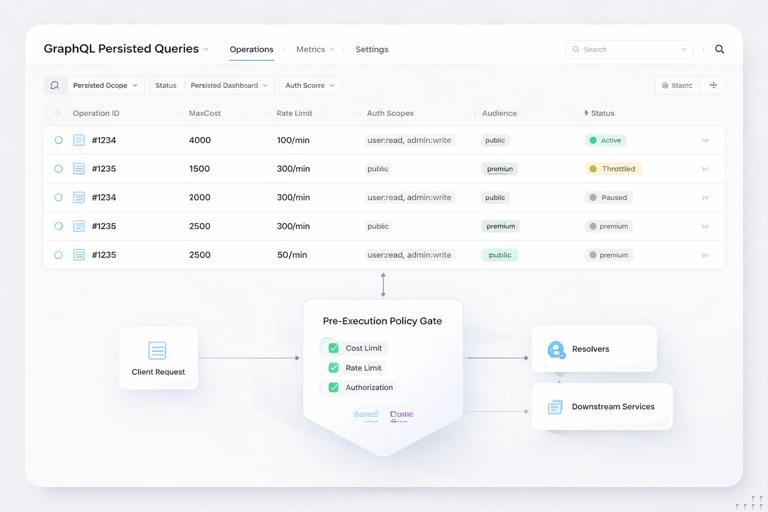
With allowlisted operations, you can attach metadata to each operation: expected cost, rate limits, required auth scopes, and whether it is safe for anonymous traffic. This enables policy decisions before resolver execution, which is critical for protecting databases and downstream services.
Step-by-Step: Implementing Automatic Persisted Queries (APQ)
Step 1: Choose a Stable Hashing Scheme
APQ typically uses SHA-256 of the exact query document string. The key is consistency: the client and server must hash the same canonical string. In practice, clients hash the query text as authored (including whitespace), so you should ensure your build pipeline produces stable query strings. Some teams normalize whitespace before hashing, but that must be consistent across all clients.
Step 2: Add APQ Support in the Server
At request time, the server checks for a persisted query extension containing the version and the hash. If the hash is known, the server retrieves the stored query text and executes it. If unknown, the server returns a “PersistedQueryNotFound” style error. On a retry that includes the full query text, the server validates that the hash matches the query text, stores the mapping, and executes.
// Pseudocode: APQ flow at the edge of your GraphQL server
function handleGraphQLRequest(req) {
  const pq = req.extensions?.persistedQuery
  if (pq?.sha256Hash) {
    const stored = persistedQueryStore.get(pq.sha256Hash)
    if (stored) {
      return executeGraphQL({ query: stored, variables: req.variables })
    }
    // If query text is missing, ask client to retry with full query
    if (!req.query) {
      return error("PersistedQueryNotFound")
    }
    // If query text is present, verify hash matches
    const computed = sha256(req.query)
    if (computed !== pq.sha256Hash) {
      return error("PersistedQueryHashMismatch")
    }
    persistedQueryStore.set(pq.sha256Hash, req.query)
    return executeGraphQL({ query: req.query, variables: req.variables })
  }
  // No persisted query extension: handle normally or block in production
  return executeGraphQL({ query: req.query, variables: req.variables })
}
Step 3: Decide Where to Store the Mapping
APQ needs a store from hash to query text. Options include in-memory LRU (fast but not shared across instances), Redis (shared and fast), or a database table (durable but potentially slower). For production, Redis is a common choice. Use TTLs to prevent unbounded growth, and consider a maximum size or eviction policy.
Step 4: Add Guardrails for “First Seen” Queries
APQ can still introduce new queries at runtime, which can be risky. Add controls such as: only allow APQ registration for authenticated clients; only allow registration from trusted client IDs; rate-limit “PersistedQueryNotFound” retries; and enforce query complexity limits on registration attempts. This prevents an attacker from filling your store with junk hashes or introducing expensive operations.
Step-by-Step: Implementing a Strict Allowlist in Production
Step 1: Build an Operation Manifest During CI
In an allowlist model, you generate a manifest of operations from your client code (or multiple clients). The manifest maps operation name and/or hash to the full query text and optional metadata. This is typically produced during CI when you build the client application.
// Example manifest structure
{
  "3b1c...": {
    "name": "ProductDetails",
    "query": "query ProductDetails($id: ID!) { product(id: $id) { id name price } }",
    "maxCost": 200,
    "audience": "public"
  },
  "9f02...": {
    "name": "AdminUserSearch",
    "query": "query AdminUserSearch($term: String!) { ... }",
    "maxCost": 500,
    "audience": "admin"
  }
}
Step 2: Deploy the Manifest to a Registry or Bundle It with the Server
You can ship the manifest with the server container image, store it in object storage, or publish it to a dedicated “operation registry” service. Bundling is simplest and safest for immutability: production servers only know about operations deployed with them. A registry can be more flexible for multi-client environments but requires careful change control and authentication.
Step 3: Enforce “ID-Only” Requests
In production, reject requests that include raw query text. Require clients to send only the persisted query ID/hash. This prevents ad hoc queries from being executed and makes traffic predictable.
// Pseudocode: allowlist enforcement
function handleGraphQLRequest(req) {
  const id = req.extensions?.persistedQuery?.sha256Hash || req.headers["x-operation-id"]
  if (!id) return error("PersistedQueryRequired")

  const entry = allowlist.get(id)
  if (!entry) return error("PersistedQueryNotAllowed")

  // Optional: enforce audience and auth
  if (entry.audience === "admin" && !req.user?.isAdmin) {
    return error("Forbidden")
  }

  // Optional: enforce per-operation max cost
  return executeGraphQL({ query: entry.query, variables: req.variables })
}
Step 4: Handle Rollouts and Backward Compatibility
Allowlisted operations require coordination between client and server deployments. To avoid breaking clients during rollouts, support multiple manifest versions for a period of time. A practical approach is to keep the previous manifest entries for at least one client release cycle, and remove old entries only after you are confident older clients are no longer active.
If you have multiple clients (web, iOS, Android, partners), consider namespacing operation IDs by client and version, or storing metadata that indicates which clients are allowed to call an operation.
Operational Controls Beyond Persisted Queries
Operation-Level Rate Limiting
Rate limiting is more effective when you can identify the operation deterministically. With persisted queries, you can apply limits per operation ID rather than per endpoint. For example, you might allow a high rate for a lightweight “viewer” query but a low rate for an expensive search query. Combine dimensions: per user, per IP, per API key, and per operation ID.
Implement rate limiting as close to the edge as possible (API gateway, CDN worker, or reverse proxy) so rejected requests do not consume GraphQL execution resources. If you must do it in the GraphQL server, do it before parsing and validation when possible (persisted ID lookup first, then rate limit, then execute).
Query Cost and Complexity Budgets
Even with allowlisted operations, you still need to protect against expensive variable values (for example, a search term that triggers heavy downstream work, or a large “first” argument if your schema permits it). Attach a cost budget to each operation and validate variables against policy. This can be as simple as: maximum page size, maximum number of IDs in a list, maximum date range, and maximum nesting depth if your server supports depth analysis.
A practical pattern is to store “maxCost” and “maxPageSize” in the operation manifest, then enforce them at runtime. This makes the policy explicit and reviewable during code review.
Traffic Shaping and Circuit Breakers
Operational controls should include what happens when downstream dependencies degrade. Use circuit breakers per data source and consider per-operation fallback behavior: return partial data, return a controlled error, or temporarily block an operation. Persisted queries help here because you can target a single problematic operation ID without shutting down the entire GraphQL endpoint.
For example, if a downstream search service is timing out, you can temporarily block only the search operation IDs at the gateway, while allowing product detail and checkout operations to continue.
Timeouts and Deadlines
Set a global request deadline and enforce it across resolvers and downstream calls. Persisted queries make it easier to tune timeouts per operation: an operation that aggregates multiple services might have a higher timeout than a simple lookup, but still bounded. Ensure your server propagates deadlines to HTTP clients, database drivers, and message brokers so work is canceled rather than continuing after the client has disconnected.
Security Considerations Specific to Persisted Queries
Do Not Treat Persisted Queries as Authorization
Allowlisting controls which operations can run, not who can access the data. You must still enforce field- and object-level authorization in resolvers or middleware. A persisted query can still request sensitive fields if the schema allows it; the server must check permissions at runtime based on the caller’s identity and scopes.
Prevent Hash Collisions and Tampering
Use a strong hash (SHA-256 is typical) and verify that the provided hash matches the query text whenever you accept query text (APQ registration). In strict allowlist mode, you should not accept query text at all, which eliminates this class of tampering.
Control Introspection and Tooling Access
In production, you may choose to restrict introspection to trusted clients or disable it entirely. Persisted queries complement this: if clients do not need to send arbitrary queries, they also do not need introspection at runtime. If you keep introspection enabled for operational reasons, consider gating it behind admin authentication and strict rate limits.
Protect the Persisted Query Store
If you use APQ with a shared store, treat it as part of your security boundary. Apply authentication to any registry APIs, restrict network access to Redis or databases, and monitor for unusual growth in stored entries. Add quotas per client to prevent store-filling attacks.
Observability: Measuring and Enforcing Operational Behavior
Log and Trace by Operation ID
Persisted queries give you a stable key for metrics. Record operation ID, operation name, client ID, and response status. In distributed tracing, set the span name to the operation name and attach the operation ID as an attribute. This makes it easier to identify which operations drive latency, errors, and downstream load.
Detect Unknown or Deprecated Operations
In allowlist mode, unknown operation IDs should be rare and actionable. Track them as a security signal: spikes can indicate misconfigured clients or probing attempts. If you maintain multiple manifest versions, track usage of older operation IDs so you can safely retire them.
Per-Operation SLOs
Instead of a single “GraphQL endpoint latency” metric, define SLOs per critical operation. For example, checkout-related operations might require tighter latency and error budgets than analytics queries. Persisted queries make it straightforward to segment metrics and apply targeted mitigations.
Practical Deployment Patterns
Environment-Based Policy
A common pattern is: in development, accept raw queries for fast iteration; in staging, enable APQ to test the handshake and store behavior; in production, enforce allowlist-only for public traffic while optionally allowing APQ registration for internal tools behind VPN or strong authentication.
Multi-Client and Partner Access
If you serve multiple clients, treat operation registration as a contract. Maintain separate allowlists per client type, or attach “audience” metadata to each operation. For partner APIs, consider issuing API keys that map to a specific allowlist subset, so partners cannot call internal operations even if they learn the IDs.
Blue/Green and Canary Rollouts
When rolling out new operations, deploy the server manifest first (or registry entries), then release the client that references the new IDs. For canaries, allow the new operation IDs only for a small percentage of traffic or a specific client version. If you detect elevated error rates or latency, revoke or block the new operation IDs without rolling back the entire server.
Common Failure Modes and How to Avoid Them
Mismatch Between Client and Server Manifests
If clients ship operation IDs that the server does not recognize, requests will fail immediately. Avoid this by sequencing deployments carefully and keeping old IDs active long enough. Add automated checks in CI that verify the server has the required manifest entries for the client release.
Overly Large Variable Inputs
Persisted queries do not automatically prevent expensive variable values. Enforce variable constraints: maximum list sizes, maximum string lengths, and maximum ranges. Validate early, before executing resolvers, and return a controlled error when limits are exceeded.
Assuming Persisted Queries Eliminate All DoS Risk
Allowlisting reduces query-shape risk, but attackers can still flood allowed operations. Combine persisted queries with rate limiting, authentication, bot protection, and resource limits (timeouts, concurrency caps). The goal is layered defense: each control reduces a different category of risk.