Why performance feels different in HTMX + Alpine apps
In a hypermedia-driven UI, the browser is already good at rendering HTML, but performance problems still show up in three places: server time to produce fragments, network time to deliver them, and client time to paint them without jank. This chapter focuses on techniques that fit the HTMX model: caching the HTML fragments you already render, streaming responses so the user sees progress earlier, and preventing layout shift so partial swaps don’t cause the page to jump.
Fragment caching: cache the HTML you already render
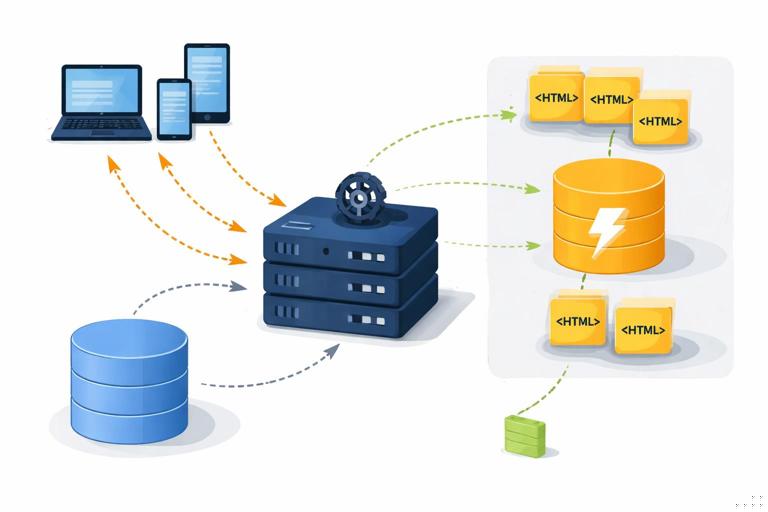
Fragment caching means storing the rendered HTML for a partial (a list, a card, a sidebar, a row) so repeated requests can skip expensive database work and template rendering. With HTMX, this is especially effective because many endpoints return the same fragment for many users or for repeated interactions (e.g., the same “top products” list, the same navigation, the same search results page 1 for a popular query).
What to cache: full pages vs fragments
Full-page caching is powerful but often blocked by per-user personalization and CSRF tokens. Fragment caching is more flexible: you can cache the expensive, mostly-static part and still render a small personalized wrapper around it. In HTMX endpoints, the response is already a fragment, so you can cache exactly what the client swaps in.
- Cache stable fragments: category lists, popular items, read-only cards, computed summaries.
- Avoid caching highly personalized fragments unless you include the user identity in the cache key.
- Cache “outer shells” less often; cache “inner lists” more often.
Cache keys: make them explicit and correct
A fragment cache is only safe if the cache key captures everything that changes the output. For HTMX endpoints, the key usually includes: route name, query parameters (page, sort, filter), locale, permissions, and sometimes device hints. If you forget a dimension, users can see the wrong HTML.
Practical approach: build a cache key function that takes a normalized request context and returns a string. Normalize query parameters (sort keys, default values) so semantically identical requests map to the same key.
- Listen to the audio with the screen off.
- Earn a certificate upon completion.
- Over 5000 courses for you to explore!

Download the app
// Pseudocode: cache key builder for a product list fragment
function productListCacheKey(req) {
  const page = parseInt(req.query.page ?? '1', 10)
  const sort = (req.query.sort ?? 'relevance').toLowerCase()
  const q = (req.query.q ?? '').trim().toLowerCase()
  const locale = req.locale
  const role = req.user?.role ?? 'anon'
  return `frag:products:list:v3:locale=${locale}:role=${role}:q=${q}:sort=${sort}:page=${page}`
}
Time-to-live vs event-based invalidation
There are two common invalidation strategies. TTL-based caching expires after a short time window (e.g., 30 seconds, 5 minutes). Event-based invalidation deletes keys when the underlying data changes (e.g., product updated, inventory changed). TTL is simpler and often good enough for lists; event-based invalidation is better for detail fragments where correctness matters.
- Use TTL for “good enough” freshness: trending lists, dashboards, counts that can lag slightly.
- Use event invalidation for correctness-sensitive fragments: price, availability, permissions.
- Combine both: event invalidation plus a TTL as a safety net.
Step-by-step: add fragment caching to an HTMX endpoint
Step 1: identify an expensive fragment endpoint. Look for endpoints hit frequently (pagination, filtering) or with heavy queries.
Step 2: define the cache key and TTL. Include all parameters that affect output. Choose a TTL that matches how often the data changes.
Step 3: cache the rendered HTML string, not the data. This avoids repeating template rendering and keeps the cached unit aligned with what HTMX swaps.
Step 4: return cache metadata via headers when useful. Even if you cache server-side, it helps to expose whether the response was a cache hit for debugging.
// Pseudocode: server-side fragment caching
async function productsFragment(req, res) {
  const key = productListCacheKey(req)
  const cached = await cache.get(key)
  if (cached) {
    res.setHeader('X-Fragment-Cache', 'HIT')
    return res.send(cached)
  }

  const data = await db.products.search({
    q: req.query.q,
    sort: req.query.sort,
    page: req.query.page
  })

  const html = renderTemplate('fragments/product-list.html', { data })
  await cache.set(key, html, { ttlSeconds: 60 })
  res.setHeader('X-Fragment-Cache', 'MISS')
  return res.send(html)
}
Varying by HTMX request context
Sometimes the same route returns different HTML depending on whether it’s an HTMX request or a full navigation (for example, returning a full layout vs only the inner fragment). If you do that, the cache key must include that dimension. A simple approach is to include a boolean like isHtmx in the key.
// Pseudocode: include HTMX context in cache key
const isHtmx = req.headers['hx-request'] === 'true'
const key = `${baseKey}:hx=${isHtmx ? 1 : 0}`
Don’t cache accidental per-request tokens
Common pitfall: caching HTML that contains per-request values such as CSRF tokens, one-time nonces, or user-specific IDs. If those appear inside the cached fragment, you can break forms or leak data. Fix it by keeping tokens outside cached fragments, or by rendering tokens client-side only where needed, or by varying the cache key per user session (which reduces cache usefulness).
Micro-caching for bursty traffic
Even a 1–5 second cache can flatten load spikes. Micro-caching is useful for endpoints that are expensive but change frequently, like “latest activity” lists. The goal is not long-term reuse; it’s to prevent repeated identical work during bursts.
Streaming responses: show progress sooner
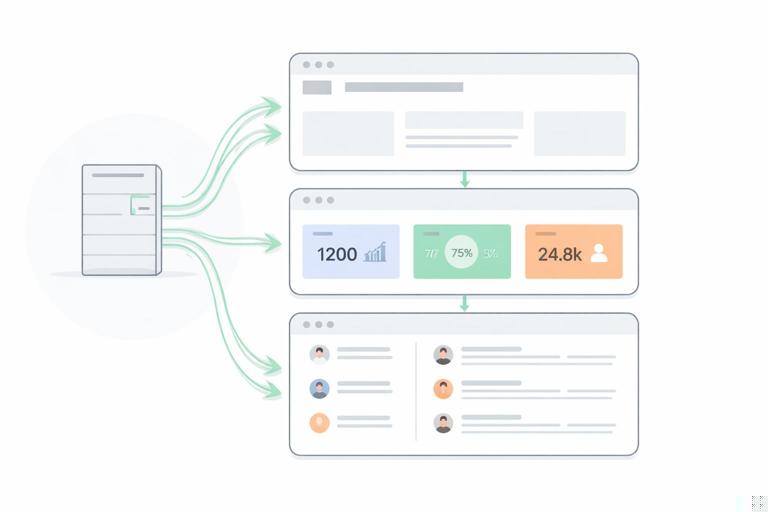
Streaming responses let the server send HTML in chunks as it becomes available, so the browser can start parsing and rendering earlier. This is especially valuable when the first part of the UI is quick to generate but later parts depend on slower queries or external calls. In HTMX apps, streaming can be used for full navigations and, in some setups, for fragment endpoints as well.
When streaming helps (and when it doesn’t)
Streaming helps when time-to-first-byte is dominated by server work that can be split into stages. It does not help if the bottleneck is a single unavoidable slow query, or if your infrastructure buffers responses (some proxies and serverless platforms do). It also won’t help if the client can’t meaningfully render partial HTML (for example, if the fragment must be complete to be inserted).
- Good fit: pages with independent regions (header, sidebar, main list) that can render progressively.
- Good fit: long lists where you can send the first N items quickly and append the rest.
- Not a fit: tiny fragments that are already fast; focus on caching instead.
Two practical patterns: skeleton-first and content-as-ready
Pattern 1: skeleton-first. Send a stable layout immediately (including placeholders), then stream in the real content. This reduces perceived latency and avoids layout shift if the skeleton reserves space.
Pattern 2: content-as-ready. Stream real HTML for each section as soon as it’s computed. This works well when sections are independent and can be appended or swapped individually.
Step-by-step: stream a page with independent regions
Step 1: flush the initial HTML early. Include the outer layout and placeholders for regions. Make sure placeholders have fixed dimensions (or at least min-heights) to reduce shifting.
Step 2: compute regions concurrently. Start database queries or API calls in parallel.
Step 3: as each region completes, write its HTML to the response. If you’re streaming a full page, you can place region content directly where it belongs. If you’re streaming updates to an already-loaded page, consider using out-of-band swaps so streamed chunks can target specific elements.
// Pseudocode: streaming a full HTML response
async function dashboard(req, res) {
  res.setHeader('Content-Type', 'text/html; charset=utf-8')
  res.setHeader('Transfer-Encoding', 'chunked')

  res.write(renderTemplate('layout-start.html', { title: 'Dashboard' }))
  res.write(renderTemplate('dashboard-skeleton.html'))
  // flush if your runtime supports it
  res.flush?.()

  const statsPromise = db.getStats()
  const feedPromise = db.getActivityFeed()

  const stats = await statsPromise
  res.write(renderTemplate('fragments/dashboard-stats.html', { stats }))
  res.flush?.()

  const feed = await feedPromise
  res.write(renderTemplate('fragments/dashboard-feed.html', { feed }))
  res.write(renderTemplate('layout-end.html'))
  res.end()
}
Streaming fragments with out-of-band swaps
If you want to stream multiple updates from one request into different parts of the existing page, you can send chunks that include elements marked for out-of-band swapping. The idea is: the response contains multiple fragments, each declaring where it should go. This can approximate “server-driven progressive rendering” without a heavy client runtime.
<!-- Example chunk: update stats region out-of-band -->
<div id="stats" hx-swap-oob="true">
  <!-- stats HTML -->
</div>

<!-- Example chunk: update feed region out-of-band -->
<div id="feed" hx-swap-oob="true">
  <!-- feed HTML -->
</div>
Step-by-step: first render placeholders for #stats and #feed in the page. Then trigger a single HTMX request that returns streamed OOB chunks. As each chunk arrives, the corresponding region updates. Validate that your server and proxy do not buffer the response; otherwise the browser will receive everything at once and you’ll lose the benefit.
Alpine.js considerations during streaming
If streamed HTML includes Alpine components, initialization happens when the DOM nodes are inserted. Keep streamed components small and avoid re-initializing large Alpine trees repeatedly. Prefer streaming content into stable containers rather than replacing an entire Alpine root. If you must replace an Alpine root, ensure the new HTML includes the necessary x-data and that any state you want to preserve lives outside the swapped region.
Avoiding layout shift: keep swaps from making the page jump
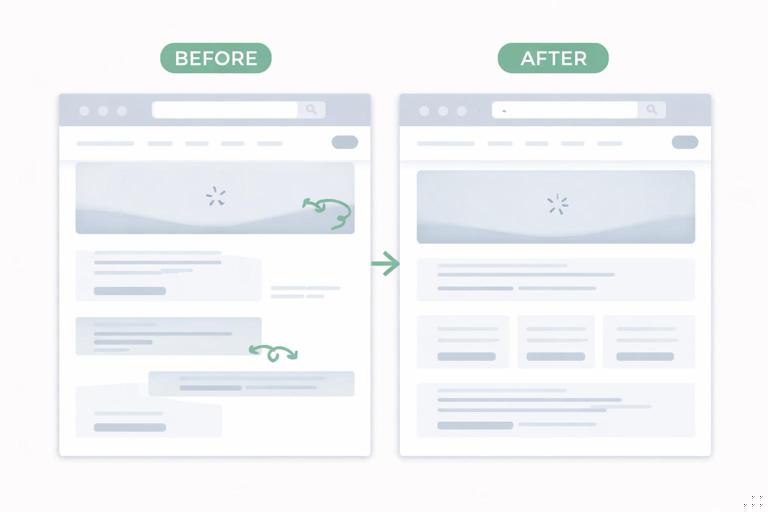
Layout shift happens when content changes cause elements to move unexpectedly, often while the user is reading or trying to click. In HTMX apps, layout shift can be triggered by fragment swaps that change heights, by images without reserved space, by late-loading fonts, or by inserting validation messages above inputs. Preventing layout shift improves perceived performance and reduces mis-clicks.
Reserve space with skeletons and min-heights
The simplest fix is to reserve space for content before it arrives. For lists, set a min-height on the container approximating the final height. For cards, use skeleton blocks with fixed dimensions. The goal is not perfect accuracy; it’s to avoid large jumps.
<div id="results" style="min-height: 480px">
  <!-- initial skeleton rows -->
  <div class="skeleton-row"></div>
  <div class="skeleton-row"></div>
  <div class="skeleton-row"></div>
</div>
Prefer swapping “inside” stable containers
Swapping the entire container can cause the browser to recalculate layout more broadly, especially if the container participates in grid or flex layouts. When possible, keep the outer container stable and swap only its inner content. This also helps preserve scroll position and reduces the chance of shifting surrounding elements.
<div class="panel">
  <h3>Orders</h3>
  <div id="orders-body"><!-- swap here --></div>
</div>
Use predictable heights for media
Images and embeds are a classic source of layout shift. Always provide dimensions or aspect ratio so the browser can reserve space before the media loads. If your fragments include images, ensure the HTML includes width and height attributes (or CSS aspect-ratio) consistently.
<img src="/media/p123.jpg" width="320" height="240" alt="Product photo">Keep error messages from pushing content
Inline errors can shift the layout, especially when inserted above fields. A practical technique is to reserve an error slot with a fixed min-height under each input, so showing an error doesn’t move the rest of the form. This is a CSS/layout decision that pairs well with HTMX swaps.
<label>Email</label>
<input name="email">
<div class="field-error" style="min-height: 1.25rem">
  <!-- error text swapped in here -->
</div>
Stabilize lists during incremental updates
When updating a list (filtering, sorting, live refresh), items can change order or count, causing the user’s viewport to jump. Two practical mitigations are: keep the container height stable during the swap, and animate changes subtly so movement feels intentional. Even without heavy client code, you can reduce jank by swapping only the list items and keeping headers, toolbars, and pagination controls fixed.
If you use Alpine for local UI state (like “expanded row”), avoid replacing the entire row container unless necessary. Instead, swap a nested details region so the row’s height changes predictably.
Step-by-step: prevent shift during a results swap
Step 1: wrap results in a container with a stable min-height based on typical content.
Step 2: ensure images in results have explicit dimensions or aspect ratio.
Step 3: swap only the inner list, not the surrounding toolbar and container.
Step 4: if the new list is shorter, keep the container min-height until after the swap completes, then relax it. You can do this with a small Alpine helper that toggles a CSS class during the request lifecycle.
<div x-data="{ loading: false }"
     @htmx:beforeRequest.window="loading = true"
     @htmx:afterSwap.window="loading = false">
  <div class="toolbar">...</div>
  <div id="results" :class="loading ? 'min-h-results' : ''">
    <ul id="results-list">...</ul>
  </div>
</div>

/* CSS idea */
.min-h-results { min-height: 480px; }
Combine techniques: fast, progressive, stable
These techniques reinforce each other. Caching reduces server time, streaming reduces time-to-first-render, and layout stability reduces perceived latency and interaction errors. A practical workflow is: first add fragment caching to the endpoints that are hit most; then stream only the pages where users wait the longest; finally, audit swaps for layout shift and reserve space where needed.
Quick checklist for a slow fragment endpoint
- Can the rendered HTML be cached safely? If yes, implement server-side fragment caching with a correct key.
- Is the response blocked on multiple independent computations? If yes, consider streaming or splitting into parallel region requests.
- Does the swap cause the page to jump? If yes, reserve space (min-height, skeletons, image dimensions) and swap inside stable containers.
- Are you replacing Alpine roots unnecessarily? If yes, narrow the swap target to preserve state and reduce re-initialization.