What “Infinite Scroll” Means in an HTMX + Alpine.js App
Goal: load more items as the user reaches the end of a list, without a full page reload and without fetching the same data repeatedly.
Key idea: instead of “page 1, page 2” navigation, the UI progressively appends new fragments to an existing list. The server still owns the data ordering and the “next slice” logic; the browser just asks for the next chunk when needed.
Two constraints to keep in mind: (1) avoid over-fetching (re-downloading items you already have), and (2) keep rendering incremental (append new DOM nodes, don’t re-render the whole list).
Incremental Rendering vs. Over-Fetching
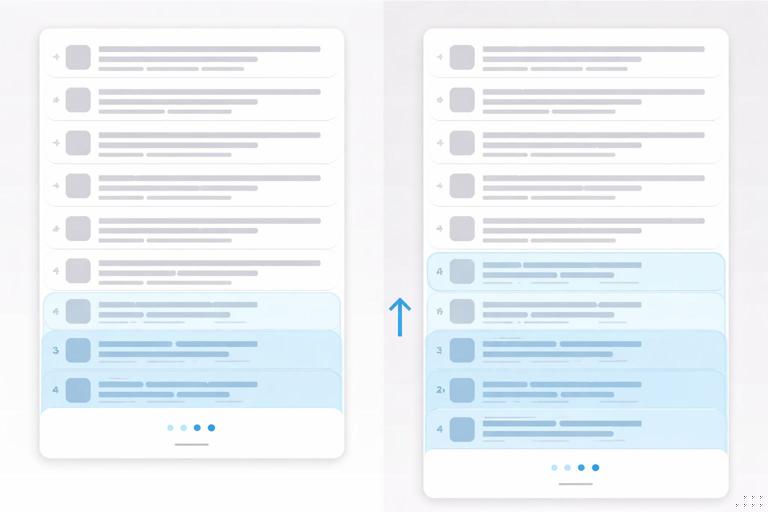
Incremental rendering means each request returns only the new items to add (plus a small “sentinel” element that triggers the next request). The swap strategy should append to the list, not replace it.
Over-fetching happens when each “load more” request returns the entire list up to that point (e.g., returning items 1–40 when you already have 1–20). This wastes bandwidth, increases server work, and can cause visual glitches (duplicate items, scroll jumps) unless you add client-side deduplication.
- Listen to the audio with the screen off.
- Earn a certificate upon completion.
- Over 5000 courses for you to explore!

Download the app
Rule of thumb: each incremental request should return exactly one “page” of new items, and the client should append them once.
Choosing a Cursor Strategy (Offset vs. Cursor)
Offset pagination uses parameters like ?page=3 or ?offset=40&limit=20. It’s simple, but can be unstable if items are inserted or deleted while the user is scrolling: offsets shift, and the user may see duplicates or miss items.
Cursor pagination uses a stable “position marker” such as ?after_id=123 or ?after=2026-01-01T12:00:00Z. It’s usually better for infinite scroll because it’s resilient to inserts and deletes, and it naturally supports “give me the next N items after this one.”
Recommendation: prefer cursor-based pagination for feeds, timelines, and any list that can change while the user is on the page. Use offset-based pagination for static datasets or admin tables where stability is less critical.
Pattern: Sentinel-Triggered Infinite Scroll with HTMX
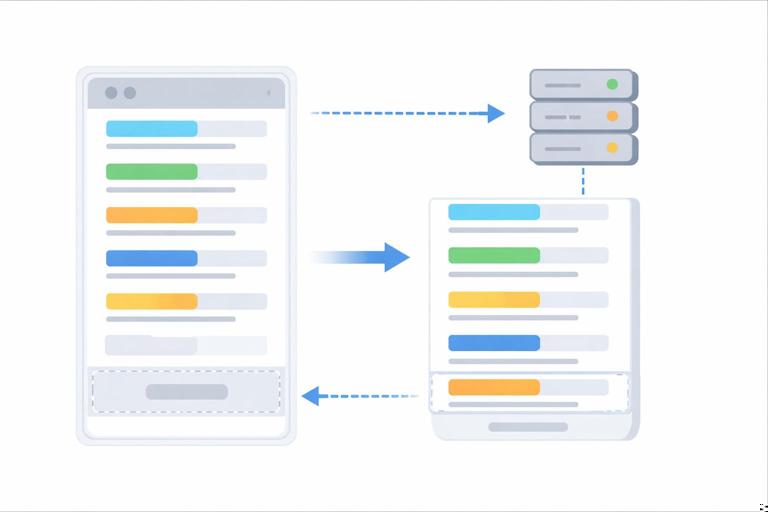
Concept: render a list of items plus a “sentinel” element at the bottom. When the sentinel becomes visible, it triggers an HTMX request to fetch the next chunk. The response appends new items and replaces the sentinel with a new sentinel pointing to the next chunk.
Step 1: Render the initial page with a list and a sentinel
On the initial page load, render the first chunk of items and include a sentinel element that knows how to fetch the next chunk. The sentinel should be outside the list items but inside the list container so appends happen in the right place.
<div class="feed"> <ul id="feed-items"> {% for item in items %} <li class="feed-item" id="item-{{ item.id }}"> <h3>{{ item.title }}</h3> <p>{{ item.summary }}</p> </li> {% endfor %} </ul> <div id="feed-sentinel" hx-get="/feed/next?after_id={{ next_after_id }}" hx-trigger="revealed" hx-target="#feed-items" hx-swap="beforeend"> <p>Loading more…</p> </div></div>Why this avoids over-fetching: the request is for “next items after next_after_id”, not “everything up to page N”.
Why this is incremental rendering: the response is appended to #feed-items using hx-swap="beforeend".
Step 2: Return a fragment that appends items and updates the sentinel
The server endpoint /feed/next should return HTML that contains: (1) the next batch of <li> items, and (2) a new sentinel that replaces the old one (or updates it) so the next request uses the new cursor.
Because our target is #feed-items and we are swapping beforeend, we should return only list items in the response. But we also need to move the sentinel forward. A clean approach is to target a wrapper that contains both items and sentinel, or use out-of-band swaps for the sentinel.
Option A (simpler): target a wrapper that includes both list and sentinel
<div id="feed-block"> <ul id="feed-items"> {% for item in items %} <li class="feed-item" id="item-{{ item.id }}"> <h3>{{ item.title }}</h3> <p>{{ item.summary }}</p> </li> {% endfor %} </ul> <div id="feed-sentinel" hx-get="/feed/next?after_id={{ next_after_id }}" hx-trigger="revealed" hx-target="#feed-block" hx-swap="outerHTML"> <p>Loading more…</p> </div></div>In this variant, the sentinel replaces the entire #feed-block with a new block that includes the old items plus new items. That would re-send existing items, which is over-fetching. So we do not want this approach unless we change the response to include only the new items and a new sentinel, and swap into a container that appends both.
Option B (recommended): append items, update sentinel out-of-band
Keep hx-target="#feed-items" and append only new <li> elements. Then update the sentinel using an out-of-band swap so it can move its cursor forward without re-fetching items.
<!-- Response from /feed/next -->{% for item in items %} <li class="feed-item" id="item-{{ item.id }}"> <h3>{{ item.title }}</h3> <p>{{ item.summary }}</p> </li>{% endfor %}<div id="feed-sentinel" hx-swap-oob="outerHTML" hx-get="/feed/next?after_id={{ next_after_id }}" hx-trigger="revealed" hx-target="#feed-items" hx-swap="beforeend"> <p>Loading more…</p></div>What happens: HTMX appends the <li> elements to #feed-items. Separately, it finds the element with hx-swap-oob and replaces the existing #feed-sentinel in the DOM. The sentinel now points to the next cursor.
Step 3: Stop when there is no next page
When the server has no more items, return only an out-of-band swap that replaces the sentinel with a “no more results” marker (or remove it entirely). This prevents repeated requests and avoids a “spinner forever” state.
<div id="feed-sentinel" hx-swap-oob="outerHTML"> <p>You’ve reached the end.</p></div>Preventing Duplicate Requests and Race Conditions
Infinite scroll is prone to accidental double-fetching: the sentinel can be revealed multiple times quickly (fast scrolling, layout shifts, images loading). If two requests overlap, you can append the same “next page” twice or advance the cursor incorrectly.
Use a server-side cursor that is idempotent
If the request uses after_id (or after_timestamp) and the server always returns “the next N items after that cursor,” then repeating the same request returns the same items. That’s not ideal, but it’s predictable. You can then mitigate duplicates by ensuring the cursor advances only when the client uses the updated sentinel from the latest response.
Disable the sentinel while a request is in flight (Alpine.js)
HTMX provides request lifecycle events you can hook into. With Alpine.js, you can maintain a small state flag and conditionally enable the sentinel trigger. The goal is: once a request starts, prevent another request until it finishes.
<div x-data="{ loading: false }" @htmx:beforeRequest.window="if ($event.target.id === 'feed-sentinel') loading = true" @htmx:afterRequest.window="if ($event.target.id === 'feed-sentinel') loading = false"> <ul id="feed-items"> <!-- items --> </ul> <div id="feed-sentinel" :hx-trigger="loading ? 'none' : 'revealed'" hx-get="/feed/next?after_id=..." hx-target="#feed-items" hx-swap="beforeend"> <p x-show="loading">Loading more…</p> <p x-show="!loading">Scroll to load more</p> </div></div>Notes: (1) binding hx-trigger dynamically works because HTMX reads attributes at trigger time, but if you run into issues, you can instead toggle a CSS class and use hx-trigger="revealed once" plus sentinel replacement to re-arm it. (2) the sentinel replacement approach already reduces duplicates because each successful response replaces the sentinel with a fresh element.
Use “once” semantics by replacing the sentinel each time
A practical trick is to treat the sentinel as single-use: once it triggers, the response replaces it. Even if the old sentinel becomes revealed again, it no longer exists. This is another reason the out-of-band sentinel update is useful.
Incremental Rendering That Stays Fast

Appending DOM nodes indefinitely can slow down the page. Infinite scroll needs a plan for performance: reduce DOM weight, keep images from causing layout shifts, and avoid expensive client-side work on every append.
Keep item markup lean and stable
Prefer a compact item template. Avoid deeply nested structures and avoid re-running heavy Alpine initializations per item. If you need per-item behavior, scope Alpine to the smallest element and keep data minimal.
<li class="feed-item" x-data="{ open: false }"> <button type="button" @click="open = !open">Details</button> <div x-show="open">...</div></li>Reserve space for images to prevent repeated reveals
If images load late and change the page height, the sentinel can bounce in and out of view, triggering extra requests. Reserve dimensions (width/height attributes or CSS aspect-ratio) so layout remains stable.
<img src="..." width="320" height="180" alt="...">Consider “windowing” for very long lists
HTMX itself doesn’t virtualize lists. If your feed can grow to hundreds or thousands of items, consider a server-driven “window” approach: keep only the most recent X items in the DOM and provide a “Load previous” control, or periodically collapse older items into a summary block. This keeps the DOM manageable without turning the app into a heavy client-rendered SPA.
Avoiding Over-Fetching at the Data Layer
Even if your HTML fragments are small, you can still over-fetch at the database layer by doing expensive queries repeatedly. Infinite scroll endpoints should be designed to be cheap and cache-friendly.
Return only the fields needed for the list
For the list view, fetch only the columns needed to render the list items (title, snippet, timestamp, id). Defer expensive joins or large text fields until the user opens a detail view.
Use stable ordering and an index-friendly cursor
If you paginate by created_at and id, ensure you have an index that supports the query pattern. A common pattern is ordering by (created_at DESC, id DESC) and using a cursor like after_created_at + after_id to disambiguate ties.
GET /feed/next?after_created_at=2026-01-01T12:00:00Z&after_id=123This avoids “missing” items when multiple rows share the same timestamp.
Cache fragments when appropriate
If many users see the same feed slices (e.g., a public timeline), you can cache the rendered HTML fragment for a given cursor and limit. If the feed is personalized, cache at a per-user level or cache only the underlying query results.
Progress Indicators and UX Details
Infinite scroll can feel unclear without feedback. You want to show loading state, handle errors, and provide a manual fallback.
Show a loading indicator that doesn’t jump
Put the loading indicator inside the sentinel so it stays at the bottom. When the sentinel is replaced, the indicator naturally moves down.
Handle errors with a retry affordance
If the request fails, you don’t want the user stuck. You can have the server return an error fragment (or handle client-side) that replaces the sentinel with a retry button that triggers the same request.
<div id="feed-sentinel"> <button hx-get="/feed/next?after_id=..." hx-target="#feed-items" hx-swap="beforeend"> Retry loading more </button></div>Provide a “Load more” fallback for accessibility
Some users prefer explicit controls, and some environments may not reliably fire “revealed” (e.g., unusual scrolling containers). A robust approach is to render a “Load more” button by default and enhance it to auto-load when revealed.
<div id="feed-sentinel" hx-get="/feed/next?after_id=..." hx-trigger="revealed" hx-target="#feed-items" hx-swap="beforeend"> <button type="button" hx-get="/feed/next?after_id=..." hx-target="#feed-items" hx-swap="beforeend"> Load more </button></div>Here, both mechanisms point to the same endpoint. If “revealed” works, it auto-loads. If not, the button still works.
Infinite Scroll Inside a Scroll Container
Many UIs use a fixed-height panel with its own scroll (e.g., a sidebar). In that case, the sentinel’s “revealed” trigger depends on the scroll container, not the window.
HTMX’s “revealed” uses IntersectionObserver and generally works inside scroll containers, but you must ensure the sentinel is actually within the scrolling element and not clipped by overflow rules in unexpected ways.
<div class="panel" style="height: 70vh; overflow: auto;"> <ul id="panel-items">...</ul> <div id="panel-sentinel" hx-get="/panel/next?after_id=..." hx-trigger="revealed" hx-target="#panel-items" hx-swap="beforeend"> <p>Loading…</p> </div></div>If you see repeated triggers, check for layout shifts and ensure the panel has stable dimensions.
Incremental Rendering with “Streaming” HTML (When You Need It)
Sometimes you want the server to start sending markup before it has computed the entire page of results, especially if each item requires some work (formatting, permissions checks, remote calls). Traditional HTMX requests wait for the full response, but you can still achieve a “perceived streaming” effect by returning smaller pages (e.g., 10 items instead of 50) and letting the sentinel trigger more frequently.
Practical guidance: keep each response fast (low latency) rather than huge (high throughput). Smaller chunks reduce time-to-first-render for the next batch and reduce the cost of retries.
Putting It Together: A Full Example with Cursor, OOB Sentinel, and Alpine Loading State
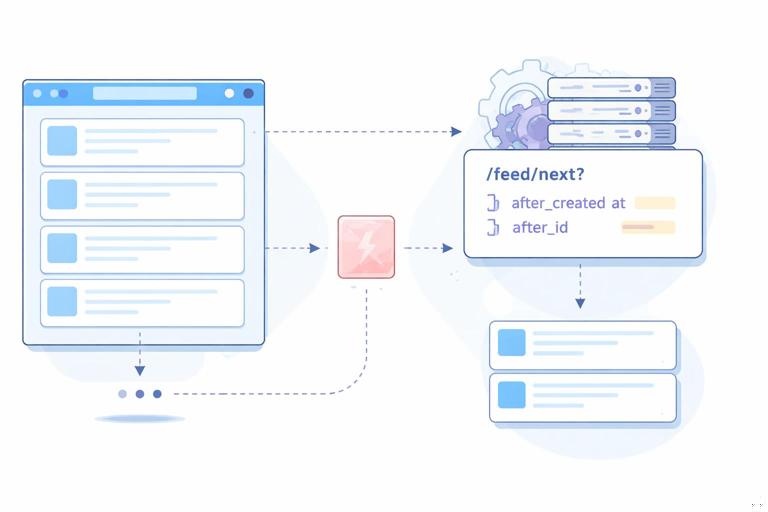
This example combines the recommended pieces: cursor-based pagination, append-only swaps for new items, out-of-band sentinel replacement, and a loading flag to reduce accidental overlaps.
Initial page HTML
<div class="feed" x-data="{ loading: false }" @htmx:beforeRequest.window="if ($event.target.id === 'feed-sentinel') loading = true" @htmx:afterRequest.window="if ($event.target.id === 'feed-sentinel') loading = false"> <ul id="feed-items"> {% for item in items %} <li class="feed-item" id="item-{{ item.id }}"> <h3>{{ item.title }}</h3> <p>{{ item.summary }}</p> </li> {% endfor %} </ul> <div id="feed-sentinel" hx-get="/feed/next?after_created_at={{ next_after_created_at }}&after_id={{ next_after_id }}" hx-trigger="revealed" hx-target="#feed-items" hx-swap="beforeend"> <p x-show="loading">Loading more…</p> <p x-show="!loading">Scroll to load more</p> </div></div>Server response fragment for /feed/next
<!-- Append-only items -->{% for item in items %} <li class="feed-item" id="item-{{ item.id }}"> <h3>{{ item.title }}</h3> <p>{{ item.summary }}</p> </li>{% endfor %}<!-- Move the sentinel forward without re-sending existing items -->{% if has_more %} <div id="feed-sentinel" hx-swap-oob="outerHTML" hx-get="/feed/next?after_created_at={{ next_after_created_at }}&after_id={{ next_after_id }}" hx-trigger="revealed" hx-target="#feed-items" hx-swap="beforeend"> <p>Loading more…</p> </div>{% else %} <div id="feed-sentinel" hx-swap-oob="outerHTML"> <p>You’ve reached the end.</p> </div>{% endif %}Why this combination works well: the client never re-downloads items it already has, the DOM only grows by the new items, the sentinel advances via out-of-band replacement, and the UI provides a stable loading indicator.