The HTMX mental model in one sentence
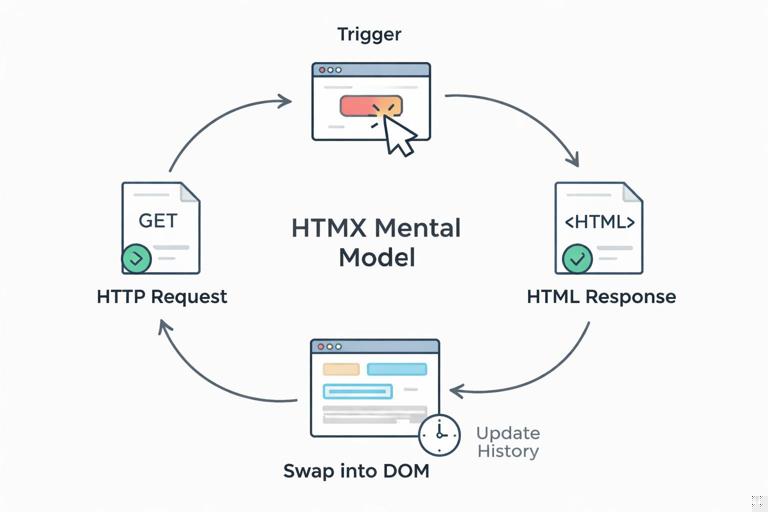
Paragraph title: A predictable loop HTMX is easiest to reason about as a loop: a user (or the page) causes a trigger, HTMX makes an HTTP request, the server returns HTML, HTMX inserts that HTML into a target using a swap strategy, and optionally updates history so the browser’s Back and Forward buttons behave as users expect.
Requests: what HTMX sends and when it sends it
Paragraph title: Requests are normal HTTP, just initiated from attributes HTMX does not invent a new transport: it issues standard HTTP requests (GET, POST, etc.) and expects HTML in response. The “mental shift” is that the request is declared in markup (for example, hx-get or hx-post) and the response is meant to be inserted into the current page rather than navigating away.
Paragraph title: Choosing the verb and endpoint Use hx-get for safe, idempotent fetches (filtering, pagination, loading a partial). Use hx-post, hx-put, hx-patch, and hx-delete for state changes. The endpoint should return a fragment of HTML that makes sense to swap into the chosen target. A good habit is to name endpoints by the fragment they return (for example, /products/list returns the list markup).
<!-- Load a list fragment -->
<button hx-get="/products/list" hx-target="#product-list">
  Refresh
</button>

<div id="product-list">...existing list...</div>
Paragraph title: What data is included in the request HTMX will include form fields when the triggering element is inside a form or is itself a form element. You can also control what gets included using hx-include (include additional elements’ values) and hx-params (filter which parameters are sent). This matters for building a stable mental model: “trigger happens” does not necessarily mean “only the clicked button’s value is sent”; it often means “the relevant form state is sent.”
<form id="filters">
  <input name="q" placeholder="Search">
  <select name="category">...</select>

  <button
    hx-get="/products/list"
    hx-target="#product-list"
    hx-include="#filters"
  >Apply</button>
</form>

<div id="product-list"></div>
Paragraph title: Request headers you can rely on HTMX adds headers that help the server decide what to render. The most commonly used are HX-Request: true (it’s an HTMX request), HX-Target (the target id), HX-Trigger (the triggering element id if present), and HX-Current-URL (the page URL). Your server can use these to return a fragment for HTMX requests and a full page for normal navigation, without duplicating business logic.
- Listen to the audio with the screen off.
- Earn a certificate upon completion.
- Over 5000 courses for you to explore!

Download the app
Triggers: what causes a request
Paragraph title: Triggers are events, and you can be explicit A trigger is the event that causes HTMX to fire the request. Defaults exist (a link triggers on click, a form triggers on submit), but you can and should be explicit using hx-trigger when you want predictable behavior. Think: “What exact event should cause the network call?”
<input
  name="q"
  placeholder="Search"
  hx-get="/products/list"
  hx-target="#product-list"
  hx-trigger="keyup changed"
>
Paragraph title: Debouncing and throttling for typing and scrolling When triggers can fire rapidly (typing, scrolling), add modifiers. A common pattern is debounced search: wait for the user to pause typing before requesting. In HTMX, you can express this directly in hx-trigger using delay.
<input
  name="q"
  hx-get="/products/list"
  hx-target="#product-list"
  hx-trigger="keyup changed delay:300ms"
>
Paragraph title: Triggering on load and on visibility You can trigger requests when an element loads or becomes visible. This is useful for lazy-loading panels, “load more” sections, or expensive fragments. The mental model stays the same: trigger → request → swap, but the trigger is not user click; it is lifecycle or intersection.
<div
  hx-get="/dashboard/metrics"
  hx-trigger="load"
  hx-target="this"
>
  Loading metrics...
</div>

<div
  hx-get="/feed/page/2"
  hx-trigger="revealed"
  hx-target="#feed"
  hx-swap="beforeend"
>
  Loading more...
</div>
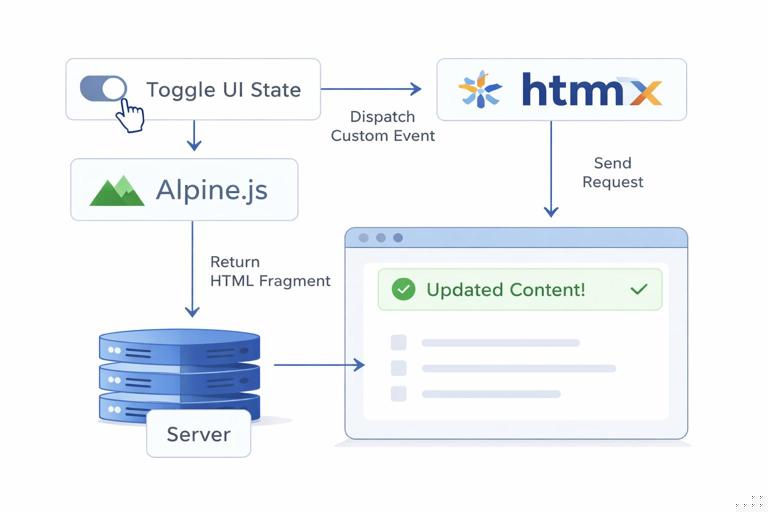
Paragraph title: Custom events and Alpine.js interop HTMX can listen to custom DOM events. This is where Alpine.js often fits: Alpine manages local UI state and emits an event when it’s time to fetch. Your mental model becomes: Alpine changes state → dispatch event → HTMX request → server returns HTML → HTMX swaps it in.
<div x-data="{ open: false }">
  <button
    @click="open = !open; $dispatch('panel-toggled')"
  >Toggle</button>

  <div
    hx-get="/panel/content"
    hx-trigger="panel-toggled"
    hx-target="this"
  ></div>
</div>
Targets: where the response goes
Paragraph title: Target answers “what gets updated” The hx-target attribute defines the element that will receive the swapped HTML. If you do not specify a target, HTMX often uses the triggering element itself (depending on the element type). For a stable mental model, always ask: “When the response comes back, which DOM node should change?” Then encode that explicitly.
<button hx-get="/cart/summary" hx-target="#cart-summary">
  Update cart
</button>

<aside id="cart-summary">...</aside>
Paragraph title: Using hx-target="this" for self-updating components A very clean pattern is to make a component self-contained: the element that declares the request is also the element that gets replaced. This reduces selector coupling and makes fragments easier to reuse.
<section
  id="profile-card"
  hx-get="/profile/card"
  hx-trigger="load"
  hx-target="this"
>
  Loading...
</section>
Paragraph title: Targeting relative elements HTMX supports targeting via CSS selectors, and you can also target relative positions (for example, closest parent). This is useful when you have repeated rows and want the clicked button to update only its row. The mental model: “the request is local, and the update is local.”
<div class="todo">
  <span class="label">Buy milk</span>
  <button
    hx-post="/todos/1/toggle"
    hx-target="closest .todo"
    hx-swap="outerHTML"
  >Toggle</button>
</div>
Swaps: how the response is inserted
Paragraph title: Swap answers “how does the DOM change” The hx-swap attribute controls how the returned HTML is applied. The default is typically innerHTML (replace the inside of the target). Other strategies include replacing the entire target (outerHTML), inserting before or after, or appending/prepending. When debugging UI issues, explicitly check: “Did I choose the correct target?” and “Did I choose the correct swap?”
<!-- Replace the entire row -->
<button
  hx-post="/orders/123/cancel"
  hx-target="#order-123"
  hx-swap="outerHTML"
>Cancel</button>

<!-- Append new items to a list -->
<button
  hx-get="/messages/page/2"
  hx-target="#messages"
  hx-swap="beforeend"
>Load more</button>

<ul id="messages">...</ul>
Paragraph title: Swap timing and transitions Swaps can be delayed or animated using swap modifiers (for example, adding a small delay) and CSS transitions. A practical mental model is to separate concerns: HTMX decides what HTML arrives and where it goes; CSS and Alpine decide how it feels (transitions, temporary states). If you need a loading state, use hx-indicator to tie a spinner to the request lifecycle.
<button
  hx-get="/reports/summary"
  hx-target="#report"
  hx-indicator="#spinner"
>Load report</button>

<div id="spinner" class="htmx-indicator">Loading...</div>
<div id="report"></div>
Paragraph title: Out-of-band swaps for updating multiple regions Sometimes one request should update more than one part of the page (for example, a cart line item and the cart total in the header). HTMX supports “out-of-band” swaps: the server returns additional fragments marked to be swapped into other targets. The mental model: one request, multiple coordinated DOM updates, still driven by HTML from the server.
<!-- Trigger -->
<button
  hx-post="/cart/items/42"
  hx-target="#cart-lines"
  hx-swap="innerHTML"
>Add</button>

<!-- Server response could include: -->
<div id="cart-lines">...updated lines...</div>
<span id="cart-count" hx-swap-oob="true">3</span>
History: making partial updates navigable
Paragraph title: History answers “does the URL change” If HTMX swaps content without changing the URL, the browser history will not reflect the user’s navigation through states like “page 1 → page 2” or “filter A → filter B.” HTMX provides tools to push or replace history entries so the URL matches the current view and the Back button restores prior content.
Paragraph title: Pushing URLs with hx-push-url Use hx-push-url when the user action represents navigation (pagination, opening a detail view, switching tabs that should be linkable). When enabled, HTMX updates the address bar and stores a snapshot so Back/Forward can restore. Your server should be able to render the same state when requested directly via a full page load at that URL.
<a
  href="/products?page=2"
  hx-get="/products?page=2"
  hx-target="#product-list"
  hx-push-url="true"
>Next</a>

<div id="product-list">...</div>
Paragraph title: Replacing URLs with hx-replace-url Use hx-replace-url when you want the URL to reflect state but you do not want to create a new history entry each time (for example, live-search updating ?q= as the user types). The mental model: push creates a new “page” in history; replace edits the current one.
<input
  name="q"
  hx-get="/products"
  hx-target="#product-list"
  hx-trigger="keyup changed delay:300ms"
  hx-replace-url="true"
>
Paragraph title: Restoring state on back/forward When history is enabled, HTMX will handle restoring previous content for you, but only if you have designed your fragments and URLs coherently. A practical checklist: the URL should encode the state (page number, filters); the server should render the correct fragment for HTMX requests; and the target should be stable so the swap lands in the same place when restoring.
Putting it together: a step-by-step mental walkthrough
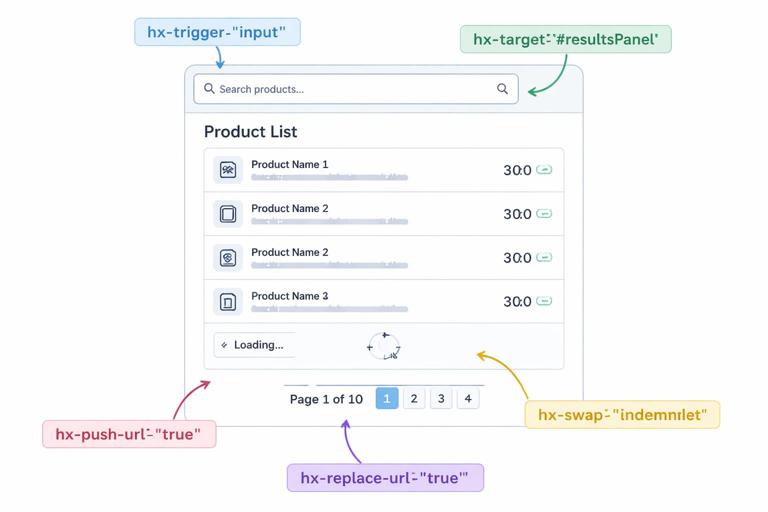
Paragraph title: Example scenario: filter + paginate a list Consider a product list with a search box and pagination. You want typing to update results without full reload, pagination links to be shareable, and Back to restore previous pages. You can build this by assigning clear triggers, stable targets, intentional swaps, and explicit history behavior.
Step 1: Define a stable target container
Paragraph title: One region owns the list UI Create a single container that will always hold the list and pagination controls. This container becomes your primary hx-target, which keeps swaps predictable and makes history restoration consistent.
<main>
  <section id="product-results">
    <!-- server-rendered initial list + pagination -->
  </section>
</main>
Step 2: Wire the search input trigger and request
Paragraph title: Debounced trigger, replace URL Typing should not create a new history entry for every keystroke, but the URL should reflect the current query so the page is shareable. Use hx-trigger with a delay and hx-replace-url.
<input
  name="q"
  placeholder="Search products"
  hx-get="/products"
  hx-target="#product-results"
  hx-trigger="keyup changed delay:300ms"
  hx-replace-url="true"
>
Step 3: Ensure pagination pushes history
Paragraph title: Pagination is navigation, so push URL Pagination clicks represent discrete navigation steps. Use hx-push-url so Back returns to the previous page of results.
<nav class="pagination">
  <a
    href="/products?page=2"
    hx-get="/products?page=2"
    hx-target="#product-results"
    hx-push-url="true"
  >2</a>
</nav>
Step 4: Decide the swap strategy
Paragraph title: Replace the region’s inner HTML For list updates, replacing the inside of the results container is usually correct. That means the server response should be the markup that belongs inside #product-results (or the entire section if you choose outerHTML). Keep it consistent: same target, same swap, predictable DOM changes.
<section id="product-results">
  <ul>
    <li>...</li>
  </ul>
  <nav class="pagination">...</nav>
</section>
Step 5: Add a loading indicator tied to requests
Paragraph title: Make latency visible without extra JavaScript Use hx-indicator so the UI communicates that a request is in flight. This reinforces the mental model for users and developers: triggers cause requests; requests have a lifecycle; the indicator reflects that lifecycle.
<div id="results-spinner" class="htmx-indicator">Loading...</div>

<input
  name="q"
  hx-get="/products"
  hx-target="#product-results"
  hx-trigger="keyup changed delay:300ms"
  hx-replace-url="true"
  hx-indicator="#results-spinner"
>
Debugging with the mental model
Paragraph title: When something breaks, locate the stage Most HTMX issues become straightforward when you diagnose by stage: (1) Did the trigger fire? (2) Did the request go to the expected URL with the expected parameters? (3) Did the server return the HTML fragment you think it returned? (4) Did the response land in the intended target? (5) Did the swap strategy do what you expected? (6) Did the URL/history update match the navigation semantics?
Paragraph title: Common mismatch: wrong target + correct response If the server returns correct HTML but nothing changes, the target selector may not match anything, or you may be swapping into an element that is not visible. Make targets stable (ids are best) and prefer hx-target="this" for self-contained components when possible.
Paragraph title: Common mismatch: correct target + wrong fragment shape If the swap “works” but the UI looks duplicated or nested incorrectly, the fragment shape likely doesn’t match the swap strategy. For example, returning a full <section id="product-results"> while using the default inner swap can produce nested sections. Align fragment shape with swap type: inner swap expects “children markup,” outer swap expects “the element itself.”
Paragraph title: Common mismatch: history not reflecting state If Back doesn’t restore what users expect, decide whether the interaction is navigation (push) or state refinement (replace). Then ensure the URL encodes the state and the server can render that state directly. History is not a magical add-on; it is a contract between URL, server rendering, and HTMX swapping.