Why endpoints for fragments need a different design
When you build with HTMX and Alpine.js, many requests are not “page navigations”; they are targeted updates that replace a small region of the DOM. That changes what a server endpoint should return. Instead of always returning a full layout, you often return a fragment: a piece of HTML that is valid and useful when inserted into an existing page. Designing endpoints for fragments means you think in terms of reusable partials, predictable boundaries, and responses that can be composed without duplicating markup or logic.
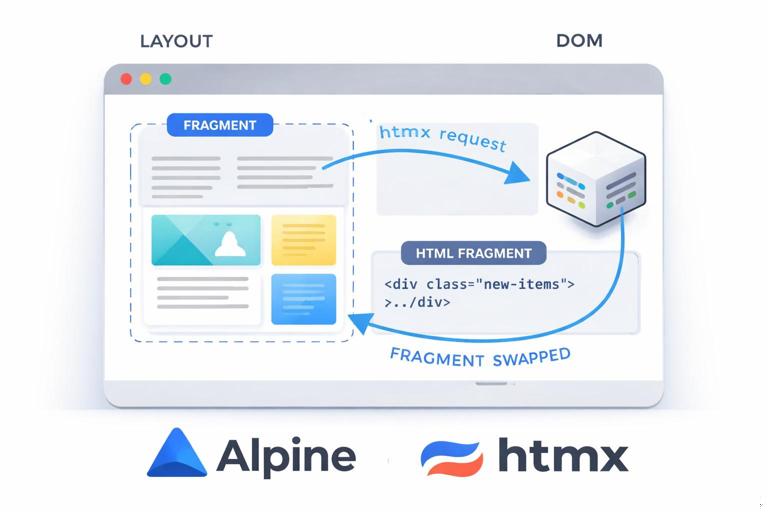
A practical way to approach this is to treat your server as a “template renderer” that can produce the same UI component in multiple contexts: as part of a full page, as a standalone fragment, or as a response to a form submission. The goal is to keep the UI consistent while avoiding two separate implementations (one for full pages and one for HTMX).
Define fragment boundaries: what is safe to swap
The first step is to decide which parts of your UI are swappable regions. A fragment should be self-contained enough to render correctly when inserted, but not so large that every small interaction forces you to re-render the whole page. A good fragment boundary typically aligns with a component-like unit: a table body, a list of cards, a form, a modal body, a notification area, or a single row in a list.
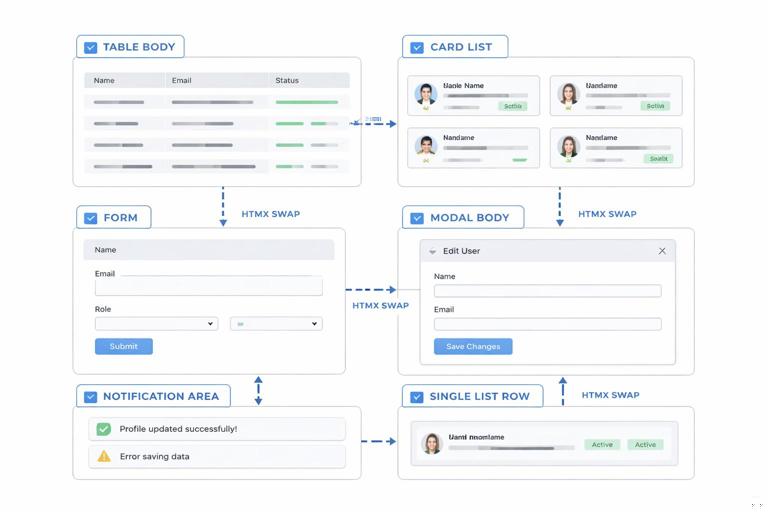
When choosing boundaries, pay attention to dependencies. If a fragment requires global CSS or scripts, that’s fine, but the fragment should not assume it can re-declare those assets. Similarly, avoid fragments that include <html>, <head>, or duplicated navigation. Keep fragments focused on the content that will be swapped.
Checklist for a good fragment
- It can be inserted into an existing DOM without breaking structure (for example, don’t return a
<tr>unless the target is a<tbody>). - It includes the minimal wrapper elements needed for correct semantics and styling.
- It does not rely on inline scripts to “boot” behavior; Alpine can be attached via attributes in the fragment itself.
- It can be rendered by the same template partial used in full-page rendering.
Use a template hierarchy: layout, page, partial
To keep fragments and full pages consistent, structure your templates in layers. A common hierarchy is: a base layout (shell), a page template (composes sections), and partial templates (reusable components). The server endpoint chooses which layer to render based on the request context.
- Listen to the audio with the screen off.
- Earn a certificate upon completion.
- Over 5000 courses for you to explore!

Download the app
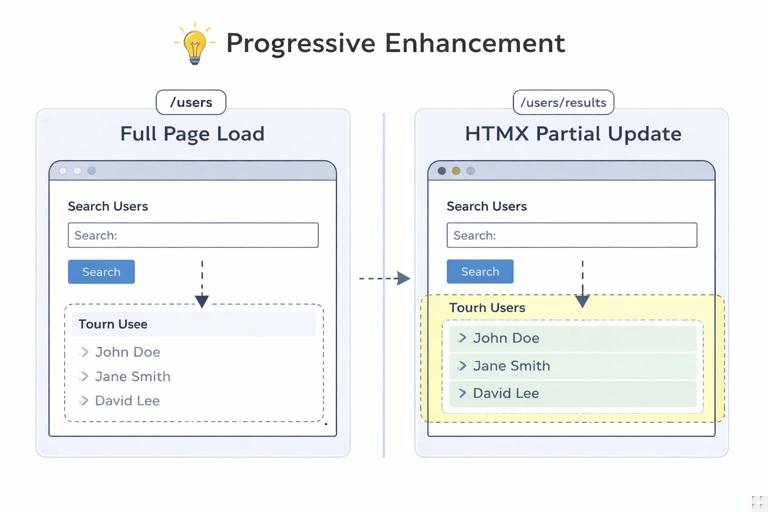
For example, the “Users” page might include a search form, a toolbar, and a results list. The results list itself is a partial. When the user types into search, HTMX requests only the results list endpoint, and the server returns just that partial HTML. When the user navigates to the page normally, the server returns the full page that includes the same partial inside the layout.
Example template structure
templates/ layout.html page_users.html partials/ users_search_form.html users_results.html user_row.html flash.htmlThis structure encourages reuse: users_results.html can loop and include user_row.html, and both full-page and fragment endpoints can render users_results.html without duplicating markup.
Decide endpoint responsibilities: page endpoints vs fragment endpoints
A clean pattern is to separate “page endpoints” from “fragment endpoints,” even if they share the same underlying data queries. Page endpoints return a full page (layout + page template). Fragment endpoints return a partial (component HTML). This separation makes it obvious what each route is for and prevents accidental full-page responses being swapped into a small target.
However, you don’t necessarily need separate URLs for everything. Another pattern is “content negotiation by request headers,” where the same URL returns either a full page or a fragment depending on whether the request came from HTMX. This can reduce route count and keep canonical URLs stable.
Pattern A: separate routes
GET /usersreturns full pageGET /users/resultsreturns fragment for results list
Pattern B: same route, different render mode
GET /usersreturns full page for normal navigationGET /usersreturns results fragment whenHX-Request: true
Pattern B works well when the fragment is the “main content” of the page. Pattern A works well when multiple fragments exist on the same page and you want explicit endpoints for each component.
Step-by-step: implement a fragment-friendly “Users search”
This walkthrough shows how to design endpoints and templates so the same results component can be returned as a fragment or embedded in a full page. The key is that the server always renders HTML, but chooses the appropriate wrapper.
Step 1: define the swappable target in the page
In the full page template, create a container that will be replaced when search parameters change. The initial page render includes the results partial so the page works without HTMX as well.
<!-- page_users.html --> <section> {% include "partials/users_search_form.html" %} <div id="users-results"> {% include "partials/users_results.html" %} </div> </section>Step 2: make the form request the fragment
The search form can submit to either the same URL or a dedicated fragment URL. The important part is that the response is suitable to swap into #users-results.
<!-- partials/users_search_form.html --> <form hx-get="/users/results" hx-target="#users-results" hx-swap="innerHTML" > <input type="search" name="q" placeholder="Search users..." /> <select name="role"> <option value="">All roles</option> <option value="admin">Admin</option> <option value="editor">Editor</option> </select> <button type="submit">Search</button> </form>This design makes the fragment endpoint’s contract clear: it returns the HTML that belongs inside #users-results, not a full page.
Step 3: create a results partial that can stand alone
The results partial should include any wrapper markup needed for correct semantics. If you return a list, return the list container too, not just list items, unless you are targeting the list itself.
<!-- partials/users_results.html --> <div class="results"> <p class="results-meta">{{ total }} users found</p> <table class="table"> <thead> <tr><th>Name</th><th>Email</th><th>Role</th></tr> </thead> <tbody> {% for user in users %} {% include "partials/user_row.html" %} {% endfor %} </tbody> </table> </div>Notice that the partial includes the table and meta line. That makes it safe to swap into a <div> target. If you instead targeted the <tbody>, you could return only rows, but then you must ensure the target is exactly a <tbody> element.
Step 4: implement the fragment endpoint
The fragment endpoint reads query parameters, performs the same search logic as the full page, and renders only the partial. In pseudocode, it looks like this:
// GET /users/results function usersResults(req, res) { const q = req.query.q ?? ""; const role = req.query.role ?? ""; const { users, total } = db.searchUsers({ q, role }); return res.render("partials/users_results.html", { users, total }); }The key design choice is that the endpoint returns HTML that matches the swap target. It does not return JSON and it does not include the layout wrapper.
Step 5: implement the full page endpoint using the same data
The full page endpoint can render the page template (which includes the same partial). It can either call the same query logic directly or share a service function with the fragment endpoint.
// GET /users function usersPage(req, res) { const q = req.query.q ?? ""; const role = req.query.role ?? ""; const { users, total } = db.searchUsers({ q, role }); return res.render("page_users.html", { users, total, q, role }); }Now you have progressive enhancement: without HTMX, the form can submit normally to /users and render a full page; with HTMX, it can submit to /users/results and update only the results region.
Reusable templates for rows, cards, and “micro-fragments”
Fragments don’t have to be large. Often you’ll want “micro-fragments” like a single table row, a single card, or a single list item. These are especially useful for create/update operations where you want to insert or replace one item without re-rendering the entire list.
Design micro-fragment endpoints carefully because HTML validity matters. If you return a <tr>, the target must be a <tbody> and the swap strategy must make sense (for example, beforeend to append). If you return a <li>, target a <ul> or <ol>.
Example: endpoint that returns a single row
// POST /users function createUser(req, res) { const user = db.createUser(req.body); // Return a single row fragment return res.render("partials/user_row.html", { user }); }In the UI, you can target the table body and append the returned row. The row partial should not include the <tbody> wrapper; it should be exactly one <tr>.
<!-- partials/user_row.html --> <tr id="user-{{ user.id }}"> <td>{{ user.name }}</td> <td>{{ user.email }}</td> <td>{{ user.role }}</td> </tr>Designing endpoints for forms: render the form partial on both success and error
For fragment-driven UX, form endpoints should usually return HTML in both success and error cases. On validation errors, return the form partial with inline error messages and the user’s input. On success, you can return a different fragment: perhaps the updated row, a refreshed list, or a flash message partial.
This approach avoids client-side branching logic. The browser swaps in whatever the server returns, and the templates remain the source of truth for how errors are displayed.
Example: edit form endpoint returning a form fragment
// GET /users/:id/edit function editUserForm(req, res) { const user = db.getUser(req.params.id); return res.render("partials/user_edit_form.html", { user, errors: {} }); }Example: update endpoint returning either errors or an updated row
// POST /users/:id function updateUser(req, res) { const { ok, user, errors } = db.updateUser(req.params.id, req.body); if (!ok) { return res.status(422).render("partials/user_edit_form.html", { user: req.body, errors }); } return res.render("partials/user_row.html", { user }); }The status code 422 is useful for invalid input, but the response is still HTML. HTMX will swap it into the target just like a 200 response unless you add special handling; the important part is that the HTML is correct for the target region.
Alpine.js inside fragments: keep behavior declarative and idempotent
Fragments can include Alpine attributes so that behavior arrives with the HTML. The key is to keep Alpine components idempotent: when a fragment is swapped in, Alpine initializes it once, and the component should not depend on previous DOM state that might have been replaced.
A common pattern is to wrap interactive areas in an x-data scope and use server-rendered values as initial state via data attributes or inline JSON. Keep the state small and local to the fragment.
Example: a reusable “flash message” fragment with Alpine dismissal
<!-- partials/flash.html --> <div class="flash" x-data="{ open: true }" x-show="open"> <p>{{ message }}</p> <button type="button" @click="open = false">Dismiss</button> </div>An endpoint can return this fragment after an action, and the client can swap it into a dedicated notifications area. No extra JavaScript wiring is required beyond Alpine being present on the page.
Response composition: returning multiple fragments without duplicating endpoints
Sometimes one action should update multiple regions: for example, updating a user might change the row in the table and also update a “total users” badge. You can design endpoints that return a composite fragment containing multiple elements, each with stable IDs, and then use an out-of-band swap strategy so HTMX can update multiple targets from one response. Even if you don’t use out-of-band swaps, you can still return a wrapper fragment that includes both regions if your target is a parent container.
From an endpoint design perspective, the important part is to keep the templates reusable. You might have a users_badge.html partial and a user_row.html partial, and a “composite response” template that includes both. That way, you don’t handcraft HTML strings in controllers.
Example composite template that includes multiple partials
<!-- partials/user_update_response.html --> <div> {% include "partials/users_badge.html" %} {% include "partials/user_row.html" %} </div>Even when you return a composite, keep each partial independently usable so other endpoints can reuse them.
Make fragment endpoints cacheable and predictable
Fragment endpoints are often called more frequently than full pages, so consistency and performance matter. Prefer GET for read-only fragments (search results, filtered lists, pagination) so they can be cached by browsers or intermediaries. Keep query parameters explicit and stable. For write operations, return fragments that represent the new server state, not what the client “thinks” happened.
Also ensure that fragment endpoints are deterministic: given the same parameters and user permissions, they should render the same HTML. This makes debugging easier and prevents subtle UI mismatches between initial page render and subsequent fragment updates.
Practical tips for predictability
- Use the same partials in full-page and fragment responses.
- Keep IDs stable (for example,
id="user-123") so replacements target the correct element. - Return complete semantic units (a full
<table>or full<tbody>) based on what you target. - Centralize formatting (dates, currency, labels) in templates/helpers so fragments and pages match.
Organize routes around UI components, not just data models
Traditional route design often mirrors data models: /users, /users/:id, and so on. With fragment endpoints, it can be more productive to add routes that map to UI components: /users/results, /users/:id/row, /users/badge, /users/:id/edit-form. These routes still use the same underlying data, but their output contract is “HTML for this component.”
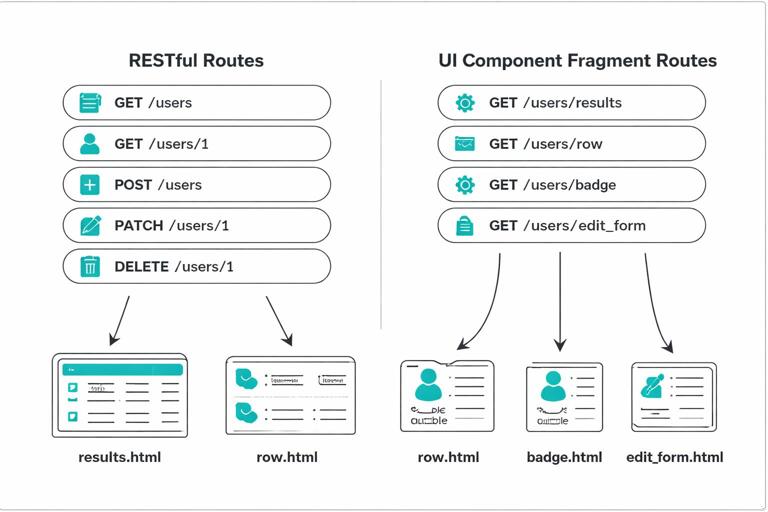
This doesn’t mean abandoning RESTful thinking; it means acknowledging that your client is asking for rendered UI pieces. Naming routes after the fragment they return makes it harder to accidentally swap the wrong shape of HTML into the DOM and makes your server code easier to navigate.
Testing fragment endpoints: verify HTML shape and swap compatibility
Because fragment endpoints return partial HTML, tests should verify not only status codes but also the shape of the HTML. For example, if /users/results is meant to be swapped into a <div>, ensure it returns a single root wrapper or at least valid markup for that target. If /users/:id/row returns a <tr>, ensure it does not accidentally include a <table> wrapper.
A practical testing approach is to parse the response HTML and assert on key selectors: the presence of .results, the correct number of rows, stable IDs, and error message elements for invalid forms. This catches regressions where a template change breaks fragment insertion even though the page still renders fine.