What “Good Forms” Mean in an HTMX + Alpine.js App
Forms are where users spend effort and where apps most often fail: validation errors appear too late, submissions double-post, network hiccups lose data, and users don’t know what happened. In a hypermedia-driven UI, the form itself is the contract: the server returns HTML that represents the current state of the form (valid, invalid, saving, saved). HTMX handles the request/response wiring, and Alpine.js handles small client-side behaviors like toggling UI states, disabling buttons, and optimistic previews. The goal is not to “move validation to the client,” but to provide fast feedback while keeping the server as the source of truth for acceptance and persistence.
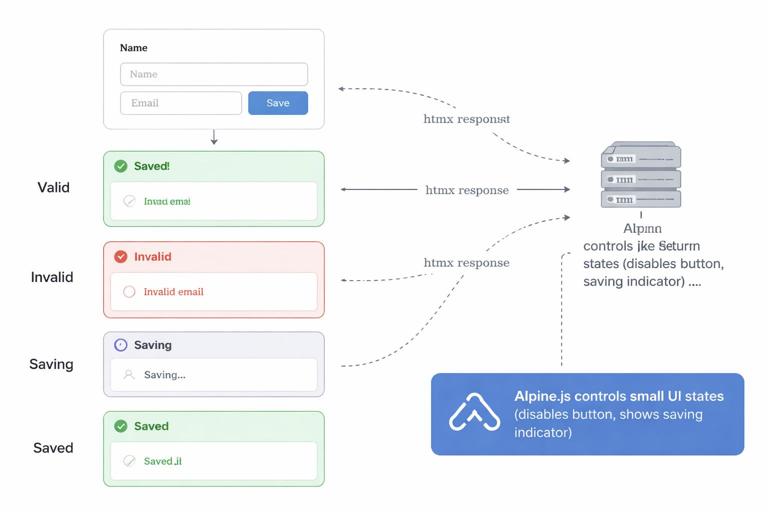
In this chapter you’ll implement three complementary patterns: inline errors (field-level and form-level), optimistic UI (immediate UI updates while a request is in flight), and reliable submissions (idempotency, double-submit protection, and safe retries). These patterns work together: inline errors make failures understandable, optimistic UI makes success feel instant, and reliability makes the system correct even under latency, refreshes, and retries.
Baseline Markup: A Form That Can Re-render Itself
Start with a form that can be returned by the server in multiple states. The key is to structure your HTML so the server can re-render the same fragment with errors and previous values. You’ll also want stable IDs and predictable containers for error messages.
<div id="profile-form" x-data="{ saving: false }"> <form method="post" action="/profile" hx-post="/profile" hx-target="#profile-form" hx-swap="outerHTML" @submit="saving = true" @htmx:afterRequest="saving = false" > <div class="field"> <label for="display_name">Display name</label> <input id="display_name" name="display_name" value="{{display_name}}" /> <p class="error" id="err-display_name">{{errors.display_name}}</p> </div> <div class="field"> <label for="email">Email</label> <input id="email" name="email" value="{{email}}" /> <p class="error" id="err-email">{{errors.email}}</p> </div> <p class="form-error" id="err-form">{{errors.form}}</p> <button type="submit" :disabled="saving"> <span x-show="!saving">Save</span> <span x-show="saving">Saving…</span> </button> </form></div>This uses a simple but powerful approach: the server returns the entire #profile-form wrapper as HTML. If there are errors, the server fills {{errors.*}} and echoes the submitted values back into value attributes. If the save succeeds, the server can return a “saved” version of the same fragment (maybe with a success message or updated values). Alpine’s saving state is purely presentational and resets when HTMX finishes the request.
Inline Errors Pattern: Field-Level and Form-Level Feedback
Inline errors should answer three questions immediately: which field is wrong, why it’s wrong, and what to do next. In an HTMX flow, you typically validate on the server and return the same form fragment with error messages. This keeps validation consistent and avoids duplicating business rules. You can still add lightweight client-side checks for obvious issues (like empty required fields) but treat them as convenience, not authority.
- Listen to the audio with the screen off.
- Earn a certificate upon completion.
- Over 5000 courses for you to explore!

Download the app
Step-by-step: Server returns 422 with the form fragment
When validation fails, return HTTP 422 (Unprocessable Entity) along with the re-rendered form HTML. HTMX will still swap the response into the target, and you can style errors based on the presence of error text.
// Pseudocode server handler for POST /profile 1) Read form fields 2) Validate 3) If invalid: render fragment with errors and return 422 4) If valid: persist and return updated fragment (200)On the HTML side, keep error containers always present (even if empty) to avoid layout jumps and to give you stable targets for accessibility attributes. You can also add aria-invalid and aria-describedby when errors exist.
<input id="email" name="email" value="{{email}}" aria-describedby="err-email" aria-invalid="{{errors.email ? 'true' : 'false'}}" />Step-by-step: Validate on blur without submitting the whole form
Sometimes you want earlier feedback than “on submit,” but you still want the server’s rules. A practical pattern is field validation endpoints that return only the field row (input + error). You can trigger them on blur or change. This is especially useful for uniqueness checks (username/email) and formatting rules.
<div class="field" id="email-field"> <label for="email">Email</label> <input id="email" name="email" value="{{email}}" hx-post="/profile/validate-email" hx-trigger="blur changed delay:300ms" hx-target="#email-field" hx-swap="outerHTML" /> <p class="error" id="err-email">{{errors.email}}</p></div>On the server, /profile/validate-email returns the updated #email-field HTML. It can include the current value and an error message if invalid. This keeps the response small and avoids re-rendering the entire form for a single field.
Form-level errors for cross-field rules
Some validations are not tied to one field: “current password incorrect,” “email already in use,” “cannot change plan while invoices unpaid,” or “start date must be before end date.” Put these in a form-level error container near the submit button or at the top of the form. When returning 422, include both field errors and a form error string. Make sure the form-level error is visually prominent and announced to screen readers (for example, by giving it a role and ensuring it’s in the swapped fragment).
<p class="form-error" id="err-form" role="alert">{{errors.form}}</p>Optimistic UI Pattern: Make the UI Feel Instant Without Lying
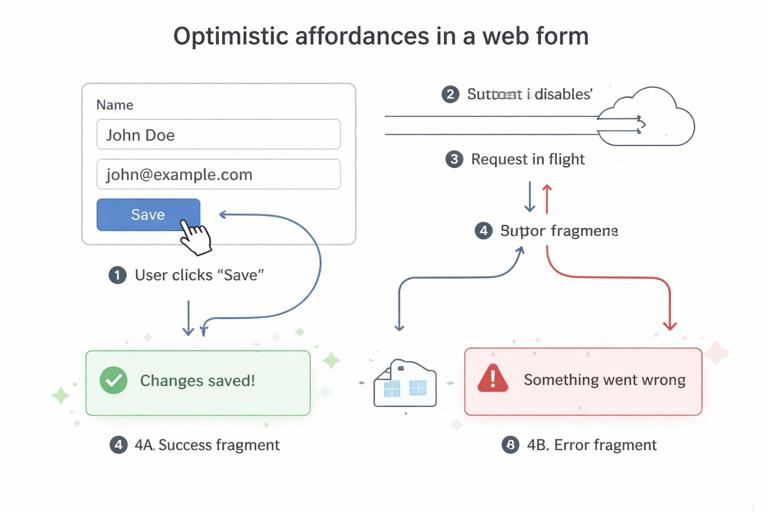
Optimistic UI means you update the interface immediately as if the action succeeded, while the request is still in flight. In a hypermedia approach, you must be careful: the server is still authoritative, and you need a clean rollback path if the server rejects the submission. The safest optimistic pattern for forms is “optimistic affordances,” not “optimistic data.” That is, show progress, disable controls, and optionally preview changes locally, but don’t permanently commit UI state until the server responds.
Step-by-step: Disable submit, show spinner, prevent double clicks
Use Alpine to manage a saving flag, set it on submit, and clear it after the HTMX request completes. This prevents double submissions and gives immediate feedback.
<div id="settings-form" x-data="{ saving: false }"> <form hx-post="/settings" hx-target="#settings-form" hx-swap="outerHTML" @submit="saving = true" @htmx:afterRequest="saving = false" > <!-- fields --> <button type="submit" :disabled="saving"> <span x-show="!saving">Save settings</span> <span x-show="saving">Saving…</span> </button> </form></div>If the server returns validation errors, the fragment swap replaces the form with an error state. If it succeeds, the fragment swap replaces it with the saved state. Either way, saving is cleared after the request finishes.
Step-by-step: Optimistic preview for “display-only” areas
Sometimes you have a “profile card” next to the form that shows the current display name or avatar. You can update that preview immediately as the user types (client-side), while still relying on the server to validate and persist on submit. This is a good optimistic pattern because it doesn’t claim the data is saved; it only previews what will be saved.
<div class="layout" x-data="{ name: '{{display_name}}' }"> <aside class="preview"> <h3>Preview</h3> <p>Public name: <strong x-text="name"></strong></p> </aside> <div id="profile-form"> <form hx-post="/profile" hx-target="#profile-form" hx-swap="outerHTML"> <label for="display_name">Display name</label> <input id="display_name" name="display_name" value="{{display_name}}" @input="name = $event.target.value" /> <p class="error">{{errors.display_name}}</p> <button type="submit">Save</button> </form> </div></div>If the server rejects the value, the form will re-render with errors. Your preview may still show the typed value; that’s acceptable if you label it as a preview and the saved state is clearly indicated elsewhere (for example, a “Saved” badge returned by the server). If you want the preview to revert on failure, you can listen for HTMX error events and reset Alpine state from server-provided values in the swapped HTML.
Step-by-step: Optimistic list insertion with rollback
For some form submissions (adding a comment, adding a tag), you may want to insert a temporary item into a list immediately. The safe way is to insert a “pending” item with a temporary client ID, then replace it when the server responds with the real HTML. If the server returns 422, remove the pending item and show inline errors.
<div x-data="{ pendingId: 0 }"> <ul id="comment-list"> <!-- existing comments --> </ul> <form hx-post="/posts/123/comments" hx-target="#comment-list" hx-swap="beforeend" @submit="pendingId++; $refs.pending.innerHTML = '<li data-pending="' + pendingId + '">Posting…</li>'; document.querySelector('#comment-list').insertAdjacentHTML('beforeend', $refs.pending.innerHTML);" @htmx:responseError="document.querySelector('#comment-list li[data-pending]').remove()" > <textarea name="body"></textarea> <button type="submit">Post</button> <template x-ref="pending"></template> </form></div>This example is intentionally simple to show the idea: insert a pending list item immediately, then let HTMX append the server-rendered comment on success. On error, remove the pending element and rely on the server to return the form with inline errors (you might target a form container instead of the list in that case). In a production version, you’d scope the pending selector more carefully and include a unique pending marker per submission.
Reliable Submissions Pattern: Correctness Under Retries, Refreshes, and Latency
Reliability is about making sure “Save” means exactly one logical operation, even if the user double-clicks, the browser retries, the network drops, or the user refreshes after submitting. HTMX makes submissions easy, but you still need server-side safeguards and a few client-side behaviors to avoid accidental duplicates and confusing UI states.
Step-by-step: Prevent double-submit at the UI layer
Disabling the submit button while a request is in flight is the first line of defense. Also consider disabling the entire form to prevent edits during submission, or at least disabling fields that would cause confusion if changed mid-flight.
<form x-data="{ saving: false }" @submit="saving = true" @htmx:afterRequest="saving = false"> <fieldset :disabled="saving"> <!-- inputs --> </fieldset> <button type="submit" :disabled="saving">Save</button></form>Even with this, you must assume duplicates can still happen (multiple tabs, back/forward, impatient users, automated retries). So you also need server-side idempotency strategies.
Step-by-step: Add an idempotency key to the form
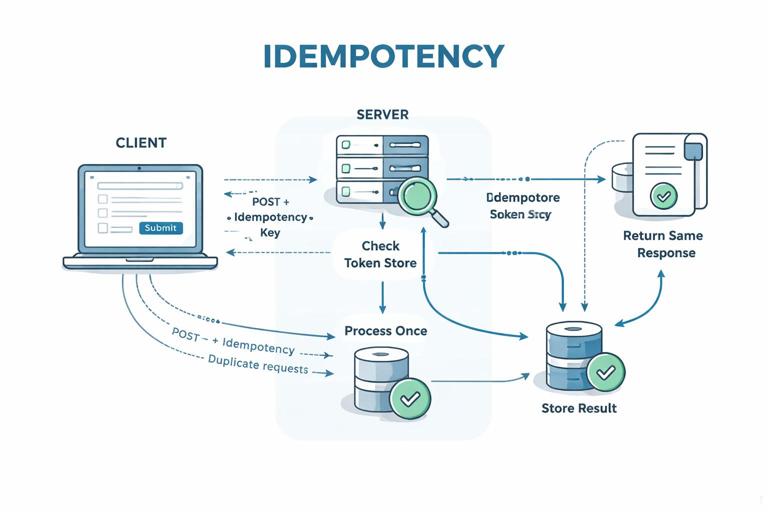
An idempotency key is a unique token generated for a single logical submission. The server stores the result of processing that token and returns the same result if it sees the token again. This is especially important for “create” operations (payments, orders, comments) where duplicates are costly.
<form hx-post="/checkout" hx-target="#checkout" hx-swap="outerHTML"> <input type="hidden" name="idempotency_key" value="{{idempotency_key}}" /> <!-- payment fields --> <button type="submit">Pay</button></form>Server-side behavior: when a request comes in, look up idempotency_key. If it’s new, process the operation and store the response (or at least the created resource ID) keyed by that token. If it’s already used, return the stored response. If validation fails, you can either mark the key as “unused” (allow retry with same key) or store the validation response for a short time; choose a strategy that matches your domain. For payments, you typically store the outcome to ensure a retry doesn’t charge twice.
Step-by-step: Use Post/Redirect/Get when the result is a full page
When a form submission results in navigation to a new page (for example, after creating a resource), use a redirect so refresh doesn’t resubmit. With HTMX, you can still follow this pattern: the server can respond with a redirect, and HTMX will handle it depending on configuration, or you can return a fragment that includes a link or triggers navigation. The key idea is to avoid leaving the browser on a “POST result” state that can be re-posted on refresh.
If you’re staying on the same page and swapping fragments, you still want a “stable saved state” returned by the server (for example, a read-only view or an updated form with a “Saved” timestamp) so the user can refresh without ambiguity.
Step-by-step: Handle network errors and timeouts explicitly
Reliable UX includes a clear failure mode when the request doesn’t reach the server or the response can’t be parsed. HTMX emits events you can use to show a non-field error message and re-enable the form. A practical approach is to reserve a small “status” area in your form wrapper and update it via Alpine when errors occur.
<div id="contact-form" x-data="{ saving: false, status: '' }"> <p class="status" x-text="status"></p> <form hx-post="/contact" hx-target="#contact-form" hx-swap="outerHTML" @submit="saving = true; status = ''" @htmx:responseError="saving = false; status = 'Could not submit. Please try again.'" @htmx:sendError="saving = false; status = 'Network error. Check your connection and retry.'" @htmx:timeout="saving = false; status = 'Request timed out. Please retry.'" > <input name="subject" /> <textarea name="message"></textarea> <button type="submit" :disabled="saving">Send</button> </form></div>Notice the separation: validation errors come back as 422 with HTML that replaces the form and shows inline messages; transport errors are handled client-side because there is no useful HTML to render. This keeps the mental model clean: server errors produce server-rendered UI; network errors produce a local status message.
Validation Response Design: Returning the Right Fragment at the Right Granularity
The most common mistake with form validation in partial-update apps is returning the wrong amount of HTML. Too little HTML forces you into brittle DOM patching; too much HTML causes unnecessary re-rendering and can reset input focus. Choose a granularity that matches the user’s action: if they submit the whole form, return the whole form wrapper; if they blur a single field, return that field row; if they add an item to a list, return the new list item.
- Whole-form submission: target the form wrapper and swap
outerHTMLso errors, values, and status are consistent. - Field validation: target the field container and swap
outerHTMLso label, input attributes, and error text stay in sync. - List creation: target the list and swap
beforeendwith a server-rendered list item.
Also decide how you’ll preserve focus. If you swap the entire form, the browser may lose cursor position. A practical compromise is to swap a wrapper that contains errors and status but not the entire form, or to return the same form with the same input IDs so you can restore focus using a small Alpine hook (for example, store the active element name on submit and focus it after swap). Keep this as an enhancement, not a requirement for correctness.
Putting It Together: A Robust Create Form With Inline Errors and Idempotency
The following example combines the patterns into a single “Create project” form: server-side validation with inline errors, disabled UI while saving, a status area for network failures, and an idempotency key to prevent duplicates. The server returns the same fragment on both success and failure, but with different content.
<div id="project-create" x-data="{ saving: false, status: '' }"> <h3>Create project</h3> <p class="status" x-text="status"></p> <form hx-post="/projects" hx-target="#project-create" hx-swap="outerHTML" @submit="saving = true; status = ''" @htmx:afterRequest="saving = false" @htmx:sendError="saving = false; status = 'Network error. Please retry.'" @htmx:timeout="saving = false; status = 'Timed out. Please retry.'" > <input type="hidden" name="idempotency_key" value="{{idempotency_key}}" /> <div class="field" id="name-field"> <label for="name">Name</label> <input id="name" name="name" value="{{name}}" aria-describedby="err-name" aria-invalid="{{errors.name ? 'true' : 'false'}}" /> <p class="error" id="err-name">{{errors.name}}</p> </div> <div class="field" id="key-field"> <label for="key">Key</label> <input id="key" name="key" value="{{key}}" hx-post="/projects/validate-key" hx-trigger="blur changed delay:250ms" hx-target="#key-field" hx-swap="outerHTML" aria-describedby="err-key" aria-invalid="{{errors.key ? 'true' : 'false'}}" /> <p class="error" id="err-key">{{errors.key}}</p> </div> <p class="form-error" id="err-form" role="alert">{{errors.form}}</p> <button type="submit" :disabled="saving"> <span x-show="!saving">Create</span> <span x-show="saving">Creating…</span> </button> </form></div>Workflow: the user types a key, the server validates it on blur and returns only the key field row with an inline error if needed. When the user submits, the server validates all fields. If invalid, it returns 422 with the full #project-create fragment showing errors and preserving values. If valid, it creates the project and returns a success version of the same fragment (for example, replacing the form with a “Project created” message and a link). If the user retries due to a timeout, the idempotency key ensures the server doesn’t create duplicates.