Why deployment workflows matter for PWAs
A PWA’s “offline-first” behavior depends on predictable asset delivery: the HTML entry point, JavaScript bundles, the service worker file, and any runtime-fetched resources must arrive with the right caching semantics. Deployment is where many teams accidentally break updates: a new HTML references new bundles that are not yet on the CDN, a service worker update is cached too aggressively, or a rollback leaves clients stuck with mismatched versions. A good deployment workflow makes releases boring: it ensures atomicity (clients see a consistent set of files), fast propagation (CDN invalidation and cache headers cooperate), and safe recovery (rollback without leaving users in a broken state).
This chapter focuses on practical deployment patterns for static hosting and CDNs, the headers you should control, how to version assets, and how to roll back safely without fighting browser caches.
Static hosting patterns for PWAs
Most PWAs can be deployed as static assets: an index.html, JavaScript/CSS bundles, images, fonts, and a service-worker.js. Static hosting is attractive because it is simple, cheap, and globally distributable via a CDN. The key is to treat the build output as an immutable artifact and to deploy it in a way that avoids partial updates.
Choose a deployment model: “single bucket” vs “versioned directories”
Two common models exist:
- Single bucket (overwrite in place): you upload new files to the same paths (e.g.,
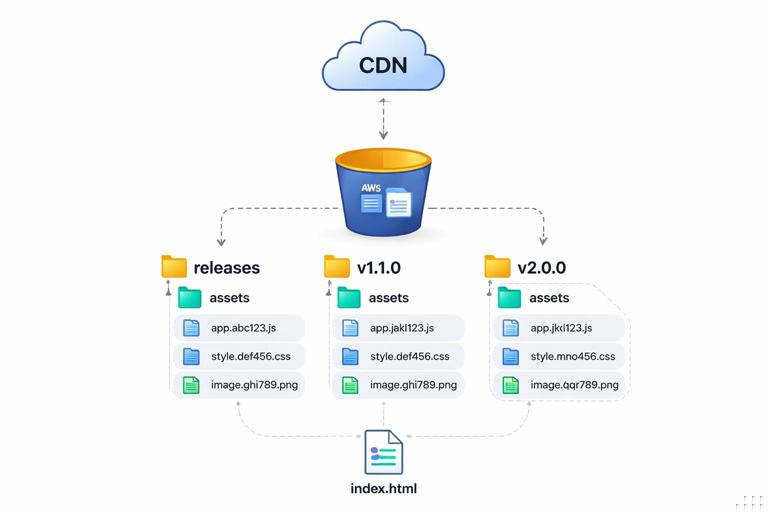
/assets/app.js), overwriting old ones. This is easy but risky: caches and CDNs may serve a mix of old and new files. - Versioned directories (immutable releases): each release is uploaded to a unique path (e.g.,
/releases/2026-01-08-1/), and only a small “pointer” file (oftenindex.html) changes to reference the new versioned assets. This supports atomicity and rollback.
For PWAs, versioned directories plus hashed filenames is usually the most robust approach, because it aligns with long-lived caching for assets and short-lived caching for the HTML entry point.
- Listen to the audio with the screen off.
- Earn a certificate upon completion.
- Over 5000 courses for you to explore!

Download the app
Atomic deployments with “upload then switch”
Atomic deployment means users never see a half-deployed state. A practical pattern is:
- Build the app to a new release directory (locally or in CI).
- Upload all versioned assets first (JS/CSS/images/fonts) to the CDN origin.
- Upload the service worker file (with special cache rules, discussed later).
- Upload
index.htmllast, because it is the entry point that starts referencing the new assets.
Uploading index.html last reduces the chance that a user loads new HTML that references bundles that are not yet available globally.
Preview environments and “same-origin” constraints
PWAs rely on same-origin rules for service workers. Preview deployments should use a unique origin (e.g., https://pr-123.example.com) rather than a path on production (e.g., /preview/pr-123) if you want to test installability and service worker behavior without interfering with production clients. If you must use paths, ensure the service worker scope and file location do not collide with production.
CDN caching headers you must control
Browsers and CDNs cache different resources differently. Your goal is to make versioned assets cache aggressively and make entry points and update-critical files revalidate frequently. The most important headers are Cache-Control, ETag, Last-Modified, and sometimes Surrogate-Control (CDN-specific). You also need to understand that CDNs may cache even when browsers do not, depending on configuration.
Recommended caching policy by file type
A practical baseline for many static PWAs:
- Hashed assets (e.g.,
/assets/app.3f2c1a9.js,/assets/styles.91ab.css):Cache-Control: public, max-age=31536000, immutable - Images with content hashes: same as hashed assets
- index.html:
Cache-Control: no-cache(ormax-age=0, must-revalidate) - service worker file (e.g.,
/service-worker.js):Cache-Control: no-cache - web app manifest (e.g.,
/manifest.webmanifest): oftenCache-Control: no-cacheor a short TTL (because changes should be picked up reasonably quickly)
no-cache does not mean “do not store”; it means “store but revalidate before using.” That is usually what you want for index.html and the service worker file: clients can keep a cached copy but will check with the server/CDN for updates.
Why the service worker file needs special treatment
The browser’s update check for the service worker script is sensitive to caching. If the service worker script is served with a long max-age, the browser may not revalidate it promptly, delaying updates. Serving it with Cache-Control: no-cache ensures the browser revalidates and can discover new versions. This is separate from what the service worker itself caches at runtime.
CDN header configuration examples
How you set headers depends on your hosting/CDN. The underlying logic is the same: match patterns and assign cache policies.
Example: generic rules
- For
/**/*.html: setCache-Control: no-cache - For
/service-worker.js: setCache-Control: no-cache - For
/manifest.webmanifest: setCache-Control: no-cache - For
/assets/*where filenames include hashes: setCache-Control: public, max-age=31536000, immutable
Example: Netlify-style headers file
/*  Cache-Control: no-cache

/service-worker.js  Cache-Control: no-cache

/manifest.webmanifest  Cache-Control: no-cache

/assets/*  Cache-Control: public, max-age=31536000, immutable
Example: Cloudflare (conceptual)
- Create a Cache Rule for
/assets/*to “Cache Everything” with long Edge TTL and respect originCache-Control. - Create a Cache Rule for
/service-worker.jsand/index.htmlto bypass cache or set Edge TTL to 0 while still allowing browser revalidation.
When using a CDN, verify both browser caching and edge caching. A common mistake is to set correct origin headers but have the CDN override them with an aggressive default policy.
Validation: how to confirm headers in practice
Make header verification part of your release checklist:
- Use
curl -I https://example.com/to inspectCache-Controlonindex.html. - Use
curl -I https://example.com/service-worker.jsto confirm it is not long-cached. - Check a hashed asset:
curl -I https://example.com/assets/app.3f2c1a9.jsand confirmimmutableand a longmax-age. - In DevTools Network, verify that reloads show “(from disk cache)” for hashed assets and “304 Not Modified” (or revalidated) for HTML and service worker.
Versioning strategies that prevent mismatched clients
Versioning is not just a semantic version number; it is a strategy to ensure clients always fetch a consistent set of files. The most effective approach for static PWAs is a combination of content hashing and a release identifier.
Content-hashed filenames (cache forever, update by changing URL)
When a file’s URL changes whenever its content changes, you can cache it for a year safely. Build tools typically produce filenames like app.3f2c1a9.js. The hash should be derived from file content, not from build time, so identical content yields identical filenames.
Practical implications:
- You can set
max-age=31536000, immutablefor these assets. - CDN invalidation is rarely needed for hashed assets because new releases create new URLs.
- Rollback is easier: switching back to an older
index.htmlpoints to older hashed assets that still exist.
Release identifiers for traceability
Even with hashed assets, you want a human-readable release identifier to correlate logs, bug reports, and rollbacks. Common options:
- Git commit SHA (short)
- CI build number
- Date-based release tag
Expose it in a lightweight way:
- Embed it in
index.htmlas a meta tag or global variable. - Serve a
/version.jsonendpoint with{"release":"...","builtAt":"..."}andCache-Control: no-cache.
This helps support teams confirm what a user is running without relying on guesswork.
Versioning the service worker: stable URL, changing content
Typically the service worker script stays at a stable URL (e.g., /service-worker.js) because the registration points to it. The browser detects updates by comparing the script content. That means:
- Do not fingerprint the service worker filename unless you also implement a controlled registration indirection.
- Ensure the service worker script changes when your caching logic or precache manifest changes.
- Ensure the service worker script is revalidated frequently via
Cache-Control: no-cache.
Many build pipelines inject a precache manifest into the service worker at build time, which naturally changes the service worker content each release.
Deployment workflow: step-by-step CI/CD for static hosting
The following workflow is designed to minimize broken updates and make rollbacks fast. Adapt the commands to your stack; the sequence is what matters.
Step 1: Build a release artifact
- Run tests and type checks.
- Build production assets with content hashing enabled.
- Generate a release ID (e.g., commit SHA).
- Write the release ID into a
version.jsonfile and/or embed it inindex.html.
Ensure the build output is self-contained and can be deployed without rebuilding (immutable artifact principle).
Step 2: Upload assets to a versioned path
Upload all hashed assets and static files to a unique release directory, for example:
/releases/<release-id>/index.html
/releases/<release-id>/assets/app.3f2c1a9.js
/releases/<release-id>/assets/styles.91ab.css
Even if you ultimately serve index.html at the root, storing the full release under a versioned prefix gives you a clean rollback target.
Step 3: Promote the release (switch the entry point)
Promotion is the moment production starts serving the new release. Common promotion mechanisms:
- Copy/sync: copy
/releases/<id>/index.htmlto/index.html(and similarly for any non-hashed root files). - Redirect/rewrite: configure the CDN/origin to rewrite
/to/releases/<id>/index.html. - Symlink-like pointer: some platforms support an “active” directory pointer.
Prefer a single, fast “switch” operation over re-uploading many files in place.
Step 4: Apply cache headers and CDN behavior
Ensure your hosting/CDN applies the intended caching rules:
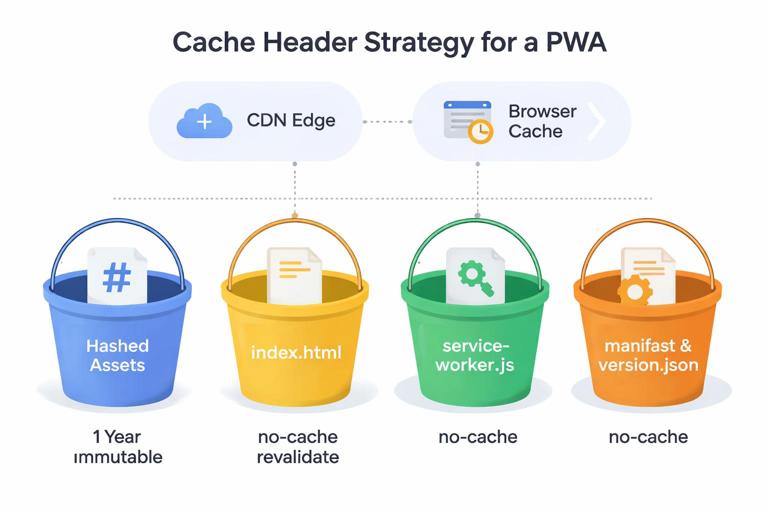
- Hashed assets: long cache, immutable
index.html: revalidateservice-worker.js: revalidateversion.json: revalidate
If your platform supports it, set these at deploy time as configuration, not as ad-hoc manual changes.
Step 5: Purge only what needs purging
With hashed assets, you typically only need to purge:
/index.html(and possibly/)/service-worker.js/manifest.webmanifest(if changed)
Avoid purging the entire CDN cache; it is slow, expensive, and unnecessary when assets are immutable.
Step 6: Post-deploy verification
Automate basic checks after promotion:
- Fetch
/and verify it references the expected release ID. - Fetch
/service-worker.jsand verifyCache-Control: no-cache. - Fetch a known hashed asset and verify long cache headers.
- Optionally run a smoke test that loads the app and checks that key routes return 200 (or expected fallbacks) from multiple regions.
Rollback strategies that work with browser and CDN caches
Rollback is not just “deploy the previous build.” You must consider that many clients have cached HTML, assets, and a service worker. A rollback plan should minimize the chance of clients running a mixed set of versions.
Rollback level 1: revert the entry point to the previous release
If you use versioned releases, rollback can be as simple as promoting the previous index.html (and any non-hashed root files) to be active again. Because older hashed assets still exist at their URLs, clients can load them reliably.
Step-by-step:
- Identify the last known good release ID.
- Switch
/index.html(or the rewrite target) back to that release. - Purge
/index.htmlat the CDN edge so the change propagates quickly.
Rollback level 2: rollback the service worker script
If the issue is caused by service worker logic (for example, a bug in caching rules), you may need to roll back /service-worker.js as well. Because the service worker script is at a stable URL, you can replace it with the previous version and purge it at the CDN.
Step-by-step:
- Deploy the previous
service-worker.jsto/service-worker.js. - Ensure it is served with
Cache-Control: no-cache. - Purge
/service-worker.jsat the CDN edge.
Note that clients update service workers on their own schedule; purging helps, but some clients may still run the problematic worker until they next check for updates. This is why it is valuable to keep the service worker script small and update-friendly.
Rollback level 3: “kill switch” for a broken release
Sometimes you need an emergency stopgap: disable certain behaviors or force the app to fall back to network-only temporarily. A practical approach is to have the service worker read a small, revalidated configuration file (for example /sw-config.json with Cache-Control: no-cache) that can toggle features. In an incident, you can flip a flag server-side without redeploying the entire app.
Example sw-config.json:
{ "disableRuntimeCaching": true, "maintenanceMode": false }This pattern should be used carefully: it adds complexity, but it can reduce time-to-mitigation when a caching bug affects many users.
Handling partial propagation and “mixed version” hazards
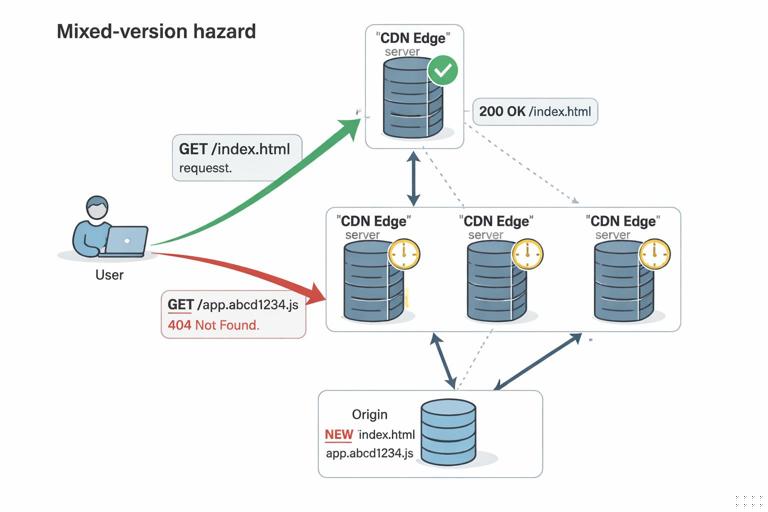
Even with good versioning, you can still get mixed versions if you overwrite files in place or if CDN propagation is inconsistent. The most common hazard is: a user gets new index.html that references app.NEW_HASH.js, but the CDN edge they hit does not have that asset yet (or it is blocked by a stale cache rule), causing a broken load.
Mitigation checklist
- Use hashed filenames for all build outputs that can be cached long-term.
- Upload assets first, then
index.htmllast. - Prefer versioned release directories and a promotion step.
- Purge only the small set of mutable entry files.
- Ensure the CDN respects origin headers for immutable assets.
Runtime guard: detect missing chunks and recover
Single-page apps sometimes fail when a code-split chunk is missing (404) after an update. A pragmatic mitigation is to detect chunk load failures and trigger a full reload, which fetches the latest index.html. This does not replace correct deployment, but it reduces user impact.
Example pattern (framework-agnostic idea):
window.addEventListener('error', (e) => {
  const msg = String(e.message || '');
  if (msg.includes('Loading chunk') || msg.includes('ChunkLoadError')) {
    window.location.reload();
  }
});
Use this carefully and avoid infinite reload loops; you can add a one-time flag in session storage.
Coordinating CDN invalidation with versioning
CDN invalidation is slow compared to serving immutable assets. The goal is to minimize invalidations and make them predictable.
What to invalidate on each deploy
/and/index.html(or equivalent entry routes)/service-worker.js/manifest.webmanifest(if changed)/version.json(if used)
Do not invalidate hashed assets; they should be immutable and safe to cache indefinitely.
Stale-while-revalidate at the edge (optional)
Some CDNs support serving slightly stale content while revalidating in the background. This can be useful for index.html to reduce latency, but it can also delay updates. If you enable it, do so intentionally and measure how it affects update propagation. For update-critical files like service-worker.js, prefer strict revalidation behavior.
Release channels and phased rollouts
For larger PWAs, consider release channels:
- Canary: a small percentage of traffic or a separate subdomain receives the new release first.
- Stable: the main release channel.
With static hosting, a simple way to implement this is DNS or CDN routing rules that send a fraction of users to a different origin path (e.g., /releases/canary/<id>) or subdomain. The key is to keep service worker scope isolated per channel to avoid cross-contamination.
Operational checklist: what to standardize in your team
Build and artifact standards
- Every build produces content-hashed assets.
- Every build has a unique release ID.
- Artifacts are immutable and stored for a defined retention period.
Hosting and CDN standards
- Explicit cache rules for
index.html,service-worker.js, manifest, and hashed assets. - Automated invalidation of only mutable entry files.
- Monitoring for 404s on hashed assets and spikes in JS errors after deploy.
Rollback standards
- One-command (or one-click) rollback to a previous release ID.
- Ability to roll back service worker script independently.
- Documented incident playbook: what to purge, what to switch, and how to verify.