Capstone Overview: What You’re Building
In this capstone, you’ll build a complete offline-first app that works as either a Local Events Tracker (create events, RSVP, check-in) or an Inventory Tracker (add items, adjust counts, scan-like quick entry, mark low stock). The two variants share the same architecture: a local-first data model stored on-device, a sync layer that reconciles with a server when connectivity returns, and an interface designed to keep users productive even when the network is unreliable.
The key concept is local-first state with eventual consistency: the app treats the device database as the source of truth for immediate UI updates, while the server becomes the long-term shared record. When offline, users can still create and edit records; those changes are captured as operations and later synchronized. Your capstone goal is to integrate all pieces into a cohesive product: data model, UI flows, conflict handling, sync status, and operational tooling (seed data, export, reset).
Choose a Variant (Events or Inventory)
- Local Events: Create events with title, location, start/end time; RSVP status; attendee check-in; notes.
- Inventory: Create items with SKU/name, quantity, location, reorder threshold; stock adjustments; audit log; notes.
Pick one for your UI labels, but keep the underlying patterns identical so you can reuse the same sync and persistence approach.
Architecture at a Glance
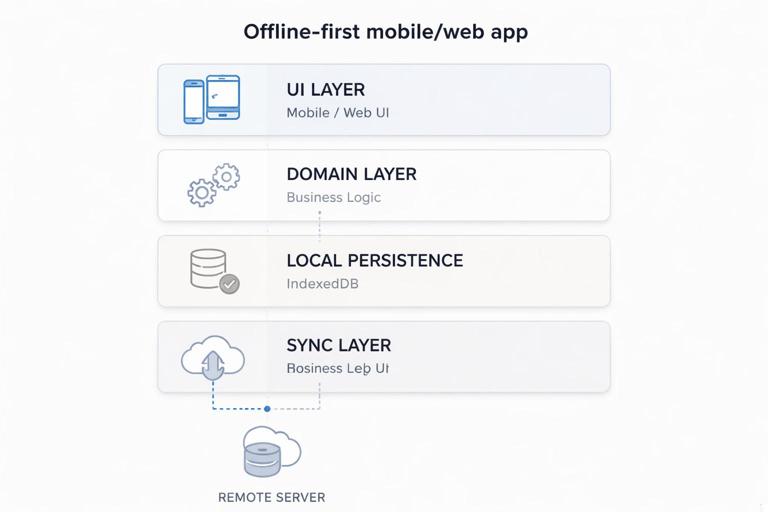
Your app will have four cooperating layers:
- UI layer: screens, forms, lists, filters, and a small sync/status indicator.
- Domain layer: entities (Event/Item), validation, derived fields (e.g., “low stock”), and operations (create/update/delete, RSVP, adjust quantity).
- Local persistence: IndexedDB tables for entities and an operation outbox.
- Sync layer: pushes outbox operations to the server, pulls remote changes, resolves conflicts, and updates local state.
The capstone focuses on how these layers fit together and how to implement the “last mile” details that make an offline-first app feel trustworthy: visible sync state, predictable conflict behavior, and recoverability.
- Listen to the audio with the screen off.
- Earn a certificate upon completion.
- Over 5000 courses for you to explore!

Download the app
Data Model and Tables
Define a minimal schema that supports offline edits, conflict detection, and auditing. Use stable IDs generated on the client (UUID) so records can be created offline and later synced without remapping.
Core Entity
Use one of these shapes (you can adapt fields):
// Event (Local Events variant) - stored in IndexedDB "events
type EventRecord = {
  id: string;              // uuid
  title: string;
  location?: string;
  startsAt: string;        // ISO
  endsAt?: string;         // ISO
  notes?: string;
  rsvpStatus?: 'going' | 'maybe' | 'no';
  checkedIn?: boolean;
  updatedAt: number;       // ms epoch (client)
  serverVersion?: number;  // monotonically increasing from server
  deleted?: boolean;       // tombstone for deletes
};

// Item (Inventory variant) - stored in IndexedDB "items"
type ItemRecord = {
  id: string;              // uuid
  sku?: string;
  name: string;
  quantity: number;
  location?: string;
  reorderPoint?: number;
  notes?: string;
  updatedAt: number;       // ms epoch (client)
  serverVersion?: number;
  deleted?: boolean;
};
Why include both updatedAt and serverVersion? updatedAt helps with UI ordering and local merges; serverVersion enables deterministic conflict checks when syncing with a central source.
Operation Outbox
Store every offline change as an operation. This is the backbone of reliable sync.
// stored in IndexedDB "outbox"
type OutboxOp = {
  opId: string;            // uuid
  entityType: 'event' | 'item';
  entityId: string;
  kind: 'create' | 'update' | 'delete';
  payload: any;            // minimal patch or full record
  baseServerVersion?: number; // serverVersion at time of edit
  createdAt: number;
  status: 'pending' | 'sending' | 'failed';
  error?: string;
};
Keep payloads small: store patches when possible (e.g., {quantityDelta:+2} or {title:"New"}). For simplicity, you can store the full record on create and a patch on update.
UI Flows You Must Implement
1) List + Detail + Edit
Implement three primary screens:
- List: shows all records, supports search/filter, and indicates local-only or unsynced changes.
- Detail: shows full record, audit info (last updated), and sync status.
- Edit/Create: form validation, optimistic save to local DB, and enqueue outbox operation.
Design rule: saving never blocks on network. The UI should confirm “Saved locally” immediately, then show sync progress separately.
2) Quick Action
Add one fast interaction that benefits from offline-first behavior:
- Events: “Check in” toggle or RSVP buttons.
- Inventory: “+1 / -1” quantity adjust buttons or a quick adjustment modal.
These actions should write to local DB instantly and enqueue an outbox op.
3) Sync Status Indicator
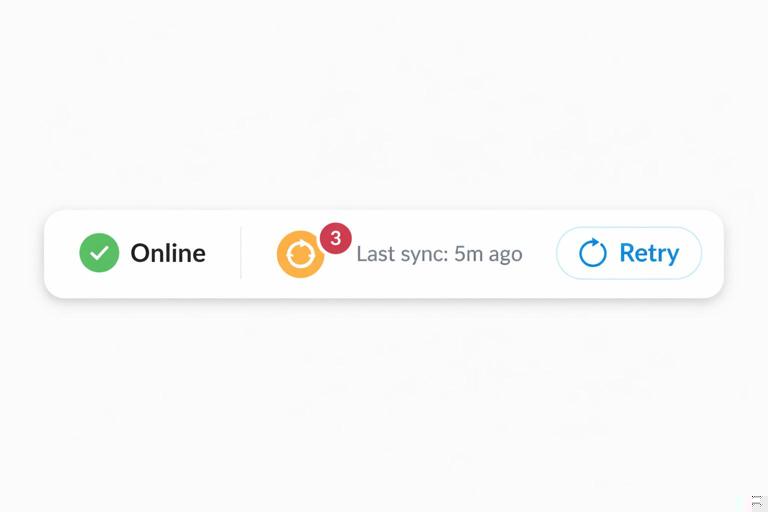
Include a small indicator in the header or settings area:
- Online/offline state
- Pending operations count
- Last successful sync time
- Retry button (manual trigger)
This indicator is crucial for user trust: offline-first apps feel broken when users can’t tell whether changes are queued or lost.
Step-by-Step: Implement Local-First CRUD with an Outbox
Step 1: Create a Local Repository API
Wrap IndexedDB access behind a repository so your UI doesn’t know about tables or transactions.
interface Repository<T> {
  list(): Promise<T[]>;
  get(id: string): Promise<T | undefined>;
  upsert(record: T): Promise<void>;
  markDeleted(id: string, updatedAt: number): Promise<void>;
}

interface OutboxRepository {
  enqueue(op: OutboxOp): Promise<void>;
  listPending(limit?: number): Promise<OutboxOp[]>;
  markSending(opId: string): Promise<void>;
  markFailed(opId: string, error: string): Promise<void>;
  remove(opId: string): Promise<void>;
  countPending(): Promise<number>;
}
Use transactions when writing both the entity and the outbox entry to ensure you never save a record without its corresponding sync operation.
Step 2: Implement “Save Locally + Enqueue” in One Transaction
async function saveEntityWithOutbox(entityType, record, opKind, patch, baseServerVersion) {
  const now = Date.now();
  const op: OutboxOp = {
    opId: crypto.randomUUID(),
    entityType,
    entityId: record.id,
    kind: opKind,
    payload: patch,
    baseServerVersion,
    createdAt: now,
    status: 'pending'
  };

  // pseudo-transaction
  await db.transaction([entityType + 's', 'outbox'], async (tx) => {
    await tx.store(entityType + 's').put({ ...record, updatedAt: now });
    await tx.store('outbox').put(op);
  });
}
For deletes, write a tombstone (deleted:true) instead of removing the record immediately. Tombstones prevent “resurrection” when you later pull remote data.
Step 3: Reflect Pending State in the UI
To show “unsynced changes,” you can:
- Store a boolean like
hasPendingOpson the record (updated in the same transaction), or - Compute it by checking outbox entries for that entityId (simpler but potentially slower).
A pragmatic approach: compute it for detail view, but for list view keep a cached map of entityId -> pending count that updates when outbox changes.
Step-by-Step: Build the Sync Engine
The sync engine runs on app start, on connectivity regain, and on user request. It performs two phases: push local operations, then pull remote changes.
Server API Contract (Minimal)
Keep the server simple. You need endpoints like:
POST /sync/pushaccepts a batch of outbox ops and returns per-op results plus updated server versions.GET /sync/pull?since=cursorreturns changed records since a cursor and a new cursor.
Store a syncCursor locally (in IndexedDB or a small settings store) to support incremental pulls.
Step 1: Push Pending Operations
async function pushPendingOps() {
  const ops = await outbox.listPending(50);
  if (!ops.length) return;

  // mark as sending to avoid duplicate concurrent pushes
  for (const op of ops) await outbox.markSending(op.opId);

  const res = await fetch('/sync/push', {
    method: 'POST',
    headers: { 'Content-Type': 'application/json' },
    body: JSON.stringify({ ops })
  });

  if (!res.ok) {
    for (const op of ops) await outbox.markFailed(op.opId, 'network/server error');
    return;
  }

  const result = await res.json();
  // result: { applied: [{opId, serverVersion}], conflicts: [{opId, serverRecord}], failed: [{opId, error}] }

  // apply outcomes
  for (const a of result.applied) {
    // update local record's serverVersion
    await applyServerVersionToEntity(ops.find(o => o.opId === a.opId), a.serverVersion);
    await outbox.remove(a.opId);
  }

  for (const f of result.failed) {
    await outbox.markFailed(f.opId, f.error);
  }

  for (const c of result.conflicts) {
    await handleConflict(ops.find(o => o.opId === c.opId), c.serverRecord);
  }
}
Batching reduces overhead and makes sync faster on mobile networks. Keep the batch size modest to avoid timeouts.
Step 2: Pull Remote Changes
async function pullRemoteChanges() {
  const cursor = await settings.get('syncCursor');
  const res = await fetch('/sync/pull?since=' + encodeURIComponent(cursor || ''));
  if (!res.ok) return;

  const data = await res.json();
  // data: { records: [{entityType, record}], cursor: 'newCursor' }

  await db.transaction(['events', 'items'], async (tx) => {
    for (const r of data.records) {
      const store = tx.store(r.entityType + 's');
      // merge strategy: if local has pending ops, avoid overwriting blindly
      await mergeRemoteRecord(store, r.record);
    }
  });

  await settings.set('syncCursor', data.cursor);
}
The pull phase must respect local pending edits. If a record has pending ops, you should either (a) skip applying remote changes until the outbox clears, or (b) merge carefully field-by-field. For a capstone, skipping is acceptable if you also show a “sync pending” badge and eventually reconcile after push completes.
Conflict Handling You Can Actually Ship
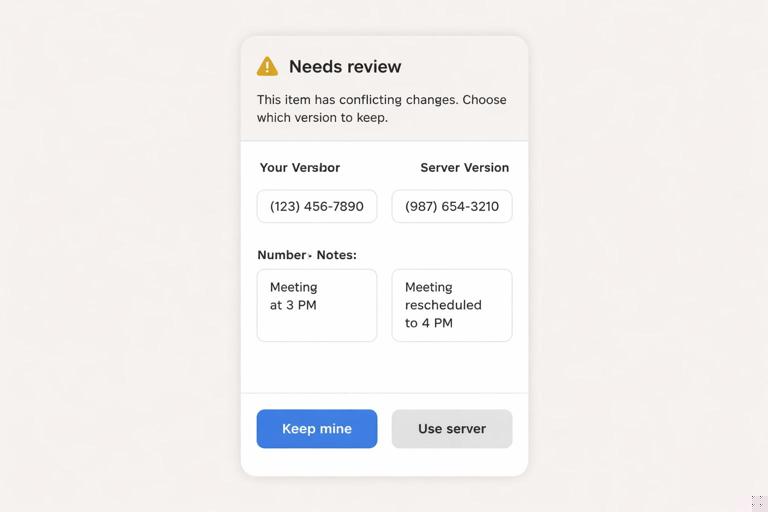
Conflicts happen when the server record changed since the user’s base version. Your goal is not perfect merging; it’s predictable behavior and a path to resolution.
Recommended Policy for This Capstone
- Default: last-write-wins on the server for non-critical fields, but detect and surface conflicts for critical fields.
- Critical fields:
- Events: startsAt/endsAt, location
- Inventory: quantity, location, reorderPoint
When a conflict is detected, store a conflict record locally and show a banner on the detail screen: “Needs review.” Provide a simple resolution UI: choose “Keep mine” or “Use server,” and then enqueue a new update op if the user chooses “Keep mine.”
type ConflictRecord = {
  id: string; // entityId
  entityType: 'event' | 'item';
  localSnapshot: any;
  serverSnapshot: any;
  createdAt: number;
};
Keep conflict resolution explicit. Avoid silent merges for quantities or times; users need to trust the numbers.
Offline UX Details That Make the App Feel Solid
Show “Saved Locally” vs “Synced”
On save, show immediate feedback like “Saved on this device.” Separately, show sync state: “Syncing…” then “Synced.” If sync fails, show “Sync failed” with a retry action. This prevents users from repeatedly editing because they think the save didn’t work.
Make Failed Ops Recoverable
Add a “Sync Queue” screen in Settings:
- List failed operations with error messages
- Allow retry all / retry one
- Allow discard operation (advanced; warn user)
Discard should be rare, but it’s a practical escape hatch during testing and for corrupted states.
Seed Data and Reset
Provide a developer-only menu (or a hidden setting) to:
- Insert sample events/items
- Clear local database
- Clear outbox
- Export local data as JSON
This makes it much easier to test offline flows repeatedly without reinstalling the app.
Practical Build Plan (Suggested Milestones)
Milestone 1: Local CRUD End-to-End
- Create list/detail/edit screens
- Implement repository layer
- Save records locally with updatedAt
- Implement delete as tombstone
Acceptance checks:
- Create/edit/delete works with network disabled
- App reload preserves data
- List shows correct ordering and search
Milestone 2: Outbox + Pending Indicators
- Write outbox entries for every change
- Display pending count in header
- Mark records with “pending” badge
Acceptance checks:
- Every local change increments pending count
- Pending count persists across reload
- Detail view shows pending state
Milestone 3: Push Sync
- Implement pushPendingOps with batching
- Handle applied/failed/conflict responses
- Update serverVersion on success
Acceptance checks:
- When online, pending ops drain to zero
- Failed ops remain visible and retryable
- ServerVersion updates locally
Milestone 4: Pull Sync + Cursor
- Store syncCursor
- Pull remote changes and merge/skip when pending
- Update list in real time
Acceptance checks:
- Changes made on another device appear after pull
- Records with pending ops are not overwritten unexpectedly
Milestone 5: Conflict UI
- Store conflicts locally
- Show “Needs review” banner
- Resolution actions enqueue new ops
Acceptance checks:
- Conflicts are visible and actionable
- Resolving a conflict results in a synced final state
Concrete Examples: Events and Inventory Operations
Events: RSVP and Check-In
RSVP is a simple update patch:
// patch example
{ rsvpStatus: 'going' }
Check-in is another patch:
{ checkedIn: true }Both should be instant locally. If you expect many rapid taps (e.g., checking in multiple attendees), consider coalescing: if multiple updates to the same entity are queued, you can compress them into one outbox op before sending.
Inventory: Quantity Adjustments with an Audit Log
Inventory benefits from an audit trail. You can store a separate table adjustments locally and sync it as its own entity type, or keep it simple by encoding adjustments as outbox ops and letting the server derive an audit log. A practical middle ground is to store local adjustments for UI history and still push them as operations.
type Adjustment = {
  id: string;
  itemId: string;
  delta: number;
  reason?: string;
  createdAt: number;
  serverVersion?: number;
};
When the user taps “+1,” you:
- Update item.quantity locally
- Insert an Adjustment row locally
- Enqueue an outbox op like
{kind:'update', payload:{quantityDelta:+1}}or{kind:'create', payload: adjustment}
For conflicts on quantity, avoid last-write-wins on the raw quantity field. Prefer server-side application of deltas so concurrent adjustments from multiple devices add up correctly.
Testing the Capstone (Manual Scenarios)
Scenario 1: Create Offline, Sync Later
- Disable network
- Create 3 records and edit one
- Reload the app
- Re-enable network and trigger sync
Expected: records persist through reload; pending count decreases to zero; serverVersion is set.
Scenario 2: Failed Operation Recovery
- Force server to return an error for one op (e.g., validation)
- Observe op marked failed
- Fix the record locally and retry
Expected: failed op remains visible; retry succeeds after fix; no duplicate records created.
Scenario 3: Conflict
- Device A edits a record and syncs
- Device B (offline) edits the same record
- Device B goes online and syncs
Expected: conflict is detected; user can choose resolution; final state is consistent.
What to Submit as Your Capstone Deliverable
- A working offline-first Events or Inventory app with local CRUD
- Outbox-based sync with visible status and retry
- Pull sync with cursor
- Conflict detection and a minimal resolution UI
- A settings/tools screen for seed/reset/export