Why Modular Brand Systems Need Ongoing Evolution
A modular brand system is not a “set it and forget it” library. Even when your components are well-built and your rules are clear, real-world usage introduces drift: new channels appear, teams improvise under deadlines, accessibility expectations rise, and product surfaces evolve. Over time, the system can become either too rigid (blocking speed) or too loose (losing coherence). Auditing, refreshing, and evolving the system is the practice of keeping it accurate, usable, and aligned with current business and user needs without breaking everything that already exists.
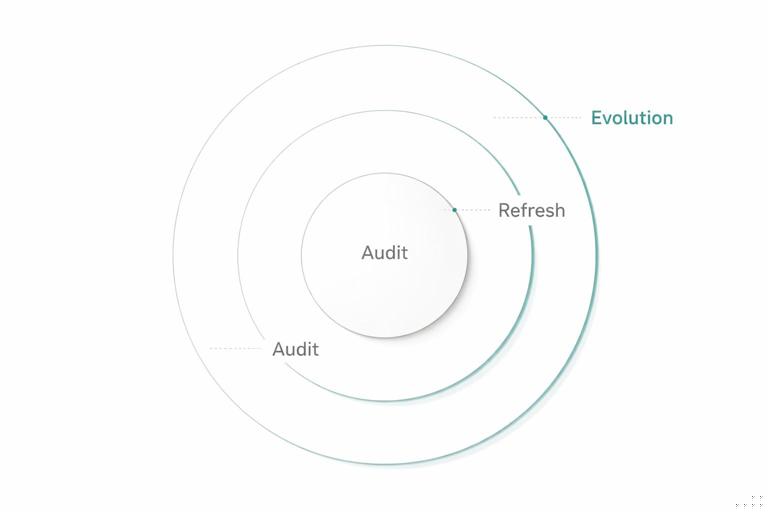
Think of evolution as three related activities with different scopes: an audit is measurement and diagnosis; a refresh is targeted improvement within the existing system; an evolution is a planned expansion or structural change that may introduce new modules, deprecate old ones, or adjust rules. The goal is continuity: the brand should feel consistent to audiences while the internal system becomes easier to use and more resilient.
Signals That It’s Time to Audit
Audits are most effective when triggered by observable signals rather than vague feelings. Common triggers include: increased design QA failures, repeated questions in support channels, growing divergence between product and marketing assets, a spike in one-off components, performance or accessibility regressions, or a new platform requirement (for example, TV, in-car, or new social formats). Another strong signal is “library fatigue”: designers avoid the system because it feels slower than starting from scratch, often due to missing variants, unclear guidance, or outdated components.
Set a cadence even without triggers. Many teams run a lightweight quarterly audit and a deeper annual audit. The quarterly version focuses on usage and friction; the annual version includes structural review, deprecations, and roadmap planning.
Audit Types: What You’re Measuring
1) Adoption and Coverage Audit
This audit answers: are teams using the system, and does it cover what they need? You measure component usage frequency, the percentage of screens or pages built with system components, and the number of exceptions. Coverage gaps often show up as repeated custom solutions for the same need (for example, multiple teams creating their own “empty state” patterns).
- Listen to the audio with the screen off.
- Earn a certificate upon completion.
- Over 5000 courses for you to explore!

Download the app
2) Consistency and Quality Audit
This audit checks whether outputs match intended rules. You look for inconsistent application of modules, mismatched variants, and drift in details like corner radii, icon stroke weights, or motion timing. Quality also includes accessibility conformance, localization readiness, and responsiveness across breakpoints.
3) Performance and Maintainability Audit
This audit focuses on the cost of the system: file sizes, runtime performance for digital assets, duplication in component code, and complexity of variants. A system can be “consistent” but still too heavy or too hard to maintain. Maintainability issues often appear as deeply nested components, redundant styles, or variants that overlap in meaning.
4) Brand Expression Audit
This audit asks whether the system still expresses the brand as intended in current contexts. It does not re-define the brand; it checks whether the existing expression is being achieved across channels and whether certain modules have become visually dated or misaligned with current product tone. For example, a system might feel overly playful in enterprise contexts or too formal in consumer social content.
Step-by-Step: Running a Practical Brand System Audit
Step 1: Define the audit scope and success metrics
Start by choosing surfaces and time windows. Example: “Audit the last 90 days of product UI releases and the last 30 marketing deliverables across web, email, and social.” Define metrics that can be tracked again later: component adoption rate, number of exceptions per deliverable, top 10 most modified components, accessibility defect count, and time-to-ship for common asset types.
- Tip: Keep the first audit narrow. A broad audit without clear metrics becomes a subjective debate.
Step 2: Collect a representative sample of outputs
Gather artifacts that reflect real usage: shipped pages, live screens, campaign templates, presentations, partner co-marketing pieces, and any templates used by non-designers. Aim for variety: different teams, different channels, different levels of complexity. If you can, include both “high-visibility” and “high-volume” outputs.
Step 3: Inventory deviations and categorize them
Review the sample and log deviations in a spreadsheet or issue tracker. Categorize each deviation by type and severity. Useful categories include: missing module (system gap), misuse (training or clarity issue), outdated asset (version drift), intentional exception (approved), and technical constraint (platform limitation). Severity can be “cosmetic,” “brand risk,” “accessibility risk,” “performance risk,” or “maintenance risk.”
Make the log actionable by attaching evidence: screenshot, link, file reference, and the component/module involved. Avoid vague notes like “looks off.” Instead: “Button variant used with incorrect padding; inconsistent with component spec; appears in 12 screens.”
Step 4: Identify root causes, not just symptoms
For each recurring deviation, ask why it happened. Common root causes include: unclear guidance, missing variants, overly strict rules, poor discoverability in the library, confusing naming, lack of templates, or slow review cycles. A deviation is often a signal that the system is not meeting real constraints.
Example: If teams repeatedly create custom “card” layouts, the root cause may be that the existing card component doesn’t support common content combinations, or that the recommended layout patterns don’t map to real data states.
Step 5: Quantify impact and prioritize
Prioritize issues using a simple scoring model: frequency (how often it occurs), impact (brand, accessibility, performance), and effort (time to fix). This prevents the audit from being dominated by personal preferences. A small visual inconsistency that appears everywhere may be more important than a major issue that appears once.
Step 6: Produce an audit report that leads to work
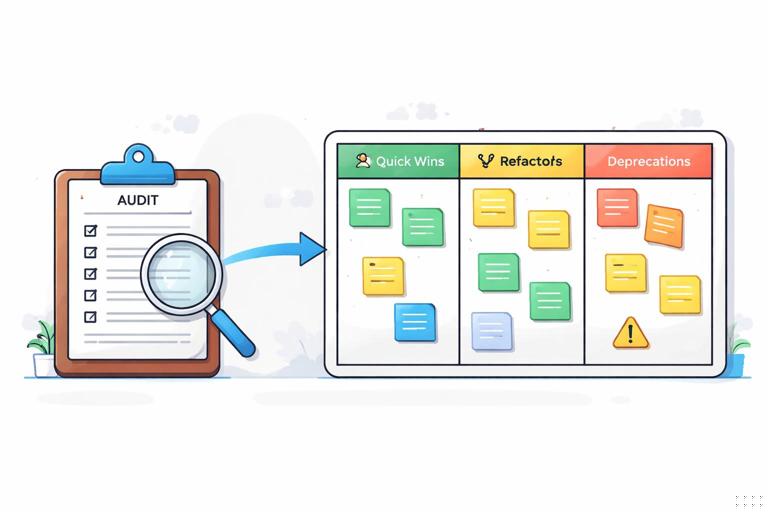
Your output should be a backlog, not a slide deck. Summarize: top issues, root causes, recommended actions, and owners. Include quick wins (documentation clarifications, missing templates) and longer-term work (component refactors, deprecations). Attach the deviation log as an appendix.
Refreshing the System: Targeted Improvements Without Breaking Trust
A refresh is a set of improvements that keeps the system recognizable and compatible. The emphasis is on reducing friction and improving quality while minimizing breaking changes. Refreshes often include: adding missing variants, tightening specs, improving templates, fixing accessibility gaps, and removing duplication.
Refresh Principles
- Prefer additive changes: add a new variant rather than changing default behavior, unless the default is clearly wrong.
- Keep outputs stable: if you must change visuals, ensure the change is subtle and justified by measurable improvements (legibility, contrast, responsiveness).
- Document migration paths: every change should include “what to do if you used the old thing.”
- Protect high-volume modules: changes to widely used components require extra testing and staged rollout.
Step-by-Step: Planning and Executing a Refresh
Step 1: Convert audit findings into a refresh backlog
Group issues into themes: “missing states,” “inconsistent spacing in templates,” “accessibility defects,” “duplicate components,” “unclear guidance.” Each theme becomes an epic with tasks. Ensure each task has acceptance criteria tied to the audit metrics.
Step 2: Decide what is a fix vs. a new capability
Some issues are bugs (incorrect component behavior), others are new needs (new content types). Treat them differently. Bug fixes should be fast and low debate. New capabilities require design exploration and stakeholder alignment.
Step 3: Prototype changes in a sandbox library
Create a safe space to test changes without disrupting production. Use a small set of representative screens and templates as “test fixtures.” Apply the proposed changes and compare before/after for: visual consistency, accessibility, performance, and ease of use.
Step 4: Validate with real users of the system
Run short feedback sessions with designers, developers, and template users. Ask them to complete tasks: “Build a pricing page,” “Create a webinar email,” “Assemble a product feature screen.” Measure time, confusion points, and where they go off-system. This reveals whether the refresh solves the root cause.
Step 5: Release in increments with clear notes
Ship refresh changes in small batches. Provide release notes that are task-oriented: “New: Empty state variants for data tables,” “Improved: Focus states for interactive components,” “Fixed: Icon alignment in small sizes.” Include screenshots and “when to use” guidance. If you maintain templates, update them in the same release so users see the improved path immediately.
Evolving the System: When Refresh Isn’t Enough
Evolution is appropriate when the system must adapt to new realities: a new product line, a major channel shift, a new accessibility standard, or a need to support significantly different content structures. Evolution can introduce new module families, restructure how modules relate, or retire outdated patterns. The key risk is fragmentation: if evolution is not managed, teams fork the system and coherence collapses.
Common Evolution Scenarios
- Channel expansion: the system must support new formats (for example, large-screen dashboards, wearables, or retail signage) that require new layout behaviors and asset constraints.
- Content model changes: the brand must support richer data states, personalization, or user-generated content, requiring new component states and guardrails.
- Accessibility and compliance upgrades: new requirements force changes to interaction patterns, focus management, or contrast handling.
- Operational scaling: more teams and faster shipping require simplifying the system, reducing variant explosion, and improving defaults.
Managing Deprecation Without Chaos
Deprecation is the controlled retirement of modules, templates, or rules. It is essential for long-term maintainability. Without deprecation, the system becomes a museum: everything remains “supported,” and users cannot tell what is current.
Deprecation Levels
- Soft deprecation: keep the old module available but mark it as “legacy,” discourage new use, and point to the replacement.
- Hard deprecation: remove the module from the primary library and require migration for active products/templates.
- Archived: keep for reference only, not for production use.
Step-by-Step: A Deprecation Playbook
Step 1: Define replacement paths
Never deprecate without a replacement or a clear rationale. If the replacement is “use module X with these settings,” document the mapping. If the replacement is a new module, release it first and validate adoption.
Step 2: Tag and surface legacy items
Make legacy status visible where people choose components and templates. Add a short reason: “Legacy: does not meet accessibility focus requirements,” or “Legacy: duplicates new card family.” The goal is to prevent new usage.
Step 3: Set timelines and thresholds
Choose a timeline based on risk and adoption. Example: “Soft deprecate now; hard deprecate in 90 days; archive in 180 days.” Tie hard deprecation to thresholds like “less than 5% usage” or “all high-traffic templates migrated.”
Step 4: Provide migration support
Create a migration checklist and, when possible, automation scripts or batch-update guidance. Offer office hours for teams with complex cases. Track migration progress in a shared dashboard.
Keeping the System Healthy: Continuous Monitoring
Audits should not be the only time you learn about problems. Continuous monitoring reduces surprises and makes evolution calmer. Monitoring can be lightweight: track support questions, review exception requests, and watch for repeated custom solutions. The goal is early detection of drift and gaps.
Practical Monitoring Inputs
- Support channel tagging: tag questions by module and issue type (missing variant, unclear guidance, bug).
- Exception request log: record what was requested, why, and whether it became a system update.
- Template usage analytics: track which templates are used and which are copied and heavily modified.
- Quality checks: periodic spot checks of high-visibility surfaces for drift and accessibility regressions.
Balancing Stability and Change: Compatibility Strategies
The hardest part of evolving a modular brand system is preserving trust. People adopt systems when they believe the system will not unexpectedly break their work. Use compatibility strategies to make change safe.
Compatibility Techniques
- Default-preserving updates: keep existing defaults stable; introduce improvements as opt-in variants first.
- Bridging components: provide transitional modules that match old behavior but align with new structure, then deprecate them later.
- Staged rollouts: update a limited set of templates or products first, learn, then expand.
- Golden examples: maintain a small set of canonical, up-to-date examples that demonstrate current best practice.
Practical Example: Turning Audit Findings Into an Evolution Roadmap
Imagine your audit reveals three recurring issues: (1) teams create custom content blocks for announcements across channels, (2) accessibility defects cluster around interactive cards, and (3) marketing templates are frequently detached and modified, causing drift. A refresh might fix focus states and add missing variants, but the repeated custom content blocks suggest a deeper evolution: the system lacks a robust, flexible “announcement” module family that works across contexts.
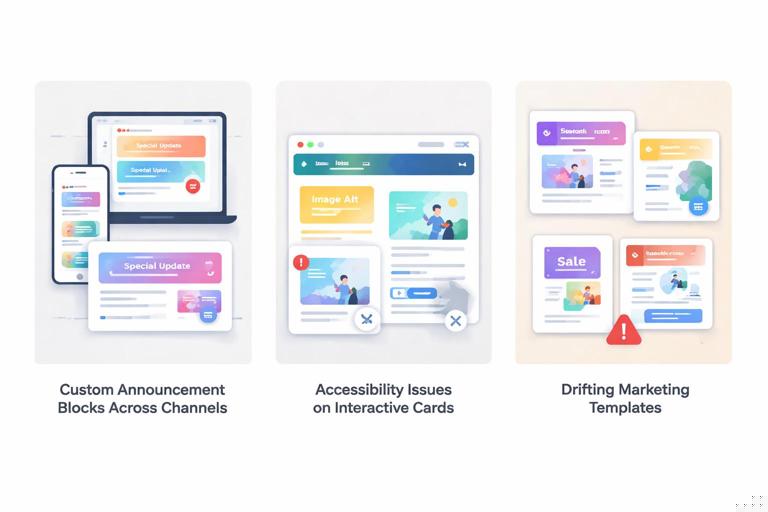
A roadmap could look like this: first, release an improved interactive card behavior and update the most-used templates (refresh). Second, introduce a new announcement module family with clear states (informational, warning, success), and provide cross-channel templates that use it (evolution). Third, soft-deprecate the old ad-hoc announcement patterns and migrate high-traffic surfaces (deprecation). Throughout, monitor exception requests: if teams still ask for custom announcements, the new module family may need additional variants or clearer guidance.
Step-by-Step: Building an Evolution Roadmap That Teams Will Follow
Step 1: Define the “north star” outcomes
Outcomes should be measurable and tied to real pain: reduce exceptions by 30%, cut time-to-build for common deliverables by 20%, eliminate a class of accessibility defects, or reduce template drift. Avoid outcomes like “make it more modern” unless you translate them into measurable criteria (for example, improved legibility at small sizes, fewer custom overrides).
Step 2: Break work into releases with clear intent
Organize the roadmap into releases that users can understand: “Accessibility uplift,” “Template stabilization,” “New module family,” “Legacy cleanup.” Each release should include what changes, who is affected, and what actions are required.
Step 3: Maintain a change log that is decision-friendly
Track decisions with context: what problem was observed, what options were considered, what was chosen, and what trade-offs were accepted. This prevents re-litigating decisions every time a new stakeholder joins.
Step 4: Create upgrade guides per audience
Different users need different instructions. Designers need updated templates and usage guidance; developers need implementation notes and migration steps; template users need “swap this block for that block” instructions. Keep guides short and task-based.
Step 5: Validate with a pilot group before broad rollout
Select a small set of teams or deliverables to pilot the evolved modules. Measure whether the pilot reduces exceptions and improves speed. Use pilot feedback to adjust before broad release. A successful pilot becomes a proof point that encourages adoption.
Common Pitfalls and How to Avoid Them
Pitfall: Treating exceptions as failures
Exceptions are data. If many teams request the same exception, the system may be missing a legitimate capability. Log exceptions, look for patterns, and decide whether to incorporate them or explicitly reject them with rationale.
Pitfall: Variant explosion during refresh
When you respond to every edge case by adding a new variant, the system becomes unusable. Instead, look for composable solutions and strong defaults. If a variant is rarely used, consider whether it should be a documented exception rather than a first-class option.
Pitfall: Silent changes that surprise users
Even small changes can break trust if they appear without notice. Always publish release notes and provide migration guidance. If you must change a default, communicate early and offer a transition period.
Pitfall: Audits that become subjective taste debates
Anchor audits in observable criteria: frequency, impact, and effort. Use before/after comparisons and test fixtures. When disagreements arise, return to the audit metrics and the defined outcomes.
Tools and Artifacts to Make Auditing and Evolution Repeatable
- Audit checklist: a repeatable list of what to inspect across channels (consistency, accessibility, responsiveness, performance, template drift).
- Deviation log template: fields for surface, module, issue type, severity, frequency, root cause, and recommended action.
- Test fixture set: a curated set of representative screens/pages/templates used to validate changes.
- Deprecation registry: a list of legacy items, status, replacement, timeline, and migration progress.
- Release note format: consistent structure for new/improved/fixed/deprecated items with screenshots and “when to use.”